
TABLE OF CONTENTS
- Overview
- Prerequisites
- Product Feed List Overview
- Feed Types Explained
- Which Feed Should Be Used?
- Adding Product Feeds
- Duplicate Feed Validation
- USE CASES
- Sitemap File Behavior
- Robots.txt Integration
- Error Handling
- Recommendations and Guidelines
Overview
A Product Feed, also known as a Data Feed, is an Excel, TXT, or XML file that contains product information. The Product Feed is used by search engines such as Google or Bing to index the website.
Znode Product Feeds allow Admin to generate and manage XML sitemaps and third‑party product feeds for storefront indexing and integrations.
Disclaimer: Feed generation for large catalogs can be a resource-intensive process and may take a considerable amount of time to complete. To minimize the impact on business operations and system performance, it is recommended to schedule feed generation during non-business hours.
Prerequisites
- Administrator access to the Admin Console
- A store with an active catalog
- Store must be in an active (non-draft) state
- Media Storage must be properly configured
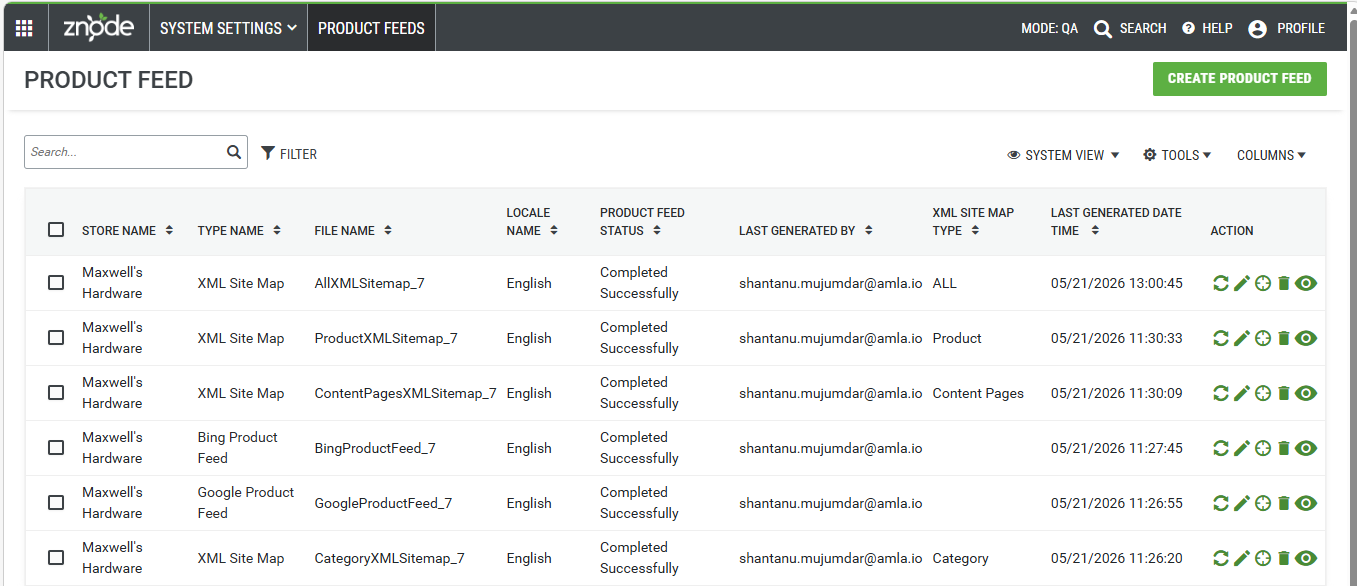
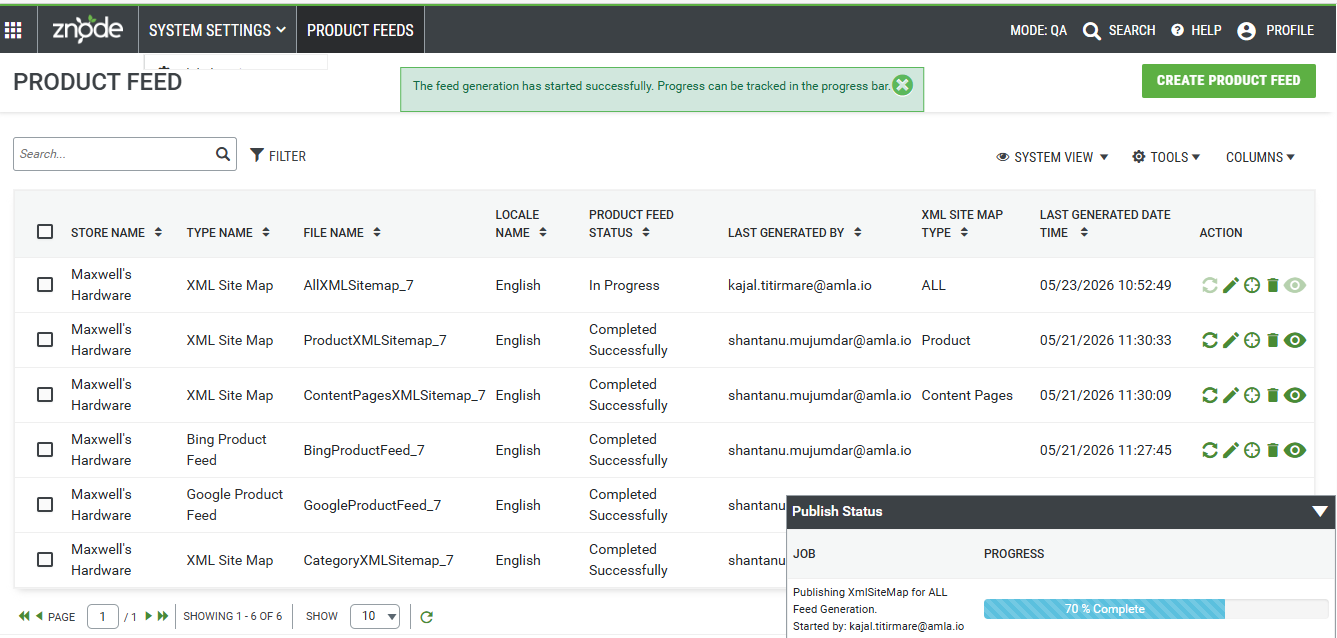
Product Feed List Overview
- Store Name
- Displays the store for which the product feed or sitemap is generated.
- Site Map Type
- Indicates the feed category such as XML Site Map, Google Product Feed, or Bing Product Feed.
- File Name
- Shows the system‑generated name of the feed file created for the selected store and feed type.
- Locale Name
- Displays the locale associated with the product feed, applicable for Google and Bing product feeds.
- Product Feed Status
- Shows the current status of the feed generation process, such as Generating, Completed, or Failed.
- Last Generated By
- Displays the username of the administrator who last generated or regenerated the feed.
- XML Site Map Type
- Identifies the specific XML sitemap type generated, such as Product, Category, Content Pages, or All.
- Last Generated Date & Time
- Shows the date and time when the feed was last successfully generated.
- Action - Provides available actions for managing the selected product feed based on its current status.
- Regenerate
- Allows administrators to regenerate the existing feed and update the previously generated file.
- Edit
- Opens the feed configuration in read‑only mode and allows regeneration by saving the feed.
- Schedular
- Allows administrators to configure scheduled execution for automatic feed generation.
- Delete
- Removes the selected product feed configuration from the system
- View
- Opens the generated XML feed file in a new browser tab for validation and review
- Regenerate
Feed Types Explained
Google Product Feed
The Google Product Feed is structured to meet Google Merchant Center requirements. It includes all required attributes and formatting, ensuring compatibility with Google's validation rules and reducing the need for additional mapping.
XML Product Feed
This is a platform-agnostic feed containing core product data such as title, price, and availability. It is typically used by feed aggregators like ShoppingFeed, which transform and distribute the data to marketplaces such as Amazon, Walmart, and Facebook.
Which Feed Should Be Used?
- Google Merchant Center → Use Google Product Feed
- Third-party marketplaces (via aggregators like ShoppingFeed) → Use XML Product Feed
Note: While some platforms support field mapping, the Google Product Feed is specifically designed for Google Merchant Center and is the recommended option for that channel.
Adding Product Feeds
| Field Name | Description |
|---|---|
| Locale ID | Create a feed for the selected locale from the dropdown list. |
| Site Map Type | Select the type of site map:
|
| Feed Title | Enter the title for the feed. This appears in Product Listing Ads (PLA) on Google/Bing results. |
| Feed Link | Enter the feed URL. Clicking this link directs users to the product page. |
| Feed Description | Provide a general description explaining the data shared with Google/Bing. |
| XML Site Map Type | Specify the data to generate:
|
| File Name | Specify the file name for the generated Product Feed. |
| Store | Select the store for which the Product Feed will be generated. |
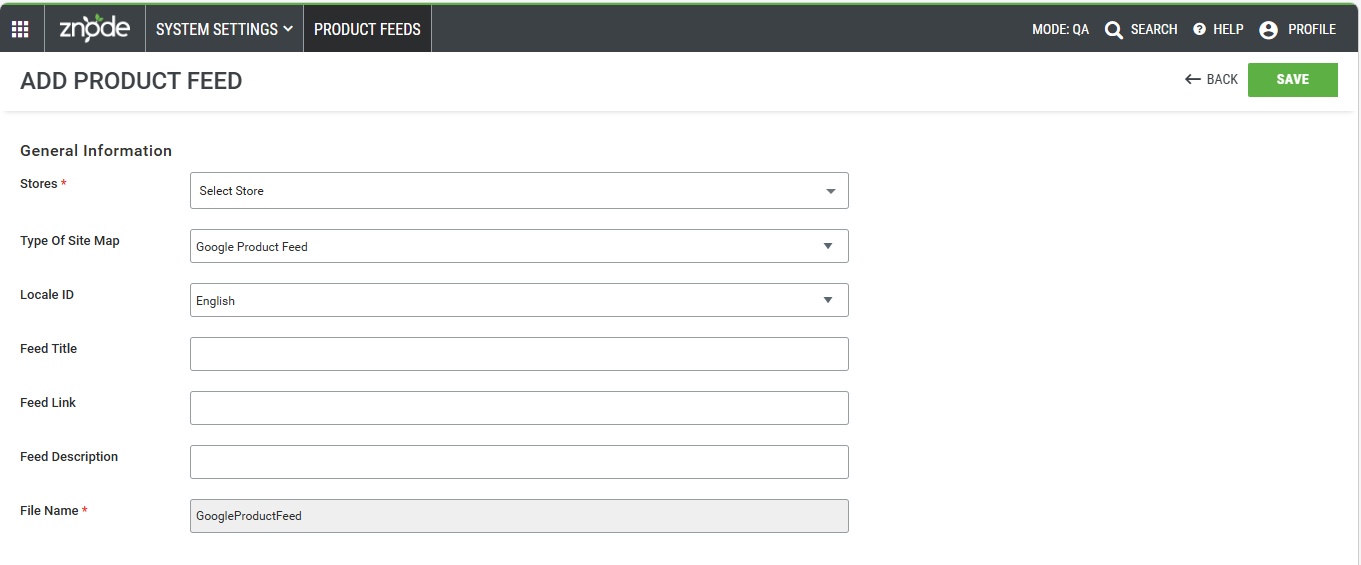
Google Product Feed Configuration
When Google Product Feeds is selected from the Type of XML Site Map dropdown, the fields should appear in the following order:
- Stores
- Locale ID
- Feed Title
- Feed Link
- Feed Description
- File Name (Prefilled & Non editable)
The File Name field is read-only. It is automatically populated by the system based on the selected GoogleProductFeed_<Store ID>
- Save Button
Behavior
- Work as per existing functionality with the following updates:
- Files are stored as per Media Settings in DAM
- Files are publicly accessible
- Naming format:
Filename_PortalId
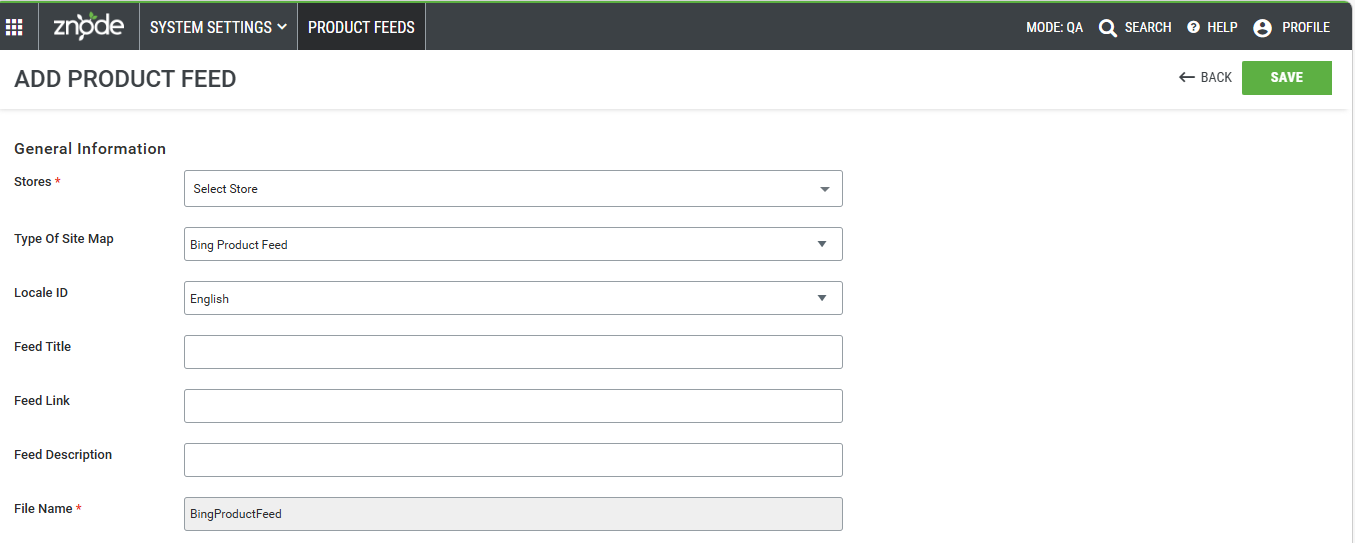
Bing Product Feed Configuration
When Bing Product Feed is selected from the Type of XML Site Map dropdown, the fields should appear in the following order:
- Store
- Locale ID
- Feed Title
- Feed Link
- Feed Description
- File Name (Prefilled & Non editable)
The File Name field is read-only. It is automatically populated by the system based on the selected BingProductFeed_<Store ID>
- Save button
Behavior
- Work as per existing functionality with the following updates:
- Files are stored as per Media Settings in DAM
- Files are publicly accessible
- Naming format:
Filename_PortalId
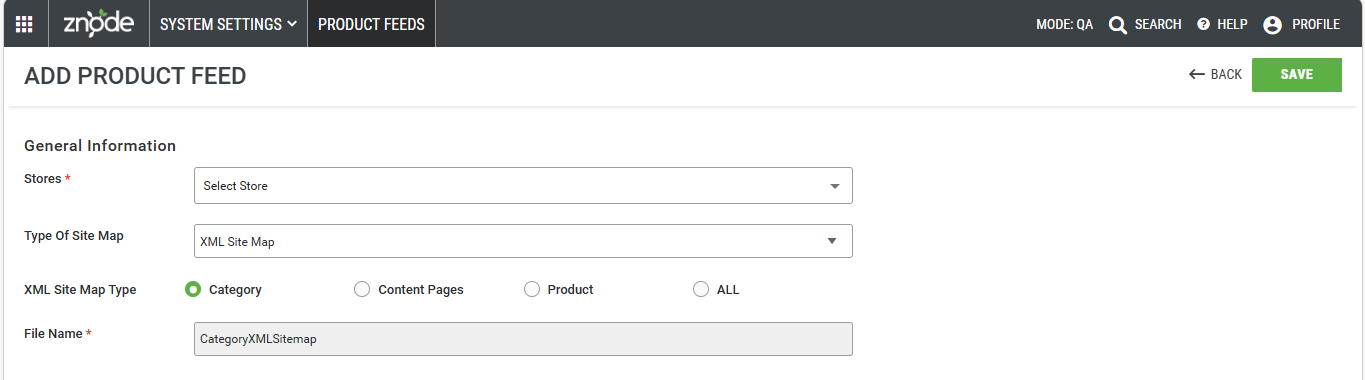
XML Product Feed
- Stores
- XML Site Map Type
- Category
- Content Pages
- Product
- ALL
- File Name (Prefilled)
- Admin clicks on Save button to generate the XML Site map Product feed
- Whenever the product feed generation started or updated below, message should be displayed - “The feed generation has started successfully. Progress can be tracked in the progress bar”.
Tracking Feed Generation Progress
When feed generation starts, the system displays a progress bar that provides real‑time updates.
Progress Information Displayed
- Job Name
- File Name
- Started By
- Current Stage
- Completion Percentage
The progress bar updates automatically and reflects the current generation stage.
Status Behavior
- Generating
- View and Generate actions are disabled.
- Completed
- View and Generate actions are enabled.
- If generation is already in progress for the same Store and Feed Type, the system displays:
“Feed generation is currently in progress. Please try again later.”
Duplicate Feed Validation
Znode prevents creation of duplicate feeds for the same Store and Feed combination.
If a duplicate is detected, the system displays:
“The Store and Feed combination already exists.”
Validated Combinations Include
- Store – XML Site Map – Product
- Store – XML Site Map – Category
- Store – XML Site Map – CMS Pages
- Store – XML Site Map – All
- Store – Google Product Feed – Locale
- Store – Bing Product Feed – Locale
USE CASES
Use Case 1: Regenerate an Existing Sitemap File
Scenario
An Administrator generates a sitemap file for a store where the same file type already exists.
Behavior
- No new file is created
- The existing file is updated with the latest data
Expected Outcome
- Sitemap URL remains unchanged
- Content reflects the latest updates
Use Case 2: Generate All Sitemap When Individual Files Exist
Scenario
Product, Category, and Content Page sitemaps already exist, and the Administrator generates an All Sitemap.
Behavior
- Existing individual sitemap files:
- Removed from the sitemap URL
- Still available in the Product Feed List page
- Only the All Sitemap file remains active in the sitemap URL
Expected Outcome
- Sitemap URL shows only the All Sitemap file
- Historical files remain accessible for reference
Use Case 3: Generate Individual Sitemap When All Sitemap Exists
Scenario
An All Sitemap already exists, and the Administrator generates a specific sitemap type (e.g., Product).
Behavior
- The All Sitemap file is removed from the sitemap URL
- The newly generated file (e.g., Product) becomes active
Expected Outcome
- Sitemap URL reflects the new file type
- Previous All Sitemap remains available in the system
Sitemap File Behavior
Regeneration Rules
- Regenerating the same feed type updates the existing file.
- Generating All removes individual sitemap files from the sitemap URL.
- Individual files remain visible in the Product Feed listing.
Chunk Size Handling
If the number of URLs exceeds the configured chunk size:
- Multiple sitemap files are generated.
- Files follow this format:
- XML Sitemap:
<domain>/<sitemap-name>_<chunk-number> - Other feeds:
<domain>/<sitemap-name>_<chunk-number>_<locale-id>
Chunk size is controlled through system configuration.
Admin Control
- Chunk size is configurable via the web.config file
- Same limit applies to all sitemap types
Robots.txt Integration
Behavior
- When any XML sitemap is generated:
- The sitemap URL is automatically added to Robots.txt
- Sitemap URL is added:
- Only once per store
- Only if a sitemap exists
Store-Level Handling
- Each store has a unique sitemap URL
- Each URL is separately appended in Robots.txt
Error Handling
Scenario 1: No Active Catalog or Store in Draft
- Sitemap generation is blocked
- A generic error message is displayed
Scenario 2: Scheduled Job Execution Failure
- No active catalog exists, or
- Store is still in draft
- Existing sitemap file is not updated
- Previous data remains intact
- The sitemap file will never become empty once created
Scenario 3: Accessing Non-Existing Sitemap
- User is redirected to a 404 Error Page
- This follows standard storefront behavior for invalid URLs
Recommendations and Guidelines
- Generate either:
- Individual sitemap files, or
- A single All Sitemap (avoid mixing unnecessarily)
- Always ensure the store has an active catalog before generating sitemaps
- Use scheduling carefully and validate store readiness
- Monitor sitemap URLs after generation to ensure correct file availability
- After Media Storage changes, resave all feeds to refresh data
- Review Robots.txt to confirm correct sitemap URL entries
Notes
- Feed generation does not block other Admin Console publish activities.
- The feed is generated as a static file. Therefore, any product changes, such as product disablement, or status modifications, are not reflected automatically. To ensure the feed contains the latest product information, the feed generation process must be reinitiated after such changes.
Admin can terminate the Product Feed generation, where the Product Feed generation process becomes unresponsive or stuck, the system provides Admin with the ability to manually terminate the process to prevent system blockage and allow regeneration. This functionality is available through the Maintenance section in the Admin Console.