
TABLE OF CONTENTS
Navigate to: Admin > Menu List
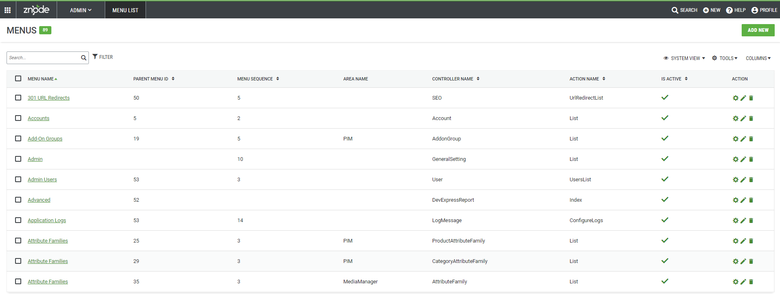
The menu list provides all the Znode menus and details. Each menu contains a Controller Name and an Action Name. In this area administrator can resequence or disable an existing Menu.
Adding a Menu Item
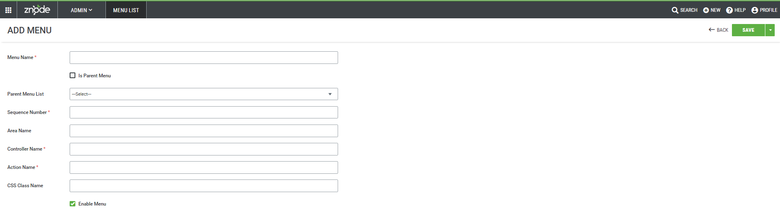
Navigate to: Admin > Menu List > "Add New" button
- Add Menu List details
- Save progress using the "Save" button. The page reloads with action confirmation.
- The New Menu List is now added.
Menu List Item Details
| Details | Description |
| Menu Name | The menu Name is displayed as a navigation element name. (Ex: "Product Feeds", "Admin Users", etc.) |
| Parent Menu ID | If checked, A new Menu will be created as a Parent Menu. (Ex: "PIM", "DAM", etc.) |
| Menu Sequence | Determines the display order of the newly created Menu. |
| Area Name | The area name is displayed during mouse hover on the main module. (Ex: "PIM", "Media Manager", etc.) |
| Controller Name | Controller Name as displayed in any URL. (Ex: http://admin.Znode900.localhost.com/PIM/Catalog/CatalogList. Here Catalog is the Controller Name of the Menu.) |
| Action Name | Action Name as displayed at the end of the URL. (Ex: http://admin.Znode900.localhost.com/PIM/Catalog/CatalogList. Here CatalogList is the Action Name.) |
| Is Active | Indicates if the menu is active or not. |
Editing a Menu List
Navigate to: Admin > Menu List > "Edit" action
- Edit Menu List Details
- Save progress using the "Save" button. The page will reload with action confirmation.
- The menu List is now edited.
Delete Menu List
Navigate to: Admin > Menu List > "Delete" action
- The page will reload with action confirmation.
- The menu List is now deleted.