
Introduction
Manufacturers and distributors often maintain alternative SKUs or product information to support different sales channels, regional requirements, or customer‑specific contracts. These variations ensure that buyers see the terminology, descriptions, or product identifiers most relevant to their market or purchasing relationship.
The Product Information Override feature in Znode 10 enhances the product search and buyer experience by allowing administrators to enter alternative product details—such as Product Name, Short Description, and Long Description—based on the Store, Account, or selected Locale.
By optimizing the product content that buyers see during search and browsing, businesses can ensure more relevant, segment‑specific results without creating duplicate product records. These customized details are collectively known as Product Information Overrides.
Feature Overview
Product Information Overrides allow the same SKU to present different product information depending on:
- Store
- Account (optional)
- Locale (Locale Code)
When overrides are configured and enabled:
- Znode returns overridden product data instead of default PIM data (when override APIs are consumed).
- Overrides apply consistently across API responses (New Product Override APIs), and the Storefront (with required API implementation).
- If no override exists, Znode automatically falls back to the base product data.
Enabling Product Information Overrides
This feature is disabled by default and must be enabled in both Global and Store settings.
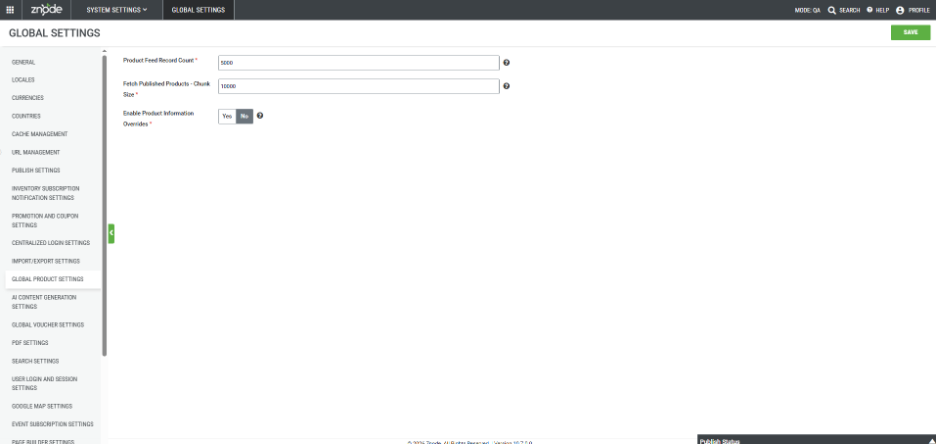
Global Setting
Navigation Path: Global Settings → Global Product Settings → Enable Product Information Overrides
- Enables the feature at the system level.
- If disabled, product overrides will not function regardless of store configuration
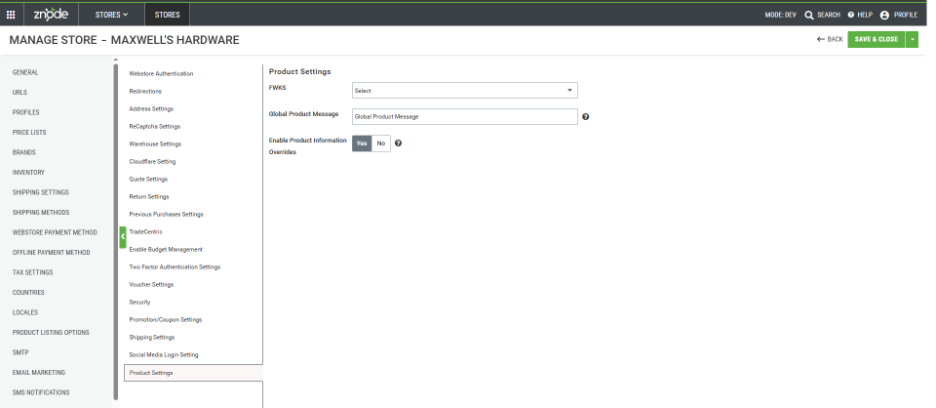
Store-Level Settings
Navigation Path: Store Settings → Additional Attributes → Product Settings → Enable Product Information Overrides
- Enables product overrides for a specific store.
- Overrides are evaluated dynamically based on store context.
Notes:
- Both flags must be enabled
- If the override flag is disabled at either level:
- Znode falls back to the default PIM product information.
- All override data is ignored.
- This feature is strictly implemented for product searching and storefront display purposes. The system does not store any alternate data in the database for a product, order, quote, etc., except for records maintained within the Custom Table.
Prerequisites
Before using Product Information Overrides, ensure:
- Enable Product Information Overrides is turned ON in:
- Global Settings
- Store Settings
- The product is already created and published in PIM.
- Appropriate catalog publishing permissions are available.
Configuring Product Information Override Records
To configure Product Information Overrides, override records must be created with the following attributes.
Required Fields
- SKU – Original product SKU
- Locale Code (for example, en-US)
- Store Code (for example, DemoStore)
Optional Fields
- Account Code – Used for account-specific overrides
- Alternate SKU – Based on business requirements
- Alternate Product Name – Based on business requirements
- Alternate Short Description – Based on business requirements
- Alternate Long Description – Based on business requirements
Override Combinations
- Different override scenarios can be created using combinations of:
- Locale Code (language or region)
- Store Code (store-specific)
- Account Code (account-specific)
- This allows:
- Alternate product names/descriptions by Store.
- Account-specific product SKUs/names and descriptions.
- Locale-specific product content
Managing Product Information Overrides
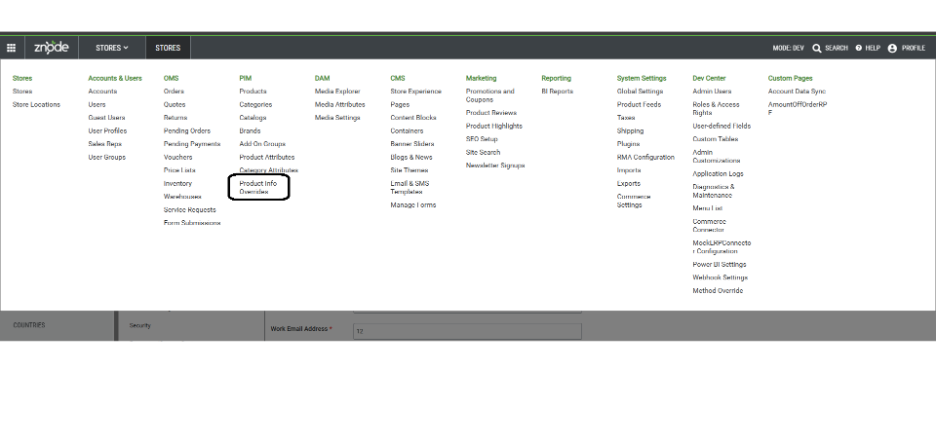
Navigation Path:
- Product Information Overrides can be managed from:
- PIM → Product Information Overrides
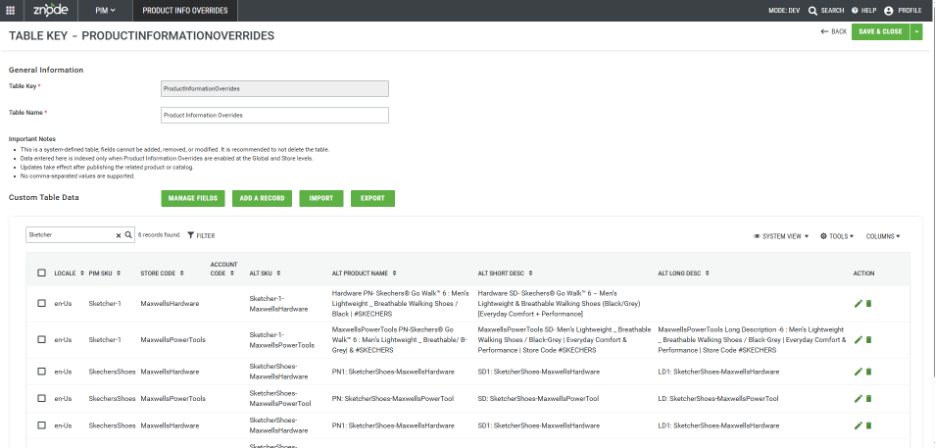
Product Information Overrides (Custom Table Management)
- Override records are stored in the ProductInformationOverrides system table. Administrators can:
- Add new override records
- Manual or via Import
- Edit existing records
- Manual or via Import
- Review all configured overrides
- Export all configured overrides
- Adding New Fields to this custom table is restricted.
- Add new override records
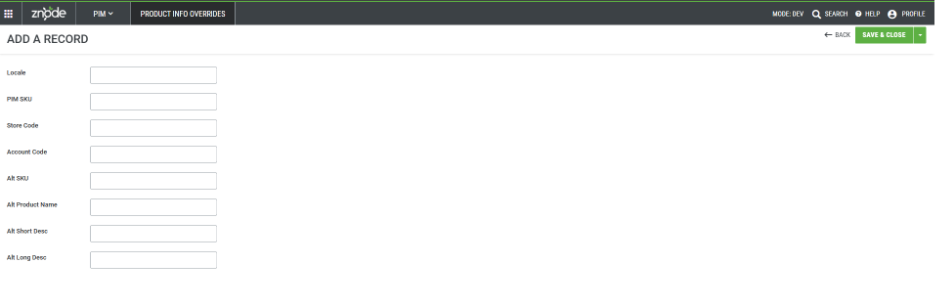
Adding an Override Record
- Navigate to PIM → Product Information Overrides
- Select Add a Record
- Enter the required SKU, Locale Code, and Store Code
- Enter alternate product information as required
- Save the record
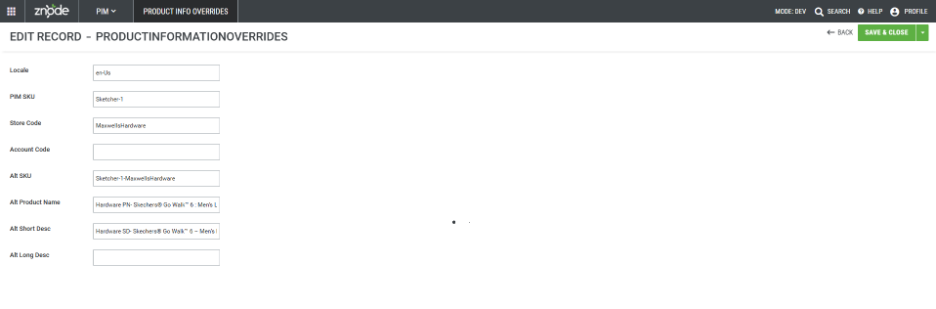
Editing an Override Record
- Select an existing override record
- Update alternate product information
- Save the changes
Importing and Exporting Override Data
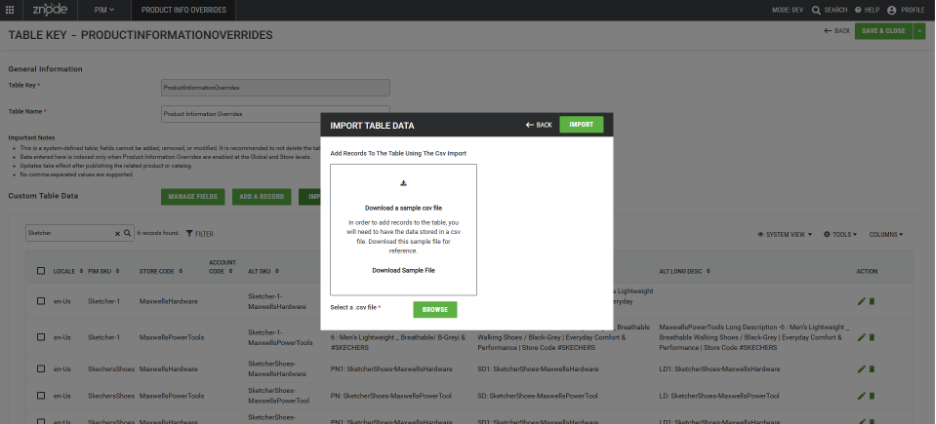
- Product Information Overrides can be imported using a CSV file, enabling bulk updates for:
- Alternate product names
- Short and long descriptions
- Store and account mapping
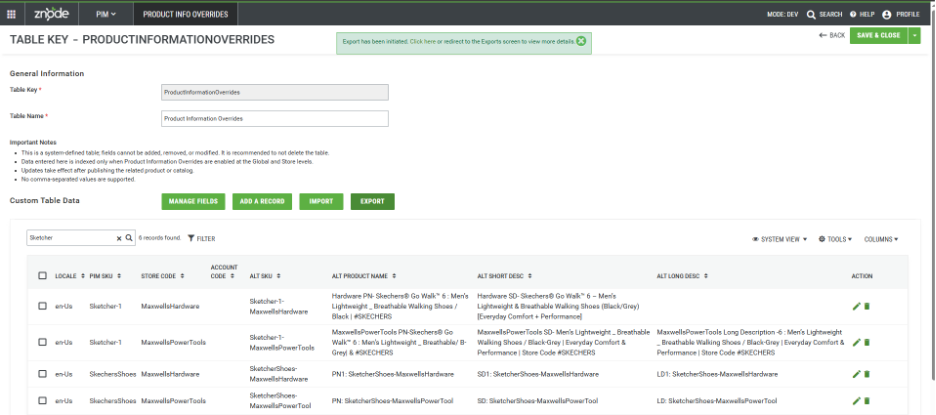
- Product Information Overrides can be exported as well.
- These methods are recommended for large catalogs, enterprise-scale implementations, and data migration from one environment to another.
Viewing Override Information for a Product
When both Global Product Override settings are enabled:
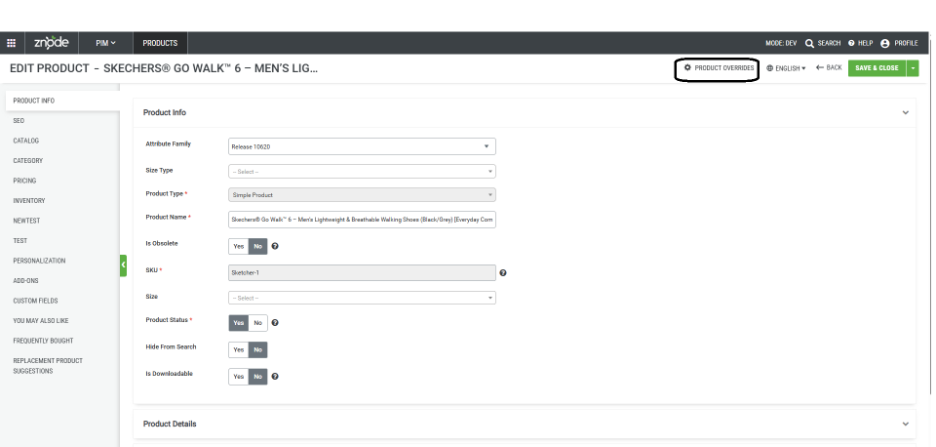
- A Product Overrides option becomes available on the Product Management page.
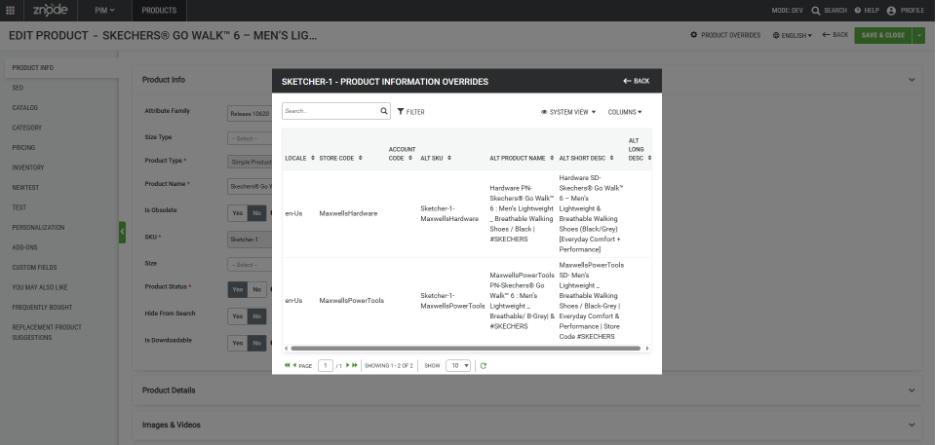
- Selecting this option opens a modal displaying:
- All override records associated with the product
- Alternate names, descriptions, and other override details
- This view provides visibility into how the product appears across different stores, accounts, and locales.
- Adding and editing Product Override information is not allowed from this screen.
Publishing Requirements
First-Time Setup (Mandatory)
- When Product Information Override is used for the first time:
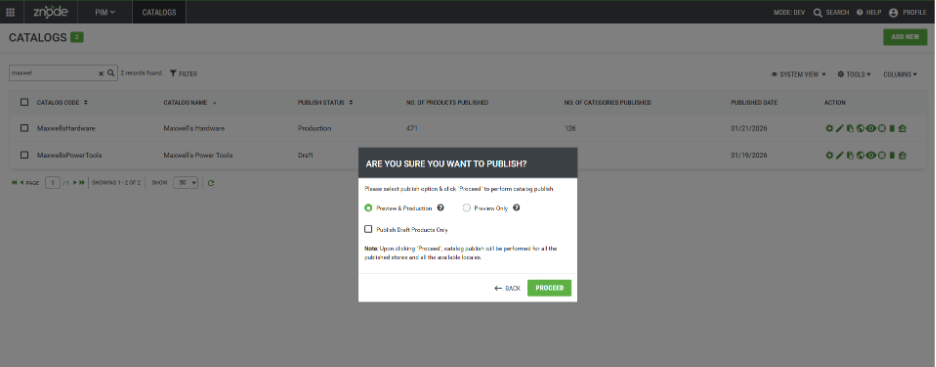
- The entire catalog must be published
- The “Publish Draft Products Only” option must not be selected.
- This step is required because:
- A separate Elastic index is created to store override product information
- Elastic Search must be fully rebuilt to support override data.
After Initial Setup
- After the initial full catalog publish is completed:
- If any changes are made in the overridable data, then the complete catalog publish is required (which is a known limitation).
Impact on Elastic Search
- Product Information Overrides generate a dedicated Elasticsearch index to support overridden product data.
Purpose of the Override Index
- The override-specific Elasticsearch index ensures:
- Accurate search results
- Correct product information per Store, Account, and Locale
- Consistent application of overridden product attributes across search responses
- When override data exists, the override index is used to resolve product information. If no override data is available, the system falls back to the base catalog index.
Index Creation and Naming
The override index is created using the same name as the catalog index, prefixed with override_.
(Example: override_<catalog_index_name>)
This index:
Is not visible in the Znode Admin UI
Does not display status or health information in Admin
Is not manageable through Admin tools
In the current phase, the override index can be viewed only directly in Elasticsearch. Admin-level visibility and management will be addressed in future phases.
Reindexing and Publishing Behavior
- The override index is created and refreshed only through a full catalog publish.
- Manual creation or reindexing of the override index from the Znode Admin screen is not supported.
- The following actions are out of scope:
- Reindexing a specific catalog index instead of publishing
- Explicitly creating or refreshing the override index from Admin.
- Any update to override-enabled product data requires a complete catalog publish.
Performance Considerations
- Initial publishing may take additional time due to:
- Full Elasticsearch re-indexing
- Creation of the override-prefixed catalog index.
- If the volume of data in the custom table is very large, it can significantly impact Elasticsearch performance, particularly by increasing indexing load and slowing down search query execution. As a result, search latency and resource consumption may increase. In such scenarios, Elasticsearch configurations—such as indexing strategy, shard sizing, query optimization, and resource allocation—should be reviewed and adjusted to maintain optimal search performance and system stability.
Important Points
- This change does not affect data exchanges with any third-party applications. Existing integrations and data flows remain unchanged.
- If a product override is not available for a specific locale, the system falls back to PIM data. If PIM contains data for that locale, it is displayed; otherwise, the product’s default locale data from PIM is shown.
- The feature is supported for all product types as well as all associated add-ons.
- Znode’s default search behavior does not return results when a shopper searches for a variant that is associated only with a parent product and is not directly associated with a category. The same restriction will be respected for the Product Information Override.
- Example: If a variant SKU is associated with a parent product but only the parent product is associated with a category (and the variant itself is not associated with any category), searching for that variant SKU will not return any results. Likewise, product information overrides for that variant will not be searchable unless the variant is associated with a category.
Known Limitations
- Product Publish Status Is Not Updated Automatically
- Expected Behavior
- When Product Information Override data is added or updated in the Custom Table associated with a product, the product’s publish status should automatically change to Draft, indicating that a publish action is required for the changes to take effect.
- Current Limitation
- This behavior is not currently implemented. Adding or modifying Product Information Override records does not update the product’s publish status to Draft.
- Impact
- Product changes related to overrides may not be immediately apparent to administrators.
- The system does not indicate that publishing is required after override updates.
- A full catalog publish is required to ensure override data is applied correctly, particularly during the initial use of this feature.
- Workaround
- Perform a full catalog publish after adding or updating Product Information Override data.
- Do not rely on product draft status as an indicator of pending override-related changes.
- Custom Table Schema
- This override data is currently maintained in the Custom Table database. (Which is exposed for partners to modify the fields and schemas).
- Updating the existing Override schema or field details results in functional failure.
- Expected Behavior
- Duplicate Records in the Custom Table Cause Errors
- Description:
- Product Information Override data is stored in a Custom/System Table. Each record must be uniquely defined based on the combination of:
- SKU
- Store Code
- Locale Code
- Account Code (if applicable)
- Product Information Override data is stored in a Custom/System Table. Each record must be uniquely defined based on the combination of:
- Current Limitation
- If duplicate records exist in the Custom Table with the same combination of identifying fields, the system throws an error while returning the results in the API.
- Error Message: An error occurred while retrieving product override data due to multiple entries found in the custom table. Please correct the duplicate data and try again. For additional details, review the application logs in the Admin Portal.
- If duplicate records exist in the Custom Table with the same combination of identifying fields, the system throws an error while returning the results in the API.
- Mitigation and Best Practices
- Perform manual data validation before adding or importing override records.
- Avoid creating duplicate combinations during manual entry or CSV imports.
- Implement governance and review processes for managing Product Information Override data.
- Description:
- Incomplete Publish History Tracking for Product Overrides
- Expected Behavior
- The Publish History section should display the complete lifecycle of a publish operation, including.
- Publish start time
- Publish completion time
- Product Information Override indexing time
- The Publish History section should display the complete lifecycle of a publish operation, including.
- Current Limitation
- Currently, the Publish History displays only the main catalog publish time. The indexing time related to Product Information Overrides is not tracked or displayed.
- Impact
- Limited visibility into the total duration of publish operations involving overrides.
- Difficulty in monitoring or troubleshooting override-related indexing delays.
- Incomplete audit information for publish activities
- Workaround
- Assume that override indexing is executed as part of the overall catalog publish process.
- Allow additional time after the publish completion for override data to become fully available in search and storefront results.
- Expected Behavior
- System Table Deletion Only Possible via Database
- Expected Behavior
- The system table should be protected from deletion and should not be removable through any means once created, ensuring data integrity and system stability.
- Current Limitation
- There is no option available in the UI to delete the system table; however, the table can still be deleted directly from the database.
- Impact
- System tables may be unintentionally removed through direct database access.
- Deletion of the system table can lead to data loss or system malfunction.
- Such actions bypass application-level safeguards and validations.
- Workaround
- Avoid deleting system tables directly from the database.
- Restrict database-level access to prevent unintended deletion of system tables.
- Expected Behavior
- Feature Not Optimized for Large Datasets
- Expected Behavior
- The feature should efficiently handle very large datasets without performance degradation, ensuring smooth operation regardless of the number of records.
- Current Limitation
- The feature is not fully optimized for extremely large datasets. It can handle up to one hundred thousand records reliably, but performance may degrade or operations may fail with datasets significantly larger than this.
- Impact
- Users working with extremely large datasets may experience slow response times or incomplete processing.
- Certain operations may fail if the number of records exceeds the tested limits.
- This limitation could affect reporting, bulk updates, or any high-volume data operations.
- Workaround:
- Avoid exceeding the tested limit of one hundred thousand records until the feature is enhanced for larger-scale use.
- Expected Behavior
- Variants Not associated with Category-Catalog
- Expected Behavior
- API responses should include all product variants for which override data exists, regardless of whether the variants are associated with a catalog or category.
- Current Behavior
- Only product variants that are associated with a catalog are returned in API responses. Variants not linked to any catalog are excluded.
- The APIs productoverride/{sku} and productoverride/multipleproduct/{skus} return data only for products associated with a category. Products or variants that are not mapped to any category are not included in the response payload.
- Impact
- Product variants that are not associated with a catalog or category are not visible through the APIs, which may result in incomplete or missing data in downstream systems.
- Consumers of the APIs may not receive expected override information for certain products, potentially leading to data inconsistencies.
- Workaround
- Ensure that all relevant products and variants are properly associated with both a catalog and a category before invoking the APIs.
- Review catalog and category mappings as part of the data setup process to avoid missing results in API responses.
- Expected Behavior
- Sorting and Pagination Limitations
- Expected Behavior
- The APIs should support sorting and pagination to efficiently manage large datasets and return ordered results. API responses should be optimized to ensure consistent and predictable performance regardless of data volume or usage patterns.
- Current Limitation
- Sorting and pagination are not supported in the current release. API responses may return large, unsorted datasets.
- Impact
- Consumers may need to process and organize data on the client side.
- Workaround:
- Apply sorting, pagination, and filtering logic on the client side until these features are supported in a future release.
- Expected Behavior