
1. Overview
This knowledge base article provides a practical guide for development partners integrating custom shipping microservices with the Znode platform. It outlines the required inputs, configuration structure, request/response expectations, and key behavioral considerations to ensure seamless integration.
2. Purpose
The purpose of this document is to help developers understand:
- How Znode communicates with external shipping microservices
- What information must be provided during plugin development
- How shipping services are configured and mapped in Admin and Store settings
- Required response fields for displaying shipping methods
- Plugin configuration (global and store-specific)
- Important integration considerations and constraints
This document should be reviewed before beginning custom plugin development.
3. Key Capabilities of Znode’s Custom Shipping Framework
Znode’s extensible shipping framework allows development partners to:
- Integrate with internal or external carriers
- Support multiple shipping types (e.g., LTL, parcel, pickup, local delivery)
- Implement custom business logic and rules
- Run shipping logic as independent microservices
- Return multiple shipping services in a single request
- Update or version services independently of Znode core
- Configure plugins globally or per store
- Apply customer- or account-specific shipping rules
4. How Custom Shipping Services Work
Each shipping plugin defines one or more Shipping Services, such as:
- LTL Freight
- Local Truck Delivery
- Will Call Pickup
Znode uses these services to:
- Display shipping options in Admin
- Allow stores to enable or disable services
- Map services to shipping methods
- Call Estimate or Calculate APIs
- Display shipping rates during checkout
Important: Consistent identifiers and complete response data are required for proper operation.
5. Developer Requirements
5.1 Shipping Service Code
- A unique system identifier
- No spaces or special characters
- Must match the value expected by the plugin
Examples:
- LTLFREIGHT
- OURTRUCK
- WILLCALL
5.2 Display Name
Human-readable name shown in Admin UI
5.3 Display Order
Determines the order in which services appear in Admin
5.4 IsCalculateIndividually (Boolean: 0 or 1)
Defines how Znode calls the shipping plugin:
- 1 (True) → Znode calls the plugin once per service
- 0 (False) → Znode calls the plugin once for all services (batch)
6. API Invocation Patterns
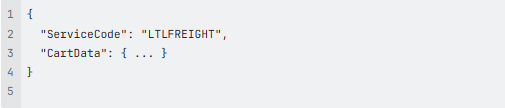
6.1 Calculate Request (IsCalculateIndividually = 1)
Znode sends a separate request per service:
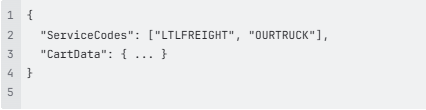
6.2 Estimate Request (IsCalculateIndividually = 0)
Znode sends all services in a single request:
7. How Plugin Configuration Works
7.1 Global Configuration
Applies across all stores and environments:
- API Base URL
- Authentication details
- Environment (Sandbox / Production)
- Shared headers or tokens
7.2 Store-Level Configuration (Configuration Sets)
Applies per store:
- API keys
- Account numbers
- Warehouse or location identifiers
- Store-specific rules
Note: Only fields defined in the Spec.yaml file will be visible in Admin.
8. Spec.yaml Requirements
The Spec.yaml file defines the configuration schema and UI behavior in Admin.
It should include:
- All required configuration fields
- Global vs store-level designation
- Field groupings
- Data types and validation rules
- Consistent naming aligned with plugin logic
Recommendation: Validate completeness before development begins to avoid rework.
9. Plugin Response Requirements
9.1 Estimate API Response
Each object in ShippingEstimateRate[] must include:
- ShippingCode (Required)
- ShippingRate (Required — must be > 0)
- ResponseMessage (Required — cannot be null)
9.2 Calculate API Response
Response must include:
- ShippingCost (Required — must be > 0)
- IsValidShippingSetting (Required — must be true)
- ResponseMessage (Required)
9.3 Important Note: $0 Shipping
Znode currently filters out shipping methods with $0 cost
A platform enhancement is underway to support valid free shipping scenarios
10. Error Handling Guidelines
To ensure reliability and transparency:
- Return structured and meaningful error responses
- Avoid generic HTTP 500 errors
- Provide business-level messages such as:
- Carrier unavailable
- Account not eligible
These messages are surfaced to downstream systems and UI.
11. Known Considerations
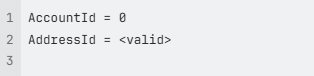
11.1 Account and Address Behavior
Some customer addresses may include:
Resolution Approach
If account validation is required, partners can resolve it using:

Note: This behavior may change in future platform releases.
12. Developer Preparation Checklist
Before starting development, ensure the following are ready:
- Shipping Service Codes
- Display names and display order
- isCalculateIndividually values
- Global configuration fields
- Store-level configuration fields
- Completed and validated Spec.yaml
- Sample Estimate API responses
- Sample Calculate API responses
- Error response formats
- Business rules and conditional logic
13. Summary
Znode’s custom shipping framework provides a flexible and scalable way to integrate external shipping logic via microservices. Proper configuration, standardized identifiers, and compliant API responses are critical to ensure successful integration and accurate rate calculation during checkout.
For more technical details please refer: Shipping Plugin Customization Developers Guide