
TABLE OF CONTENTS
Regression Test a Baseline Update
A baseline update can touch any shared file: middleware, the custom server, the theme configuration, shared agents. This is the checklist to run after the merge is done and the branch builds, before you ship it. It is a smoke test across the whole storefront, not a retest of one feature.
For implementation partners and developers When right after a baseline merge, before deployment Covers build · tests · critical journeys · settings · cache · rollback
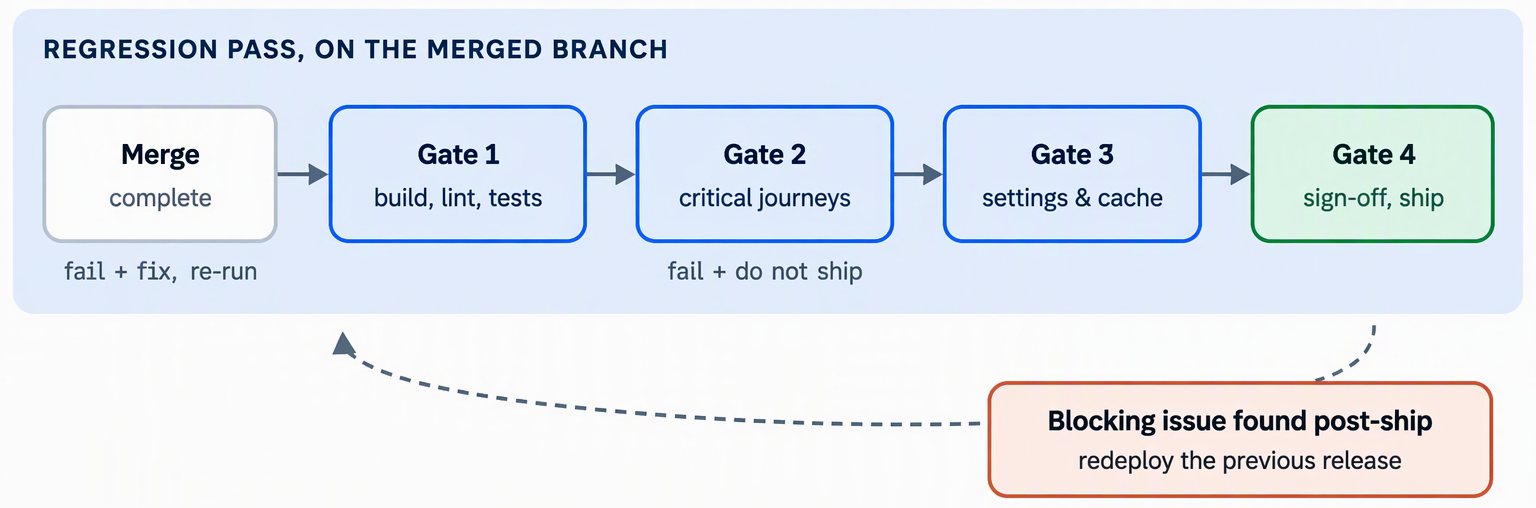
Steps run against the merged branch
Each gate must pass before the next one starts. A blocking issue found after shipping sends you to the rollback plan, not back to Gate 1.
| Gate | Name | Description |
| 1 | Build & tests | Both apps build, lint and the full Jest suite pass. |
| 1B | Env diff | No newly required variable is missing from an environment. |
| 2 | Journeys | Every critical journey, both locales, both auth states. |
| 3 | Settings | Login-required, maintenance, theme resolution |
| 3B | Cache | Cache headers and behavior |
| 4 | Final Verification | Create audit trail of gate verifications |
Gates are required since a merge can pass review and still regress.
A baseline update can touch middleware.ts, server.js, next.config.js, the theme configuration map, shared agents and clients, translation keys, or the set of environment variables the storefront reads. Your project's unit tests can all stay green and the store can still regress, because the break is only visible in a running store, or only on a setting your default test store does not use.
This is normal. It is the expected cost of layering customizations on a product baseline, which is exactly why a regression pass follows a merge instead of a build check alone.
Don't treat a green build and a green test run as proof the store works. Gate 1 only rules out the failures that are visible without a running store.
Gates / Milestones
Gate 1 - Build and tests
Verify build, lint and automated tests. Run these before anything manual. A failure here is far cheaper to find now than during checkout testing.
terminal
npx nx build webstore
npx nx build page-builder
npm run lint
npx nx run-many -t test --passWithNoTests
Check | Priority | Why it matters after an update |
Both apps build | Must | A baseline change can break a type or an import path your project depends on |
Both Docker images build (base → builder → runner) | Must | The production build runs inside the image; a local build passing is not proof the image does |
Full lint passes | Must | Same command the commit hook runs; catches drift the merge introduced |
Full Jest suite passes | Must | npx nx affected -t test alone can miss a regression in a package nothing in the diff directly touches but that a shared default change affects |
Every project that had a test target still has one | Must | A baseline change to nx.json or a package config can silently drop it |
For the test tooling itself (what is installed, how to mock the shared server helpers, and how to add a test to a package) see the related guides at the end — this checklist only tells you what to re-run.
Gate 1B - Environment diff
Verify diff environment variables against the previous version. A baseline update can introduce a variable that did not exist before. If your deployment does not set it, a feature can silently fall back to a default, or fail outright, only in the target environment.
STEP 1 - Diff the environment file
Compare the storefront's environment file against the pre-merge version. Treat it as a template — never copy real secret values between environments.
terminal
git diff <pre-merge-ref> -- apps/webstore/.env
STEP 2 - Check it against the configuration groups
Every variable the storefront reads falls into one of these groups. A new variable in the diff belongs to one of them; confirm it is set everywhere the group's variables are normally configured.
Back-end connection · Application & store · Authentication & secrets · Data & page caching · Anonymous cache & CDN · Redis · Payments (browser) · Observability & build
STEP 3 - Confirm every target environment, not just local
Environment variables set on the container take precedence over .env files, and NEXT_PUBLIC_* values are fixed when the image is built. A variable set locally proves nothing about the deployed environment.
Watch for: a new or changed OTEL_* variable. The OpenTelemetry start-up refuses to run when a required one is missing, which can take observability down without affecting the storefront itself — easy to miss because nothing visibly breaks for shoppers.
Gate 2 - Journeys
Verify critical journeys for each locale and for both guest and logged in user states. Run these in a deployed or containerized environment - not nx dev - which skips the anonymous page cache and uses the Next.js development server instead of the production one. Use a private window for every anonymous check so no stale session carries over.
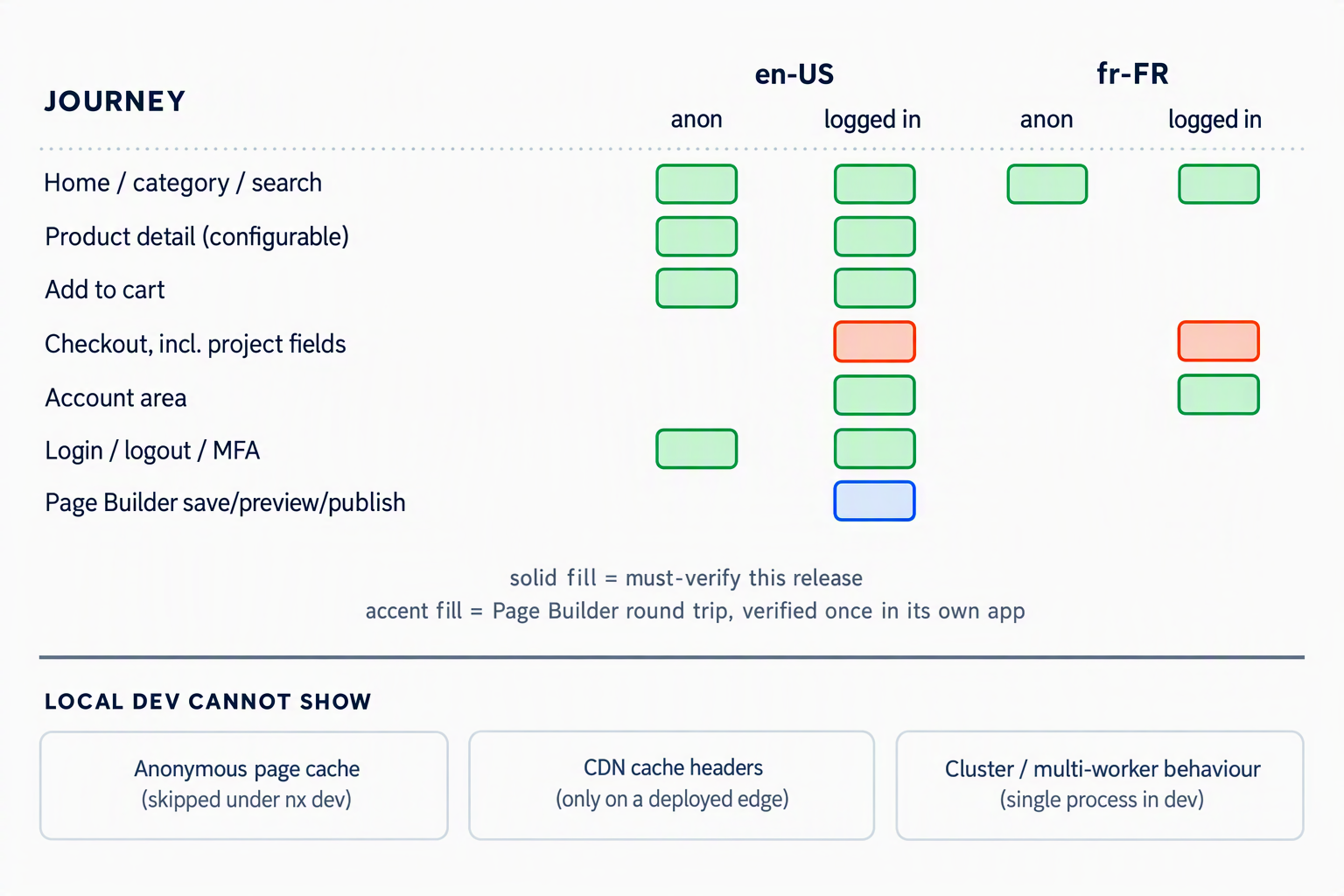
Checkout, account and login must cover each locale and both logged-in and non-logged in states in full; the other journeys share enough code that a smaller sample catches most regressions.
Journey | What "pass" looks like |
Home, category, search | Each locale renders, no console errors, filters and pagination work |
Product detail — configurable product | Option selection updates price, SKU and availability without a full reload. Exercises more of the data layer than a simple product, so a mapping regression shows up here first |
Add to cart | Cart count and line-item update for both a standard and a configurable product |
Full checkout | Address through order review completes; generalize this to your project's own checkout extension point (custom fields, a reworked billing-address placement, filtered payment options) and confirm it still renders and submits |
Account area | Order history, addresses and any project-specific pages load logged in, and redirect anonymous visitors to /login |
Login / logout / MFA | Credentials sign-in, failure handling, logout, and the MFA challenge where the store has it enabled |
Page Builder round trip | Save, preview and publish a trivial change; confirm it appears on the live page without a restart |
Gate 3 - Settings
Verify store-settings-dependent behavior. These only show up on a store configured for the setting in question, not on the default store you use day to day. A baseline change to middleware or the theme configuration is the most likely way one of these silently regresses.
| Setting | Description |
| Login-required store | Anonymous visitors still redirect to /login, except the excluded paths and SEO files. |
| Maintenance mode | Turning it on redirects every request to /maintenance; turning it off restores normal service. |
| Multi-locale | Default locale has no URL prefix; the other locales' prefix still resolves. |
| Theme resolution | Your project's theme config still overrides the baseline widgets after the merge; an unlisted theme still falls back cleanly. Theme resolution is worth a closer look: the store's theme name must still map to your project's configuration, your project's widget and page-type overrides must still render in place of the baseline ones, and any theme without an entry must still fall back to the base configuration without error |
Gate 3B - Cache
Verify cache behavior. The custom server is one of the files most likely to change in a baseline update, so verify it explicitly rather than assuming the merge left it intact.
terminal
# anonymous: run twice, expect MISS then HIT for a public page
curl -sI https://<store-domain>/en-US/<public-page> | grep -i -E "x-anon-cache|cache-control"
# personalized or excluded path: must never show HIT
curl -sI https://<store-domain>/en-US/account/orders | grep -i -E "x-anon-cache|cache-control"
Do publish a real content change in Znode Admin and confirm it appears live without a manual purge. That proves revalidation still fires end to end, not just that the cache headers look right.
Don't assume the manual purge endpoint is a substitute for revalidation working. Use it to confirm it still functions, not as your only check.
Gate 4 - Final Verification
Verify sign-off before you ship. Record the result of every gate so a second person can audit the release without repeating every check. Do not sign off with any unresolved failures.
Area | Result | Notes |
Gate 1 — build, lint, automated tests | Pass / Fail | |
Gate 1b — environment variable diff | Pass / Fail | |
Gate 2 — critical journeys | Pass / Fail | |
Gate 3 — store-settings behavior | Pass / Fail | |
Gate 3b — cache behavior | Pass / Fail | |
Rollback plan confirmed | Pass / Fail | |
Sign-off | Approved / Rejected | Name, date |
Detailed Checklist
☐ Both apps build and both Docker images build
☐ Lint passes and the full Jest suite passes
☐ No environment variable newly required by the update is missing from any target environment
☐ Home, category, search and both product detail types checked in all locales
☐ Full checkout, including the project's checkout extension, completes logged in
☐ Account area and login/logout verified logged in and logged out
☐ Page Builder save, preview, publish round trip confirmed
☐ Login-required store, maintenance mode and multi-locale checked
☐ Theme and project widget overrides still resolve correctly
☐ Anonymous cache headers correct and a real publish revalidates without a manual purge
Rollback plan
Decide this before you deploy, not after a problem appears in production.
| Know the last good release | Each release is tagged; know which tag was live before this deployment. |
| Redeploy, don't patch forward under pressure | Re-run the same deploy workflow against the previous release tag or commit to rebuild and redeploy the last known-good images. |
| Try the narrow fix first, if it fits | A stale cache or a missing environment variable can often be corrected without a full rollback. |
| Verify, then close the loop | Check the health endpoint and the must-verify journeys after rolling back, and record what failed so the next update's pass checks it specifically. |
Troubleshooting and Related Guides
Common issues and where to go next
You see | What it usually means |
A package that had tests now shows no test target | A baseline change to nx.json or the package's own config dropped it |
A feature works locally but not in the deployed environment | A newly required environment variable is set locally but not on the container |
A project widget stopped appearing for your theme | The theme configuration map or the base config's widget list changed in the merge |
One visitor sees another visitor's page | A personalized path fell out of the excluded-paths list during the merge |
A publish in Znode Admin doesn't show up live | Revalidation broke; check the token and the revalidation endpoint before assuming it's a code bug |