
Navigate to: Stores > Stores >Manage Stores> Approval Management
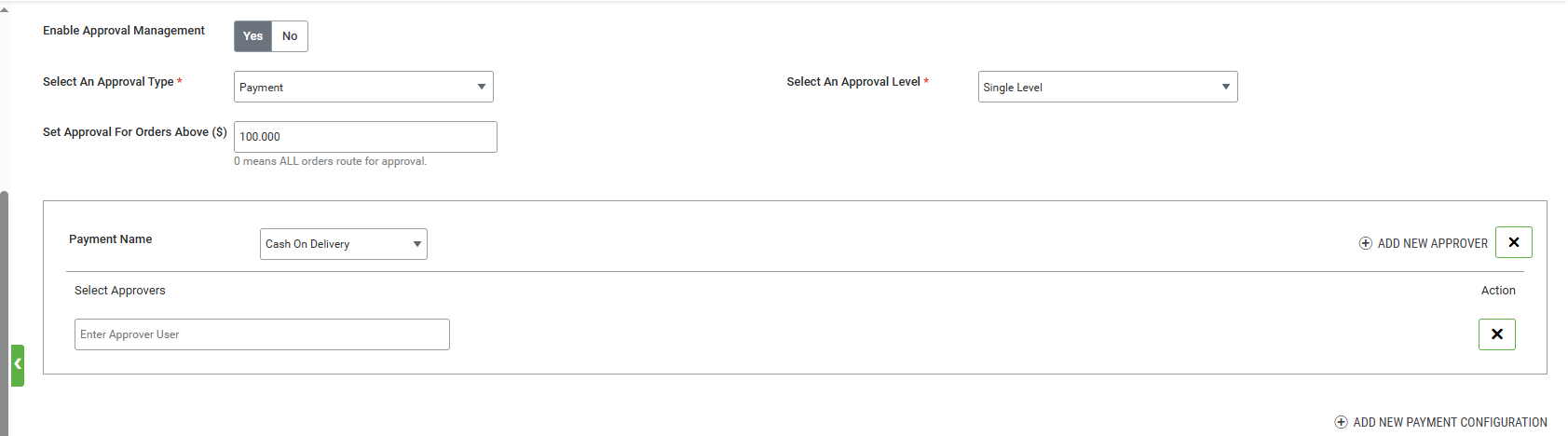
Configuration Steps
- Login to Admin Console
- Navigate to: Stores → Manage Store → Approval Management
- Enable Approval Management
- Select Approval Type (Payment)
- Save and publish the store
For ‘Approval Type = Payment’, administrators can set the following:
- "Set approval for Orders above ($)", above which the approval would be required
- Approval level, which indicates approval will be required from a single approver or multiple approvers.
- Support for both digital and non-digital payment methods
When the approval type is set to Payment, the admin can configure approval routing for specific payment methods.
In this case, the "Add New Payment Configuration" button becomes visible. Upon clicking it, a section opens where the admin can select one or more payment methods and associate approvers for each selected method.
Note: The Set approval for Orders above ($) setting is evaluated against the Order Subtotal to determine whether an order requires approval and to identify the applicable approval level. This behavior applies to both Single-Level and Multi-Level approval workflows. The approval evaluation is based solely on the Order Subtotal; the Order Total, including taxes, shipping charges, discounts, handling fees, and other order-level adjustments, is not considered when determining whether the approval threshold has been met.
Order Placement Flow
- User logs into the website
- Adds products to cart and proceeds to checkout
- Selects a payment method enabled for approval routing
- Enters payment details and submits for approval
System Behavior
- Order is created in Pending Orders
- Payment details are recorded
- Order appears in Pending Order History with status "Pending for Approval"