
Overview
The Service Requests section is a centralized location for Administrators to create, manage, and respond to customer inquiries, issues, feedback, and support requests.
The Service Requests section displays requests across all Znode stores accessible to the Administrator, providing a single location to monitor customer communications and track request resolution.
Administrators can create Service Requests directly from the Admin Console, maintain communication history, add internal notes, and respond to customers within the request record.
Service Requests can originate from:
- Manual creation by Administrators in the Admin Console.
- The Storefront Contact Us form submitted by a customer.
- The feedback form displayed on the order confirmation page and submitted by a customer.
Use Cases
Common use cases for Service Requests include:
- Customer support inquiries.
- Product or order-related questions.
- General business inquiries.
- Customer feedback collection.
- Issue resolution and follow-up communication.
Create a Service Request
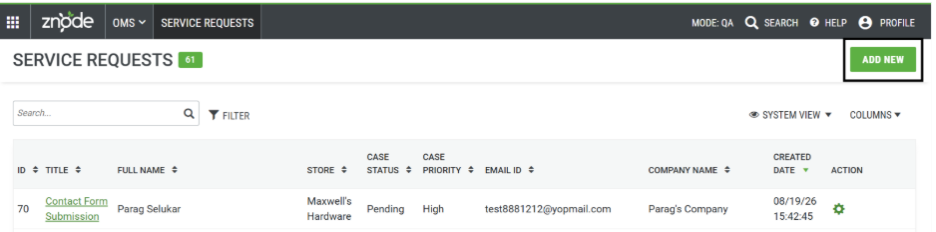
Administrators can manually create a Service Request from the Admin Console.
Navigate to:
Admin Console > OMS > Service Requests
Steps
- Select Add New.
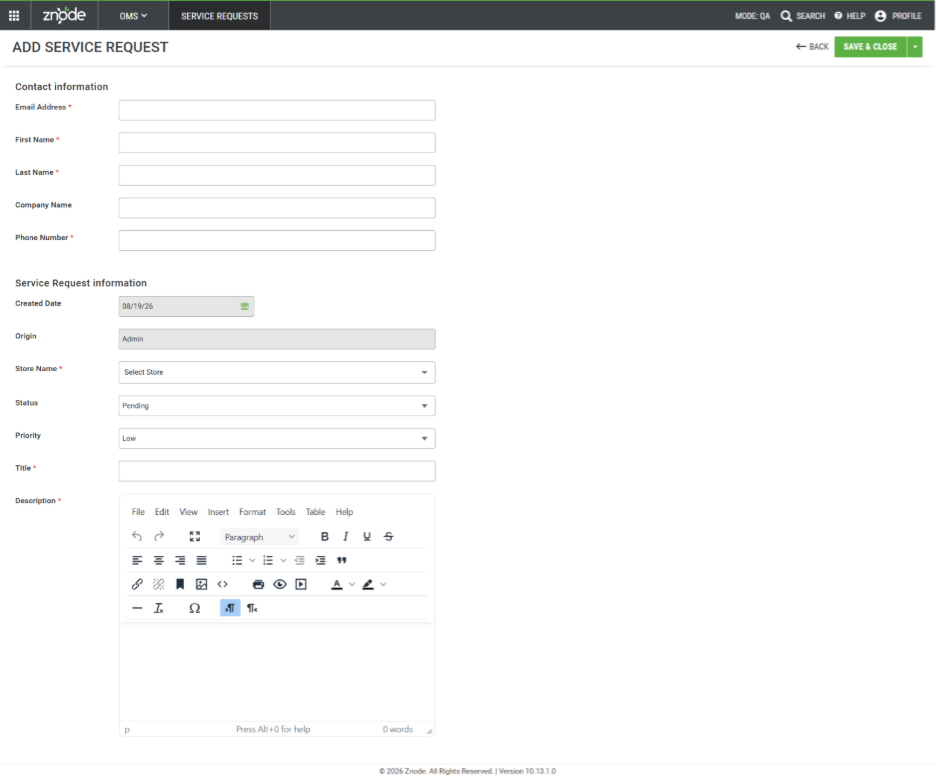
- Enter the customer contact information.
- Enter the Service Request details.
- Select Save.
The following information must be completed when creating a Service Request.
Contact Information Fields
| Field | Description |
|---|---|
| Email Address * | Customer email address. All correspondence related to the Service Request is sent to this email address. |
| First Name * | Customer first name. |
| Last Name * | Customer last name. |
| Company Name | Customer company name. |
| Phone Number * | Customer contact number. |
Service Request Information Fields
| Field | Description |
|---|---|
| Created Date | Date on which the Service Request is created. |
| Origin | Source of the request. If the customer is logged in, profile information may be associated with the request. |
| Store Name * | Store associated with the Service Request. |
| Status | Current status of the Service Request. Available values include: Closed, Duplicate, Deferred, and Pending. |
| Priority | Priority assigned to the request. Available values include: Emergency, High, Medium, and Low. |
| Title * | Brief summary of the request. |
| Description * | Detailed description of the issue, inquiry, or request. |
Expected Outcome
The Service Request is successfully created and appears in OMS > Service Requests, where Administrators can track, manage, and respond to the request.
Manage Service Requests
After a Service Request is created, Administrators can manage customer interactions and track activity from within the request record.
Available Management Actions
Administrators can:
- Add internal notes to the Service Request.
- Reply to the customer.
- View communication history.
- Review email correspondence related to the request.
- Update request status and priority as needed.
Expected Outcome
All customer communications and request updates are maintained within the Service Request record, providing a complete history of interactions and resolution activities.
Service Requests from the Storefront
Service Requests can also be created automatically from customer interactions on the Storefront.
Contact Us Form
The Storefront includes a Contact Us form that generates a Service Request when submitted by a customer.
Accessing the Contact Us Form
URL: /caserequest/contactus
Expected Outcome
When a customer submits the Contact Us form, a Service Request is automatically created and becomes available in OMS > Service Requests.
Order Confirmation Feedback Form
Customers can submit feedback through the feedback form displayed on the Storefront order confirmation page.
Expected Outcome
When feedback is submitted, a Service Request is automatically created and stored in OMS > Service Requests, allowing Administrators to review and respond as necessary.
View Service Requests
To view Service Requests:
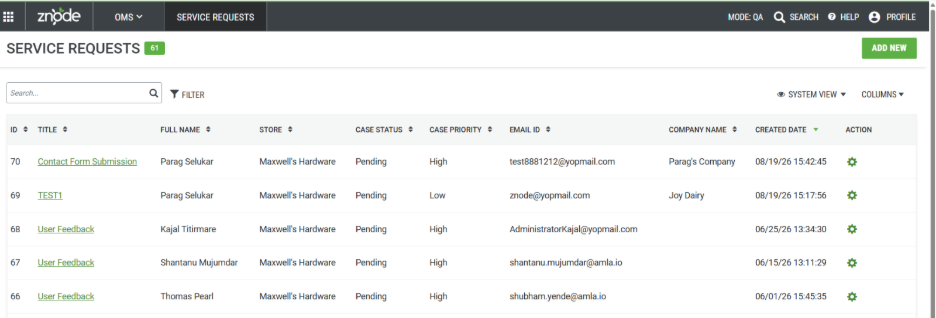
- Navigate to Admin Console > OMS > Service Requests.
- Review the list of existing requests.
- Open a request to view details, customer information, notes, status, priority, and communication history.
Expected Outcome
Administrators can monitor, manage, and respond to all Service Requests from a centralized location.
Notes and Limitations
- The Contact Us page exists natively within the Storefront but is not automatically included in site navigation.
- Service Requests created through both the Admin Console and Storefront are stored in the same Service Requests area within OMS.
- Communication history includes email interactions associated with the Service Request.
- Internal notes can be used to document follow-up actions, progress updates, and resolution details without exposing information to customers.