
Navigation:
Customers > Guest Users
Overview
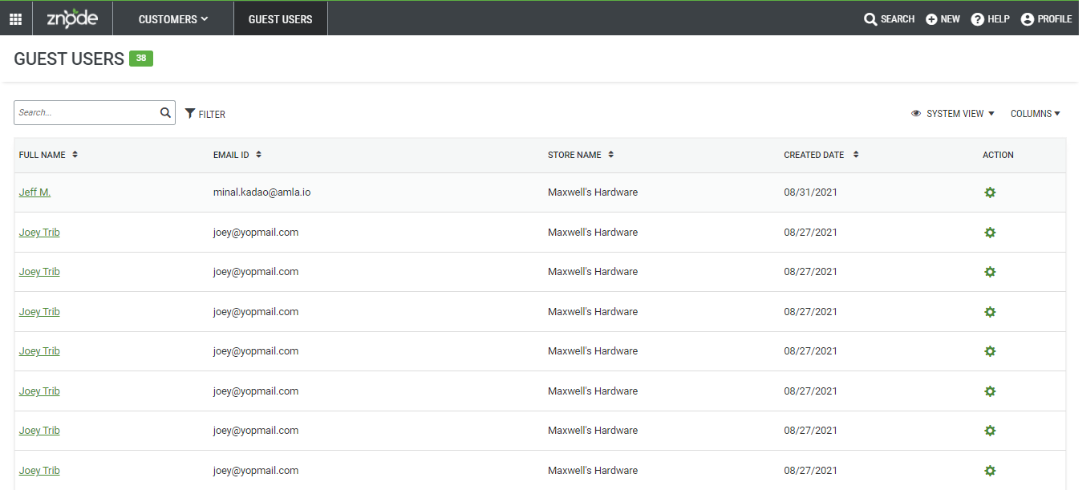
The Guest Users page displays a list of customers who have completed purchases using the guest checkout option in the Storefront. This page provides a centralized view of guest users across all stores, allowing administrators to review and manage guest customer records without requiring customers to create registered accounts.
Prerequisites
- Access to the Admin Console.
- Permissions to view and manage customer information.
Use Case
View Guest Checkout Customers
Administrators can use the Guest Users page to:
- View customers who have placed orders using guest checkout.
- Access guest user information across all stores.
- Manage guest user records from a centralized location.
Access Guest Users
- Sign in to the Admin Console.
- Navigate to Customers.
- Select Guest Users.
Result
The Guest Users page opens and displays a list of customers who have used the guest checkout option in the Storefront.
Expected Outcome
After accessing the Guest Users page, administrators can:
- View guest customer records.
- Review guest checkout activity across all stores.
- Manage guest user records from a single location.
Guest User Record Creation Behavior
Each time a customer places an order using guest checkout, Znode creates a new guest user record. Guest user records are not automatically matched, reused, or merged based on customer information.
As a result, multiple guest user records may appear in the Guest Users list even when a customer enters identical information, such as:
- First and last name
- Email address
- Phone number
- Billing address
- Shipping address
This behavior ensures that each guest checkout transaction is maintained as a separate guest user record.
Notes
- Guest users are customers who complete purchases without creating a Storefront account.
- The Guest Users page displays guest customer records from all stores that the administrator can access.
- Multiple guest user records can exist for the same customer when orders are placed using guest checkout, even if all customer details entered during checkout are identical.
- Available management options may vary based on user permissions and platform configuration.
- The guest user record is created immediately when the guest address is saved during the checkout process, before the order is placed.