
TABLE OF CONTENTS
Default Email Templates and their Purpose
- Customer Account Management & User Registration
- Account Verification
- Order Management
- Order Approval Workflow
- Quotes Management
- Return & Refund Process
- Customer Communication & Feedback
- Voucher Management
- Inventory Management
- Vendor Management
- Product Marketing & Sharing
- Forms Management
- Billing & Financial Notifications
Navigate to: CMS > Email Templates
Znode has several default email templates that come already configured and ready to use as-is or customize. (e.g. Account Information, Order Receipt, Account Activation)
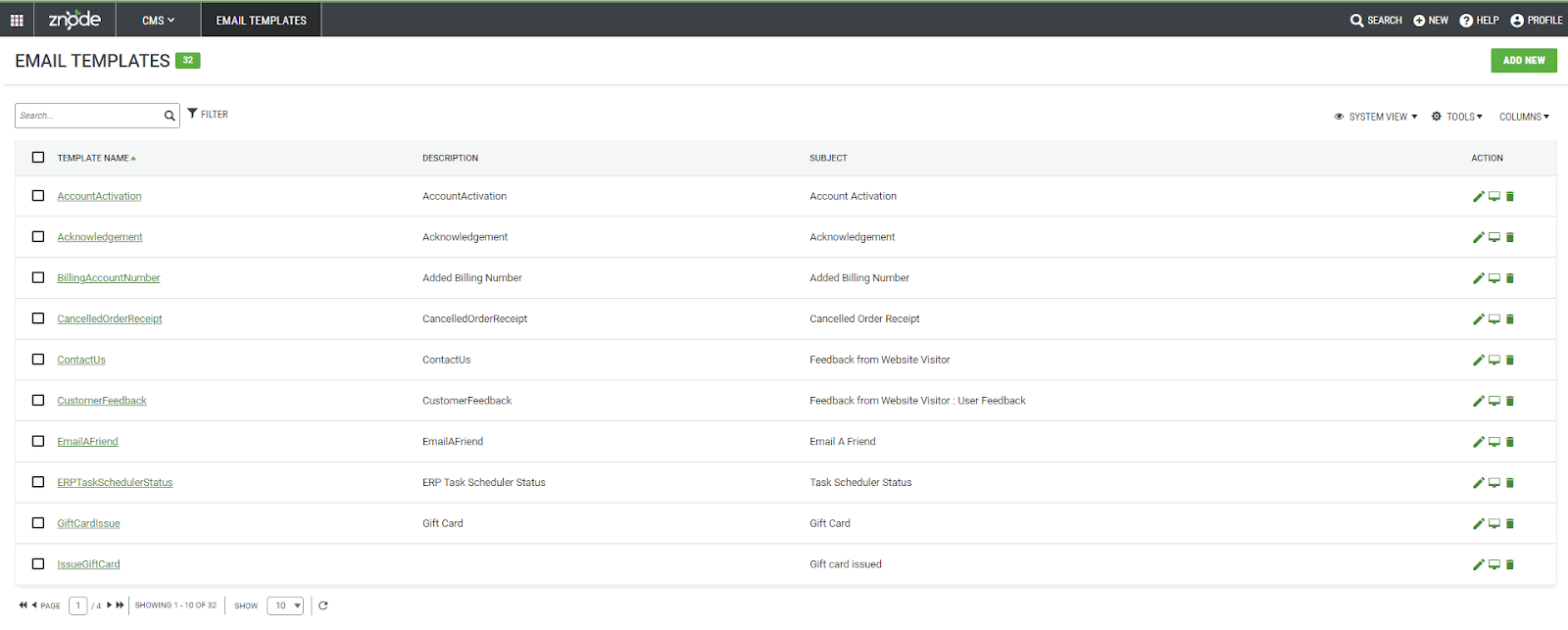
Default Email Templates and their Purpose
Customer Account Management & User Registration
Reset Password Link
Email to customer that contain a link to reset their password.
Supported Macros | Macro Description |
#StoreLogo# | This replaces the macro text with the Store Logo |
#StoreName# | This replaces the macro text with the Store Name |
#FirstName# | This replaces the macro text with the First Name of the customer |
#Link# | This replaces the macro text with the Link |
#Url# | This replaces the macro text with the URL |
New Customer Account from Admin
Email to customer notifying them that a new account was created by the administrator.
| Supported Macros | Macro Description |
|---|---|
| #StoreLogo# | This replaces the macro text with the Store Logo |
| #Link# | This replaces the macro text with the Link |
| #FirstName# | This replaces the macro text with the First Name of the customer |
| #StoreName# | This replaces the macro text with the Store Name |
| #Url# | This replaces the macro text with the URL |
| #LastName# | This replaces the macro text with the Last Name |
| #UserName# | This replaces the macro text with the First Name |
| #PhoneNumber# | This replaces the macro text with the Phone Number |
| #CustomerServicePhoneNumber# | This replaces the macro text with the Customer Service Phone Number |
| #CustomerServiceEmail# | This replaces the macro text with the Customer Service Email |
| #EmailAddress# | This replaces the macro text with the Email Address |
New Customer Account from Webstore
Email to customer notifying them that a new account was created on the webstore.
| Supported Macros | Macro Description |
|---|---|
| #StoreName# | This replaces the macro text with the Store Name |
| #StoreLogo# | This replaces the macro text with the Store Logo |
| #FirstName# | This replaces the macro text with the First Name |
| #Url# | This replaces the macro text with the Url |
Customer Account Activation
Email sent to customers notifying them that their account has been activated.
| Supported Macros | Macro Description |
|---|---|
| #StoreLogo# | This replaces the macro text with the Store Logo |
| #Url# | This replaces the macro text with the Url |
| #CustomerName# | This replaces the macro text with the Customer Name |
Convert User To Administrator
Email to users notifying them that they have been given administrator rights.
| Supported Macros | Macro Description |
|---|---|
| #DisplayName# | This replaces the macro text with the Display Name of the address |
| #ContactNo# | This replaces the macro text with the contact number |
| #LoginURL# | This replaces the macro text with the login URL |
Registration Attempt Using Existing Username
Email to the customer for notifying an attempt has been made to register using their username.
| Supported Macros | Macro Description |
|---|---|
| #StoreLogo# | This replaces the macro text with the Store Logo |
| #StoreName# | This replaces the macro text with the Store Name |
| #Firstname# | This replaces the macro text with the First Name |
| #LastName# | This replaces the macro text with the Last Name |
| #Link# | This replaces the macro text with the Link |
B Store Registration Request for Verification
Email to the customer for notifying an attempt has been made to register using their username.
| Supported Macros | Macro Description |
|---|---|
| #Username# | This replaces the macro text with the User Name |
| #CompanyName# | This replaces the macro text with the Company Name |
| #EmailAddress# | This replaces the macro text with the Email Address |
| #Firstname# | This replaces the macro text with the First Name |
| #LastName# | This replaces the macro text with the Last Name |
| #AddressLine1# | This replaces the macro text with the Address Line 1 |
| #Country# | This replaces the macro text with the Country Name |
| #State# | This replaces the macro text with the State Name |
| #City# | This replaces the macro text with the City |
| #PostalCode# | This replaces the macro text with the Postal Code |
| #PhoneNumber# | This replaces the macro text with the Phone Number |
Account Verification
Account Verification Request
Email to administrators notifying them of a new customer's account verification request. Supported Macros Macro Description #StoreLogo# This replaces the macro text with the Store Logo #StoreName# This replaces the macro text with the Store Name #UserName# This replaces the macro text with the User Name
| Supported Macros | Macro Description |
|---|---|
| #StoreLogo# | This replaces the macro text with the Store Logo |
| #StoreName# | This replaces the macro text with the Store Name |
| #UserName# | This replaces the macro text with the User Name |
Account Verification Request in Progress
Email to customer notifying them that their account verification is in progress.
| Supported Macros | Macro Description |
|---|---|
| #StoreLogo# | This replaces the macro text with the Store Logo |
| #StoreName# | This replaces the macro text with the Store Name |
| #UserName# | This replaces the macro text with the User Name |
Account Verification Successful
Email to customer notifying them that their account verification was successful.
| Supported Macros | Macro Description |
|---|---|
| #StoreLogo# | This replaces the macro text with the Store Logo |
| #StoreName# | This replaces the macro text with the Store Name |
| #UserName# | This replaces the macro text with the User Name |
Order Management
Order Receipt
| Supported Macros | Macro Description |
|---|---|
| #ReceiptText# | This replaces the macro text with the Receipt Text |
| #StoreLogo# | This replaces the macro text with the Store Logo |
| #StoreName# | This replaces the macro text with the Store Name |
| #OrderId# | This replaces the macro text with the ID of an order |
| #OrderDate# | This replaces the macro text with the Order Date |
| #BillingAddress# | This replaces the macro text with the Billing Address of the customer |
| #ShippingAddress# | This replaces the macro text with the Shipping Address |
| #SKU# | This replaces the macro text with the SKU of a product |
| #Name# | This replaces the macro text with the Product Name |
| #Quantity# | This replaces the macro text with the quantity of the product |
| #Price# | This replaces the macro text with the product price |
| #TotalCost# | This replaces the macro text with the Total Cost |
| #PromotionCode# | This replaces the macro text with the Promotion Code |
| #PaymentName# | This replaces the macro text with the Payment Name |
| #PONumber# | This replaces the macro text with the PO Number |
| #CustomerServiceEmail# | This replaces the macro text with the Customer Service Email |
| #CustomerServicePhoneNumber# | This replaces the macro text with the Customer Service Phone Number |
| #SiteName# | This replaces the macro text with the Storefront Name |
| #StoreURL# | This replaces the macro text with the Storefront URL |
| #VoucherNumber# | This replaces the macro text with the Voucher Number |
| #JobName# | This replaces the macro text with the Job Name |
| #ShippingName# | This replaces the macro text with the Shipping Name |
| #AdditionalInstructions# | This replaces the macro text with the Additional Instructions |
| #AdditionalInstructLabel# | This replaces the macro text with the Additional Instruct Label |
| #PurchaseNumberLabel# | This replaces the macro text with the Purchase Number Label |
| #CardTransactionLabel# | This replaces the macro text with the Card Transaction Label |
| #CardTransactionID# | This replaces the macro text with the Card Transaction ID |
| #Amount# | This replaces the macro text with the Amount of order |
| #ExtendedPrice# | This replaces the macro text with the Extended Price |
| #ShortDescription# | This replaces the macro text with the Short Description of a product |
| #Feedback# | This replaces the macro text with the Feedback |
| #LabelInHandDate# | This replaces the macro text with the Label In Hand Date |
| #InHandDate# | This replaces the macro text with the In Hands Date |
| #LabelShippingConstraintscode# | This replaces the macro text with the Label Shipping Constraint code |
| #ShippingConstraintCode# | This replaces the macro text with the Shipping Constraint Code |
| #Rates# | This replaces the macro text with the Rates |
| #TaxName# | This replaces the macro text with the Tax Name |
| #Title# | This replaces the macro text with the Title |
| #ApproverComments# | This replaces the macro text with the approver comments associated with an order |
| #Description# | This replaces the macro text with the Description |
| #FirstName# | This replaces the macro text with the First Name |
Cancelled Order Receipt
Email to customer notifying them of the cancellation of an order.
| Supported Macros | Macro Description |
|---|---|
| #OrderId# | This replaces the macro text with the ID of an order |
| #OrderDate# | This replaces the macro text with the Order Date |
| #StoreLogo# | This replaces the macro text with the Store Logo |
| #BillingFirstName# | This replaces the macro text with the Billing First Name |
| #BillingLastName# | This replaces the macro text with the Billing Last Name |
| #BillingAddress# | This replaces the macro text with the Billing Address |
| #ShippingAddress# | This replaces the macro text with the Shipping Address |
| #SKU# | This replaces the macro text with the SKU of a product |
| #Name# | This replaces the macro text with the Product Name |
| #Quantity# | This replaces the macro text with the quantity of the product |
| #PromotionCode# | This replaces the macro text with the Promotion Code |
| #PaymentName# | This replaces the macro text with the Payment Name |
| #CardTransactionID# | This replaces the macro text with the Card Transaction ID |
| #PONumber# | This replaces the macro text with the PO Number |
| #StoreName# | This replaces the macro text with the Store Name |
| #SiteName# | This replaces the macro text with the Webstore Name |
| #CustomerServiceEmail# | This replaces the macro text with the Customer Service Email |
| #CustomerServicePhoneNumber# | This replaces the macro text with the Customer Service Phone Number |
| #CardTransactionLabel# | This replaces the macro text with the Card Transaction Label |
| #PurchaseNumberLabel# | This replaces the macro text with the Purchase Number Label |
Resend Order Receipt
Email to customer with order receipt including returned item details
| Supported Macros | Macro Description |
|---|---|
| #ReceiptText# | This replaces the macro text with the Receipt Text |
| #StoreLogo# | This replaces the macro text with the Store Logo |
| #OrderId# | This replaces the macro text with the ID of an order |
| #OrderDate# | This replaces the macro text with the Order Date |
| #SKU# | This replaces the macro text with the SKU of a product |
| #Name# | This replaces the macro text with the Product Name |
| #Quantity# | This replaces the macro text with the quantity of the product |
| #Price# | This replaces the macro text with the Price of the product |
| #ExtendedPrice# | This replaces the macro text with the Extended Price |
| #TotalCost# | This replaces the macro text with the Total Cost |
| #Title# | This replaces the macro text with the Title |
| #AdditionalInstructLabel# | This replaces the macro text with the Additional Instructions Label |
| #AdditionalInstructions# | This replaces the macro text with the Additional Instructions |
| #FeedBack# | This replaces the macro text with the Feedback |
| #AccountName# | This replaces the macro text with the Account Name |
| #StoreName# | This replaces the macro text with the Store Name |
| #StoreURL# | This replaces the macro text with the Store URL |
| #CustomerServiceEmail# | This replaces the macro text with the Customer Service Email |
| #CustomerServicePhoneNumber# | This replaces the macro text with the Customer Service Phone Number |
| #ShortDescription# | This replaces the macro text with the Short Description of a product |
| #Amount# | This replaces the macro text with the Amount of order |
| #SiteName# | This replaces the macro text with the Webstore Name |
| #PromotionCode# | This replaces the macro text with the Promotion Code |
| #PaymentName# | This replaces the macro text with the Payment Name |
| #CardTransactionID# | This replaces the macro text with the Card Transaction ID |
| #PONumber# | This replaces the macro text with the PO Number |
| #CardTransactionLabel# | This replaces the macro text with the Card Transaction Label |
| #PurchaseNumberLabel# | This replaces the macro text with the Purchase Number Label |
| #CustomerServiceEmail# | This replaces the macro text with the Customer Service Email |
| #Image# | This replaces the macro text with the Product Image |
Shipping Receipt
Email to customer notifying them that a package has been shipped.
| Supported Macros | Macro Description |
|---|---|
| #OrderId# | This replaces the macro text with the ID of an order |
| #OrderDate# | This replaces the macro text with the Order Date |
| #StoreLogo# | This replaces the macro text with the Store Logo |
| #BillingFirstName# | This replaces the macro text with the Billing First Name |
| #BillingLastName# | This replaces the macro text with the Billing Last Name |
| #BillingAddress# | This replaces the macro text with the Billing Address |
| #ShippingAddress# | This replaces the macro text with the Shipping Address |
| #ShippingName# | This replaces the macro text with the Shipping Name |
| #TrackingNumber# | This replaces the macro text with the Tracking Number |
| #TrackingMessage# | This replaces the macro text with the Tracking Message |
| #Custom1# | This replaces the macro text with the Custom 1 value saved in the database |
| #Message# | This replaces the macro text with the Message |
| #SKU# | This replaces the macro text with the SKU of a product |
| #Name# | This replaces the macro text with the Product Name |
| #Quantity# | This replaces the macro text with the quantity of the product |
| #Price# | This replaces the macro text with the Price of the product |
| #PromotionCode# | This replaces the macro text with the Promotion Code |
| #PaymentName# | This replaces the macro text with the Payment Name |
| #CardTransactionID# | This replaces the macro text with the Card Transaction ID |
| #PONumber# | This replaces the macro text with the PO Number |
| #SiteName# | This replaces the macro text with the Webstore Name |
| #StoreURL# | This replaces the macro text with the Store URL |
| #CustomerServiceEmail# | This replaces the macro text with the Customer Service Email |
| #CustomerServicePhoneNumber# | This replaces the macro text with the Customer Service Phone Number |
| #StoreName# | This replaces the macro text with the Store Name |
| #PurchaseNumberLabel# | This replaces the macro text with the Purchase Number Label |
| #CardTransactionLabel# | This replaces the macro text with the Card Transaction Label |
| #Image# | This replaces the macro text with the Product Image |
Order Placed Notification
Email to the administrator notifying them that an order has been placed.
| Supported Macros | Macro Description |
|---|---|
| #ReceiptText# | This replaces the macro text with the Receipt Text |
| #SiteName# | This replaces the macro text with the Site Name |
| #OrderId# | This replaces the macro text with the ID of an order |
| #OrderDate# | This replaces the macro text with the Order Date |
| #StoreLogo# | This replaces the macro text with the Store Logo |
| #StoreName# | This replaces the macro text with the Store Name |
| #BillingAddress# | This replaces the macro text with the Billing Address |
| #ShippingAddress# | This replaces the macro text with the Shipping Address |
| #ShipmentNo# | This replaces the macro text with the Shipment Number |
| #ShipTo# | This replaces the macro text with the Ship To address |
| #SKU# | This replaces the macro text with the SKU of a product |
| #Name# | This replaces the macro text with the Product Name |
| #Quantity# | This replaces the macro text with the quantity of the product |
| #Price# | This replaces the macro text with the Price of the product |
| #Extended Price# | This replaces the macro text with the Extended Price of the product |
| #PromotionCode# | This replaces the macro text with the Promotion Code |
| #PaymentName# | This replaces the macro text with the Payment Name |
| #CardTransactionID# | This replaces the macro text with the Card Transaction ID |
| #PONumber# | This replaces the macro text with the PO Number |
| #Title# | This replaces the macro text with the Title |
| #Amount# | This replaces the macro text with the Amount |
| #TotalCost# | This replaces the macro text with the Total Cost |
| #ShortDescription# | This replaces the macro text with the Short Description of a product |
| #AdditionalInstructionLabel# | This replaces the macro text with the Additional Instruct Label |
| #AdditionalInstructions# | This replaces the macro text with the Additional Instructions |
| #Feedback# | This replaces the macro text with the Feedback |
| #Image# | This replaces the macro text with the Product Image |
| #CardTransactionLabel# | This replaces the macro text with the Card Transaction Label |
| #PurchaseNumberLabel# | This replaces the macro text with the Purchase Number Label |
| #Customer Service Email# | This replaces the macro text with the Customer Service Email |
| #Customer Service Phone Number# | This replaces the macro text with the Customer Service Phone Number |
| #ApproverComments# | This replaces the macro text with the approver comments associated with an order |
| #Column1# | This replaces the macro text with the Column1 |
| #UOMDescription# | This replaces the macro text with the UOMDescription |
Order Approval Workflow
Pending Order Approval
Email to administrator or manager notifying them of a pending order that needs approval.| Supported Macro | Macro Description |
|---|---|
| #StoreLogo# | This replaces the macro text with the Store Logo |
#StoreName# | This replaces the macro text with the store name where the order was placed. |
#OrderId# | This replaces the macro text with the unique order number/ID. |
| #FirstName# | This replaces the macro text with the customer's first name. |
| #LastName# | This replaces the macro text with the customer's last name. |
| #Email# | This replaces the macro text with the email label value (if configured). |
| #EmailAddress# | This replaces the macro text with the customer's email address. |
| #OrderDate# | This replaces the macro text with the order submission date. |
| #JobNameLabel:# | This replaces the macro text with the job name label. |
| #JobName# | This replaces the macro text with the associated job/project name. |
| #CheckoutAddInfoLabel:# | This replaces the macro text with the additional checkout information label. |
| #ShippingAddress# | This replaces the macro text with the shipping address. |
| #LabelInHandDate# | This replaces the macro text with the "In Hand Date" label. |
| #InHandDate# | This replaces the macro text with the requested delivery/in-hand date. |
| #DynamicContent# | This replaces the macro text with dynamically generated content configured for the order. |
| #CustomerName# | This replaces the macro text with the customer name. |
| #SKU# | This replaces the macro text with the SKU of the ordered product. |
| #ProductName# | This replaces the macro text with the product name. |
| #Description# | This replaces the macro text with the product description. |
| #Quantity# | This replaces the macro text with the ordered quantity. |
| #ApproveLink# | This replaces the macro text with the approval action URL used for Approve, Edit, or Reject actions. |
| #Image# | This replaces the macro text with the Product Image |
| #ApproverCommentsLabel# | This replaces the macro text with the Approver Comments Label |
| #ApproverComments# | This replaces the macro text with the Approver Comments |
Pending Order Approved
Email to customer notifying them of the approval of their pending order.
| Supported Macros | Macro Description |
|---|---|
| #CustomerName# | This replaces the macro text with the Customer Name |
| #StoreName# | This replaces the macro text with the Store Name |
| #LastName# | This replaces the macro text with the Last Name |
| #StoreLogo# | This replaces the macro text with the Store Logo |
| #OrderId# | This replaces the macro text with the Order Id |
| #QuoteId# | This replaces the macro text with the Quote ID |
| #ApproverComments# | This replaces the macro text with the approver comments associated with an order |
#ApproverCommentsLabel# | This replaces the macro text with the approver comments Label |
Pending Order Rejected
Email to customer notifying them of the rejection of their pending order.
| Supported Macros | Macro Description |
|---|---|
| #FirstName# | This replaces the macro text with the First Name |
| #LastName# | This replaces the macro text with the Last Name |
| #QuoteId# | This replaces the macro text with the Quote ID |
| #StoreName# | This replaces the macro text with the Store Name |
| #StoreLogo# | This replaces the macro text with the Store Logo |
| #ApproverComments# | This replaces the macro text with the approvercommentsassociatedwithanorder |
#ApproverCommentsLabel# | This replaces the macro text with the approvercommentsLabel |
Pending Order Status Notification
Email to customer notifying them of the status of their pending order.
| Supported Macros | Macro Description |
|---|---|
| #CustomerName# | This replaces the macro text with the Customer Name |
| #QuoteId# | This replaces the macro text with the Quote ID |
| #StoreName# | This replaces the macro text with the Store Name |
| #StoreLogo# | This replaces the macro text with the Store Logo |
| #ReceiptText# | This replaces the macro text with the Receipt Text |
| #OrderId# | This replaces the macro text with the Order Id |
| #OrderDate# | This replaces the macro text with the Order Date |
| #CustomerServiceEmail# | This replaces the macro text with the Customer Service Email |
| #CustomerServicePhoneNumber# | This replaces the macro text with the Customer Service Phone Number |
| #BillingAddress# | This replaces the macro text with the Billing Address |
| #ShippingAddress# | This replaces the macro text with the Shipping Address |
| #ShipmentNo# | This replaces the macro text with the Shipment No |
| #ShipTo# | This replaces the macro text with the Ship To |
| #SKU# | This replaces the macro text with the SKU |
| #Name# | This replaces the macro text with the Name |
| #Description# | This replaces the macro text with the Description |
| #ShortDescription# | This replaces the macro text with the Short Description |
| #UOMDescription# | This replaces the macro text with the UOM Description |
| #Quantity# | This replaces the macro text with the Quantity |
| #ExtendedPrice# | This replaces the macro text with the Extended Price |
| #ProductLink# | This replaces the macro text with the Product Link |
| #CatalogName# | This replaces the macro text with the Catalog Name |
| #BillingFirstName# | This replaces the macro text with the Billing First Name |
| #BillingLastName# | This replaces the macro text with the Billing Last Name |
| #Message# | This replaces the macro text with the Message |
| #Custom1# | This replaces the macro text with the Custom1 |
| #TrackingMessage# | This replaces the macro text with the Tracking Message |
| #CustomerName# | This replaces the macro text with the Customer Name |
| #CardNumber# | This replaces the macro text with the Card Number |
| #ExpirationDate# | This replaces the macro text with the Expiration Date |
| #Amount# | This replaces the macro text with the Amount |
| #Image# | This replaces the macro text with the Image |
| #ProductName# | This replaces the macro text with the Product Name |
| #Price# | This replaces the macro text with the Price |
| #CustomerNotification# | This replaces the macro text with the Customer Notification |
| #DepartmentName# | This replaces the macro text with the Department |
| #DepartmentAddress# | This replaces the macro text with the Department Address |
| #DepartmentEmail# | This replaces the macro text with the Department Email |
| #BillingEmailId# | This replaces the macro text with the Billing Email ID |
| #FirstName# | This replaces the macro text with the First Name |
| #DisplayName# | This replaces the macro text with the Display Name |
| #Address# | This replaces the macro text with the Address |
| #Email# | This replaces the macro text with the Email |
| #LastName# | This replaces the macro text with the Last Name |
| #City# | This replaces the macro text with the City |
| #State# | This replaces the macro text with the State |
| #EmailAddress# | This replaces the macro text with the Email Address |
| #ShareFeedback# | This replaces the macro text with the Share Feedback |
| #CompanyName# | This replaces the macro text with the Company Name |
| #PhoneNumber# | This replaces the macro text with the Phone Number |
| #Comments# | This replaces the macro text with the Comments |
| #EmailMessage# | This replaces the macro text with the Email Message |
| #SchedularStatus# | This replaces the macro text with the Schedular Status |
| #ErrorMessage# | This replaces the macro text with the Error Message |
| #SiteName# | This replaces the macro text with the Site Name |
| #UserId# | This replaces the macro text with the User Id |
| #PromotionCode# | This replaces the macro text with the Promotion Code |
| #PaymentName# | This replaces the macro text with the Payment Name |
| #CardTransactionID# | This replaces the macro text with the Card Transaction ID |
| #PONumber# | This replaces the macro text with the PO Number |
| #CardTransactionLabel# | This replaces the macro text with the Card Transaction Label |
| #PurchaseNumberLabel# | This replaces the macro text with the Purchase Number Label |
| #CustomerServiceEmail# | This replaces the macro text with the Customer Service Email |
| #Title# | This replaces the macro text with the Title |
| #Amount# | This replaces the macro text with the Amount |
| #TotalCost# | This replaces the macro text with the Total Cost |
| #AdditionalInstructionLabel# | This replaces the macro text with the Additional Instruction Label |
| #AdditionalInstructions# | This replaces the macro text with the Additional Instructions |
| #FeedBack# | This replaces the macro text with the Feedback |
| #UserName# | This replaces the macro text with the UserName |
| #Link# | This replaces the macro text with the Link |
| #Url# | This replaces the macro text with the Url |
| #Password# | This replaces the macro text with the Password |
| #QuoteId# | This replaces the macro text with the Quote Id |
| #ShippingName# | This replaces the macro text with the Shipping Name |
| #TrackingNumber# | This replaces the macro text with the Tracking Number |
| #SchedulerName# | This replaces the macro text with the Scheduler Name |
| #TouchPointName# | This replaces the macro text with the Touch Point Name |
| #ContactNo# | This replaces the macro text with the Contact No |
| #ReturnNumber# | This replaces the macro text with the Return Number |
| #ReturnStatus# | This replaces the macro text with the Return Status |
| #RemainingAmount# | This replaces the macro text with the Remaining Amount |
| #StartDate# | This replaces the macro text with the Start Date |
| #VoucherName# | This replaces the macro text with the Voucher Name |
| #VoucherAmountUse# | This replaces the macro text with the Voucher Amount Use |
| #RemainingAmount# | This replaces the macro text with the Remaining Amount |
| #ReturnBarcode# | This replaces the macro text with the Return Barcode |
| #JobName# | This replaces the macro text with the Job Name |
| #AccountNumber# | This replaces the macro text with the Account Number |
| #InHandDate# | This replaces the macro text with the In Hand Date |
| #ShippingConstraintCode# | This replaces the macro text with the Shipping Constraint Code |
| #TaxName# | This replaces the macro text with the Tax Name |
| #Rates# | This replaces the macro text with the Rates |
| #CODE# | This replaces the macro text with the Code |
| #OTPExpirationTime# | This replaces the macro text with the OTP Expiration Time |
| #StoreURL# | This replaces the macro text with the Store URL |
| #QuoteStatus# | This replaces the macro text with the Quote Status |
| #OrderNumber# | This replaces the macro text with the Order Number |
| #QuoteDate# | This replaces the macro text with the Quote Date |
| #ReturnedTitle# | This replaces the macro text with the Returned Title |
| #ReturnedPrice# | This replaces the macro text with the Returned Price |
| #ReturnedShortDescription# | This replaces the macro text with the Returned Short Description |
| #ReturnedUOMDescription# | This replaces the macro text with the Returned UOM Description |
Quotes Management
New Quote Request Notification For Admin
Email to administrators notifying that a new Quote request is received.
| Supported Macros | Macro Description |
|---|---|
| #StoreLogo# | This replaces the macro text with the Store Logo |
| #OrderId# | This replaces the macro text with the Order ID |
| #QuoteId# | This replaces the macro text with the Quote ID |
| #QuoteStatus# | This replaces the macro text with the QuoteStatus |
| #QuoteDate# | This replaces the macro text with the Quote Date |
| #ExpirationDate# | This replaces the macro text with the Gift Card Expiration Date |
| #TotalCost# | This replaces the macro text with the Total Cost |
| #QuoteName# | This replaces the macro text with the Quote Name |
| #CustomerServiceEmail# | This replaces the macro text with the Customer Service Email |
| #CustomerServicePhoneNumber# | This replaces the macro text with the Customer Service Phone Number |
| #StoreName# | This replaces the macro text with the Store Name |
| #Amount# | This replaces the macro text with the Amount |
| #ExtendedPrice# | This replaces the macro text with the Extended Price |
| #Price# | This replaces the macro text with the Price |
| #Quantity# | This replaces the macro text with the Quantity |
| #ShortDescription# | This replaces the macro text with the Short Description |
| #Description# | This replaces the macro text with the Description |
| #Name# | This replaces the macro text with the Name |
| #SKU# | This replaces the macro text with the SKU |
| #ShippingName# | This replaces the macro text with the Shipping Name |
| #ShippingConstraintCode# | This replaces the macro text with the Shipping Constraint Code |
| #InHandDate# | This replaces the macro text with the In Hand Date |
| #LabelInHandDate# | This replaces the macro text with the Label In Hand Date |
| #LabelShippingConstraintCode# | This replaces the macro text with the Label Shipping Constraint Code |
| #LabelShippingType# | This replaces the macro text with the Label Shipping Type |
| #BillingAddress# | This replaces the macro text with the Billing Address |
| #ShippingAddress# | This replaces the macro text with the Shipping Address |
| #UOMDescription# | This replaces the macro text with the UOM Description |
| #Column1# | This replaces the macro text with the Column1 |
| #Title# | This replaces the macro text with the Title |
| #TaxName# | This replaces the macro text with the Tax Name |
| #Rates# | This replaces the macro text with the Rates |
Quote Converted To Order Notification For Customer
Email to customer to notify them that their quote is converted to order
| Supported Macros | Macro Description |
|---|---|
| #OrderId# | This replaces the macro text with the Order Id |
| #StoreLogo# | This replaces the macro text with the Store Logo |
| #QuoteId# | This replaces the macro text with the Quote ID |
| #QuoteStatus# | This replaces the macro text with the QuoteStatus |
| #QuoteDate# | This replaces the macro text with the Quote Date |
| #ExpirationDate# | This replaces the macro text with the Gift Card Expiration Date |
| #TotalCost# | This replaces the macro text with the Total Cost |
| #QuoteName# | This replaces the macro text with the Quote Name |
| #CustomerServiceEmail# | This replaces the macro text with the Customer Service Email |
| #CustomerServicePhoneNumber# | This replaces the macro text with the Customer Service Phone Number |
| #StoreName# | This replaces the macro text with the Store Name |
| TotalCost# | This replaces the macro text with the Total Cost |
| #Amount# | This replaces the macro text with the Amount |
| #ExtendedPrice# | This replaces the macro text with the Extended Price |
| #Price# | This replaces the macro text with the Price |
| #Quantity# | This replaces the macro text with the Quantity |
| #ShortDescription# | This replaces the macro text with the Short Description |
| #Description# | This replaces the macro text with the Description |
| #Name# | This replaces the macro text with the Name |
| #SKU# | This replaces the macro text with the SKU |
| #ShippingName# | This replaces the macro text with the Shipping Name |
| #ShippingConstraintCode# | This replaces the macro text with the Shipping Constraint Code |
| #InHandDate# | This replaces the macro text with the In Hand Date |
| #BillingAddress# | This replaces the macro text with the Billing Address |
| #ShippingAddress# | This replaces the macro text with the Shipping Address |
| #Image# | This replaces the macro text with the Product Image |
| #JobName# | This replaces the macro text with the Job Name |
| #ExtendedPrice# | This replaces the macro text with the Extended Price |
| #ShortDescription# | This replaces the macro text with the Short Description |
| #LabelInHandDate# | This replaces the macro text with the Label In Hand Date |
| #LabelShippingConstraintCode# | This replaces the macro text with the Label Shipping Contraint Code |
| #LabelShippingType# | This replaces the macro text with the Label Shipping Type |
| #UOMDescription# | This replaces the macro text with the UOM Description |
| #UserName# | This replaces the macro text with the UserName |
| #Column1# | This replaces the macro text with the Column1 |
Quote Request Acknowledgement Notification For Customer
Email to customer to notify them that their quote request is received
| Supported Macros | Macro Description |
|---|---|
| #OrderId# | This replaces the macro text with the Order Id |
| #StoreLogo# | This replaces the macro text with the Store Logo |
| #UserName# | This replaces the macro text with the User Name |
| #QuoteId# | This replaces the macro text with the Quote ID |
| #QuoteStatus# | This replaces the macro text with the QuoteStatus |
| #QuoteDate# | This replaces the macro text with the Quote Date |
| #ExpirationDate# | This replaces the macro text with the Gift Card Expiration Date |
| #TotalCost# | This replaces the macro text with the Total Cost |
| #QuoteName# | This replaces the macro text with the Quote Name |
| #CustomerServiceEmail# | This replaces the macro text with the Customer Service Email |
| #CustomerServicePhoneNumber# | This replaces the macro text with the Customer Service Phone Number |
| #StoreName# | This replaces the macro text with the Store Name |
| #TotalCost# | This replaces the macro text with the Total Cost |
| #Amount# | This replaces the macro text with the Amount |
| #ExtendedPrice# | This replaces the macro text with the Extended Price |
| #Price# | This replaces the macro text with the Price |
| #Quantity# | This replaces the macro text with the Quantity |
| #ShortDescription# | This replaces the macro text with the Short Description |
| #Description# | This replaces the macro text with the Description |
| #Name# | This replaces the macro text with the Name |
| #SKU# | This replaces the macro text with the SKU |
| #ShippingName# | This replaces the macro text with the Shipping Name |
| #ShippingConstraintCode# | This replaces the macro text with the Shipping Constraint Code |
| #InHandDate# | This replaces the macro text with the In Hand Date |
| #BillingAddress# | This replaces the macro text with the Billing Address |
| #ShippingAddress# | This replaces the macro text with the Shipping Address |
| #Image# | This replaces the macro text with the Product Image |
| #JobName# | This replaces the macro text with the Job Name |
| #LabelInHandDate# | This replaces the macro text with the Label In Hand Date |
| #LabelShippingConstraintCode# | This replaces the macro text with the Label Shipping Contraint Code |
| #LabelShippingType# | This replaces the macro text with the Label Shipping Type |
| #UOMDescription# | This replaces the macro text with the UOM Description |
| #Column1# | This replaces the macro text with the Column1 |
| #Title# | This replaces the macro text with the Title |
Return & Refund Process
New Return Order Notification for Admin
Email to administrators notifying that a new Return request is received.
| Supported Macros | Macro Description |
|---|---|
#QuoteId# | This replaces the macro text with the Return Order ID associated with the return request. |
| #StoreName# | This replaces the macro text with the store name. |
| #CustomerName# | This replaces the macro text with the customer's full name. |
| #OrderNumber# | This replaces the macro text with the original order number. |
| #QuoteStatus# | This replaces the macro text with the current status of the return request. |
| #QuoteDate# | This replaces the macro text with the date the return request was created. |
| #ReturnTotalExpectedQty# | This replaces the macro text with the total quantity expected to be returned. |
| #TotalCost# | This replaces the macro text with the total return amount. |
| #CustomerServiceEmail# | This replaces the macro text with the customer service email address. |
| #CustomerServicePhoneNumber# | This replaces the macro text with the customer service phone number. |
| #ShippingAddress# | This replaces the macro text with the customer's shipping address. |
| #BillingAddress# | This replaces the macro text with the billing address. |
| #SKU# | This replaces the macro text with the product SKU. |
| #Name# | This replaces the macro text with the product name. |
| #Description# | This replaces the macro text with the product description. |
| #ShortDescription# | This replaces the macro text with the product short description. |
| #UOMDescription# | This replaces the macro text with the unit of measure description. |
| #Quantity# | This replaces the macro text with the quantity being returned. |
| #Price# | This replaces the macro text with the unit price of the item. |
| #ExtendedPrice# | This replaces the macro text with the extended price (Quantity × Price). |
| #Title# | This replaces the macro text with the total summary label, such as Subtotal, Tax, or Shipping. |
| #Amount# | This replaces the macro text with the amount corresponding to the total summary label. |
| #FeedBack# | This replaces the macro text with the feedback or comments associated with the return request. |
Return Order Status Notification For Customer
Email to customer notifying them that the return request status has been updated
| Supported Macros | Macro Description |
|---|---|
| #StoreName# | This replaces the macro text with the Store Name |
| #OrderId# | This replaces the macro text with the Order Id |
| #CustomerName# | This replaces the macro text with the Customer Name |
| #QuoteStatus# | This replaces the macro text with the current status of the return request. |
Return Request Notification For Customer
Email to customer notifying them that the return request has been received and is in review
| Supported Macros | Macro Description |
|---|---|
| #QuoteId# | This replaces the macro text with the Return Order ID associated with the return request. |
| #OrderId# | This replaces the macro text with the original Order ID. |
| #StoreName# | This replaces the macro text with the store name. |
| #Username# | This replaces the macro text with the customer's username. |
#CustomerName# | This replaces the macro text with the customer's full name. |
| #OrderNumber# | This replaces the macro text with the original order number. |
| #QuoteStatus# | This replaces the macro text with the current status of the return request. |
| #QuoteDate# | This replaces the macro text with the date the return request was created. |
| #ReturnTotalExpectedQty# | This replaces the macro text with the total quantity expected to be returned. |
| #TotalCost# | This replaces the macro text with the total return amount. |
| #QuoteName# | This replaces the macro text with the customer service representative's name. |
| #CustomerServiceEmail# | This replaces the macro text with the customer service email address. |
| #CustomerServicePhoneNumber# | This replaces the macro text with the customer service phone number. |
| #ShippingAddress# | This replaces the macro text with the customer's shipping address. |
| #BillingAddress# | This replaces the macro text with the billing address. |
| #SKU# | This replaces the macro text with the product SKU. |
| #Name# | This replaces the macro text with the product name. |
| #Description# | This replaces the macro text with the product description. |
| #ShortDescription# | This replaces the macro text with the product short description. |
| #UOMDescription# | This replaces the macro text with the unit of measure description. |
| #Quantity# | This replaces the macro text with the quantity being returned. |
| #Price# | This replaces the macro text with the unit price of the item. |
| #ExtendedPrice# | This replaces the macro text with the extended price (Quantity × Price). |
| #Title# | This replaces the macro text with the total summary label, such as Subtotal, Tax, or Shipping. |
| #Amount# | This replaces the macro text with the amount corresponding to the total summary label. |
| #FeedBack# | This replaces the macro text with the feedback or comments associated with the return request. |
| #Image# | This replaces the macro text with the Product Image |
Refund Processed Notification For Customer
Email to customer to notify them that the refund has been processed for their Return request
| Supported Macros | Macro Description |
|---|---|
| #StoreName# | This replaces the macro text with the Store Name |
| #ReturnNumber# | This replaces the macro text with the Return Number |
| #UserFullName# | This replaces the macro text with the User Full Name |
Customer Communication & Feedback
Contact Us
| Supported Macros | Macro Description |
|---|---|
| #StoreLogo# | This replaces the macro text with the Store Logo |
| #FirstName# | This replaces the macro text with the First Name of the customer |
| #LastName# | This replaces the macro text with the Last Name |
| #CompanyName# | This replaces the macro text with the Company Name |
| #PhoneNumber# | This replaces the macro text with the Phone Number |
| #Comments# | This replaces the macro text with the Comments |
| #StoreName# | This replaces the macro text with the Store Name |
Customer Feedback Notification
| Supported Macros | Macro Description |
|---|---|
| #StoreLogo# | This replaces the macro text with the Store Logo |
| #FirstName# | This replaces the macro text with the First Name of the customer |
| #LastName# | This replaces the macro text with the Last Name |
| #City# | This replaces the macro text with the City |
| #State# | This replaces the macro text with the State |
| #EmailAddress# | This replaces the macro text with the Email Address |
| #ShareFeedback# | This replaces the macro text with the feedback shared by the customer |
| #Message# | This replaces the macro text with the Message |
New Contact Request
Email to the administrator to notify them of the new form submission.
| Supported Macros | Macro Description |
|---|---|
| #StoreName# | This replaces the macro text with the Store Name |
| #StoreLogo# | This replaces the macro text with the Store Logo |
| #StoreUrl# | This replaces the macro text with the Store Url |
Contact Acknowledgement
Email to customer to notify them of the successful submission of the form.
| Supported Macros | Macro Description |
|---|---|
| #StoreUrl# | This replaces the macro text with the Store Url |
| #StoreName# | This replaces the macro text with the Store Name |
| #StoreLogo# | This replaces the macro text with the Store Logo |
Service Request Message
| Supported Macros | Macro Description |
|---|---|
| #StoreLogo# | This replaces the macro text with the Store Logo |
| #EmailMessage# | This replaces the macro text with the Email Message |
Voucher Management
New Voucher Issued For Customer
| Supported Macros | Macro Description |
|---|---|
| #CustomerName# | This replaces the macro text with the Customer Name |
| #StartDate# | This replaces the macro text with the Voucher Start Date |
| #VoucherName# | This replaces the macro text with the Voucher Name |
| #ExpirationDate# | This replaces the macro text with the Gift Card Expiration Date |
| #StoreName# | This replaces the macro text with the Store Name |
| #Amount# | This replaces the macro text with the Amount of order |
| #CardNumber# | This replaces the macro text with the Gift Card Number |
Email to customer to notify them that their voucher has been used for an order.
| Supported Macros | Macro Description |
|---|---|
| #CustomerName# | This replaces the macro text with the Customer Name |
| #StoreName# | This replaces the macro text with the Store Name |
| #CardNumber# | This replaces the macro text with the Voucher Number |
| #Remaining Amount# | This replaces the macro text with the Remaining Voucher Balance |
| #VoucherName# | This replaces the macro text with the Voucher Name |
| #VoucherAmountUsed# | This replaces the macro text with the Used Voucher Amount |
Reminder To Use The Voucher Balance Before It Expires
Email to customer to notify them to use the voucher before it expires
| Supported Macros | Macro Description |
|---|---|
| #CustomerName# | This replaces the macro text with the Customer Name |
| #StoreName# | This replaces the macro text with the Store Name |
| #CardNumber# | This replaces the macro text with the Voucher Number |
| #ExpirationDate# | This replaces the macro text with the Voucher Expiration Date |
| #VoucherName# | This replaces the macro text with the Voucher Name |
Inventory Management
Low Inventory Order Notification
Email to the administrator notifying them that a placed order has resulted in low/negative inventory.
| Supported Macros | Macro Description |
|---|---|
| #StoreName# | This replaces the macro text with the Store Name |
| #OrderId# | This replaces the macro text with the Order ID |
| #OrderDate# | This replaces the macro text with the Order Date |
| #SKU# | This replaces the macro text with the SKU |
| #Quantity# | This replaces the macro text with the quantity |
| #StoreLogo# | This replaces the macro text with the Store Logo |
Send Waiting List Notice In Inventory
| Supported Macros | Macro Description |
|---|---|
| #StoreName# | This replaces the macro text with the Store Name |
| #ProductName# | This replaces the macro text with the Product Name |
| #SKU# | This replaces the macro text with the SKU |
| #EmailAddress# | This replaces the macro text with the Email Address |
| #Image# | This replaces the macro text with the Image |
| #ProductLink# | This replaces the macro text with the Product Link |
| #Url# | This replaces the macro text with the Url |
Vendor Management
Vendor Receipt
| Supported Macros | Macro Description |
|---|---|
| #ReceiptText# | This replaces the macro text with the Receipt Text |
| #OrderId# | This replaces the macro text with the Order ID |
| #OrderDate# | This replaces the macro text with the Order Date |
| #BillingAddress# | This replaces the macro text with the Billing Address |
| #ShippingAddress# | This replaces the macro text with the Shipping Address |
| #ShipmentNo# | This replaces the macro text with the Shipment Number |
| #ShipTo# | This replaces the macro text with the Ship To address |
| #SKU# | This replaces the macro text with the SKU of a product |
| #Name# | This replaces the macro text with the Product Name |
| #ShortDescription# | This replaces the macro text with the Short Description |
| #Quantity# | This replaces the macro text with the product quantity |
| #Price# | This replaces the macro text with the Product Price |
| #ExtendedPrice# | This replaces the macro text with the Extended Price |
| #PaymentName# | This replaces the macro text with the Payment Name |
| #CustomerServiceEmail# | This replaces the macro text with the Customer Service Email |
| #CustomerServicePhoneNumber# | This replaces the macro text with the Customer Service Phone Number |
| #ShippingName# | This replaces the macro text with the Shipping Name |
| #StoreLogo# | This replaces the macro text with the Store Logo |
| #SiteName# | This replaces the macro text with the Webstore Name |
| #AdditionalInstructLabel# | This replaces the macro text with the Additional Instruct Label |
| #AdditionalInstructions# | This replaces the macro text with the Additional Instructions |
| #FeedBav | This replaces the macro text with the Feedback |
Product Marketing & Sharing
Product Compare
An email that contains comparison details of two or more products to a recipient list.
| Supported Macros | Macro Description |
|---|---|
| #CustomerServiceEmail# | This replaces the macro text with the Customer Service Email |
| #CustomerServicePhoneNumber# | This replaces the macro text with the Customer Service Phone Number |
| #Image# | This replaces the macro text with the Product Image |
| #ProductName# | This replaces the macro text with the Product Name |
| #Price# | This replaces the macro text with the Product Price |
| #Variants# | This replaces the macro text with the Product Variants |
Product Key Order Receipt
| Supported Macros | Macro Description |
|---|---|
| #SKU# | This replaces the macro text with the Product SKU |
| #Name# | This replaces the macro text with the Product Name |
| #Keys# | This replaces the macro text with the Keys |
Email a Friend
| Supported Macros | Macro Description |
|---|---|
| #StoreLogo# | This replaces the macro text with the Store Logo |
| #ProductLink# | This replaces the macro text with the Storefront URL of the product |
| #CatalogName# | This replaces the macro text with the Catalog Name |
| #StoreName# | This replaces the macro text with the Store Name |
| #StoreURL# | This replaces the macro text with the Storefront URL |
Forms Management
Form Submission Acknowledgement
Email to customer notifying them of the successful submission of a form configured from the Storefront.
| Supported Macros | Macro Description |
|---|---|
| #StoreLogo# | This replaces the macro text with the Store Logo |
| #StoreName# | This replaces the macro text with the Store Name |
| #CustomerServiceEmail# | This replaces the macro text with the Customer Service Email |
| #CustomerServicePhoneNumber# | This replaces the macro text with the Customer Service Phone Number |
Form Submission Notification
Email to administrators notifying them of submission of a form configured from the Storefront.
| Supported Macros | Macro Description |
|---|---|
| #StoreLogo# | This replaces the macro text with the Store Logo |
| #StoreName# | This replaces the macro text with the Store Name |
Billing & Financial Notifications
Billing Account Number Added
Email to customer notifying them that the Billing Number has been added to their account.
| Supported Macros | Macro Description |
|---|---|
| #CustomerName# | This replaces the macro text with the Customer Name |
| #StoreURL# | This replaces the macro text with the Store URL |
Integration & System Notifications
ERP Task Scheduler Status
Email to customer notifying them about the ERP Task Schedule.
| Supported Macros | Macro Description |
|---|---|
| #StoreLogo# | This replaces the macro text with the Store Logo |
| #SchedulerStatus# | This replaces the macro text with the Scheduler Status |
| #ErrorMessage# | This replaces the macro text with the Error Message |
Data Exchange Error Notification
Emails about errors that occur during the execution of data exchanges will be sent to the configured email addresses.
| Supported Macro | Macro Description |
|---|---|
| #DataExchangeName# | Displays the name of the Data Exchange process that was executed. Used in both the email subject and email body. |
| #SchedulerStatus# | Displays the execution status of the scheduler (e.g., Failed, Error, Completed). |
| #LogMessages# | Displays the error message(s) or execution log details generated during the Data Exchange process. |
| #StartTime# | Displays the Data Exchange scheduler start time in UTC. |
| #EndTime# | Displays the Data Exchange scheduler end time in UTC. |
Data Exchange Info Notification
Emails about notifications that occur during the execution of data exchanges will be sent to the configured email addresses.
| Supported Macro | Macro Description |
|---|---|
| #DataExchangeName# | Displays the name of the Data Exchange process that was executed. Used in both the email subject and email body. |
| #SchedulerStatus# | Displays the execution status of the scheduler (e.g., Failed, Error, Completed). |
| #StartTime# | Displays the Data Exchange scheduler start time in UTC. |
| #EndTime# | Displays the Data Exchange scheduler end time in UTC. |
Customer Newsletter Onboarding
This template sends a welcome message to customers/shoppers as soon as they join the newsletter list
| Supported Macro | Macro Description |
|---|---|
| #StoreLogo# | This replaces the macro text with the Store Logo |
| #Email# | This replaces the macro text with the Email |
New Newsletter Signup Notification
This template is used to notify the admin whenever a new shopper subscribes to the newsletter.
| Supported Macro | Macro Description |
|---|---|
| #StoreLogo# | This replaces the macro text with the Store Logo |
| #Email# | This replaces the macro text with the Email |
| #SignUpDate# | This replaces the macro text with the SignUp Date |
2FANewVerificationCode
It is used to resend a verification code
| Supported Macro | Macro Description |
|---|---|
| #Username# | This replaces the macro text with the Username |
| #CODE# | This replaces the macro text with the Code |
| #OTPExpirationTime# | This replaces the macro text with the OTP Expiration Time |
2FAVerificationCode
It is used to resend a verification code
| Supported Macro | Macro Description |
|---|---|
| #Username# | This replaces the macro text with the Username |
| #CODE# | This replaces the macro text with the Code |
| #OTPExpirationTime# | This replaces the macro text with the OTP Expiration Time |