
TABLE OF CONTENTS
- API Cache
- Application/Webstore Cache
- Refresh the Entire Webstore Cache
- Refresh Cloudflare Cache
- Protocol Utilization for Clear Cache
- Extending Znode's Cache Eviction framework
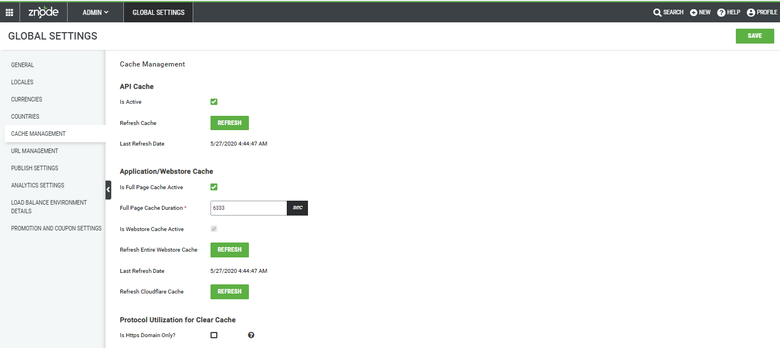
API Cache
| Field/Button | Description |
| Is Active | When this field is checked, API Cache will be enabled. |
| Refresh Cache | When this button is clicked, the API Cache will be refreshed. |
| Last Refresh Date | This date and time indicate when the API Cache was last refreshed. |
Application/Webstore Cache
| Field/Button | Description |
| Is full-page Cache Active | When this field is checked, full page cache is enabled. |
| Full Page Cache Duration | The full page cahce remians active until the duration (in seconds) is set in this field. |
| Is Webstore Cache Active | When this field is checked, the webstore cache is enabled. By default, this field is always checked, and admin users are not allowed to uncheck it from the application. |
| Last Refresh Date | This date and time indicate when the webstore cache was last refreshed. |
Refresh the Entire Webstore Cache
When this button is clicked, a list of domains appears. Administrators can select the domains that need the cache cleared.
Refresh Cloudflare Cache
When this button is clicked, a list of domains appears that have the Cloudflare settings enabled from the Manage Store module. Administrators can select the domains that need the cache cleared.
Protocol Utilization for Clear Cache
When this field is checked, the clear cache mechanism is enabled for the HTTPS protocol only.
Extending Znode's Cache Eviction framework
Read the developer documentation to learn more about extending the Cache Eviction framework.