
Introduction
When system processes become unresponsive or remain in an “In Progress” status indefinitely, administrators need a way to manage and clear them. The Admin Console now provides a “Terminate Stuck Process(es)” capability that enables administrators to terminate long-running or stuck processes. This feature supports both manual termination by administrators and automatic termination based on global system configurations.
Configurations
- Introduction of New Global Settings
- The following global settings control how the system identifies and handles stuck processes. These configurations allow administrators to enable automatic termination, define how long a process can run before being considered stuck, and specify how frequently the scheduler should check for such processes. Together, these settings ensure that long-running or unresponsive jobs are detected and terminated efficiently, helping maintain system stability and avoiding process bottlenecks.
- Enable – Terminate Stuck Process(es)
- Activates or deactivates automatic process termination.
- Type: Yes/No
- Default: No
- Purpose: When enabled, the system will automatically detect and terminate stuck processes.
- Activates or deactivates automatic process termination.
- Terminate Stuck Process(es) – In Minutes
- Defines the maximum allowed run time for any process before it is considered “Stuck”.
- Type: Number (1–9999)
- Default: 60 minutes
- Defines the maximum allowed run time for any process before it is considered “Stuck”.
- Scheduler Frequency – Terminate Process(es)
- Specifies how frequently the scheduler checks for stuck processes.
- Type: Text
- Default: Recurring
- Cron Expression – Terminate Process(es)
- Defines the execution schedule of the termination job.
- Type: Text
- Default: /60
- Defines the execution schedule of the termination job.
- Specifies how frequently the scheduler checks for stuck processes.
- Enable – Terminate Stuck Process(es)
- A dedicated system attribute group named “Terminate Process(es)” has been introduced to organize all configurations related to identifying and terminating stuck processes. This group consolidates the key settings that control how the system detects long‑running processes, how frequently it checks them, and when automatic termination should occur.
- Group Details:
- Group Name: Terminate Process(es)
- Attributes Included:
- Enable – Terminate Stuck Process(es)
- Terminate Stuck Process(es) – In Minutes
- Scheduler Frequency – Terminate Process(es)
- Cron Expression – Terminate Process(es)
- Attributes Included:
- Group Name: Terminate Process(es)
- Group Details:
- The following global settings control how the system identifies and handles stuck processes. These configurations allow administrators to enable automatic termination, define how long a process can run before being considered stuck, and specify how frequently the scheduler should check for such processes. Together, these settings ensure that long-running or unresponsive jobs are detected and terminated efficiently, helping maintain system stability and avoiding process bottlenecks.
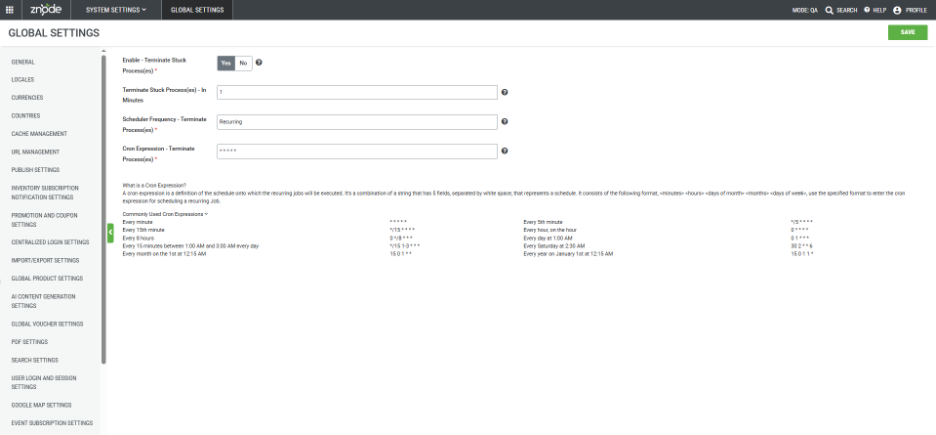
System Behavior
- Automatic Termination
- The scheduler automatically terminates any job that remains in the “In Progress” state for longer than the time specified in the “Terminate Stuck Process(es) – In Minutes” setting.
- This ensures that long-running processes do not block system operations or subsequent publishes.
Introduction of “Terminate Stuck Process(es)” in Diagnostics & Maintenance
- A new section titled “Terminate Stuck Process(es)” is added below Clear Publish Data
- The “Terminate Stuck Process(es)” feature allows administrators to terminate unresponsive processes either automatically, based on configurations defined in the Global Settings, or all the ongoing processes manually, without the need to wait for a predetermined time.
- Ensure the decision to terminate is carefully considered to avoid disruptions.
- Garbage or temporary data may remain in the system until the next successful publish/process, potentially affecting system performance or accuracy.
- The “Terminate Stuck Process(es)” feature allows administrators to terminate unresponsive processes either automatically, based on configurations defined in the Global Settings, or all the ongoing processes manually, without the need to wait for a predetermined time.
- Terminate Button
- A new “Terminate” button (styled like Clear Data) allows administrators to manually terminate ongoing processes.
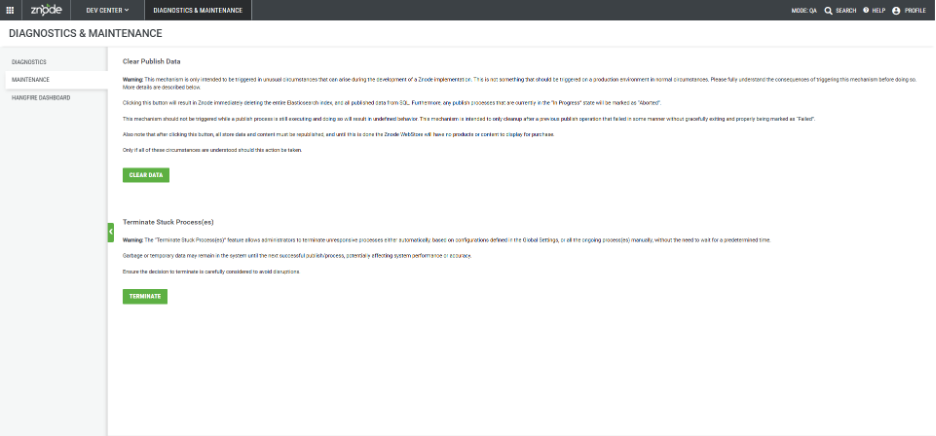
- Once the Terminate button is clicked, the administrators have to choose which process(es) are to be terminated (by default, all of the entities are checked)
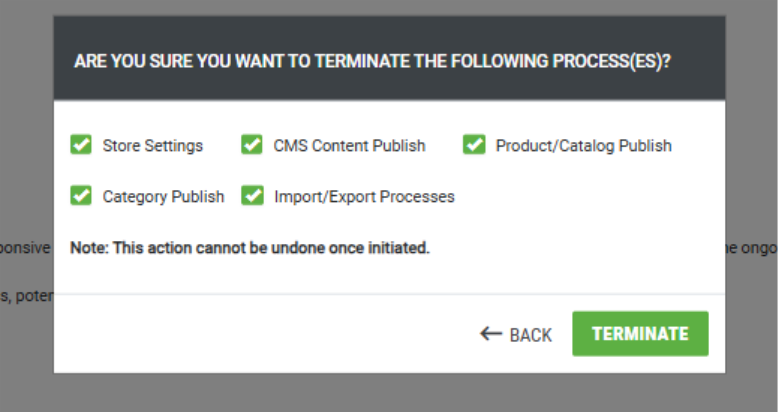
- Entities Supported:
- Store Publish
- Product Publish
- Catalog Publish
- CMS Publish (Pages, Store Experience, Content Blocks, Containers, Sliders, Blogs, News)
- Category Publish
- PIM Index Creation
- CMS Index Creation
- Import Process
- Export Process
- Once termination is completed, the system displays a message on any screen:
- “<number> process(es) have been terminated successfully.”
- ("<number>" is replaced by the actual count.)
- “<number> process(es) have been terminated successfully.”
- A new “Terminate” button (styled like Clear Data) allows administrators to manually terminate ongoing processes.
- Event Logs
- Each event generates a log entry:
- Manual Termination:
- "<process>" terminated by <username>
- Automatic Termination:
- "<process>" terminated by Job TerminateStuckProcess.
- Manual Termination:
- Each event generates a log entry:
Important Points
- Garbage data from terminated publishes is not cleared immediately; it is removed during the next successful publish.
- Terminating processes does not affect Storefront functionality.