
TABLE OF CONTENTS
- Purpose
- Storefront Caching Architecture
- Cache Layers
- Page Builder Preview vs Storefront Behavior
- Use Case: Determine the Correct Cache Layer
- Recommended Cache Placement
- When to Use Caching
- When Not to Use Caching
- Platform Cache vs Custom Cache
- Cache Placement Decision Tree
- Cache Key Standards
- Cache Invalidation
- Middleware Performance Best Practices
- Best Practices
Overview
Storefront caching improves page rendering performance by reducing repeated processing and unnecessary requests to downstream services. Znode uses multiple independent caching layers throughout the request lifecycle, each designed to solve a specific performance challenge.
Understanding where caching occurs and selecting the appropriate cache layer is critical to ensuring performance improvements without introducing stale data, scalability concerns, or cache invalidation challenges.
Caching should be considered an architectural design decision rather than a late-stage optimization.
Purpose
This article explains how caching operates within a Znode Storefront, how requests flow through cache layers, and how to determine the correct location for custom caching implementations.
Topics covered include:
- Storefront caching architecture
- Available cache layers
- Cache-placement strategy
- Platform cache versus custom cache decisions
- Cache invalidation mechanisms
- Store isolation and cache keys
- Performance and scalability considerations
Storefront Caching Architecture
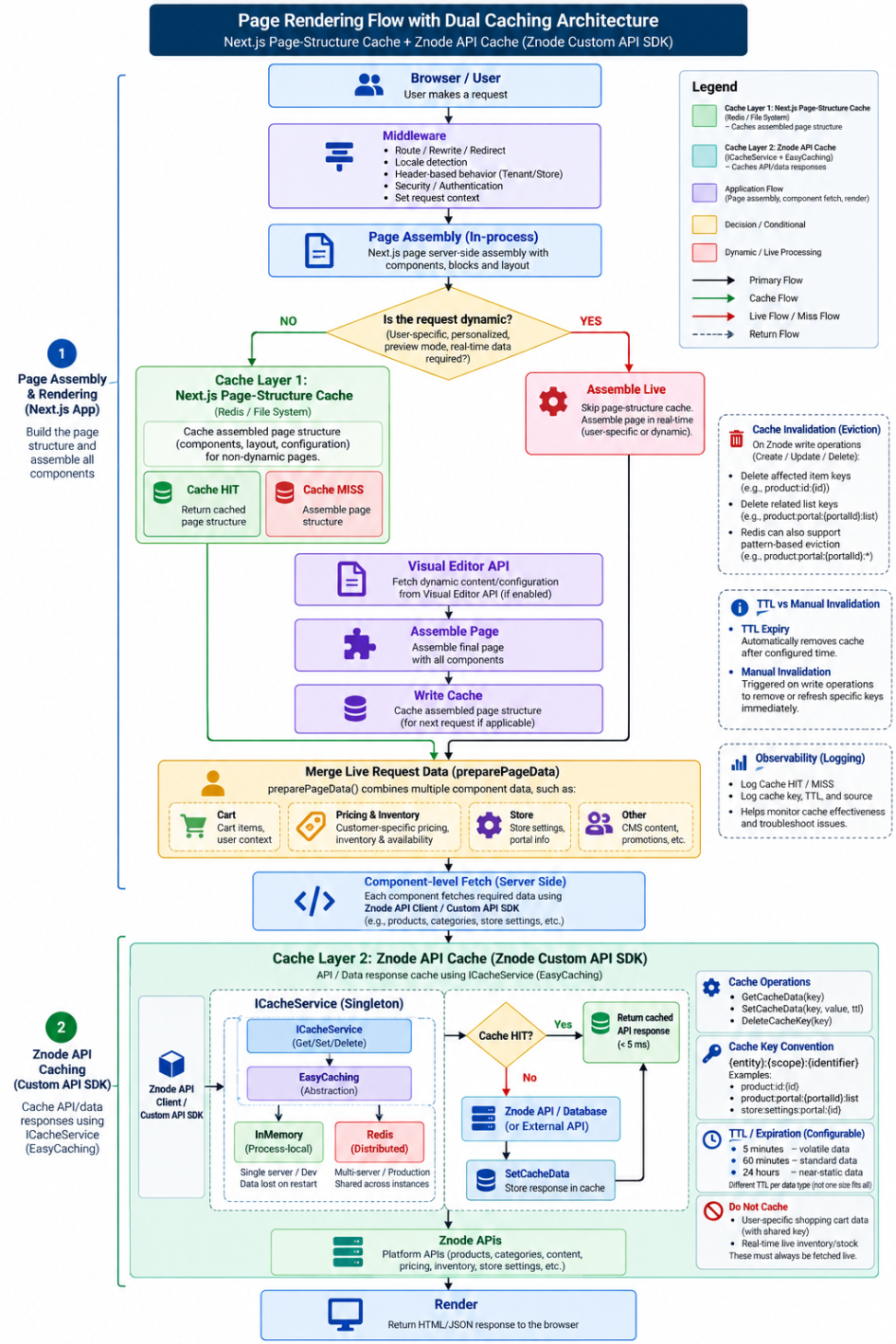
A Storefront request may pass through several independent caching layers before reaching Znode APIs. Each layer has its own responsibility, lifecycle, and invalidation process.
Primary Request Flow:
Browser
   ↓
CDN / Edge
   ↓
Middleware
   ↓
Page Assembly
   ↓
Page/Data Cache
   ↓
Znode APIs
   ↓
Render
Not every request traverses every cache layer. Static assets may be served entirely from the browser cache or CDN, while dynamic pages may assemble content through additional processing layers.
Cache Layers
| Layer | Purpose | Typical Lifetime |
|---|---|---|
| Browser Cache | Static assets such as JavaScript, CSS, fonts, and images | Per browser session |
| CDN / Edge Cache | Shared public responses | Shared infrastructure cache |
| Middleware Routing | Routing decisions only | Evaluated per request |
| In-Process Portal Cache | Portal metadata, domains, redirects, theme information | 15 minutes |
| Page-Structure Cache | Prepared Page Builder page definitions | 1 hour by default |
| Next.js Data Cache | Tagged server-side fetch responses | Tag-driven invalidation |
| Znode API Fetch Cache | Server-side API fetch calls | Tag-driven invalidation |
Page-structure caching and data caching solve different problems. Page-structure caching prevents repeated assembly of Page Builder content, while data caching prevents repetitive retrieval of reusable API data. Transactional and personalized information remains live.
Page Builder Preview vs Storefront Behavior
Page Builder Preview
- Reads current Page Builder content directly.
- Does not use page-structure caching.
- Represents the latest unpublished and published content state.
Customer Storefront
- May utilize page-structure caching.
- Reflects published content after cache invalidation or revalidation completes.
- Always evaluates sessions, carts, pricing, authorization, and user-specific information dynamically.
Differences between previewed content and Storefront content do not automatically indicate an issue. Publish and cache invalidation events should be verified first.
Use Case: Determine the Correct Cache Layer
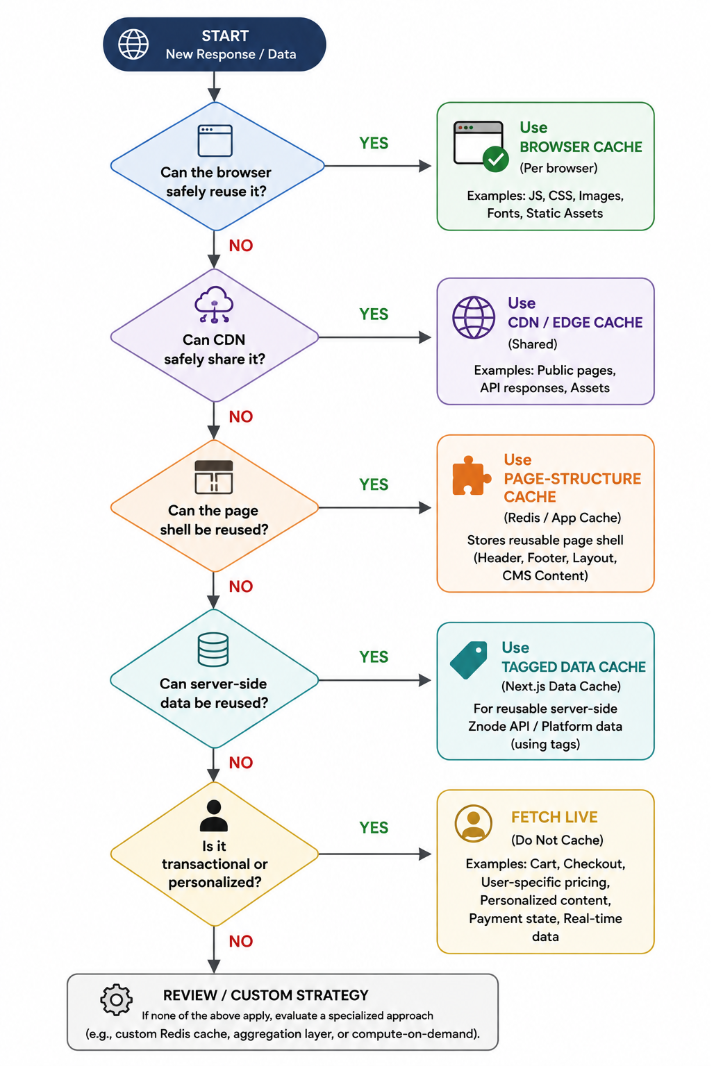
The recommended approach is to cache information as close to the consumer as safely possible.
Decsion Process
- Determine whether the response can be safely reused by the browser.
- If not, determine whether the response can be shared through a CDN.
- If not, determine whether the page shell can be reused.
- If not, determine whether server-side data can be reused.
- If not, retain live request processing.
The goal is to cache at the nearest practical layer where the response remains reusable and correct.
Recommended Cache Placement
| Data Type | Recommended Layer |
|---|---|
| JavaScript, CSS, Fonts | Browser Cache |
| Portal Metadata | In-Process Portal Cache |
| Page Builder Content | Page-Structure Cache |
| Product Catalog Data | Tagged Data Cache |
| Navigation | Page/Data Cache |
| Store Configuration | Portal Cache |
| Cart Data | Live Only |
| Checkout Data | Live Only |
| Payment State | Live Only |
| User-Specific Pricing | Personalized Runtime Processing |
| Live Inventory | Typically Live |
Transactional and personalized data should remain dynamic to ensure correctness.
When to Use Caching
Caching should be considered when the following conditions apply:
- The data is read frequently.
- Retrieval requires expensive processing.
- Some level of staleness is acceptable.
- The same data is reused across multiple requests.
- The information is not transactional or highly personalized.
Suitable examples include product catalogs, navigation structures, CMS content, SEO metadata, and store configuration settings.
When Not to Use Caching
Shared caching should not be used for:
- Payment state
- Payment tokens
- Checkout authorization
- Customer carts
- Sensitive personal information
- Real-time transactional processing
- Authoritative live inventory
- Fully personalized responses
These values are evaluated on every request to ensure accuracy and security.
Platform Cache vs Custom Cache
Platform Caching
Platform caching should be preferred whenever the response can be reused without introducing custom logic.
Examples include:
- CDN caching for public pages
- Page-structure caching for Page Builder pages
- Tagged data caching for Znode API requests
New Page Builder page types automatically participate in platform page-structure caching once registered.
Custom Redis Caching
Custom Redis caching is appropriate when:
- Data originates from external services.
- Information requires aggregation.
- Results are shared across requests.
- Page-level caching is not possible.
- Custom BFF implementations repeatedly retrieve identical data.
Every custom cache implementation should:
- Include store-specific key prefixes.
- Define an explicit TTL.
- Define an invalidation strategy.
- Fail open when the cache is unavailable.
Cache outages should degrade to live retrieval instead of generating application failures.
Cache Placement Decision Tree
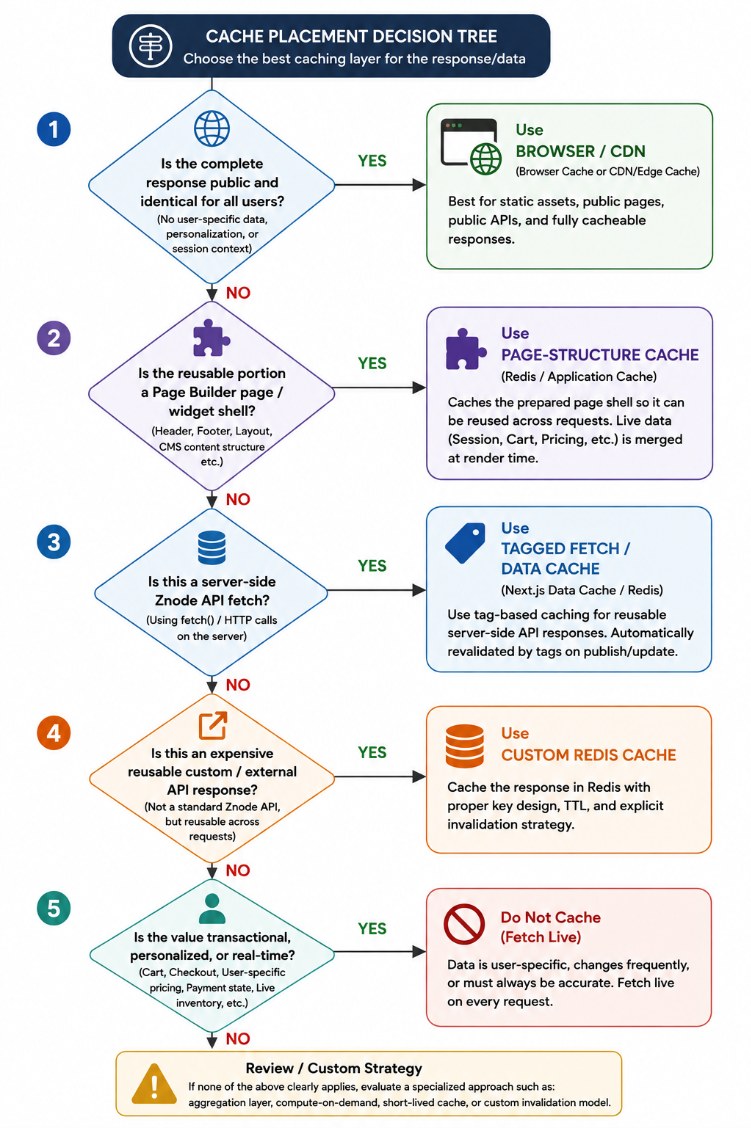
For high personalized responses, cache only reusable portions of the response and merge personalized data during rendering.
Cache Key Standards
Recommended Key Format
{app}:{environment}:{storeId}:{entity}:{identifier}:{facet}:{version}Examples
znode:prod:12:product:SKU-1234
znode:prod:12:product:SKU-1234:pricing:v2
znode:prod:12:page:home
znode:prod:12:category:electronics:nav
Store-specific key scoping is required to ensure correct tenant isolation, security, and targeted invalidation.
Cache Invalidation
Caching must always include a corresponding invalidation strategy.
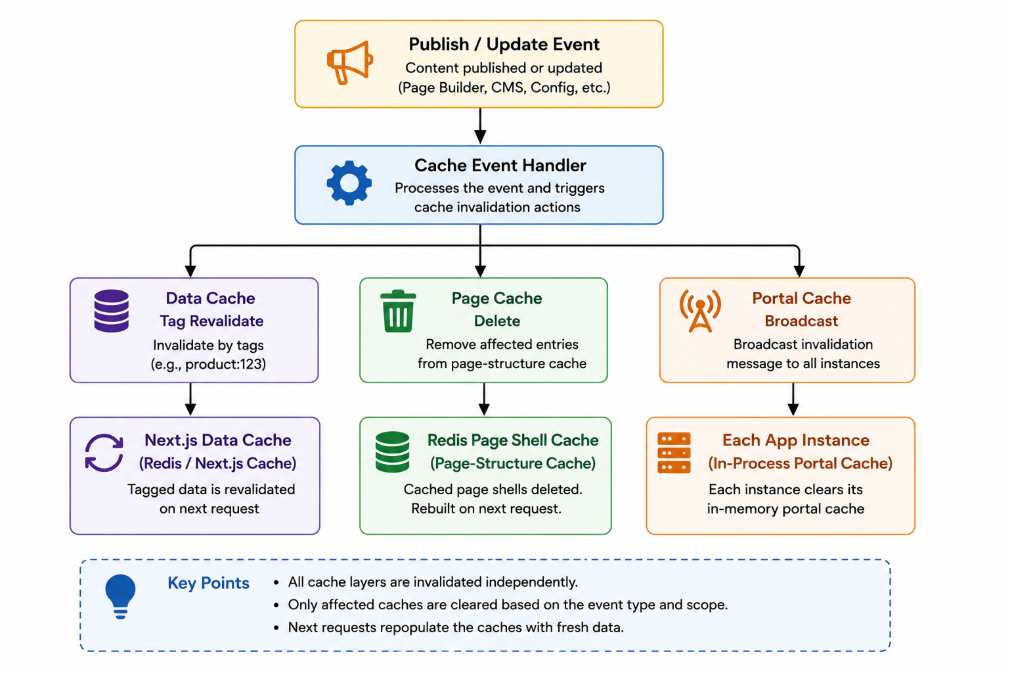
Typical Prouct Update Invalidation
- Product cache
- Pricing cache
- SEO cache
- Category listing cache
- Product detail page cache
Derived data must also be invalidated whenever source data changes.
Platform Invalidation Mechanism
Publish and update events generate cache invalidation actions that:
- Trigger tagged-data cache revalidation.
- Remove affected page-structure cache entries.
- Broadcast cache-eviction events to all application instances.
This approach ensures consistency across multiple Storefront instances.
Middleware Performance Best Practices
- Exclude static assets from middleware execution.
- Execute inexpensive checks before network calls.
- Validate sessions locally whenever possible.
- Use bounded in-process caches for portal metadata.
- Apply memory limits and controlled eviction strategies.
- Use short-lived negative caching for unknown hosts.
Because middleware executes before most cache layers, inefficient middleware can negate caching benefits throughout the application.
Best Practices
- Cache at the nearest practical layer.
- Prefer CDN caching before implementing Redis caching.
- Cache reusable content rather than personalized responses.
- Always scope cache keys by store.
- Always define cache expiration policies.
- Always define cache invalidation processes.
- Avoid using caching to mask architectural inefficiencies.
- Validate cache effectiveness using real performance measurements.
A properly designed caching strategy reduces downstream processing costs, improves response times, and scales efficiently without compromising data correctness.