
TABLE OF CONTENTS
- A Search Request, End to End
- Facets: Filters and Counts, in One Response
- Add a Facet in 4 Steps: "In Stock Only"
- Sorting Is a Fixed, Mapped List
- Type-Ahead, and the B2B Lookups That Reuse Search
- Caching Rules for Search
- The No-Results State
- Golden Rules
- Hand-Over Checklist
- Troubleshooting
Solution Architecture Guidance
- Use Znode's native search capabilities before proposing storefront customization. Keyword search, facets, sorting, type-ahead, keyword redirects, spelling suggestions, barcode search and SKU-oriented lookups already have established patterns. Type-ahead suggestions depend on the store's type-ahead setting. Catalog attributes configured as facets are the preferred way to introduce filterable product characteristics, because they participate in the existing facet behavior without a custom filtering mechanism. A newly configured facet attribute normally appears in search only after the search index is refreshed (for example, by a catalog publish), not immediately.
- Separate storefront presentation requirements from search-engine capabilities during discovery. The storefront can select supported sort options and pass search criteria, but adding a storefront sort option does not make a field sortable in the search index, and relevance tuning or SKU boosting belongs to the search index rather than storefront code. Confirm back-end search support before committing to custom ranking or sorting requirements.
- Treat keyword search, exact SKU lookup and Quick Order SKU search as distinct capabilities, even though they are related. Establish which user journey the client is changing before estimating the solution; assuming one search customization automatically applies to the other lookup experiences can understate scope. Barcode scanning uses the same keyword search, so a keyword-search customization also affects barcode scanning and should be tested with it.
- Preserve the platform's search data-freshness model. Product search results and real-time pricing or inventory-related search calls are intentionally not cached. However, when the page cache for guest users or a CDN is enabled, guest users may receive a cached search results page for the configured cache time (60 seconds by default). Logged-in users and shoppers with a cart always see live results. Search freshness also depends on the back-end search index being refreshed after catalog changes. If guest users must always see live results, the search page can be excluded from the page cache. Requirements that depend on caching these results should be challenged during solutioning, because catalog state, facets, pricing visibility, pricing and inventory can change frequently.
- Favor extension of Znode's existing search behavior over parallel custom search mechanisms. The standard search response already combines products, facet counts, pagination and suggestion data, while configured facets provide existing selection and navigation behavior. Rebuilding capabilities that Znode already supplies adds unnecessary implementation and maintenance scope; truly custom filters or search behavior should be treated as an ongoing customization that requires testing as the platform evolves.
Keyword search, facets, sorting, type-ahead and barcode/SKU lookups all run through one small set of functions. This guide shows how a search request flows end to end, how a facet selection becomes a filter, and how to add new search behavior without duplicating the pipeline.
- Audience: Implementation partners and developers
- Stack: Next.js 15 · React 19 · TypeScript · Nx
- Example: An "In Stock Only" facet toggle. The example name is a placeholder. Replace it with your own.
The diagram shows where each search component runs: in the browser, on the storefront server or in the back-end search service.
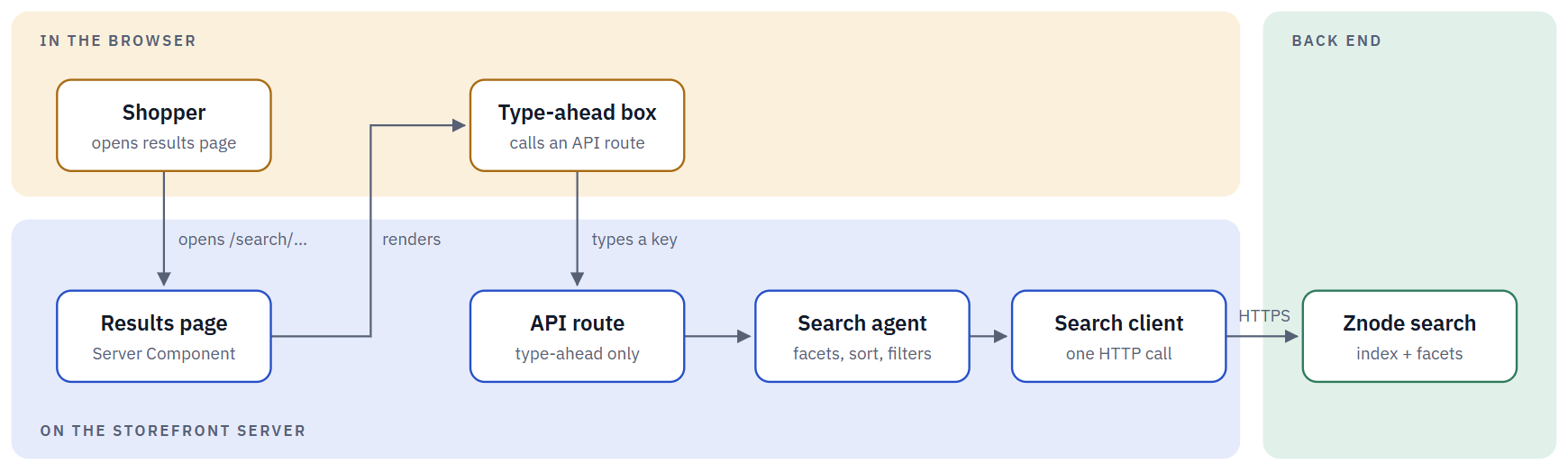
The results page is a Server Component, so it calls the search agent directly. The type-ahead box runs in the browser, so it goes through an API route first.
| Component | Runs on | Job |
|---|---|---|
| Search agent | Storefront server | Builds filters, facets and sort from the URL, calls the client. |
| Search client | Storefront server | One call returns products, facet counts and pagination together. |
| Facet & sort UI | Browser | Writes the choice into the URL; no client-side state needed. |
| Results page | Storefront server | Re-runs the search on every request with the new URL. |
| Type-ahead box | Browser | Calls a small API route on every keystroke. |
A Search Request, End to End
A keyword, the selected facets and the sort choice are all plain URL query parameters. The results page re-reads them and calls the search agent again on every request. There is no client-side search state to keep in sync.
The diagram shows how a search request flows end to end.
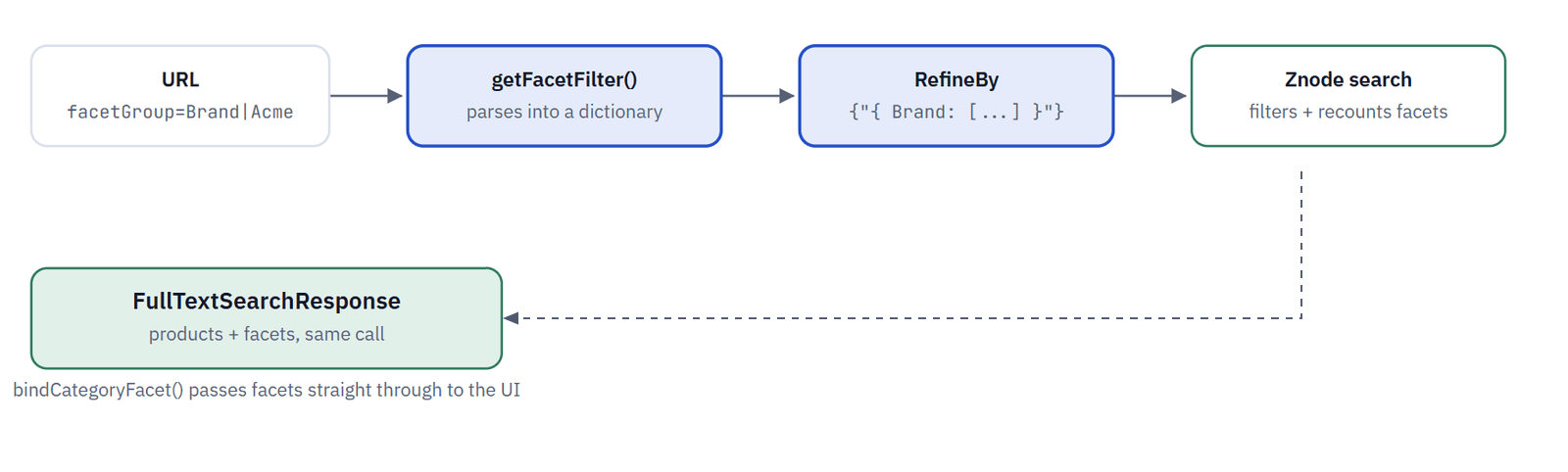
Solid arrows are requests; dashed arrows are responses. Steps 3–4 happen inside the same agent call, with no extra round trip to compute RefineBy.
Facets: Filters and Counts, in One Response
A facet is a query-string convention, not a separate API. Znode's full-text search endpoint returns the product list and the remaining facet counts together, as long as the request asked for the facet expand.
The diagram shows how a facet selection becomes a filter.
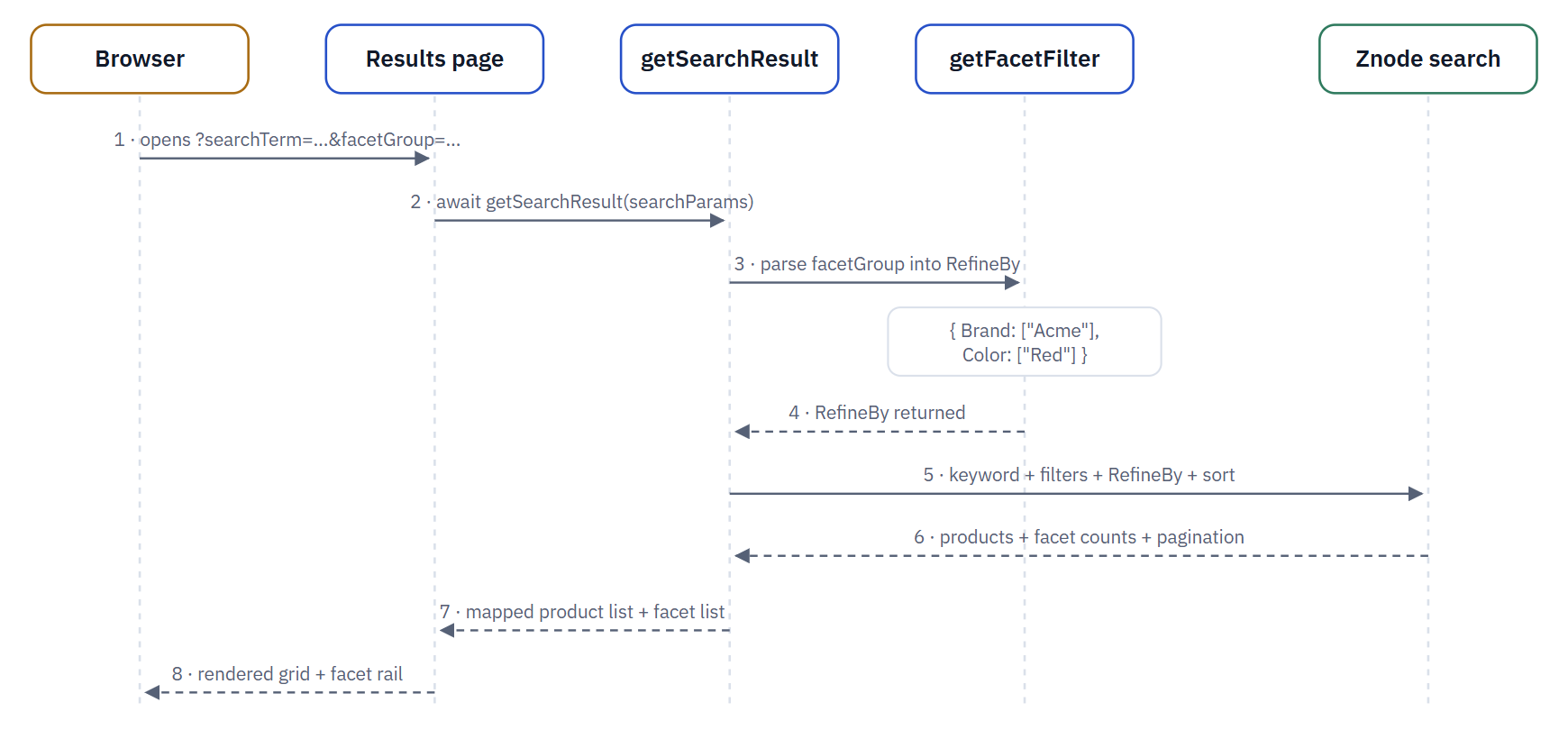
A facet selection never triggers a second request for counts. If a new facet attribute doesn't appear, check that it is marked as a facet in Znode Admin and that ExpandKeys.Facet is still requested.
| Piece | Where | Job |
|---|---|---|
| Facet UI | packages/base-components/.../product/facet/ | Renders facet groups by controlType; writes selections into the URL |
getFacetFilter | packages/agents/src/product/product.ts | Parses facetGroup (and properties.Brand) into a filter dictionary |
RefineBy | bindSearchModel | Carries that dictionary into the search request as a JSON string |
| Facet counts | FullTextSearchResponse.facets | Recomputed by Znode for the filtered result, returned in the same call |
Add a Facet in 4 Steps: "In Stock Only"
Most new facets need no code at all. They only need the attribute marked as a facet in Znode Admin. This example covers the other case: a toggle with no catalog attribute behind it, added as a one-off filter next to the facet pipeline.
STEP 1 - Check whether it's already a facet
If the attribute is marked as a facet in Znode Admin, it already comes back in the search response's facet list. Nothing to build: the facet UI renders it automatically.
- Do prefer a real facet whenever the catalog can express the rule. It gets counts, multi-select and chip removal for free.
- Don't build a parallel filter mechanism for something the back end can already express as a facet.
STEP 2 - Add the toggle to the filter dictionary
For a toggle with no catalog facet behind it, extend getFacetFilter so it also reads a dedicated query flag, and add that flag to ISearchParams as optional.
packages/agents/src/product/product.ts
packages/types/src/search-params.ts
packages/agents/src/product/product.ts (inside getFacetFilter)
// CUSTOM: "In Stock Only" toggle, not a Znode-configured facet
if (filterParam?.inStockOnly === "true") {
  dictionary["InStockOnly"] = ["true"];
}
STEP 3 - Render the toggle
Write inStockOnly=true into the URL the same way the existing facet checkboxes do. The results page re-reads searchParams on every request, so no client-side state is needed beyond the URL itself.
- Do reuse the existing URL-driven pattern so
FacetChipListand back/forward navigation keep working. - Don't call an API route directly from the toggle. Let the Server Component re-run the search.
STEP 4 - Test the dictionary, not the UI
packages/agents/src/product/product.spec.ts
product.spec.ts
it("adds InStockOnly to RefineBy when requested", async () => {
  const result = await getFacetFilter({ inStockOnly: "true" } as ISearchParams);
  expect(result.InStockOnly).toEqual(["true"]);
});
Sorting Is a Fixed, Mapped List
Sort options are a small enum, not a free-text field. getSortByProductList maps a numeric sort value to a field Znode's search index actually supports: name, price, rating, reviews, stock status and popularity today.
| Step | Where |
|---|---|
| Add the enum value and its mapping | getSortByProductList, packages/agents/src/product/product.ts |
| Confirm the back end can sort on that field | The search index configuration. Adding a case in the storefront does not create the capability. |
| Add it to the sort dropdown and translations | The dropdown reads productData.sortList, filtered by getFilteredSortList |
True ranking changes (boosting specific SKUs, relevance tuning) are configured on the search index, not in storefront code. The storefront only picks one of the sort keys the back end already exposes.
Type-Ahead, and the B2B Lookups That Reuse Search
The dropdown that appears while typing runs in the browser, so it goes through a small API route on every keystroke, instead of calling the agent directly like the results page does.
| Behavior | API route | Notes |
|---|---|---|
| Suggestions while typing | /api/search/search-hydrated-typeahead | Only when the store's type-ahead feature is on; otherwise falls back to a plain keyword search |
| Pre-search panel (recent/popular, "My Searches") | /api/search/search-hydrated | Needs a catalog code and a user profile ID |
| Lightweight keyword suggestions | /api/search/search-suggestions | No facets or pricing, just matching keywords |
| Live type-ahead pricing | /api/search/search-typeahead-pricelist | Never cached; prices must stay current |
| Keyword redirects (vanity search terms) | /api/search/search-redirect | Matches configured keywords case-insensitively |
Barcode scanning and SKU lookups reuse pieces of this pipeline rather than duplicating it. Pick the right one before extending any of them:
| Lookup | Type | How it works |
|---|---|---|
| Barcode scan | Free-text relevance | Treats the scanned text as a search keyword and calls the exact same keyword search function as the results page. |
| Add-by-SKU | Exact lookup | A direct product lookup by SKU, not full-text search, with different caching and error handling. |
| Quick Order SKU search | Grid-specific | Its own row-by-row SKU resolution, separate from both of the above. |
Caching Rules for Search
Search results are not cached by default, on purpose. The product search call has no cache-tag branch at all, and the pre-search panel and type-ahead pricing calls force a fresh fetch explicitly.
| Rule | Details |
|---|---|
| Never tag the product search call | Search results depend on facets, catalog state and pricing visibility that change too often to cache safely. |
| Never tag pricing or inventory calls | Type-ahead pricing is deliberately always fresh, the same rule real-time pricing follows everywhere else in the storefront. |
| Tag only genuinely shared data | A search-adjacent banner or message that's identical for every shopper can use the normal CacheTags pattern. |
The No-Results State
A keyword search with zero results shows a dedicated message with spelling and phrasing tips, not the generic "no records" state used elsewhere. "Did you mean" data is already on the response. Reuse it instead of inventing a new suggestion feature.
- Do edit the existing translation keys, or add new tips to the list, for a copy change. No agent change needed.
- Do render the existing "did you mean" alternatives when you want to suggest other terms.
- Don't build a new suggestion pipeline. The suggested term and alternatives are already computed by the search back end.
Golden Rules
| Rule | What it means |
|---|---|
| Facets are a URL convention | Parse and build facetGroup the same way the existing code does, so chips and navigation keep working. |
| Filters are built on the server | RefineBy is assembled in the agent, never sent as a raw filter from the browser. |
| One call returns products and facet counts | Don't add a second round trip just to get updated counts. |
| Search results stay uncached | Don't add CacheTags to the product search, facet or pricing calls. |
| Know which lookup you're extending | Keyword search, SKU lookup and Quick Order's SKU search are three different functions. |
| Custom code stays marked | Any non-attribute-backed facet or filter is marked // CUSTOM: <reason>. |
Hand-Over Checklist
Before the pull request, confirm:
- New facet logic lives in
getFacetFilteror a clearly marked function beside it, not duplicated in a Client Component - Non-attribute-backed facets or filters are marked
// CUSTOM: <reason> - New fields were added as optional fields on existing types, not new parallel types
- No
CacheTagsfilter was added to the product search, facet, or pricing calls - New translation keys were added to every language file
- Agent changes are covered by a unit test on the mapped output
- Barcode or SKU changes were made to the correct one of the three lookup paths
Troubleshooting
| You see | What it usually means |
|---|---|
| A facet never appears | The attribute isn't marked as a facet in Znode Admin, or the facet expand was dropped from the request |
| Selected facets don't filter the grid | The facetGroup encoding doesn't match the existing convention; check RefineBy on the request |
| Sorting has no effect | The sort case maps to a field the search index doesn't actually sort on |
| Type-ahead shows stale prices | The pricing call was made with caching left on; it should always force a fresh fetch |
| "Did you mean" never appears | The request explicitly turned off suggestions, or the keyword is already an exact match |
| Search looks a step behind after a catalog change | Unlikely to be a storefront cache. Search isn't tagged by default, so check the back-end search index refresh. |