
TABLE OF CONTENTS
- Overview
- The Checkout Session
- Placing an Order, Step by Step
- Replace a Checkout Section
- Add Cost Center and Project Reference Fields
- Where the Files Go
- Payment Security
- Golden Rules
- Hand-Over Checklist
- Troubleshooting
Solution Architecture Guidance
Start With Standard Configuration
- Use Znode's standard checkout configuration before introducing custom code. The platform already supports:
- Payment methods assigned per store and per user in Znode Admin
- Shipping methods configured per store
- Order approvals and limits
- Session behavior
- reCAPTCHA
- Address validation
- Quote requests
- Restricting shipping methods by user or business rule requires a customization. Customize checkout when requirements add business-specific data, validation, eligibility rules or workflow behavior that these settings do not cover.
Cover Every Transaction Path
- Treat checkout changes as transaction-wide capabilities rather than isolated screen changes. A requirement may affect orders, quotes, approvals, offline and online payments, guest and logged-in users, and every payment method offered by the store.
- Checkout has separate submission paths for offline payments and approvals, and for online payments such as card, ACH and wallets. The quote page shares the same checkout component. Custom fields and rules must be applied to every path; otherwise they can work for some payment types and not others.
- Ask the technical team to identify all affected paths and include integration, security, validation, localization, testing, payment-failure handling and operational support in the estimate.
Preserve Payment and Order Safeguards
- Card data must remain in the hosted payment experience.
- Totals and identity must be determined on the server.
- Business rules must be enforced before payment wherever possible.
- Failed orders must not leave an unreleased payment. The standard flow already releases a payment when an order fails, and any custom rule that can reject an order after payment must do the same.
- Protection against duplicate order submission should be preserved.
- Requirements that alter payment handling or bypass these controls should be treated as high-risk and should not be committed without explicit technical validation.
Minimize Changes to Platform-Owned Code
- Keep customizations aligned with Znode's supported checkout extension approach, and minimize and clearly mark changes to platform-owned code. Checkout screens are customized without changing Znode's own components. Enforcing rules and saving custom data on the server does, however, require a small number of clearly marked changes to platform server code.
- Even supported checkout customization creates an ongoing obligation to compare custom behavior with future Znode checkout changes, particularly session and order-submission logic. Broad replacement of the checkout flow increases regression testing, upgrade effort and the risk of missing platform fixes.
Set Client Expectations
- Set client expectations that additional checkout fields and business rules are supportable, but they are not merely presentation changes. They require consistent behavior across applicable transaction paths, server-side enforcement, data persistence, and agreement on where custom data appears in Znode Admin and exports.
- Storing custom checkout data with the order and showing it in Znode Admin or exports may require back-end work. This work should be scoped separately from the storefront changes.
- The more paths, payment types, languages or approval scenarios involved, the greater the implementation and long-term support scope.
Checkout turns a cart into an order in a fixed series of stages. Each stage has a clear place to extend it. This guide shows how the stages connect, which changes need no code, and the rules that keep payments and orders correct.
- Audience: implementation partners and developers working on the Znode 10 storefront.
- Stack: Next.js 15, React 19, TypeScript, Nx.
- Worked example: Cost center and Project reference fields.
<project>and<theme>stand for your project's package and theme names. Example names (Cost center, Project reference,<project>-components) are placeholders. Replace them with your own. - Version: needs Znode 10.10.1.0 or later, since that's when the checkout session was added. The timer settings in The Checkout Session came in later releases.
Overview
The checkout flow, with the order path, the quote path and the approval path:
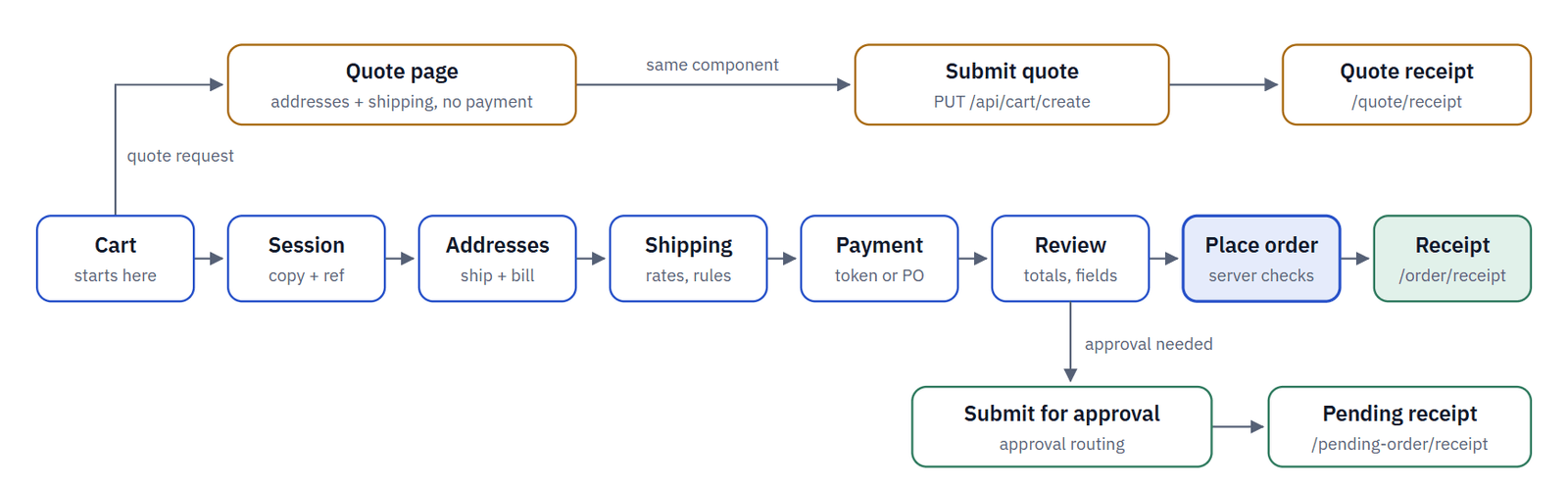
One checkout component serves orders and quotes. Approval is decided from the store's approval settings and the order total, and changes the final button to Submit for approval.
| Part | Runs on | What it does |
|---|---|---|
| Page route | Server | Guards the URL and loads the checkout page. |
| Checkout shell | Browser | Composes the sections and holds the shopper's choices. |
| Checkout routes | Server | Resolve the session and call one agent each. |
| Agents | Server | Totals, payment, rules and placing the order. |
| Theme config | Server | Decides which checkout component a store renders. |
The Checkout Session
Checkout works on a copy of the cart, so the cart stays unchanged while the shopper pays and each browser tab has its own checkout. The copy's number is encrypted on the server and travels with every call as a header. Your custom routes use the same mechanism.
How the checkout reference travels between the browser, the storefront server and the back-end services:
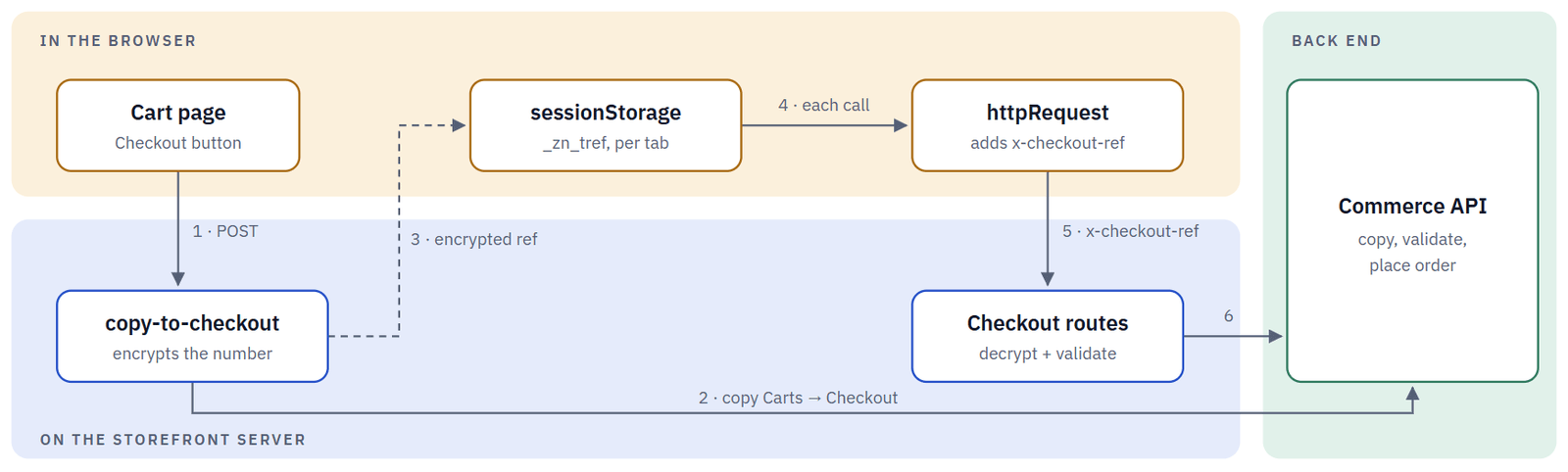
A missing or tampered reference decrypts to nothing, and the route answers 403. When a newer copy replaces the session (for example in another tab), routes answer sessionInactive and the shopper is sent back to the cart.
Do resolve the checkout number in every checkout route with getCheckoutNumberFromRequest(request), and call your routes through httpRequest so the header is sent.
Don't accept a checkout or cart number from the request body for checkout calls, or store the reference anywhere other than sessionStorage.
These are set in Znode Admin, in the Checkout Session Settings group.
| Admin setting (code key) | Effect |
|---|---|
Enable Timer-Based Checkout Expiration (timerBasedCheckoutExpiration) | Turns session expiry on or off. Off by default on new setups. While it's off, sessions don't time out and the duration below is ignored. |
Checkout Session Timeout Duration (checkoutSessionTimeoutDuration) | How long the session lasts, in minutes, when timer-based expiry is on. The screen falls back to 10. |
Hide Checkout Countdown (hideCheckoutTimer) | Hides the countdown on the checkout page. Expiry is still enforced. |
Auto Redirect to Cart on Checkout Expiry (autoRedirectToCartOnCheckoutExpiry) | Returns the shopper to the cart when the session expires. |
Placing an Order, Step by Step
Card and wallet payments are tokenized by a hosted payment script, so card data never reaches the storefront. The server then reserves the order number, reads the total itself, takes the payment and places the order in one call.
The card and wallet payment sequence, from card details to the order receipt:
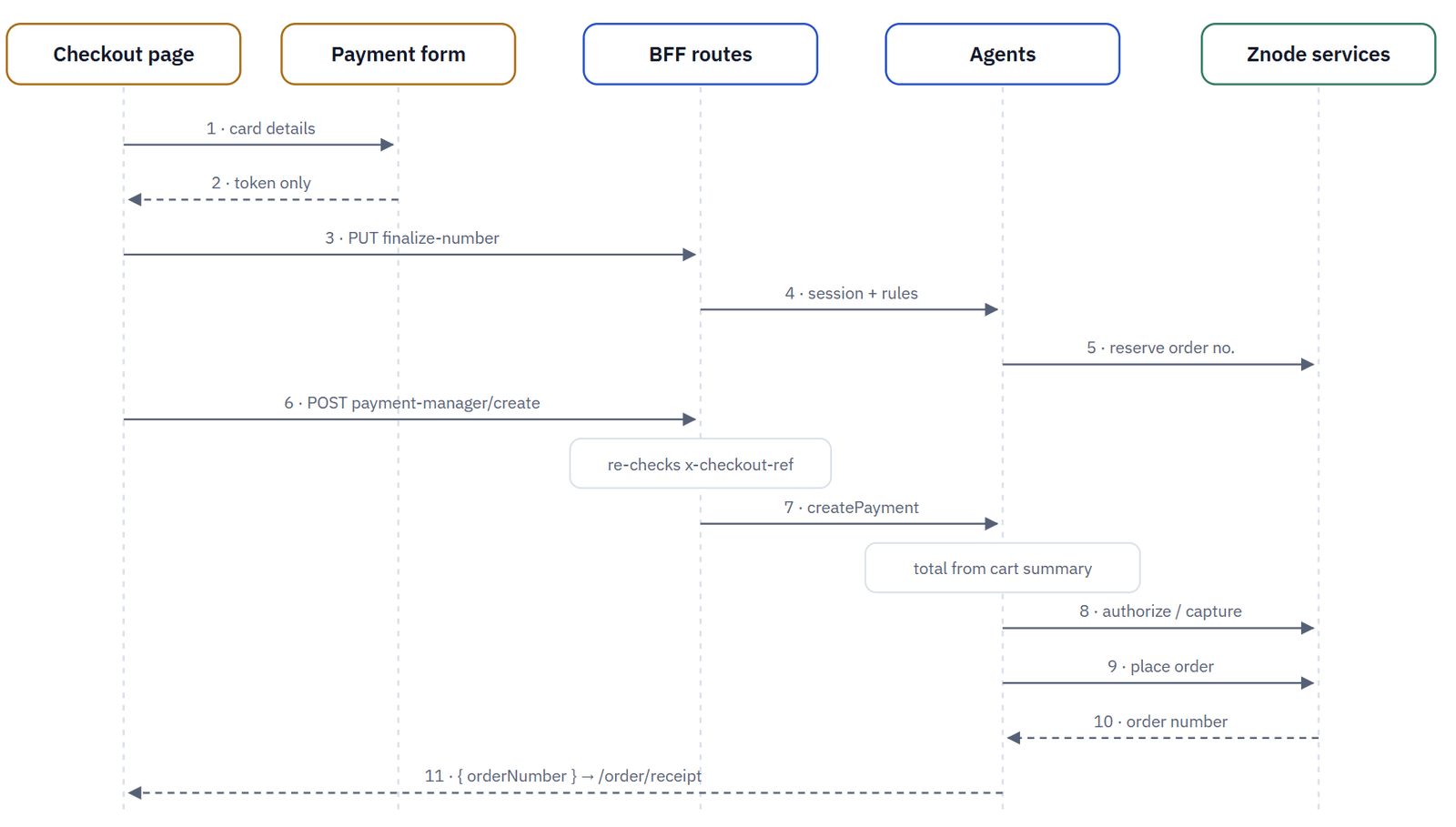
Offline methods (purchase order, invoice, cash on delivery) and zero totals skip steps 1–5 and 8: the page calls POST /api/place-order, which checks the session and reCAPTCHA, then places the order. If step 9 fails after a card payment, the agent voids or refunds the payment.
| Stage | Storefront route | Server work |
|---|---|---|
| Start checkout | /api/cart/copy-to-checkout | Copy the cart, encrypt the reference |
| Addresses | /api/checkout-address/* | Save shipping and billing address IDs on the checkout |
| Shipping | /api/shipping-options, /api/save-shipping-details | Rates for the address; save the choice and constraints |
| Promotions | /api/apply-discount, /api/remove-discount | Coupons and vouchers on the checkout |
| Payment setup | /api/payment/*, /api/payment-manager/*, /api/apple-pay/validate | Method settings, payment script credentials, saved cards |
| Place order | /api/place-order, /api/submit-for-approval, /api/payment-manager/create | Session, reCAPTCHA, totals, payment, order |
| Quote | PUT /api/cart/create | Convert the cart to a quote (no checkout session) |
Configure Before You Code
Much of checkout is driven by Znode Admin. Settings change behavior for every visitor at once, survive upgrades and need no deployment.
| Option | Change type | What it covers |
|---|---|---|
| Znode Admin settings | No code | Payment methods per store and user, shipping methods, approval type and order limits, session timer, reCAPTCHA, address validation, quote requests. |
| Replace a section | Code (UI) | A redesigned or extra section in your own checkout shell, chosen by the store's theme configuration. |
| Add a rule | Code (server) | Validation, filtering or saving extra data in an agent on the submit path. Always paired with any UI change. |
How a store's theme picks the checkout component
<theme>-config/config/page-config-map.ts
   ["checkout", { components: { CheckoutPage: CheckoutPageConfig }, removeComponentKeys: [] }]
        ↓
<theme>-config/widgets/page-widgets/checkout/CheckoutPageRender.tsx
   import { CheckoutPage } from "@znode/<project>-components/components/page-widget/checkout-page";
        ↓
packages/<project>-components/src/components/checkout/Checkout.tsx   // your checkout shell
Remember the quote page:
/quote imports the checkout component directly rather than through the Page Builder. Point it at the same shell so that orders and quotes never drift apart.
Extension Points
Each stage has one supported place to change it. Configuration comes first; code changes always include a server-side check.
Extension points for each checkout stage:
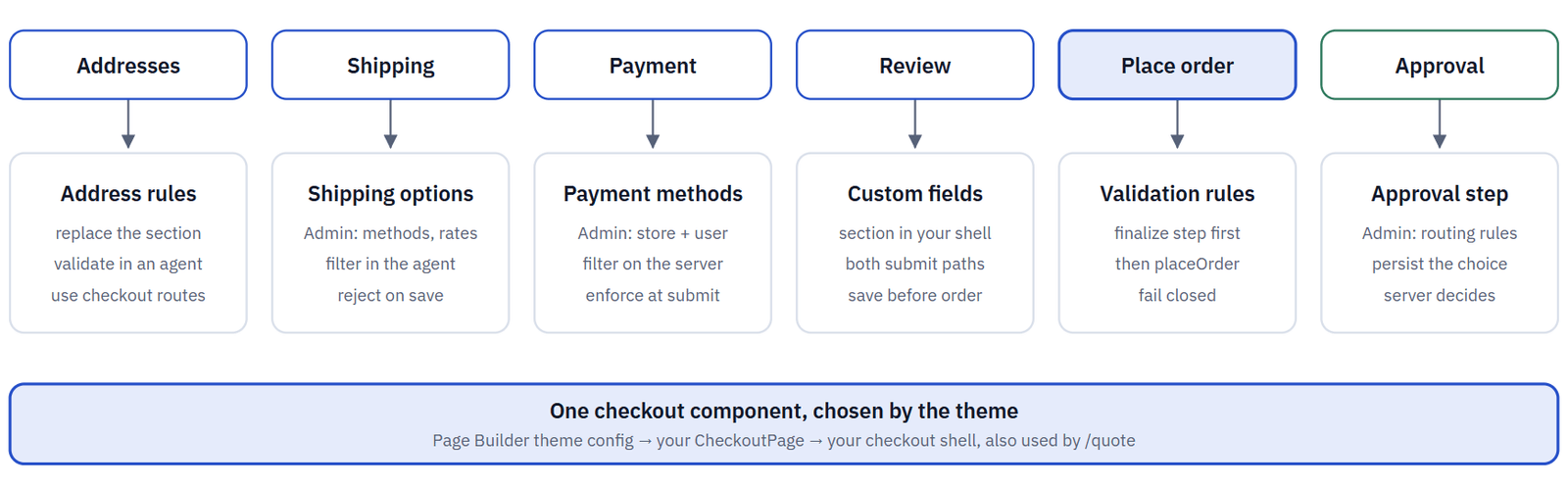
Every column has a configuration option, a UI option and a server rule. Ship the server rule even when the UI already prevents the input.
| You want to | Where to change it |
|---|---|
| Hide payment methods for some users | Admin assignment first. Otherwise filter the list in an agent used by the checkout page data and /api/payment/configurations, and reject a hidden method at submit |
| Hide shipping methods by a rule | Filter the result of getShippingOptions; reject a shippingId that was not offered when it is saved |
| Block orders that break a business rule | The finalize step (before any payment) and the placeOrder agent (every path) |
| Add fields such as a cost center | A section in your shell, the payload on both submit paths, validation and saving in placeOrder |
| Let buyers choose an approver | A section in your shell; persist the choice on the server before the order is placed |
| Load extra data with the page | getCheckoutPageDetails and the field list in prepareCheckoutData |
Replace a Checkout Section
Copy only what you change. Everything else stays imported from the base package, so Znode fixes keep flowing in.
STEP 1 - Create your checkout shell
packages/<project>-components/src/components/checkout/Checkout.tsx
Start from the base Checkout.tsx and keep its props (ICheckoutData). Import the sections you keep, such as ShippingOptions, CheckoutTimer and useCheckoutSession, from @znode/base-components/components/checkout/….
STEP 2 - Swap one section
Copy the section you change, for example the cart review, into your package and import it locally. Keep the same props so the shell stays easy to compare with the base.
Do keep ensureShippingDetailsSaved, the session hook and the submit-in-progress flags when you replace the submit or shipping sections.
Don't edit files in base-components. Changes there are overwritten or conflict at every upgrade.
STEP 3 - Wire it to the theme and the quote page
<theme>-config/widgets/page-widgets/checkout/CheckoutPageRender.tsx · apps/webstore/src/app/[locale]/quote/page.tsx · packages/page-builder/src/configs/get-config.ts
Render your own page widget from the theme's checkout widget, register the theme in themeConfigMap, and point the quote page at your shell. Mark baseline edits with // CUSTOM: <reason>.
New to themes? The Webstore Customization Guide walks through creating a theme and registering it in get-config.ts (Use Case 2).
STEP 4 - Compare at every upgrade
Diff your shell against the new base Checkout.tsx and carry over fixes, especially in session handling and the submit logic.
After you merge an update, run through Regression Testing After a Znode Update.
Add Cost Center and Project Reference Fields
This worked example adds a required Cost center (letters, digits and dashes, up to 20 characters) and an optional Project reference (up to 50 characters), entered at checkout, checked on the server and saved with the order.
STEP 1 - Define the data
packages/types/src/<project>/checkout-reference.ts   ·   packages/types/src/checkout.ts
checkout-reference.ts
export interface ICheckoutReferenceFields {
  costCenter: string;
  projectReference?: string;
}
// packages/types/src/checkout.ts: add to IConvertToOrder and IPaymentRequest
referenceFields?: ICheckoutReferenceFields; // CUSTOM: cost center + project reference
STEP 2 - Write the rule once
packages/agents/src/<project>/checkout/reference-fields.ts
One pure function, with no server-only imports, used by both the screen and the server. Keep the save helper that calls Znode in a separate server-only file.
reference-fields.ts
const COST_CENTER_PATTERN = /^[A-Za-z0-9-]{1,20}$/;
export function validateReferenceFields(fields?: ICheckoutReferenceFields): string[] {
  const errors: string[] = [];
  if (!COST_CENTER_PATTERN.test(fields?.costCenter?.trim() ?? "")) errors.push("costCenterInvalid");
  if ((fields?.projectReference ?? "").length > 50) errors.push("projectReferenceTooLong");
  return errors; // translation keys
}
STEP 3 - Add the section to your shell
packages/<project>-components/src/components/checkout/reference-fields/ReferenceFields.tsx
A "use client" component with two inputs. The shell holds the value in state, shows the errors from the rule and keeps Place order disabled while there are errors. Texts go into the existing Checkout translation namespace of both apps, so no page needs new namespaces.
STEP 4 - Send it on both submit paths
| Path | Add referenceFields to |
|---|---|
| Offline payment, zero total, approval | convertToOrderRequestModel in your submit actions |
| Card, ACH, wallets, redirect payments | createPaymentRequest in your payment options, and copy it into the order model built by createOrder |
STEP 5 - Validate and save on the server
packages/agents/src/checkout/checkout.ts   ·   apps/webstore/src/app/api/payment-manager/create/route.ts
checkout.ts · placeOrder, before CommerceCollections_placeOrder
// CUSTOM: cost center + project reference
if (validateReferenceFields(convertToOrderRequestModel.referenceFields).length) {
  return { isSuccess: false, hasError: true, errorMessage: "Invalid checkout reference fields." };
}
await saveReferenceFields(checkoutNumber, convertToOrderRequestModel.referenceFields);
// saveReferenceFields → Order_updateOrderDetails({ endpoint: "carts", orderPayload: { classNumber, customData } })
Before any payment: repeat the check in /api/payment-manager/create and return 400 on failure, so that a card is never charged for an order that will be rejected.
STEP 6 - Verify
Call /api/place-order and /api/payment-manager/create directly with bad values and confirm they are rejected. Place valid orders as a guest and as a logged-in user, with each payment type and through approval. If the saved data needs to show in Znode Admin or in exports, open a Znode Support ticket so we can scope that with you.
Where the Files Go
[new] is a file you create. [edit] is a Znode file you change. Mark those with // CUSTOM: <reason> and recheck them at every upgrade.
apps/webstore/
  messages/
    #This example assumes US English and French languages
    en-US.json, fr-FR.json  [edit] Checkout namespace
  src/app/
    [locale]/quote/
      page.tsx  [edit] use your shell
    api/payment-manager/create/
      route.ts  [edit] check before payment
apps/page-builder/messages/
  en-US.json, fr-FR.json  [edit] same keys
packages/
  <project>-components/src/components/
    checkout/
      Checkout.tsx  [new] your shell
      reference-fields/ReferenceFields.tsx  [new] new section
      checkout-submit-order-actions/, payment-options/  [new] your copies, add to payload
    page-widget/checkout-page/
      CheckoutPage.tsx  [new] renders your shell
  agents/src/
    <project>/checkout/
      reference-fields.ts, save-reference-fields.ts  [new] rule + save
    checkout/
      checkout.ts  [edit] placeOrder hook
    payment/
      payment-manager.ts  [edit] createOrder payload
  types/src/
    <project>/checkout-reference.ts  [new]
    checkout.ts  [edit] add field
  page-builder/src/configs/
    <theme>-config/widgets/page-widgets/checkout/
      CheckoutPageRender.tsx  [your theme] import your widget
    get-config.ts  [edit] register the theme
Payment Security
The storefront handles payment tokens, never card data. Four safeguards are built in. Keep them intact when you customize.
| Safeguard | What it does | Status |
|---|---|---|
| Hosted payment form | Loaded from NEXT_PUBLIC_PAYMENT_MANAGER_URL (and NEXT_PUBLIC_SPREEDLY_PLUGIN_URL for that plugin). Returns a token. | Keep it |
| Session check | Payment and order routes re-check x-checkout-ref and the session before acting. | Built in |
| Server totals | The charged amount comes from the server-side cart summary, never from the browser. | Built in |
| Release on failure | If the order fails after a card payment, the payment is voided or refunded. | Extend to your rules |
Do work only with tokens, keep the hosted script URLs and the CSP nonce handling, and keep NEXT_ENCRYPTION_SECRET strong and different per environment.
Don't build your own card inputs, log payment tokens or gateway responses, or change a payment amount in the browser.
Golden Rules
| Rule | What it means |
|---|---|
| Validate on the server | Every rule shown on screen is repeated in an agent on the submit path. |
| Never trust client totals | Read prices, tax, shipping and discounts from getCartSummary on the server. |
| The server decides who and which checkout | User and store from the session; checkout number from x-checkout-ref. |
| Place order once | Disable the button while submitting, keep the session check, reuse the reserved order number, and check order status before any retry. |
| Fail closed | If a rule cannot be evaluated, block the order and log the reason. |
| Validate before money moves | Run rules in the finalize step; release any payment you reject afterwards. |
| Stay out of PCI scope | Card data stays in the hosted payment form. |
| Mark baseline edits | Every changed shared file carries // CUSTOM: <reason>. |
Hand-Over Checklist
Before the pull request, confirm:
- Cart → checkout → receipt works for a guest and a logged-in user, with every payment type the store offers
- The quote page and the approval path still work and show your changes where they apply
- Refresh keeps the session; a duplicated tab gets its own; an expired session returns to the cart
- New checkout routes return
403withoutx-checkout-ref - Server rules reject bad input when routes are called directly, not only through the screen
- A rejected online order leaves no authorized or captured payment
- No card data, tokens or secrets in logs, page source or storefront network calls
- Texts exist in every language file of both apps; tests and lint pass (
npx nx test agents,npm run lint) - Baseline edits are marked with
// CUSTOM:
Troubleshooting
| You see | What it usually means | What to do |
|---|---|---|
| Checkout returns to the cart with "session expired" | The page was opened directly, another tab took over the session, or the timer ran out | Start checkout from the cart, in one tab. If it keeps expiring, check the Checkout Session Timeout Duration setting. |
A new route answers 403 | It was not called through httpRequest, so the checkout header was missing | Call the route through httpRequest, and read the checkout number with getCheckoutNumberFromRequest(request). |
Your changes show on /checkout but not on /quote | The quote page still imports the base component | Point apps/webstore/src/app/[locale]/quote/page.tsx at your shell. |
| Your changes don't show at all | The theme is not registered in themeConfigMap, or the theme's checkout widget still renders the base page widget | Register the theme in themeConfigMap (get-config.ts), and have the theme's CheckoutPageRender.tsx import your page widget. |
| Custom data saved for purchase orders but not card orders | Only one submit path was updated | Add the data to createPaymentRequest and copy it into the order model built by createOrder (worked example, Step 4). |
| New page data is empty | The field was not added to the list copied in prepareCheckoutData | Add the field to the list copied in prepareCheckoutData. |
| "Shipping option no longer available" | Saving the shipping choice failed before the order | Check the server logs for the checkout area. If you replaced the submit or shipping section, make sure it still calls ensureShippingDetailsSaved. |