
TABLE OF CONTENTS
- Overview
- Store-Specific Pricing
- Buyer-Specific Pricing
- Account-Specific Pricing
- Profile-Specific Pricing
- User-Specific Pricing
- Understanding Price List Precedence
- Pricing Assignment Summary
Overview
Znode provides flexible pricing capabilities that support a variety of Ecommerce business models. Pricing can be configured at the Storefront level for all customers or tailored for specific buyers, customer accounts, and Profile groups.
Administrators can implement pricing strategies ranging from a single standard Pricing List to advanced pricing models that support seasonal promotions, negotiated account pricing, and individual buyer pricing.
Znode pricing is configured using two primary approaches:
- Store-Specific Pricing
- Buyer-Specific Pricing
The pricing model selected depends on whether pricing should apply to all customers within a Storefront or only to specific customer segments.
Store-Specific Pricing
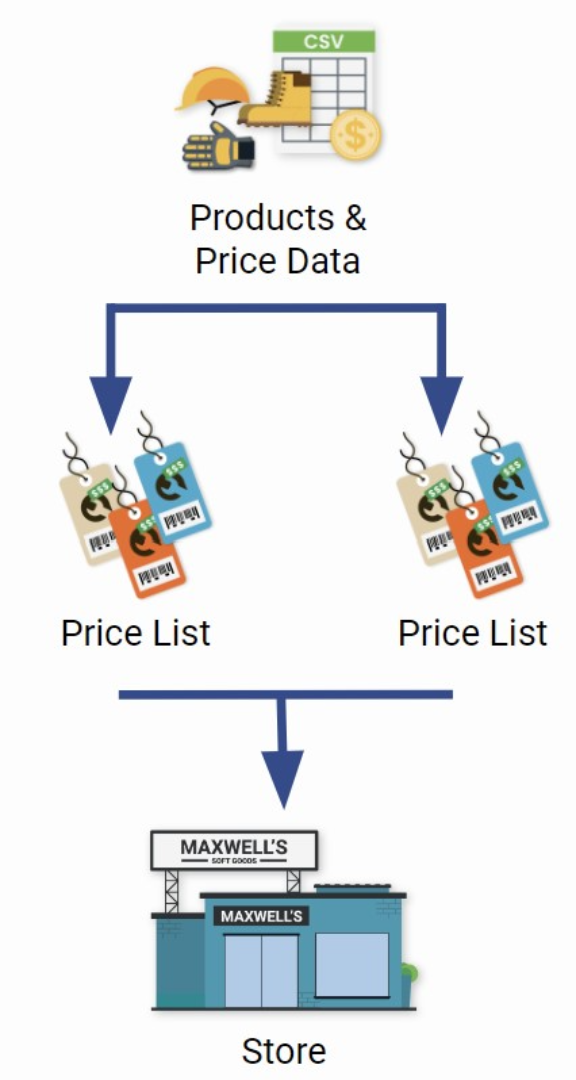
Store-specific pricing applies the same pricing structure to all customers shopping within a Storefront.
Common Use Cases
- Standard product pricing across a Storefront.
- Seasonal or promotional pricing events.
- Temporary sale pricing.
- Multi-store pricing strategies.
How Store-Specific Pricing Works
Administrators create one or more Pricing Lists, including:
- A base Pricing List that contains standard product pricing.
- Optional seasonal or promotional Pricing Lists that contain temporary pricing adjustments.
The Pricing Lists are then associated with a Storefront through store configuration settings.Configuring a Price List | Znode
Example Scenario
A retailer operates a single Storefront and uses a standard Pricing List throughout the year. During a holiday promotion, the retailer associates a seasonal Pricing List that applies discounted pricing to selected products for the duration of the promotion.
Expected Outcome
All customers visiting the Storefront view pricing based on the Pricing Lists associated with that Store.
Buyer-Specific Pricing
Buyer-specific pricing allows organizations to present different pricing to specific customers, user groups, profiles, or B2B accounts.
This pricing model is commonly used when negotiated pricing, contract pricing, or customer-specific discounts must be applied.
Common Use Cases
- Contract pricing for B2B customers.
- Customer-specific negotiated pricing.
- Account-based pricing structures.
- Profile-based pricing strategies.
- Special pricing for strategic customers.
How Buyer-Specific Pricing Works
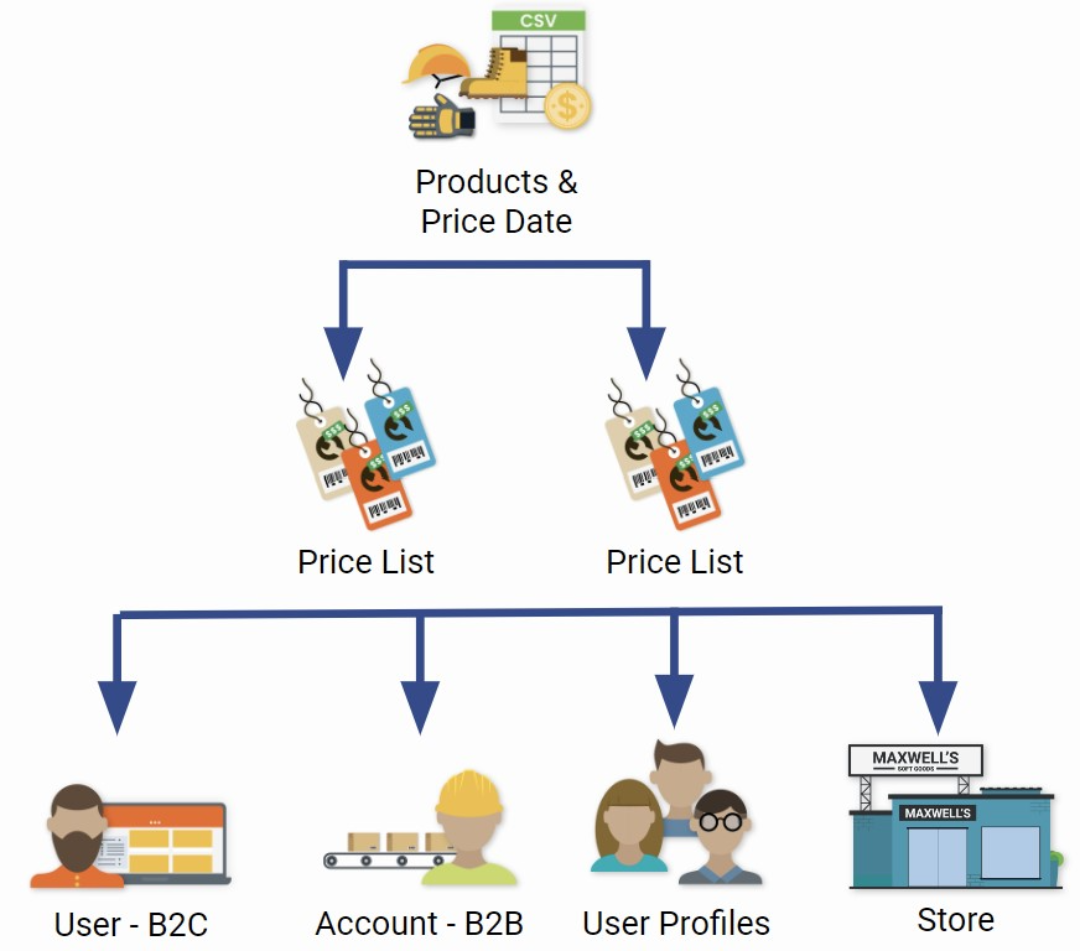
Administrators create dedicated Pricing Lists and associate them with:
- B2B Accounts.
- User Profiles.
- Individual Users.
- Specific customer segments.
When a customer signs in, Znode evaluates the applicable pricing assignments and displays pricing based on the Pricing Lists associated with that customer.
Example Scenario
A manufacturer provides standard pricing to public customers while offering negotiated pricing to wholesale distributors. Separate Pricing Lists are assigned to distributor accounts, allowing those customers to view their contract pricing when signed in.
Expected Outcome
Customers view pricing that is specific to their assigned Account, User Profile, or User record, enabling personalized purchasing experiences.
Pricing Strategy Considerations
| Pricing Model | Best Used For |
|---|---|
| Store-Specific Pricing | Standard pricing, promotional campaigns, seasonal sales, and Store-level pricing management. |
| Buyer-Specific Pricing | Contract pricing, negotiated pricing, account-based pricing, and personalized customer pricing. |
Expected Outcome
Administrators can implement pricing strategies that support both broad Storefront pricing requirements and highly personalized customer pricing models, ensuring the correct prices are displayed to the appropriate customers across all sales channels.
Buyer-Specific Pricing
Buyer-specific pricing allows Administrators to provide unique pricing to specific buyers, customer accounts, or customer Profile groups while maintaining standard Storefront pricing for all other customers.
Common Use Cases
- Contract pricing for key customers.
- Negotiated customer pricing.
- Distributor or partner pricing.
- Tiered customer programs.
- Pricing by customer type.
- Individual buyer pricing exceptions.
How Buyer-Specific Pricing Works
Administrators first establish standard pricing for the Storefront using store-specific Pricing Lists.
Additional buyer-specific Pricing Lists can then be created and assigned to:
- Customer Accounts.
- User Profiles.
- Individual Buyers.
When a buyer qualifies for buyer-specific pricing, Znode evaluates the assigned Pricing Lists and applies the appropriate pricing according to the configured Pricing List precedence rules.
Account-Specific Pricing
Account-specific pricing allows a customer organization or Account to receive pricing that differs from the standard Storefront pricing.
This pricing model is commonly used for negotiated contracts, enterprise accounts, strategic customers, and long-term pricing agreements. Managing Account Price Lists | Znode
Common Use Cases
- Enterprise account pricing agreements.
- Contract pricing for B2B customers.
- Distributor and reseller pricing.
- Long-term customer pricing negotiations.
- Strategic account pricing programs.
How Account-Specific Pricing Works
Administrators create dedicated Pricing Lists and associate them with a specific Account.
When users associated with that Account sign in to the Storefront, Znode evaluates the assigned Account Pricing Lists and applies the appropriate pricing based on configured Pricing List precedence rules.
Expected Outcome
All eligible users associated with the Account receive the negotiated pricing assigned to that Account.
Profile-Specific Pricing
Profile-specific pricing allows pricing to be assigned to a group of customers that share the same Profile. Associating a Price List with a User Profile | Znode
Common Use Cases
- Customer segment pricing.
- Wholesale customer pricing.
- Distributor pricing groups.
- Industry-specific pricing programs.
- Membership-based pricing strategies.
How Profile-Specific Pricing Works
Administrators associate Pricing Lists with a User Profile.
Customers assigned to that Profile automatically receive the pricing defined by the associated Pricing Lists whenever they shop on the Storefront.
Expected Outcome
Customers belonging to the same Profile receive a consistent pricing experience without requiring individual pricing assignments.
User-Specific Pricing
User-specific pricing allows unique pricing to be assigned directly to an individual buyer.
This pricing model is useful when a specific buyer requires pricing that differs from the pricing assigned to the broader customer Account or Profile. Associating a Price List with a User | Znode
Common Use Cases
- Executive buyer pricing agreements.
- Special customer negotiations.
- Buyer-specific contracts.
- Individual pricing exceptions.
- VIP customer pricing.
How User-Specific Pricing Works
Administrators associate Pricing Lists directly with a User record.
When the user signs in, Znode evaluates the assigned User Pricing Lists and applies pricing according to Pricing List precedence rules.
Expected Outcome
The specific buyer receives individualized pricing regardless of broader Account or Profile pricing assignments.
Understanding Price List Precedence
Multiple Pricing Lists can apply to a single buyer. In these situations, Znode uses Pricing List precedence rules to determine which pricing is displayed on the Storefront and used during checkout. Pricing Guide
Pricing precedence becomes important when:
- Multiple Pricing Lists are assigned to the same buyer.
- Store-specific pricing and buyer-specific pricing overlap.
- Account-, Profile-, and User-specific pricing are assigned within the same customer hierarchy.
Example Scenario
Consider the following pricing assignments:
- A Storefront contains a standard base Pricing List.
- A customer Account has negotiated Account-specific pricing.
- An individual buyer within that Account has additional User-specific pricing.
When multiple pricing sources are available, Znode evaluates Pricing List precedence to determine the final price displayed to the buyer and used during checkout.
Why Price List Precedence Matters
Proper precedence configuration ensures that buyers receive the intended pricing and prevents conflicts between Store, Account, Profile, and User pricing assignments.
Administrators should review and validate Pricing List precedence whenever multiple Pricing Lists are assigned to ensure the expected pricing is applied to customers.
Pricing Assignment Summary
| Pricing Assignment Type | Applies To | Typical Use Case |
|---|---|---|
| Store-Specific Pricing | All Storefront Customers | Standard and promotional pricing. |
| Account-Specific Pricing | B2B Accounts | Contract and negotiated account pricing. |
| Profile-Specific Pricing | Customer Profiles | Customer segment pricing strategies. |
| User-Specific Pricing | Individual Buyers | Personalized or exception-based pricing. |