
TABLE OF CONTENTS
- Overview of Spreedly Integration in Znode
- Order Cancellation Workflow
- Behavior for Authorized vs Captured Payments
- Automatic Refund/Void Logic
- Error Handling (Refund Failure Scenarios)
- ERP Integration Considerations
- Limitations / Known Constraints
- Additional Notes on Settlement Verification
Overview of Spreedly Integration in Znode
Znode integrates with Spreedly as a payment orchestration platform to securely process payment transactions through configured payment gateways. This integration enables Znode to manage payment authorization, capture, void, and refund operations without directly handling sensitive payment data.
When orders are placed on the Storefront, Znode interacts with Spreedly to:
- Authorize or capture payments
- Track transaction states
- Perform payment reversals (void or refund) during order cancellation
Payment reversal during order cancellation is automated and depends on the payment status at the time of cancellation.
Order Cancellation Workflow
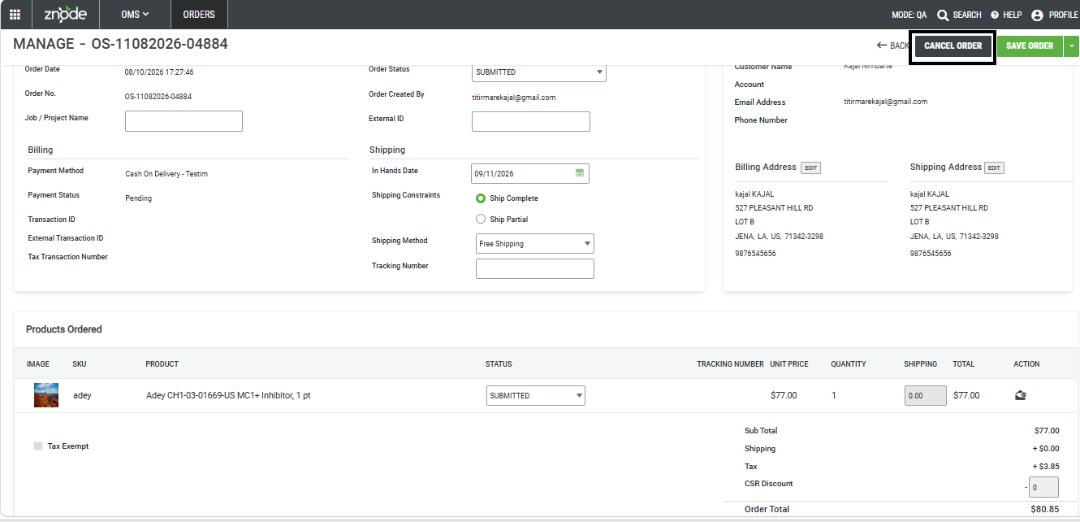
When an order is cancelled in the Admin Console, Znode follows a consistent system-driven workflow:
- Navigate to Admin Console > OMS > Orders.
- Select the required order.
- Click Cancel Order.
- The system evaluates the payment status (Authorized or Captured).
- Znode sends a request to Spreedly to reverse the transaction.
- The payment status is updated (Voided or Refunded).
- The order status is updated to Cancelled.
Workflow Summary
| Payment State Before Cancellation | Payment Action Performed | Payment Status After Cancellation | Order Status |
|---|---|---|---|
| Authorized | Void | Voided | Cancelled |
| Captured | Refund | Refunded | Cancelled |
Behavior for Authorized vs Captured Payments
Case 1: Order Cancelled While Payment is Authorized
Scenario: Payment is authorized but not captured.
- Order Status → Cancelled
- Payment Status → Voided
At this stage, funds are only reserved. Cancelling the order triggers a void, releasing the authorization.
Case 2: Order Cancelled While Payment is Captured
Scenario: Payment is already captured.
- Order Status → Cancelled
- Payment Status → Refunded
Since funds have already been collected, cancelling the order requires issuing a refund to the customer.
Automatic Refund/Void Logic
- Order cancellation automatically triggers payment reversal.
- Znode calls Spreedly APIs:
- Void API for authorized payments
- Credit (Refund) API for captured payments
- No manual intervention is required.
- Refunds and voids are initiated directly from Znode.
System Behavior (Default / Non-configurable Aspects)
- Payment reversal is always triggered on order cancellation.
- The system automatically determines whether to void or refund.
- There is no configuration to disable refund or void functionality.
Audit Trail & Where to Check Transactions
Znode Order History
- Navigate to Admin Console > OMS > Orders.
- Open the required order.
- Review the Order History section.
Available Details:
- Order status changes
- Payment status updates (Voided / Refunded)
- Timestamps of actions
- Transaction references
Spreedly / Payment Gateway Logs
- Payment transactions are also logged in Spreedly.
- Detailed transaction records can be viewed in the Spreedly dashboard.
- Additional validation can be performed in the payment gateway portal.
Error Handling (Refund Failure Scenarios)
If a refund or void operation fails:
- Znode continues to track the order status.
- Error details are available in Spreedly transaction logs.
- Administrators should:
- Verify the transaction in Spreedly.
- Check the payment gateway logs.
- Take corrective action in the gateway if necessary.
ERP Integration Considerations
What Data is Synced vs Not Synced
- Order cancellation status is stored in Znode.
- Payment status (Voided / Refunded) is available in Znode.
- Data can be retrieved through Znode APIs.
ERP Integration Behavior
- Cancellation and refund data is partially available by default.
- Custom API integration is required to sync data with ERP systems.
- ERP systems must explicitly consume order and payment status data.
Limitations / Known Constraints
- No configuration to disable refund or void during order cancellation.
- Payment reversal is always triggered automatically.
- Znode does not verify final settlement before initiating refund.
- Detailed gateway error messages may not be fully visible in Znode.
Additional Notes on Settlement Verification
- Spreedly does not always provide final settlement confirmation back to Znode.
- Administrators should verify settlement status directly in the payment gateway when required.