
Release Notes / Version 10.6.1.0 / Jan 14, 2026
Highlights
Release Information
The Znode 10.6.1.0 release introduces new features, enhancements, performance upgrades, and bug fixes.
Disclaimer
Customer Import
- The old Select Store dropdown has been deprecated and is no longer used for associating customers with stores during imports or updates.
- Going forward, all customer-to-store associations must be handled exclusively through the Customer Import CSV using the new StoreCode column. To ensure accurate mapping, proper validation, and compatibility with the latest features (including multi-store support and Centralized User Login settings), it is strongly recommended to download and use the latest Customer Import template for all future imports. Using the updated template helps prevent import errors and ensures that store assignments are correctly applied across the system.
Deprecation of Standalone Braintree Payment Method
- In this release, Znode is deprecating the standalone Braintree payment method. This method was originally introduced as a reference implementation for adding custom payment methods. Since Braintree is already fully supported via Spreedly, maintaining a separate standalone version is redundant.
- The standalone Braintree payment method has been removed from:
- System Settings → PlugIn → Available/Installed Plugins.
- Any configuration sets associated with the standalone Braintree method will be automatically removed from the database.
- Future Braintree configurations must now be managed exclusively through Spreedly.
- The standalone Braintree payment method has been removed from:
Temporary Disablement of Promotions, Coupons, and Vouchers Management on the Manage Order Screen. (Continued from Previous Version)
- In this release, the ability to add, manage, or modify promotions, coupons, and vouchers has been temporarily disabled on the Manage Order screen in the Admin Console. While promotions and coupons applied during order creation will still be visible on the Manage Order screen, the options to add new promotions or remove existing ones will not be available. This functionality will be re-enabled in a future update.
Deprecations
Store Selection (Dropdown) - Customer Import
- As part of this release, the Select Store dropdown previously used to associate customers with stores has been deprecated.
- What This Means
- Store assignment is no longer managed through the UI dropdown during customer import or update.
- Customers must now be associated with stores exclusively through the Customer Import CSV.
What’s New
Publish Enhancements
Introduction
This release improves Catalog and Store publishing by preventing unnecessary or invalid publish operations. The enhancements reduce redundant indexing, improve publish history accuracy, and add safeguards around empty catalogs, catalog status management, and concurrent store publishing.
Key Enhancements
- Catalog publish now runs only when products exist in Draft status.
- Empty catalogs (0 products, 0 categories) cannot be published.
- A new publish status, “Publish not initiated,” records skipped publish attempts.
- Catalog status automatically changes to Draft on edit and returns to Production after successful publish.
- Only one store publish can run at a time.
- Clear validation and warning messages guide users during publish actions.
Workflow
- Catalog Publish (Manual, Store-Level, Scheduler
- When a catalog publish is initiated, the system checks for products in Draft status. If none exist, the publish is skipped, no PIM index is generated, and a validation message is shown: “Catalog publish cannot be initiated as there are no products in the Draft status.”
- Publish history is recorded with status Publish not initiated, zero products/categories, and matching start/end times. If draft products exist, publishing proceeds as normal.
- Store Publish with Catalog
- When publishing a store with “Publish Draft Products Only” selected and the catalog has no draft products, the store publish completes successfully while the catalog publish is skipped. No catalog index is created, a warning message is displayed, and the catalog publish history shows Publish not initiated.
- Publishing Empty Catalogs
- Publishing is blocked for catalogs with 0 products and 0 categories, displaying: “Unable to publish as catalog does not contain any products.”
- Catalogs with a blank status are excluded from store, account-specific, and user profile catalog associations.
- Catalog Status Management
- Any catalog edit automatically sets the status to Draft. The status changes back to Production only after a successful publish.
- Store Publish Concurrency Control
- Only one store publish can run at a time. Additional publish attempts are blocked with the message: “Publish is in progress. Only one publish can be initiated at a time.”
Product Feed Stability and timeout configuration – Commerce Connector
Introduction
This release improves the stability and reliability of data exchange processes by introducing configurable execution time limits. Previously, long-running or stalled exchanges could run indefinitely, consuming system resources and blocking subsequent processes. With this enhancement, administrators gain better control, predictability, and visibility into data exchange execution.
Key Enhancements
- Configurable Timeout per Data Exchange
- Admins can now define a maximum execution time (in seconds) for each data exchange.
- Default Timeout Applied
- A default timeout of 120 seconds is automatically applied to
- Newly created data exchanges
- Exchanges created from libraries
- Existing exchanges after deployment (via migration/fallback)
- A default timeout of 120 seconds is automatically applied to
- UI Enhancements
- A new “Timeout (seconds)” field is added to:
- Add Data Exchange
- Manage Data Exchange
- Copy Data Exchange
- Exchange detail popups
- The field is optional, clearly labeled, and positioned below the Tags field.
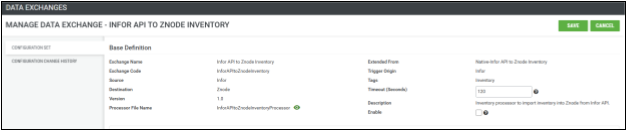
- The field is optional, clearly labeled, and positioned below the Tags field.
- A new “Timeout (seconds)” field is added to:
- Input Validation
- Only positive whole numbers are allowed. Invalid inputs (non-numeric, decimals, zero, or negative values) display a clear inline validation message.
- Improved Execution Handling
- Exchanges exceeding the configured timeout are automatically terminated and marked as Timed Out, with detailed logs for diagnostics
Workflow
Configuration
- Admin navigates to the Data Exchange list.
- Admin creates, edits, or copies a scheduled data exchange.
- Admin enters or updates the Timeout (seconds) value.
- Configuration is saved and persisted.
Execution
- Data exchange is triggered (manual or scheduled).
- The system reads the configured timeout and starts the execution timer.
- If execution completes within the timeout, the process finishes successfully.
- If execution exceeds the timeout:
- The process is automatically terminated.
- Status is set to Timed Out.
- Logs capture the timeout event with details: “Data exchange timed out after exceeding configured timeout. Component={Source|Destination}”
User Guidance
- Tooltip help text explains the timeout behavior and default value: “Maximum execution time (in seconds) for source and destination. Processes exceeding this limit are automatically terminated. Default: 120 seconds.”
Customer Import – Enhancements (Beta)
- Background:
- In earlier versions, customer-to-store assignment was managed through a Select Store dropdown, which limited scalability and control. The store association was largely manual, supported only single-store selection, as a result:
- Customers could not be efficiently assigned to multiple stores through a single import.
- Managing customer access across multiple stores required additional manual effort.
- Store-level centralized login restrictions could not be managed via import.
- Customers could not be efficiently assigned to multiple stores through a single import.
- In earlier versions, customer-to-store assignment was managed through a Select Store dropdown, which limited scalability and control. The store association was largely manual, supported only single-store selection, as a result:
- What’s New in This Release:
- This release introduces an improved Customer Import experience that replaces the Select Store dropdown with store-based configuration via import columns. This enhancement delivers greater accuracy and scalability, and enables administrators to import or update customers when the Centralized User Login feature is enabled.
- Deprecations:
- As part of this release, the Select Store dropdown previously used to associate customers with stores has been deprecated.
- What This Means
- Store assignment is no longer managed through the UI dropdown during customer import or update.
- Customers must now be associated with stores exclusively through the Customer Import CSV.
- Changes to the Customer Import Template (CSV)
- To support this enhancement, the Customer Import Template has been updated with new columns that explicitly define store access, default behavior, and login restrictions.
- Newly Added Columns and Behavior:
- StoreCode (Required)
- Position: First Column in the CSV
- Specifies the store to which the customer is associated.
- Comma-separated store values are not supported in the import file. Each customer record can be associated with only one store per row. If an administrator needs to associate a customer with multiple stores, they must include multiple records in the CSV—one for each store association—using the same customer details. This ensures accurate store mapping and consistent processing during the import.
- Must match an existing Store Code in the system.
- Once imported, this value cannot be unassociated. The import process supports only the addition and updating of records; unassociating a customer from a store is not currently supported through imports.
- Use “All Stores” (exact format) to associate the user with all available stores.
- This is respected only when the Centralized User Login setting, under Global Settings, is set to True
- Import validation:
- Missing or invalid store codes will cause the import to fail.
- DefaultStoreCode (Optional)
- Position: 2nd Last Column in the CSV
- Visibility:
- This column appears in the Import Template only when the Centralized User Login setting, under Global Settings, is set to True.
- Defines the customer’s default store.
- Must be one of the stores already associated with the user.
- If left blank, the first associated store is automatically set as the default.
- The input in the columns will only be validated when the Centralized User Login setting, under Global Settings, is set to True.
- Import Validation
- The value must be a valid store code and must already be associated with the user.
- RestrictCentralizedLogin_Store (Optional)
- Position: Last Column in CSV (after DefaultStoreCode)
- Visibility:
- This column appears in the Import Template only when the Centralized User Login setting, under Global Settings, is set to True.
- Controls whether login is restricted at the store level or allowed for all stores.
- Accepted values: Yes or No
- When access is restricted (setting is set to Yes) to a specific store, the shopper can only log in at that designated/associated store, ensuring that personal information (login credentials), order history, and store-specific data remain secure.
- For example, login credentials for a shopper account restricted to Store A cannot be used to access Store B or C.
- When the access is unrestricted (the setting is set to NO), login credentials are not restricted to a specific store and can be used across all stores.
- System checks whether a record with a given username already exists,
- If yes, then the new store gets associated with that username without creating a duplicate account.
- If a store is already associated with the username, the system will update the existing data for that store to ensure it remains updated.
- System checks whether a record with a given username already exists,
- When access is restricted (setting is set to Yes) to a specific store, the shopper can only log in at that designated/associated store, ensuring that personal information (login credentials), order history, and store-specific data remain secure.
- Accepted values: Yes or No
- Import Validations:
- Any value other than Yes/No (or equivalent True/False, 1/0) will cause the import to fail.
- If left blank, the default value is considered NO.
- StoreCode (Required)
- Impact on Existing Columns
- Other columns (except AccountCode) in the Customer Import CSV continue to follow the standard customer import format.
- Existing validation rules for mandatory fields, column mapping, and data integrity remain in effect.
- Account Code
- Changes in AccountCode (when the Centralized User Login setting, under Global Settings, is set to True).
- Only the AccountCode associated with the Default Store is accepted in this column.
- If an AccountCode is provided that is not associated with the Default Store, the import will fail
- Changes in AccountCode (when the Centralized User Login setting, under Global Settings, is set to True).
- Important Points:
- If the Centralized User Login setting, under Global Settings, is set to False,
- DefaultStoreCode and RestrictCentralizedLogin_Store columns will be hidden/ignored.
- Any values provided in these columns will be ignored; no validations will be applied.
- StoreCode: Once imported, this value cannot be unassociated. The import process supports only the addition and updating of records; unassociating a customer from a store is not currently supported through imports.
- StoreCode: Once imported, this value cannot be unassociated. The import process supports only the addition and updating of records; unassociating a customer from a store is not currently supported through imports.
- ProfileName
- If a Profile Name is explicitly provided in the CSV, only that specified profile will be associated with the shopper, overriding the store’s default profile or any profiles associated with the account. If no Profile Name is provided but an account is specified, all profiles associated with that account will be associated with the shopper by default. If neither a Profile Name nor an account is provided, the store’s default profile for registered users will be associated with the shopper.
- Beta Release Note:
- This feature is currently in Beta and supports only the following scenarios:
- Associating a Customer with a single Store via Import.
- Associating a Customer with All Stores via Import.
- DefaultStoreCode:
- It is important to add a store that is already associated with a customer, as this ensures that existing relationships and data connections are maintained accurately. Failing to do so could lead to inconsistencies or unexpected behavior
- This feature is currently in Beta and supports only the following scenarios:
- If the Centralized User Login setting, under Global Settings, is set to False,
Voucher Import - Enhancements
Background:
- In previous versions of Znode, the import functionality for vouchers was limited to system-defined fields only. Admins could not import data into user-defined fields (UDFs) that were added for custom requirements. As a result:
- Data for user-defined fields must be entered manually for each voucher.
- Manual entry increased the risk of human error.
- A business requirement emerged to enable importing data into user-defined fields for vouchers to reduce manual effort and improve accuracy.
What’s New in This Release:
- In this release, Znode enhances the voucher import functionality to support user-defined fields (UDFs). Previously, admins could only import system-defined fields, and any custom fields had to be entered manually. This improvement reduces manual effort, minimizes errors, and enables bulk import of vouchers, including user-defined fields.
Note: This enhancement applies only to vouchers. Other entities, such as products, categories, customers, accounts, pricing, promotions, SEO, or highlights, are not included in this release.
Key Enhancements:
User-Defined Fields in Voucher Import CSV
When a new UDF is created for vouchers, the corresponding column is automatically added to the sample Voucher Import template.
The process of creating a UDF for Vouchers works as is i.e
Create a new UDF and define its properties:
Attribute Name
Attribute Type (e.g., Text, Date, Number, Yes/No, File/Image, Multi-Select, Simple Select, Text Area
Validation rules (Required, Min/Max, Allowed values, Max Characters, etc.)
Once saved, the UDF automatically appears as a column in the Voucher Import CSV template.
UDF columns appear after system-defined fields, following the configured display order.
Admins can populate these fields directly in the CSV for bulk import.
Attribute Types and Validations:
Voucher UDFs support multiple attribute types, with validations applied during import:
Date:
Must follow date format; validated against Min/Max dates
File / Image
File Name with configured file extensions; source indicated in <AttributeName>_Source Column (if external media configurations are enabled).
Multi-Select / Simple Select
Values must match predefined options.
Number:
Numeric only; respects Min/Max, decimals, and negatives as configured
Text / Text Area:
Max character limits, regex/validation rules (Alphanumeric, URL, Email)
Yes/No:
Accepts Yes/No, True/False, 1/0
Required Fields:
If a UDF is marked Required, it cannot be left blank in the CSV.
Missing values in required fields cause the record to fail import.
Impact on Existing Columns:
Other columns (except user-defined fields) in the Voucher Import CSV continue to follow the standard Voucher Import behavior.
The system validates all fields, inserts valid records into the database, and generates detailed import logs. Failed records are logged with clear error messages, while successful records are still processed.
Important Points:
Only Voucher UDFs are supported in this release.
Other entities (products, categories, customers, accounts, pricing, promotions, SEO, highlights) are not supported in this release.
Standard Znode import behaviors (including mandatory column checks, error logging, and mapping validations) continue to apply.
Admins should verify that UDF values in the CSV match the attribute type and validation rules before importing the data.
Braintree Payment Support via Spreedly
- Disclaimer:
- To ensure the feature functions as intended, using the latest version of the Storefront may be required. Older versions could lead to limited functionality or operational issues.
- Background:
- Previously, Znode supported Braintree as a standalone payment method. This standalone implementation was initially provided as a reference integration for custom payment methods. However, Braintree is already fully supported through Spreedly, making the standalone implementation redundant.
- With the deprecation of the standalone Braintree gateway, it became necessary to transition Braintree payment processing exclusively to Spreedly. This ensures:
- Continuity of payment services.
- Elimination of redundant configurations.
- Full support for all Braintree payment types and business workflows.
- What's New In This Release
- This release introduces Braintree support via Spreedly, with the following enhancements:
- Braintree Configuration via Spreedly
- Admins can now configure Braintree as a payment gateway within Spreedly. This is done by navigating to the admin console: System Settings → Plugins → Installed Plugins → Spreedly → Edit Plugin → Configuration Sets → Add New → Add Configuration Set.
- A new option labeled “Braintree” has been added to the Select Gateway Type dropdown on the configuration set screen. All future Braintree transactions must be processed through this workflow.
- General Settings include:
- Configuration Code (mandatory): Unique identifier for each configuration set.
- Display Name (mandatory): Name shown on the webstore.
- Display Order (mandatory): Sequence of payment methods on checkout.
- Display Settings (mandatory toggle): Enable or disable the payment method.
- Select Gateway Type (mandatory): Admin selects “Braintree”.
- Gateway Settings include:
- Gateway Mode (mandatory): Test Mode (sandbox) or Live Mode (production).
- Authentication Mode (mandatory, non-editable): Default authentication used by Znode.
- Merchant Account ID (optional): Required if multiple merchant accounts exist.
- Merchant ID (mandatory): Braintree Merchant ID.
- Private Key (mandatory): Generated in the Braintree account.
- Public Key (mandatory): Generated in the Braintree account.
Payment Type (mandatory): Credit Card (default) or ACH.
Gateway Token and Gateway Status: Read-only, system-generated fields.
Znode Payment Settings
Admins can define how Braintree payments are processed during order placement:
Authorize and Capture: Payment is authorized and captured immediately when the order is placed.
Authorize Only: Payment is authorized at order placement, but capturing is done manually via the Manage Order screen.
Verify Only: A $0 verification transaction is performed at order placement. Manual authorization and capture options appear in the Manage Order screen once configured.
Verify and Authorize: $0 verification and authorization occur during order placement, with manual capture available afterward.
Verify, Authorize, and Capture: Verification, authorization, and capture all happen automatically when the order is placed.
- Braintree Configuration via Spreedly
Functional Impact:
Configuration Sets:
If an incorrect Merchant ID, Private Key, or Public Key is entered, the configuration set will not be created, and an error message will be displayed.
Deleting or disassociating a configuration removes Braintree from the checkout page.
Offline Payments:
Braintree can be used as an offline payment method within the store settings.
Quotes:
Braintree is available when converting quotes into orders, if configured.
Returns and Refunds
Refunds for Braintree orders are processed back to the original payment method.
User Profiles and Accounts:
Braintree respects account- and user-level configurations
Checkout:
Once configured and associated with the Store, Braintree appears on the checkout page and allows orders to be placed.
API:
All APIs handling payments now support Braintree via Spreedly, following standard Znode business rules
- This release introduces Braintree support via Spreedly, with the following enhancements:
Important Point:
Deprecation of standalone Braintree does not have an impact on overall system stability.
Security Enhancements
reCAPTCHA Secret Key Handling Improved on Webstore Login Page
Enhanced security by ensuring the reCAPTCHA secret key is no longer exposed in browser elements or network requests on the webstore login page. The implementation now uses secure server-side validation and masked client-side interactions to prevent potential misuse or vulnerability
Quote Submission Hardening: Strict Validation of targetClassType
Enhanced backend validation to prevent type tampering during Quote submission. The application now strictly validates the targetClassType parameter and rejects any attempt to switch the value from "Quotes" to "Orders" (or any unsupported type). This closes a loophole where an attacker could intercept the Quote creation request and trick the system into creating a confirmed Order instead of a Quote.
Security Hardening: Server-Side Enforcement of Cart Quantity Limits
Strengthened API validation to prevent quantity manipulation in the cart via /api/cart/update-cart-item. The endpoint now enforces server-side limits on updateCartQuantity, aligning with UI constraints (e.g., max 100) and rejecting arbitrary values (e.g., 1000) that could be injected by intercepting tools.
Impact
- Prevents bypassing UI controls and eliminates quantity escalation via API tampering.
- Aligns cart behavior across channels (web UI, API, mobile) with consistent enforcement of business limits.
- Reduces fraud risk and protects inventory & pricing integrity.
Critical n8n RCE Vulnerability (CVE-2025-68668
- Addressed a critical Remote Code Execution (RCE) vulnerability in n8n, rated CVSS 10.0 (Critical). This flaw allowed authenticated users to execute arbitrary code on the n8n server, potentially leading to full system compromise.
- This mitigates a severe risk of system takeover and ensures the integrity and security of the n8n environment.
API Enhancements
- Z10-29098 | Enhance custom processors to support injection of objects
- We have added an IServiceProvider parameter to the processors, which allows them to obtain instances of any registered services dynamically, rather than creating objects directly. This improves flexibility and decouples the processors from specific implementations
- Z10-29548 | Custom API Changes for Data Exchange Code
- Custom APIs have been updated to support the revised data exchange logic, introducing Exchange Code as a new mandatory field.
Important Points:
- Z10-29095 | Enhance Data Logging
- Previously, Admin > Application Logs did not display complete details when failures occurred. File name, line number, method name, and stack trace were not consistently logged. This has now been enhanced to ensure all relevant details are captured in the application logs, enabling faster and more effective debugging.
Breaking Changes
- No Breaking changes
Black Box Improvement
Digital Asset Management (DAM)
Z10-14861 | File Upload API /v2/files-upload inconsistent behavior across scenarios
Hardened validations and responses for predictable upload behavior across edge cases.
Z10-29214 | Admin freezes when uploading an invalid image with special characters
Sanitized filenames and improved validation to prevent UI freeze during image uploads.
Z10-29613 | Media Explorer: Column dropdown freezes
Fixed rendering and event handling to keep the column dropdown responsive.
Order Management System (OMS)
Z10-26820 | Manage Order: Quantity Displays as Decimal; Action Icons Vanish After Shipping Method Change
Corrected display formatting to show integer quantities and preserved action icons when shipping methods change during order management.
Z10-27051 | Order Missing from List
Fixed indexing and filtering issues causing orders to be absent from the list view. Orders now consistently appear according to applied filters and status.
Z10-27226 | Reorder from Order History Not Working
Restored reorder functionality from Order History, including item availability checks and pricing refresh, to support quick repeat purchases.
Z10-27789 | UI Issue with Tax Bifurcation on Manage Order/Quote
Adjusted UI components to properly render tax bifurcation details within Manage Order/Quote, ensuring clarity and correct alignment.
Z10-28391 | Quote Note Not Appearing Under Quote Details in Admin
Fixed missing Quote Notes in Admin. Notes now load and display within Quote Details, maintaining complete context for sales workflows.
Z10-29125 | Order History Shows Incorrect System Entries After Updating ‘In Hands Date.’
Resolved incorrect audit entries in Order History following In Hands Date updates. Logs now reflect accurate system events and timestamps.
Z10-29127 | Inconsistent Image Rendering Size on Admin → Manage Quotes
Standardize image rendering sizes within Manage Quotes to avoid layout shifts and ensure consistent visual presentation.
Z10-29263 | First Letter of Additional Attribute Appears Capitalized in Manage Order
Corrected formatting so additional attribute values retain their original case, matching the setup configuration.
Z10-29311 | Pending Orders: Quantity, Shipping Unit Price, and Total Columns Misaligned
Fixed column alignment issues in Pending Orders to ensure quantities, unit prices, and totals align with their headers for readability.
Z10-29464 | Quote Creation Date Incorrect
Adjusted timestamp handling so quote creation reflects the correct date/time in all views and reports.
Z10-23387 | Quotes: Update message not appearing in “Quote History and Notes” after editing addresses
Logged update messages whenever billing/shipping addresses are edited in Manage Quote.
Z10-23723 | Inconsistency in order status change
Enforced consistent workflow transitions and state validations for order status changes.
Dev Center
Z10-19848 | Custom Table Import Fails When File Name Exceeds Character Limit
Enforced filename length validations during custom table import to prevent database errors. Over-limit filenames now receive clear errors before processing.
Z10-29454 | Numeric Field Causes DateTime Conversion Error in Custom Table
Corrected data type handling for numeric fields to prevent inadvertent DateTime conversions during record addition in custom tables.
Z10-29489/Z10-28033 | Pricing Import Activation Date Appears One Day Early
Fixed a timezone/offset calculation issue causing activation dates to display one day earlier than provided. Imports now preserve the exact input date.
Z10-29581 | Product Import Status Not Updating with Large Record Counts
Optimized import job tracking to correctly update status for large product imports, including improved batching, progress reporting, and completion signals.
Z10-29677 | Custom Table Import Not Working
Restored custom table import functionality by addressing schema validations, transaction handling, and error reporting for robust end-to-end operation.
Z10-29743 | CommerceConnector Default Exchange: Validation Message on Optional Field Removal
Adjusted validation rules so that removing values from optional fields in the Default Exchange does not trigger erroneous validation messages.
Z10-29773 | SEO Import Performance Issue:
Improved performance of SEO imports through index tuning and batched writes, significantly reducing execution time for large datasets.
Z10-29903 | CommerceConnector SFTP Upload Fails When Destination Timeout Too Short
Handled short destination timeouts gracefully in SFTP uploads with automatic retries and clearer error messaging to reduce failed transfers.
Z10-29970 | User Import Fails When Same User Enabled for One Store and Disabled for Another
Resolved a database conflict where a single user had mixed enabled/disabled statuses across stores in the CSV. Import now validates multi-store states and merges consistently.
Product Information Management (PIM)
Z10-25694 | Inventory and Price Updates for Group Product Variants Require Parent Publish
Ensured variant-level inventory and price updates reflect on the webstore independent of parent group product publish. Publishing logic now supports variant propagation.
Z10-28242 | Add to Cart Button Disabled for Specific Scenario
Resolved a PIM-to-storefront integration issue that led to disabled Add to Cart for certain products/scenarios. Availability rules and validations are now consistent.
Z10-28263 | Unable to Switch Product Sections After Selecting New Custom Section
Fixed a navigation lock where selecting a newly created custom section prevented switching to other product sections. UI state management is now reliable.
Z10-29193 | Configurable Product: Screen Freezes When Associating Products Without Selecting Attributes
Prevented UI freezes by enforcing attribute selection prerequisites before associating variants to configurables, with clear guidance and validation.
Z10-29668 | Update: SKU Validation Message
Improved SKU validation messaging to be clearer and more actionable, including format, uniqueness, and character constraints.
Z10-28572 | Deleting and Recreating Brand with Same Code Auto-Associates Old Products
Addressed brand recreation logic where reusing the same brand code inadvertently re-associated previously linked products. Brand-to-product associations now reset cleanly.
Marketing
Z10-27793 | “Add Promotion and Coupon” page: validation error messages misaligned
Aligned error messages under their respective fields to reduce confusion.
Z10-28990 | Boost and Bury: Category Name not working as expected
Fixed category-level targeting in Boost and Bury to apply prioritization correctly.
Z10-29729 | Discount Information: “All Profile” checkbox gets unchecked after Save & Close
Persisted checkbox state so “All Profile” remains selected post-save.
System Settings
Z10-25090 | Page Builder: “Slides Per View” in Offer Banner not reflected in Preview
Synced preview rendering to honor the “Slides Per View” setting for Offer Banners.
Z10-14583 | Custom Table API returns 500 for a bad Table Key and 404 for an incorrect endpoint
Standardized error handling so incorrect table keys and endpoints return clear client errors instead of unexpected 500s.
Z10-17034 | Admin Orders Time Zone: Incorrect order date/time on receipt page
Fixed timezone conversions to show accurate order date and time on receipts.
Z10-23399 | Checkout: Tax field missing in Order Summary when tax is 0
Ensured the Tax field displays consistently, even when the tax evaluates to zero.
Z10-23847 | Diagnostics & Maintenance: “Terminate Publish” ends only one CMS publish task
Updated termination logic to stop all ongoing CMS publish tasks as intended.
Z10-26372 | Avalara Doc status not updated for Canadian addresses (single product) when order status changes. Synchronized status updates with Avalara for Canadian orders upon changing to Cancelled or Shipped.
Z10-27751 | Plugin configuration set validation messages misaligned under fields
Aligned validation messages properly under their respective configuration fields.
Z10-28232 | Avalara shows a negative shipping amount
Corrected shipping amount calculation/transmission to prevent negative values.
Z10-28558 | Credit card payment flow fails for American Express & MasterCard
Stabilized authorization/capture flows for AMEX and MasterCard across supported gateways.
Z10-28903 | CyberSource: Incorrect authorization/capture status for orders above $1000
Aligned high-value transaction handling with gateway responses to ensure accurate status reporting.
CMS
Z10-26686 | Publish blogs/news: Status not updating to Preview
Corrected status transitions so Preview reflects the current publish state.
Z10-26870 | Page Builder: ‘Max Cards Per View’ not working (Brand & other carousels)
Ensured carousels honor configured max cards per view across breakpoints.
Z10-28091 | Email: Reduce space against ‘Ship To’ in Return Order Acknowledgement
Refined template spacing to improve readability around the Ship To address.
Z10-29060 | Offer Banner properties do not work as intended in default configurations
Aligned property behaviors with defaults for consistent preview/live rendering.
Z10-29076 | Blogs/news with Active/Expire dates not appearing on webstore list pages
Fixed date-based visibility logic for content listing pages.
Z10-29078 | Blog News Comment List: “Failed to update” error appears on update attempt
Resolved update errors and provided accurate success messaging.
Z10-29134 | Banner Sliders: Offer Banners settings/display do not function properly on creation
Applied creation-time settings reliably to ensure correct slider display.
Z10-28409 | Add Email & SMS Template: UI misaligned
Aligned fields and validation messages for a cleaner authoring UI.
Z10-25090 | Page Builder: “Slides Per View” in Offer Banner not reflected in Preview
Synced preview rendering to honor the “Slides Per View” setting for Offer Banners.
Accounts and Users
Z10-4461 | Customer Users: Impersonation prompts for login on 10x webstore
Resolved an issue where customer user impersonation on the 10x webstore incorrectly prompted for login, ensuring session continuity during impersonation.
Z10-27994 | Guest user’s full name appears blank in Admin > Account & Users after placing an order
Mapped guest name correctly to account records post-order.
Z10-28328 | User count mismatch between Admin and Webstore in Account → Manage Account → Users with centralized login
Synced counters and cache invalidation to display accurate user counts.
Z10-28468/Z10-28590 | Admin: Sales Rep can view details of another store (security/functional)
Tightened role/store scoping to prevent cross-store data exposure.
Z10-28533 | Selecting “All Stores” during user creation maps roles only to the default store
Applied role assignments across all selected stores instead of just the default.
Z10-28677 | Checkout: Profile-based payment restrictions ignored for guest users
Enforced restrictions consistently for guests and registered users alike.
Z10-29344 | User able to delete default profile
Protected default profiles from deletion through validation and guardrails.
Reporting
Z10-29411 | BI Report: User Activity Log filter includes “Storefront Pages Visited.”
Removed unintended filter option; filter set now matches supported event types.
Other and API Improvements
Z10-16877 | Newly created user with account not appearing in Top Accounts (Admin Dashboard)
Refreshed indexing/caches so newly linked users surface correctly in Top Accounts.
Z10-20253 | Webstore Checkout: “Set as Default” unchecks when editing shipping address.
Persisted checkbox state reliably through shipping address edits.
Z10-24485 | GetAssociatedWarehouseList API: invalid expand keys validation incomplete; unclear error for missing PortalId.
Strengthened expand key validation, and clarified error messaging when PortalId is missing.
Z10-28998 | Signup API missing errorCode in response
Added errorCode to enable accurate client-side error handling.
Z10-29000 | OrderDiscounts.Name should return the promotion name
Mapped the field to return the associated promotion name for clarity in summaries/reports.
Z10-29023 | Assigned voucher not returned by API without Admin UI refresh
Fixed real-time propagation so newly assigned vouchers are immediately available via API.
Z10-29091 | Unable to switch to other sections in categories/promotions/coupons/site search after clicking custom sections
Resolved navigation lock and restored switching between sections after custom section selection.
Z10-29166 | VoucherClient.GetVouchersAsync throws on filters (PortalId, IsActive, UserId, StartDate, ExpirationDate)
Handled filter combinations and null checks to eliminate exceptions.
Z10-29167 | Need credit card details for registered and guest users, regardless of saved state
Ensured card details capture is consistent for all users during payment submission.
Z10-29205 | Reset Password shows validation error but redirects to Login
Corrected flow to stay on the reset step until valid, with clear error handling.
Z10-29323 | dataexchanges/real-time-exchanges API should accept request body
Enabled request body support with proper validation for richer payloads.
Z10-29778 | Commerce Portal: StatusCode missing in order details API
Included StatusCode in responses for reliable downstream state handling.
Z10-29694 | UserV2/UpdateUser unable to update user
Fixed update logic and field validations to allow consistent user updates.
Z10-25725 | Znode V2: Account Department creation /v2/account-departments
Stabilized creation workflow with validations and consistent responses.
Z10-25726 | Znode V2: Update Account /v2/accounts
Corrected partial updates and concurrency handling to ensure predictable account modifications.
Z10-25791 | Znode V2: List all account addresses /v2/accounts/addresses
Standardized pagination and filtering to return complete/consistent address lists.
Z10-25797 | Znode V2: Create Account Notes /v2/account-notes
Ensured notes persist correctly with proper metadata and indexing.
Z10-25800 | Znode V2: Delete Account Notes (Bulk) /v2/account-notes-bulk/{noteIds}
Processed bulk deletions reliably and reported partial failures accurately.
Z10-25805 | Znode V2: Update Account Note /v2/account-notes
Stabilized note updates, ensuring timestamps and content changes are reflected.
Z10-28959 | Webstore_Search: Currency symbol not showing in product suggestions
Restored currency symbol display in typeahead suggestions for price clarity.
Z10-27393 | Returns API: Eligible Orders pagination metadata and page size not respected
Implemented accurate pagination with correct metadata and page-size adherence.
Z10-29352 | Apex GiftCard/List API: ModifiedDate not populated
Populated ModifiedDate to support audit/reporting use cases.
Z10-29392 | GetCoupon API returns 500; promotion fields null despite valid association
Fixed backend errors and ensured promotion fields are populated: type, message, and name.
Z10-29427 | Base API: ProfileIds null check not handled; missing API to fetch Promotion by PromotionId
Added robust null handling and introduced an endpoint to fetch promotions by PromotionId.
Z10-29878 | Calculate Cart API fails with expands (ZnodeException)
Handled expands properly and eliminated exceptions during cart calculation.
Z10-30045 | Cart is getting empty for existing users
Resolved session/caching conflicts to maintain cart persistence across sessions/devices.
Open-Source Enhancements and Fixes
Z10-12595 | After removing product from 'Order summary' section of checkout page, user is redirected to Cart Page
When a user removes a product from the order summary during checkout, instead of staying on the checkout page, they are redirected back to the cart page, disrupting the checkout flow.
Z10-18572 | Zip code appears on the 'Zip Code' field of the 'Estimate Shipping Costs' section on going back to the cart page after applying a coupon on the checkout Page
After applying a coupon on the checkout page and navigating back to the cart, the Zip Code field in the Estimate Shipping Costs section incorrectly retains the previous value, confusing.
Z10-21698 | Webstore - Logged-in user's review is showing the userid instead of the entered name in reviews
Product reviews submitted by logged-in users display the internal user ID instead of the name entered by the user, leading to poor user experience and privacy concerns.
Z10-23182 | Webstore - PDP - Recently Viewed Products - Quick View - Switching variants of a configurable product in Quick View redirects to the same product detail page being viewed.
When switching variants of a configurable product in Quick View from Recently Viewed Products, the user is redirected to the same PDP instead of updating the Quick View content dynamically.
Z10-25171 | Webstore_PLP page: Long Product name overlapping
On the Product Listing Page (PLP), long product names overlap with other UI elements, breaking the layout and reducing readability.
Z10-25352 | Webstore_Search Product: UI issue for Quick view in case of locale changed to French
Quick View UI breaks when the locale is switched to French, causing misaligned elements and poor usability.
Z10-25628 | Webstore_Quick order_Cart page reloads twice
The cart page reloads twice when using Quick Order functionality, leading to unnecessary delays and performance issues.
Z10-25869 | Knox Webstore: Mobile testing: Safari: In the footer section, long text shows distorted
On Safari mobile, long text in the footer appears distorted and improperly wrapped, affecting mobile responsiveness.
Z10-25994 | Webstore: Profile’s first name is not updated immediately. The changes are updated by explicitly refreshing the webstore edit profile page / other page
When a user updates their first name in the profile, the change does not reflect immediately across the webstore unless the page is manually refreshed.
Z10-26434 | Webstore_Create Quote button is clickable before summary details are fully loaded, causing incorrect calculations
The Create Quote button becomes active before summary details finish loading, leading to incorrect quote calculations and potential errors.
Z10-27096 | Webstore : PLP: PDP: “Only 1 more quantity.” The product quantity validation appears when the shopper adds the maximum quantity on PDP/PLP in the mentioned scenario
Quantity validation incorrectly triggers with the message “Only 1 more quantity” even when the maximum allowed quantity is already added.
Z10-27853 | Inconsistency in recently viewed product message on PDP in case of Price expiration date is over.
Recently viewed product messages on PDP behave inconsistently when the product’s price expiration date has passed, confusing shoppers.
Z10-28081 | Search is not working on the Previous Purchases page
Search functionality fails on the Previous Purchases page, preventing users from finding past orders efficiently.
Z10-28608 | Discrepancy in calendar widget in custom range on previous purchase page
The calendar widget for selecting a custom date range on the Previous Purchases page shows discrepancies, such as incorrect date selection or misalignment.
Z10-28749 | Validation Missing When "Save for Later" and Cart Combined Quantity Exceeds Max Limit
No validation occurs when combined quantities from “Save for Later” and the cart exceed the maximum allowed limit, leading to incorrect order processing.
Z10-28905 | Commerce Portal - Create Quote/Order - Reset line item price is not functional
The Reset Line Item Price feature in Commerce Portal does not work, preventing users from reverting prices to their original values during quote/order creation.
Z10-29009 | “Is Obsolete” Status Not Reflecting on Cart Page After Product Publish.
Products marked as “Is Obsolete” after publishing do not reflect this status on the cart page, allowing users to proceed with outdated items.
Z10-29128 | After adding a product to the cart on browser tab 1, it does not appear in the cart when accessing the cart on tab 2 in the mentioned scenario
Cart synchronization fails across browser tabs, causing added products to not appear when switching tabs.
Z10-29314 | Improper price is shown when we reset the price of the product, which have additional cost/upcharge associated with it - Commerce Portal
Resetting the price of products with additional costs/upcharges in the Commerce Portal displays incorrect pricing, leading to calculation errors.
Z10-29450 | Header shows incorrect username after account switch/logout
After switching accounts or logging out, the header continues to display the previous username instead of updating to the correct state.
Z10-29610 | Unable to create a quote from the webstore, Spinner is appearing
Quote creation fails on the webstore, leaving users stuck with a loading spinner and no progress.
Z10-29630 | The paragraph text is getting a larger font size than the heading tags
Paragraph text incorrectly appears larger than heading tags, breaking visual hierarchy and design consistency.
Z10-29872 | In the Cart for all products, Out of stock is displaying, though the product is 'Allow Backordering.'
Cart incorrectly shows “Out of Stock” for products that allow backordering, causing confusion and blocking checkout