
Release Notes / Version 10.7.0.0 / Jan 30, 2026
Highlights
Release Information
The Znode 10.7.0.0 release introduces new features, enhancements, performance upgrades, and bug fixes.
Disclaimer
Temporary Disablement of Promotions, Coupons, and Vouchers Management on the ManageOrder Screen. (Continued from Previous Version)
- In this release, the ability to add, manage, or modify promotions, coupons, and vouchershas been temporarily disabled on the Manage Order screen in the Admin Console. Whilepromotions and coupons applied during order creation will still be visible on the ManageOrder screen, the options to add new promotions or remove existing ones will not beavailable. This functionality will be re-enabled in a future update.
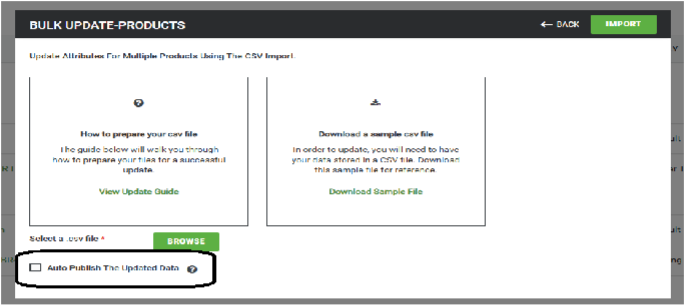
Temporary Disablement of “Auto Publish the Updated Data” Flag
- In this release, the “Auto Publish the Updated Data” flag has been temporarily disabled. While existing published data will remain available and visible as expected, updates willno longer be automatically published when changes are made. Manual publishing will still be required where applicable. This functionality will be re-enabled in a future update.
Temporary Disablement of “Hide Category on Menu Publish the Updated Data” Flag
- The “Hide Category on Menu” flag in the Admin Category settings has been temporarilydisabled and is not available for use. This option is currently unsupported, and itsbehavior is excluded from standard functionality until further notice.
Temporary Disablement of “Admin Login Page Setting” Under Global Settings
- The “Admin Login Page Setting” in the Admin Global Settings has been temporarilydisabled and is not available for use. This option is currently unsupported, and itsbehavior is excluded from standard functionality until further notice.
Breaking Changes & Known Issues
- Breaking Changes
- External Media URL Configuration – Breaking Change
- When External Media is enabled, the use of #baseurl# and #imagename#macros in URL configuration is now mandatory; implicit URL constructionis no longer supported. Existing configurations without macros will break, but administrators now have greater flexibility to control URL structure byplacing macros anywhere in the pattern.
- Old Behavior
- When External Media was enabled, #baseurl# and #imagename#macros were optional. If not provided, the system automatically constructs the URL by prefixing the External Base URL andappending the Image Name.
- Example
- External Base URL: https://cdn-usds-pr.znodecorp.com/znode10/
- URL Configuration: Catalog/800
- Image Name: 300-300-pnj.png
- Final URL:
- Updated Behavior
- When External Media is enabled, #baseurl# and #imagename#macros are mandatory. The system no longer auto-appendsvalues, and URLs are formed only based on explicit macro placement.
- Example
- External Base URL: https://cdn-usds-pr.znodecorp.com/znode10/
- URL Configuration: #baseurl#Catalog/800/#imagename#
- Image Name: 300-300-pnj.png
- Final URL:
- External Media URL Configuration – Breaking Change
- Known Issues
- Product Override Full-Text Search – Pagination Issues
- The Product Override full-text search API returns inconsistent paginationresults, including empty product lists on valid page indexes and incorrectTotalPages and TotalResults values. Pagination metadata is impacted by changes to pageIndex and pageSize, resulting in inaccurate page navigation and unreliable search result counts.
- The issue will be fixed in the upcoming release.
- The Product Override full-text search API returns inconsistent paginationresults, including empty product lists on valid page indexes and incorrectTotalPages and TotalResults values. Pagination metadata is impacted by changes to pageIndex and pageSize, resulting in inaccurate page navigation and unreliable search result counts.
- Partial Payment Not Honored for “Invoice Me” Orders
- When making a partial payment on an Invoice Me order usingACH/PayFabric, the system incorrectly applies the full order amountinstead of the entered partial amount, leaving no pending balance. Thisissue occurs in QA (works as expected in Sandbox) and impacts theQuote-to-Order flow and Spreedly integration.
- The issue will be fixed in the upcoming release.
- When making a partial payment on an Invoice Me order usingACH/PayFabric, the system incorrectly applies the full order amountinstead of the entered partial amount, leaving no pending balance. Thisissue occurs in QA (works as expected in Sandbox) and impacts theQuote-to-Order flow and Spreedly integration.
- Catalog Publish Status Not Updating After Category Changes
- In Stage Admin → PIM Catalog, modifying category order or associationsdoes not change the catalog status from Production to Draft afternavigating back. This works correctly in Sandbox but fails in Stage, impacting the Admin catalog management experience.
- The issue will be fixed in the upcoming release.
- In Stage Admin → PIM Catalog, modifying category order or associationsdoes not change the catalog status from Production to Draft afternavigating back. This works correctly in Sandbox but fails in Stage, impacting the Admin catalog management experience.
- Product Override Full-Text Search – Pagination Issues

What’s New
Nx and Next Js Upgrade
- Overview
- The primary goal of this upgrade is to leverage new features introduced in Nxand Next.js, improve the overall development experience—particularly HotModule Replacement (HMR) using Turbopack—reduce development-time, and enhance build and reload performance.
- Leverage new features and performance improvements introduced inNx 22 and Next.js 15
- Enable Turbopack-based Hot Module Replacement (HMR) forfaster development feedback
- Reduce development-time slowness and improve build andreload performance
- Improve developer experience through modern tooling andworkflows
- Ensure compatibility with existing applications, shared libraries, and third-party dependencies within the monorepo
- Reduce technical debt and establish a stable, future-readyfoundation for ongoing development
- All upgrades will be validated to ensure that existing applications, sharedlibraries, and build pipelines continue to function correctly, with breakingchanges identified and addressed during the migration process.
- The primary goal of this upgrade is to leverage new features introduced in Nxand Next.js, improve the overall development experience—particularly HotModule Replacement (HMR) using Turbopack—reduce development-time, and enhance build and reload performance.
- Focus Areas
- Upgrade Nx from v19 to v22 to improve task orchestration, caching efficiency, and dependency graph management.
- Upgrade Next.js from v14 to v15 to enable Turbopack-based development, improved HMR, and enhanced server-rendering capabilities.
- Upgrade React from v18 to v19 to adopt new rendering optimizations, compiler support, and modern async patterns.
- Reason for Upgrade
- The current setup, based on Nx v19 and Next.js v14 does not fully supportTurbopack and has shown unstable behavior when attempting to adopt newerbundling workflows. This limits development performance and blocks access tokey improvements introduced in React 19 and Next.js 15.
- Upgrading to Nx 22, Next.js 15, and React 19 enables:
- Turbopack for significantly faster development startup times andincremental builds.
- Improved Hot Module Replacement (HMR) with instant code updatesinstead of frequent full-page reloads.
- React 19 use() hook, allowing asynchronous data to be consumed directlywithin components (e.g., const data = use(fetchData())), resulting in cleaner and more readable code.
- React Compiler (React Forget) for automatic re-render optimizationwithout extensive use of useMemo or useCallback.
- Stable React Server Components (RSC) for smaller client bundles andfaster server rendering.
- Next.js 15 enhancements, including improved caching behavior, streaming support, and App Router performance improvements.
Reference Document:
PayFabric Payment Gateway Integration
- Introduced support for the PayFabric payment gateway in Spreedly to enable paymentprocessing.
- This enhancement allows merchants to configure and use PayFabric as a custompayment gateway for order placement.
- Scope (Included in This Phase)
- Creation of the PayFabric configuration set
- Order placement using Credit Card and ACH payment methods
- Out of Scope (Not Included in this Release)
- Skip CVV functionality
- Save Card capability
- Returns and refunds processing
- Modifications to the Manage Order screen
- Changes to existing API behavior
Enhancements to Two-Factor Authentication (2FA) Settings
- Disclaimer:
- To ensure the feature functions as intended, using the latest version of theStorefront may be required. Older versions could lead to limited functionality oroperational issues.
- Feature Overview:
- Two-Factor Authentication (2FA) settings across the Admin Console andStorefront have been enhanced to provide greater configurability, clearer settingdefinitions, and improved validation—while preserving existing behavior bydefault.
- What’s New:
- Configurable Resend Code Cooldown
- Administrators can now configure the waiting period before a verificationcode can be resent.
- This setting was previously hardcoded at 30 seconds and is nowconfigurable to better balance security and user experience.
- The default value remains 30 seconds, ensuring no change to existingbehavior unless updated.
- Clearer and More Consistent Settings
- 2FA setting labels have been updated for improved clarity andconsistency.
- Session-related settings now use clearer time units:
- The Two-Factor Authentication Validity Period is configured in days.
- Two-Factor Authentication Code Timeout is configured inminutes.
- Improved Validation
- When enabling or updating 2FA, the system now validates that SMTPemail settings are configured.
- If SMTP details are missing, a validation message is displayed beforesaving changes.
- What Stays the Same
- Existing 2FA enablement for both the Admin Console and Storefront remains unchanged.
- Customers with 2FA already enabled are not required to reconfigure settings.
- Default values align with current system behavior to prevent unexpected changes.
- Active user sessions and existing authentication flows remain unaffected.
- No breaking changes are introduced to API authentication or legacy 2FA flows.
- Default Settings After Upgrade: These values can be updated by administrators at anytime to meet organizational security requirements.
- 2FA Validity Period: 2 days
- Authentication Code Timeout: 10 minutes
- Resend Code Cooldown: 30 seconds
- Configurable Resend Code Cooldown
Quick Order Support for TradeCentric Punchout
- Disclaimer:
- To ensure the feature functions as intended, using the latest version of theStorefront may be required. Older versions could lead to limited functionality or operational issues.
- Feature Overview:
- Quick Order is now fully supported during TradeCentric punchout sessions. Usersaccessing the Znode Storefront via TradeCentric (loaded within an iframe) canseamlessly use Quick Order to add products in bulk, improving ordering efficiency and usability.
- What’s New
- Quick Order is now available in TradeCentric punchout sessions
- The Quick Order component renders and functions correctly within theZnode iframe.
- Multiple product entry methods supported
- Add via Quick List
- Paste multiple SKUs
- Upload via spreadsheet
- Manual SKU entry:
- SKU only (comma-separated)
- SKU + quantity (comma-separated)
- Seamless cart integration
- Products added through Quick Order are added to the cart and follow the standard punchout checkout flow back to TradeCentric.
- Quick Order is now available in TradeCentric punchout sessions
- What Stays the Same:
- Quick Order behavior and validations remain consistent with the standardstorefront experience.
- No impact on non-punchout sessions or existing TradeCentric configurations.
- Performance, security, and browser compatibility are unchanged.
- Out of Scope
- Logging or analytics for Quick Order usage during TradeCentric punchout sessions.
- Capture of iframe- or punchout-specific errors for monitoring or reporting.
BI Reports: Improve Filter Panel Usability in BI Reports
- Feature Overview:
- Previously, left panel filters were only active after selecting a row, which could be confusing. We’ve updated the interface to improve clarity and usability.
- What’s New
- Left panel filters are now hidden by default, removing the need to select a row.
- This simplifies the interface and makes navigation more intuitive.
Order Pick List Report designing
- Feature Overview
- The Power BI report and Order Details API now focus exclusively on OS-classorders. Other order classes are excluded unless they are converted into finalorders, ensuring the report reflects only relevant, actionable data.
- What’s New
- Power BI report displays only OS-class orders.
- Order Details API now pulls only OS orders from the database.
- Non-final order classes are excluded until converted to final orders, improvingaccuracy and clarity.
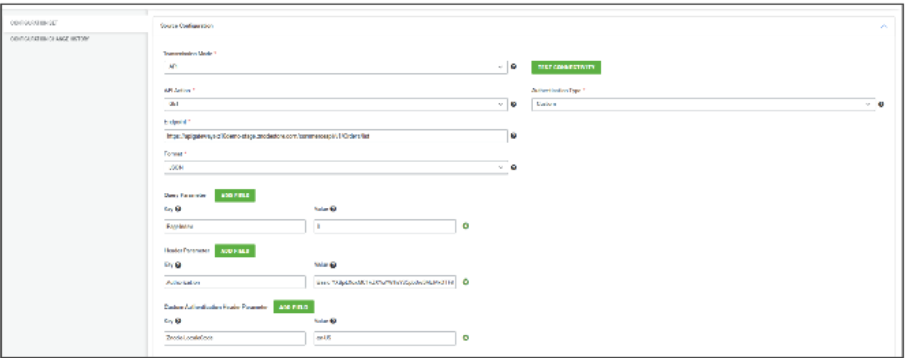
Allow the user to add - Custom Authentication Type
- Feature Overview
- Previously, Data Exchange configurations only supported predefinedauthentication types, limiting integration with APIs that require customauthentication. Users could not configure authentication logic beyond thestandard options, restricting flexibility for complex integrations.
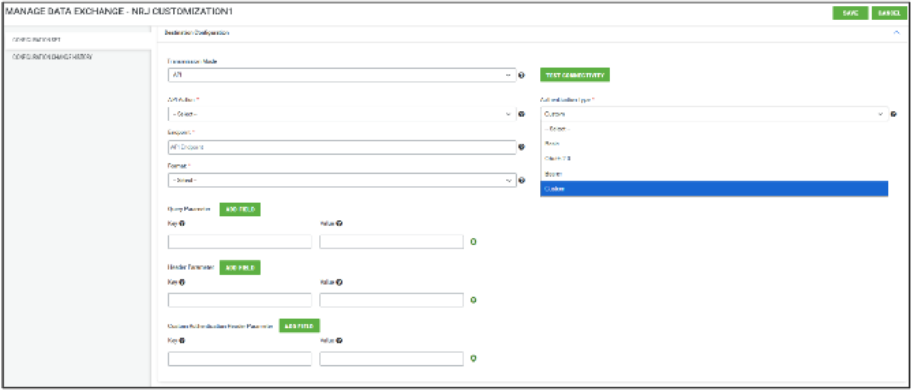
- To address this, a new Custom Authentication type has been introduced for both
- Source and Destination configurations, enabling users to define API-specificauthentication logic while retaining full configuration history.
- What’s Newo
- Custom Authentication type available when Transmission Mode = API.
- Option appears in both Source and Destination authentication sections.
- Selecting Custom Authentication displays fields to define API-specificauthentication logic:
- API
- Action
- Authentication Type
- Endpoint
- Format
- Query Parameters
- Custom Authentication Header
- Standard fields like Username, Password, and API Key are hidden when CustomAuthentication is selected.
- All Custom Authentication data is retained in the system, even if the userswitches to another authentication type, allowing seamless restoration when switching back.
- Configuration Change History logs are generated for:
- New configuration creation
- Updates to existing configurations
Commerce Connector - Data Exchange UI changes
- Feature Overview
- The Data Exchanges interface has been streamlined for clarity and usability. Keyvisual elements and interactions have been updated to reduce clutter, improve consistency, and make common tasks more efficient.
- What’s New
- The top black bar was removed to declutter the interface.
- List page title updated to “Data Exchanges” for consistency across pages.
- The Exchange Name column width increased to display full names without resizing.
- Edit button added in the exchange preview modal for quick, direct editing.
- Exchange Code column added.
Security Enhancements
Offline Payment Validation for Invoice Processing
- Enhanced security controls for the offline-payment endpoint to prevent invoices from being marked as paid using arbitrary or invalid paymentTransactionToken orexternalTransactionId values. The system now enforces strict validation of transactionidentifiers and verifies payment authenticity before allowing invoice settlement. This enhancement safeguards against unauthorized invoice payment, improves data integrity, and mitigates the risk of fraudulent or unintended financial records on thewebstore.
Server-Side Validation for Payment Amount Integrity
- Strengthened payment security during checkout by enforcing server-side validation onthe POST /api/payment-manager/create endpoint.
- Previously, the request payload could be intercepted and manipulated to alter the totalpayable amount, which was accepted without verification and successfully authorizedand captured in Spreedly.
- The system now validates the payment total against authoritative order data on theserver, preventing tampering, ensuring payment integrity, and mitigating the risk of underpayment, fraud, and financial data inconsistencies.
Server-Side Enforcement of Payment Action Controls
- Enhanced checkout payment security by enforcing server-side validation of the creditCardVerification action in the /api/payment-manager/create API.
- Previously, the payment action value could be intercepted and modified on the client (forexample, changing VerifyOnly to AuthorizeAndCapture), and the server would honor thetampered request.
- This allowed full transaction capture even when the merchant had explicitly restricted the payment method to verification or authorization only.
- The system now validates the payment action against merchant and payment-methodconfiguration on the server, preventing unauthorized capture and ensuring consistent enforcement across all supported Spreedly providers, including NMI, Vantiv, and CyberSource.
Open Redirect Protection on Webstore
- Strengthened webstore security by addressing an open redirection vulnerabilityidentified during a security scan.
- URL redirection handling has been hardened to validate and restrict redirect targets, ensuring users are only redirected to trusted and approved domains.
- This enhancement prevents potential phishing attacks, unauthorized redirects, andmisuse of the application’s navigation flow, improving overall security posture.
Validation and Restriction of ReturnUrl Redirects
- Improved webstore security by hardening the handling of the returnUrl query parameter, which is used to redirect users after specific actions. Previously, the parameter was notvalidated or restricted, allowing attackers to craft URLs that redirected users from alegitimate domain to attacker-controlled sites.
- This behavior could be abused for phishing, social engineering, and bypassing URL-based security controls.
- The system now validates and restricts redirect destinations to approved, trusteddomains only, preventing unauthorized redirection and reducing the risk of abuse.
Mitigation of DOM-Based Open Redirection Risks
- Strengthened client-side security to mitigate DOM-based open redirection vulnerabilitiesby eliminating the use of untrusted data for dynamically setting redirection targets wherever possible.
- In scenarios where dynamic redirection is required for functional reasons, robust client-side defenses have been implemented. These include strict validation of redirect targetsagainst an approved whitelist of permitted URLs before any redirection occurs.
- This approach prevents malicious input from introducing arbitrary or attacker-controlleddestinations, significantly reducing the risk of phishing, social engineering, and abuse oftrusted application domains.
Cross-Site Scripting (XSS) Protection for Custom Table Name Attribute
- Enhanced input handling and output encoding for the Custom Table Name attribute to prevent cross-site scripting (XSS) attacks.
- Previously, user-supplied input containing JavaScript payloads (for example,<script>alert('XSS')</script>) was rendered without proper sanitization or escaping, resulting in script execution in the browser.
- The application now enforces strict input validation and context-appropriate outputencoding, ensuring malicious scripts are neutralized and protecting users fromunauthorized script execution.
Server-Side Validation of Payment Amounts
- Enhanced checkout payment security by enforcing strict server-side validation ofpayment amounts before initiating authorization or capture with the payment gateway.
- The system now ensures that the payable amount used for payment processing isderived exclusively from trusted server-calculated order data.
- This enhancement strengthens financial integrity, prevents discrepancies between ordertotals and processed payments, and improves overall protection against unauthorized orunintended payment manipulation.
Strengthened Authorization Controls for Account Switching
- Improved security for the account-switching authentication workflow by enforcing strictauthorization and identity validation on the server.
- The system now ensures that account-switching actions are permitted only forappropriately authenticated and authorized users, in accordance with configured access rules.
- This enhancement prevents unauthorized account access, strengthens user isolation, and reinforces overall authentication and authorization integrity.
Performance Enhancement
Optimized Guest Address Handling
- Improved checkout performance for guest users by optimizing address handling duringaddress creation.
- Redundant address-list retrieval has been eliminated, reducing unnecessary API calls and improving responsiveness when adding a new address.
Black Box Improvements
Product Information Management (PIM)
Z10-16989 | Active Category Shows “No Records Found” on Webstore
Resolved an issue where active categories displayed no products. Category-product indexinghas been corrected.
Z10-17699 | SEO Page Name Not Retained When Navigating Back from PDP
Fixed an issue where default SEO URLs were used instead of configured SEO names whennavigating back from PDP.
Z10-18443 | Inactive Products Visible on PLP with Blank PDP
Resolved an issue where inactive products appeared on PLP but led to blank PDPs. Productvisibility rules have been enforced.
Z10-20304 | Pricing Status Messages Not Displayed Correctly
Fixed incorrect display of “Pricing Not Set” and “Obsolete” messages for grid-enabled products.
Z10-25253 | Publish Failure Message for Inactive Products
Corrected publish messaging to accurately reflect failures when attempting to publish inactiveproducts.
Z10-25980 | Inactive Products Appear in Search Results
Resolved an issue where inactive products were searchable despite PDP being unavailable.
Z10-26405 | Product SEO Details Not Properly Reflected on Webstore
Fixed inconsistencies in product SEO details and friendly URLs, especially during cart-to-PDPnavigation.
Z10-26617 | Blank Screen and UI Misalignment During Product Publish
Resolved UI rendering issues encountered during product publish for specific SKUs.
Z10-27113 | Configurable Product Parent Image Not Displayed
Fixed an issue where the parent image did not display if the selected variant combination wasunavailable.
Z10-27877 | Brand SEO Details Not Displayed Locale-Wise
Resolved an issue where localized brand SEO data was not reflected correctly on the webstore.
Z10-28675 | Variant Options Displayed as Strikethrough in Quick View
Fixed incorrect strikethrough styling applied to variant options in quick view.
Z10-28945 | Publish Failures and Missing Product Data
Resolved multiple issues causing publish failures and incomplete product data.
Z10-29873 | PDP Video Thumbnail Not Displaying
Fixed an issue where video thumbnail images were not rendered on the PDP.
Z10-29947 | Publish Status Not Updating to Production
Resolved an issue where the publish status remained “Draft” after successful publishing.
Z10-29635 | Deleted and Recreated Brand Still Visible on Webstore
Fixed an issue where products remained visible after deleting and recreating brands with thesame code
System Settings
Z10-30087 | Text Area Attributes Should Not Support Default Value Import
Corrected import validation to prevent default values for text area attributes such as short andlong descriptions.
Z10-28674 | User Import Fails to Associate Profile
Fixed an issue where user imports failed to associate profiles correctly based on account orstore defaults.
Z10-30000 | Orders Processed with Fake Credit Cards in Production
Resolved a critical issue allowing orders to be placed with invalid credit card details in livepayment mode.
Z10-30168 | Order Placed Without Selecting Saved Card
Fixed an issue where orders could be placed without selecting a saved card when CVV wasskipped.
Z10-30210 | Delay in APM Payment Selection During Quote-to-Order
Resolved delays experienced while selecting APM payment methods during quote conversion.
Z10-30425 | UPS Rates Not Updated in Order Summary
Fixed an issue where UPS shipping rates were not refreshed in order and quote summaries.
Z10-30483 | Payment iFrame Fails During Quote Conversion
Resolved a React error preventing the payment iFrame from loading during admin quote-to-
order conversion
Reporting
Z10-23509 | Power BI Reports Not Respecting Store-Specific Filtering Options
Corrected an issue where Power BI reports ignored store-specific filters and displayedaggregated or incorrect data. The filtering logic has been enhanced to ensure reports strictlyrespect the selected store context, improving data accuracy and reporting reliability.
Z10-29603 | Power BI: Audit Log Report Not Displayed in Admin
Resolved an issue where the Audit Log report was not visible within the admin Power BI section. The report configuration and visibility settings have been corrected to ensure administratorscan access audit logs as expected.
Content Management System (CMS)
Z10-25129 | Page Builder Preview Displays Horizontally Configured Link Panel Vertically onMobile
Fixed an issue where horizontally configured Link Panel components appeared verticallyaligned in mobile preview. The responsive rendering logic has been updated to ensure layoutconsistency across devices.
Z10-29329 | Banner Slider Bullet Points Misaligned for Center and Right Alignment
Resolved alignment issues with banner slider bullet points when configured for center or rightalignment. The UI styling has been corrected to reflect the selected alignment accurately.
Z10-29362 | Page Builder Advertisement Banner Text Alignment Not Working
Fixed an issue where text alignment settings for Advertisement Banner components were notapplied correctly. Text now aligns as configured in both preview and published views.
Z10-22052 | Deleted CMS Page Data Reappears When Recreating Page Without Publish
Corrected an issue where deleted CMS page data resurfaced when creating a new page withidentical details prior to publishing. Page data cleanup logic has been improved to prevent data reuse.
Z10-24472 | Activated CMS Page Not Reflecting After Expiration Without New BrowserSession
Resolved an issue where reactivated CMS pages were not visible in the same browser session
after expiration. Cache handling has been improved to ensure immediate page availability.
Z10-27777 | Commerce Pages: Multiple Tabs Highlighted Simultaneously
Fixed a UI issue where both General Settings and Commerce Pages tabs appeared highlighted at the same time. Tab state management has been corrected for better navigation clarity.
Z10-27813 | Homepage Promo Not Displaying
Resolved an issue preventing homepage promotional content from displaying. Rendering andpublishing logic has been corrected to ensure promos appear as configured.
Z10-28282 | Payment Method “Voucher” Not Displayed on Email Receipt
Corrected an issue where the Voucher payment method was missing from email receipts. Receipt templates have been updated to display all applicable payment methods.
Z10-28383 | Draft Changes Not Persisting After Save
Fixed an issue where draft CMS changes were lost after saving and navigating away. Draftpersistence logic has been improved to ensure changes are retained until published.
Z10-28654 | Homepage Banner Rich Text Formatting Not Reflected on Published Site
Resolved an issue where rich text formatting in homepage banners was not reflected post-publish. Formatting is now consistently rendered across admin and webstore views.
Z10-28721 | Carousel Indicators Not Working in Preview Mode
Fixed an issue where indicator functionality did not work for Product and Category Carousels inpreview mode. Indicator support has been extended to all supported carousel components.
Z10-29083 | Footer UI Widget Changes Not Updating in Preview Environment
Resolved an issue where footer widget updates were not reflected in the preview. The previewrefresh mechanism has been corrected to display the latest changes.
Z10-29360 | Banner Slider Bullet Points Alignment Issue
Corrected bullet point alignment inconsistencies in banner sliders to ensure uniform displayacross all alignment configurations.
Z10-29365 | Page Builder AdSpace Displays HTML Content on Image
Fixed an issue where raw HTML content was rendered on AdSpace images. Content renderinghas been sanitized to display text correctly.
Z10-30001 | Widget Data Missing in Non-Default Locales
Resolved an issue where widgets displayed structure but not data in non-default locales. Locale-specific data binding has been corrected.
Z10-30050 | Banner Image Not Updating in Banner and Grid Views
Fixed an issue where updated banner images were not reflected in both the banner and the grid
displays. Cache invalidation and refresh logic have been improved.
Z10-30422 | Error Displayed When Adding Banner Text
Resolved an issue causing a “Failed to update the record” error when adding banner text. Validation and save operations have been stabilized.
Z10-30442 | Blog Image Upload Fails Due to EF Core LINQ Error
Fixed an issue where adding or updating blog images caused an EF Core LINQ exception. Theunsupported StringComparison usage has been corrected.
Accounts & Users
Z10-29332 | Search Not Working for Sales Representative Users
Resolved an issue where search functionality was unavailable for sales representative users. Role-based permissions have been corrected.
Z10-30129 | Error When Starting Impersonation from Admin User Listing
Fixed an issue where impersonation failed when initiated from the admin user list. Impersonation workflow has been stabilized.
Z10-27094 | Forgot Password Validation Missing on Reuse of Link
Resolved an issue where no validation message appeared when reusing the forgot passwordlink. Proper validation messaging has been added.
Z10-29071 | CP and Account/Customer Roles Visible on Storefront
Corrected an issue where internal roles were displayed on the storefront. Role visibility hasbeen restricted appropriately.Z10-29074 | User Not Associated to All Stores When Selected
Fixed an issue where users were not linked to all stores when “All Stores” was selected duringcreation with Centralized Login enabled.
Z10-29582 | B2B Role Persists After Account Removal
Resolved an issue where the B2B role was not reverted after account removal. Role restorationlogic has been corrected.Z10-29583 | Commerce Portal Role Removed After Assigning B2B Role
Fixed an issue where assigning a B2B role caused the Commerce Portal role to disappear. Role
coexistence handling has been improved.
Order Management System (OMS)
Z10-15605 | Order Receipt Time Zone Not Respected
Corrected an issue where order receipt timestamps ignored the configured display time zone.
Z10-17055 | Incorrect Quote Date Displayed
Fixed an issue where quote dates were incorrectly displayed on quote receipts and detailspages.
Z10-17877 | Price Display Incorrect When Retail Price Is Zero
Resolved incorrect price display when retail price was set to zero with ERP integration enabled.
Z10-24676 | Price Change Logs Not Displayed
Fixed an issue where price change history logs were not generated or displayed.
Z10-29533 | Bundle Parent Image Replaced by Child Image
Resolved an issue where bundle parent images were overridden by child product images.
Z10-29575 | Line Item Price Missing Additional Cost in Quick View
Fixed an issue where additional costs were excluded from line item pricing in quick view.
DAM
Z10-30114 | DAM Replace Media Button Not Functional
Resolved an issue where the Replace Media action failed in DAM. Media replacementfunctionality has been restored.
Z10-26291 | DAM Images Broken in Admin and Webstore
Fixed an issue causing DAM images to break across admin and storefront views.
Z10-28778 | External Media Macro Not Working
Resolved an issue with macro handling in External Media settings.
Z10-28820 | Incorrect External Media Document URLsFixed incorrect URL generation for external documents such as PDFs and DOCX files.
Z10-29832 | Azure Media Sync to Znode DAM
Resolved synchronization issues when importing media from Azure into Znode DAM
Marketing
Z10-13972 | Product Position Not Matching Search Bury Conditions
Resolved an issue where PLP product positioning ignored admin-defined search bury rules.
Z10-26805 | Synonym Publish Failure
Fixed issues preventing synonym publishing in the admin environment.
Z10-27880 | Product Highlights Association Not Working
Resolved an issue preventing products from being associated with highlights.
Z10-29469 | Promotions Filter Returns Multiple Results for Store
Fixed an issue where product promotions returned duplicate results when filtered by store.
Z10-29922 | Synonym Search Fails for Numeric-Alphanumeric Mapping
Resolved an issue where the synonym search failed for numeric values mapped to alphanumericproduct codes.
Stores
Z10-30468 | Punch-Out Session Not Terminating (TradeCentric)
Resolved an issue where TradeCentric punch-out sessions were not terminating correctly.
Z10-29019 | Incorrect Approver History in Multi-Level Approval Routing
Fixed an issue where incorrect approvers were displayed in the approval history.
Other
Z10-29024 | Guest Order FullName Returned as Empty
Resolved an issue where guest user full names were returned as empty in the Quick View API.
Z10-29394 | ModifiedDate Filter Not Supported in GiftCard/List API
Updated API behavior to handle unsupported filters gracefully.
Z10-29753 | v2 Users Update Portals Configuration API Issue
Resolved unexpected behavior in the portal configuration update API.
Z10-26448 | Multiple Issues Observed in v2.1 Users API
Fixed multiple inconsistencies related to Portal ID handling.
Z10-30101 | Custom Shipping Estimates API Not Executable
Resolved an issue preventing the execution of custom shipping estimate APIs.
Z10-30603 | SKU-Based Product Override Not Working as Expected
Fixed issues affecting SKU-based product override functionality.
Z10-30604 | Multiple SKU Product Override API Not Working
Resolved API issues impacting multiple SKU-based product detail overrides.
Open-Source Enhancements and Fixes
Z10-20676 | Saved Cart: Move to Cart Button Not Disabled for Zero Quantity
Corrected an issue where the Move to Cart button remained enabled even when the productquantity was set to zero and no validation was triggered. Proper validation has beenimplemented to disable the action and prevent invalid cart operations.
Z10-28404 | Login Screen Displayed After Successful Login
Resolved an issue where the login screen continued to appear even after successfulauthentication, despite the username being visible. Session handling and redirection logic havebeen corrected to ensure proper navigation post-login.
Z10-29103 | Order History Page Temporarily Shows “No Records Found” on Refresh
Fixed an issue where refreshing the Order History page briefly displayed a default No RecordsFound message before loading data. The loading state has been optimized to preventmisleading UI flashes.
Z10-29423 | Breadcrumb Navigation Redirects to Error Page on Account Orders
Resolved an issue where breadcrumb navigation on the Account Orders page redirected users
to an error page. Breadcrumb routing logic has been corrected for accurate navigation.
Z10-29588 | Mobile UI Issue on Featured Products Section
Fixed UI alignment and layout issues affecting the featured products section on mobile devices. Responsive styling has been improved for consistent presentation.
Z10-29865 | Cancel Button Not Working on Create Account Page During Checkout
Resolved an issue where the Cancel button was non-functional on the Create Account pageduring checkout. Button behavior has been restored to allow proper navigation.
Z10-30107 | Checkout Allows Order Placement Without Billing Address
Fixed an issue where users could place orders using online payment methods without providinga billing address. Mandatory billing address validation has been enforced.
Z10-16444 | Webstore Slowness for Configurable Products
Improved performance for configurable products on the webstore. Backend processing anddata retrieval have been optimized to reduce page load times.
Z10-17383 | Checkout Fails When Cart Is Empty During Order or Quote Placement
Resolved an issue where checkout showed loading states or failed updates when the cart wasempty while orders or quotes were placed simultaneously. Cart validation has beenstrengthened to redirect shoppers back to the cart appropriately.
Z10-18266 | Confusing “Visual Editor” Reference on Empty Content Page
Updated messaging on empty content pages to remove confusing references to the VisualEditor. User-facing text has been clarified for better understanding.
Z10-18888 | Mobile PDP: Unable to Zoom Out After Zooming In
Fixed an issue on mobile PDPs where users could not zoom out after zooming in. Touchgesture handling has been corrected for smoother interaction.
Z10-19458 | “Move to Top of the Page” Navigation Missing
Restored the Move to Top of the Page navigation feature that was missing in the 10x version. Navigation usability has been improved.
Z10-23711 | Promo Code Message Displayed Twice on Apply
Resolved an issue where promo code messages appeared twice upon clicking the Apply buttonon the Cart and Checkout pages. Message rendering logic has been streamlined.
Z10-25876 | additionalCost Parameter Missing in lineitems/create API
Enhanced the lineitems/create API to support the additionalCost parameter. This allowsaccurate representation of extra charges at the line-item level.
Z10-26919 | General UI Issues on Mobile Devices
Resolved multiple UI inconsistencies observed across mobile devices. Responsive layouts andcomponent styling have been improved.
Z10-27218 | Page Builder Dynamic Widget Confirmation Popup Size Issue
Fixed an issue where confirmation pop-ups for Dynamic Widgets appeared larger thanexpected. Popup sizing has been adjusted for better visual consistency.
Z10-27446 | UI Issues on Mobile Devices
Addressed various mobile UI issues impacting layout and usability. Improvements have beenmade to ensure consistent rendering across devices.
Z10-27768 | Invoice Shipping Constraint and Address Formatting Issues
Corrected an issue where shipping constraints were not reflected correctly on invoices andshipping address formatting appeared distorted. Invoice templates have been refined foraccuracy and clarity.
Z10-28035 | Loader Appears Incorrectly When Removing Voucher
Fixed an issue where the loader appeared in the center of the page instead of the vouchersection when a voucher was removed. Loader placement has been corrected.
Z10-28106 | Mobile PDP UI Issue Related to Reviews (Android)
Resolved UI issues affecting the reviews section on PDPs in Android devices. Layout andinteraction issues have been fixed.
Z10-29234 | Long Message Submission Fails on Request Quote Form
Fixed an issue where submitting long text in the message field caused the error “Request QuoteForm Not Submitted!”. Input handling and validation have been improved.
Z10-29327 | Firefox: Page Builder Flicker on PDP Refresh
Resolved a flickering issue observed in Firefox when refreshing the PDP built using PageBuilder. Rendering stability has been improved.
Z10-29456 | Shipping Method Name Inconsistent Between Cart and Checkout
Corrected an issue where shipping method names were displayed differently on the Cart andCheckout pages. Naming consistency has been enforced across flows.
Z10-29542 | Multiple Loaders Displayed When Placing Order with Voucher
Fixed an issue where multiple loaders appeared during order placement when a voucher wasapplied. Loader behavior has been consolidated.
Z10-29688 | Quick View UI Issue
Resolved UI inconsistencies in the Quick View modal to ensure proper layout and alignment
across devices.
Z10-29853 | Header Link Panel Not Displayed on Mobile View
Fixed an issue where the header link panel was not visible on mobile devices. Responsivevisibility settings have been corrected.
Z10-30283 | Incorrect Breadcrumb Navigation on Account Order Details Page
Resolved an issue where breadcrumb navigation on the Account Order Details page led toincorrect paths. Breadcrumb logic has been corrected for accurate navigation