
Release Notes / Version 10.7.1.0 / Feb 13, 2026
Highlights
Release Information
The Znode 10.7.1.0 release introduces new features, enhancements, performance upgrades, and bug fixes.
Version Note:
To ensure the new feature functions as intended, using the latest version of the Storefront is recommended. Older versions may support the feature partially or could lead to limited functionality or operational inconsistencies.
Disclaimer
Temporary Disablement of Promotions, Coupons, and Vouchers Management on the Manage Order Screen. (Continued from Previous Version)
- In this release, the ability to add, manage, or modify promotions, coupons, and vouchers has been temporarily disabled on the Manage Order screen in the Admin Console. While promotions and coupons applied during order creation will still be visible on the Manage Order screen, the options to add new promotions or remove existing ones will not be available. This functionality will be re-enabled in a future update.
Disclaimer
“Hide Category on Menu – Publish Updated Data” Flag Reinstated (Work in Progress)
- The “Hide Category on Menu – Publish Updated Data” flag has been reinstated in the admin to restore visibility of the configuration option.
- Please note that the complete functional implementation is still in progress. While the flag is now available, the associated publish behavior enhancementsare under development and will be delivered in an upcoming update.
Deprecation
- Shipping Type has been removed from the Commerce Connector menu.
Breaking Changes & Known Issues
NA
What’s New
CyberSource Fraud Management Integration
- Feature Overview
- Enhanced the Znode platform by integrating CyberSource Fraud ManagementEssentials (FME) to introduce intelligent, automated fraud detection andprevention within the checkout workflow. This integration strengthens transactional security while maintaining a seamless customer experience.
- Key Highlights
- Real-Time Fraud Detection: Enables intelligent fraud screening duringcheckout for both anonymous and registered users.
- Configurable Activation: Introduced a new Boolean flag “Enable FraudManagement” in Znode Payment Settings (default: No). Fraud rules areenforced only when enabled in both CyberSource and Znode.
- OMS Enhancements
- Added a new Fraud Status label with accepted value as(Review/Success) in the Order Billing section (visible only forCyberSource transactions, for others it is hidden).
- Note: Monitor transactions are treated as successful orders (no separate monitor handling maintained).
- Order Handling:
- Orders flagged as Review are created in Znode with status recordedin OMS and payment logs.
- Fraud-rejected transactions are blocked, and customers areredirected to checkout with a secure, user-friendly error message.
- Important Notes:
- There are numerous rules that can be set in the CyberSource Fraud Management Dashboard, and here are some important notes to be madeagainst the same with this current phase release of the CyberSource in the10.7.1.0 release:
- Regional & Country IP Address Rules
- These rules cannot function currently because the customer’soriginating IP address is not included in the transactionpayload. This will be supported in the upcoming enhancement
- Velocity Rule
- Only the Total Count parameter is currently operational. Otherparameters—*Email*, Device, Shipping Address, and *IPAddress*—are not usable because they are not included in thecurrent request. These will be covered in the upcomingenhancement.
- Standard Rules
- These rules could not be fully tested because they require livecredit card transactions; test cards do not trigger these rules.
- Additionally, certain rules related to IP address and shippingaddress do not work right now because these fields are notbeing passed in the transaction request.
- Support for these fields will be included in the upcomingenhancement.
- Threshold Rule
- These rules work as expected for saved card transactions. Support for new credit card transactions will be added in theupcoming enhancement.
- Score Threshold Rules
- These also work correctly for saved card transactions. Validation for new credit card transactions will be included inthe upcoming enhancement.
- Regional & Country IP Address Rules
- Additionally, it has been identified that when a shopper uses a new credit card (i.e., a card not previously saved) and the transaction receives a Reviewdecision in CyberSource, the order is not created in Znode, even though thetransaction appears in a Review state within CyberSource. This gap has beenanalyzed and is planned to be addressed in the upcoming phase to ensureconsistent order creation and status synchronization.
- The payment settings to be included in the current release/ticket are:
- Verify
- Verify and Authorize
- Authorize Only
- The remaining payment settings listed below will be incorporated in theupcoming enhancement
- Authorize and Capture
- Verify, Authorize, and Capture
- There are numerous rules that can be set in the CyberSource Fraud Management Dashboard, and here are some important notes to be madeagainst the same with this current phase release of the CyberSource in the10.7.1.0 release:
- Recommendation
- Avoid Using “Verify Only” with Fraud Management Enabled
- It is not recommended to configure “Verify Only” as the paymentaction for a configuration set where Fraud Management is enabled.
- When a transaction is placed into a Review state by CyberSourceFraud Management:
- Authorization reversal cannot be performed while the transactionremains in Review.
- The transaction must first be explicitly accepted or rejected inCyberSource before any reversal can occur.
- For transactions not placed in Review, the standard flow works as expected.
- Behavior with “Verify + Authorize”
- When using Verify + Authorize, CyberSource’s intended behaviorcreates two separate transactions for a single order:
- Verification Transaction – $1 (temporary verification charge)
- Authorization Transaction – Full order amount
- When using Verify + Authorize, CyberSource’s intended behaviorcreates two separate transactions for a single order:
- Example Scenario
- If the order total is $500 and the transaction is routed to Review inCyberSource Fraud Management:
- Verification transaction: $1
- Authorization transaction: $500
- Total held amount: $501
- Since transactions in Review cannot be auto-reversed for thetransaction in the verification state:
- The CyberSource admin must manually accept bothtransactions.
- After acceptance, the verification transaction must beexplicitly reversed for the CyberSource sandbox/account.
- If not handled correctly, the customer may temporarily becharged $501 instead of $500.
- Due to the manual intervention required and the risk of unintended customercharges during Review scenarios, configuring “Verify Only” is notrecommended when Fraud Management is active. Proper payment actionselection should be carefully aligned with Fraud Management workflows toavoid operational and customer-impact issues
- If the order total is $500 and the transaction is routed to Review inCyberSource Fraud Management:
- Avoid Using “Verify Only” with Fraud Management Enabled
Commerce Connector - Menu changes
- Feature Overview
- The Commerce Connector menu has been simplified by removing unused items to improve clarity and navigation
- What’s New
- Promotion Type has been removed from the Commerce Connector menu.
- Promotion type has now moved under the Dev Center
Required Custom Properties in PriceERPResponseModel for theGetRealTimePricing() Touchpoint
- Feature Overview
- Custom Fields support has been implemented in the RealTimePricing ERPintegration. This enhancement enables flexible field mapping and processingbased on business requirements.
- What’s New
- Custom Fields support has been added to the RealTimePricing ERP integration.
- Ability to map custom fields as per integration requirements
- Enhanced processing to support additional ERP data attributes
- Enhancement Details
- Previously, custom fields were not supported in the RealTimePricing ERPintegration. With this update, users can now configure and process custom field mappings, improving flexibility and ensuring better alignment with ERP data structures.
Centralized user login customer import (Phase 2)
- Feature Overview
- This enhancement introduces support for Shopper Account Creation via Importwith store-level association and centralized login controls. The customer import template is updated to include StoreCode, DefaultStoreCode, and RestrictCentralizedLogin-Store columns.
- The system validates store associations, default store logic, and account-storemapping during import. This ensures controlled multi-store user managementand improved data governance.
- What’s New
- Updated Customer Import template with new columns: StoreCode, DefaultStoreCode, and RestrictCentralizedLogin-Store = No/Yes.
- It introduces support for CP role-based scenarios, Sales Representative–basedscenarios, and Stores with Exemption for both RestrictCentralizedLogin_Store =YES and NO configurations.
- Added validation for store association, default store mapping, and centralizedlogin restrictions.
- Enabled user creation, update, and store association through import based onStoreCode logic.
Introduce Store URL Macro for Email Templates
- Feature Overview
- Currently, Znode does not provide a system macro for the Store URL that can beused consistently across the previously mentioned email templates.
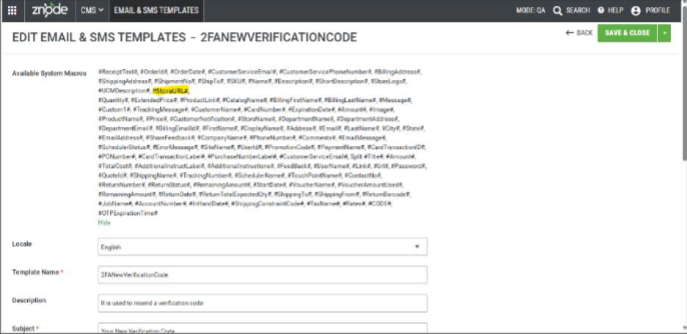
- This enhancement introduces a new system macro, #StoreURL#, to dynamicallyresolve the store URL from which an email is triggered. The macro will be supported across all email templates and can be used in image sources andhyperlinks. This eliminates hardcoded URLs, ensures consistency, and improvesscalability in multi-store environments.
- What’s New
- Introduced a new system macro #StoreURL# available across all emailtemplates.
- The macro dynamically resolves to the correct store URL based on the store thattriggers the email.
- Can be used in image sources (e.g., store logos) and hyperlinks within email templates.
- Eliminates the need for hardcoded URLs, improving maintainability andscalability in multi-store environments.
- The #StoreURL# macro is now available under system macros in Marketing →Email Templates.
Security Enhancements
Input Access Security Validation
- Earlier, inputs were accepted without strict validation, which posed a potential securityrisk from malicious scripts. We have now implemented proper input validation toenhance system security.
Secured Password Change API Payload Transmission
- Enhanced the security of the Edit Profile password update process to prevent sensitivecredential exposure.
- Previously, the POST request transmitted confidential data such as the currentpassword, new password, confirm password, and username in plain text within therequest payload.
- The implementation has been strengthened to ensure secure handling and transmissionof sensitive information, mitigating the risk of credential exposure in the event ofinterception and aligning with secure API communication best practices.
Strengthened Validation for targetClassType in Saved Cart & Saved ForLater Flow
- Improved server-side validation during the Saved Cart and Saved For Later submissionprocess to prevent parameter manipulation.
- Previously, the application did not adequately validate the targetClassType parameter, allowing a malicious actor to intercept the Quote creation request and alter the value(e.g., from “SavedCart” to “SaveForLater”) to improperly trigger confirmed ordercreation instead of generating a Quote request.
- The backend logic has been enhanced with strict parameter validation and enforcementto ensure request integrity.
- This update prevents unauthorized state transitions, protects order workflows fromtampering, and strengthens overall transactional security.
Performance Enhancement
Optimization of Add to Cart and Product Pricing API & Stored Procedures
- Improved the performance of Add to Cart and Product Pricing operations by optimizingthe underlying APIs and associated stored procedures.
- Query execution and data retrieval logic have been enhanced to reduce latency andimprove scalability.
- These changes result in faster cart updates, quicker price calculations, and overallimproved storefront performance under load.
Optimization of Checkout Address API Invocation Handling
- Optimized the checkout address entry process, where multiple API calls were being triggered while the user was typing the address.
- The request handling logic has been refined to reduce redundant API invocations andimprove debounce behavior.
- This enhancement minimizes unnecessary server load, improves response time, and delivers a smoother checkout experience.
Black Box Improvements
Product Information Management (PIM)
Z10-9161 | SEO URL Does Not Show 404 After Product Removal
Fixed an issue where accessing a removed product’s SEO URL did not return a proper 404 page.URL routing and validation logic have been updated to correctly display a 404 response when the product is no longer associated with a category.
Z10-23233 | Attribute Code Displayed Instead of Attribute Label
Corrected an issue in Admin where the attribute code was displayed in place of the attribute label within Attribute Groups. UI binding has been adjusted to correctly display the configuredlabel.
Z10-28672 | External Media Source Images Not Loading After Publish
Resolved the inconsistent loading of external media images after product publish. Media synchronization and caching mechanisms have been stabilized.
Z10-29593 | Inconsistent Variant Association Limit for Configurable Products
Fixed an issue causing inconsistent limits when associating variants with configurableproducts. Validation logic has been standardized to enforce correct association thresholds.
Z10-29780 | Configurable Product Real-Time Price Issue
Resolved discrepancies in real-time pricing for configurable products. Pricing calculation logichas been aligned with variant selection behavior.
Z10-29897 | Category Order Not Maintained When Reordering Subcategories
Corrected an issue where subcategory ordering was not preserved after moving categoriesdown. Sorting logic has been fixed to maintain the configured hierarchy order.
Z10-30525 | CMS Index Not Created on Republish
Resolved an issue where republishing a store did not create CMS indexes and failed to reflectpublish status updates. Index generation and publish tracking have been corrected.
Z10-30844 | Product Shows Published but Changes Not Reflected
Fixed an issue where a product appeared as published, but changes were not visible on thewebstore. Cache invalidation and publish synchronization logic have been enhanced.
System Settings
Z10-17843 | Google Product Feed Missing Namespace and Fields
Corrected missing Google namespace and critical product fields in the Google Product Feedconfiguration. Feed generation logic has been enhanced to comply with Google Merchant requirements.
Z10-29969 | User Import Succeeds for Exempted Store with Centralized Login
Resolved an issue where the user import succeeded for exempted stores under centralized login. Validation logic has been strengthened to restrict imports based on store configuration.
Z10-30098 | Incorrect Error Handling for Invalid Date Format During Import
Fixed inconsistent error handling during import of invalid date formats. Validation messaginghas been improved to provide accurate feedback.
Z10-30313 | My List Product Sequence Not Matching Import
Corrected an issue where the imported product sequence in My List did not match the configuredorder. Import logic has been adjusted to preserve sequence integrity.
Z10-30398 | Tax Displayed for Tax-Exempt Customer
Resolved an issue where tax was still calculated for tax-exempt customers. Tax evaluation logichas been corrected to respect exemption profiles.
Z10-30506 | AvaTaxCode Not Passed to AvaTax
Fixed an issue where AvaTaxCode was not being transmitted to the AvaTax service. Integrationpayload mapping has been updated to include required tax codes.
Z10-30511 | Special Characters Not Importing Correctly in Custom Table
Resolved an issue where special characters were not imported correctly into Custom Tables. The encoding and parsing logic have been corrected.
Z10-30639 | Username Field Blank After Azure Blob User Import
Corrected an issue where imported users displayed a blank username field. Import mappinglogic has been fixed to correctly assign username values.
Z10-30879 | Import Blocks Same Username Across Centralized Stores
Resolved an issue where identical usernames across centralized login stores were incorrectlyblocked. Import validation logic has been refined to support multi-store associations.
Dev Center
Z10-27695 | Zip Code Import API Returns 400 Despite CountryCode Provided
Resolved an issue where the Zip Code Import API returned a 400 Bad Request error stating thatCountryCode was required, even when it was already provided in the request body. Validationlogic has been corrected to properly recognize and process the supplied CountryCodeparameter.
Z10-29965 | Cron Expression Description Missing in Data Exchange Scheduler
Fixed an issue where the Cron expression description was not displayed in the Admin DataExchange Scheduler setup. UI enhancements have been implemented to provide clear scheduling information and improve configuration transparency.
Z10-30560 | Log Not Visible in Data Exchange Processor
Resolved an issue where logs were not visible in the Data Exchange Processor section ofAdmin. Logging configuration has been corrected to ensure all relevant execution logs areproperly captured and displayed.
Z10-30941 | Custom Table Buttons and Grid Missing Despite Data Presence
Corrected an issue where “Add a Record,” Import, Export buttons, and the Custom Table gridwere missing even though data existed in Manage Fields. UI rendering and permission checkshave been aligned to ensure proper display of controls and records.
Content Management System (CMS)
Z10-25037 | Console Error in Commerce Pages
Resolved console errors occurring within Admin CMS Commerce Pages. Script handling andcomponent initialization have been corrected to ensure stable content editing.
Z10-26721 | Console Error in CMS Page Builder
Fixed console errors triggered when accessing CMS Page Builder. Frontend scripts andcomponent loading logic have been stabilized.
Z10-28425 | Console Errors in Page Builder Section
Addressed multiple console errors impacting Page Builder usability. Improved Java Scripthandling ensures smoother content editing and publishing.
Z10-28892 | Blog Publishing Errors
Resolved issues causing blog publishing failures. Publishing workflow and content indexinghave been corrected to ensure consistent visibility on the storefront.
Z10-29086 | Blog/News Not Navigating to Associated CMS Page
Fixed navigation issues preventing blogs and news from redirecting to associated CMS pages. Routing logic has been enhanced for proper content mapping.
Z10-29256 | Non-Admin Pages Display Placeholder Instead of 404
Corrected behavior where unauthorized pages displayed placeholders instead of returning a 404 error. Proper HTTP status handling has been implemented.
Z10-29372 | Client Fetch Error in Commerce Pages
Resolved client fetch errors impacting CMS commerce pages. API integration handling anderror messaging have been stabilized.
Z10-30133 | Contact Form Not Loading Consistently
Fixed the inconsistent loading behavior of the contact form component. Improved frontendrendering ensures reliable availability across sessions.
Z10-30328 | Misaligned Save & Close and Back Buttons in Banner Editor
Corrected UI alignment issues for Save & Close and Back buttons in Banner Add/Edit mode. Layout consistency has been improved for better usability.
Z10-30563 | Homepage Promo Details Not Reflected After Publish
Resolved an issue where homepage promotional content did not reflect correctly in PageBuilder or Webstore after publish. Publishing synchronization and cache refresh logic have beenfixed.
Accounts & Users
Z10-27488 | Webstore Login Fails for Users with More Than Three Profiles
Resolved an issue where users associated with more than three profiles were unable to log in tothe webstore. The authentication logic has been corrected to properly evaluate and processmultiple profile associations, ensuring successful login without profile limitations.
Z10-27892 | Email Filter Not Working on Account User Page
Fixed an issue where filtering users by email address in the Account User page did not returnexpected results. The search query has been optimized to correctly filter and display matchingrecords.
Z10-28655 | Blank User List Page for Newly Created Admin Users
Corrected an issue where newly created admin users encountered a blank screen whenaccessing the User List. Role validation and data binding logic have been stabilized to ensureproper page rendering.
Z10-28807 | Role Not Updated During Convert User to Admin
Resolved a defect where converting a customer user to an admin role did not update theassigned role correctly. Role mapping logic has been fixed to ensure accurate conversion andpermission assignment.
Z10-29142 | Update Users Mutation Not Handling Partial Updates Correctly
Fixed an issue in the UpdateUsers mutation where partial updates failed to persist unchanged
fields correctly. The mutation logic now safely handles selective updates without overwritingexisting valid data.
Z10-29286 | Wishlist Not Working for Exempted Stores with Centralized Login
Addressed an issue where the Wishlist functionality did not respond for exempted stores whenCentralized Login was enabled. Store validation logic has been corrected to ensure properwishlist interaction.
Z10-29373 | Disable Icon Enabled for Logged-in (Self-Created) User
Resolved an issue where the disable icon was incorrectly enabled for the logged-in user whocreated their own account. UI controls now properly restrict self-disabling actions.
Z10-29650 | Converted Admin User Not Visible in Admin User Listing
Fixed an issue where successfully converted admin users were not appearing in the Admin Userlisting. Data refresh and role filtering logic have been corrected to display all eligible users.
Z10-29867 | Create Account Cancel Button Not Working
Corrected an issue where the Cancel button in the Create Account screen was non-functional. Navigation handling has been updated to redirect users appropriately without saving unintendeddata.
Z10-29971 | Registration Page Cancel Button Not Functional
Resolved an issue where the Cancel button on the webstore registration page did not redirectusers as expected. Proper navigation flow has now been restored.
Z10-29973 | Exempt Stores Displayed in User Store Dropdown
Fixed an issue where exempt stores were incorrectly listed in the user Store Name dropdown. Store visibility filtering has been corrected to display only valid associations.
Z10-30016 | 2FA Login Succeeds Without OTP After Invalid Attempt
Resolved a security issue where login could succeed without OTP validation after an invalidattempt when “Remember this device” was selected. Two-factor authentication logic has beenstrengthened to enforce OTP verification strictly.
Z10-30109 | Checkout Billing Address Blank but Order Placement Allowed
Fixed an issue where the billing address section appeared blank, and users were still able toplace orders. Mandatory field validation has been reinforced to prevent incomplete ordersubmissions.
Z10-30116 | Checkout Allows Orders with Blank Address Details
Corrected validation gaps, allowing orders to be placed with incomplete address information. Address validation now ensures required fields are properly completed before checkout.
Z10-30190 | Unable to Convert User to Admin User
Resolved an issue preventing the successful conversion of users to admin roles. Role assignmentand permission synchronization have been corrected.
Z10-30227 | Generic Error When Adding New User in Admin
Fixed a generic error triggered while attempting to create a new user in Admin. Validationmessaging has been improved, and backend processing stabilized.
Z10-30685 | Shipping & Billing Address Updates Overwrite Each Other
Resolved an issue where updating either shipping or billing address inadvertently updated bothaddresses. Address binding logic has been corrected to maintain independent updates.
Z10-30831 | Shipping Methods Not Loaded When Addresses Differ
Fixed an issue where shipping methods failed to load if billing and shipping addresses weredifferent. The Checkout service calls now properly evaluate both addresses
Order Management System (OMS)
Z10-17905 | Voucher Order Details Page Blank for Approval Orders
Fixed an issue where the Order Details page appeared blank for voucher-based orders requiringapproval. Data binding and approval state handling have been corrected to ensure properrendering of order information.
Z10-24940 | AR Flow Displays Incorrect Status and Created By Email
Resolved inconsistencies in AR flow where incorrect order summary status and “Created By”email appeared, along with errors during status changes. Order state synchronization has beencorrected to reflect accurate transactional data.
Z10-28914 | Save vs Submit Behavior Incorrect in OMS
Corrected an issue where Save and Submit actions behaved inconsistently in OMS workflows. Action handling logic has been clarified to ensure expected processing outcomes.
Z10-28935 | ShortDescription Not Displayed in OrderReceipt Template
Fixed an issue where ShortDescription fields were not rendered in the Order Receipt template. Template binding logic has been enhanced to properly display configured content fields.
Z10-29000 | OrderDiscounts.Name Does Not Return Promotion Name
Resolved an issue where OrderDiscounts.Name returned incorrect or empty values instead ofthe promotion name. Data mapping logic has been updated to correctly reference applied promotion details.
Z10-29143 | Order List Query Missing ExternalId
Corrected the Order List query to fetch missing ExternalId values. Query structure has beenupdated to ensure complete data retrieval for integration and reporting scenarios.
Z10-29495 | Order Info Logs Not Printing in Admin Logs
Resolved an issue where Order Info logs were not visible under Admin > Applications Logs.Logging configuration has been corrected to capture and display order-level log entries.
Z10-29539 | Voucher Expiration Validation Fails on Same-Day Edits
Fixed validation errors occurring when editing same-day activation and expiration dates forvouchers. Date comparison logic has been adjusted to properly handle same-day scenarios.
Z10-29604 | Voucher Amount Deducted Multiple Times from Multiple Tabs
Resolved an issue where placing orders from multiple tabs caused voucher amounts to be deducted multiple times. Concurrency control mechanisms have been introduced to preventduplicate deductions.
Z10-30018 | Order Status Change Reverts to Previous Status
Corrected an issue where order status updates were not saved and reverted to the previousstatus. Transaction persistence logic has been stabilized to ensure reliable status updates.
Z10-30082 | Invalid File Type Error for Supported Voucher Image Types
Fixed an issue where supported image file types triggered invalid file type errors during voucherattribute uploads. File validation logic has been corrected to recognize supported formats.
Z10-30150 | Unable to Create Price List with Restricted Code “15OFF.”
Resolved an issue where admin users were unable to create a price list with code “15OFF” due to validation restrictions. Code validation rules have been refined to allow valid business-specific configurations.
Z10-30363 | Order Placement Allowed Without Mandatory PO Number
Corrected a validation gap allowing orders to be placed without a required PO number. Mandatory field validation has been enforced at checkout submission.
Z10-30365 | PO Number Validation Missing on Submit Order
Resolved missing PO number validation during order submission. Validation logic now ensurescompliance with configured mandatory requirements.
Z10-31183 | Only First Tier Price Displayed on Webstore
Fixed an issue where only the first-tier price was displayed for products on the webstore. Pricing logic has been corrected to display all configured tier pricing levels accurately.
DAM
Z10-29554 | Gallery Images Overwritten During Bulk Update
Corrected an issue where bulk import operations unintentionally overwrote existing galleryimages. Import logic now preserves the current media unless explicitly updated.
Z10-29851 | Media Images Missing
Resolved missing media image references affecting storefront display. File association andstorage validation have been corrected.
Z10-30094 | Unable to Associate Images to Products
Fixed an issue preventing successful image association with products. Media linking servicesnow properly persist image mappings in the system.
Z10-31037 | External Images Not Displayed After Publish
Corrected an issue where externally hosted images failed to display on the webstore afterproduct publish. Media indexing and caching mechanisms have been updated
Marketing
Z10-29732 | BOGO Percentage Coupon Fails for Certain Quantity Combinations
Resolved an issue where BOGO percentage coupons failed to apply discounts for certaineligible quantity combinations. The discount calculation logic has been refined to correctlyevaluate quantity thresholds and apply configured promotions.
Z10-29958 | Missing Macros in Available System Macros List
Fixed an issue where certain macros were missing from the Available System Macros list. Macro registration and rendering logic have been updated to ensure all supported macros aredisplayed.
Z10-30960 | Publish Synonym Job Stuck in “In Progress” Status
Corrected an issue where the Publish Synonym job remained indefinitely in “In Progress”
state. Background job handling and completion status updates have been stabilized.
Z10-30987 | BOGO Coupon Applies Discount Beyond Maximum Limit
Resolved an issue where BOGO coupons applied discounts beyond the configured MaximumApplicable Set limit. Discount enforcement logic has been tightened to strictly honorconfiguration boundaries.
Stores
Z10-29819 | Publish Status Window UI Breaks After Store Publish
Fixed an issue where the Publish Status window remained stuck on the list page and caused UIbreakage after publishing store settings or catalog. Publish workflow and UI refresh handlinghave been stabilized.
Z10-29994 | Tradecentric Client Secret Validation Missing
Addressed missing validation for Client Secret in Tradecentric integration. Security validationchecks have been added to ensure proper credential enforcement.
Z10-30225 | CurrencyCode Not Sent to TradeCentric
Resolved an issue where CurrencyCode was not included in the TradeCentric integrationpayload. Payload mapping has been corrected to ensure accurate financial transactions
Other
Z10-24176 | V2 API – Account/List Multiple Functional Issues
Resolved multiple inconsistencies in the V2 Account/List API affecting data retrieval andresponse accuracy. API handling logic has been corrected to ensure reliable filtering, pagination, and data mapping across account-related endpoints.
Z10-25059 | Cart Item Validation Not Based on Cart Item ID
Fixed an issue where cart validation was performed incorrectly at the product level instead ofthe cart item ID level. Validation logic has been refined to ensure accurate cart item evaluation, especially for duplicate or configurable products.
Z10-27740 | Unauthenticated Email Template Injection / SendGrid API Abuse
Addressed a security vulnerability allowing unauthenticated email template injection andpotential misuse of the SendGrid API. Input validation and authentication checks have beenstrengthened to prevent unauthorized email triggering.
Z10-29255 | Accounts Admin Does Not Show Accounts Without Addresses
Resolved an issue where accounts without associated addresses were not visible in Admin. Account listing logic has been updated to ensure all valid accounts are displayed regardless of address association.
Z10-29779 | API Returns 204 for Non-Default Store Codes with Centralized Login
Fixed an issue where the API returned 204 No Content for valid non-default store codes whencentralized login was enabled. Response handling has been corrected to ensure accurate data retrieval across store associations.
Z10-29860 | Functional Documentation Issue in v2/account-notes API
Corrected inconsistencies in the functional behavior of the v2/account-notes PUT API. Endpointlogic has been aligned with expected documentation behavior to ensure consistent updates.
Z10-29876 | Functional Issues in /v2/account-departments API
Resolved functional issues affecting GET operations in the account-departments API. Filteringand data retrieval mechanisms have been corrected to ensure accurate responses.
Z10-29975 | Price List Associated Multiple Times via API
Fixed an issue where price lists were associated multiple times with the same account throughAPI calls. Validation logic has been added to prevent duplicate associations.
Z10-30117 | Error in Upload Multiple Files API Execution
Resolved an error occurring during execution of api/components/upload-multiple-files due tofailures in the GetMediaList method. API processing logic has been corrected to ensure successfulfile handling.
Z10-30226 | Update Single Attribute API Returns 200 but Does Not Update Product
Corrected an issue where the API returned a successful 200 response but failed to update theproduct attribute. Update persistence logic has been fixed to ensure accurate data modification.
Z10-30517 | Hydrated Search API Returns Results for Invalid User/Account
Resolved an issue where the Hydrated Search API returned results even when the UserId orAccountCode did not exist. Validation checks have been enforced to ensure accurate filtering.
Z10-30613 | Product Override Full Text Search API Not Returning Data
Fixed an issue where the full-text search API failed to return results despite existing data. Queryexecution and indexing logic have been corrected.
Z10-30682 | Pagination Not Working in Product Override Full Text Search API
Resolved an issue where pagination parameters were ignored in search results. Pagination handling has been corrected to ensure accurate result segmentation.
Z10-30861 | Add Line Items API Creates New Quote Instead of Updating Existing Quote
Corrected API behavior where adding line items to an existing quote created a new quoteinstead. API logic has been refined to properly append line items to the intended quote.
Open-Source Enhancements and Fixes
Z10-11949 – Content Page – Boundary Value Validations Missing in Dynamic Form
Boundary value validations were missing in the Dynamic Form component on content pages, allowing users to submit values outside permitted limits. Proper minimum and maximumconstraints have now been enforced to prevent invalid data entry. This ensures improved data integrity, consistent validation behavior, and a better user experience during form submission.
Z10-22300 – Add to Cart Button Briefly Disabled During PLP to PDP Render
During the page transition from Product Listing Page (PLP) to Product Detail Page (PDP), the Add toCart button appeared disabled momentarily due to rendering delays. The UI behavior has beenoptimized to eliminate this temporarily disabled state. This enhancement ensures a smootherpage transition and improved customer interaction consistency.
Z10-23803 – Content Search Results – URL Added for Content Pages & Blog/News Posts Content pages and blog/news posts were not generating proper URLs in storefront searchresults. This update ensures accurate and SEO-friendly URLs are appended to search results. Users can now navigate directly to the intended content pages without broken or missing links.
Z10-25862 – Checkout – “Browse” Button for Purchase Order File Upload Has No Hover Effect
The “Browse” button within the Purchase Order file upload section lacked a hover stateindicator, impacting visual feedback. The UI has been enhanced to include proper hover styling. This ensures consistent user interface behavior and improved accessibility cues.
Z10-26566 – Wishlist: View Details Button Appearing Instead of Add to Cart for $0 ProductFor products priced at $0, the Wishlist page incorrectly displayed a “View Details” button insteadof “Add to Cart.” The logic has been corrected to display the appropriate call-to-action based onproduct configuration. This ensures accurate purchasing flow behavior.
Z10-27026 – Disabled Product Still Appearing on Webstore When Accessed via Category
Disabled products were accessible on the storefront when navigated through category URLs.The visibility rules have been corrected to ensure that disabled products are fully restricted from frontend access. This prevents unintended exposure of inactive products.
Z10-27776 – Console Errors Displayed on Webstore Home Page
Console errors were appearing on the storefront home page due to script or rendering issues. These errors have been resolved to ensure clean frontend execution. The fix improves overallperformance stability and reduces debugging noise.
Z10-27950 – Console Errors on Webstore Home Page and Cart
Multiple console errors were observed on both the Home and Cart pages. The underlying scriptand component issues have been addressed. This ensures improved page stability and asmoother shopping experience.
Z10-28290 – Searching by Postal Code in Store Locator Goes on Continuous Loading
Searching by postal code in the Store Locator resulted in continuous loading without returningresults. The search logic and response handling have been corrected. Users now receiveaccurate store results without unnecessary delays.
Z10-28410 – Not Found Pages were not rendering as expected
Enhancements were implemented to improve the 404 “Not Found” page experience. Updatesinclude better messaging, navigation guidance, and improved error handling. This ensures usersare redirected appropriately when encountering invalid URLs.
Z10-29113 – Stage Webstore: Console Errors on Webstore
Console errors were identified in the staging webstore environment. These issues have beenresolved to ensure consistency between staging and production environments. The fix supportscleaner testing and deployment validation.
Z10-29116 – Commerce Portal – Updated User Name Not Reflecting on Order Edit Screen
After updating a user’s profile name, the change was not reflected on the Order Edit screenwithin the Commerce Portal. The synchronization issue has been resolved to ensure updateduser details are consistently displayed across order management screens.
Z10-29299 – Breadcrumb Navigation Incomplete During Search
Breadcrumb navigation was incomplete when users performed a search operation. Thenavigation logic has been enhanced to display the correct hierarchical path. This improvescontextual awareness and overall usability.
Z10-29608 – 404 Error When Navigating to Product/Catalog/Other Pages
Users encountered 404 errors when accessing product, catalog, or other storefront pages. Routing and URL handling logic have been corrected. This ensures reliable page accessibilityacross the webstore.
Z10-29617 – Main Navigation Menu Not Populating. The main navigation menu failed to load due to data retrieval issues. The rendering logic has been corrected to ensure consistent navigation visibility. This restores proper storefrontusability.
Z10-29687 – ADA Scan: Level ‘A’ Error on Return Detail Page
Accessibility scan identified Level A compliance issues on the Return Detail page. Necessarycorrections were implemented to align with ADA accessibility standards. This ensures improvedcompatibility with assistive technologies.
Z10-29690 – ADA Scan: Level ‘A’ Error on My Account Dashboard Page
Level A accessibility issues were detected on the My Account Dashboard page. The requiredupdates have been applied to meet accessibility compliance guidelines. This enhancesinclusive user experience across the storefront.
Z10-30041 – Adding Product to List via PDP Generates New List Each Time
When adding a product to a list from the Product Detail Page (PDP), a new list was created eachtime instead of adding the item to the selected list. The issue has been corrected to ensureproducts are added to the intended existing list. This prevents unnecessary duplicate listcreation.
Z10-30947 – Webstore: Configurable Product – “Email a Friend” Opens Simple Variant PDPInstead of Configurable PDP
The “Email a Friend” functionality redirected users to a simple variant page instead of theconfigurable product page. The redirection logic has been corrected to maintain the properproduct context. This ensures accurate sharing of configurable products.