
Release Notes / Version 10.9.0.0 / March 27, 2026
Highlights
Release Information
The Znode 10.9.0.0 release introduces new features, enhancements, performance upgrades, and bug fixes.
Version Note:
To ensure the new feature functions as intended, using the latest version of the Storefront is recommended. Older versions may support the feature partially or could lead to limited functionality or operational inconsistencies.
Disclaimer
Temporary Disablement of Email Marketing Tab
- The Email Marketing tab within the Stores section has been temporarily disabled. This measure has been implemented to accommodate ongoing updates and improvements. During this period, admin users will not have access to email marketing features from the Stores section. The functionality will be restored once the necessary changes have been completed and validated.
Temporary Disablement of Promotions, Coupons, and Vouchers Management on the Manage Order Screen. (Continued from Previous Version)
- In this release, the ability to add, manage, or modify promotions, coupons, and vouchers has been temporarily disabled on the Manage Order screen in the Admin Console. While promotions and coupons applied during order creation will still be visible on the Manage Order screen, the options to add new promotions or remove existing ones will not be available. This functionality will be re-enabled in a future update.
Breaking Change
- Alternatively, CSP settings can be modified in:
- packages\constants\src\headers.ts
- After making the changes, deploy the latest storefront build for the updates to take effect.
What’s New
USPS Address Validation Support
Feature Overview
- The USPS Address Validation Plugin introduces an extensible address validation capability within the Znode platform. This feature enables real-time validation of customer-entered addresses using the United States Postal Service (USPS) validation service.
- The plugin is implemented using the Znode 10 plugin framework and follows the standard configuration set pattern, allowing administrators to centrally configure USPS credentials and associate validation configurations with individual stores.
- This solution improves address accuracy, delivery reliability, and overall checkout experience by validating and standardizing addresses entered by customers. It also provides a scalable foundation for supporting additional address validation providers in future releases.
Key Features
- USPS Address Validation Integration
- Provides real-time address validation using USPS services.
- Ensures customer addresses are standardized and validated before processing.
- Plugin-Based Architecture
- Implemented using the Znode 10 plugin framework.
- Supports modular configuration and easier extensibility for future providers.
- Centralized Global Configuration
- Administrators configure USPS service endpoints and authentication details in a centralized plugin configuration.
- Configuration Set Management
- Supports multiple configuration sets to accommodate different environments or business requirements.
- Each configuration set can be mapped to one or more stores.
- Store-Level Configuration
- Allows stores to enable address validation and select the appropriate configuration set.
- Secure Authentication
- Uses Client ID and Client Secret credentials provided by USPS for secure API communication.
- Future Extensibility
- Designed to support additional address validation providers and USPS shipping rate estimation in future phases.
Workflow (Admin Console)
- Log in to the Admin Console.
- Navigate to System Settings → Plugins → Installed Plugins.
- Locate the USPS Plugin in the plugin grid.
- Click the USPS plugin name or the gear icon to manage the configuration and follow the below steps.
Step 1: Configure Plugin Information
- The Edit Plugin – USPS screen displays the following details:
- Plugin Name: USPS
- Version: 1.0.0
- Author: Znode
- Status: Active
- Pre-Release: Enabled by default
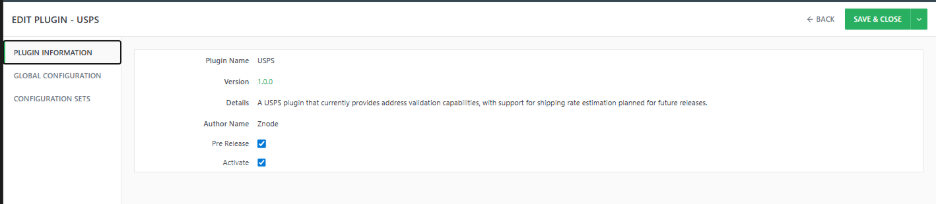
Step 2: This section provides general information about the installed plugin.
Configure Global Settings
- Administrators must configure the USPS service endpoints required for address validation
- Required Fields
- Address Validation URL
- The endpoint used by the system to perform address validation requests.
- Access Token URL
- Used to obtain authentication tokens required for secure API communication.
- Recommended Address URL
- Returns standardized address suggestions based on USPS validation rules.
- Address Validation URL
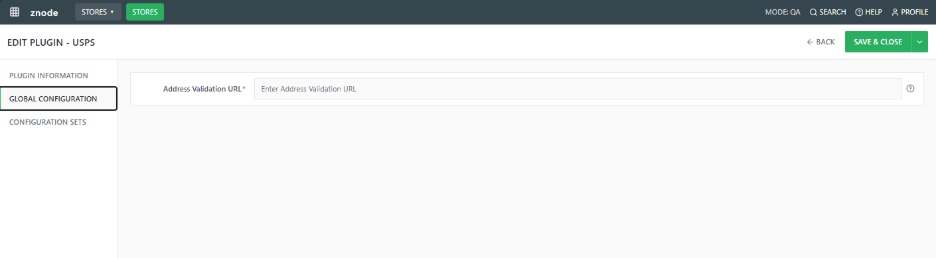
Note : These fields must be configured correctly for the plugin to function.
Step 3: Create Configuration Sets
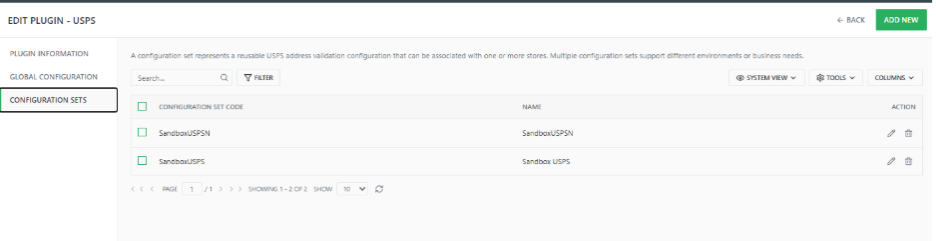
- Navigate to the Configuration Sets section.
- Click Add New.
- Enter the required details:
Field | Description |
Configuration Code | Unique identifier for the configuration |
Display Name | Friendly name shown in the admin |
Client ID | USPS API client identifier |
Client Secret | Secret key used for secure authentication |
- Save the configuration set.
- Multiple configuration sets can be created for different environments or stores.
Step 4: Manage Configuration Sets
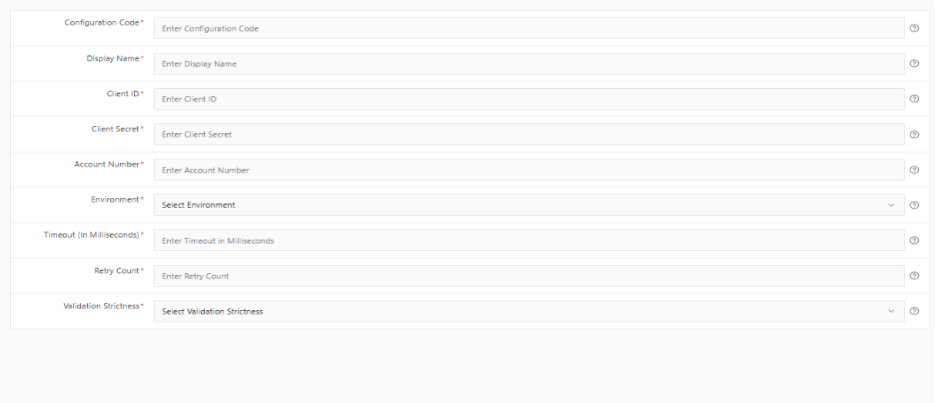
- The system displays all created configuration sets in a list with the following columns:
- Configuration Set Code
- Name
- Action (Edit / Delete)
- Administrators can edit or remove configurations as needed.
Step 5: Store Association
- After configuration sets are create
- Administrators associate the configuration set with a specific store.
- The selected store will use the configured USPS validation settings for address verification.
#Storename Macro In Email Subject line
Feature Overview
The #StoreName# macro allows the system to dynamically insert the store name into email communications. In a multi-store environment, this helps recipients easily identify which store the email originated from. When the macro is used in an email template, the system automatically replaces #StoreName# with the configured Store Name when the email is generated, ensuring clear and consistent communication across all stores.
Key Features
- Dynamic Store Name Display
- The #StoreName# macro automatically replaces the placeholder with the configured Store Name when the email is sent.
- Multi-Store Identification
- Ensures customers can clearly identify the originating store in email communications.
- Subject and Body Support
- The macro can be used in both the email subject line and email body for consistent store identification.
Workflow (Admin Configuration)
- Navigate to Marketing → Email Templates in the Admin Panel.
- Select and open an existing email template.
- Add the #StoreName# macro in the Subject Line or Email Body.
- Save the email template.
- When the email is triggered, the system dynamically replaces #StoreName# with the configured store name before sending the email.
- Supported Email Templates are:
Sr. No | Email Template |
1. | AccountVerificationRequestInProgress |
2. | AccountVerificationRequest |
3. | AccountVerificationSuccessful |
4. | OrderPlacedNotification |
5. | OrderReceipt |
6. | CancelledOrderReceipt |
7. | ContactAcknowledgment |
8. | ContactUs |
9. | FormSubmissionAcknowledgement |
10. | FormSubmissionNotification |
11. | LowInventoryOrderNotification |
12. | NewVoucherIssuedForCustomer |
13. | NewContactRequest |
14. | NewCustomerAccountFromAdmin |
15. | PendingOrderApproval |
16. | PendingOrderApproved |
17. | PendingOrderRejected |
18. | PendingOrderStatusNotification |
19. | RefundProcessedNotificationForCustomer |
20. | RemainingVoucherBalance |
21. | ReminderToUseTheVoucherBalanceBeforeItExpires |
22. | ResendOrderReceipt |
23. | ResetPasswordLink |
24. | ReturnOrderStatusNotificationForCustomer |
25. | ReturnRequestNotificationForCustomer |
26. | ShippingReceipt |
27. | SendWaitingListNoticeInInventory |
28. | NewCustomerAccountFromWebstore |
Hide Category on Menu
Feature Overview
- This enhancement improves the Shop Products menu behavior by ensuring that category navigation indicators accurately reflect the visibility of subcategories. Currently, the menu displays a right arrow for a main category based on the HasChildCategories value returned by the API. However, when all subcategories under a main category have “Hide Category on Menu” set to Yes, the arrow is still displayed even though no subcategories are visible to the user.
- With this improvement, the API logic is updated to evaluate only visible subcategories when determining the HasChildCategories value. This ensures that the menu arrow appears only when at least one visible subcategory exists, providing a more accurate and intuitive navigation experience.
Key Features
- Accurate Menu Indicator Logic
- The right arrow indicator in the Shop Products menu will now be displayed only when a main category contains at least one visible subcategory.
- API-Level Validation
- The logic for determining HasChildCategories is updated at the API level to ensure the UI reflects the correct category hierarchy.
- Improved User Experience
- Prevents the display of expandable menu indicators when no visible subcategories are available, reducing user confusion.
- Consistent Category Visibility Handling
- The system now evaluates the “Hide Category on Menu” flag for all subcategories before determining whether a category should be expandable.
- Seamless UI Compatibility
- Since the UI already depends on the HasChildCategories API response, no UI changes are required. The updated API response automatically ensures correct menu behavior.
Enhanced User Portal Mapping Visibility
Feature Overview
- This enhancement introduces a new event, UpdateUserPortals, to provide real-time notifications whenever a user’s portal associations are updated in Znode. Previously, portal association changes were not captured by any event, which prevented webhook subscribers from receiving updates when users were associated or unassociated with stores.
- With this enhancement, the system triggers an event whenever portal assignments change, ensuring external systems remain synchronized with user-to-portal mappings. The event includes relevant user and store information and supports scenarios such as multiple store associations and All Stores assignments.
Key Features
- New Event for Portal Associations
- Introduced the UpdateUserPortals event to notify systems when a user is associated or unassociated with portals.
- Webhook Integration Support
- Webhooks are triggered in real time when portal assignments are updated through Admin or API flows.
- Comprehensive Event Payload \
- The event payload includes key details such as UserId, UserName, StoreCodes, DefaultStoreCode, and IsAllStoreUser.
- All Stores Optimization
- When a user is associated with All Stores, only the allStores flag is passed instead of sending individual store codes.
- Improved Synchronization with External Systems
- Ensures external integrations stay updated with the latest user-to-portal relationships.
- Centralized Login Readiness
- Designed to support future enhancements where additional store associations created through centralized login can trigger the same event.
Feature to Hide Brand name attribute in Brand Carousel
Feature Overview
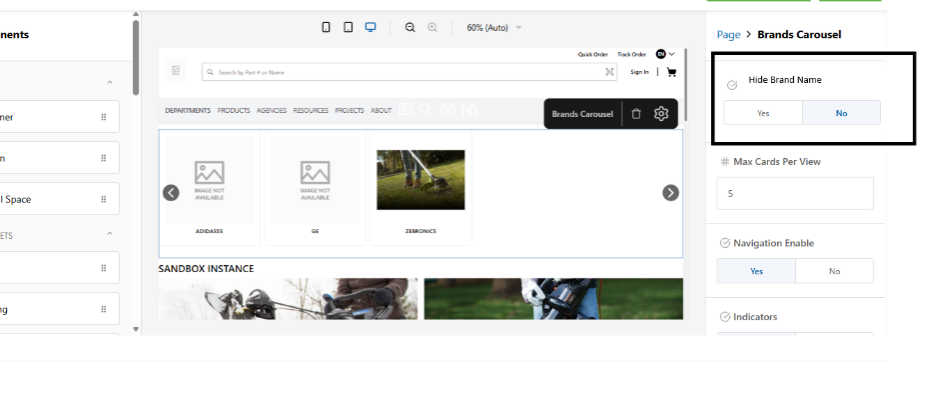
- The Hide Brand Names enhancement provides additional configurability in the Brand Carousel and Brand List components within the Page Builder. Currently, both the Brand Image and Brand Name are always displayed on the storefront. This enhancement introduces an option that allows administrators to control the visibility of the brand name, enabling storefronts to display only brand logos when required.
- By introducing the Hide Brand Names (Yes/No) attribute, administrators can easily manage how brand information is presented without modifying the component structure. This improves design flexibility, supports cleaner visual layouts, and avoids redundancy when the brand logo already contains the brand name. The configuration is managed directly within the Page Builder settings panel, ensuring a simple and consistent setup process.
Key Features
- Configurable Brand Name Visibility
- A new attribute “Hide Brand Names” is introduced in the Brand Carousel and Brand List components to control the display of brand names.
- Default Behavior Maintained
- The default value is No, which ensures existing behavior remains unchanged by displaying both Brand Image and Brand Name.
- Logo-Only Display Option
- When the value is set to Yes, only the Brand Image (logo) is displayed on the storefront and the brand name text is hidden.
- Admin-Level Configuration
- Administrators can configure this setting directly from the Page Builder right-side configuration panel.
- Supported Components
- The functionality is available for both:
- Brand Carousel Widget
- Brand List Component on Commerce Pages
- Improved Design Flexibility
- Enables storefronts to create cleaner and more visually focused layouts by displaying only brand logos when required.
- Enables storefronts to create cleaner and more visually focused layouts by displaying only brand logos when required.
Workflow (Admin Configuration)
- Changes in Brand Carousel
- Navigate to CMS → Store Experience → Manage Store → Page Builder.
- The feature can also be accessed through the following paths:
- CMS → Store Experience → Manage Store → Commerce Pages → Home
- CMS → Store Experience → Store List → Page Builder (Action Icon)
- CMS → Pages → Content Pages → Page Builder (Action Icon)
- In Page Builder, drag and drop the Brand Carousel component from the Znode Widgets section.
- Select the component on the preview canvas.
- Click the Settings (gear) icon to open the configuration panel.
- Configure the Hide Brand Names attribute:
- No (Default): Displays both Brand Image and Brand Name.
- Yes: Displays only the Brand Image and hides the brand name.
- Associate brands with the component by clicking Associate Brand and selecting brands from the available list.
- Save the configuration.
- Click Save Preview to view the changes in the preview environment.
- Click Publish to apply the changes to the storefront.
- If the user clicks Back, the changes are not saved and the user is redirected to the previous page.
- Changes in Brand List
- Navigate to: CMS > Store Experience > Manage Store > Commerce page --> Page builder
- Admin view the blog list under the commerce pages
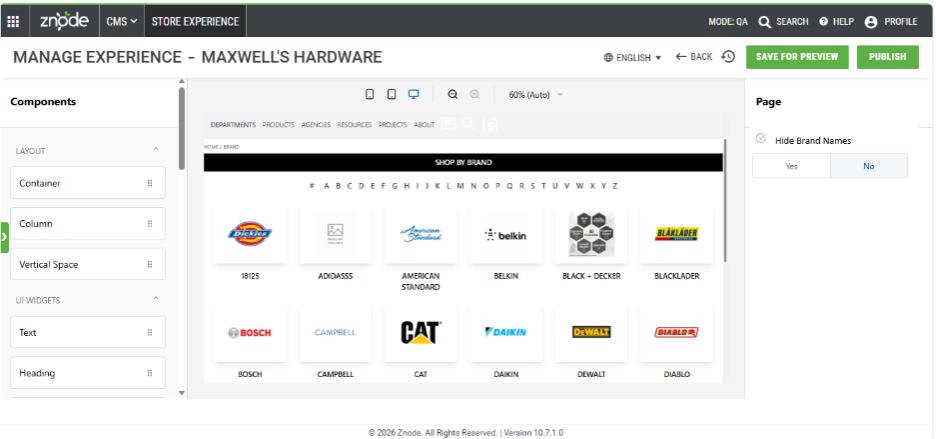
- When the admin drags and drops the Brand list page into the Page Builder, on the right Panel, a new attribute is introduced.
- Attribute Name: Hide Brand NamesType: (Yes/No)Default Value: No
- By default, the value is set to No, which means the brand names is displayed along with the brand image in preview mode.
- If the value is set to Yes, the brand names is hidden, and only the brand image is displayed in preview mode
- Save the configuration.
- Click Save Preview to view the changes in the preview environment.
- Click Publish to apply the changes to the storefront.
- If the user clicks Back, the changes are not saved and the user is redirected to the previous page.
Improved Synonym Handling with Bidirectional Flag Support
Overview
- The synonym functionality has been enhanced to correctly respect the “Is Bidirectional” flag in Znode Admin.
- Previously, all synonyms behaved as bidirectional due to Elasticsearch comma syntax, even when the flag was unchecked.
- With this fix, synonyms now behave accurately based on the selected configuration (bidirectional or unidirectional).
Key Features
- Correct Handling of “Is Bidirectional” Flag
- Ensures synonym behavior matches admin configuration.
- Bidirectional Synonyms (Flag Checked)
- Uses comma syntax.
- Both terms expand into each other during search.
- Unidirectional Synonyms (Flag Unchecked)
- Uses arrow syntax (=>).
- Expansion happens only from Original Term → Replaced By.
- Improved Search Accuracy
- Prevents unintended reverse search results.
- Aligns backend behavior with user expectations.
Workflow
- Go to Znode Admin → Synonyms
- Enter:
- Original Term
- Replaced By
- Select Is Bidirectional:
- Checked → Bidirectional (comma syntax)
- Unchecked → Unidirectional (arrow syntax)
- Save changes
- Publish synonyms
- Validate search results
Example
Unidirectional Case (Flag Unchecked):
- Original Term: Grape
- Replaced By: Bat Weight
Search Behavior:
- Searching “Grape” → Returns Grape + Bat Weight
- Searching “Bat Weight” → Returns Bat Weight only
Page Builder Widget Enhancements
Feature Overview
Enhancements have been introduced to improve clarity, usability, and consistency within the Page Builder for Znode widgets. These updates include improved system messages for widgets without configured content and updated terminology within widget configurations to make the interface more intuitive for administrators
- Widget Configuration Messages
- New system messages are introduced to guide administrators when widgets are added to a page but content has not yet been configured.
- Applicable Widgets
- Banner Slider
- Categories Carousel
- Offer Banner
- Products Carousel
- Brands Carousel
- Link Panel
- Message Displayed
- “The <widgetname> widget has no content. Configure the widget by selecting the settings icon in the toolbar. If the data is already configured, publish the page to reflect the changes.”
- The <widgetname> placeholder dynamically displays the corresponding widget name.
- Special Widgets:
- For the following widgets, a different message will appear:
- Widgets:
- Ad Space
- Home Page Promo
- Homepage Ticker
- Message: "Please check if the <widgetname> container is configured. If it is already configured, publish the page to reflect the changes.”
- For the following widgets, a different message will appear:
- Rich Text Widget
- Message:“The Rich Text Widget has no content. Configure the widget by selecting the settings icon in the toolbar.”
- These messages appear when:
- A widget is first dragged from the component list, or A CMS page containing the widget is copied.
- Applicable Widgets
- New system messages are introduced to guide administrators when widgets are added to a page but content has not yet been configured.
Changed some terminologies as mentioned in the table below:
Component
Old Term
Update to
Offer Banners
Pagination enable
Indicators
Image Widget
Target
Open In
Image Widget
Layout
Old Options:
Fixed Size (200X200)
Original Size
Fill ContainerImage Display Mode
New Options:
Fixed Size (200X200)
Original Size
Fill ContainerImage Widget> Alignment
Old Options:
Start
Center
End
New Options:
Left
Center
Right
Form Widget
Search From
Select From
Form Widget
Form Name
From Title
C. Help texts for the Form Widget as per the table below.
Attribute
Old
New
Action on Form Submission
Select the option to perform when the form is submitted
Choose what happens after form submission: show a message (Text Message) or send buyers to a URL (Redirect URL).
Text Message
Use this message to thank customers after they submit the form.
Enter the message that will be shown to buyers after they successfully submit the form (e.g., ‘Thank you for contacting us!’)
Submit Button Text
Text displayed on the form's submit button (e.g., 'Submit', 'Send', 'Register'.)
Enter the label to display on the form’s submit button (e.g., ‘Submit’, ‘Send’, or ‘Register’).
Notification Email Address
Enter the comma-separated email addresses of internal users to be notified after the form is submitted.
Enter email addresses to notify on form submissions. Add and separate multiple addresses with commas(e.g., abc@znode.com, xyz@znode.com ).
Email Notification Template
This email is sent to the internal users listed above. Leave blank if no email should be sent.
This email template is sent to buyers who get notified when a form is submitted. Leave blank if no email should be sent.
Acknowledgement Email Template
This email is sent to customers after they submit a form. Leave blank if you do not wish to send an email.
This email template is sent to buyers after they submit a form. Leave blank to disable sending an email.
- Widget Configuration Messages
Security Enhancements
- HTTP to HTTPS Redirection Not Enforced
- HTTP to HTTPS redirection was not previously enforced, which could allow unsecured requests to be processed over an unencrypted connection. To address this, server-side redirection from HTTP to HTTPS has now been implemented. This ensures that all incoming requests are automatically redirected to a secure connection, strengthening transport-level security and removing any dependency on browser-based auto-upgrade mechanisms.
- HTTP to HTTPS redirection was not previously enforced, which could allow unsecured requests to be processed over an unencrypted connection. To address this, server-side redirection from HTTP to HTTPS has now been implemented. This ensures that all incoming requests are automatically redirected to a secure connection, strengthening transport-level security and removing any dependency on browser-based auto-upgrade mechanisms.
- reCAPTCHA Secret Key Exposed on Login Page
- The reCAPTCHA secret key was previously exposed on the login page, creating a potential security vulnerability. This has now been addressed by ensuring that the secret key is no longer accessible on the client side. The reCAPTCHA implementation has been secured by handling all sensitive validation on the server, thereby preventing misuse and strengthening overall authentication security.
- The reCAPTCHA secret key was previously exposed on the login page, creating a potential security vulnerability. This has now been addressed by ensuring that the secret key is no longer accessible on the client side. The reCAPTCHA implementation has been secured by handling all sensitive validation on the server, thereby preventing misuse and strengthening overall authentication security.
- Stored XSS Leading to Webstore Account Takeover
- A stored Cross-Site Scripting (XSS) vulnerability has been identified and resolved by implementing comprehensive security measures. User inputs are now properly sanitized to prevent malicious data from being stored, and all dynamic outputs are safely encoded before rendering in the browser. Additionally, content security controls have been strengthened to further mitigate the risk of script injection, ensuring a more secure and resilient application.
Black Box Improvements
Product Information Management (PIM)
Z10-23793 | Publish Fails During Simultaneous Store/Catalog Publish
Fixed concurrency handling to prevent publish failures when multiple admin users initiate publishes simultaneously.
Z10-24793 | Out of Memory Error from /getcategories API
Optimized category API processing to prevent memory exhaustion during large data retrieval.
Z10-26866 | Product Weight Field Not Updating Properly
Corrected data synchronization so clearing or updating the weight field reflects accurately in the database and UI.
Z10-28234 | Inventory Saved with Zero Quantity and Incorrect Message
Fixed inventory validation and response messaging when saving products with zero quantity.
Z10-29111 | Catalog Publish Triggered When Deleting PIM Index Settings
Prevented unintended catalog publish actions when modifying or deleting PIM index configuration.
Z10-30182 | Product Shows “No Longer Available” After Add to Cart
Corrected availability validation logic to ensure products added from PLP/PDP remain consistent in the cart.
Z10-31119 | Unexpected Message When Publishing Category from SEO Setup
Resolved incorrect status messaging displayed during category publish when status was Draft.
Z10-32169 | SEO Details Fail to Publish
Fixed publishing pipeline issues preventing SEO details from being successfully published.
System Settings
Z10-18455 | Shipping List Filter Not Working with Country = All
Fixed shipping list filtering when selecting “All” countries to ensure expected results are returned.
Z10-24269 | CSP Violation Blocking Datadog Logs during Checkout
Updated Content Security Policy to prevent Datadog script loading errors during checkout while maintaining security compliance.
Z10-25204 | Custom Table with Single Unique Column Shows No Records
Resolved an issue where Custom Tables with a single unique column allowed imports but failed to display records.
Z10-27413 | FedEx/UPS Shipping Changes Not Reflecting Immediately
Updated shipping configuration refresh logic, so plugin changes reflect instantly without requiring re‑association.
Z10-28920 | CSP Blocks Datadog Script on Payment Iframe
Resolved CSP and JSON parsing issues blocking Datadog scripts during payment iframe initialization.
Z10-29581 | Product Import Status Does Not Update for Large Imports
Fixed import status tracking progress and completion update correctly for large files.
Z10-29684 | Invalid Spreedly Credentials Show Generic Error
Improved error messaging to clearly indicate invalid credentials when creating Spreedly configurations.
Z10-30049 | Generic “Fail to Create” Shown Instead of Spreedly Error
Enhanced error handling to surface the actual Spreedly transaction failure message.
Z10-30053 | Blank Page When Editing Spreedly Configuration
Resolved UI rendering and state errors that caused a blank page in Spreedly configuration edit mode.
Z10-30332 | Valid Credit Cards Fail Client‑Side Validation
Corrected client‑side validation rules to properly accept valid credit card numbers.
Z10-30644 | Duplicate Payment History Entries for Invoice Payments
Resolved duplicate payment history entries generated during third‑party invoice payments.
Z10-31069 | Order Total Mismatch After Approval with Voucher
Corrected voucher and payment recalculations to maintain accurate order totals after approval.
Z10-31070 | Shipping Amount Not Recalculated in Admin
Fixed shipping recalculation logic in Admin order and quote flows.
Z10-31116 | Payment History Inconsistency for Avalara International Orders
Corrected tax and payment sync issues to ensure consistent payment history for international orders.
Z10-31729 | Credit Card Form and Save Card Option Inconsistent
Fixed UI state issues so validations and “Save Credit Card” options display consistently.
Z10-31730 | CVV Error Appears in Wrong Place
Corrected CVV validation message placement when switching between saved and new cards.
Z10-31737 | Duplicate Validation Messages After Affirm Cancel
Removed redundant validation messages triggered after cancelling Affirm payments.
Z10-31841 | CVV Digit Limit Not Validated in Payfabric
Fixed CVV length validation logic for Payfabric card processing.
Z10-31932 | Save Card Checkbox Disappears After Validation Error
Restored Save Card checkbox visibility after resolving validation failures.
Z10-32039 | Order Placed Even When ACH Payment Is Declined
Blocked order placement when ACH payments fail to ensure payment integrity.
Z10-32070 | Saved Card Displays Blank Number intermittently
Resolved intermittent issues where saved card numbers appeared blank during checkout.
Z10-32074 | Blank Page when Editing Spreedly Configurations
Fixed admin edit workflow to prevent blank screens when editing Spreedly settings.
Z10-32352 | Pay Invoice Fails Due to postMessage Origin Mismatch
Corrected origin validation to allow successful invoice payments and receipt generation.
Z10-32457 | Payment History Requires Manual Refresh
Updated UI refresh logic so payment history updates automatically after transactions.
Z10-32617 | Data Exchange Import Returns Empty JSON Values
Fixed JSON array mapping logic affected by the 10.8.1.0 upgrade.
Dev Center
Z10-14130 | Custom Table API Missing Validation Checks
Implemented comprehensive validation checks in the Custom Table Fields API to prevent invalid configurations and ensure consistent schema integrity during create and update operations.
Z10-32041 | Duplicate Entry Created for Diagnostics & Maintenance
Fixed data validation to prevent duplicate records and enforce mandatory sequence number requirements.
Z10-14463 | Custom Table Bulk Delete API Missing Validations
Added missing validation logic to the bulk delete Custom Table API to prevent invalid row deletions and ensure stable execution.
Z10-14480 | Custom Table Delete API Returns 500 Error for Filters
Fixed an issue where applying filters during Custom Table deletion caused a 500 internal server error by improving filter validation and error handling.
Z10-14587 | Custom Table API Fails When Adding Second Unique Field
Resolved a server error encountered when adding a second unique field via the Custom Table Fields API by correcting uniqueness constraint handling.
Z10-30502 | Data Exchange Edit Fails on First Attempt
Fixed an issue where editing a data exchange failed on the first attempt due to improper state initialization.
Z10-30949 | Stored XSS Vulnerability in Custom Tables
Resolved a stored XSS vulnerability on Custom Table pages by sanitizing inputs and encoding outputs to prevent script execution.
Z10-31586 | Custom Table Bulk Insert API Functional Issues
Corrected multiple validation and processing issues in the Custom Table bulk‑insert API to ensure stable and accurate data insertion.
Z10-31878 | Default Confirmation Popup Shown When Deleting Data Exchange
Updated delete behavior to display the appropriate confirmation message instead of the default popup during data exchange deletions.
Z10-32111 | Import Fails on Re‑import with Unique Number Field
Fixed re‑import failures caused by unique number field constraints by improving upsert and validation handling.
Z10-32367 | Commerce Connector Configuration Failure
Resolved issues preventing configuration of Commerce Connectors by correcting validation and connection setup logic.
Content Management System (CMS)
Z10-31620 | CMS Page Field Validations Missing in Add/Edit Mode
Restored field validation messages for CMS page Add/Edit flows to ensure mandatory fields are validated correctly.
Z10-31829 | Form Builder Flickers When Reordering Attributes or Groups
Resolved UI flickering and layout instability when reordering form attributes or groups in the CMS canvas.
Z10-31863 | Blog Publish Status Remains Draft When “Is Active” Is Unchecked
Fixed blog publishing logic to correctly update publish status even when the “Is Active” flag is disabled.
Z10-31976 | Existing Banners Not Displayed on Webstore
Corrected banner rendering and publish synchronization to ensure existing banners display properly on the webstore.
Z10-32117 | Locale Dropdown Not Working in Page Builder (JS Error)
Resolved a Bootstrap JavaScript error that prevented the locale dropdown from functioning in the Page Builder UI.
Z10-32012 | CMS Publish Does Not Stop When Mandatory Fields Are Missing
Added validation enforcement so CMS publish is blocked when mandatory page fields are incomplete.
Accounts & Users
Z10-29662 | V2 Accounts Address API Functional Issues
Resolved data retrieval and response inconsistencies in the Accounts Address V2 API.
Z10-29694 | UserV2 Update User API Not Working
Fixed validation and update flow to allow successful user updates through the UserV2 API.
Z10-30129 | Error When Starting Impersonation from Admin
Resolved permission and session issues causing errors during admin impersonation.
Z10-30534 | GetUserDetailById API Returns Null Account Details
Corrected account association handling so APIs return accurate linked account data.
Z10-31297 | Duplicate Admin User Displayed in Admin List
Resolved duplicate admin user entries caused by account association inconsistencies.
Z10-31386 | Unable to Remove Image for Sales and Reps Users
Enabled removal of associated images for Sales and Representative users.
Z10-31695 | No System Emails Received for Specific Username
Fixed user notification handling so system emails are delivered correctly.
Z10-32005 | Custom Yes/No Flags Change Unexpectedly in DOM
Resolved UI state issues where custom flags were changing unexpectedly after render.
Z10-32328 | Emails Sent to Username Instead of Updated Email Address
Corrected email resolution logic to ensure messages are sent to the latest updated email address.
Z10-32337 | Known Issue: Missing Address APIs in INT Environment
Documented and tracked missing address APIs in INT as a known environment‑specific issue.
Order Management System (OMS)
Z10-20676 | Move to Cart Allowed with Zero Quantity
Resolved an issue where shoppers could move products to the cart even when the quantity was set to zero. Added validation to block the action and disable the Move to Cart button, ensuring quantity requirements are enforced correctly and preventing invalid cart entries.
Z10-25264 | Add to Cart Disabled After Variant Switch
Fixed an issue where the Add to Cart button remained disabled when switching from a personalized variant to a non‑personalized variant. Updated state handling to re‑evaluate validation rules and restore correct button functionality based on variant selection.
Z10-31894 | Unable to Place Quote – Submit Button Disabled
Fixed validation blockers causing the Submit Quote button to remain disabled.
Z10-29013 | Quote Submitted Without Billing Address
Enforced billing address validation to prevent quote submission without required address details.
Z10-29013 | Quote Submitted Without Billing Address
Blocked quote submission when a billing address is missing, enforcing proper validation.
Z10-27746 | Order Tax Exempt Flag Unchecked for Guest Orders
Corrected tax‑exempt flag persistence for guest orders to reflect the intended checkout configuration.
Z10-26946 | Approval Routing Fails with “Always Requires Approval” Setting
Corrected approval routing logic for scenarios where user‑level “Always Requires Approval” is enabled in a single‑level approval setup. Orders are now routed and approved as expected without bypassing or blocking the approval flow.
Z10-28638 | Redundant Saved Card API Call During Guest Checkout
Removed unnecessary API calls related to saved cards during guest checkout, improving performance.
Z10-27450 | Resend Confirmation Email Not Sent
Resolved an issue where resending order confirmation emails did not trigger delivery. Fixed email event handling to ensure confirmation emails are reliably sent when the resend action is initiated.
Z10-27595 | Order Remains Pending Approval for Shopper After Approval
Fixed order status synchronization so shoppers correctly see the updated order status once approver approves and places the order. Prevents confusion caused by stale “Pending Approval” statuses.
Z10-27732 | Console Error When reCAPTCHA Loads on Checkout
Resolved JavaScript and loading sequence issues related to reCAPTCHA on the checkout page. The fix removes console errors and ensures checkout functions smoothly without impacting validation.
Z10-28011 | Null Tax and Shipping When Cart Is Modified in Another Tab
Fixed a concurrency issue where tax and shipping values were messed when the cart was modified in another browser tab during checkout. Improved session handling to maintain accurate calculations and order totals.
Z10-29518 | Discount Applied Incorrectly to Quotes
Corrected discount evaluation logic to ensure promotional discounts are not applied to quote workflows where they are not supported.
Z10-29564 | Scratched Shipping Prices Displayed on Quotes
Removed strike‑through shipping prices from quote flows to align with correct quote pricing behavior and prevent misleading pricing displays.
Z10-30514 | Wrong Quantity Saved When Editing Order Templates
Fixed quantity persistence issues when editing existing order templates and adding products, ensuring the saved template reflects the correct product quantities.
Z10-30520 | Inventory Not Populating for Specific SKUs
Resolved inventory synchronization issues affecting specific SKUs so available quantities populate accurately across PDP, Cart, and Admin.
Z10-30589 | Validation Message Missing in Quick Order Flow
Restored missing validation messages in the Quick Order flow when multiple products are added, improving user guidance and error visibility.
Z10-31070 | Shipping Amount Not Recalculated in Admin
Corrected shipping recalculation logic so updated shipping methods immediately reflect accurate costs across Admin Order and Quote flows.
Z10-31517 | Address Formatting Issues in Print and Packing Slips
Resolved formatting inconsistencies in printed documents by standardizing address layout across order prints and packaging slips.
Z10-31549 | Return Receipt UI Label Mismatch
Aligned Return Receipt labels between the Webstore and Admin so consistent naming is displayed across return workflows.
Z10-31576 | Reorder Does Not Recalculate Quantity‑Based Pricing
Fixed reorder logic to ensure quantity‑based pricing is re‑evaluated in real time when quantities are changed during reorder.
Z10-31580 | Reorder Adds Multiple Products Instead of Selected Item
Resolved an issue where reordering a single line item added multiple products to the cart. The reorder action now adds only the selected item.
Z10-31763 | Order Can Be Placed Without Selecting Shipping Option
Enforced mandatory shipping method selection during checkout to prevent order placement without a chosen shipping option.
Z10-31780 | Add‑on Price Mismatch During Reorder
Aligned add‑on pricing across PDP, Cart, and Checkout during reorder flows to ensure consistent and accurate pricing.
Z10-31836 | Product Sorting Not Working in Promotion Selection
Fixed product sorting logic used during promotion setup to ensure products display in the intended order when configuring discounts.
Z10-31885 | Wishlist Not Working for Existing Users
Resolved wishlist access issues impacting existing users by correcting data retrieval and session handling.
Z10-31891 | Error During Quote to Order Conversion
Fixed validation and pricing errors that blocked successful quote‑to‑order conversion, ensuring smooth workflow completion.
Z10-31924 | Generic Error in Product Highlights
Resolved data binding and validation issues that caused a generic error when loading product associations under Product Highlights.
Z10-32002 | Service Requests Not Created
Fixed backend processing issues preventing service requests from being created from both Admin and Webstore.
Z10-32120 | Order Report Description Overlapping
Corrected layout and formatting issues in generated order reports to prevent overlapping text and improve readability.
Z10-32127 | Cart Icon Temporarily Shows Old Quantity
Improved UI refresh handling so the cart icon immediately reflects the correct quantity without briefly showing outdated values.
Z10-32167 | Incorrect Coupon Discount on Reorder with Add‑ons
Fixed coupon evaluation logic to correctly calculate discounts during reorder flows involving add‑on products.
Z10-32172 | Incorrect Discount for “Amount Off Order” Coupons on Reorder
Resolved order‑level discount miscalculations during reorder for Amount Off Order coupons.
Z10-32184 | Bundle Quantity Validated Using Parent Inventory
Corrected bundle inventory validation to use child‑level availability instead of parent inventory, preventing incorrect quantity validation.
Z10-32192 | Out‑of‑Stock Bundle Added to Cart from Wishlist
Blocked adding out‑of‑stock bundle products to the cart from the wishlist by enforcing real‑time inventory checks.
Z10-32236 | Incorrect Return Number Label and Timestamp
Fixed incorrect label mapping and timestamp formatting for return orders to ensure accurate and consistent display.
Z10-32440 | Shipping Methods Show $0 Cost in Request for Quote
Resolved shipping rate calculation issues so correct shipping costs display in Request for Quote flows.
Z10-32058 | Shipping Estimates API Returns 404
Fixed endpoint routing and configuration issues that caused the Shipping Estimates API to return 404 errors, restoring proper API responses.
Z10-31433 | Incorrect “Created By” Value Returned in Quote Details API
Resolved an issue where the Quote Details API returned an incorrect “Created By” value. Updated the data mapping logic to ensure the response accurately reflects the user who originally created the quote.
Z10-27569 | Convert Quote to Order Email Receipt Not Sent to Customers
Fixed an issue where customers did not receive the “Convert Quote to Order” email receipt after a quote was successfully converted. Restored the email trigger and ensured the receipt is sent reliably upon successful order creation.
DAM
Z10-24606 | Category Image Not Updated on Webstore After Publish
Fixed an issue where updated category images in Admin were not reflecting on the webstore after publish by correcting cache invalidation and media refresh logic.
Z10-28668 | Brand Image Not Immediately Visible on Webstore After Import
Resolved delayed visibility of brand images after import by improving media synchronization and cache refresh handling.
Z10-30755 | Large Image Size Displayed on PLP Page
Corrected image rendering behavior to ensure optimized and consistent image sizes are displayed on the Product Listing Page.
Z10-31656 | UI Breaks When Changing Default Pagination in DAM Media Settings
Fixed UI layout and state issues that caused the DAM media settings page to break when pagination values were modified.
Z10-31977 | Category Image Not Updating in PIM Category Add/Edit Pages
Resolved JavaScript and API errors preventing category images from updating correctly during category add/edit operations.
Marketing
Z10-23224 | 301 Redirect Fails When URL Starts with Special Characters
Improved validation and error handling to prevent incorrect configuration when special characters are used in 301 redirect URLs.
Z10-28944 | Synonym Import Does Not Auto‑Trim Spaces
Fixed auto‑trimming logic to remove leading and trailing spaces from catalog and synonym codes during imports.
Z10-30707 | Boost & Bury “IS” Method Not Honored in Search Results
Corrected search condition evaluation so the “IS” method works accurately, without affecting other matching methods.
Z10-31413 | Category Name and Product Count Misaligned for Long Names
Improved category listing layout to ensure long category names and product counts display clearly and align properly.
Z10-32040 | PDP Highlight Image Path Appears Blank
Resolved image path binding issues to ensure highlight images display correctly on the Product Detail Page.
Z10-32141 | SEO Friendly Page Name Tooltip Formatting Issue
Corrected tooltip indentation and wrapping issues to improve readability in SEO Setup help text.
Open-Source Enhancements and Fixes
Z10-29873 | PDP Video Thumbnail Not Displaying
Resolved missing video thumbnail rendering on PDP by correcting media binding logic.
Z10-32443 | Store Deletion Removes Orders and Duplicates Users
A disclaimer has been added to clearly highlight the potential consequences of deleting a store. This ensures that users are made aware of the impact—such as loss of associated data, configurations, and dependencies—before proceeding with the deletion action.
Z10-29385 | Loader Stuck When Editing Shipping/Billing Address in Checkout
Fixed checkout loader and state handling to prevent infinite loading when editing addresses.
Z10-31848 | “Set as Default” Address Option Disappears in Checkout
Resolved address state handling so default address options remain available.
Z10-30008 | Saved Credit Card Number Not Visible on Expand
Corrected masked card rendering so saved credit card numbers display correctly when expanded.
Z10-30198 | Mobile Checkout Credit Card UI Issues
Fixed layout and validation issues affecting credit card entry on mobile checkout.
Z10-30605 | Trade Centric Displays “0” on Mobile Webstore
Fixed rendering logic that caused incorrect zero values on mobile views.
Z10-30675 | Submit Payment Button Not Working in Firefox iFrame
Fixed iframe event handling so the Submit Payment button functions correctly in Firefox.