
Release Notes / Version 10.11.0.0 / May 28, 2026
Highlights
Release Information
The Znode 10.11.0.0 release introduces new features, enhancements, performance upgrades, and bug fixes.
Version Note: To ensure the new feature functions as intended, using the latest version of the Storefront is recommended. Older versions may support the feature partially or could lead to limited functionality or operational inconsistencies.
Disclaimer
Deployment Window – Publishing and Processing Restriction Notice
During the scheduled deployment window, please avoid performing any publishing, indexing, synchronization, import/export, or related processing activities in the areas listed below. This precaution is necessary to prevent potential deployment conflicts, data inconsistencies, or processing failures.
Store Settings
CMS/Content Publish and Index Generation
Product/Catalog Publish and Index Generation
Data Sync and Image Generation
Temporary Disablement of Email Marketing Tab
The Email Marketing tab within the Stores section has been temporarily disabled. This measure has been implemented to accommodate ongoing updates and improvements. During this period, admin users will not have access to email marketing features from the Stores section. The functionality will be restored once the necessary changes have been completed and validated.
Temporary Disablement of Promotions, Coupons, and Vouchers Management on the Manage Order Screen. (Continued from Previous Version)
In this release, the ability to add, manage, or modify promotions, coupons, and vouchers has been temporarily disabled on the Manage Order screen in the Admin Console. While promotions and coupons applied during order creation will still be visible on the Manage Order screen, the options to add new promotions or remove existing ones will not be available. This functionality will be re-enabled in a future update.
Disable SEO Validation
Even if the Disable SEO Validation flag is set to true, the changes will only take effect after explicitly saving the configuration.
Breaking Changes
Enhanced Catalog Indexing: Indexed Pricing and SEO for Improved Sorting and Performance
- This change can lead to a breaking change when enabled; it is important to adopt the update carefully and perform thorough regression testing across all impacted features after upgrading (with storefront).
- Key Impact: The sorting options: Price, Low to High and Price, High to Low will be hidden in the Storefront when the setting is enabled.
- For more details, please click here.
What’s New
Product Feed Enhancement (Phase 1)
Feature Overview
- Admin navigates to: System settings ----> Product Feeds
- Enhanced the Product Feed functionality by introducing real-time progress tracking, improved feed management visibility, duplicate feed validation, and better sitemap generation handling.
- The enhancement improves the Admin experience while generating large Product Feeds and XML Sitemaps by providing clear status updates, progress indicators, and additional feed management capabilities.
Disclaimer:
- To ensure the new feature functions as intended, using the latest version of the Storefront is recommended. Older versions may support the feature partially or could lead to limited functionality or operational inconsistencies.
- This is a breaking change when enabled; it is important to adopt the update carefully and perform thorough regression testing across all impacted features after upgrading.
Key Features
- Introduced a real-time progress bar with status updates during Product Feed and XML Sitemap generation.
- Added new columns on the Product Feed listing page:
- XML Site Map Type
- Status
- Last Generated By
- Last Generated Date & Time
- View XML Action Icon
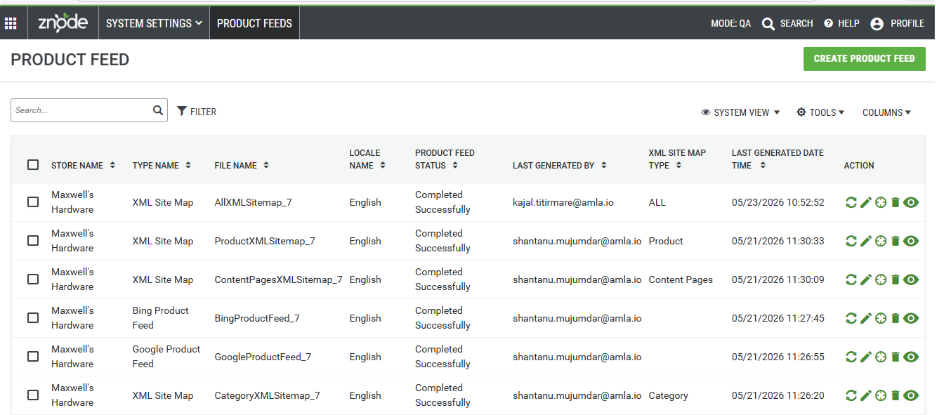
- Added duplicate feed validation to prevent creation of feeds with the same Store and Feed combination.
- Introduced View XML functionality to directly access generated feed XML files.
- Added automatic file naming conventions for XML Sitemap, Google Product Feed, and Bing Product Feed generation.
- Improved feed generation handling for simultaneous manual and scheduler executions to avoid duplicate processing conflicts.
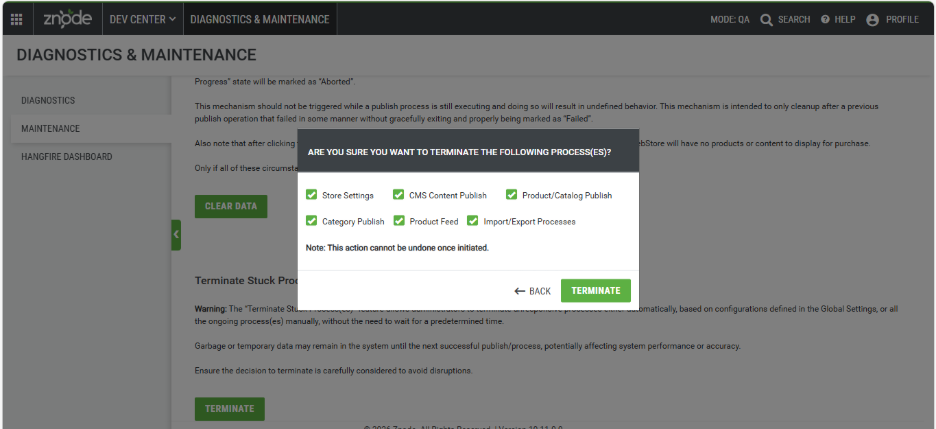
- Added support for terminating stuck Product Feed generation processes from Diagnostics & Maintenance.
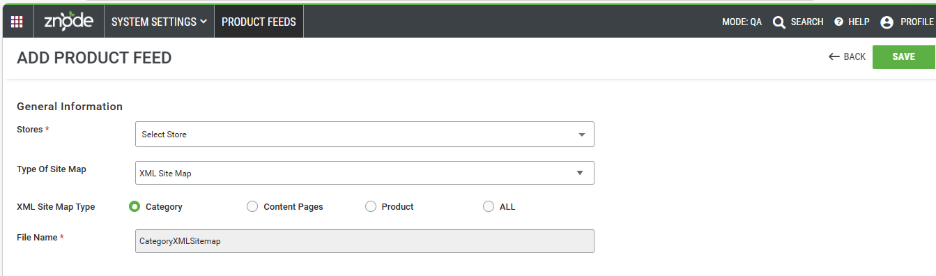
- Renamed the label “Type of XML Site Map” to “Type of Site Map” for better usability.
- Enhanced usability with configurable columns, filter support, and real-time status visibility in Product Feed management.
Content Security Policy Configuration (Global & Store Level)
Feature Overview
- A new global setting “Content Security Policy”, has been introduced under Global Settings to add centralized and store-level Content Security Policy (CSP) configuration framework to enhance storefront security and provide flexible CSP management across multiple stores.
- The enhancement enables administrators to define default global CSP rules while allowing store-specific CSP extensions without impacting other stores. Changes are applied dynamically at runtime without requiring storefront redeployment.
Disclaimer:
- To ensure the new feature functions as intended, using the latest version of the Storefront is recommended. Older versions may support the feature partially or could lead to limited functionality or operational inconsistencies.
- This is a breaking change when enabled; it is important to adopt the update carefully and perform thorough regression testing across all impacted features after upgrading.
Key Feature
- Added Global Content Security Policy (CSP) configuration under:
- Admin → System Settings → Global Settings → API and Security Settings.
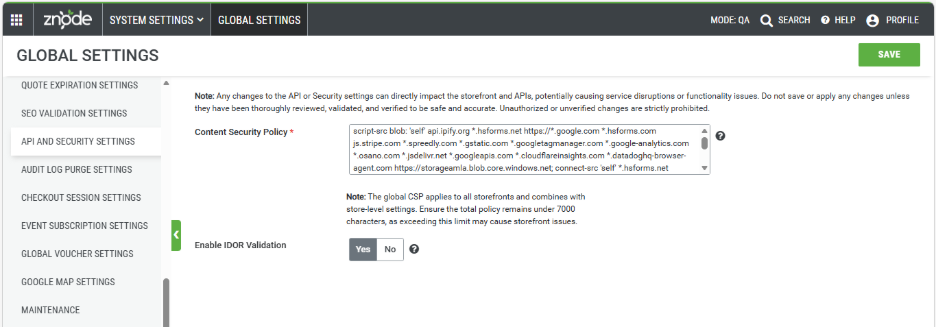
- Added Store-level CSP configuration support under:
- Admin → Stores → Manage Store → Additional Attributes → Security.
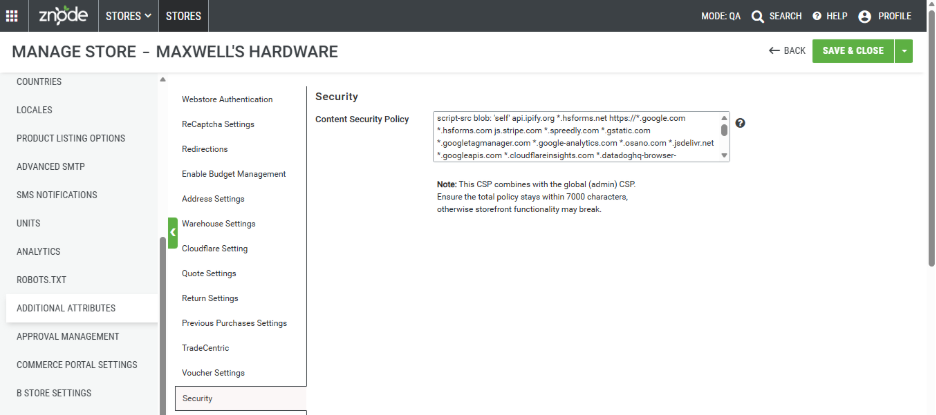
- Added support for Global CSP configuration applicable across all stores.
- Introduced Store-level CSP configuration support to allow additional store-specific CSP directives and API domains.
- Implemented CSP inheritance and merge behavior:
- Stores automatically inherit the default Global CSP configuration.
- Store-specific CSP entries are merged with the Global CSP instead of replacing it
- Example:
- If 5 APIs are configured in the Global CSP and 2 additional APIs are configured for Store A:
- Store A will apply all 7 CSP entries.
- Other stores will continue using only the 5 Global CSP entries.
- Example:
- Added support for dynamic CSP enforcement through browser response headers without requiring storefront redeployment.
- Improved security validation to ensure unsupported or incorrectly formatted CSP directives are identified during configuration.
- Added browser-level protection for external API, script, and resource loading based on configured CSP rules.
- Introduced warnings and guidance for administrators to ensure all required third-party domains are explicitly allowed in the CSP configuration.
- Added support for store-isolated CSP behavior where Store-level CSP configurations do not impact other stores.
- Example of blocked integration behavior:
- If the Spreedly API domain is removed from the Global CSP configuration, browser security enforcement blocks payment API requests during checkout.
- This may prevent payment tokenization or order placement, resulting in payment processing failures on the storefront.
- Note : Error validation is not handled from frontend(Storefront) if any CSP is removed
Important Notes
- Admin must ensure all CSP directives and domains are valid and properly formatted.
- Incorrect or incomplete CSP configuration may block required APIs, scripts, or external resources, resulting in partial storefront loading or broken functionality.
- CSP rules are enforced by the browser, and blocked resources can be identified through browser console errors.
- All required third-party integrations must be explicitly allowed in the CSP configuration for proper storefront functionality.
Enhanced Catalog Indexing: Indexed Pricing and SEO for Improved Sorting and Performance
Feature Overview
- This enhancement improves the existing Catalog Index Settings feature by enabling indexed pricing and SEO resolution at the Store level.
- It addresses inconsistencies and performance issues caused by dynamic runtime calculations by introducing a pre-indexed approach for Product Listing (PLP) and Search Listing Pages (SLP).
- This ensures:
- Accurate product sorting across large datasets
- Improved storefront performance
- Centralized control of pricing and SEO through a single Default Store
Disclaimer:
- To ensure the new feature functions as intended, using the latest version of the Storefront is recommended. Older versions may support the feature partially or could lead to limited functionality or operational inconsistencies.
- This change can lead to a breaking change when enabled; it is important to adopt the update carefully and perform thorough regression testing across all impacted features after upgrading.
- Key Impact: The sorting options: Price, Low to High and Price, High to Low will be hidden in the Storefront.
Key Features
- Indexed Pricing for PLP/SLP
- Pricing is derived from the selected Default Store pricelist
- Eliminates conflicts from multiple dynamic pricing sources
- Centralized SEO Indexing
- SEO attributes (Title, Description, Keywords, Friendly URL) are indexed from a single store
- Ensures consistent SEO across all storefronts
- Enhanced Sorting Accuracy
- Sorting applies to the complete product result set (not only the current page)
- Supports:
- Price: Low to High
- Price: High to Low
- Advanced Sorting Logic
- Null-priced products appear last
- “Call for Pricing” products appear last
- Indexed price is respected even though the products are eligbile for Promotional Price
- Store-Level Index Configuration
- Default Store acts as the single source of truth for pricing and SEO
- Supports multiple pricelists with precedence handling
- Draft Save Capability
- Changes are saved without immediate storefront impact
- Requires publish to take effect
- Improved Admin Experience
- Enhanced tooltips and descriptive guidance
- Clear success messages for Save and Publish actions
Configuration Overview
- Existing Setting:
- PIM → Catalogs → Edit Catalog
- Index Settings Configuration
- Display Pricing and SEO Details of Products from Index
- Disabled
- Dynamic pricing hierarchy is used (including real time pricing):
- User → Account → Profile → Store
- SEO is resolved dynamically per Store
- Dynamic pricing hierarchy is used (including real time pricing):
- Disabled
- Enabled
- Pricing is indexed from selected Default Store pricelist
- SEO is indexed from selected Default Store
- Dynamic pricing sources are ignored on PLP/SLP
- Select Default Store
- Mandatory when index setting is enabled
- Only authorized Stores are visible
- Supports typeahead search
- Save Behavior
- Configuration is saved as draft
- No impact on storefront until publish
- Publish Behavior
- When Disabled
- Existing dynamic pricing and SEO behavior continues
- Price-based sorting options may be hidden
- When Enabled
- Selected Store pricelist is used for indexing
- Indexed pricing drives PLP/SLP display and sorting
- SEO is applied from Default Store across storefront
- Re-indexing Impact
- Any changes to:
- Store
- Pricelist
- Catalog data
- Any changes to:
- When Disabled
- Display Pricing and SEO Details of Products from Index
Require full catalog publish to reflect updates
- Important Note
- A full catalog publish is mandatory when:
- Index settings are enabled/disabled
- Default Store is updated
- Pricing or SEO data changes
- A full catalog publish is mandatory when:
- PIM indexing alone is not sufficient
Storefront Behavior
- Pricing Behavior
- PLP / SRP
- Uses indexed pricing from Default Store pricelist
- Ignores:
- User Pricelist
- Account Pricelist
- Profile Pricelist
- PDP, Cart, Checkout
- Continues dynamic pricing resolution:
- User → Account → Profile → Store
- Continues dynamic pricing resolution:
- PLP / SRP
- Sorting Behavior
- Applied across:
- Entire category listings
- Search results
- All paginated datasets
- Rules:
- Null price → displayed last
- Call for Pricing → displayed last
- Promotions → sorting based on indexed price instead of effective discounted price
- Applied across:
- SEO Behavior:
- SEO data is derived only from Default Store:
- SEO Title
- SEO Description
- SEO Keywords
- SEO Friendly URL
- Applied consistently across all storefronts using the catalog
- SEO data is derived only from Default Store:
- Data Consistency & Limitations
- Default Store acts as single source of truth
- Other Store pricing and SEO configurations are ignored for indexed pages
- Missing pricing results in:
- “Price is not set”
- Currency mismatch prevents price display on PLP/SLP
- Indexed pricing may differ from PDP/Checkout pricing due to dynamic calculation
Enhanced API Security with IDOR Validation (Phase 3)
Feature Overview
- A new global setting, Enable IDOR Validation, has been introduced under Global Settings → General to control API-level security for preventing unauthorized data access. This enhancement enforces ownership validation across APIs, ensuring users can only access their own resources while allowing controlled rollout through configuration.
- The implementation has been done for Cart
Disclaimer:
- To ensure the new feature functions as intended, using the latest version of the Storefront is recommended. Older versions may support the feature partially or could lead to limited functionality or operational inconsistencies.
- This is a breaking change when enabled; it is important to adopt the update carefully and perform thorough regression testing across all impacted features after upgrading.
Key Features
- New Global Setting – Enable IDOR Validation
- Added a configurable toggle (Yes/No) within Global Settings to manage IDOR validation.
- Default Value: NO
- Provides centralized control for enabling or disabling enhanced API security.
- When disabled, the system continues to behave as per existing logic.
- Accessible via Admin UI under Global Settings → General.
- Added a configurable toggle (Yes/No) within Global Settings to manage IDOR validation.
- Phase 3 – IDOR Support for APIs (Security Enhancement)
- IDOR validation has been implemented across selected APIs to ensure that users can only access resources they own. This enhancement enforces ownership validation at the API level, preventing unauthorized access to other users’ data. The feature is controlled through the global setting, allowing phased adoption.
- Key Features:
- Ownership Validation:
- Validates each request against user context to ensure access is restricted to owned resources only.
- Enhanced Security Enforcement:
- Protects against unauthorized data access by enforcing strict ownership checks.
- Standardized Error Handling:
- Returns a 403 Forbidden response when an IDOR violation is detected. Existing validations continue to return appropriate 4xx responses where applicable.
- Feature Flag Control:
- Can be enabled or disabled using the Enable IDOR Validation setting, supporting controlled rollout.
- API Contract Stability:
- No changes to request/response structures or parameters; however, responses may differ when validation is enforced.
- Documentation Updates:
- API documentation has been updated to include IDOR validation behavior and the new 403 response for impacted endpoints.
- Ownership Validation:
- Request Context Requirement (Storefront Update Required)
- To support IDOR validation, API requests must include authenticated user context passed from the Storefront.
- Mandatory Header: Z-Request-Context
- This header carries an encoded user context generated by the Storefront BFF layer.
- It is validated before authorization checks to ensure request authenticity.
- Header Requirements
- Must be generated by the Storefront BFF layer.
- Must include valid, encoded user context.
- Must follow the exact structure expected by the backend.
- Strict Validation Rules
- Any modification to the header structure will result in validation failure.
- Custom or altered formats are not supported by the backend.
- Secure Context Handling & Encryption\
- All API requests include an encrypted Z-Request-Context header.
- The header securely identifies:
- The authenticated user
- Any CSR (Customer Service Representative) acting on behalf of the userEnsures tamper-proof transmission and data integrity.
- Key Characteristics:
- Uses encryption with a shared key mechanism.
- Prevents manipulation of request context.
- Supports secure CSR impersonation scenarios.
- Maintains a consistent structure for validation and auditing.
- All API requests include an encrypted Z-Request-Context header.
- Storefront Behavior & Integration
- The Storefront must attach the Z-Request-Context header to all outgoing API requests.
- Implemented the API client/BFF layer.
- Ensures secure and consistent communication with backend services.
- Backward Compatibility and Fallback Behavior
- IDOR validation is applied only when both conditions are met:
- The Enable IDOR Validation setting is enabled
- The Z-Request-Context header is present in the request
- If the header is missing:
- The request is processed using existing authorization logic
- IDOR validation is not enforced
- This approach allows gradual adoption without disrupting existing integrations.
- IDOR validation is applied only when both conditions are met:
- Guest User Behavior:
- IDOR validation is not applicable for guest users.
- Guest flows (such as cart operations without login) continue to function using the platform’s existing access model, as no user context is available.
- Important Note:
- Any modification to the request context structure or encryption logic is not supported by the backend and will result in validation failure.
- Only a few APIs are currently covered; more will be included in upcoming releases.
List of APIs can be accessed here.
Custom Table Add/Edit/Delete Event Trigger Enhancements
Feature Overview
This feature enables event-driven notifications for Custom Table CRUD operations (Create, Update, Delete) within the Admin application. It reuses the existing Znode event framework, ensuring consistency with current architecture and allowing downstream systems to process data changes in real time. Event communication is handled through the existing gRPC-based pipeline without introducing webhooks or new infrastructure.
Key Features
- Supports event publishing for Custom Table Create, Update, and Delete operations.
- Reuses the existing Znode event framework (DispatchEvent, Event Publisher, and Consumer).
- Implements a dedicated IZnodeEventHelper for Custom Table following the Commerce Portal pattern.
- Uses gRPC for event communication and processing across services.
- Enables seamless event consumption through the existing ZnodeEventConsumer pipeline.
Performance Enhancements
Performance Degradation Due to Order Event Data Exchange Resolved
Optimized system performance by addressing inefficiencies in processing order event data exchange. Overall application responsiveness has been improved. Changed the consumer method from Sync to Async, removed duplicate calls, and optimized the eventing logic.
Black Box Improvements
Product Information Management (PIM)
Z10-31871 | Progress Bar Removal After Completion Fixed
Resolved an issue where progress bars remained visible after process completion. UI behavior is now correctly updated.
Z10-31884 | Incorrect “Out of Stock” Display Fixed
Corrected an issue where in-stock products were incorrectly shown as out of stock on homepage widgets.
Z10-32480 | Duplicate SEO Data Creation Prevented
Fixed an issue causing duplicate entries in the SEO entity table during publish. Data handling has been improved.
Z10-32641 | “View Guide” Link Functionality Restored
Resolved a broken link issue for the “View Guide” feature by adding the updated link. The navigation now works correctly.
Z10-32724 | ProductInformationOverrides Scope Issue Fixed
Corrected an issue where the override feature incorrectly impacted schema customization. Proper scope handling has been enforced. Restricted editing of the Field Length property from the front end by making the field read-only.
Z10-33208 | Product Override API Return Values Corrected
Resolved inconsistencies in Product Override Read API responses to ensure accurate data retrieval.
Z10-33307 | Variant Display Issue Fixed
Fixed an issue by Modifying the Store Procedure where product variants were not displayed when configurable attributes were missing. The system now handles such cases gracefully.
Z10-33756 | Brand Visibility Issue Between Pages Fixed
Resolved inconsistency where brands appeared in the brand list but not on PDP after association.
Z10-33861 | Swatch Image Removal Behavior Corrected
Fixed an issue where swatch images were automatically removed after setting swatch text. Both configurations now coexist correctly.
Z10-34058 | Save & Close Functionality Restored for Multistore Attributes
Implemented validation handling for mandatory attributes on the Save & Close action — the system now displays a validation message to the user when required fields (like Searchspring Site ID) are missing. This prevents the confusing silent failure where the page simply didn't redirect.
Z10-34089 | Catalog Page Rendering Issue Fixed
Addressed rendering issues on the catalog page to ensure proper display of content. Resolved the Catalog list page failure caused by an AutoMapper date-binding issue on the admin side by updating the date format in Global Settings, and added a user-facing exception message ("Something went wrong…contact support") for graceful error handling.
Z10-34121 | Swatch Images Display Issue on PDP Fixed
Resolved incorrect rendering of swatch images on the Product Detail Page. Added fixed height and width constraints to swatch images on the PDP for configurable products, preventing them from expanding to fill the full container space and ensuring correct rendering and alignment.
Z10-34294 | Products Not Displayed in Subcategory Fixed
Corrected an issue where products were missing in subcategory views due to mapping errors. Updated the SP_Znode_PublishCatalogEntity_v1_1 stored procedure to correctly handle catalog-specific category publish records and removed the default HideFromSearch filter from the Elasticsearch query, ensuring products render correctly in nested sub-categories on the Webstore.
System Settings
Z10-30494 | Shipping Method Rendering Standardized
Fixed inconsistencies in shipping method display across cart and checkout pages. The same free-shipping filtration logic from the Checkout page was added to the Cart Shipping Estimator, ensuring both pages now consistently filter out free-shipping methods when applicable.
Z10-33797 | Shipping Cost Reset Issue Fixed
Ensured shipping methods and costs are cleared when ZIP code is removed.To recalculate the Tax and other calculations. Added the refreshCartSummary call to make the calculation again.
Z10-33998 | USPS Rate Mismatch Fixed
Corrected mismatch between USPS rates and order summary totals.Aligned mailClass handling, standardized the price field, and removed dependency on USPS API response sequencing across estimate and calculate calls so the displayed shipping rate matches the order summary.
Z10-34130 | Multiple Quote Creation Issue Fixed
Resolved issue causing multiple quotes when using Affirm payments. Added a persistent check on the Quote Number so that only a single copy is created and used for the final payment, preventing multiple copies from being generated. Impact: convert quote to order flow from quote details in webstore.
Z10-34332 | CyberSource Masking Format Corrected
Improved consistency and accuracy of masked card data display. Standardized the CyberSource saved card masking logic to consistently display the last 4 digits of the card number across both the payment iframe and the saved card section, fixing the inconsistent digit count and incorrect masking format.
Z10-34378 | Incorrect Shipping Method Visibility Fixed
Resolved issue where domestic shipping methods appeared for international addresses. Reset stale shipping options and invalidate previous selections when a new address-triggered fetch starts, and added request version tracking to prevent outdated API responses and shipping radio selections from remaining interactive during in-flight requests.
Z10-34460 | Avalara CustomerCode Mapping Corrected
Fixed incorrect usage of UserId instead of alphanumeric CustomerCode.Introduced a new CustomerCode property to support alphanumeric customer identifiers.User can now pass values such as TH-00001 in the CustomerCode field as a string:eventPayload["CustomerCode"] = "TH-00001";
Important note:
The UserId property will continue to support numeric values only.In future releases, usage of UserId for customer identification will be deprecated in favor of CustomerCode.To support existing partner implementations, UserId will continue working in the same way as before. However, if CustomerCode is provided, it will be considered instead of UserId.
Dev Center
Z10-32980 | Precision and Scale Handling Standardized Across Systems
Fixed inconsistencies in handling records where precision and scale values were equal across Admin, Import, and API operations.
Z10-33975 | Data Exchange Status Stuck at “Started” Issue Fixed
Resolved an issue where data exchange processes remained in “Started” status indefinitely. Status updates now reflect actual progress.
Z10-34622 | Hangfire Dashboard Loading Issue Resolved
Fixed an issue where the Hangfire dashboard failed to load. System stability and dashboard accessibility have been improved.
Marketing
Z10-24814 | Sorting by “Most Review” Fixed
Resolved incorrect sorting behavior for the “Most Review” parameter for select ratings. Updated the Elasticsearch data type and average rating calculation logic at the stored procedure and database table level to return decimal ratings correctly, eliminating the sorting mismatch caused by Elasticsearch returning integer ratings while the UI displayed SQL-calculated decimal ratings.
Z10-30310 | Brand Search Result Issue Fixed
Corrected issue where brand-based searches returned no results on the webstore. Updated the database stored procedures (Fn_GetElasticAttributeAndDataType and Znode_PublishUpdateProductJson_v4) to generate _search text fields (e.g., Brand_search) in the Elasticsearch product index for Simple Select attributes marked as searchable, enabling brand name keyword search on the webstore.
Z10-34108 | Search API Returning Incorrect SEO Records Fixed
Resolved issue where inactive SEO URLs were returned instead of valid mappings. Fixed the Search API's SEO URL lookup query to fetch the latest published SEO record from the PublishSEO table instead of older duplicate entries, ensuring the /v2/search/seo-urls endpoint returns the active category mapping rather than the stale inactive product record after product deletion and SEO URL reassignment.
Z10-34352 | Admin SEO Tab Performance Improved
Enhanced performance of the SEO tab in Admin to reduce loading times. Optimized the SEO tab database queries and API layer (via DB stored procedure and API migration fixes) to resolve the 13–60 second load times on the Admin PIM Product SEO tab and Marketing SEO Setup pages for large catalogs (default locale).
Z10-34377 | SEO Page Performance Optimized
Improved page load performance for SEO-related pages. Optimized the Znode_GetCatalogProductSEODetail stored procedure (which was taking ~17 seconds) and introduced a new Znode_GetProductNameFromProductAttribute procedure, along with API migration fixes, to resolve SEO page slowness on the Gordon Electric Admin PIM Product SEO and Marketing SEO Setup pages for the default locale.
Content Management System (CMS)
Z10-33372 | Invalid Query Parameter Handling Improved on Product Highlight Page
Resolved an issue where invalid or malformed query parameters caused incorrect page behavior. Proper validation has been added to handle such cases gracefully.
Z10-33374 | Incorrect Product Name on Review Page Fixed
Corrected an issue where modifying the product name URL parameter displayed incorrect product details. Validation has been tightened to ensure accurate rendering.
Z10-34124 | Popup Message Display Issue Fixed in Brand Carousel
Fixed an issue where popup messages did not appear immediately when adding brands to the carousel. The UI now updates dynamically without requiring a page refresh.
Z10-34428 | Widget Content Reversion Issue Resolved
Addressed an issue where widget content reverted unexpectedly on the webstore under certain scenarios. Content persistence has been improved to prevent data loss.
Z10-34677 | CMS Page Count Break Issue Fixed After Search/Update
Resolved an issue where page count broke after search actions or content changes. Pagination logic has been corrected for consistency.
Accounts & Users
Z10-25357 | Default Catalog Update Issue Fixed
Resolved an issue where updating the default catalog via API was not reflected on the frontend when PublishCatalogId was set to 0.
Z10-26386 | Unauthorized Visibility of Account Dropdown Fixed
Addressed a security issue where parent-child account dropdowns were visible without user login. Added session-check and page-refresh handling for the Departments menu (desktop and mobile) on stale login tabs, so idle tabs sync the session state upon navigation after login in another tab.
Z10-29067 | Incomplete Error Message Improved
Enhanced error messaging to provide complete and meaningful information to users. Corrected the validation message configured in the Admin resources to display the proper error message when attempting to impersonate a locked/disabled user account.
Z10-31121 | Registration Attempt Email Trigger Fixed
Resolved an issue where registration attempt emails were not triggered for existing usernames. Moved the RegistrationAttemptUsingExistingUsername email trigger to execute before the CheckUserExistsForRequestedPortals exception at the controller level, ensuring the notification email is sent on duplicate username registration
Z10-31917 | Address Creation Validation Updated
Fixed an issue allowing address creation without state and county information by enforcing validation. Added CountryName and StateName properties to the nested address request model of the v2/accounts (Create a New Account) API so that accounts are created with the correct country and state instead of defaulting to US/Alabama.
Z10-34091 | User Profile Overwrite Issue Fixed
Resolved an issue where account profile data incorrectly overwrote user profile details during association. Updated the user save logic to preserve explicitly associated user profiles during edit, preventing the account profile from overriding the user-level profile assignment and ensuring correct payment methods are displayed based on the user's profile.
Z10-34487 | Admin Session Logout Issue Fixed
Corrected unexpected logout behavior when navigating to the Admin root URL. Enhanced the Admin login flow to validate existing authenticated sessions before rendering the login page, so navigating to the root Admin URL now redirects active users to the Dashboard instead of the login screen
Order Management System (OMS)
Z10-17642 | Emails Sent to Username Instead of Updated Email Address in User Profile
Corrected an issue where system-generated emails were sent to the username instead of the updated email address configured in the user profile. The email resolution logic has been updated to always prioritize the latest email address saved in the user profile for accurate communication.
Z10-27272 | Admin - Orders - Edit and Save Issue Resolved
Resolved an issue where editing and saving orders from the Admin Orders section did not persist changes correctly. Improvements have been made to ensure all updates are properly saved and reflected in the system.
Z10-31003 | Voucher Displaying Incorrect Discount Amount Fixed
Fixed an issue where vouchers applied before quote creation showed a 0 discount amount after conversion to an order. The calculation logic has been corrected to accurately retain and display the applied discount.
Z10-31205 | Order JSON Price Values Standardized
Resolved inconsistencies in order JSON price values where USD amounts were not rounded to two decimal places. The formatting has been standardized to maintain accuracy and consistency across systems.
Z10-31447 | Checkout & Place Order for Other User’s Cart Secured
Addressed a security loophole allowing users to proceed with checkout and place orders using another user’s cart. Proper authorization validation has been implemented to restrict access.
Z10-32108 | Order Total Mismatch Across Systems Corrected
Fixed an issue where order totals differed between Webstore, Admin OMS, Spreedly, and Braintree due to cart manipulation in parallel tabs. Synchronization logic has been improved to ensure consistency across all touchpoints.
Z10-32271 | Order Placement with Deleted User Prevented
Resolved an issue where orders could still be placed using a deleted user session. Additional validation has been introduced to prevent order placement for removed users.
Z10-32694 | Product Price Limit Handling Corrected
Fixed an issue related to incorrect pricing limits for products, ensuring proper validation and accurate enforcement of configured price limits.
Z10-32775 | Order List API Filtering Behavior Fixed
Corrected discrepancies in the Order List API where filters did not work as per documentation. The API now adheres to expected behavior with proper filtering support.
Z10-33927 | Incorrect Admin Name Display in Return List Fixed
Resolved an issue where admin name was displayed as the customer name when returns were created without a customer name. The mapping logic has been updated for accurate representation.
Z10-33992 | Line Item Status Consistency Updated
Fixed an issue where line item statuses changed unexpectedly when the overall order status was updated. The logic has been refined to maintain consistent and expected status behavior.
Z10-33999 | BOGO Discount Calculation Issue Corrected
Resolved an issue where BOGO discounts increased incorrectly when only the “Get” product quantity was updated. The calculation logic has been corrected to apply discounts accurately.
Z10-34052 | BOGO Promotion Applied to Incorrect Product Fixed
Corrected an issue where percentage-based BOGO discounts were applied to incorrect products. The promotion engine now correctly identifies and applies discounts to eligible items.
Z10-34262 | Update Cart Item API Functionality Restored
Resolved an issue where the Update Cart Item API failed to update items correctly. The API now processes updates reliably.
Z10-34281 | Delete Cart Item API Fixed for Valid Inputs
Addressed an issue preventing deletion of cart items despite valid inputs. The API now supports proper item removal functionality.
Z10-34284 | Update Cart Item Quantity API Errors Resolved
Fixed failures and inconsistent error responses in the Update Cart Item Quantity API. Validation and response handling have been improved.
Z10-34288 | Remove All Cart Items API Issue Fixed
Resolved an issue where the Remove All Cart Items API failed even with valid inputs. The API logic has been corrected for proper execution.
Z10-34323 | Active Class Number API Validation Improved
Corrected validation issues and incorrect response handling in the Active Class Number API. Proper status codes and responses are now returned.
Z10-34328 | Update Personalization Data API Enhanced
Added missing validation checks for Portal Code and Class Type in the Update Personalization Data API to ensure accurate processing.
Z10-34402 | Admin Quick Quote Access Issue Fixed
Resolved an issue where the Quick Quote feature was not opening in Admin. The navigation and loading logic has been corrected.
Z10-34426 | Promotion/List API Error Fixed
Fixed an issue in the Promotion/List API that caused an error due to incorrect query parsing. Proper validation has been added.
DAM
Z10-29954 | External Image Rendering Issue Fixed
Resolved an issue where images from external URLs were not rendered correctly after import. Added validation for the VoucherImage_Source column in the voucher import process and updated the logic to default to Internal Media when the source is blank, ensuring images render correctly for ExternalMedia/FullURL sources and allowing successful import when both image and source fields are empty
Z10-30080 | Internal Media Image Rendering Issue Fixed
Corrected an issue where images failed to render after importing from internal sources. Fixed the import logic to correctly resolve and store internal media paths for multi-image attributes, ensuring imported images render properly instead of displaying as broken references after voucher import.
Z10-32253 | Upload Status Not Updating Fixed
Resolved an issue where the status remained “Waiting” after large image uploads. Status now updates correctly.
Z10-32385 | Webstore Image Display Issue Fixed
Fixed an issue where images were not appearing on the webstore due to rendering problems. Fixed duplicate media entries in the ZnodeMedia table by updating seven stored procedures
Z10-33149 | Incorrect CDN Data Issue Fixed
Corrected inconsistencies in CDN data returned for product images. resolve incorrect CDN URL formation caused by shared internal DAM/external media storage, and fixed DB stored procedures and code-level media path logic for Brand, BlogNews, MediaWidget, and WidgetTitle entities to properly render ExternalMedia source URLs during Portal/Catalog publish.
Other
Z10-31026 | Missing OrderId in AdditionalDetails GraphQL Entity Fixed
Resolved an issue where the OrderId column was missing in the AdditionalDetails GraphQL entity despite being present in the database. The schema has been updated to ensure the OrderId field is included for complete data access.
Z10-31032 | Missing Fields in ProductDetails GraphQL Entity Corrected
Fixed an issue where multiple fields available in the database were not exposed in the ProductDetails GraphQL entity. The schema has been enhanced to provide full data visibility.
Z10-31073 | API Support Added for Approval Permission Code Management
Introduced new API endpoints to retrieve and update the ‘Approval Permission Code’ for users based on user ID and portal code, enabling better integration and control.
Z10-33052 | Highlight API Functionality Restored
Resolved an issue where the /highlight/create API endpoint was not functioning. The API has been corrected to handle requests successfully.
Z10-34162 | SMTP API Email Validation Issue Fixed (POST)
Fixed an issue where email format validation was missing in the POST Advanced SMTP API. Proper validation has been added to ensure valid email inputs.
Z10-34166 | SMTP API Email Validation Issue Fixed (PUT)
Resolved missing email validation in the PUT Advanced SMTP API. Input validation has been implemented to enforce correct email formats.
Z10-34437 | Global Entity Attributes API Performance Optimized
Improved performance of the Global Entity Attributes API by reducing response time and enhancing support for batch updates.
Open-Source Enhancements and Fixes
Z10-25546 | Pagination Issue in My Account Pages Fixed
Resolved inconsistencies in pagination across My Account pages, ensuring smooth navigation and correct page rendering.
Z10-32642 | GA4 Ecommerce Data Model Updated
Enhanced the GA4 ecommerce data model to improve tracking accuracy and alignment with reporting standards.
Z10-33663 | Button Positioning on Guest Return Page Improved
Adjusted UI spacing to ensure the Submit Return button is properly positioned and easily accessible
Z10-33755 | Improved API Error Handling for SMTP Configuration
Enhanced validation and error messaging for invalid StoreCode inputs in the Advanced SMTP API to provide better clarity.
Z10-33806 | Correct HTTP Status Code Returned for SMTP API
Resolved an issue where incorrect HTTP 200 responses were returned instead of 204 when no configuration existed. Proper status codes are now returned.
Z10-34612 | Data Mapping Issue with Array Index Fixed
Resolved incorrect mapping behavior when using array index-based mappings by correcting alignment logic.