
Release Information
The Znode 10.10.0.0 release introduces new features, enhancements, performance improvements, and bug fixes.
Disclaimer
Temporary Disablement of Email Marketing Tab
- The Email Marketing tab within the Stores section has been temporarily disabled to support ongoing updates and improvements. During this period, admin users will not be able to access email marketing features from the Stores section. This functionality will be restored once the updates are completed and validated.
Temporary Disablement of Promotions, Coupons, and Vouchers on Manage Order Screen
- In this release, the ability to add, manage, or modify promotions, coupons, and vouchers has been temporarily disabled on the Manage Order screen in the Admin Console.Promotions and coupons applied during order creation will still be visible.Adding or removing promotions from the Manage Order screen is currently disabled.This functionality will be restored in a future release.
Disable SEO Validation
- Even if the Disable SEO Validation flag is set to true, the changes will only take effect after explicitly saving the configuration.
Breaking Changes
Content Security Policy (CSP) Enforcement Update
- The default CSP configuration has been updated to improve storefront security. The directives of unsafe-inline and unsafe-eval are no longer supported in the default configuration. Existing custom implementations relying on inline scripts or eval-based execution may stop working and must be updated to follow nonce-based CSP policies.
- Old Behavior
- CSP allowed the use of unsafe-inline and unsafe-eval.
- Inline JavaScript and dynamically evaluated scripts could execute without nonce validation.
- Custom scripts embedded in HTML worked without additional security attributes.
- Updated Behavior
- The directives unsafe-inline and unsafe-eval are removed.
- Only nonce-based trusted scripts are allowed.
- Inline scripts without a valid nonce are blocked by the browser.
- What May Break and Required Action
| Scenario | Impact | Required Action |
|---|---|---|
| Inline event handlers (onclick) | Will not execute | Use JavaScript event listeners (addEventListener) |
| Use of eval() or new Function() | Blocked by CSP | Refactor code to remove dynamic execution |
| Dynamically injected scripts | Blocked without nonce | Add nonce attribute to script elements |
| Inline script tags | Blocked without nonce | Move scripts to external files or add nonce |
Reference
- CSP Level 3 (W3C Specification) [https://www.w3.org/TR/CSP3/?utm_source=chatgpt.com#security-nonces]
- MDN Web Docs – Content Security Policy [https://developer.mozilla.org/en-US/docs/Web/HTTP/Guides/CSP#strict_csp]
- Example
Previous Behavior (Not Supported)
<button onclick="handleClick()">Click</button>
Recommended Fix
document.querySelector("button") .addEventListener("click", handleClick);Temporary Development Workaround
${nonce? " 'nonce-" + nonce + "'" : ""}${isDevelopmentMode ? " 'unsafe-inline' 'unsafe-eval'" : ""};CSP settings can also be modified in:
packages/constants/src/headers.ts
After making changes, redeploy the storefront build for updates to take effect.
Note: This breaking change impacts only customers who upgrade or merge the Webstore (Storefront) source code from versions such as v10.8.0.
Vertex Tax Integration (Trusted Id Requirement)
- A change in the Vertex tax service security validation now requires a valid Trusted Id to be included in all tax calculation of API requests. Requests without this value are rejected by the Vertex service, which prevents tax calculation during checkout.
- Old Behavior
- The Trusted Id field in the Vertex API request could be null or empty.
- Vertex previously processed the request even when the Trusted Id was missing.
- The tax was calculated successfully and displayed during checkout.
- No additional configuration was required in the admin panel.
- Updated Behavior
- The Vertex API now requires a valid Trusted Id in every tax calculation request. If the Trusted Id is missing or null, the Vertex service returns an “Access Denied” response and tax calculation fails.
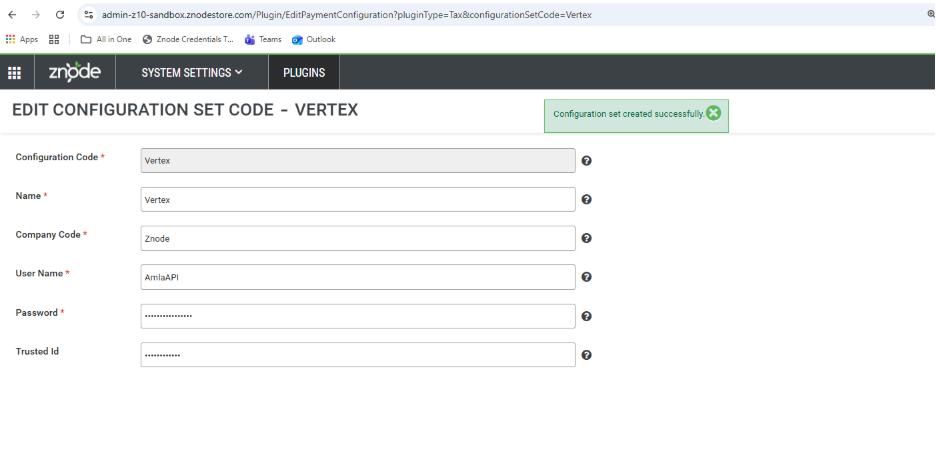
- A new Trusted Id configuration field is introduced on the Configuration Set page in the admin panel.
- The Trusted Id field is masked in the Admin UI to ensure sensitive information is protected and not visible to users.
- Once configured, the Trusted Id will be automatically included in all Vertex tax API requests to enable successful tax calculation during checkout.
What's New
Enhanced API Security with IDOR Validation (Phase 1)
A new global setting Enable IDOR Validation has been introduced under Global Settings → General to prevent unauthorized API data access.
- Default Value: No
- When disabled, the system continues existing behavior.
- When enabled, ownership validation is enforced for APIs.
Key Features
- Ownership validation for user resources.
- Prevents unauthorized access to other users' data.
- Returns 403 Forbidden when IDOR violation occurs.
- No changes to API request or response structure.
Request Context Requirement
To support IDOR validation, a mandatory header must be included in API requests.
- Header Name: Z-Request-Context
- Generated by Storefront BFF layer.
- Contains encoded authenticated user context.
Security Characteristics
- Encrypted request context
- Supports CSR impersonation scenarios
- Prevents request manipulation
- Maintains secure validation and auditing
Fallback Behavior
- If IDOR validation is disabled → existing authorization logic applies.
- If header is missing → request is processed without IDOR enforcement.
- Guest users are not affected.
Disable SEO Validation
Feature Overview
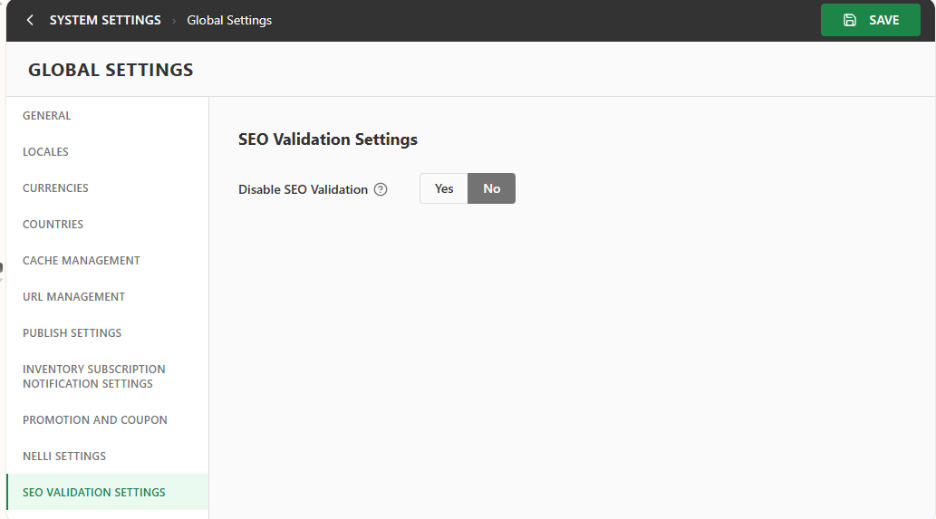
- A new configuration option for SEO Validation Settings has been introduced under Global Settings to provide administrators with control over validation rules applied to the SEO Friendly Page Name / SEO Friendly URL field.
- By default, the system enforces standard SEO validation rules to maintain consistent URL structure and prevent conflicts with reserved system routes. This enhancement introduces a configurable option that allows administrators to disable SEO validation, enabling the use of custom URL patterns when required for specific business scenarios such as marketing campaigns, legacy URL structures, or external integrations.
Disclaimer:
- To ensure the new feature functions as intended, using the latest version of the Storefront is recommended. Older versions may support the feature partially or could lead to limited functionality or operational inconsistencies.
Key Features
- Introduced a new Global Setting: Disable SEO Validations.
- Default value is No, ensuring existing SEO validation rules remain enforced.
- When enabled (Yes), administrators can enter SEO URLs without restrictions imposed by predefined validation rules.
- Provides flexibility for custom SEO URL structures while maintaining standard validation as the default behavior.
- Supports scenarios where businesses need custom URL patterns beyond standard SEO constraints.
Workflow (Admin Console)
- Navigation: System Settings → Global Settings → SEO Validation Settings
- Attribute Details
- Attribute Name: Disable SEO Validations
- Attribute Type: Yes / No
- Default Value: No
- Behavior
- When set to No (Default): Standard SEO validation rules are enforced.
- Ensures:
- SEO-friendly format compliance
- Allowed character restrictions
- Prevention of conflicts with reserved system keywords
- Consistent URL structure across the storefront.
- When set to Yes
- Predefined SEO validation rules are bypassed.
- Administrators can enter custom values in the SEO Friendly Page Name / SEO Friendly URL field without system-imposed restrictions.
- Impacted Admin Pages
- The configured validation behavior applies to the following areas:
- PIM
- Product
- SEO Setup
- Product
- 301 URL Redirect
- PIM
- The configured validation behavior applies to the following areas:
- Note:
- No validation will be implemented at the API level, as it has multiple dependencies that may impact existing integrations.
- No changes to the Storefront. Any URLs that were not working earlier will continue to behave the same. Only SEO URL creation from the admin side is enabled.
CyberSource Fraud Management Phase 2
Disclaimer:
To ensure this feature functions as intended, usage of the latest version of the Storefront is strongly recommended.
Older Storefront versions may provide partial support and could result in limited functionality or operational inconsistencies.
Feature Overview
- This release introduces critical enhancements to the payment authorization and fraud management integration with CyberSource. The update resolves previously identified gaps related to verification amounts, transaction payload completeness, fraud rule evaluation, and order lifecycle handling.
- All known and documented limitations affecting these areas have been addressed as part of this enhancement.
- Important: This release supports authorization-only flows. Payment capture is not included in this enhancement.
Key Features
- Payment Verification Enhancements
- Verification amount updated to $0:
- Card verification is now performed using a $0 verification amount, replacing the earlier $1 verification.
- The $1 verification was previously required due to Spreedly platform limitations.
- This limitation has now been fully resolved, enabling:
- Elimination of unnecessary pending $1 charges on customer statements
- Improved customer experience during payment validation
- Verification amount updated to $0:
- Fraud Management & Rules Enhancements
- Regional & Country IP Address Rules
- Regional and country-based IP address rules are now fully functional.
- These rules are correctly evaluated during authorization based on the customer’s originating IP address.
- Velocity Rules
- Velocity rule support has been expanded and is now partially available with the following supported parameters:
- Supported Parameters
- Total Count
- Shipping Address
- IP Address
- Currently Not Supported
- Device
- Account Number
- Regional & Country IP Address Rules
Velocity rules now evaluate supported parameters accurately for both new and saved credit card authorization transactions.
- Standard Rules
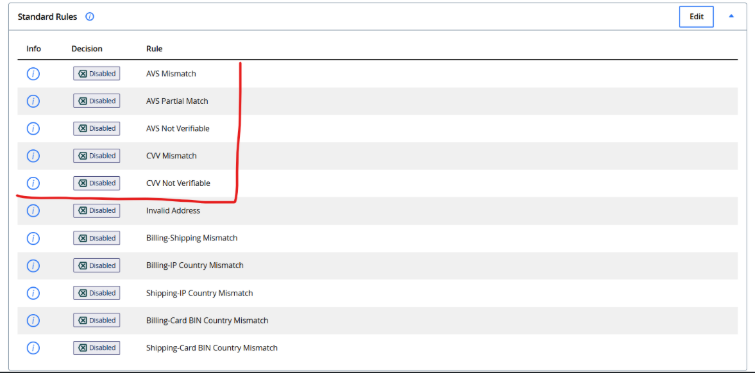
- The highlighted Standard Rules can only be validated using live credit card transactions
- These rules could not be tested in non-production environments due to the exclusive availability of test credit cards.
- Previously missing inputs—such as IP address and shipping address—are now included in the transaction request.
- As a result, all remaining Standard Rules (as shown in the configured ruleset) execute correctly without functional limitations.
- Threshold Rules
- Threshold rules are now supported for new credit card authorization transactions.
- This enhancement extends rule evaluation beyond saved cards, ensuring consistent fraud checks for all authorization scenarios.
- Score Threshold Rules
- Score Threshold Rules continue to operate as expected for saved card authorization flows.
- Validation has now been extended to new credit card authorization transactions, delivering complete and consistent rule coverage.
- Order Creation & Review Flow Fix
- Resolved an issue where new credit card authorization transactions routed to a “Review” decision in CyberSource did not result in order creation in Znode.
- Orders are now consistently created in Znode, even when the transaction enters a review state.
- This ensures proper synchronization between CyberSource fraud decisions and the Znode order lifecycle, eliminating order visibility gaps.
Note: Please note creating a new configuration set for cybersource gateway is mandatory as we have moved with Cybersource rest.
Pass Additional Fields to CyberSource Fraud Management (FME)
Feature Overview
- This enhancement improves the fraud evaluation process in the Visa CyberSource Fraud Management Essentials (FME) integration within the Znode eCommerce Platform.
- Additional customer and transaction details will be included in the fraud scoring request to provide more accurate risk assessment during credit card transactions. By passing these fields to CyberSource, merchants can review suspicious transactions more effectively and make informed decisions for orders placed on hold.
Disclaimer: To ensure the new feature functions as intended, using the latest version of the Storefront is recommended. Older versions may support the feature partially or could lead to limited functionality or operational inconsistencies.
Key Features
- Enhanced fraud scoring by sending additional transaction data to Visa CyberSource FME.
- Support for passing Customer Email and Shipping Address in the fraud management request.
- Improved visibility of transaction details in the CyberSource FME console for manual order review.
- Helps merchants evaluate orders placed near the fraud score threshold before approving or rejecting them.
Provision to pass User ExternalId to Customer field in PayFabric Transaction
Feature Overview
- This enhancement improves the integration between the Znode eCommerce Platform and PayFabric by ensuring that customer information is associated with payment transactions. During order placement, the User ExternalId from Znode will be passed to PayFabric and populated in the Customer field of the transaction. This allows merchants to easily identify the customer linked to each transaction in PayFabric.
Disclaimer: To ensure the new feature functions as intended, using the latest version of the Storefront is recommended. Older versions may support the feature partially or could lead to limited functionality or operational inconsistencies.
Key Features
- Populate the Customer field in PayFabric transactions with the User ExternalId during order placement.
- Improve transaction traceability by linking payments with the corresponding customer in PayFabric.
Workflow
Order Placement Flow
- A customer places an order using a credit card on the Znode eCommerce Platform.
- During transaction creation, the system sends payment details to PayFabric.
- The User ExternalId from Znode is passed and populated in the Customer field of the PayFabric transaction.
- The transaction is successfully recorded in PayFabric with the associated customer identifier.
Shopping Cart Calculation Override Support (ZMO)
Feature Overview
- Introduced support for Shopping Cart Calculation Override using Znode Method Override (ZMO). This feature enables partners and implementation teams to customize cart total calculations—such as applying user credits or other pricing logic—during runtime, ensuring flexibility in pricing strategies without impacting core platform behavior.
Disclaimer: To ensure the new feature functions as intended, using the latest version of the Storefront is recommended. Older versions may support the feature partially or could lead to limited functionality or operational inconsistencies.
Key Features
- Supports overriding cart calculation logic through ZMO for customized total computation.
- Enables real-time updates to cart and order summary values during the calculation process.
- Ensures modified totals are returned and consistently reflected across the storefront experience.
- Applies to key user journeys including cart summary, checkout, order receipt, and order details.
- Maintains separation from existing promotion, voucher, and coupon mechanisms.
- Does not impact admin functionality or line-item level pricing, which are managed through separate systems.
Znode Basic Authentication – Standard Separator Support Enhancement
Feature Overview
- The Znode API Basic Authentication mechanism has been enhanced to support the industry-standard colon (:) separator in addition to the existing pipe (|) separator. Previously, authentication tokens were accepted only in the domain|key format, which caused compatibility issues with widely used API tools and clients such as Postman, Insomnia, and REST clients that natively follow the standard domain:key structure.
- This enhancement aligns Znode authentication with the Basic Authentication specification while ensuring full backward compatibility for existing integrations.
Key Features
- Dual Separator Support
- Authentication logic now supports both:
- Standard format: domain:key
- Legacy format: domain|key
- Ensures seamless interoperability with industry-standard API tools and existing Znode integrations.
- No changes required for existing clients using the legacy format.
- Authentication logic now supports both:
- Strict Token Validation
- Enhanced validation logic ensures only properly formatted tokens are accepted.
- Invalid or malformed delimiters (e.g., ;;, ||, |:, ::) are rejected.
- Tokens containing invalid special characters such as @, /, & are not permitted.
- Invalid authentication attempts return a 401 Unauthorized response.
- Environment Compatibility
- Authentication behavior is validated and consistent across:
- Production environments (e.g., somedomain.com)
- Local development environments (e.g., localhost:44392)
- Ensures uniform behavior across all deployment stages.
- Backward Compatibility
- Existing authentication tokens using the legacy pipe (|) separator continue to function without modification.
- No impact on existing APIs, integrations, or client implementations.
- This is a non-breaking enhancement designed for seamless adoption.
Security Enhancements
- Delete cart items without authentication)
- Enforce authentication on DELETE /api/cart/remove-all-cart-items so it always requires a valid session or access token.
- Implement strict authorization: verify the authenticated user actually owns the cartNumber before allowing deletion.
- Replace direct, predictable cart IDs with indirect/opaque identifiers (e.g., UUIDs or hashed values) instead of sequential IDs.
- Log all delete operations and monitor them and apply rate limiting on this endpoint to prevent automated mass deletion attempts.
Performance Enhancements
- Cart Performance Improvements
- Improved performance and stability of cart-related functionality under high user load (validated with 150–500 concurrent users). The following enhancements were implemented:
- Merge Guest User Cart – Significantly reduced response time, improving cart merge efficiency.
- Cart Summary – Optimized response time, ensuring faster and more consistent cart overview retrieval.
- Get Cart Items – Enhanced performance for quicker loading of cart item details.
- Key Improvements
- Addressed data inconsistencies affecting cart operations.
- Eliminated performance bottlenecks caused by inefficient data retrieval.
- Improved overall responsiveness and scalability of cart APIs.
- Improved performance and stability of cart-related functionality under high user load (validated with 150–500 concurrent users). The following enhancements were implemented:
Black Box Improvements
Product Information Management (PIM)
Z10‑26131 | Product Image Removed from Cart After Deactivation
Added a condition to assign the value from Orderproductdetail.productImage if attributeData is null.
Z10‑30625 | Inactive Product Shows Null Quantity Error
Updated cart validation to skip min/max quantity checks when inactive-product APIs return null values, preventing the incorrect message “The selected quantity must be between null to null.”
Z10‑32338 | PLP Breaks for Long SKU Values
Updated PLP and product details UI to constrain long SKU values within the card, displaying them in a truncated format with ellipsis (…) while preserving layout. Added tooltip/hover behavior to show the full SKU on demand, ensuring a clean UI and full information visibility.
Z10‑32872 | Brand Name Length Validation Missing
Added validation rules for brand name length.
Z10‑33193 | Catalog Publish Stuck at 22%
Resolved the issue by terminating the locking/deadlock process on the DB server, after which catalog publish completed successfully; no code changes were required, and deeper impact analysis will be done in regular regression.
Z10‑33391 | Products Not Rendering for Specific Category
Added a null check for the media source in the v2/published-categories/id/{categoryId} API to prevent failures when category media is missing or deleted from DAM.Corrected the ID mapping/discrepancy in the ZnodePublishCategoryEntity table so published categories (like Chain and Rope) render products correctly on the Webstore even after catalog publish.
Z10‑33048 – ZnodeTraining10.com Publish Failure
Resolved an issue where publishing on ZnodeTraining10.com was failing, ensuring publish processes now complete successfully and changes are properly reflected on the training storefront.
System Settings
Z10‑24835 | Synonym Import Ignores Pipe Delimiter
Updated the Admin synonym UI to treat the pipe (|) as a valid delimiter, splitting imported values into individual keywords instead of a single string.
Aligned the UI display and edit behavior with the stored comma‑separated values so that pipe‑delimited synonyms are consistently shown and managed across import, listing, and edit flows.
Z10‑26938 | Duplicate Tax Types in Order Bifurcation
Tax calculation logic was updated to ignore tax types with a zero rate so that non‑applicable taxes are no longer bound or displayed twice in the tax bifurcation on the Manage Order page.
Z10‑27482 | Incorrect Tax During Quote‑to‑Order Conversion
Tax amount formatting was corrected by applying consistent numeric formatting to taxSummary.Rate, eliminating unwanted trailing zeros and ensuring uniform decimal display for Avalara tax calculations when converting quotes to orders
Z10‑30504 | Shipping Amount Not Updating After Item Removal
Updated the Checkout flow so that, after a line item is removed, CheckoutShoppingCartItems.removeCartItem() sets setReloadShippingOption(true), triggering AddressWrapper’s useEffect to call updateShippingOptions with the current address and keep Shipping Methods and Order Summary shipping amounts in sync.
Z10‑32500 | Custom Table Import Failing
Updated Znode_ImportCustomTableJsonIntoTempTable to safely handle special characters during XML parsing, preventing XML parsing: illegal name character errors so Custom Table imports with such data complete successfully.
Z10‑32514 | Quote Shipping Section Not Reloading
Leveraged existing Quote changes so that when items are removed, the Checkout now reloads the Shipping Methods section along with the Order Summary. Ensured shipping methods refresh correctly after item removal.
Z10‑32586 | Affirm Cancel Error Toast Disappears Quickly
Adjusted the Affirm cancellation flow during quote-to-order conversion so the “Unable to place order” toast now remains visible long enough to be read before redirection. Implemented a delay to show the toast first, then proceed with navigation, without impacting other payment or checkout flows.
Dev Center
Z10‑32247 | Custom Table Validation Message Disappears
Fixed custom field-length validation so error messages stay visible after Save/Save & Close on the Manage Fields page. Prevented form submission when field length exceeds the Global Settings limit until the value is corrected.
Z10‑32331 | Failed to Create Number Field (Sporadic)
Handled the null fieldCode in HandleCustomTableExceptionForFieldLength to avoid NullReferenceException and preserve the original error, and added a user‑friendly validation message when reserved field name “ID” is used.
Z10‑32570 | Webhook Filter Throws Generic Error
Updated the webhook list filter validation logic so valid filters now return filtered results (or “No records found”) instead of a generic error when applying any filter on the Webhook Settings list.
Z10‑32741 | Custom Table Field Code Already Exists Error
Updated the duplicate field-code handling to treat HTTP 409 (conflict) the same as ErrorCodes. Already Exist, so the UI now shows a specific “Field code already exists” validation message instead of the generic “Failed to create” error when adding a Custom Table field with an existing field code.
Z10‑33283 | Custom Table API Uses FieldName Instead of FieldCode
Resolved the issue by updating the custom table insert validation to match incoming request columns against FieldCode instead of FieldName, so /v1/custom-table-data/{TableKey}/insert now correctly accepts valid field codes and only returns “Invalid column” when an actually invalid code is provided.
Content Management System (CMS)
Z10‑27335 – Page Builder Layout Deletion Error with Znode Widgets
Fixed an issue where deleting a layout in Page Builder caused an error when the page contained a configured Znode widget, allowing admins to manage layouts without disruption.
Z10‑32087 | Drag & Drop in Page Builder Causes JS Error
Fixed an issue in Page Builder where dragging and dropping UI/Znode widgets triggered a missing /StoreExperience/CreateUrl API call and a runtime e is null JS 1 error, by correcting the widget API invocation and upgrading the underlying Puck editor
Z10‑32308 | Incorrect Redirect When SEO URL Is Blank
Added three additional properties—PageCode, BlogNewsType, and BlogNewsId—to the Znode.Engine.CMS.Model.SearchCMSPageResponse model. These properties help identify the type and enable conditional handling for SEO URL generation based on that type.
Z10‑32631 | Duplicate Approval Email Templates
Removed duplication and corrected template dependencies.
Z10‑32682 | JS Error While Managing Ad Space Variants
Resolved missing jQuery validation dependency.
Z10‑32776 | Duplicate Blog SEO Clears Data
Fixed validation so duplicate checks do not reset inputs.
Z10‑32827 | Adding HTML Logs Out User in Page Builder
Resolved session handling issues during content editing.
Z10‑33251 | Video Widget Not Responsive
Remove the Google Fonts <link> from the dynamic widget.Load the required fonts once at the global level (e.g., main layout or <head>). This ensures fonts are loaded before widget rendering and prevents repeated layout shifts.
Accounts & Users
Z10‑23492 | Username Length Validation Shows Wrong Error
Fixed validation logic preventing false “Username already exists” messages.
Z10‑23694 | Login Remember Me Not Working
Resolved session persistence issues for Remember Me functionality.
Z10‑31380 | Generic Error When Saving Sales/Reps User
Improved validation to show meaningful error messages.
Z10‑31672 | Admin Button Color Does Not Reset
Fixed UI state handling so buttons revert to default after actions.
Z10‑32503 | User Search Causes Loader Issue
Disabled the IsAllowSearch flag for non-visible customer list columns so the User List search only applies to key fields (e.g., UserName, FullName, Email, StoreName), reducing stored procedure load and preventing the continuous loader on search.
Z10‑32581 | GetAccountUserOrderList API Path Param Ignored
Fixed API behavior to correctly process accountId path parameter.
Z10‑32609 | GetUserDetailById API Returns Incomplete Data
Corrected response mapping to return full user details.
Z10‑33041 | Voucher Amount Sorting Not Working
Fixed sorting logic on the User Vouchers grid.
Z10‑33359 | Invalid Column Error When Creating Partner User
Resolved schema mismatch during partner user creation.
Z10‑33389 | Admin Users Not Appearing
The problematic stored procedure for user role mapping was reverted to the previous stable version. This restored proper role retrieval and display for Admin Users in Dev Center → Admin Users.
Z10‑33390 | Generic Error on Accounts User Page
Improved error handling to display actionable messages. If you want, I can also give you a concise “Solution Implemented” paragraph you can paste directly into the ticket or release notes
Order Management System (OMS)
Z10‑26117 | Quote Emails Not Working as OOB
Updated and corrected the quote-related email templates so that New Quote Request (Admin), Quote Request Acknowledgement (Customer), and Quote Converted to Order (Customer) are triggered.Using the correct QuoteConvertedToOrderNotificationForCustomer template.
Z10‑30138 | OMS Performance Issues
Optimized backend workflows to improve response time and stability.
Z10‑31579 | Random Tax Exempt Logs Triggered
Corrected logging conditions on order status changes.
Z10‑31740 | Approver Not Receiving Approval Email
The system is updated so that only a single “PendingOrderApproval” template needs to be configured for the Pending Approval flow.The confusing requirement to have two templates with identical names to make the email fire was removed.
Z10‑31822 | Checkout Page Briefly Visible After Order Placement
Prevented checkout UI flash on browser back navigation.
Z10‑32290 | POD OMS Performance Issue
Improved backend performance to reduce processing delays.
Z10‑32616 | Order Date Filter Ignores Time
Enhanced filtering logic to include both date and time. Updated Znode_GetCommercecollectionListByCode to stop casting the date‑time filter to date only and instead pass the full date‑time range directly to the dynamic SQL so orders are filtered correctly by both date and time.
Z10‑32680 | Order Receipt Layout Breaks for Long Descriptions
Adjusted the OMS order print receipt HTML/CSS so long product descriptions and personalization text wrap correctly and the table layout remains intact in both Portrait and Landscape print orientations.
Z10‑32841 | Sorting Pending Orders Throws Error
Resolved sorting logic for Amount and Application Type columns. Updated the OMS Pending Orders XML and admin view model to use the correct field names (TotalAmount and ApplicationType) for sorting, fixing the generic error when sorting by Pending Order Amount or Application Type.
Z10‑32879 | Irrelevant Attributes Displayed in Manage Quote
Filtered configurable attributes to display only relevant ones. Linked the Description value to CartDescription only when Description is not null, preventing GetShippingChargesForManage from overwriting cart descriptions and showing irrelevant configurable product attributes after changing the shipping method.
Z10‑32918 | Checkout Buttons Disabled After Auto‑Correction
Fixed UI state so buttons re‑enable automatically.
Z10‑32953 | Missing Macros in Order Receipt Email
Added correct column macros for email templates. Mapped the correct column macros for the specified fields in the Order Receipt email template to ensure accurate data population.
Z10‑32974 | Voucher Auto‑Applied After Quote Edit
Corrected voucher behavior to prevent unintended application.
Z10‑33002 | Guest Cart Merge 502 Error Under Load
Improved load handling and error recovery.
Z10‑33047 | Incorrect BOGO Discount Calculation
Fixed promotion calculation logic for accuracy.
Z10‑33119 | Customer Email Replaced After Quote Conversion
Resolved data overwrite issue preserving customer email.
Z10‑33183 | Backend Latency During Load Testing
Optimized APIs, DB procedures, and order flow.
Z10‑33184 | Place Order API Fails Under Load
Improved concurrency and timeout handling.Optimized the Place Order flow by removing repetitive live checks of the method‑override flag and tuning slow queries, significantly reducing response time and eliminating intermittent failures under load.
Z10‑33223 | Order Receipts Not Sent
Fixed email trigger and template configuration issues.
Z10‑33226 | Infinite Loader When Creating Promotion
Resolved UI loading loop during store selection.
Z10‑33229 | Product Shows Out of Stock Incorrectly
Corrected inventory logic when tracking is disabled. Adjusted Manage Quote inventory validation so that products marked as “Don’t Track Inventory” no longer trigger an “Out of Stock” error when updating quantities, while still correctly handling true out‑of‑stock scenarios.
Z10‑33388 | Voucher Creation Stuck in Loading
Fixed backend response handling to complete voucher creation.
DAM
Z10‑30703 | Duplicate Files on External Document Upload
The responsible stored procedure was modified so the data from STRING_SPLIT is not duplicated, eliminating extra media rows.
Z10‑32394 | DAM Sync Stuck at 0%
Updated the stored procedure to safely cast the JobId column to UNIQUEIDENTIFIER using TRY_CAST and ensured the output column is explicitly defined as JobId. This improves type safety and ensures correct value mapping in the result set.
Z10‑32476 | Highlight Images Not Rendering
Updated the SQL logic to handle the media source type 'FullURL' within the CASE statement used to determine [Path]. Now, when ZM.MediaSource is 'FullURL', the [Path] is directly assigned from ZM.Path, in addition to the existing handling for 'ExternalMedia' and 'InternalMedia'.
Other
Z10‑14862 | DAM_Media_V2API: Insufficient Documentation for /v2/files-upload
Enhanced Stoplight documentation to fully describe request parameters, payload structure, and responses for the files‑upload API. This improves developer clarity and reduces integration errors.
Z10‑29576 | V2 API CMS Widget Issues in Profiles API
Resolved functional and data consistency issues affecting CMS widgets using the profiles API.
Z10‑30143 | API v2/accounts/{accountcode} Returns Error
Resolved request handling issues that caused valid account update requests to fail unexpectedly.
Z10‑30469 | Product Overrides Hydrated Search API Issue
Resolved data retrieval and facet handling issues in the hydrated search API to ensure accurate results.
Z10‑31641 | Accounts PUT API Functional Issues
Fixed validation, update, and response consistency issues in the Accounts PUT API.
Z10‑32613 | V2 Search API Schema Failure
Corrected schema compatibility issues that caused search API failures in QA.
Z10‑32690 | User API Returns Incorrect IsActive Value
Fixed response mapping to correctly reflect user activation status.
Open-Source Enhancements and Fixes
Z10‑18014 | Checkout PO Method Change Disables Place Order
Fixed checkout validation to clear PO data correctly and re‑enable the Place Order button after payment method changes.
Z10-30730 | 2FA Authentication Code Timer Does Not Reset After Resend
Fixed an issue where the 2FA authentication code timer did not reset after resending the code once the previous one had expired. The timer now correctly restarts on each resend, ensuring users receive a valid countdown and can complete verification without confusion.
Z10‑25497 | Parent Category Count Not Updating
Resolved product count recalculation logic to ensure accurate parent category counts.
Z10‑30730 | 2FA Timer Does Not Reset After Resend
Fixed OTP timer logic so the countdown resets correctly after resending the code.
Z10‑31080 | Search Results Missing Vertical Scrollbar
Corrected UI layout handling so scrollbars display consistently when results exceed view height.
Z10‑326777 | Approved User Unable to Place Order
Fixed approval state synchronization allowing approved users to place orders successfully.
Z10‑32689 | Missing Loader on Move to Cart
Added progress indicators during Move to Cart actions for better user feedback.
Z10‑32828 | Cart Page Button Alignment Issue
Resolved UI alignment problems affecting cart page action buttons.
Z10‑32972 | Quick View Click Freezes Webstore
Resolved blocking JavaScript issues causing the storefront to become unresponsive.
Z10‑33101 | Demo Store Locations Page Error
Fixed routing and data binding issues on the Locations page.
Z10‑33222 | PDP Page Not Found on Variant Selection
Corrected configurable variant URL generation for newly created attributes.