
Release Notes / Version 10.10.1.0 / May 12, 2026
TABLE OF CONTENTS
- Highlights
- Release Information
- Breaking Changes
- Deprecations
- What’s New
- Checkout Experience Enhancements (Beta Version)
- Enhanced API Security with IDOR Validation (Phase 2)
- Support for USPS Shipping Estimator
- 301 URL Redirect - Removed SEO Validation
- Trigger Types in Commerce Connector – Real-time event and callback (Multi-step data exchanges)
- Payment Type Display Enhancement – Show Voucher as Payment Method
- PayPal Payment Gateway Integration with Credit Card Support
- Security Enhancements
- Black Box Improvements
Highlights
Release Information
The Znode 10.10.1.0 release introduces new features, enhancements, performance upgrades, and bug fixes.
Version Note: To ensure the new feature functions as intended, using the latest version of the Storefront is recommended. Older versions may support the feature partially or could lead to limited functionality or operational inconsistencies.
Disclaimer
Temporary Disablement of Email Marketing Tab
- The Email Marketing tab within the Stores section has been temporarily disabled. This measure has been implemented to accommodate ongoing updates and improvements. During this period, admin users will not have access to email marketing features from the Stores section. The functionality will be restored once the necessary changes have been completed and validated.
Temporary Disablement of Promotions, Coupons, and Vouchers Management on the Manage Order Screen. (Continued from Previous Version)
- In this release, the ability to add, manage, or modify promotions, coupons, and vouchers has been temporarily disabled on the Manage Order screen in the Admin Console. While promotions and coupons applied during order creation will still be visible on the Manage Order screen, the options to add new promotions or remove existing ones will not be available. This functionality will be re-enabled in a future update.
Disable SEO Validation
- Even if the Disable SEO Validation flag is set to true, the changes will only take effect after explicitly saving the configuration.
Breaking Changes
- Content Security Policy (CSP) Enforcement Update
- The default CSP configuration has been updated to improve storefront security. The directives of unsafe-inline and unsafe-eval are no longer supported in the default configuration. Existing custom implementations relying on inline scripts or eval-based execution may stop working and must be updated to follow nonce-based CSP policies.
- Old Behavior
- CSP allows the use of unsafe-inline and unsafe-eval directives.
- Inline JavaScript and dynamically evaluated scripts could be executed without nonce validation.
- Custom scripts embedded directly within HTML pages functioned without additional security attributes.
- Updated Behavior
- The directives of unsafe-inline and unsafe-eval are removed from the default CSP configuration.
- Only nonce-based trusted scripts are allowed to be executed in production environments.
- Any inline script without a valid nonce is blocked by the browser.
- What May Break and Required Action
Scenario Impact Required Action Inline event handlers (e.g., onclick) Will not execute Replace with JavaScript event listeners (addEventListener) Use of eval() / new Function() Blocked by CSP Refactor code to remove dynamic execution or upgrade dependent libraries Dynamically injected scripts Blocked if nonce is missing Attach the generated nonce to script elements Inline <script> tags Blocked without nonce Move to external files or add nonce attribute - Reference
- CSP Level 3 (W3C Specification) [https://www.w3.org/TR/CSP3/?utm_source=chatgpt.com#security-nonces]
- MDN Web Docs – Content Security Policy [https://developer.mozilla.org/en-US/docs/Web/HTTP/Guides/CSP#strict_csp]
- Example . Inline Event Handlers Will Stop Working
- Previous Behavior (Not Supported)
<button onclick="handleClick()">Click</button> - Fix (After Recommended)
document.querySelector("button") .addEventListener("click", handleClick);
- Previous Behavior (Not Supported)
- Workaround to support old non-secure implementation:
- Inline scripting can be temporarily enabled during development using:
${nonce? " 'nonce-" + nonce + "'" : ""}${isDevelopmentMode ? " 'unsafe-inline' 'unsafe-eval'" : ""}; - Alternatively, CSP settings can be modified in:
- packages\constants\src\headers.ts
- After making the changes, deploy the latest storefront build for the updates to take effect.
- Inline scripting can be temporarily enabled during development using:
Note: This breaking change impacts only customers who upgrade/merge the Webstore (Storefront) source code as part of the upgrade (e.g., moving from Storefront v10.8.0)
Deprecations
Vertex Plugin – Field Deprecations
- Summary
- As part of ongoing improvements to simplify and standardize configuration, updates have been made to the Vertex plugin configuration fields.
- What’s Changed
- The following fields have been removed from the new configuration experience:
- Username
- Password
- The following fields have been removed from the new configuration experience:
- Backward Compatibility
- Existing configurations using Username and Password will continue to function without any disruption.
- These legacy fields are retained only for backward compatibility and are not recommended for new implementations.
- Going Forward
- When creating new Vertex Config Sets, only the Trusted ID field will be available.
- Users are encouraged to transition to the new configuration approach to ensure future compatibility and alignment with platform standards.
- Impact
- No immediate action is required for existing configurations.
- New configurations must use the updated field structure.
DeletePaymentAuthToken touchpoint - Deprecated
- Summary
- The touchpoint has been removed from the system as it is no longer in use. The DeletePaymentAuthToken scheduler is currently not visible in Hangfire.
- What Changed
- The related job associated with this touchpoint has been removed and will no longer be available.
- Impacted Area
- No immediate impact is expected. The system will continue to be monitored to ensure the scheduler is completely cleared after the remaining jobs finish execution.
What’s New
Checkout Experience Enhancements (Beta Version)
Feature Overview
- This release introduces the Checkout Session Management System, a foundational enhancement to the checkout architecture that ensures consistency, prevents concurrency conflicts, and enforces strict session-level control across all checkout interactions.
- It standardizes checkout behavior across multiple devices, tabs, browsers, and impersonation flows by introducing immutable checkout snapshots, session lifecycle management, and backend-driven validation.
Disclaimer
- To ensure the new feature functions as intended, using the latest version of the Storefront is recommended. Older versions may support the feature partially or could lead to limited functionality or operational inconsistencies.
Configuration Overview (Admin Console)
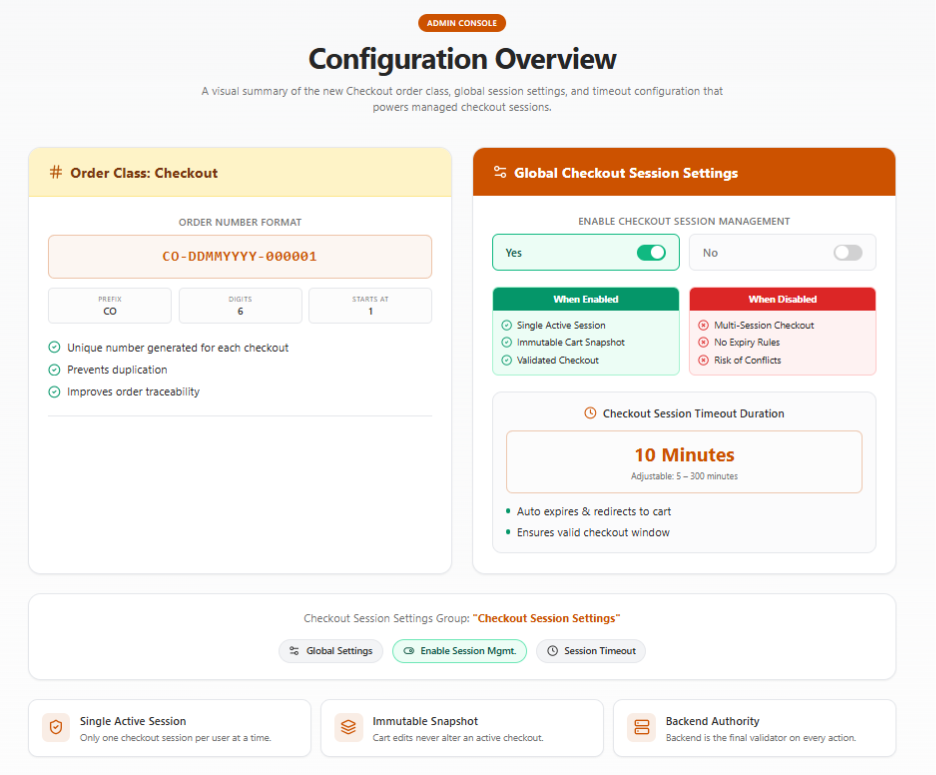
- Introduction of New Order Class: Checkout
- A new internal order class named Checkout has been introduced.
- Class Configuration:
- Default Number Format: CO-<DD><MM><YYYY>-<Number>
- Digit Length – 6
- Next Number – 1 (Starts with)
- Functional Behavior
- A unique checkout class number is generated for every checkout initiation.
- Used internally for tracking checkout-to-order relationships.
- Helps prevent duplication and improves traceability.
- The Checkout Session Management feature is controlled through global configuration settings, enabling administrators to define checkout behavior across all storefront users.
- All settings are grouped under:
- Group Name: Checkout Session Settings
- Entity Type: Global Settings
- Associated Attributes:
- Enable Checkout Session Management
- Checkout Session Timeout Duration (Minutes)
- Associated Attributes:
- All settings are grouped under:
- Settings Behavior:
- Checkout Session Timeout Duration (Minutes)
- Purpose:
- Defines how long a checkout session remains valid.
- Default Value
- 10 Minutes
- Allowed Range
- 5-300 Minutes
- Intended Behavior:
- At checkout initiation:
Expiry Time = Checkout Start Time + Configured Duration - Once Expired:
- Checkout becomes invalid
- Payment and order placement are blocked
- User is redirected to the Cart and is required to restart checkout.
- Business Impact:
- Ensures checkout represents a real-time, valid purchase window
- Ensures checkout represents a real-time, valid purchase window
- At checkout initiation:
- Purpose:
- Checkout Session Timeout Duration (Minutes)
Storefront Functional Behavior (End-to-End)
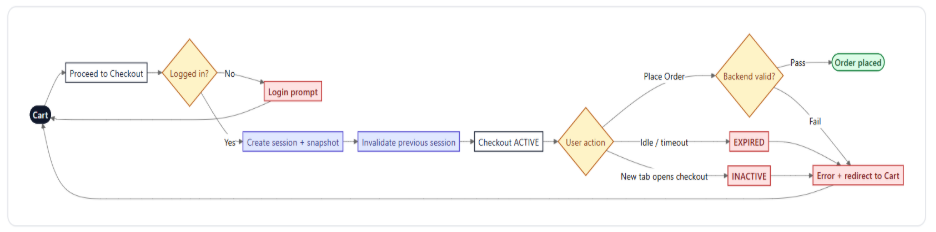
- Checkout Initiation Workflow
- Trigger
- User clicks Proceed to Checkout
- System Behavior
- Validates user session (including impersonation if applicable)
- Creates a new checkout session
- Captures a complete cart snapshot
- Assigns a unique session identifier
- Mark's session as active
- Invalidates any previously active session
- Outcome
- Only the latest checkout is valid and is available for Order Placement.
- Only the latest checkout is valid and is available for Order Placement.
- Trigger
- Checkout Snapshot Behavior
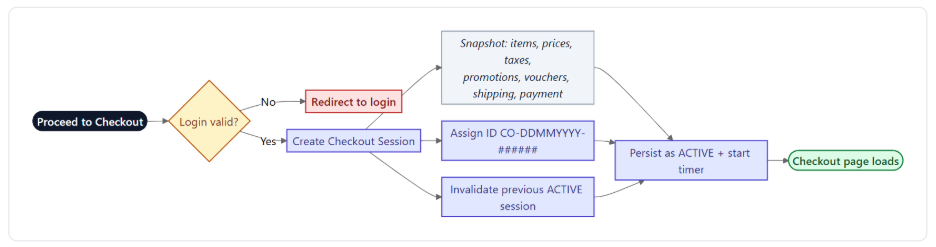
- Checkout captures:
- Items
- Pricing
- Taxes
- Promotions
- Vouchers (if applied)
- Shipping Method (if selected)
- Payment Method (if selected)
- Outcome:
- Checkout remains stable and predictable
- Checkout remains stable and predictable
- Checkout captures:
- Multi-Tab / Multi-Device Handling
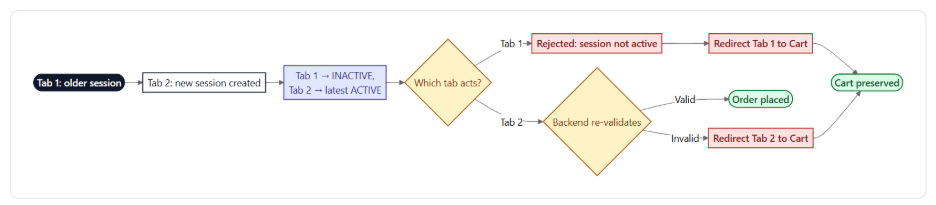
- Scenario:
- User opens checkout in multiple tabs/devices
- System Behavior:
- The latest checkout session becomes active
- All previous sessions have become inactive
- User Impact:
- Attempting actions in an older session results in:
- Blocked operation
- Pay and Submit
- Place Order
- Submit for Approval
- Outcome:
- Prevents duplicate orders and payment conflicts
- Prevents duplicate orders and payment conflicts
- Scenario:
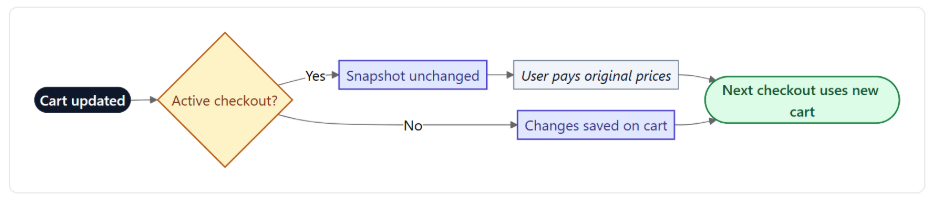
- Cart and Checkout Isolation
- Cart remains independent of checkout session
- Actions such as:
- Adding Items
- Updating Quantity
- Latest Cart Changes➡️ Apply only to future checkout sessions
- Outcome:
- No unintended changes during checkout.
- No unintended changes during checkout.
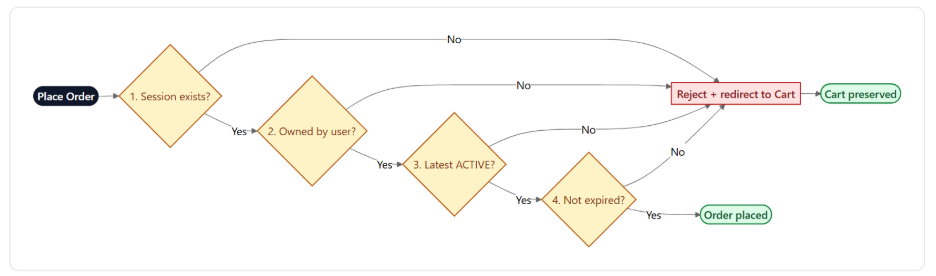
- Order Placement Validation
- Before placing an order, the system validates:
- Session exists
- Session belongs to the current user
- Session is the latest and most active
- Session has not expired
- Failure Behavior:
- If validation fails:
- The order is blocked
- User receives error message
- User is redirected to Cart
- If validation fails:
- Outcome:
- Prevents invalid or duplicate order submissions
- Prevents invalid or duplicate order submissions
- Before placing an order, the system validates:
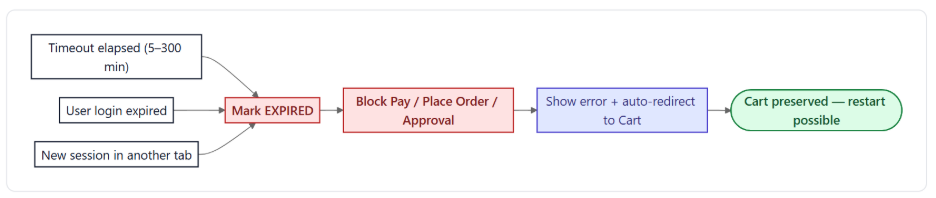
- Checkout Session Expiry
- Trigger Conditions:
- Timeout exceeded
- User session expires
- New checkout session created
- System Behavior:
- Session becomes expired
- All checkout actions are blocked:
- Payment initiation
- Order placement
- User:
- Redirected to Cart and
- An error message is displayed.
- Outcome:
- Ensures only valid sessions proceed for Order Placement
- Ensures only valid sessions proceed for Order Placement
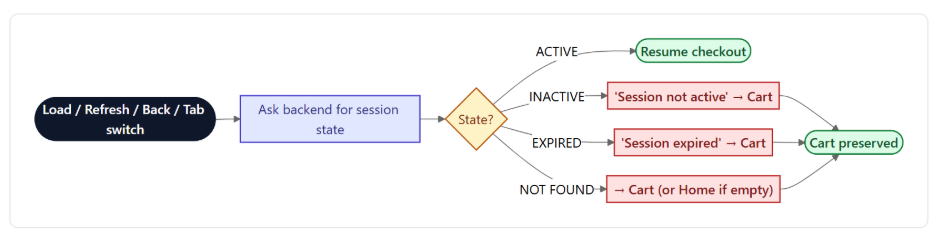
- Browser and Navigation Handling
- System re-validates session during:
- Page load
- Page refresh
- Browser Back/Forward
- Tab switching
- Behavior based on Session State
Session State System Behavior ACTIVE Resume checkout INACTIVE/EXPIRED Block + redirect/message NOT_FOUND Redirect to cart/home - Outcome:
- Prevents access to invalid checkout states
- Prevents access to invalid checkout states
- System re-validates session during:
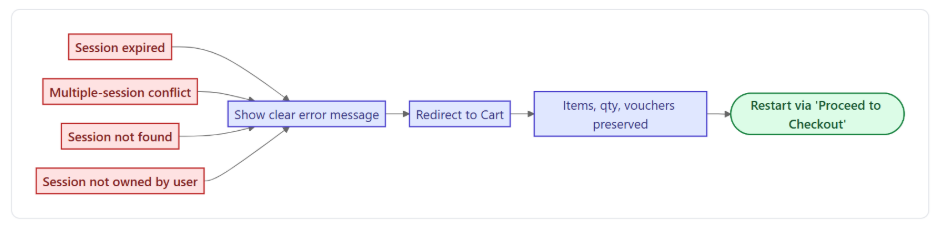
- Error Handling & Recovery
- Common error scenarios:
- Expired session
- Multiple session conflict
- Session not found
- System Response:
- Display a clear message
- Redirect user to cart
- Preserve cart items
- Outcome:
- Smooth recovery without data loss
- Smooth recovery without data loss
- Common error scenarios:
- Behavioral Points:
- Only one active checkout session per user
- Checkout is a fixed snapshot
- Backend is the final authority for validation
- Checkout expiry does not affect the cart
- Configuration changes apply only to new checkout sessions
- No real-time synchronization between cart and checkout
- Important Points:
- The current implementation includes hardcoded validation checks to verify the validity of the Checkout Session at the following stages:
- Place Order / Submit for Approval
- Pay Now and Submit
- Additional validation checks can also be introduced at the following stages, as the existing APIs are fully compatible with such enhancements:
- Shipping Method Selection or Modification
- Validation can be implemented at the project level during shipping method selection or updates.
- Payment Method Selection
- Additional checks can be incorporated during payment method selection without requiring API-level changes.
- Promotions and Coupons/Vouchers
- Validation logic related to promotions and coupon application can be added at the project level.
- Shipping Method Selection or Modification
- Performance Impact:
- While adding validation checks at multiple stages improves data consistency and session validation accuracy, excessive validation across the checkout flow may introduce additional processing overhead. Under high storefront traffic or heavy workloads, this could potentially impact overall checkout performance and response times.
- Therefore, it is recommended to carefully evaluate the trade-off between validation coverage and system performance before enabling checks across multiple touchpoints in the checkout lifecycle
- The current implementation includes hardcoded validation checks to verify the validity of the Checkout Session at the following stages:
- Known Limitations:
- Issue 1: Checkout Session Invalidation During Payment (Multi-Tab)
- When the same cart is opened in multiple tabs, initiating checkout in one tab while a payment is processing in another can invalidate the active checkout session. This causes the user to be redirected back to the Cart page during payment processing. The issue creates a race condition that may lead to inconsistent payment and order states, making it unclear whether the payment succeeded or the order was created successfully.
- Issue 2: Direct Access to Checkout URL
- If a user directly accesses the /checkout URL without a valid checkout session, they are redirected to the Cart page along with a validation message.
- Issue 3: Inconsistent Cart Persistence After Last Item Removal in Checkout
- Removing the final line item from Checkout → Order Summary ends the checkout session and redirects the user to the Cart page; however, the cart reloads with previously removed items still present. This creates a state synchronization issue between checkout and cart data, leading to confusion about whether item removal actions were successfully applied.
- Removing the final line item from Checkout → Order Summary ends the checkout session and redirects the user to the Cart page; however, the cart reloads with previously removed items still present. This creates a state synchronization issue between checkout and cart data, leading to confusion about whether item removal actions were successfully applied.
- Issue 1: Checkout Session Invalidation During Payment (Multi-Tab)
- Trigger Conditions:
Enhanced API Security with IDOR Validation (Phase 2)
Feature Overview
- A new global setting, Enable IDOR Validation, has been introduced under Global Settings → General to control API-level security for preventing unauthorized data access. This enhancement enforces ownership validation across APIs, ensuring users can only access their own resources while allowing controlled rollout through configuration.
- The implementation has been done for Cart
Disclaimer:
- To ensure the new feature functions as intended, using the latest version of the Storefront is recommended. Older versions may partially support the feature or may lead to limited functionality or operational inconsistencies.
- This is a breaking change when enabled; it is important to adopt the update carefully and perform thorough regression testing across all impacted features after upgrading.
Key Features
- New Global Setting – Enable IDOR Validation
- Added a configurable toggle (Yes/No) within Global Settings to manage IDOR validation.
- Default Value: NO
- Provides centralized control for enabling or disabling enhanced API security.
- When disabled, the system continues to behave as per existing logic.
- Accessible via Admin UI under Global Settings → General.
- Added a configurable toggle (Yes/No) within Global Settings to manage IDOR validation.
- Phase 1 – IDOR Support for APIs (Security Enhancement)
- IDOR validation has been implemented across selected APIs to ensure that users can only access resources they own. This enhancement enforces ownership validation at the API level, preventing unauthorized access to other users’ data. The feature is controlled through the global setting, allowing phased adoption.
- Key Features:
- Ownership Validation:
- Validates each request against the user context to ensure access is restricted to owned resources only.
- Enhanced Security Enforcement:
- Protects against unauthorized data access by enforcing strict ownership checks.
- Standardized Error Handling:
- Returns a 403 Forbidden response when an IDOR violation is detected. Existing validations continue to return appropriate 4xx responses where applicable.
- Feature Flag Control:
- Can be enabled or disabled using the Enable IDOR Validation setting, supporting controlled rollout.
- API Contract Stability:
- No changes to request/response structures or parameters; however, responses may differ when validation is enforced.
- Documentation Updates:
- API documentation has been updated to include IDOR validation behavior and the new 403 response for impacted endpoints.
- Ownership Validation:
- Request Context Requirement (Storefront Update Required)
- To support IDOR validation, API requests must include an authenticated user context passed from the Storefront.
- Mandatory Header: Z-Request-Context
- This header carries an encoded user context generated by the Storefront BFF layer.
- It is validated before authorization checks to ensure request authenticity.
- Header Requirements
- Must be generated by the Storefront BFF layer.
- Must include a valid, encoded user context.
- Must follow the exact structure expected by the backend.
- Strict Validation Rules
- Any modification to the header structure will result in validation failure.
- Custom or altered formats are not supported by the backend.
- Secure Context Handling & Encryption
- All API requests include an encrypted Z-Request-Context header. The header securely identifies: The authenticated user
- The header securely identifies:
- The authenticated user
- Any CSR (Customer Service Representative) acting on behalf of the user
- Ensures tamper-proof transmission and data integrity.
- Key Characteristics:
- Uses encryption with a shared key mechanism.
- Prevents manipulation of request context.
- Supports secure CSR impersonation scenarios.
- Maintains a consistent structure for validation and auditing.
- All API requests include an encrypted Z-Request-Context header. The header securely identifies: The authenticated user
- Storefront Behavior & Integration
- The Storefront must attach the Z-Request-Context header to all outgoing API requests.
- Implemented at the API client/BFF layer.
- Ensures secure and consistent communication with backend services.
- Backward Compatibility and Fallback Behavior
- IDOR validation is applied only when both conditions are met:
- The Enable IDOR Validation setting is enabled
- The Z-Request-Context header is present in the request
- If the header is missing:
- The request is processed using existing authorization logic
- IDOR validation is not enforced
- This approach allows gradual adoption without disrupting existing integrations.
- IDOR validation is applied only when both conditions are met:
- Guest User Behavior:
- IDOR validation is not applicable for guest users.
- Guest flows (such as cart operations without login) continue to function using the platform’s existing access model, as no user context is available.
- Important Note:
- Any modification to the request context structure or encryption logic is not supported by the backend and will result in validation failure.
- Only a few APIs are currently covered; more will be included in upcoming releases.
- List of APIs can be accessed here.
Support for USPS Shipping Estimator
Feature Overview
- This release introduces USPS Shipping Rate Calculation to provide real-time shipping costs during cart estimation and checkout. Previously, USPS integration supported only address validation, limiting pricing accuracy.
- With this enhancement, the system now retrieves live USPS rates across supported services
Key Features
- Integration with USPS Rate APIs to fetch live shipping prices.
- Supports both domestic and international shipping rates.
- Enables accurate rate display on:
- Cart Estimator
- Checkout page
- Order summary
- USPS Configuration: New configurable endpoints added for flexibility:
- Access Token URL
- Rate API URL
- Rate Shop API URL
- Domestic API URL
- International API URL
These fields allow administrators to configure and maintain USPS service connectivity.
- Shipping Calculation Methods
A new configuration option controls how shipping is calculated- Total Cart Weight
- Shipping based on the combined weight of all items.
- Displays a single consolidated shipping cost.
- Ignores product dimensions (L/W/H set to 0).
- Per Item Weight (Existing Behavior)
- Calculates shipping per item and sums the total.
- Supports line-item shipping for returns.
- May impact checkout performance.
- Total Cart Weight
- Cart Estimator & Checkout Behavior
- USPS methods are displayed only when:
- Configured for the store/profile
- Valid for the customer’s shipping address
- Real-time rates shown in:
- Cart estimation
- Checkout shipping options
- USPS methods are displayed only when:
- Shipping Eligibility Constraints
- USPS shipping applies only to items ≤ 70 lbs.
- Freight shipping is not supported.
- Address Validation Configuration
- New flag to control the availability of configuration sets within address validation settings (internal use)
301 URL Redirect - Removed SEO Validation
Feature Overview
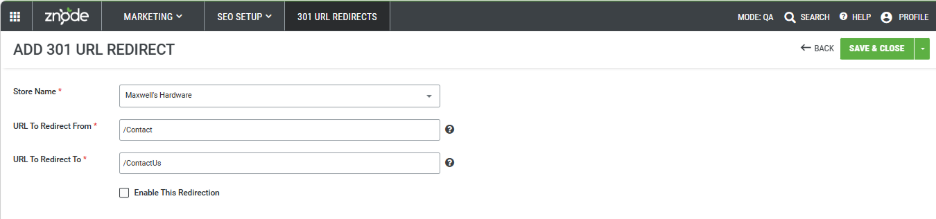
- The 301 URL Redirect feature allows administrators to redirect an old URL to a new URL within the storefront.
- Previously, the URL to Redirect From and URL to Redirect To fields followed strict SEO validation rules, which restricted certain formats and reserved keywords.
- With this update, the SEO validation has been removed, allowing administrators to enter any valid Znode specific URL path in both fields for greater flexibility in managing redirects.
Key Features
- Flexible URL Configuration
Administrators can define redirects without being restricted by the earlier SEO validation rules.
Validation Removed for Redirect Fields
The URL to Redirect From and URL to Redirect To fields no longer enforce SEO path validation.
Improved Redirect Management
Enables easier configuration of redirects for migrated content and legacy links.
Standard Redirect Behavior Maintained
Once enabled, the system automatically redirects the source URL to the target URL using the existing 301 redirect mechanism.
Out of Scope
- Third-party or external URLs are not supported.
Trigger Types in Commerce Connector – Real-time event and callback (Multi-step data exchanges)
Feature Overview
- Znode 10 enhances the Commerce Connector with support for multi-step data exchanges, real-time eventing, and real-time callback execution. These enhancements enable organizations to orchestrate complex integration workflows, automate integrations based on business events, and retrieve live external data during storefront requests.
- Previously, Data Exchanges supported only a fixed two-step integration architecture (source → destination). This enhancement introduces a flexible multi-step pipeline architecture that supports sequential processing across APIs, SFTP, Blob Storage, and external systems.
- The new HTTP-based Trigger Execution framework enables two real-time execution models:
- Znode Event (Push Model) – Automatically triggers a Data Exchange when a configured event occurs within Znode.
- Znode Callback (Pull Model) – Retrieves live pricing or inventory data from external systems during storefront requests such as Product Detail Page (PDP) loads.
- The new HTTP-based Trigger Execution framework enables two real-time execution models:
- This enhancement enables real-time integrations while maintaining backward compatibility with existing scheduler-based Data Exchanges.
Key Features
- Multi-Step Data Exchanges
- Data Exchanges now support unlimited sequential integration steps instead of the previous fixed two-step model.
- Supported Transmission Modes
- API
- SFTP
- Blob Storage
- Multi-Step Capabilities
- Add unlimited integration steps
- Configure independent mappers for each step
- Sequential step execution
- Reuse data from previous steps
- Configure transformations per step
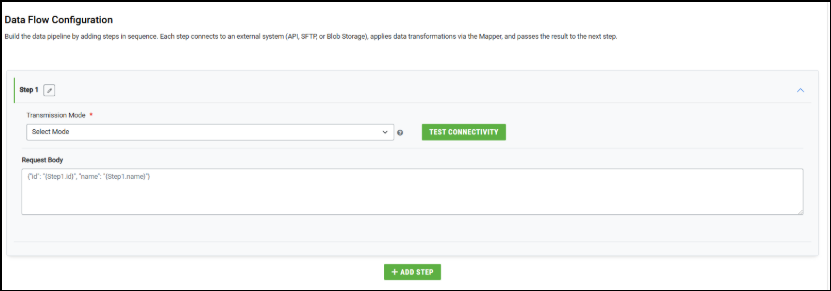
- Step Data Referencing
- Data from previous steps can be referenced using:
- step1.fieldName
- step2.fieldName
- Example:
- Step1.Account.Name
- Step1.Account.Name
- Data from previous steps can be referenced using:
- Trigger Execution Framework
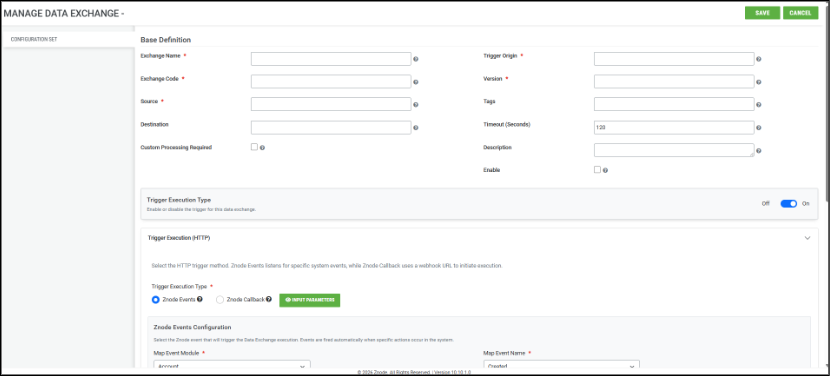
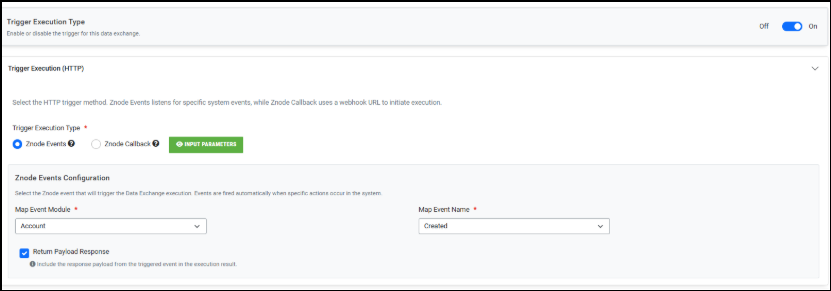
- A new Trigger Execution (HTTP) configuration section is available within the Manage Data Exchange screen.
- Trigger Execution type must be set to on when using multi step data exchanges
- Supported Trigger Types
- Znode Event (Push-Based Execution)
- Automatically executes a Data Exchange when configured system events occur.
- Supported event modules include:
- Account
- Order
- Product
- Category
- Price
- Inventory
- Catalog
- Portal
- Example use cases:
- Account updates
- Order creation
- Product changes
- Znode Event (Push-Based Execution)
- Important Eventing Behavior
- Event payloads contain minimal information such as:
- eventDataCode
- eventModule
- eventName
- Event payloads contain minimal information such as:
- Complete entity data must be retrieved in subsequent API steps using the provided payload values.
- Example:
- Payload.eventdatacode
- Payload.eventdatacode
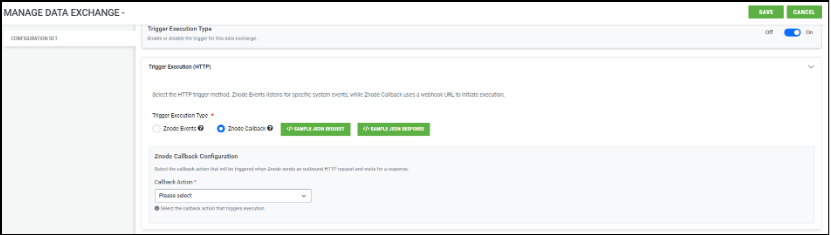
- Znode Callback (Pull-Based Execution)
- Znode Callback enables storefront pages to retrieve real-time data from external systems during user activity.
- Supported Callback Types
- Real-Time Pricing
- Real-Time Inventory
- Real-Time Order Details
- Order Status
- Callback Behavior
- When a storefront request occurs
- Znode triggers the callback
- Commerce Connector calls the external API
- Response data is transformed using the Global Mapper
- Live data is returned to the storefront
- When a storefront request occurs
- Supported Storefront Scenarios
- Real-time pricing on PDP
- Real-time inventory availability
- Dynamic order information
- Enhanced Manage Data Exchange Experience
- The Manage Data Exchange screen now contains:
- Exchange Details / Base Definition Details
- Trigger Execution (HTTP)
- Data Flow Configuration
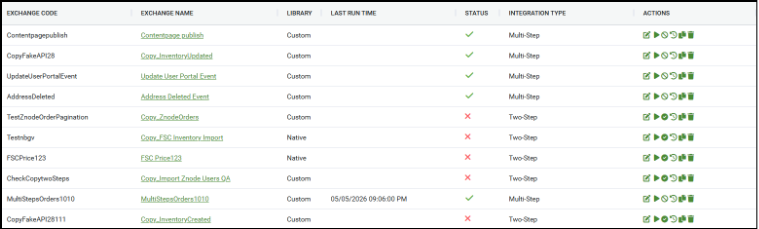
- Integration Type Column
- A new Integration Type column is added to the Data Exchange listing page.
- Supported values:
- Two-Step – Legacy integration architecture
- Multi-Step – Enhanced configurable integration flow
- The Manage Data Exchange screen now contains:
- Step-Level Mapping Enhancements
- Each step in a multi-step exchange now contains its own independent mapper
- Behavior Changes
- Mappers are no longer shared globally
- GET/API retrieval steps may not require mappings
- Transformations are configured only where needed
- Global Mapper
- Callback-based exchanges introduce a Global Mapper used specifically to format responses returned to Znode.
- Example required mappings:
- Sales Price
- Retail Price
- SKU
- Line Item ID

- Backward Compatibility
- Existing scheduler-based Data Exchanges continue functioning without modification.
- Behavior
- Legacy two-step exchanges remain supported (Edit mode only)
- Existing integrations are unaffected
- No migration is required
- New real-time integrations use HTTP-trigger-based architecture
- Workflow
- Real-Time Eventing Workflow (Push Model)
- A configured Znode Event occurs
- Trigger validation executes
- Data Exchange execution initializes
- Sequential steps execute
- Mapper transformations are applied
- API/SFTP/Blob operations execute
- Execution logs are generated
- Status is marked Completed or Failed
- Example Event Workflow
- Account Updated → Fetch Account Details → Transform Data → Send to ERP/SFTP
- Real-Time Eventing Workflow (Push Model)
- Real-Time Callback Workflow (Pull Model)
- Shopper opens PDP
- Znode triggers callback request
- Commerce Connector calls external API
- API response is transformed using Global Mapper
- Live pricing/inventory is returned to Znode
- PDP displays real-time data
- Execution logs are generated
- Example Callback Workflow
- PDP Load → External Pricing API → Response Mapping → Live Price Display
- Multi-Step Execution Workflow
- Step 1 retrieves data
- Step output is stored
- Step 2 consumes previous output
- Mapper transformations execute
- Additional sequential steps process data
- Final execution result is returned
- Important Notes and Limitations
- Important Conditions
- Callback Data Exchanges must be enabled
- Legacy real-time pricing/inventory integrations must be disabled for callback execution
- Disabling callback exchanges reverts storefront pricing/inventory to stored Znode values
- Important Conditions
- Current Limitations
- The following capabilities are currently not supported:
- Advanced retry monitoring UI
- Pagination and aggregation in multi-step flows
- Copying multi-step exchanges
- Custom processors in multi-step flows
- Step output persistence
- Advanced monitoring dashboards
- The following capabilities are currently not supported:
- Prerequisites
- Before configuring Real-Time Eventing or Callback:
- Administrator access to the Znode Admin Console
- Commerce Connector must be enabled
- External APIs or endpoints must be reachable
- ERP/SFTP/Blob configurations must be available
- Legacy RP integrations must be disabled for callback scenarios
- Before configuring Real-Time Eventing or Callback:
- Scheduler & Exchange Recommendations
- Supported Scheduler Types
Scheduler Type Purpose Scheduled Automated recurring exchanges OnDemand Manual execution RealTime Event-triggered immediate processing
- Supported Scheduler Types
- Recommended Production CRON Frequencies
Exchange Type Recommended Frequency Inventory Sync Every 15 minutes Order Export Every 15–30 minutes Price Sync Every 4 hours Product Impor Daily Full Catalog Sync Weekly - Important Scheduler Guidelines
- Do not configure scheduler intervals below 5 minutes.
- High-frequency jobs may overload Hangfire queues.
- Large exchanges should be scheduled during off-peak hours.
- Long-running jobs should use dedicated queues where possible.
- Pagination & Data Volume Recommendations
- Recommended Page Sizes
Data Type Recommended Page Size Maximum Recommended Inventory 500 5,000 Orders 200 3,000 Products 250 3,000 Prices 1,000 5,000 Customers 250 3,000
- Recommended Page Sizes
- Pagination Guidelines
- Pagination should always be enabled for API-based exchanges.
- Page sizes above 1,000 may cause memory pressure.
- Very small page sizes increase HTTP overhead.
- Large payloads increase serialization and deserialization costs.
- Recommended Processing Limits
Parameter Recommended Maximum Export records per file 5,000 Export file size 50 MB API payload size 10 MB Concurrent export jobs 3 per server - Real-Time Processing Guidelines
- Real-Time Processing Characteristics
- Real-time exchanges execute as synchronous HTTP operations.
- The request lifecycle includes:
- Request received
- Processor execution
- ERP/Znode API communication
- Data transformation
- Immediate response returned
- Recommended Usage Patterns
Recommended Usage Not Recommended Single order processing Bulk catalog synchronization Single SKU inventory lookup Large inventory exports Order acknowledgment Full price synchronization Lightweight API workflows Large batch operations
- Real-Time Processing Characteristics
- Recommended Performance Targets
Metric Recommended Response Time < 2 seconds Payload Size < 1 MB Concurrent Requests < 20 ERP API Latency < 500 ms - Real-Time Operational Risks
- Real-time exchanges are blocking operations.
- Slow ERP APIs directly impact storefront performance.
- No queue buffering exists for real-time requests.
- High concurrency may saturate API thread pools.
- Inventory Synchronization Recommendations
- Recommended Inventory Modes
Scenario Recommended Mode Product page inventory check Real-Time Warehouse inventory sync Scheduled Full inventory reconciliation File-based
- Recommended Inventory Modes
- Inventory Synchronization Risks
- Real-time inventory calls execute in line with storefront requests.
- Slow ERP APIs increase storefront latency.
- No native in-process inventory caching exists.
- High inventory traffic can overload ERP systems.
- Recommended Mitigation Strategies
- Enable Redis caching for inventory lookups.
- Use short cache expiration windows (2–5 minutes).
- Prefer scheduled synchronization for large catalogs.
- Avoid bulk real-time inventory requests.
- Transmission Modes & File Processing
- Supported Transmission Modes
Mode Recommended Usage API Real-time and lightweight integrations SFTP Legacy ERP file integrations Blob Storage Large file exchange Import Handler Bulk Znode imports
- Recommended File Processing Limits
Import Type Recommended Batch Size Product Import 1,000–10,000 Price Import 2,500–10,000 Inventory Import 2,500–10,000 Category Import 500–1,000 Promotions 500 - File Processing Recommendations
- Split large files into smaller batches.
- Avoid processing files larger than 50 MB.
- Prefer Blob Storage or SFTP for high-volume integrations.
- Increase timeout values for large imports where necessary.
- Infrastructure Sizing Recommendations
- Recommended Production Sizing
Environment CPU Memory Recommended Instances Small 1 vCPU 2 GB 1 Mid-Market 2 vCPU 4 GB 2 Enterprise 3+ vCP 8–16 GB 3+
- Recommended Production Sizing
- Known Limitations & Constraints
- Architecture Limitations
ID Limitation Impact L1 No hard-coded max record limit per exchange Large exchanges may cause memory pressure L2 Real-time processing is synchronous Caller blocks until processing completes L3 Event queues may be temporary Events may be lost during a restart L4 No built-in DLQ Failed events may be discarded L5 Shared Hangfire queue Long-running jobs may block short jobs L6 Pagination retry counts are partially hardcoded Limited runtime tuning L7 SQL parser timeout constraints Large parsing jobs may fail L8 No built-in real-time rate limiting ERP APIs may be overloaded L9 SFTP reconnect per file Slow for many small files L10 Real-time calls execute inline No buffering or async queueing
- Architecture Limitations
- Operational Constraints
Constraint Details Minimum Scheduler Interval 5 minutes recommended Real-Time Payload Size 10 MB maximum recommended Export File Size 50 MB recommended maximum API Page Size 5,000 recommended maximum Concurrent Real-Time Requests More than 20 may impact stability - Recommended Data Volume Limits
Exchange Type Recommended Limit Product Import 10,000 rows per batch Price Import 10,000 rows per batch Inventory Import 10,000 rows per batch Category Import 2,000 rows per batch - Unsupported Configurations & Anti-Patterns
The following patterns are not recommended and may negatively impact performance or system stability.Anti-Pattern Risk Real-time full catalog synchronization API thread exhaustion Real-time bulk inventory updates ERP overload Page sizes greater than 5,000 Memory spikes CRON execution every 30 seconds Hangfire saturation Single-node RabbitMQ deployments Single point of failure Very large XML payloads High memory allocation Running all workloads on a single queue Queue starvation Large synchronous ERP calls Storefront slowness
Payment Type Display Enhancement – Show Voucher as Payment Method
Feature Overview
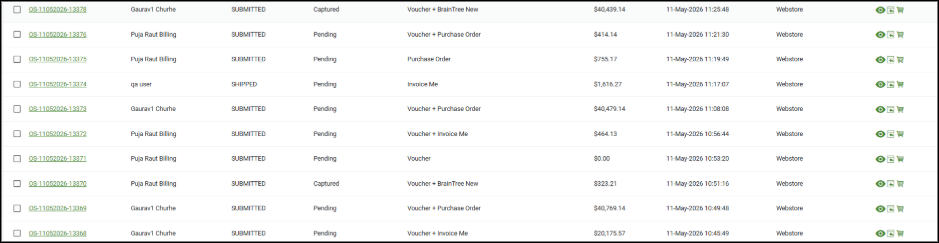
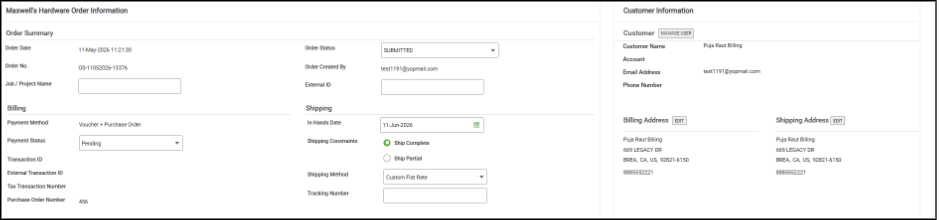
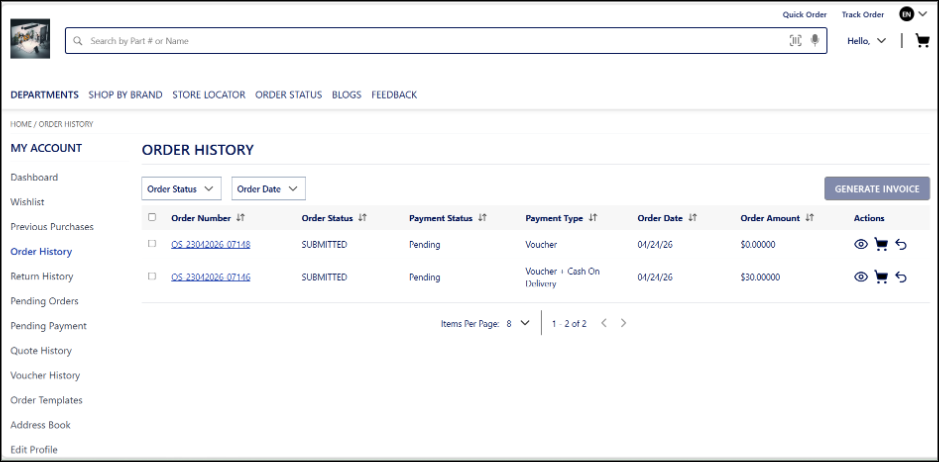
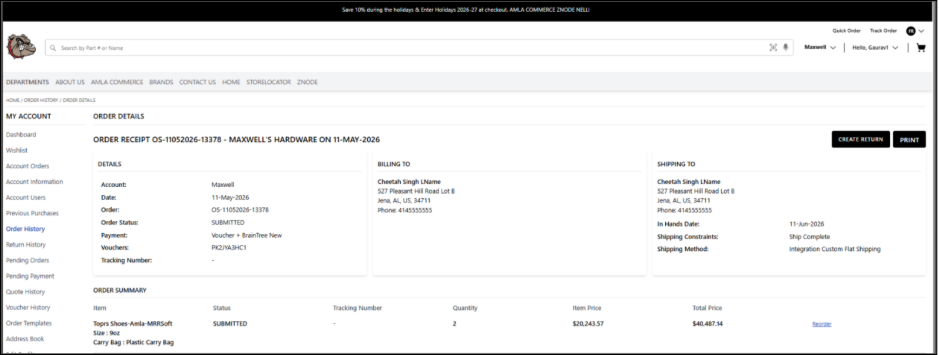
- This enhancement introduces support for displaying Voucher as a payment method across all storefront, admin, and commerce portal touchpoints. The system dynamically generates and displays payment method values based on the actual payment distribution used during checkout.
- The enhancement ensures accurate visibility of payment methods in scenarios involving:
- 100% Voucher-based payments
- Voucher + Secondary payment combinations
Key Features
- Dynamic Payment Method Display
- Automatically generates payment method names based on actual payment instruments used during checkout.
- Ensures accurate and transparent representation of order payments.
- Voucher as a Standalone Payment Method
- Displays Voucher as the payment method when the order total is fully covered by a voucher.
- Supports zero-value orders without leaving the payment method blank.
- Split Payment Support
- Supports combined payment method display such as:
- Voucher + COD
- Voucher + Credit Card
- Voucher + Any supported secondary payment method
- Consistent Cross-Platform Display
- Payment method display is standardized across:
- Storefront
- Admin order management
- Sales Rep dashboard
- Commerce Portal
- ERP integrations
- Emails, PDFs, invoices, and receipts
- Improved Transparency & Reporting
- Supports combined payment method display such as:
- Enhances visibility into actual payment usage.
- Prevents misleading or incomplete payment method information in customer and admin interfaces.
- Supported Scenarios
Scenario Displayed Payment Method 100% Voucher Payment Voucher Voucher + COD Voucher + COD Voucher + Credit Card Voucher + Authorize.net
Admin changes
Storefront Changes
PayPal Payment Gateway Integration with Credit Card Support
Feature Overview
- The PayPal Payment Gateway integration enables secure and seamless online payments within the storefront.
- With this enhancement, support has been introduced for PayPal as a payment gateway, along with the ability for customers to complete transactions using credit cards through PayPal’s interface. This provides greater flexibility and convenience for end users during checkout.
Key Features
PayPal Gateway Integration
Administrators can configure PayPal as a payment option, allowing customers to securely complete transactions using their PayPal accounts.
Credit Card Payment Support via PayPal
Customers who do not have a PayPal account can still complete purchases using their credit cards through PayPal’s guest checkout functionality.
Enhanced Payment Flexibility
The addition of PayPal and credit card support ensures a wider range of payment options, improving the overall checkout experience and accommodating diverse user preferences.
Security Enhancements
Cookie without HttpOnly flag set
we have fix for Device-Id and userDetails reason httpOnly cookies can only be set and read by the server — they are completely inaccessible to browser JavaScript. Several cookies in this application are actively read and written by client-side React components (via js-cookie / document.cookie). Converting these to httpOnly would break core application functionality.
Checkout payment bypass via cart summary manipulation.
The fix introduces server-side validation at the agent layer, where the actual order total is independently recomputed from the cart summary before processing. Payment enforcement is now based on this verified total rather than client-supplied values, ensuring that manipulated or zero-amount requests are rejected. This eliminates the ability to bypass payment through client-side tampering.
Order placed without mandatory PO number via API.
The fix adds server-side validation at the agent layer to enforce the mandatory Purchase Order number requirement. Before forwarding the request to the place-order API, the agent now verifies that the purchaseOrderNumber field is present and valid. If it is missing or empty, the request is rejected with an appropriate error message, preventing orders from being processed without a valid PO number.
Note : To ensure this change works, webstore changes latest from master to be taken as needed.
Black Box Improvements
Product Information Management (PIM)
Z10-27872 | Most Popular sort was not working.
Resolved an issue where the “Most Popular” sort option failed to return correct results. Sorting logic has been corrected to properly rank products based on popularity metrics.
Z10-28974 | Elastic data not removed on catalog delete.
Fixed by adding logic to construct and delete the corresponding override_{IndexName} indices alongside the base indices during catalog deletion.
Z10-30988 | Sorting resets when page number changes in Admin grid.
Fixed by ensuring the current sort column and direction are preserved and appended to the URL on every page navigation and page-size change, so the applied sorting persists across all pages.
Z10-31109 | Catalog name “All” appears twice in PIM Index Settings.
Modified the Znode_GetSearchIndexSettingList stored procedure to filter out records with invalid/orphaned PublishCatalogId values, ensuring only records with valid, existing catalog entries in dbo.ZnodePimCatalog are returned.
Z10-31864 | Multiple PIM index publish queues generated.
Validation checks were added to the publish queue mechanism to prevent multiple simultaneous publish queues from being generated
Z10-32669 | Catalog publish fails after importing 5k products.
Fixed by implementing database connection resilience in the publish process so that if the DB connection breaks mid-publish, the process detects the disconnection and waits until the connection is restored before resuming, instead of failing outright.
Z10-32710 | Missing attributes in Category & Product Listing.
Corrected attribute binding, so all configured PIM attributes appear correctly on category and product listing pages.
Z10-32912 | Publish notifier not removed though terminated.
Fixed notifier cleanup logic to remove terminated publish notifications and prevent cascading publish issues.
Z10-32999 | Products show “Publish Failed” after catalog publish.
Corrected publish status evaluation to ensure products reflect the actual result of the catalog publish.
Z10-33160 | Facets not returned for specific catalog code.
Resolved facet generation logic so applicable filters are returned correctly for all catalog codes.
Z10-33278 | Catalog publish performance issues.
Optimized catalog publish processing to reduce execution time and improve reliability for large catalogs.
Z10-33837 | Configurable product publish fails – missing ZnodeProductId.
Corrected schema mapping and validation to ensure required fields are available during the configurable product to publish.
System Settings
Z10-24258 | Reorder fails with same credit card via Spreedly.
A new IsDuplicateTransaction flag was added. When a duplicate transaction is detected, a clear error message is now displayed on the checkout page.
Z10-30048 | Spreedly Verify‑Only mode mismatch.
The VerifyAmount and RefundAmount columns in the [dbo].[ZnodeTransactions] table were updated from DECIMAL(12,6) to DECIMAL(28,6) to eliminate the SQL arithmetic overflow error that caused checkout payments to fail on high-value orders while Spreedly verification succeeded.
Z10-32871| Payment iframe does not reopen and “Add New Card” option becomes unresponsive after closing the CyberSource popup.
The issue was resolved by removing the modal-open CSS class from the <body> element when the CyberSource popup is closed, ensuring the UI state is reset correctly and interactions are restored. This allows the payment iframe to reopen and the “Add New Card” option to function as expected.
Z10-30197 | Error on selecting APM payment method.
Resolved issues in APM payment selection by improving validation and payment initialization logic. Handled it using spreedly events, polling and fallback setTimeout logic as well.
Z10-32218 | Clear All filters not working on Manage Templates.
Fixed by ensuring the persisted filter state is also cleared alongside the UI inputs so the full unfiltered template list is restored. Corrected filter reset behavior to ensure all applied filters are cleared successfully.
Z10-32749 | Credit card fields load with delay on checkout.
Fixed by adding a loader overlay to the iframe section so users see a smooth loading indicator instead of blank space while Spreedly renders the fields. Optimized payment field rendering to eliminate noticeable loading delays.
Z10-33040 | Missing Pricelist Code error not logged in imports.
Fixed by flagging PriceList Code as a required field so that missing-value validation fires and the error is properly logged in import failure logs.
Z10-33154 | Credit card expiry validation message does not clear.
Fixed by converting to a React state-based approach so validation errors clear in real-time on input change across all fields, consistent with CVV behavior.
Z10-33541 | CyberSource fraud validation hangs payment popup.
Fixed by adding proper popup close/dispose logic so the fraud rejection error message now displays in the foreground instead of behind the hung popup, and also clearing/resetting the error state to prevent it from re-triggering on page refresh.
Z10-33824 | DeletePaymentAuthToken scheduler failing.
Fixed by completely removing this obsolete touchpoint from the Hangfire dashboard, ensuring it no longer appears in Recurring, Failed, Retries, or Scheduled job states.
Z10-33832 | Blank screen when editing plugin configuration.
Fixed by correcting the JSON serialization/deserialization handling so the updated configuration page properly renders after save instead of going blank.
Z10-33978 | Error when selecting shipping method on checkout.
Added a portal ID check in the stored procedure Znode_ValidateSelectedShippingAvailability to correctly validate shipping availability against the user's current portal.
Dev Center
Z10-32227 | Incorrect validation message in Custom Tables.
Fixed the Custom Tables "DisplayOrderError" raw key appearing when the Display Order value exceeds the allowed limit by adding the missing data-val-range, data-val-range-min, and data-val-range-max validation attributes on the DisplayOrder input field in the Manage Fields view, so the UI now shows a clear, user-friendly range validation message instea
Z10-32692 | Search bar disappears when searching with space.
The fix involved trimming whitespace from the filter value before constructing the API query string:
Z10-32799 | Multiple issues in Custom Table & Export.
Set MustHide = 'Y' for the Table Key column in the XML generator default script to hide it from the UI, and added an exclusion condition in the export logic to filter out the ElasticSearchEvent column from exported data.
Content Management System (CMS)
Z10-33209 | Dynamic content widget styles apply to other pages.
Fixed the Dynamic Content widget styles leaking across pages by ensuring injected styles are properly removed from the <head> when the page or component unmounts.
Z10-33322 | Order confirmation email breaks with long text.
Fixed the Order Receipt email template HTML by correcting the indentation and adding word-break: break-all to the item description cells in the ZnodeEmailTemplateLocale table, so long personalized text wraps properly instead of overflowing and breaking the layout.
Z10-33923 | Content Pages content disappears.
Fixed the CMS Content Pages disappearing on pagination or page-size change by ensuring the server-side cookie correctly updates the ur-recentFolderId property value, so the stored procedure's WHERE clause generates with the proper root folder ID and returns the complete page list.
Accounts & Users
Z10-32431 | Validation triggered on Forgot Password click.
Updated blur (onBlur) handlers for Email and Password fields to conditionally skip validation when focus moves to the “Forgot Password” link using relatedTarget.Introduced helper method isForgotPasswordLink to detect navigation target. Added constant ACCOUNT.FORGOT_PASSWORD_TEST_SELECTOR for consistent selector usage.
Z10-33140 | Admin password reset not working.
Removed the invalid localhost:3000 entry from the ZnodeDomain table, which was causing the Admin Password Reset email to generate a localhost URL instead of the correct domain URL — preventing users from successfully resetting their passwords.
Z10-33318 | Reset password screen misaligned on Mobile Safari.
Added a Tailwind CSS media query to override the static height class on the wrapper div of the Change Password section — fixing the misaligned "RESET PASSWORD" and "CANCEL" buttons and the footer overlap on the mobile Safari (iPhone) view.
Z10-33330 | Trigger UpdateUserPortals webhook on store link during login.
Added the UpdateUserPortals webhook event trigger in the login flow when a new store (portal) is associated with the user during centralized login.
Z10-33376 | Admin “All Store Access” removed unexpectedly.
Updated condition to handle both null and empty (portal == null || !portal.Any()) ensuring correct evaluation of isAllStoreUsers.
Z10-33446 | Duplicate AspNetUserRoles records created.
Updated the Update User flow to send IsConvertToAdmin = false so that the PortalId filter is correctly applied in the stored procedure Znode_ManageUserRole. Prevented duplicate role assignments by enforcing uniqueness checks.
Z10-33540 | Account Address API missing ExternalId.
Added the missing properties (ExternalId and IsCommercial) to the data model and response model. Also updated the stored procedure to include ExternalId filtering logic so that the API now supports filtering based on ExternalId.
Z10-33687 | CatalogName treated as required in Update Account API.
Fixed by making CatalogName nullable so the API accepts null when PublishCatalogId is already provided.
Z10-33790 | AddressList API returns 204 instead of data.
Fixed by ensuring expand=ZnodeAddress is included in the API request so the address data is properly hydrated and returned with a 200 OK response.
Z10-33834 | Admin customization section not visible.
Fixed a menu parent name mismatch in the Admin UI (e.g., "Users" vs "User") that prevented the custom section from mapping to the correct entity, and ensured the MenuType metadata is always populated in the API response — so the system can now properly associate and render custom page sections created via Dev Center → Admin Customizations on the User Details page's left-side menu.
Order Management System (OMS)
Z10-21899 | Order placed with outdated data if cart updated in another tab.
Implemented server‑side cart version validation and page reload prompts to prevent orders from being placed using stale cart data across tabs.
Z10-25064 | Shipping and tax mismatch between Quote and Order.
Fixed double‑counting of addon pricing during order creation to align order totals with quote calculations.
Z10-27015 | Max quantity validation not triggered from Save for Later.
Backend-level cart item quantity validation was implemented to enforce maximum quantity limits consistently across all flows — including Save for Later to Cart, direct cart updates, and URL manipulation — with the checkout button disabled and appropriate error messages displayed when validation fails.
Z10-27305 | Quote/Order emails sent to old email after profile update.
Email mapping was corrected to use the actual customer email address instead of the username for order/quote notifications. The EmailNotificationService.cs mapping was updated, a dedicated email property was added to the model, and the stored procedure was updated to return the proper email column
Z10-28107 | Zero‑priced product order after price list removal.
Added server‑side price validation to block checkout if valid pricing is missing.
Z10-28539 | Editable pricing & shipping fields causing quote issues.
Restricted LiveCalculate API to pass only shipping/tax keys for quotes and disabled non-functional fields (Line Item Shipping, Unit Price) to fix inconsistent pricing on the Manage Quote screen
Z10-29546 | Cart allows ordering more than stock via multiple sources.
Implemented multi-tab checkout session isolation by creating a separate checkout session snapshot on entering checkout, preventing cart modifications from other tabs from affecting the active session and blocking over-stock orders.
Z10-29575 | Quick View does not show line item price with add‑ons.
Fixed the Znode_GetOrders stored procedure to correctly return additional cost data from the ZnodeOrderAdditionalCost table, ensuring line item prices in Quick View include additional costs
Z10-29967 | Thank You page shows $0 tax & shipping with duplicate tab.
Implemented multi-tab checkout session isolation by creating a separate checkout session snapshot upon entering checkout, so cart modifications in other tabs do not override the active session's shipping, tax, and payment selection
Z10-30073 | Race condition causes incorrect items & order total.
Added server-side checkout session isolation with a session guard on page load, so cart mutations (e.g., moving items from "Save for Later" back to cart) in another tab cannot alter the active checkout session's items or payment amount.
Z10-30998 | Quote total not updated after line‑item shipping change.
Ensured quote totals recalculate and persist correctly when line‑level shipping is updated.
Z10-31822 | Checkout page briefly visible after order placement.
On the order receipt page, the checkout page entry in the browser history is replaced with the cart page using the browser history API (e.g., history.replaceState). So, when a user presses the browser Back button after placing an order, they skip the checkout page entirely and land on the page before it (home page).
Z10-32028 | Checkout shows $0 shipping & tax after cart refresh.
A separate checkout-session snapshot is now created when the user enters Checkout. Cart actions in any other tab (including refreshes) are completely isolated and cannot mutate the active checkout session. This is part of the broader Checkout Session Management & Multi-Session Consistency Control implementation.
Z10-32193 | Incorrect data shown when sorting Previous Purchases.
Corrected the stored procedure's pagination logic (DB side) and fixed the helper method's record-to-model mapping based on item count/index, ensuring sorting only returns the logged-in user's purchase data.
Z10-32197 | Wrong calculation when updating Qty during Quote to Order.
Fixed recalculation triggers to ensure quantity updates reflect correct pricing and totals.
Z10-32333 | Quote calculation issues when shipping method updated.
Stabilized recalculation flow so shipping method updates correctly adjust totals.
Z10-32451 | Configurable product shows “no longer available.”
Corrected validation to prevent incorrect availability messages for valid configurations.
Z10-32645 | Quote & Order shipping calculation mismatch.
Updated the quote-to-order conversion logic to use the latest saved shipping method and recalculate shipping/add-on amounts during order placement — ensuring Order totals match the updated Quote for both 3rd-party and custom shipping methods.
Z10-32773 | Tax Exempt auto‑checked after shipping change.
Preserved explicit tax exemption selection instead of auto‑enabling during recalculation.
Z10-32792 | High‑value orders bypass approval via new tab.
Re‑evaluated approval rules at submission time to enforce approval checks consistently.
Z10-32866 | Unable to place return when modifying multiple line items.
Added a filter in the createReturnOrder method in return-order.ts to exclude line items with quantity ≤ 0 before sending the return request.
Z10-33317 | “Page Not Found” on Voucher History actions.
Corrected routing so voucher actions resolve to valid pages. Added the voucherNumber to the query parameter in Voucher.tsx
Z10-33636 | Purchase Order number not retrieved in order list.
Added the PurchaseOrderNumber property to the CollectionDetailsResponseModel response model (and added it to the SP result set via subtask). This single additive change enabled both impacted APIs to return the field.
Z10-33833 | Order number mismatch in quote‑to‑order conversion.
The fix was a single-line change in the SP Znode_OrderUpdateCartToOrder — if a FinalClassNumber already exists in the copied quote entry, it skips regenerating the order number, preventing the mismatch.
Z10-33838 | Duplicate line items in order details.
A WHERE clause correction in the database query was applied to prevent duplicate line item records from being persisted in the ordershipment table during order placement.
Z10-33925 | Order purge leaves orphan shipment records.
Added a race condition guard in the database WHERE clause to prevent orphan records from being left behind during the order purge process.
DAM
Z10-33347 | Product thumbnail not displaying after DAM upload.
Corrected image synchronization so DAM‑uploaded assets display correctly on product thumbnails.
Other
Z10-26873 | Import Logs API (/import/getimportlogs) returning incorrect/mismatched data compared to Admin logs
Corrected an issue where the Import Logs API returned incorrect or mismatched data when compared with the logs displayed in the Admin UI. The API response mapping and data source alignment have been updated to ensure the API consistently reflects the same import log details shown in Admin.
Z10-33745 | API: Advanced SMTP: 201 Created response returned even when required fields are missing in POST /v2/stores/{storeCode}/advanced-smtp API
Corrected an issue where the Advanced SMTP POST API incorrectly returned a 201 Created response even when mandatory fields were missing. Proper server-side validation has been enforced to return appropriate validation errors for incomplete requests.
Z10-33760 | API: Advanced SMTP: 200 OK response returned even when required fields are missing in PUT /v2/stores/{storeCode}/advanced-smtp API
Resolved an issue where the Advanced SMTP PUT API returned a successful 200 OK response despite missing required fields. Validation logic has been strengthened to ensure mandatory fields are validated before updating the configuration.
Z10-33765 | API: Advanced SMTP – Multiple Stoplight inconsistencies for POST /v2/stores/{storeCode}/advanced-smtp API
Fixed multiple inconsistencies between the Advanced SMTP POST API implementation and the Stoplight documentation. API specifications and actual behavior have been aligned to ensure accurate contract representation for consumers.
Z10-33767 | API: Advanced SMTP – Multiple Stoplight inconsistencies for PUT /v2/stores/{storeCode}/advanced-smtp API
Resolved documentation mismatches between Stoplight and the Advanced SMTP PUT API behavior. Updated API definitions to match implemented validations, responses, and field requirements.
Z10-33768 | API: Advanced SMTP – 400 Bad Request returned for valid inputs in POST API
Corrected an issue where valid request payloads resulted in a 400 Bad Request response. Request parsing and validation rules have been corrected so properly formed inputs are accepted successfully.
Z10-33776 | API: Advanced SMTP: 201 Created returned with empty FromEmailAddress and FromDisplayName in POST API
Fixed an issue where the Advanced SMTP POST API returned a success response even when mandatory fields FromEmailAddress and FromDisplayName were empty. Mandatory field validation has been enforced to prevent invalid configurations.
Z10-33784 | API: Advanced SMTP: StoreName and StoreCode appear as NULL in POST API response
Resolved an issue where StoreName and StoreCode were returned as NULL in the POST API response. Response mapping has been corrected to populate and return accurate store details.
Z10-33785 | API: Advanced SMTP: StoreName and StoreCode appear as NULL in PUT API response
Corrected response construction in the PUT API so StoreName and StoreCode values are returned correctly after updating Advanced SMTP settings.
Z10-33786 | API: Advanced SMTP: 500 Internal Server Error for invalid StoreCode in GET API
Fixed an issue where providing an incorrect or non‑existent StoreCode resulted in a 500 Internal Server Error. Proper error handling has been added to return meaningful client-side error responses instead.
Z10-33789 | API: Advanced SMTP: No validation error for empty mandatory fields in PUT API
Corrected missing validation handling in the PUT API so empty values for mandatory fields now return proper validation errors instead of being accepted silently.
Z10-33793 | API: Advanced SMTP: Incorrect PortalAdvancedSMTPSettingId and Admin data not updated
Resolved an issue where the PUT API returned an incorrect PortalAdvancedSMTPSettingId and updates were not reflected in Admin. Update logic and response mapping have been corrected to ensure data consistency.
Z10-33801 | API: Advanced SMTP: Port field accepts 0 and negative values in POST API
Added numeric range validation to prevent invalid port values such as 0 or negative numbers from being accepted during Advanced SMTP creation.
Z10-33802 | API: Advanced SMTP: Port field accepts 0 and negative values in PUT API
Extended port validation to the PUT API to ensure only valid, positive port numbers can be saved during Advanced SMTP updates.
Open-Source Enhancements and Fixes
Z10-21420 | Webstore- Breadcrumb shows only immediate child category when product is accessed via search.
Corrected an issue where products accessed via search displayed only the immediate child category in breadcrumbs. The breadcrumb resolution logic has been enhanced to derive and display the full category hierarchy, ensuring consistent navigation context.
Z10-25363 | Breadcrumb Changes After Navigating Back to Product Page via Browser Back Button.
Fixed an issue where browser back navigation altered the breadcrumb trail. Navigation state management has been improved to retain the original category context when returning to the PDP.
Z10-25907 | Breadcrumb navigation inconsistency when navigating via browser back button and re-selecting category.
Resolved breadcrumb inconsistencies caused by category reselection after browser navigation by stabilizing category-context preservation across navigation events.
Z10-27002 | PDP: Breadcrumb issues for products assigned to multiple categories across stores.
Improved breadcrumb resolution for multi‑category products by prioritizing store-specific category context to ensure correct hierarchy display on PDP.
Z10-29248 | Brands: Applied filter facet is collapsed.
Updated facet UI behavior so applied brand filters remain expanded, improving filter visibility and usability during navigation.
Z10-29270 | Admin session idle >30 mins shows blank tab on mega menu click.
Addressed session timeout handling to ensure the admin megamenu reloads correctly instead of rendering a blank screen after prolonged inactivity.
Z10-30698 | Parent category disappears from breadcrumb via carousel navigation.
Fixed breadcrumb state loss when navigating through category carousels by ensuring parent category context is retained.
Z10-33516 | PLP Search Listing Page Not Scrolling and Add to Cart button not visible.
Resolved PLP layout and scrolling issues by fixing CSS and container height calculations, ensuring Add to Cart remains accessible.
Z10-33591 | Brand section not displayed on PDP after variant reselection.
Corrected PDP rendering so the Brand section consistently remains visible after reselecting product variants.
Z10-33554 | Test Email Settings uses Legacy SMTP instead of Advanced SMTP.
Updated Test Email logic to respect the configured Advanced SMTP setup instead of defaulting to legacy SMTP.
Z10-33653 | SMTP Authentication Method resets after copying store.
Ensured SMTP authentication settings persist correctly when a store is copied rather than defaulting to Advanced SMTP.