
Release Notes / Version 10.9.1.0 / April 13, 2026
Highlights
Release Information
The Znode 10.9.1.0 release introduces new features, enhancements, performance upgrades, and bug fixes.
Version Note:
To ensure the new feature functions as intended, using the latest version of the Storefront is recommended. Older versions may support the feature partially or could lead to limited functionality or operational inconsistencies.
Disclaimer
Temporary Disablement of Email Marketing Tab
- The Email Marketing tab within the Stores section has been temporarily disabled. This measure has been implemented to accommodate ongoing updates and improvements. During this period, admin users will not have access to email marketing features from the Stores section. The functionality will be restored once the necessary changes have been completed and validated.
Temporary Disablement of Promotions, Coupons, and Vouchers Management on the Manage Order Screen. (Continued from Previous Version)
- In this release, the ability to add, manage, or modify promotions, coupons, and vouchers has been temporarily disabled on the Manage Order screen in the Admin Console. While promotions and coupons applied during order creation will still be visible on the Manage Order screen, the options to add new promotions or remove existing ones will not be available. This functionality will be re-enabled in a future update.
Breaking Change
- Alternatively, CSP settings can be modified in:
- packages\constants\src\headers.ts
- After making the changes, deploy the latest storefront build for the updates to take effect.
What’s New
Vertex Tax Integration & Support
Feature Overview
- Znode has introduced a new Vertex Tax O Series® integration to extend support for real-time tax calculation, exemption handling, and transaction posting. This integration addresses the needs of enterprise customers who prefer Vertex over Avalara, offering seamless tax computation in line with other tax provider configurations. By adding this feature, Znode enables broader market adoption, accelerates the onboarding process for organizations using Vertex, and simplifies the tax configuration for stores.
Key Features
- Vertex Plugin Implementation: A new plugin that integrates Vertex Tax O Series® into the Znode platform.
- Real-time Tax Calculation: Allows for automatic tax calculations based on Vertex’s rules and tax jurisdictions.
- Exemption Handling: Supports tax-exempt customer profiles, ensuring no tax is applied to eligible transactions.
- Transaction Posting: Enables accurate and timely posting of tax transactions.
- Multiple Configuration Sets: Administrators can create reusable Vertex configuration sets, which can be applied to one or more stores, depending on the business need.
- Compatibility with Existing Tax Systems: The addition of Vertex does not impact existing tax integrations, allowing stores that use Avalara to continue functioning as usual.
Workflow (Admin Console)
- Vertex Plugin Configuration
- Plugin Installation:
- Manage Plugin Configurations:
- Create New Configuration Set:
- System Settings - Taxes:
- Store - Tax Association Workflow
- Manage Store Tax Settings:
- Admins can assign a Configuration Set to a store by selecting it from the list of available Vertex configuration sets. Only one configuration set can be assigned per store at any given time.
- If more than one configuration set is selected, a validation message will appear: “Only one configuration set can be associated per tax type.”
- Tax Method Association:
- The Tax Method(s) Tab allows admins to associate the correct Vertex tax methods with each store.
- Tax method association follows the same workflow used for other tax providers in Znode
- Tax Exemption Handling
- For customers with tax-exempt profiles, the system ensures no tax is applied to their transactions, even when Vertex is configured and active for the store.
- Manage Store Tax Settings:
- Backward Compatibility
- No Impact on Existing Tax Providers: Stores using Avalara will continue to operate without any disruption.
- No Changes to Existing Checkout Workflows: Tax calculation flows remain unchanged unless a store switches to Vertex.
- No Impact on Historical Orders: Orders placed prior to the integration continue to reference their original tax provider without migration.
- Important Points
- The Vertex plugin integrates seamlessly with the Znode 10 plugin framework, offering an out-of-the-box solution for real-time tax calculations.
- The plugin supports global configurations that can be applied to individual stores as needed, based on business or environmental requirements.
- Admin Interface: The new plugin is visible in the admin interface and is automatically activated for immediate configuration.
- Shipping in Taxes: Admins can choose to include shipping in the tax calculations by selecting the appropriate option during tax setup.
- Discounted Pricing: The plugin respects the existing flow for calculating taxes on discounted prices, ensuring consistency with other tax rules.
- Failure Logging: In the event that no response is received from Vertex, the system will log the failure for diagnostic and troubleshooting purposes.o Configuration and Credential Verification: The system will verify the correctness of the configuration set and the validity of credentials to ensure proper integration with Vertex
- Out of Scope for This Release
- Update, Disable, and Delete Features: The features related to updating, disabling, or deleting an installed plugin are not included in this phase of the release.
- Return-Related Work: Any functionality related to returns is out of scope and not addressed in this phase.
Side-Based Border Support Added (Heading & Container)
Feature Overview
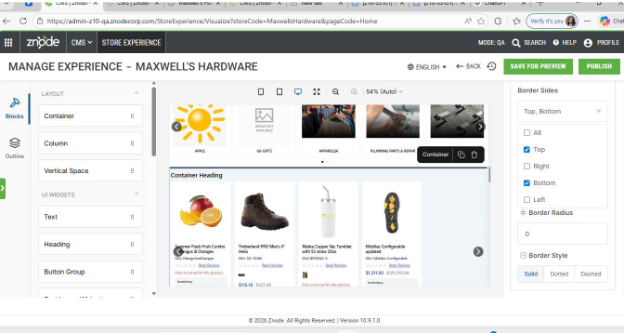
This release enhances border styling flexibility in Page Builder by introducing side‑based border support for Heading and Container components. Admin can now apply borders to specific sides—top, right, bottom, or left—instead of being restricted to a uniform border on all sides.
This enhancement enables more precise visual control and supports common design patterns such as dividers, underlines, and section separators without custom CSS
Key Features
- Selective Border Application
Borders can now be applied to individual sides—top, right, bottom, or left—or to all sides, providing granular styling control. - Multi‑Side Selection Support
Multiple sides can be selected simultaneously (e.g., top + bottom only), allowing flexible border combinations based on layout needs. - Backward‑Compatible Behavior
Existing pages using the default all border option remain unaffected, ensuring no impact on current layouts.
Puck Plugin Upgrade (v0.17.4 to v0.21.1)
Feature Overview
- The Puck Editor Plugin upgrade to v0.21.1 enhances the Page Builder experience with improved usability, modern UI updates, and a scalable Slot-based architecture. The upgrade replaces the legacy Dropzone approach, introduces better navigation and editing controls, and ensures smooth backward compatibility through automated legacy page JSON migration. Overall, it improves author productivity while preparing the platform for future enhancements.
Key Features
- Slot-Based Architecture (Dropzone to Slot Migration)
- Replaces all legacy Dropzone implementations with a modern Slot-based architecture
- Improves layout flexibility, scalability, and maintainability
- Ensures seamless compatibility with existing pages through automatic legacy data migration
- Provides a future-ready foundation aligned with the latest Puck standards.
- Automated Legacy Page JSON Migration
- Introduces a migration utility to automatically convert legacy page JSON structures
- Detects legacy zones and migrates data only when required
- Prevents redundant migrations and protects data integrity
- Eliminates the need for manual updates to existing pages
- Enhanced Page Builder UI (Plugin Rail)
- Adds a new Plugin Rail for faster and more intuitive navigation
- Provides quick access to editor tools and plugins
- Improves discoverability and organization of features
- Enhances usability for complex and content-heavy pages
- Improved Editing Experience with Keyboard Shortcuts
- Supports Delete and Backspace keys to remove selected components
- Aligns with standard UX patterns used in modern editors
- Speeds up content editing and reduces reliance on mouse interactions
- Resizable Sidebars for Flexible Workspace
- Allows users to resize editor sidebars based on preference and screen size
- Improves focus when working on layouts or configurations
- Enhances productivity for large and complex page structures
- Better Widget Navigation via Outline Panel
- Automatically focuses the selected widget on the canvas when clicked from the Outline
- Simplifies navigation on pages with a large number of components
- Reduces time spent searching for elements during editing
- Improved Drag-and-Drop Capabilities
- Enables dragging existing widgets into Flex containers
- Eliminates the need to recreate widgets when reorganizing layouts
- Provides a more consistent and intuitive drag-and-drop experience
- Performance and Stability Improvements
- Optimized migration logic to avoid unnecessary processing
- Cleaner, more maintainable codebase after package and API updates
- Improved rendering reliability across Page Builder and Webstore
Enhancement: Saved Credit Card Expiry Date Visibility Enhancement
Feature Overview
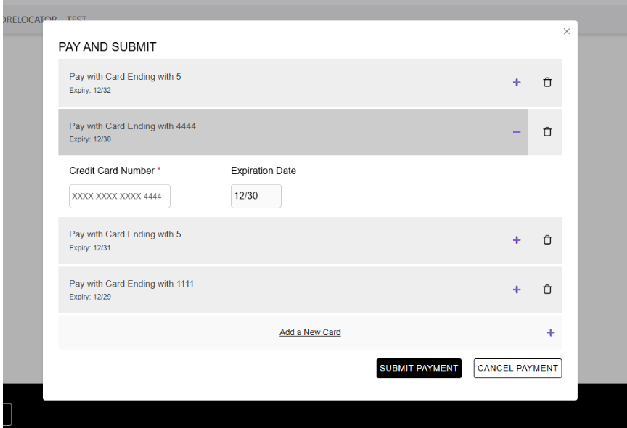
- As part of a small enhancement, Znode has introduced the ability to display expiry dates for saved credit cards. This feature provides increased transparency for users, ensuring that shoppers can easily identify when their saved credit cards are no longer valid. The feature is available for all saved credit cards across all payment gateways.
Key Features
- Expiry Date Display for Saved Credit Cards: The expiry date will be shown on both the list view and expanded view of saved credit cards.
- List View: The expiry date will be visible for each saved credit card in the list view.
- Expanded View: The detailed expiry date will be displayed in the expanded view.
Backward Compatibility
- Existing Saved Credit Cards: This enhancement will be applied to all existing saved credit cards for all payment gateways.
- Expired Credit Cards: Shoppers will not be allowed to make payments using expired credit cards. If a card has expired, the user will be prompted to choose an alternative payment method.
Important Points
- This feature will provide clear visibility into credit card expiry dates and will help preven tissues related to payments from expired cards.
- The enhancement will apply across all supported payment gateways, ensuring uniform behavior for all payment methods.
Synonyms Publish Optimization & Faster Index Updates
Feature Overview
Optimized the synonym publishing process to significantly reduce processing time and ensure faster reflection of updates in storefront search.
Key Feature
- Eliminated index recreation during publish
- Direct synonym updates via the Elasticsearch Settings API
- Moved synonym handling to search-time (no reindexing required)
- Improved the success message for better clarity
Workflow
- Admin selects synonyms → clicks Publish → system validates selection → updates synonyms directly → changes reflect in search within seconds.
- Success Message:
"Synonyms have been published successfully and will reflect in search results shortly.”
Improvements
- Publish time reduced from ~2 minutes to:
- ~30 seconds (QA/Stage)
- <5 seconds (Dev/INT)
- Faster search updates without reindexing
- Improved admin and shopper experience
Improved Error Handling for Custom Table JSON Imports
Feature Overview
Enhanced error handling for custom table JSON imports to provide clear and actionable failure messages instead of generic errors.
Key Feature
- Added detailed error messages for failed JSON imports
- Improved import logs to surface underlying database/import issues
- Updated database logic to support better error reporting
- Fix applied across custom table import processes
Workflow
System processes JSON import → validates payload →
- If valid: import completes successfully
- If invalid, the system returns a detailed error message indicating the root cause
Improvements
- Replaced generic “Import Process failed” with meaningful error messages
- Faster troubleshooting for malformed JSON and DB-related issues
- Improved reliability and visibility of import operations
Business Central Native Data Exchanges – Commerce Connector
Feature Overview
Introduced Microsoft Dynamics 365 Business Central (BC) native data exchanges in the “AddFrom Library” section of the Commerce Connector to support bulk data import into Znode.
Key Features
- Added native BC data exchanges for:o Import Users
- Import Products
- Import Categories
- Import Inventory
- Import Pricing
- Integrated exchanges into the Native Library for easy configuration
Workflow
Admin navigates to Commerce Connector → Add From Library → selects required BC data exchange → configures and executes import → data is imported into Znode.
Note: Import Accounts and Import Addresses are not included in this release. These will be supported in future releases.
Dynamics 365 F&SCM Native Data Exchanges – Commerce Connector
Feature Overview
Introduced native Microsoft Dynamics 365 Finance & Supply Chain Management (F&SCM) dataexchanges in the Commerce Connector → Add From Library section to enable faster and easierbulk data import into Znode.
Key Features
- Added native F&SCM data exchanges for:
- Import Simple Products
- Import Configurable Products
- Import Categories
- Import Inventory
- Import Pricing
- Reduced setup effort with ready-to-use library items
Global Setting Display Enhancement
Feature Overview
- Znode has introduced an enhancement to the Global Settings module to ensure that the side navigation respects the configured Display Order for attribute groups. This improvement addresses inconsistencies where tabs did not appear in the expected sequence, enhancing usability and alignment with admin configurations.
Key Features
- Display Order Enforcement: Sidebar tabs derived from user-defined fields now follow the Display Order configured in the Global Setting attribute family.
- Alphabetical Fallback Sorting: Attribute groups without an explicitly defined display order(default value: 999) are automatically sorted alphabetically.
- Consistent Sorting Logic: When multiple attribute groups share the same display order, they are further sorted alphabetically to maintain consistency.
- Preserved System Tabs Order: Core system tabs remain fixed at the top of the navigation and are not impacted by display order configurations.
- Scoped Enhancement: The updated sorting behavior applies only to the Global Settings page and does not affect other areas of the application.
Workflow
- Configure Display Order:
- Navigate to Dev Center > User-Defined Fields.
- Select the GlobalSetting attribute family.
- Define or update the Display Order for attribute groups.
- View Updated Navigation:
- Go to Admin > Global Settings.
- The side navigation will now reflect:
- Configured display order for attribute groups.
- Alphabetical sorting for groups without explicit order.
- Alphabetical sorting for groups sharing the same order value.
- System Tabs Behavior:
- The following tabs remain fixed at the top and are not influenced by displayorder:
- General
- Locales
- Currencies
- Countries
- Cache Management
- URL Management Configuration
- Publish Settings
- Inventory Subscription Notification
- Promotion and Coupon Settings
- Centralized User Login
- The following tabs remain fixed at the top and are not influenced by displayorder:
- Important Points
- This enhancement improves consistency between admin configuration and UI behavior.
- Sorting logic is deterministic and predictable across all scenarios.
- No functional impact on other modules or navigation structures within the platform.
Category Publish Status Update on CategoryAssociation Import
Feature Overview
- Enhanced the CategoryAssociation CSV import behavior to ensure category publish status accurately reflects unpublished changes. Categories will now transition from Production to Draft when newly associated products are unpublished, improving visibility and administrative clarity.
Key Features
- Automatically updates category publish status from Production to Draft during CategoryAssociation CSV imports when:
- New product associations are added, and
- The associated products are unpublished
- Clearly surfaces draft changes at the category level for administrators
- Reduces confusion and manual validation during catalog management
- Improves alignment with existing publish and review workflows
Security Enhancements
- Content Security Policy Allows Clickjacking
Security headers have been strengthened to prevent iframe‑based clickjacking attacks. The webstore server was updated to set the X‑Frame‑Options header to SAMEORIGIN, blocking unauthorized external domains from embedding the site in iframes. This improves protection for both user and admin interactions and aligns the platform with standard web security best practices.
Black Box Improvements
Product Information Management (PIM)
Z10-25796 | Add to Cart Fails in Some Cases
Resolved product and inventory validation inconsistencies that caused Add‑to‑Cart failures under specific conditions.
Z10-26752 | Screen Freezes After Catalog Publish
Fixed UI performance issues that caused the admin screen to freeze when catalog publishing was triggered with the history popup open.
Z10-32289 | Configurable Swatch Selection Not Redirecting to Correct Variant and Variant Not Displayed
Resolved an issue where selecting a swatch option on a configurable product did not redirect users to the correct variant and caused certain variants (such as Variant 3) to not display. The swatch selection and variant resolution logic have been corrected to ensure proper variant mapping, accurate redirection, and consistent display of all available variants on the PDP.
Z10-27975 | Catalog Publish Stuck at 50%
Resolved blocking processes causing catalog publish jobs to stall at 50% progress.
Z10-30232 | Configurable Variant in Draft While Parent Is Published
Corrected publish state synchronization so configurable product variants remain consistent with the parent product status.
Z10-30239 | Publish Status Not Updating After Override
Resolved an issue where updating product overrides did not correctly change the product’s publish status to Draft. A new store procedure has been implemented to accurately update and synchronize the product state whenever an override is modified. This ensures that overridden products now correctly reflect draft status and require republishing, maintaining data integrity and expected publish behavior.
Z10-28293 | Order Placement Allowed for Product Without Inventory and No Warehouse Assigned
Resolved an issue where users were able to add products to the cart and successfully place orders even when no warehouse was assigned, and no inventory was available, despite back order being enabled. Inventory validation logic has been strengthened to ensure that a product must have a valid warehouse assignment before allowing add‑to‑cart or order placement, enforcing correct inventory constraints, and preventing unintended orders.
Z10-30438 | Filtering by Full Product Type Returns No Results
Updated product filtering logic so searching with full product type names works as expected.
Z10-30683 | Inconsistent Brand Navigation URLs
Standardized URL generation for brand navigation to ensure consistency across the navigation path.
Z10-31119 | Unexpected Message During Category Publish from SEO Draft
Resolved misleading publish messaging when categories in SEO setup are in Draft status.
Z10-31302 | Save & Close Button Hidden After Custom Page Interaction
Fixed UI state persistence so the Save & Close button remains visible across page navigation.
Z10-31550 | Generic Error Shown When Searching Products.
Improved error handling so meaningful messages are displayed instead of generic errors during product search.
Z10-31886 | Category Status Not Showing Draft After Active/Inactive Update
Implemented correct draft status handling when category active states are modified.
Z10-32169 | SEO Details Fail to Publish
Resolved SEO publishing logic issues preventing SEO details from being published correctly.
Z10-32701 | Issue with PIMAttribute Family Assigned Groups APIC
Corrected API response inconsistencies so that assigned attribute groups return accurately.
Z10-32816 | Store Publish Fails Immediately After Clicking Publish
The issue was resolved by aligning the field length configuration to ensure consistent behavior across both impacted modules, eliminating validation and data mismatch issues.
Z10-32594 | Configurable Product Auto‑Converted to Simple
Resolved unintended auto‑conversion and synchronization issues between configurable products and variants
System Settings
Z10-15075 | Webstore_Auth.Net: Validation Messages for Spreedly Authorize.Net Checkout
Improved checkout validation behavior for Spreedly Authorize.Net by enabling real-time, inline field validation. Error messages now appear while users type instead of only after clicking Pay &Submit, ensuring faster feedback and improved checkout usability.
Z10-19931 | Webstore: Missing Validation When Plugin Configuration Is Deleted
Implemented proper checkout and quote validation to notify shoppers when a required PluginConfiguration Set has been deleted from the admin. This prevents orders or quotes from being placed under invalid or missing configurations.
Z10-27372 | Shipping Rate Mismatch with UPS & FedEx Carrier Tools
Corrected shipping rate calculation logic to align with UPS and FedEx carrier tools for both residential and commercial addresses, eliminating discrepancies shown at checkout.
Z10-29002 | Shipping Method Deselected on Refresh but Charges Persist
Fixed checkout refresh logic where third‑party or free shipping methods were deselected while shipping charges still appeared in the order summary.
Z10-30099 | Tax Bifurcation Incorrect in Tax‑Exempt Order Emails
Updated order receipt email templates to correctly display tax bifurcation details for tax‑exempt orders.
Z10-30297 | Imports: Sporadic Database Errors Across Multiple Types
Improved transaction handling and stability in the import framework to prevent intermittent database errors across multiple import types.
Z10-31439 | Shipping Method Deselected but Amount Still Displayed
Resolved inconsistency where shipping methods were cleared after refresh, but shipping costs remained visible in the order summary.
Z10-31881 | Product Details Vanish During Third‑Party Payment Conversion
Fixed state management issues causing product details to disappear in the background while converting orders using third‑party payment methods.
Z10-32010 | Saved Card Validation Bypassed (Cybersource)
Fixed saved card validation logic in the Cybersource payment pop-up to prevent proceeding with invalid or cancelled card entries.
Z10-32092 | Tradecentric PunchOut Add‑on Price Missing
Corrected PunchOut integration so that add‑on product prices are included correctly in the line‑item price. Passed itemPrice instead of unitPrice to include add-on details.
Z10-32746 | Pacejet Shipping Method Should Be Removed
Removed Pacejet shipping method from the shipping dropdown to prevent unintended usage.
Dev Center
Z10-29742 | Password Popup Appears on Timeout Change
Fixed validation logic, so the password update pop-up triggers only when credentials change, not when the timeout is triggered.
Z10-30511 | Special Characters Not Importing in Custom Tables
Fixed special-character corruption and bulk load failures in custom table imports by updatingZnode_ImportCustomTableJsonIntoTempTable to read JSON as SINGLE_BLOB (VARBINARY)with safe XML-based decoding, so XML-reserved content no longer breaks the import.Introduced dbo.ZnodeSpecialCharacterMapper to normalize previously mis-encoded UTF‑8sequences into their correct readable characters.
Z10-30790 | Header Hidden on Data Exchange Pages
Updated the CC integration so data exchange pages opened in new tabs retain the Znode admincontext/experience
Z10-30990 | TouchPoint Logs Missing Scheduler and Name
Ensured log metadata fields populate correctly.
Z10-31574 | Number Field Precision Validation Issue
Corrected validation for Number fields with high precision and scale.
Z10-31613 | Header Removed When Data Exchange Page Opens in New Tab
Fixed layout rendering issues to retain the header.
Z10-31684 | Missing Entity Type Validation When Saving Attribute
Added validation to prevent saving attributes without selecting an Entity Type.
Z10-32137 | Failed to Create When Updating Unique Number Field
Resolved conflicts during updates to unique Number fields.
Z10-32477 | Failed to Create When Updating Unique Text Field
Fixed schema validation issues affecting unique Text field updates.
Z10-32684 | Data Exchange Run Shows Failed Despite Success
Corrected log status determination when only the Source API configuration exists
Content Management System (CMS)
Z10-31835 | DevTools Source Map Errors in Inline Scripts
Resolved source map URL warnings and improved iframe event handling to keep the console clean.
Z10-31936 | Banner Console Source Map and Media Upload 404 Errors
Fixed incorrect API routing and source mapping to eliminate console warnings.
Z10-32205 | Blogs API Returns 404 for JavaScript File
Resolved missing resource references causing API and source map errors in the Media Upload module.
Z10-32262 | Brand List Modal Closes on Scroll
Fixed modal window behavior to prevent unexpected closure during scrolling.
Z10-32264 | Video Control and Auto Play Not Syncing
Ensured immediate and consistent reflection of video control and autoplay settings.
Z10-32298 | JS Error on Add New Banner Slider
Resolved JavaScript errors triggered when clicking the Add New slider button.
Z10-32299 | Vertical Scrollbar Disappears on Banner Slider List
Fixed UI rendering issues causing the vertical scrollbar to disappear after modal interactions.
Z10-32301 | Email a Friend Crashes When Template Missing
Added safeguards to prevent crashes when the Email‑a‑Friend template is not configured.
Z10-32307 | Console Error on Admin Login Page
Resolved invalid function reference error shown during admin login.
Z10-32428 | SEO Friendly Page Name Helper Text Needs Update
Updated helper text for clarity and correctness.
Z10-32583 | Slider Validation Persists and Delays Modal Close
Improved slider validation flow and modal close responsiveness.
Z10-32697 | Category Page Sanitization for Interactive Code Blocks
Enhanced sanitization logic while preserving valid interactive content rendering.
Accounts & Users
Z10-26088 | Approver Still Appears in Search After Selection
Removed already‑selected approvers from search results.
Z10-28645 | Payment Method Behavior Differs Between 9x and 10x
Standardized payment method handling across platforms.
Z10-30653 | Default Store Incorrect After Unchecking All Stores
Added missing resetDefaultStore() handling so unchecking “All Stores” correctly clears any invalid default store (like Store 4) and restricts the default to the explicitly selected stores only(e.g., Store 2 or Store 3).
Z10-30889 | Department Not Updated for Users Imported With All Stores
Handled customer import with All Stores and Centralized Login by updating the SP and related logic so that managed users’ Department (and other updatable fields) are correctly updated for both All Stores and multi‑store scenarios.
Z10-30910 | Duplicate Users Created During Centralized Import
Improved merge handling to prevent duplicates.
Z10-31511 | Set as Default Checkbox Disabled Incorrectly
Fixed address form logic when defaults already exist.
Z10-31691 | Forgot Password Fails for Long Usernames
Resolved gateway errors for usernames exceeding 30 characters.
Z10-31800 | Failed to Update Username Error on Back Navigation
Stopped the unnecessary username validation on the Add User page, so clicking “Back” without entering or saving data simply navigates back without showing the “Failed to update the username” error.
Z10-32077 | Admin Unable to Manage Users Across Stores
Fixed permission inheritance for multi‑store user management.
Z10-32324 | Payment Method Precedence Incorrect
Corrected checkout logic so user profile settings take precedence over account profile.
Z10-32397 | Password Reset Email Sent Despite Store Exemption
Updated the forgot‑password user validation to use portal‑based (store‑specific) checks instead of generic centralized login lookup, so exempted stores like ApexNP cannot trigger password reset emails for users not associated with that store.
Z10-32585 | Account Profile Not Associated After Replacement
Resolved incorrect association handling during account replacement.
Z10-32602 | Create New Password Link Leads to 502
Optimized the password reset flow by shortening the “Create New Password” URL and reducing the CSP header size (removing unused domains), preventing 502 Bad Gateway errors when users open the reset link from the Forgot Password email.
Z10-32696 | User ID Converted Using INT16
Replaced all userId usages constrained by Int16 with Int32 across UserAgent, AccountAgent, and OrderAgent customer‑list APIs to prevent overflow for user IDs >32,767
Reporting
Z10-29601 | Power BI Shows NAN for Session Duration
Corrected session data calculations to eliminate invalid values.
Order Management System (OMS)
Z10-21401 | Quote Created By Field Incorrect
Corrected the Created By field so quotes created by admin users correctly display admin information instead of customer data.
Z10-28223 | Coupon Applied Incorrectly When Weight Limit Exceeded
Updated coupon logic to correctly calculate total cart weight, including add‑on products, preventing invalid coupon application.
Z10-28326 | Order, Quote & Pending Counts Mismatch
Resolved data calculation inconsistencies causing mismatched order, quote, and pending order counts between the webstore and admin.
Z10-28890 | Tax Exempt Status Not Applied on Quotes (QA)
Fixed tax exemption application logic so that exempt status is respected on quotes in QA environments.
Z10-29481 | SKU Not Displayed on Checkout Page
Ensured SKUs for both simple and bundle products display correctly on the checkout page.
Z10-29955 | CardTransactionID Macro Not Rendering
Fixed email macro substitution so #CardTransactionID# renders correctly in order confirmation emails.
Z10-30127 | Unwanted Product Details on Shipping Change
Resolved recalculation issues causing irrelevant product details to appear when shipping methods change.
Z10-30353 | Order Details Not Updating After Approval Conversion
Fixed order synchronization issues in single‑level approval workflows.
Z10-30580 | Custom Data Null in Item‑List API
Resolved API data binding issues so Custom2 values return correctly for carts with multiple installation addresses.
Z10-30609 | Quick Order Error Messaging Not User‑Friendly
Improved Quick Order validation messages and fixed cases where valid products could not be added.
Z10-32216 | Admin Displayed as Customer in Returns
Corrected return records so admin-created returns do not overwrite customer identity fields.
Z10-32219 | Admin Email Shown Instead of Customer
Fixed email attribution logic for admin‑created returns.
Z10-32258 | Item‑List API Missing Product Attributes
Resolved API response issues so attributes from previous purchases are returned when re‑adding items.
Z10-32376 | CurrencyCode Missing in Order API.
Ensured Currency Code is populated correctly when CurrencySuffix is present.
Z10-32392 | Store Code Link Leads to 404
Fixed store code routing so pending order links resolve correctly.
Z10-32407 | Modified By Column Shows Incorrect Data
Corrected audit field mappings so Modified By values display accurate user information.
Z10-32408 | Pending Orders Show Incorrect Application Type
Updated display logic to show the correct application type instead of Webstore/WebstorePreview.
Z10-32414 | Internal System Message Appears in Email
Removed internal confirmation messages from appearing in customer order confirmation emails.
Z10-32415 | BOGO Configuration Sets Not Applied Correctly
Fixed rule evaluation to allow multiple BOGO configuration sets to apply correctly.
Z10-32416 | BOGO Applies Discount to Higher‑Priced Item
Corrected discount calculation logic to ensure BOGO discounts apply to the lowest‑priced eligible item.
Z10-32418 | Move to Cart Button Disabled After Quantity Update
Resolved UI state issues causing the Move to Cart button to remain disabled after rapid quantity changes.
Z10-32453 | Missing Quote‑to‑Order Email Receipt
Fixed notification logic so customers receive the quote‑to‑order conversion email reliably.
Z10-32455 | UI & Functional Issues in QuoteConverted Email
Resolved formatting and personalization issues in quote conversion email templates.
Z10-32472 | Reordering Adds All Variants Incorrectly
Fixed reorder logic so only the selected variant is re‑added rather than all group variants.
Z10-32473 | Mobile Quote Receipt Attribute Spacing Issue
Corrected mobile UI rendering issues where quote line‑item attributes appeared without spaces.
Z10-32584 | Bundle PDP Shows Default Store Inventory
Fixed inventory messaging so bundle PDP reflects correct inventory instead of default store values.
Z10-32587 | Bundle Add to Cart Uses Wrong Inventory
Corrected bundle inventory selection logic during add‑to‑cart operations.
Z10-32588 | Quick Order SKU Format Validation Issue
Improved validation messaging to prevent incorrect errors for valid SKUs with format differences.
Z10-32636 | Backend Approval API Error Shows Success Message
Fixed error handling to ensure accurate messaging when backend approval APIs fail.
Z10-32677 | Approver Cannot Place Order from Webstore
Resolved workflow issues preventing approvers from placing orders after admin approval.
Z10-32691 | Voucher Label Mismatch in Pending Orders
Corrected voucher labels shown in admin pending order views.
Z10-32758 | Order Approval Process Issue
Fixed user-level approval routing so multistore shoppers correctly see “Submit for Approval”, and orders enter Pending Approval when an approver is configured, even when the Znode user’s portal ID is missing.
Z10-32925 | Add to Cart Action Fails
Optimized the legacy Znode_UpdateAssignTo stored procedure logic invoked during Add to Cart to eliminate inefficient old commerce portal processing, restoring fast and reliable cart operations on the Kleen Rite NP site
DAM
Z10-28056 | DAM Sync Time Not Reflecting Time Zone
Fixed time zone conversion to ensure sync timestamps match the displayed location. Added explicit cache invalidation in MediaConfigurationService.cs so the Last Synced date/time is refreshed with the latest media sync data instead of serving stale cached values.
Z10-31515 | DAM File Uploads Timing Out Post Launch
Improved upload handling and performance to prevent timeouts. Optimized DAM image upload processing and enforced a 20 MB per‑session upload limit.
Z10-32302 | Store Logo Broken in Email Templates
Updated the email template logo resolution logic to detect full HTTP/HTTPS URLs and use them directly (without prefixing the media server path), while continuing to prepend the mediaserver path only for internal media so store logos render correctly from both external URLs and internal DAM.
Z10-32445 | Image Upload Popup Shows 404 Error
Corrected API endpoint routing for image uploads in categories.
Marketing
Z10-23484 | SEO URLs Not Handling Slash and Non‑Slash
Updated the regex rules so that the SEO path must not begin & end with a “/”. Also updated the help text & it’s UI.
Open-Source Enhancements and Fixes
Z10-24196 | Credit Card Field Border Missing (Spreedly)
Resolved UI styling issues where the right border of the credit card number field was missing in the Spreedly iframe.
Z10-30980 | Incorrect PO Details Shown for Non‑PO Payments
Updated the Znode_InsertUpdateCopyZnodeOrder stored procedure to set PurchaseOrderNumber to NULL for reorder flows without PO, instead of carrying forward the previous order’s PO details.
Z10-32590 | Card Number Field Hidden in CyberSource Popup
Resolved UI issues where the card number field became hidden when expanding the saved card section in CyberSource payment flow. Updated the Spreedly script to a newer version (1.1.12) to resolve conflicting CSS that was hiding the card number field in the payment iframe.
Z10-32661 | Mobile Auto‑Zoom on Save Cart
Fixed mobile viewport behavior that caused pages to auto‑zoom after saving a cart.
Z10-32871 | CyberSource Add New Card Popup Not Reopening
Resolved an issue where the CyberSource payment iframe failed to reopen, and the Add New Card option became unresponsive. emoved the modal-open class from the <body> when the CyberSource popup is closed, ensuring the payment iframe reopens correctly and the “Add NewCard” option becomes clickable again.
Other
Z10-29781 | V2 Accounts API Default Billing Issue
Resolved incorrect responses from the default billing address API.
Z10-29822 | User Creation API Returns 500 Error
Fixed validation handling for verification‑based user creation.
Z10-29823 | DELETE Account Address API Returns 404
Corrected valid address ID handling.
Z10-29964 | Accounts Bulk Delete API Failure
Resolved functional issues impacting bulk delete operations.
Z10-30447 | Product Override Category Facet API Missing Data
Corrected parent category population logic.
Z10-30451 | Product Override Suggestions API Issues
Resolved multiple functional issues affecting keyword‑based suggestions.
Z10-30962 | Account Department Bulk Delete Returns 500
Improved input validation and error handling.
Z10-31937 | Blog‑News API Documentation Issues
Updated documentation with accurate filters, behavior, and corrected typos.
Z10-32168 | Search API Returns Empty Facets & HighlightList
Fixed full‑text search API responses when facets are requested.
Z10-32268 | Account Address API Missing Mandatory Fields
Updated response model to include all required frontend fields.
Highlight