
The Znode 10.12.0.0 release introduces new features, enhancements, performance upgrades, and bug fixes.
Upgrade Note: Before upgrading, please review the release notes for each version between your current version and the target versions. Important details, such as breaking changes and deprecated features, are only mentioned in the release notes where they are introduced and may not be repeated in later version's release notes.
Version Note: To ensure the new feature functions as intended, using the latest version of the Storefront is recommended. Older versions may support the feature partially or could lead to limited functionality or operational inconsistencies.
Release Highlights
New Features/Enhancements Highlights
Area | Highlights |
Experience & Content | Added Page Builder integration for Sign In and Create an Account pages, enabling flexible UI enhancements without impacting core functionality |
Customer Management
| Enhanced Customer Import to support Centralized Login Restriction store merge using new flag (11), enabling multi-store onboarding and incremental updates |
Reporting & Analytics | Introduced Total Quotes and Total Returns metrics in Power BI dashboard for improved business visibility |
APIs & Integrations | Enhanced Order Details API by adding AccountCode, reducing dependency on additional API calls and improving integration efficiency |
DAM (Media Management)
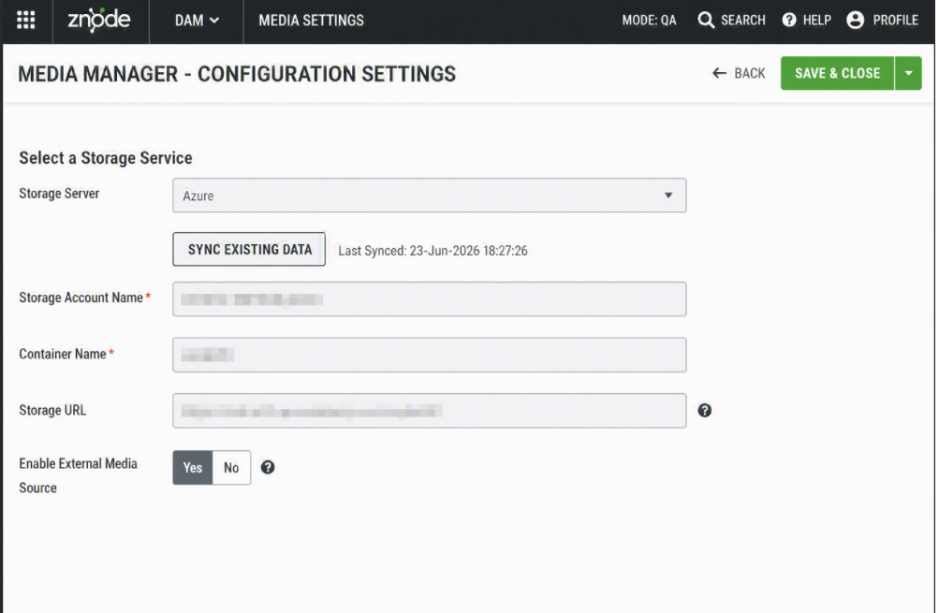
| Improved media settings with read-only storage configuration, removed access key visibility, and support for high-resolution images (up to 3000px)
|
Shipping & Integrations | Enhanced FedEx integration with store-level credential configuration, enabling multi-store and multi-account shipping flexibility |
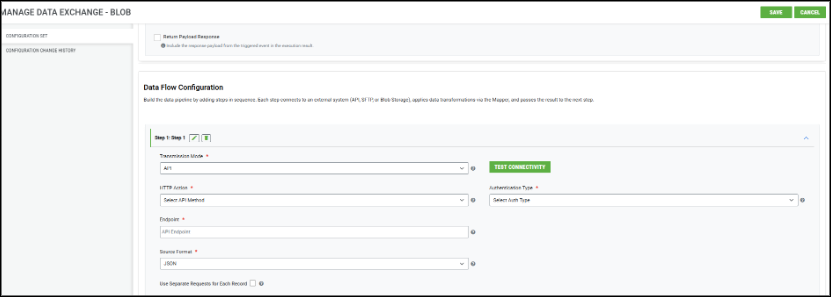
Data Exchange / Integrations | Added support for single-record API request processing in Commerce Connector using “Use Separate Requests for Each Record” flag |
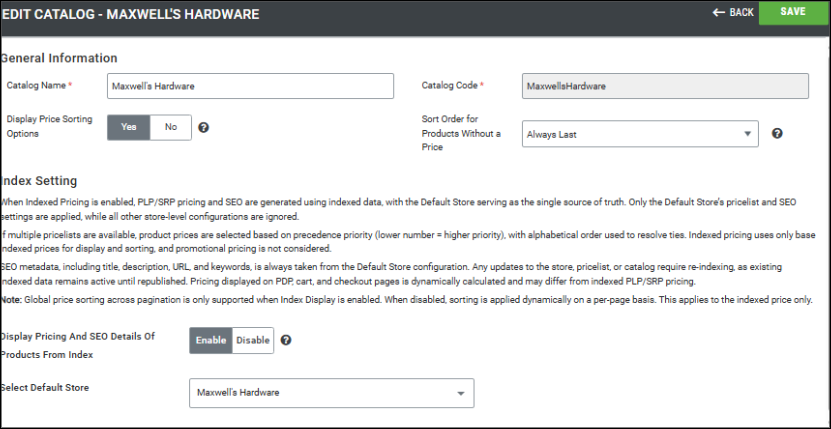
Catalog & Merchandising | Enhanced Catalog Index Settings with indexed pricing & SEO control, global price sorting, and configurable product sorting behavior |
Performance
| Improved API efficiency, reduced redundancies, and enabled better handling of large datasets and transactional flows |
Other Improvement – Highlights
Area | Key Improvements |
PIM | Publish reliability, search accuracy, stock handling, API enhancements |
System Settings | Payment, shipping, and external integrations stability |
Dev Center | Improved data persistence and admin handling |
Marketing | Search accuracy, SEO controls, and recommendations |
CMS | Content publishing stability and UI improvements |
Accounts & Users | User management, security, and performance improvements |
OMS | Order processing, pricing, navigation, and validation fixes |
DAM | Media handling and configuration improvements |
APIs & Platform | API consistency and documentation alignment |
Open Source | UI, navigation, and analytics improvements |
Disclaimer
Display Order Field Removal from Category (Admin UI Only)
- This change is limited to Admin UI only. The Display Order field has been hidden from the Category Listing, Add New Category and Manage Category forms, and the DisplayOrderCategory attribute has been removed from the Category Attribute List. No changes have been made to the underlying APIs or business logic. Existing APIs continue to support the Display Order value and will function as per their current behavior.
Enable XSS Validation
- Even if the Enable XSS Validation and Enable IDOR Validation flags are set to true, the changes will only take effect after explicitly saving the configuration.
Temporary Disablement of Email Marketing Tab
- The Email Marketing tab within the Stores section has been temporarily disabled. This measure has been implemented to accommodate ongoing updates and improvements. During this period, admin users will not have access to email marketing features from the Stores section. The functionality will be restored once the necessary changes have been completed and validated.
Temporary Disablement of Promotions, Coupons, and Vouchers Management on the Manage Order Screen. (Continued from Previous Version)
- In this release, the ability to add, manage, or modify promotions, coupons, and vouchers has been temporarily disabled on the Manage Order screen in the Admin Console. While promotions and coupons applied during order creation will still be visible on the Manage Order screen, the options to add new promotions or remove existing ones will not be available. This functionality will be re-enabled in a future update.
Disable SEO Validation
- Even if the Disable SEO Validation flag is set to true, the changes will only take effect after explicitly saving the configuration.
Breaking Changes
Enhanced Catalog Indexing: Indexed Pricing and SEO for Improved Sorting and Performance
- This change can lead to a breaking change when enabled; it is important to adopt the update carefully and perform thorough regression testing across all impacted features after upgrading (with storefront).
- Key Impact: The sorting options: Price, Low to High and Price, High to Low will be hidden in the Storefront when the setting is enabled.
- For more details, please click here.
What’s New
Page Builder Integration for Sign In and Create an Account Pages
Feature Overview
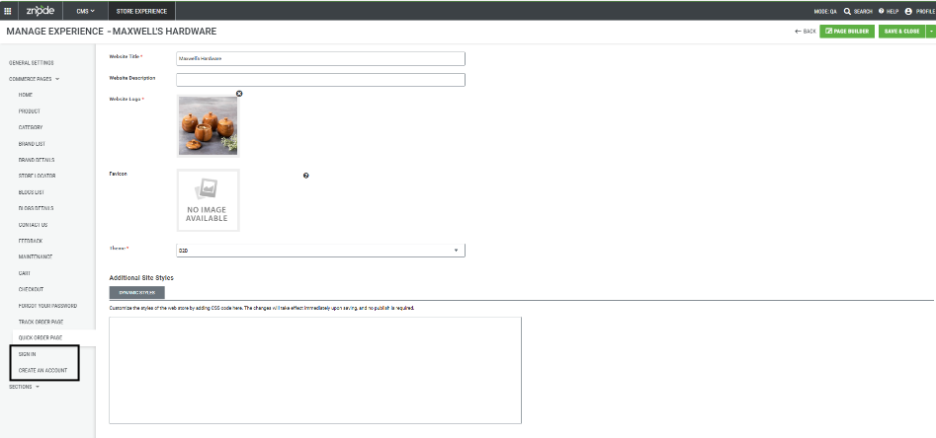
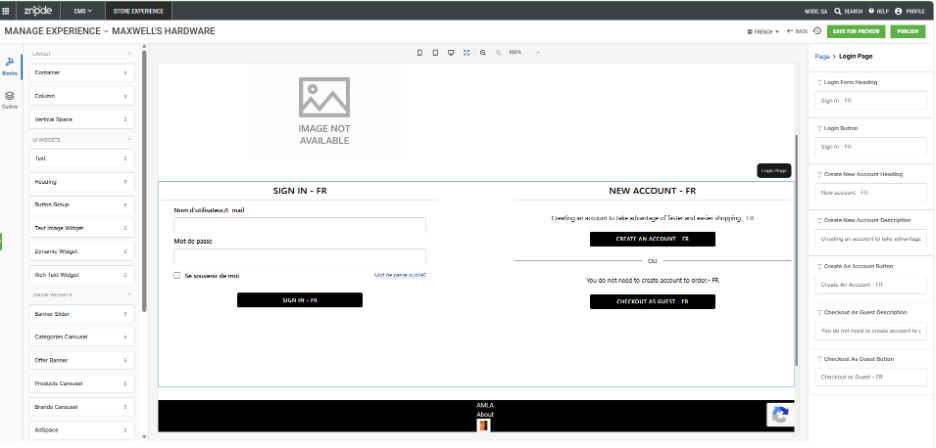
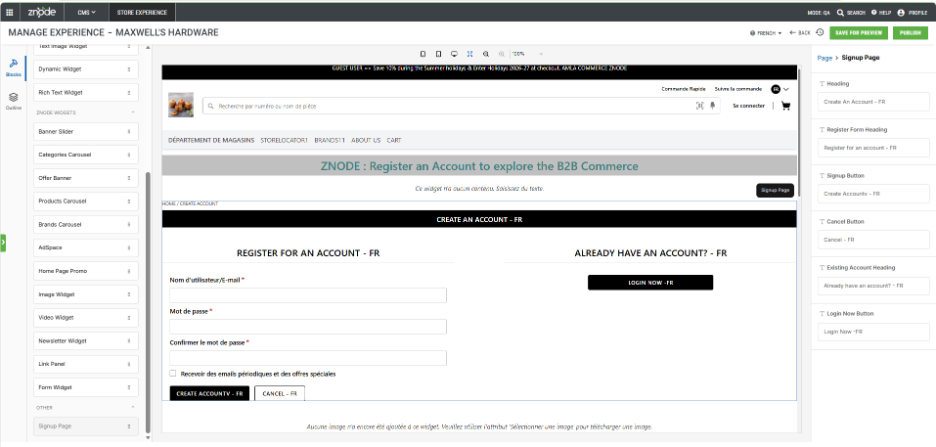
Znode now supports Page Builder integration for Create an Account and Sign In pages, enabling admins to manage and enhance these storefront pages directly through Page Builder.
This enhancement allows businesses to add and manage Page Builder content around the existing Create an Account and Sign In functionality without requiring code changes. The core business functionality remains system-controlled, ensuring that existing workflows and user experiences are preserved.
The feature provides a flexible way to enrich these pages with banners, promotional content, text blocks, images, links, and other supported Page Builder components while maintaining full backward compatibility with existing implementations.
Disclaimer
To ensure the new feature functions as intended, using the latest version of the Storefront is recommended. Older versions may support the feature partially or could lead to limited functionality or operational inconsistencies.
Key Features
- Added Create an Account and Sign In pages under Commerce Pages in Page Builder.
- Enables administrators to customize page layouts using existing Page Builder components.
- Preserves the core functionality and workflow of Create an Account and Sign In pages.
- Supports drag-and-drop placement of Page Builder components above and below the predefined page structure.
- Allows editing of page-specific labels, headings, descriptions, and instructional content through Page Builder attributes.
- Supports preview, publish, version history, and locale management using existing Page Builder capabilities.
- Provides a consistent Page Builder experience aligned with other commerce and content pages.
- Maintains full backward compatibility with existing storefront implementations and customizations.
- Supports multi-store and multi-locale environments.
- No impact on existing customer authentication workflows or account management functionality.
Customer Import Enhancement – Centralized Login Restriction Store Merge Support
Feature Overview
This release enhances the Customer Import process by introducing support for merging additional store associations into an existing customer's Centralized Login Restriction profile. A new import flag value enables administrators to create restricted customers across multiple stores and incrementally expand store access through subsequent imports without manual intervention.
Key Enhancements
- Store Merge Support for Centralized Login Restriction
- The Customer Import process introduces a new RestrictCentralizedLogin_Store flag value (11) that supports both customer creation and store association merging.
- When the import uses the new flag value, the system creates new customers with Centralized Login Restriction enabled or merges newly specified stores into an existing restricted customer's profile while preserving all previously assigned store association
- Benefits
- Eliminates manual updates when assigning additional stores to existing customers.
- Preserves existing store associations during subsequent imports.
- Simplifies customer administration across multiple stores.
- Supports phased store onboarding through incremental imports.
- Single Import for User Creation and Store Assignment
- The enhanced Customer Import process allows administrators to create a new customer, associate the customer with multiple stores, and enable Centralized Login Restriction in a single import operation.
- Benefits:
- Reduces the number of import operations required for customer onboarding.
- Simplifies multi-store customer provisioning.
- Improves administrative efficiency.
- Incremental Store Expansion
- Subsequent imports using the new flag value automatically merge newly assigned stores into an existing customer's Centralized Login Restriction profile instead of replacing existing associations or creating duplicate customer records.
- Benefits:
- Supports phased store rollouts.
- Preserves existing store mappings.
- Simplifies ongoing customer maintenance as additional stores are introduced
- New Flag Value and Behavior:
- The RestrictCentralizedLogin_Store import field supports the following values:
- Flag Value: 1
- Creates a customer with Centralized Login Restriction. Existing behavior remains unchanged and does not merge store associations.
- Flag Value: 11
- Creates a new restricted customer or merges additional store associations into an existing restricted customer's profile.
- Flag Value: 1
- The RestrictCentralizedLogin_Store import field supports the following values:
- Important Points:
- A single customer import file must use either flag value 1 or 11. Mixing both values within the same import file results in a validation error.
- Store associations are merged only when RestrictCentralizedLogin_Store = 11 is specified.
- Existing store associations are preserved during merge operations; only new stores are added.
- Successive imports using flag value 11 continue to expand a customer's store access without creating duplicate customer records.
- This enhancement applies only to customers configured for Centralized Login Restriction.
- Supported Scenarios:
- Scenario 1: New Customer Across Multiple Stores
- When importing a new customer who requires access to multiple stores, administrators can set RestrictCentralizedLogin_Store = 11.
- Result:
- The system creates the customer.
- The customer is associated with all specified stores.
- Centralized Login Restriction is enabled across all assigned stores in a single import.
- Scenario 2: Existing Restricted Customer
- When importing an existing customer who already has Centralized Login Restriction enabled, administrators can include additional stores using RestrictCentralizedLogin_Store = 11.
- Result:
- The system adds the newly specified stores to the existing customer profile.
- Existing store associations remain unchanged.
- Centralized Login Restriction continues to apply across all assigned stores.
- Scenario 3: Phased Store Rollouts
- When additional stores become available over time, administrators can perform successive imports using RestrictCentralizedLogin_Store = 11.
- Result:
- The system continues to merge newly assigned stores into the existing customer profile.
- Duplicate customer records are not created.
- Previously, assigned stores are retained.
- Scenario 1: New Customer Across Multiple Stores
Power BI Report - Dashboard Enhancements
Feature Overview
This release enhances the Znode Reports (Power BI) dashboard by introducing additional summary metrics that provide greater visibility into business activity. Administrators can now monitor the total number of quotes and return orders directly from the dashboard alongside existing sales metrics.
Key Enhancements
- Total Quotes and Total Returns Metrics
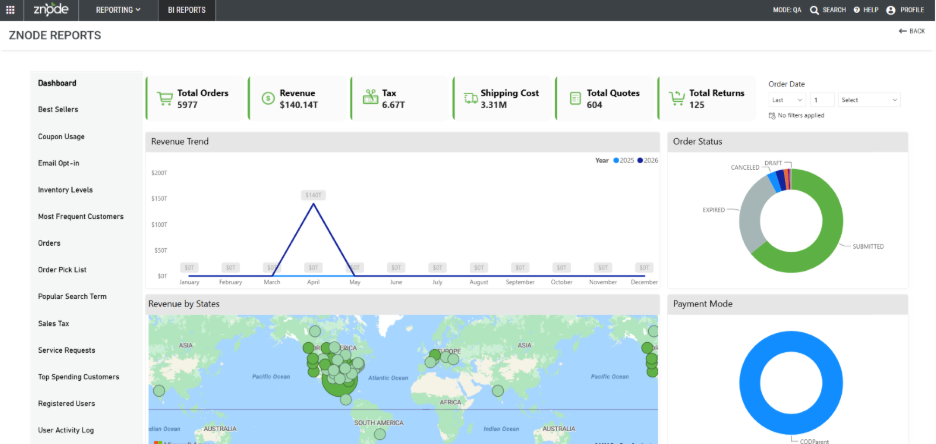
- The Reports dashboard now displays two new summary cards:
- Total Quotes – Displays the aggregate number of quotes.
- Total Returns – Displays the aggregate number of return orders.
- These metrics are displayed alongside the existing Total Sales and Total Orders cards on the main Reports dashboard.
- The new dashboard metrics support the existing date range filter available on the Reports page.
- The Reports dashboard now displays two new summary cards:
- Important Points:
- The Last 1 Hour filtering option is not supported due to Power BI limitations with calendar-based date slicers.
Order API - Enhancements
Feature Overview
This release enhances the Order Details API by including the AccountCode field in the account details section of the response payload. This enhancement simplifies integrations that require account information, such as ERP systems, by reducing the need for additional API requests.
Key Enhancements
- AccountCode Added to Order Details API
- The Order Details API (/orders/class-details/) now returns the AccountCode field along with the existing AccountId and AccountName in the account details section of the response.
- Benefits
- Eliminates the need for a separate API call to retrieve the AccountCode.
- Simplifies integration logic for downstream systems, including ERP integrations.
- Reduces API round-trips during order processing workflows.
- Improves overall integration performance and efficiency.
- Important Points:
- The AccountCode field is returned as part of the account details section of the Order Details API response.
- Existing integrations remain compatible, as no existing response properties are removed or modified.
- Integrations that previously retrieved the AccountCode through a separate API call can be updated to consume the value directly from the Order Details API response, reducing unnecessary API requests.
Media (DAM) Settings Enhancements
Feature Overview
This release enhances the Digital Asset Management (DAM) Settings module to improve administrative usability, strengthen security, and support modern high-resolution image requirements.
Key Features
- Read-Only Storage Configuration
- After the storage configuration is completed and saved, the system displays the following storage configuration fields in read-only mode:
- Storage Server
- Storage Account Name
- Container Name
- Storage URL
- Benefits
- Prevents unintended modifications to storage configuration.
- Allows administrators to view configured values for reference.
- Provides a secure and consistent administration experience.
- After the storage configuration is completed and saved, the system displays the following storage configuration fields in read-only mode:
- Storage Configuration Security Enhancement
- To enhance security, the system removes the Access Key field from the Media Settings user interface. The Access Key is no longer available for viewing or editing.
- Benefits:
- Protects sensitive storage credentials from exposure.
- Reduces the risk of accidental modification or disclosure.
- Continues to manage storage credentials securely in the backend.
- Preserves existing storage configurations without requiring any changes.
- Enhanced Large Image Size Support
- The system increases the maximum supported width for Large Images beyond the previous 1000px limit to support modern user interface and branding requirements.
- Benefits:
- Supports image widths of 1600px or higher (upto 3000px).
- Important Considerations:
- Larger image dimensions increase image generation time, memory utilization, bandwidth consumption, and page load times. Businesses should consider these factors when configuring high-resolution media to maintain an optimal balance between image quality and application performance, particularly for users accessing the application over slower network connections or lower-performance devices.
FedEx Integration – Credential Configuration Enhancement
Feature Overview
This release enhances the FedEx integration by enabling Account API Key and Account Secret Key configuration at the configuration set (store) level. This allows organizations to manage and use different FedEx credentials for each store, instead of relying solely on a single global configuration.
Key Enhancements
- Configuration-Level FedEx Credential Support
- The system now supports defining FedEx credentials (API Key and Secret Key) at the configuration set level.
- Each store can be configured with its own FedEx account credentials
- Configuration-level settings override the global configuration when present
- Ensures independent credential management across multiple stores
- Note: Completely backward compatible with the existing configuration sets
Benefits
- Enables per-store FedEx account usage for shipping operations
- Supports multi-account scenarios (e.g., region-wise or brand-specific FedEx accounts)
- Improves flexibility and scalability in multi-store environments
- Reduces dependency on a single global configuration
- Prevents cross-store impact when updating credentials
Use Case
- Organizations operating multiple stores can now:
- Assign different FedEx accounts to each store
- Manage shipping, billing, and tracking independently per store
- Align logistics operations with business-specific requirements
Commerce Connector 2.0: Support for Single-Record API Requests
Feature Overview
A new optional configuration flag, "Use Separate Requests for Each Record", has been introduced for API transmission types in Commerce Connector 2.0.
What’s New
When enabled, the system processes each record individually by creating a separate API request for every line item, rather than sending all records in a single bulk payload. This is powered by a looping mechanism that iterates through all available line items and triggers individual requests.
When to Use
- Enable this flag when the target API accepts only one record per request. This prevents failures caused by bulk payload submissions to APIs that do not support multi-record requests.
Details
- The flag is optional — existing behavior remains unchanged unless the flag is explicitly enabled.
- The flag is hidden for GET requests
- Available under the API transmission type configuration at the data exchange level.
Catalog Index Settings for Pricing and SEO Management
Feature Overview
- Enhancement to the existing Catalog Index Settings is provided with improved control over indexed pricing, SEO management, and storefront price sorting. The enhancements introduce new catalog configuration options that allow administrators to manage the visibility of price sorting and define how products without prices are handled during sorting.
- When indexed pricing is enabled, the selected Default Store continues to serve as the source for indexed pricing and SEO information, enabling consistent pricing and global price sorting across Product Listing Pages (PLP), Brand Listing Pages, and Search Listing Pages (SLP).
What’s New
- Enhanced Catalog Index Settings
- The existing Catalog Index Settings have been enhanced with additional configuration options and improved behavior.
- Display Pricing and SEO Details of Products from Index
- The existing Display Pricing and SEO Details of Products from Index setting has been enhanced to improve storefront pricing, SEO consistency, and product sorting.
- When enabled
- Product Listing Pages (PLP), Brand Listing Pages, and Search Listing Pages (SLP) display indexed pricing from the configured Default Store.
- Storefront SEO information is sourced from the configured Default Store.
- Product prices are sorted using indexed pricing across the complete product result set.
- Dynamic User, Account, and User Profile pricing is not applied on storefront listing pages.
- When disabled:
- Storefront pricing continues to be resolved dynamically using the existing pricing hierarchy.
- SEO continues to be resolved based on the active storefront.
- Default Store Enhancements
- The existing Default Store configuration has been enhanced to improve usability and validation.
- Enhancements include:
- The Default Store becomes mandatory when Display Pricing and SEO Details of Products from Index is enabled.
- Only stores accessible to the logged-in administrator are available for selection.
- Type-ahead search is supported for easier store selection.
- Updated validation ensures a Default Store is selected before indexed pricing can be enabled.
- New Catalog Settings
- Display Price Sorting Options
- A new Display Price Sorting Options setting has been introduced to control whether shoppers can access price-based sorting on storefront listing pages.
- When enabled (default):
- Price: Low to High
- Price: High to Low
- sorting options are available to shoppers.
- When disabled:
- Price-based sorting options are hidden from the storefront.
- Other supported sorting options remain available.
- Sort Order for Products Without a Price
- A new Sort Order for Products Without a Price setting allows administrators to control how products without a valid price are positioned when shoppers use price-based sorting.
- Available options include:
- Always Last (Default) – Products without a valid price always appear after priced products regardless of sort direction.
- Always First – Products without a valid price always appear before priced products.
- Treat as Zero – Products without a valid price participate in sorting using a value of zero.
- This configuration provides greater flexibility for merchandising products with missing or unavailable pricing.
- Display Price Sorting Options
- Indexed Pricing
- When Display Pricing and SEO Details of Products from Index is enabled and the catalog is published:
- Product Listing Pages (PLP)
- Brand Listing Pages
- Search Listing Pages (SLP)
- use indexed pricing generated from the configured Default Store.
- On these listing pages:
- User Price Lists
- Account Price Lists
- User Profile Price Lists
- are ignored, ensuring consistent pricing for storefront listings.
- Product Detail Pages (PDP), Cart, and Checkout continue using the existing dynamic pricing logic.
- When Display Pricing and SEO Details of Products from Index is enabled and the catalog is published:
- Indexed SEO
- When indexed pricing is enabled, storefront SEO information is generated using the configured Default Store.
- Indexed SEO includes:
- SEO Title
- SEO Description
- SEO Keywords
- SEO Friendly URL
- This ensures consistent SEO information across indexed storefront pages until the catalog is republished.
- Improved Global Price Sorting
- Price sorting has been enhanced to operate on the complete indexed product result set before pagination.
- This provides consistent sorting across:
- Category Listing Pages
- Brand Listing Pages
- Search Listing Pages
- The following sorting options now return globally ordered results across all pages:
- Price: Low to High
- Price: High to Low
- Global price sorting is supported only when indexed pricing is enabled.
- Save and Publish Experience
- Catalog Index Settings now follow a draft-based workflow.
- When administrators save changes:
- Configuration changes are saved as draft.
- Storefront behavior remains unchanged until the catalog is published.
- A confirmation message reminds administrators to publish the catalog before the changes become visible on the storefront.
- When administrators save changes:
- Catalog Index Settings now follow a draft-based workflow.
- Important Notes
- A Full Catalog Publish is required whenever Catalog Index Settings, the Default Store, or indexed pricing and SEO configurations are modified.
- Indexed pricing applies only to Product Listing Pages (PLP), Brand Listing Pages, and Search Listing Pages (SLP).
- Product Detail Pages (PDP), Cart, and Checkout continue using the existing dynamic pricing engine.
- Changes to indexed pricing or SEO are not reflected on the storefront until a Full Catalog Publish is completed.
- Existing catalogs with indexed pricing disabled continue to function without any changes to their current pricing or SEO behavior.
- If the Price: Low to High and Price: High to Low sort options are not associated with the storefront, the storefront displays the configured Default Sort only. Price-based sorting options become available after they are associated with the storefront.
Performance Enhancements
Optimized Admin Dashboard Data Retrieval
This enhancement improves the performance of the Admin Dashboard by optimizing how data is fetched across multiple dashboard widgets. Previously, each widget independently invoked dashboard APIs, resulting in repeated execution of the same stored procedure and redundant data retrieval.
Key Enhancements:
- Eliminated multiple API calls from individual dashboard widgets (Orders, Quotes, Returns, Top Accounts, Sales Details)
- Reduced redundant executions of the underlying dashboard stored procedure
- Implemented a shared data retrieval mechanism, allowing all widgets to use a single dataset
- Dashboard performance will continue to be monitored as data volume grows to ensure sustained performance and identify further optimization opportunities.
Elasticsearch Resource Utilization Optimization
Optimized Elasticsearch indexing to significantly reduce index size, improve storage efficiency, and enhance key operational processes.
Key Enhancements:
- Optimized index mappings and resource utilization to handle over 3.3 million documents within approximately 1.54 GB of storage.
- Achieved a per-document storage footprint of just ~0.48 KB, ensuring efficient resource consumption at scale.
- Applied an additional 10% index size reduction for large indexes, further improving storage efficiency.
- Publish synonyms process is significantly improved and now completes in under a minute.
- Recreate index time improved by 15%.
Black Box Improvements
Product Information Management (PIM)
Z10-29346 | Incorrect Sorting in Product Suggestions
Resolved an issue where product recommendation sections such as “Frequently Bought Together” and “You May Also Like” did not follow the configured display order and occasionally resulted in generic errors. The sorting logic has been corrected to respect the defined sequence, and error handling has been improved to ensure consistent and accurate product recommendations across the storefront. Updated 4 stored procedures at the DB level.
Z10-34515 | Display Order Issue in Attributes Grid
Corrected an issue in the Admin attributes grid where configured display order was not being honored, leading to inconsistent attribute sequencing. Implemented sorting logic in the stored procedure to handle Display Order as numeric and added sorting support for Name, SKU, and Product Type columns.
Z10-35666 | PIM Attribute Family and Attribute Group Association Not Available Through API
Enhanced API capabilities to support retrieval of Attribute Family and Attribute Group associations, which were previously not accessible via API. This limitation made it difficult for external integrations and custom implementations to accurately map product attributes to their respective families and groups. The API has now been updated to include these associations, ensuring complete attribute hierarchy visibility and enabling seamless integration, improved data consistency, and better alignment with Admin configurations.
Z10-35273 | Inventory Rounding Not Applied
Fixed an issue where product inventory quantities were displayed without adhering to global rounding settings. Updated inventory quantity mapping to apply the configured precision and rounding settings from Global Settings. Removed unnecessary trailing decimal places for consistent quantity display.
Z10-35348 | Negative Inventory Display
Resolved an issue where negative inventory values were displayed for products allowing backorders, causing confusion in stock visibility. The display logic has been updated to ensure inventory values are represented appropriately, reflecting valid and meaningful stock information. Webstore-side changes to suppress negative inventory display for child items of grouped products and show appropriate stock messaging instead.
Z10-35641 | Products Not Displayed After Catalog Publish
Fixed an issue where products associated with newly published catalogs were not visible on the storefront. The problem was caused by incorrect indexing or association processing during publish. Enhancements ensure successful catalog publishing and immediate product availability on the webstore. DB-level changes to handle the default search profile when none is configured for a catalog
System Settings
Z10-30594 | Repetitive Network Calls with Affirm
Resolved an issue where multiple redundant network/API calls were triggered during checkout when using the Affirm (Stripe-integrated) payment method. This behavior caused performance degradation and unnecessary load on the system. Optimization has been implemented to streamline API calls, reduce redundancy, and ensure a smoother and more efficient checkout experience.
Z10-30686 | Missing Payment Methods for Multi-Profile Users
Fixed an issue where users associated with multiple profiles were unable to view all applicable payment methods during checkout. Modified the SP Znode_GetPluginTypeConfigurationSet to accept UserId instead of ProfileId when @ScopeId = 3. The SP now internally fetches all profiles for the user and returns common payment methods across those profiles and the store. If no common methods are found, it falls back to all store-associated payment methods.
Z10-34476 | Shipping Method Not Retained
Resolved an issue where the selected shipping method was not retained in the cart summary after navigation between quote, checkout, or product re-add flows. State management and session handling have been corrected to persist the selected shipping method accurately, ensuring consistency throughout the checkout process.
Z10-35074 | Google Pay Payment Failure
Fixed a critical issue where Google Pay transactions failed with the OR_BIBED_11 error, preventing order placement. The integration flow has been corrected to properly handle payment authorization and validation, ensuring successful transaction processing and reliable order completion. Ensured the total price value is rounded/truncated to a maximum of two decimal places before passing it to the Google Pay API.
Z10-35094 | FedEx Method Not Displayed
Resolved an issue where the FedEx Ground shipping method was not displayed for a secondary store in a multi-store configuration. The shipping configuration logic has been updated to correctly apply and render shipping methods across all associated stores, ensuring accurate availability.
Z10-35986 | Incorrect USPS Delivery Date
Corrected an issue where delivery date estimates for the USPS shipping method were calculated incorrectly. The date calculation logic has been revised to consider proper shipping timelines and conditions, ensuring accurate and reliable delivery estimates are displayed to users.Integrated USPS Service Standards API (/service-standards/v3/estimates) to fetch real expectedDeliveryDateTime. Added a new Service Standards URL field in USPS plugin Global Configuration (pre-filled with default). Stripped hyphens from ZIP+4 before API calls
Dev Center
Z10-32327 | Note Popup Disappears on Click
Resolved an issue in the Custom Tables module where the “Note” popup closed unexpectedly when users clicked outside the popup area. This behavior disrupted the user experience and could lead to accidental data loss. The popup interaction has been enhanced to prevent unintended closure and ensure stability during user interaction, providing a more reliable and user-friendly experience. Disabled outside-click dismissal on the Note popupAdded a close (X) button for explicit user dismissal
Z10-35409 | Data Exchange Config Lost
Fixed an issue where scheduled Data Exchange configurations were lost after disabling the Data Exchange feature. The system previously reset configuration settings instead of preserving them. Enhancements have been implemented to ensure that configurations are retained and restored when the feature is re-enabled, preventing rework and improving configuration continuity for users. Disabling a Data Exchange now retains the schedule config (visible but inactive)Editing a disabled Data Exchange no longer creates a Hangfire job. Added info notes on list and edit screens clarifying that jobs run only when enabled
Marketing
Z10-23300 | Search Issues
Corrected multiple inconsistencies in search results where products were either not displayed correctly or irrelevant results were returned. The comma-splitting logic has been removed. As a result, product names containing commas are now supported and can be searched correctly as a single search term.
Z10-34851 | Catalog Pricing Flag Not Persisted
Resolved an issue where the index-based pricing flag did not retain the latest updated value for catalogs sharing the same default store. The configuration now persists accurately. Fixed the data retrieval logic to bypass the change tracker and always fetch the latest catalog entity from the database, ensuring the flag value is persisted and displayed correctly across publish and edit cycles.
Z10-34888 | “Did You Mean” Suggestions Not Returning Results
Corrected behavior where clicking search suggestions resulted in no products being displayed. The suggestion logic now maps correctly to valid product results. hanged the search profile operator from AND to OR so that "Did You Mean" suggestions return products matching any of the search terms instead of requiring all terms in a single document.
Z10-34950 | Invalid Alternative Suggestions in Search
Fixed incorrect alternative suggestions that led to empty result sets. Search suggestions now return valid and relevant alternatives. Tuned the request query to handle "No products found" optimally.Change search profile operator from AND to OR so DYM suggestions return products matching any search term
Z10-34994 | Unauthorized Access to SEO Details
Resolved a security issue where admin users could view SEO data without assigned store access. Access control is now enforced properly. Updated SEO Product logic to resolve PortalId based on the logged-in user's accessible stores. Single-store users now get their store auto-selected; multi-store users see only accessible stores listed alphabetically with the first pre-selected.
Z10-13925 | Boost & Bury: Product Name Suggestions Not Displayed
Resolved an issue where “Product Name” search suggestions were not appearing while configuring boost and bury conditions in the merchandising module. The issue was caused by improper search index binding and suggestion query handling, Removed the infinite history push logic, replaced it with a single popstate handler that redirects to the home page on the first back action. Also stores orderId in sessionStorage so the receipt can reload its data on back-navigation.
Z10-35096 | Incorrect DidYouMeanAlternatives API Response
Corrected issues in Product Override APIs where suggested terms and alternatives were not returned correctly. API responses are now consistent and usable. Implemented missing search functionality in Product Override APIs to support SuggestTerm and DidYouMeanAlternatives. Updated DB functions (Fn_GetElasticIndexMapping & Fn_GetElasticCustomIndexMapping) to make OriginalSKU searchable, and enhanced the Elasticsearch query to cover Alt SKU, PIM SKU, Alternate ProductName, Alt Short/Long Description. Catalog publish required after config changes.
Z10-35356 | SMTP Test Email False Success Message
Resolved an issue where SMTP test emails incorrectly displayed a success message even when the email was not actually delivered. The validation mechanism has been improved to accurately reflect delivery failures, ensuring reliable confirmation of SMTP configurations.
Z10-35815 | Incorrect Redirect Status Code
Addressed an issue where the 301 URL Redirect feature was incorrectly returning an HTTP 307 Temporary Redirect response instead of the intended HTTP 301 Permanent Redirect. The redirection logic has been corrected to ensure proper SEO behavior and accurate status code handling.
Content Management System (CMS)
Z10-34729 | Unexpected Message on Content Page Publish
Resolved an issue where an incorrect or unexpected system message was displayed when publishing CMS pages in Admin. The issue was caused by improper handling of page-specific validation and messaging logic. Added an early return to prevent index infrastructure creation when no eligible pages exist (expired pages). This stops the publish process from getting stuck in "Started" state. Content page publish after Clear Publish Data now requires the affected store to be published first to recreate Web Store Version records.
Z10-34935 | Configuration Messages UI Misalignment
Fixed UI alignment and spacing inconsistencies affecting configuration messages across Forgot Password, Quick Order, and Track Order pages. The layout has been refined to ensure proper spacing, alignment, and readability, providing a more consistent and user-friendly interface across all affected pages.
Z10-34958 | Track Order Button UI Alignment Mismatch
Corrected an issue where the Track Order button displayed differently between Admin preview and the webstore (especially in Chrome). UI rendering logic has been standardized to ensure consistent alignment and styling across both environments, improving visual accuracy and user experience.
Z10-35524 | Page Builder Error Logs in Application Logs
Addressed an issue where unnecessary error logs were generated during Page Builder operations. Logging behavior has been refined to capture only relevant errors, improving log clarity and reducing noise in application logs.
Z10-35790 | Link Panel Widget Publish Failure with SQL Error
Resolved a critical issue where publishing the Link Panel widget in header/footer sections failed due to a “#ZnodeMediaURL” SQL-related error. Updated outdated stored procedures (Znode_SetPublishWidgetSliderBannerEntity and Znode_PublishConfigWidgetsEntity) that were causing the #ZnodeMediaURL SQL error during Link Panel widget publish
Z10-36066 | Product Carousel Widget Throws Generic Error
Fixed an issue where the Product Carousel widget displayed a generic error instead of rendering products when configured on commerce and content pages. The widget logic has been corrected to properly fetch and display products based on configuration, ensuring a smooth storefront experience. Completely rewrote the stored procedure Znode_GetPublishProductList from scratch to optimize product filtering and data retrieval performance across the entire dataset.
Accounts & Users
Z10-26736 | Misaligned Item Details in Admin
Corrected UI alignment issues in the “Previous Purchase” section within Admin where product details such as name, quantity, and pricing were not displayed consistently compared to the webstore view. The layout has been refined to ensure proper column alignment, improved readability, and consistency across Admin and storefront experiences.
Z10-33188 | Filters Not Clearing After Switching Views
Resolved an issue where applied filters were not being cleared when switching between list and grid views across admin screens. This behavior caused inconsistent data display and user confusion as previously applied filters persisted unintentionally. The view switch logic has been updated to properly reset or maintain filters based on expected behavior, ensuring a consistent and predictable user experience while navigating between different view modes.
Z10-32698 | Delay in Editing Address Details
Optimized the performance issue where clicking the edit icon for address details in the admin panel caused a noticeable delay. Optimized the Znode_AdminUsersByUserId stored procedure by: Refactoring dynamic SQL to a static query with better joins, Applying UserId filtering earlier to reduce the dataset and Removing redundant @FilterBstore null checks.
Z10-33194 | Disabled Users Able to Log In
Fixed a critical security issue that allowed disabled users to log in to the webstore despite their inactive status. Fixed the lockout validation logic to properly check LockoutEnd regardless of aspNetUserId value and removed the incorrect Admin-role bypass so disabled users are blocked from webstore login regardless of their role.
Z10-33225 | Incomplete Categories During Impersonation
Corrected an issue where users in impersonation mode were unable to view the complete category hierarchy. Set the --header-height CSS variable dynamically based on the actual header height, so the mega-menu correctly calculates its available space regardless of whether the impersonation bar is visible, or the screen size varies.
Z10-33902 | AddressList API Returns 204
Resolved an issue where the AddressList API returned a “204 No Content” response even when address data was available. Added logic in the service layer to include the ZnodeAddress to expand when it is not explicitly passed in the request, ensuring the API returns the user address list as expected.
Z10-34477 | Incorrect Enable/Disable Behavior After Role Conversion
Fixed an issue where enable/disable functionality behaved inversely after converting a customer role to an admin role. Aligned the enable/disable logic so that it behaves consistently regardless of whether the user is managed from the Customers list page or the Admin user page.
Z10-34478 | Intermittent Disabled User Access
Addressed intermittent behavior where disabled users were still able to access the webstore in certain scenarios. Fixed the lockout validation logic to properly check LockoutEnd regardless of aspNetUserId value, and removed the incorrect Admin-role bypass so disabled users are consistently blocked from webstore login regardless of their role.
Z10-35221 | Forgot Password Failure After Config Update
Resolved an issue where users encountered “invalid username” errors during password reset after updating the RestrictCentralizedLogin_Store configuration via user import. The validation logic has been corrected to properly recognize users and allow successful password reset operations.
Z10-35224 | Logo Library Save Loader Issue
Fixed an issue where saving in the Account/Store Logo Library triggered an indefinite loader without completing any action. The save operation has been stabilized with proper response handling and UI feedback, ensuring successful execution and completion visibility. Removed the unnecessary Save action and related dropdown options from Account/Store Logo Library pages. Only relevant, supported actions are now presented.
Z10-35448 | reCAPTCHA Not Loading on Scroll
Resolved a lazy-loading issue where the reCAPTCHA component did not render when the user scrolled the page. Fixed the promise reuse flow to apply the same data transformation/mapping logic as the cache and API paths, ensuring consistent portal data responses across all code paths. Front-end only fix — no API changes involved
Z10-35685 | Multiple Roles Not Returned
Fixed an issue where only partial role information was returned for logged-in users. The system now correctly retrieves and returns all associated roles, ensuring accurate role-based access control and permission handling. Created a new API endpoint — GET v2.1/users/{username} — that retrieves user details along with all roles associated with the user. Supports accountId, StoreCode, and expand=additional-attributes parameters for complete role and permission data.
Z10-35820 | Password Reset Not Working
Resolved an issue preventing users from successfully resetting their passwords due to backend validation or token handling inconsistencies. The password reset workflow has been corrected to ensure seamless execution from request to completion. Fixed the token encryption/decryption logic to use consistent, environment-independent keys, ensuring password reset tokens are properly validated across all environments.
Order Management System (OMS)
Z10-29452 | Quote Attribute API Failure
Resolved failures in the quote attribute API that were causing disruptions in quote creation and update workflows. The issue was primarily due to inconsistent data handling and validation gaps, resulting in API call failures. Enhancements have been implemented to stabilize request processing, improve validation checks, and ensure seamless handling of quote attributes across all related workflows.
Z10-33316 | Duplicate Actions Field in Mobile View
Corrected an issue where the "Actions" column was duplicated in the order details view on mobile devices (Safari browser). The UI rendering logic has been refined to ensure the column is displayed only once, improving readability and providing a consistent user experience across devices and browsers.
Z10-34665 | Performance Issue on Cart and Checkout Page with Large Cart Data
Optimizations have been implemented to streamline pricing calculations, reduce redundant operations, and improve data retrieval efficiency. These improvement ensure faster page load times, smoother checkout flow, and improved scalability for high-volume cart scenarios without impacting accuracy or functionality.
Z10-33439 | Back Button Leads to Blank Page
Resolved a navigation issue where guest users encountered a blank page when clicking the browser back button after reaching the order confirmation page. Improvements have been made to session handling and navigation flow to ensure users are redirected to a valid page, preserving a smooth browsing experience.
Z10-33843 | Inconsistent Back Navigation
Improved overall browser back navigation behavior after order placement, where users previously experienced inconsistent or unexpected page transitions. Removed the infinite history push logic, replaced it with a single popstate handler that redirects to the home page on the first back action. Also stores orderId in sessionStorage so the receipt can reload its data on back-navigation.
Z10-33953 | Incorrect Email and Username Mapping
Fixed incorrect mapping of email and username values displayed on quote and order receipt pages. The issue stemmed from improper data binding at the API and UI layers. Data mapping logic has been corrected to ensure accurate user information is consistently displayed across all transactional documents. Swapped field mappings in QuoteCustomerInfo.tsx and QuoteDetails.tsx to use the correct API fieldsUpdated OrderReceipt.tsx to pull email from user session (userDetails?.email) with fallback to order?.userName for guests
Z10-34391 | Thank You Page Refresh Behavior
Corrected an issue where refreshing the Thank You page after order placement retained the same page instead of redirecting the user. The system now properly handles page refresh by redirecting users to the home or appropriate landing page, preventing duplicate actions and improving UX.
Z10-34940 | Bulk Order Payment Method Disabled
Resolved an issue where the payment method selection became disabled after placing multiple bulk orders consecutively. The issue was caused by improper state reset in the checkout flow. The checkout process has been improved to correctly reset payment selection, enabling uninterrupted bulk order processing. The fix addressed the race condition so discount/cart calculations remain correct under high-frequency bulk orders
Z10-34957 | Account Details Removed During Update
Fixed an issue where updating billing or shipping addresses in quotes/orders resulted in the unintended removal of associated account or email details. Data persistence logic has been corrected to ensure all relevant user information is retained during updates, maintaining data integrity. Mapped the missing properties so user details remain intact during address updates
Z10-35090 | Quote Submission Delay
Improved performance of quote submission, Backend processing and API response handling have been optimized to reduce execution time and improve overall system responsiveness.
Z10-35238 | Checkbox State Not Refreshing
Corrected an issue on the Previous Purchases page where checkbox states and validation messages were not refreshing dynamically after user actions. UI update mechanisms have been enhanced to ensure real-time state changes and proper validation feedback. State Reset Fix — Updated clearSelection() to also reset validationMessages and qtyMap.Select All Logic Fix — Added filtering to consider only eligible items (no stock validation error, no quantity validation message, valid purchased unit price). Select All now evaluates against eligible items only.
Z10-35669 | My Account Access Issue After Partial Shipment
Fixed an issue where users were unable to access the My Account dashboard after partial shipment of an order. Improvements have been made to ensure proper account access and order state handling after partial shipments. Handled null check for payment status before applying string operations
Z10-35733 | Cart Page Pricing Missing
Resolved an issue where pricing details were not displayed on the cart page, which also caused the checkout button to remain disabled. Replaced index-based price mapping with SKU + Quantity-based matching to correctly align input items with DB response rows regardless of order. Includes a SKU-only fallback for backward compatibility and graceful handling of missing/null data.
Z10-35740 | Inventory Incorrect After Backorder
Corrected inventory calculation logic for backordered products where stock values were updated incorrectly after order placement. The system now accurately adjusts inventory levels, ensuring correct availability representation and preventing stock discrepancies. Handled the logic in SP correctly
Z10-35982 | Order Number Redirects to 404
Corrected an issue where clicking on the order number from the Thank You page redirected users to a 404-error page instead of the corresponding Order Details page. The navigation logic has been fixed to ensure users are properly redirected to the correct order details view for improved post-purchase experience. Removed the unnecessary and problematic orderId state entirely. Updated the getOrderDetailHref function to directly use the actual string order?.orderNumber returned directly from the API response, ensuring the URL is always built with the correct, uncorrupted value.
DAM
Z10-24429 | Image Insertion Popup UI Issue
Improved UI rendering for the image insertion popup in the size chart module. Layout inconsistencies have been corrected for better usability. Corrected the CSS styling — fixed the backdrop appearance and z-index values on the TinyMCE dialog and its auxiliary container to ensure proper layering and visibility.
Z10-32253 | Bulk Upload Status Stuck
Resolved an issue where the upload status remained “Waiting” despite successful completion of large bulk image uploads. The status tracking mechanism has been improved to correctly reflect upload completion and processing updates.
Z10-32860 | Media Sync Timestamp Incorrectly Updates
Fixed incorrect update of “Last Synced Date/Time” on save without actual sync execution. Timestamp now reflects only real sync operations. The solution was to decouple the sync timestamp from the Media Settings save operation. The ModifiedDate column in ZnodeMedia was separated.
Z10-35826 | Website Logo Update Broken
Fixed an issue where the website logo update functionality was not working as expected in the store experience module. Added validation to check External Media configuration before rendering the popup, ensuring it only appears when enabled. This also resolved the Media Manager search issue caused by overlapping modals.
Other
Z10-29402 | Shopper Exists API Performance Issue
Resolved performance bottlenecks in the check-shopper-exists/{username}/{storeCode} API that were causing delayed responses and inconsistent status codes. Added username format validation in the API so that if special characters or an invalid username format are passed , the API returns a 400 Bad Request response hen the AllowNonEmailUsername feature flag is false. Also removed the unnecessary service/entity call, which helped optimize the overall API execution time.
Z10-29530 | Navigation Categories API Issues
Addressed functional inconsistencies in the /v2/navigationcategories API that were impacting CMS widget rendering. The API has been enhanced to correctly return category hierarchy and navigation data, ensuring widgets display accurate and complete category structures on the storefront.
Z10-29833 | Account Departments API Issues
Fixed discrepancies in both functionality and documentation for the /v2/account-departments API. Issues related to incorrect responses, missing validations, and unclear documentation have been addressed to ensure consistent API behavior and improved developer usability. Added the SwaggerResponse attribute for 404 Not Found in the controller so that the API documentation now correctly reflects the supported 404 response for account not found scenarios during account department creation.
Z10-30005 | Files Upload API Issues
Resolved multiple failures in the POST endpoint /v2/files-upload, where file uploads were not processed correctly. Enhancements include improved request validation, error handling, and response consistency to ensure successful file upload operations across use cases.
Z10-34289 | Update Cart API Validation Mismatch
Aligned validation logic of the “Update All Cart Details” API with its documented behavior. Previously, discrepancies caused unexpected validation errors or acceptance of invalid data. The API now enforces consistent validation rules, ensuring accurate cart updates. Added the required validation for the Line Item ID to ensure proper request processing.
Z10-34878 | Email Template API Issues (Legacy)
Resolved issues in the legacy /EmailTemplates/GetEmailTemplateByCode/{emailTemplateCode}/{portalId}/{localeId} API where response handling and documentation did not align. Updates ensure accurate data retrieval and proper documentation for continued compatibility.
Z10-35043 | Quotes Count API Issues
Fixed functional issues and documentation gaps in the /commerceapi/v1/Quotes/count/{quoteNumber} endpoint. The API now correctly returns quote count data, and the documentation has been updated to reflect accurate usage and expected responses.
Open-Source Enhancements and Fixes
Z10-35633 | Google Analytics Data Not Pushed to Data Layer
Resolved an issue where Google Analytics tracking data was not correctly pushed to the data layer on the webstore. Enhancements ensure accurate data capture and improved tracking for analytics and reporting.