
Release Information
Upgrade Note
Before upgrading, review the release notes for every version between the current version and the target version to ensure no critical upgrade information is missed. Important upgrade information, including breaking changes, prerequisites, configuration updates, database changes, and deprecated features, is documented in the release in which it is introduced and may not be repeated in later release notes.
Version Note
To ensure the new feature functions as intended, using the latest version of the Storefront is recommended. Older versions may support the feature partially or could lead to limited functionality or operational inconsistencies.
Disclaimer
Admin 2FA is now enabled by default. During upgrade, Two-Factor Authentication (2FA) will be automatically enabled once for all Admin environments, including those where it was previously disabled. Administrators can disable it after upgrade if needed.
This change applies to Admin users only and does not impact Webstore 2FA. To avoid login issues, ensure valid admin email addresses and SMTP settings are configured. Clear error messages and warning banners are displayed when 2FA prerequisites are not met.
What's New
Backorder Display Enhancement
Feature Overview
The Order Backorder Information Display Enhancement improves visibility of backordered items throughout the order lifecycle by displaying Backorder Quantity and Expected Backorder Date for applicable order line items.
Previously, backorder information was not consistently visible across order-related areas, making it difficult for customers, Customer Service Representatives (CSR), sales teams, and operations teams to identify delayed items and communicate accurate fulfillment expectations.
This enhancement introduces the ability to capture, persist, and display backorder details against order line items, ensuring users can easily identify quantities pending fulfillment and their expected availability dates. The solution also introduces a configurable storefront setting that allows administrators to control the visibility of estimated backorder information on Cart, Checkout, and Quote pages.
Backorder information is derived from product inventory and backorder configuration in PIM and is persisted at the time of order placement to ensure historical order accuracy. The enhancement supports all product types and provides a consistent experience across storefront pages, OMS screens, printed documents, and order-related email communications.
Key Features
Enhanced Backorder Visibility
- Displays Backorder Quantity and Expected Backorder Date for backordered order line items.
- Helps customers and internal users identify delayed products and expected fulfillment timelines.
- Improves transparency throughout the purchasing and order management process.
Order-Level Backorder Persistence
- Backorder Quantity and Backorder Date are persisted against order line items at the time of order placement.
- Historical order data remains unchanged regardless of future inventory updates.
- Ensures order records remain the source of truth.
Thank You Page Backorder Display
- Displays backorder details within the Order Summary section after order placement.
- Information is displayed only for products containing backordered quantities.
- Allows customers to immediately view delayed items and expected availability dates.
Order Email Communication Enhancements
Backorder information is displayed within supported order-related email templates:
- Order Receipt
- Cancelled Order Receipt
- Shipping Receipt
- Order Placed Notification
- Resend Confirmation Email
Provides customers with clear visibility into delayed items directly from email communications.
Configurable Storefront Visibility Setting
Introduces a new Global Setting:
Allows administrators to enable or disable display of estimated backorder information on:
- Cart Page
- Checkout Page
- Quote Details Page
Setting is applied globally across storefronts.
Multi-Warehouse Backorder Date Determination
- Supports products associated with multiple warehouses.
- Uses the Default Warehouse Backorder Date when available.
- Ensures consistent backorder date display across all impacted areas.
Product Type Support
The enhancement supports all major product types:
- Simple Products
- Configurable Products
- Bundle Products
- Grouped Products
- Add-On Products
Backorder information is displayed according to the inventory management behavior of each product type.
Line-Item Level Backorder Display
Backorder information is displayed directly against the affected product line item and supports:
- Fully backordered products
- Partially backordered products
- Mixed orders containing both backordered and non-backordered products
Dynamic Cart, Checkout, and Quote Estimation
Displays estimated backorder quantity and availability date before order placement.
Backorder information is recalculated during:
- Cart refresh
- Cart quantity updates
- Inventory changes
- Warehouse changes
- Quote conversion
- Checkout validation
Provides customers with the latest available inventory estimate.
Email Macro Support
Introduces new email template macros:
#BackorderQuantity##BackorderExpectedDate#
These macros automatically resolve using persisted order line item values and allow flexible backorder messaging within email templates.
Comprehensive OMS and Document Coverage
Storefront:
- Thank You Page
- Pending Orders
- Pending Payments
- Print Receipt
- Manage Quotes
- Cart
- Checkout
Admin:
- Manage Orders
- Pending Orders
- Pending Payments
- Print Receipt
- Manage Quotes
Backward Compatible Implementation
- Does not modify existing checkout, fulfillment, shipping, or inventory workflows.
- Existing orders continue to function without impact.
- Non-backordered products continue to display exactly as before.
- Existing integrations and APIs remain unaffected unless explicitly updated to consume the new backorder fields.
Consistent Customer Experience
Displays the same persisted backorder information across:
- OMS
- Customer-facing pages
- Printed order documents
- Email communications
Reduces customer confusion and minimizes support inquiries regarding delayed shipments.

What's New
Voucher Applicability on Additional Product Pricing
Feature Overview
The Voucher Applicability on Additional Product Pricing enhancement introduces greater flexibility in how voucher discounts are calculated across the Znode platform. Administrators can now control whether Additional Product Pricing is included in Promotion, Coupon, and Voucher calculations through a new global configuration setting.
By default, the existing behavior remains unchanged, where vouchers are calculated only on the eligible order amount excluding Additional Product Pricing. When enabled, Additional Product Pricing becomes part of the voucher-eligible amount, allowing discounts to be distributed across the complete payable value of the order.
This enhancement provides merchants with greater control over discounting strategies while maintaining backward compatibility and preserving existing voucher qualification, eligibility, redemption, prioritization, and conflict resolution rules.
Key Features
Configurable Voucher Calculation Setting
A new Global Product Setting has been introduced:
- Provides administrators with a simple Yes/No toggle to control voucher calculation behavior.
- Allows merchants to align voucher discounts with specific pricing and promotional strategies.
- Supports flexible discount allocation without modifying existing voucher definitions.
Enhanced Voucher Calculation Support
- When enabled, Additional Product Pricing is included in the voucher-eligible order amount.
- Voucher discounts are proportionally distributed across both product pricing and applicable additional charges.
- Ensures discounts can be applied to the complete customer payable amount.
Default Behavior Preservation
- When disabled, Additional Product Pricing remains excluded from Promotion, Coupon, and Voucher calculations.
- Additional Product Pricing continues to be fully payable by the customer.
- Maintains the current voucher discounting behavior without any changes.
Voucher Rule Compatibility
- Preserves existing voucher qualification rules.
- Maintains eligibility validation logic.
- Supports existing redemption workflows.
- Retains voucher sequencing and prioritization behavior.
- Continues to honor conflict resolution mechanisms.
No Configuration Changes Required
- Existing voucher configurations continue to work without modification.
- No changes are required to voucher definitions or setup.
- No updates are required to current redemption processes.
Comprehensive Platform Coverage
The enhancement supports consistent voucher calculation behavior across:
- Shopping Cart
- Checkout
- Quotes
- Orders
- Reorders
- Returns
- Refunds
Supported Application Areas
- Storefront
- Admin Console
- APIs
Backward Compatibility
- Maintains compatibility with existing orders and order histories.
- Supports existing quote workflows.
- Does not impact current integrations.
- Preserves existing voucher implementations and business rules.
Performance and Security
- Leverages existing configuration caching mechanisms.
- Utilizes established security frameworks for secure administration.
- Ensures reliable and consistent voucher calculation performance.
Merchant Flexibility
- Provides greater control over discounting strategies.
- Allows vouchers to optionally apply to the complete payable order amount.
- Supports promotional scenarios where Additional Product Pricing should receive voucher discounts.
- Enables merchants to tailor voucher behavior to specific business requirements.
Security Enhancement
Configurable Strong Password Policy Enforcement
Feature Overview
Znode now provides a Configurable Strong Password Policy framework that enables organizations to strengthen password security across customer-facing authentication workflows while maintaining flexibility through store-level configuration.
A new password security setting allows administrators to enforce enhanced password complexity requirements across storefront user accounts while maintaining full compatibility with existing authentication processes and administrative security standards.
Password Policy Configuration
A new setting has been introduced under:
Setting Name: Enable Strong Password Policy
The setting can be enabled independently for each store, allowing organizations to implement enhanced password standards on a store-by-store basis.
Password Requirements
When the Strong Password Policy is enabled, all new and updated passwords must meet the following requirements:
- Minimum length of 12 characters.
- Maximum length of 128 characters.
- Contains at least one uppercase letter.
- Contains at least one lowercase letter.
- Contains at least one numeric character.
- Contains at least one special character.
- Must not contain the user's username.
- Must not contain the user's email address.
Authentication Workflow Coverage
The Strong Password Policy is enforced across the following customer-facing and user-management workflows:
- Storefront Customer Registration.
- Storefront Buyer Registration.
- Password Change workflows.
- Forgot Password workflows.
- Password Reset workflows.
- Page Builder password operations.
- Storefront-related API password operations.
- User creation workflows.
- Commerce Portal user administration.
UI and API Enforcement
- Password validation is enforced at both the User Interface and API layers.
- Users cannot bypass password policy requirements through direct API requests.
- Ensures consistent password validation across all supported channels.
- Provides a secure and standardized authentication experience.
Store-Level Control
- The Strong Password Policy can be enabled independently for each store.
- Supports gradual rollout of enhanced security requirements across storefronts.
- Default value is No (Disabled) for both existing and newly created stores.
- For BStores, the password policy setting is inherited from the parent store.
Administrative User Security
Administrative password management follows enhanced password security requirements regardless of the store-level configuration.
The enhanced password policy is always enforced for:
- Administrator password changes.
- Administrator password resets.
- Administrative user creation.
- Buyer-to-Administrator user conversions.
- Commerce Portal administrator user management.
Administrative password workflows are not governed by the Store-Level Password Policy setting.
Password Expiration
Password expiration behavior for Administrator accounts remains unchanged.
- Administrator passwords expire after 60 days.
- Expiration notifications begin 7 days before the password expiration date.
- Password expiration duration cannot be configured through the Admin Console.
- The Strong Password Policy impacts password complexity requirements only.
- Password complexity and password expiration operate independently.
Existing User Impact
- Existing passwords remain valid after upgrade.
- Users are not required to immediately reset existing passwords.
- The enhanced policy is enforced only when a password is created, changed, or reset.
- Existing password history policies remain unchanged.
- The restriction preventing reuse of the previous four passwords continues to apply.
Upgrade Considerations
Following upgrade, all existing Administrator users will automatically have their password expiration period set to 60 days.
When an Administrator password expires, or whenever an Administrator changes or resets a password, the new password must comply with the Enhanced Password Policy requirements, including:
- Minimum password length requirements.
- Uppercase, lowercase, numeric, and special character requirements.
- Restrictions on the use of usernames and email addresses within passwords.
This ensures that all newly created or updated administrative passwords align with the platform’s strengthened security standards.
Password Expiration Configuration
- Password expiration duration remains system-controlled.
- Password expiration settings cannot be modified through the Admin Console.
- Administrator passwords continue to follow the standard 60-day expiration policy.
- Ensures consistent password governance across all administrative users.
Key Benefits
- Strengthens account security through enhanced password complexity requirements.
- Provides flexible store-level configuration for customer-facing users.
- Enforces security standards consistently across UI and API channels.
- Maintains backward compatibility for existing users and authentication workflows.
- Improves resistance against weak passwords and credential-based attacks.
- Supports organizational compliance and security best practices.
Performance Enhancement
Shipping Performance Improvements
Feature Overview
Performance optimizations have been implemented across shipping-related processes to improve response times, reduce processing delays, and enhance overall order management efficiency throughout the Znode platform.
These enhancements focus on optimizing shipping method retrieval, shipping cost calculations, carrier rate processing, and checkout shipping workflows to deliver a faster and more reliable shipping experience for both customers and administrators.
Additional improvements have been made to reduce API response times, increase scalability for high-volume transactions, and streamline shipping-related operations across storefront and administrative experiences.
Key Improvements
- Optimized shipping method retrieval processes.
- Improved shipping cost calculation performance.
- Enhanced carrier rate processing efficiency.
- Accelerated checkout shipping workflows.
- Reduced shipping-related API response times.
- Improved scalability for high-volume order processing.
- Streamlined shipping operations across storefront and administration interfaces.
- Enhanced overall order management performance.
Business Benefits
- Faster shipping rate retrieval during checkout.
- Improved customer shopping experience.
- Reduced processing delays for shipping calculations.
- Better platform scalability during peak traffic periods.
- Enhanced operational efficiency for administrators.
- Improved responsiveness across shipping-related workflows.
Important Points
2FA SMTP Configuration
Overview
Enhanced Two-Factor Authentication (2FA) SMTP configuration capabilities have been introduced to simplify setup, improve validation, and strengthen management of email delivery settings used for One-Time Password (OTP) generation and authentication workflows.
Key Enhancements
- Improved SMTP configuration experience for administrators.
- Enhanced validation of email delivery settings.
- Improved reliability of OTP email delivery.
- Streamlined setup and troubleshooting processes.
- Strengthened support for 2FA authentication workflows.
Benefits
- More reliable authentication email delivery.
- Reduced risk of OTP delivery failures.
- Improved administrator setup experience.
- Enhanced security and user authentication reliability.
Improved Category API Documentation, Migration Guidance, and Implementation Examples
Overview
The Category API documentation available on apidocs.znode.com has been enhanced to provide more comprehensive guidance for developers implementing and integrating Category APIs.
Documentation Enhancements
- Expanded API reference documentation.
- Improved endpoint descriptions and usage guidance.
- Additional migration documentation to support upgrade initiatives.
- Expanded implementation examples and usage scenarios.
- Improved developer onboarding and integration support.
Benefits
- Faster API adoption and implementation.
- Reduced development effort during integrations.
- Smoother migration planning and execution.
- Improved understanding of Category API capabilities.
- Accelerated time-to-market for custom integrations.
Catalog Publish Status UI Enhancement
Feature Overview
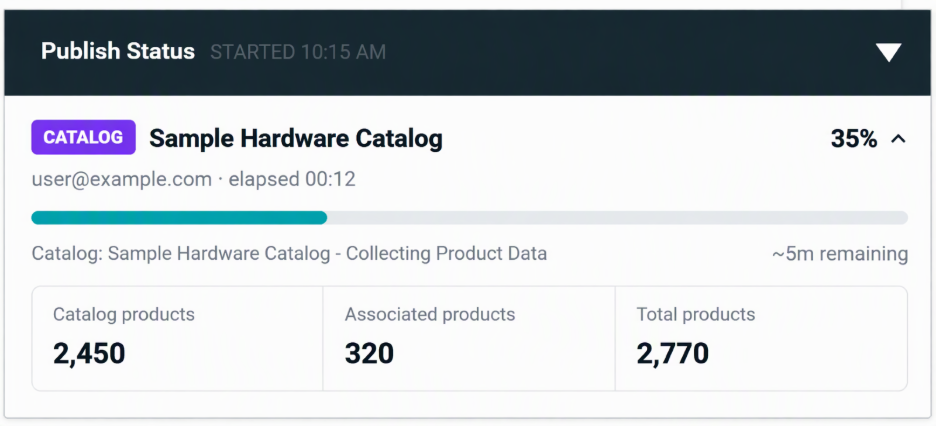
The Catalog Publish UI Enhancement introduces an improved publish monitoring experience that provides real-time visibility into catalog publishing operations through a centralized Publish Status panel.
Administrators can now monitor publishing activity, track processing progress, and view key operational metrics without navigating away from their current page.
These enhancements improve transparency for long-running publishing operations and provide greater insight into catalog publishing performance and status.
Publish Status Visibility
The Publish Status panel provides real-time visibility into:
- Publish progress tracking.
- Current processing stage.
- Total product count being published.
- Elapsed processing time.
- Estimated completion time.
- Publisher details and publish initiation information.
Key Benefits
- Improved visibility into catalog publishing operations.
- Real-time monitoring of publish progress.
- Enhanced transparency for long-running publish jobs.
- Reduced need to navigate between screens during publishing.
- Better operational awareness for administrators.
- Improved user experience when managing large catalogs.
Business Value
- Provides administrators with greater confidence during catalog publishing activities.
- Improves publish process transparency and monitoring.
- Reduces uncertainty around publish completion status.
- Supports more efficient catalog management workflows.
- Enhances the overall administration experience.
Black Box Improvements
PIM
Z10-41071 | Brand Category Association Not Saved Despite Success Message
Corrected an issue where associating a category to a brand displayed a successful confirmation message, but the category association was not actually saved.
The category association process has been enhanced to ensure category-to-brand relationships are correctly persisted and accurately reflected throughout the system.
Z10-41062 | Duplicate Brand Records Displayed When Brand Code Matches Category Code
Corrected an issue where duplicate brand records were displayed in the Admin Brand grid when a brand code matched an existing category code.
Validation and data retrieval logic have been improved to prevent duplicate brand entries from appearing and to ensure accurate brand data representation.
Z10-41027 | Improved Performance in Product Variant Associations
Enhanced the performance of product association operations within the Variant section.
Users previously experienced processing delays and intermittent generic errors while associating products. Backend processing has been optimized to provide faster, more reliable, and scalable variant association management.
Z10-40990 | Product Filters Not Working in PIM
Corrected an issue where product filters within Product Information Management (PIM) did not return expected results.
Filtering functionality has been enhanced to improve product search accuracy and ensure reliable retrieval of product records based on selected filter criteria.
Z10-40973 | Unable to Terminate Active Catalog Publishing Process
Corrected an issue that prevented administrators from terminating active catalog publishing processes.
Catalog publishing controls have been enhanced to allow authorized users to successfully stop ongoing publishing operations when required, improving operational flexibility and publish management.
Z10-40811 | Failed to Create Error Displayed While Saving Products
Corrected an issue where users received a "Failed to Create" error while saving certain products, preventing successful product creation or updates.
Product save processing has been improved to correctly handle affected scenarios and ensure successful product management operations.
Z10-40511 | Improved Logging Bootstrap Guard Validation
Enhanced application stability by improving logging bootstrap validation mechanisms.
Assembly-scoped logging guard checks have been replaced with process-wide validation across logging bootstrap call sites to help prevent duplicate initialization and ensure more reliable logging behavior throughout the application.
Z10-39936 | Restrict Variant Product Association to Simple Products Only
Enhanced variant association functionality to allow only Simple Products to be selected for variant relationships.
This improvement strengthens data integrity, prevents unsupported product types from being associated as variants, and ensures consistent variant management behavior.
Z10-40408 | Product Save Fails While Catalog Publish Is In Progress
Corrected an issue where product save operations failed with a "Failed to Create" error when a catalog publish process was running concurrently. Product management and catalog publishing processes have been enhanced to better support simultaneous operations, ensuring products can be saved successfully while catalog publishing is in progress.
Z10-39479 | Mandatory Fields Displayed as Optional for Certain Product Families
Corrected an issue where mandatory product attributes for certain product families were incorrectly displayed as optional in the Admin interface. Validation and attribute rendering logic have been enhanced to accurately identify and display required fields, ensuring successful product creation and improving data integrity.
Z10-39547 | Product Details Display Blank After API Attribute Updates
Corrected an issue where product details appeared blank after products were updated through API requests containing blank attribute values.
Product processing has been enhanced to properly handle blank attribute updates without impacting product visibility, ensuring product information remains accessible and correctly displayed after API-based updates.
Black Box Improvements
Accounts & Users
Z10-41169 | Existing Admin Users Are Unexpectedly Prompted to Change Their Password During Login
Corrected an issue where existing administrator users were incorrectly prompted to change their password during every login, even when no password reset, expiration, or policy-triggered event existed.
The login validation process has been enhanced to ensure password change prompts are displayed only when required based on configured password policies and account conditions.
Z10-41017 | Improved Consistency for 2FA and SMTP Configuration Settings
Enhanced the administration experience for Two-Factor Authentication (2FA) and SMTP configuration management.
User interface behavior, validation rules, and save operations have been standardized across related configuration screens to provide a more consistent and predictable setup experience.
Z10-40996 | Admin Login Failure Due to SMTP Authentication Errors
Corrected an issue where administrator users were unable to complete login when SMTP authentication failures prevented delivery of One-Time Passwords (OTP) required for Two-Factor Authentication (2FA).
Authentication workflows and error-handling processes have been improved to better manage SMTP-related failures and provide a more reliable login experience.
Z10-40987 | SMTP Fields Could Not Be Cleared in 2FA Configuration
Corrected an issue where optional SMTP configuration fields within the 2FA settings could not be cleared and automatically reverted to previously saved values.
Configuration management processing has been enhanced to correctly save and persist blank values when administrators intentionally remove optional SMTP information.
Z10-40882 | Guest Users Could Access Submit Quote Page Through Direct URL Modification
Corrected a security issue that allowed guest users to access the Submit Quote page through direct URL modification.
Access control validation has been strengthened to ensure only authorized users can access protected quote submission functionality, improving platform security and user access governance.
Z10-40518 | Unexpected Message Displayed After Admin Login
Corrected an issue where an unintended message was displayed to administrator users immediately after successful login.
Login processing has been updated to ensure only relevant system notifications and intended messages are presented to users.
Z10-40440 | Email Templates Continued to Use Guest Checkout Name After User Conversion
Corrected an issue where email communications continued to display guest checkout information after a user had been converted to a registered customer or administrator account.
Email template processing has been enhanced to use the correct customer identity information based on the user's current account status, ensuring accurate customer communications.
Black Box Improvements
System Settings
Z10-41048 | Hidden Categories Included in Product Feed Generation
Corrected an issue where hidden categories were included in generated category feeds and remained accessible through feed URLs.
Feed generation processes have been enhanced to exclude hidden categories from published feeds, helping prevent unintended category exposure through feed endpoints.
Z10-40667 | Tax Calculation Does Not Include Promotion Discount Details
Corrected an issue where tax calculations did not properly account for promotion discount information provided through tax plugin integrations.
The tax request process has been enhanced to include applicable promotion discounts and line-level pricing details, resulting in more accurate tax calculation outcomes.
Z10-40621 | SEO Import Behavior Is Inconsistent
Corrected an issue where SEO import functionality behaved differently from standard product and category import processes.
Import processing has been standardized to provide a more consistent, predictable, and user-friendly SEO data import experience.
Z10-40121 | Promotion Export Does Not Include Additional Attributes
Corrected an issue where promotion exports excluded additional promotion attributes from exported files.
Export functionality has been enhanced to include all relevant promotion-related data, ensuring more complete and accurate export results.
Order Management System (OMS)
Z10-41110 | Incorrect Backorder Quantity Displayed for Add-On Products
Corrected an issue where incorrect backorder quantities were displayed for products with associated add-on products.
Inventory calculations have been enhanced to ensure accurate backorder quantity information is displayed for products that include add-on associations.
Z10-40876 | Incorrect Variant Name Displayed During Return Creation
Corrected an issue where configurable product returns displayed the parent product name instead of the selected variant name during return creation.
Return processing has been updated to display the correct product variant information, improving return accuracy and usability.
Z10-40609 | Incorrect Quote Calculations When Shipping Method Changes
Corrected an issue where quote totals and related calculations were incorrectly adjusted after changing the selected shipping method.
Order and shipping calculation logic has been enhanced to ensure accurate quote pricing and total calculations.
Z10-39210 | Shipping Discount Added Incorrectly to Order Total
Corrected an issue where shipping discount amounts were incorrectly added to order totals when converting pending orders into actual orders.
Order total calculation logic has been updated to correctly apply and calculate shipping discounts.
Z10-39002 | Return Receipt Displays Null Ship-From Address
Corrected an issue where the text "Null" appeared within the Ship From Address section of generated return receipts.
Return receipt generation has been enhanced to ensure valid address information is displayed correctly.
Z10-38920 | Voucher Not Removed When Restrict Flag Is Disabled
Corrected an issue where customer-associated vouchers were not removed during checkout when the Restrict flag was configured as No.
Voucher validation and processing logic have been updated to ensure vouchers are applied or removed correctly based on configured restriction settings.
Z10-38737 | Backorder Validation Incorrectly Blocks Purchases
Corrected an issue where backorder validation prevented customers from purchasing products that were eligible for backorder sales.
Validation logic has been enhanced to support configured backorder purchasing rules and ensure qualifying products can be purchased successfully.
Z10-36101 | Incorrect Inventory Deduction Across Multiple Warehouses
Corrected an issue where inventory deduction calculations were inaccurate when order quantities exceeded available inventory across multiple warehouses.
Inventory allocation and deduction logic have been enhanced to improve inventory tracking accuracy and ensure proper stock distribution across warehouses.
Black Box Improvements
Content Management System (CMS)
Z10-41045 | Product Name Merged with Home in PDP Breadcrumb
Corrected an issue where product names were incorrectly merged with the Home breadcrumb when associated categories were hidden.
Breadcrumb navigation logic has been enhanced to maintain proper formatting and ensure product names and navigation paths are displayed correctly, providing a more consistent storefront experience.
Z10-40216 | Product Highlights Displayed Too Small on Storefront Pages
Improved the display and presentation of Product Highlights across Product Detail Pages (PDP) and other storefront pages.
Styling and content presentation have been enhanced to improve visibility, readability, and the overall customer browsing experience.
Z10-39780 | Hide from Menu Setting Not Respected in Search Results
Corrected an issue where categories configured with the Hide from Menu setting appeared within hydrated search results.
Search processing has been updated to respect category visibility settings and appropriately exclude hidden categories from search-related displays where applicable.
Reporting
Z10-40952 | Missing Account Filters in Power BI Orders Report
Corrected an issue where Account Name and Child Account Name filters were missing from the Power BI Orders Report following an upgrade to version 10.14.0.2.
Reporting functionality has been restored to provide complete filtering capabilities, enabling users to analyze order data more effectively.
Z10-40750 | Missing Znode Reports Log
Corrected an issue where Znode report logs were not being generated or displayed as expected.
Logging processes have been enhanced to ensure report execution details are properly captured, recorded, and available for administrative review and troubleshooting purposes.
Dev Center
Z10-41130 | Custom Table Bulk Insert Returns Success but No Records Are Inserted
Corrected an issue where Custom Table Bulk Insert APIs returned a successful response (isSuccess: true) while records were not actually inserted following the database deployment in version 10.14.0.6.
The bulk insert process has been enhanced to ensure records are correctly persisted and operation responses accurately reflect the actual outcome of the request.
Z10-40943 | Scheduled Product Feed Generation Failure After Automatic Trigger
Corrected an issue where scheduled product feed generation failed when initiated through automated triggers.
Scheduling and feed generation processes have been enhanced to ensure product feeds are generated successfully during automated executions.
Z10-40763 | Commerce Connector Real-Time Pricing Request Mapping Failure
Corrected an issue where real-time pricing request payloads could not be mapped correctly within API POST Call steps in the Commerce Connector.
Request processing has been enhanced to support successful request mapping and improve reliability of real-time pricing integrations.
Z10-40210 | Improved Equals Operator Handling for Custom Table Lookup APIs
Enhanced Custom Table Lookup APIs to properly process FilterOperators.Equals conditions.
This improvement provides more accurate filtering results and ensures consistent behavior across lookup operations.
Z10-37512 | Log Success and Failure Counts Display Incorrect Values
Corrected an issue where log entries displayed only processed record counts as successful and continually reported failure counts as zero.
Logging and reporting calculations have been updated to accurately display successful and failed record totals, providing improved visibility into processing outcomes.
Overall Benefits
- Improved reliability of Custom Table API operations.
- Enhanced accuracy of API response reporting.
- More dependable automated product feed generation.
- Improved support for Commerce Connector integrations.
- More accurate API filtering and lookup results.
- Enhanced logging, monitoring, and troubleshooting visibility.
- Improved developer productivity and integration reliability.
Black Box Improvements
Open-Source Enhancement (OS)
Z10-41056 | Hidden Categories Displayed in PLP Breadcrumb Navigation
Corrected an issue where Product Listing Page (PLP) breadcrumbs displayed hidden parent and child categories instead of showing only the appropriate navigation path.
Breadcrumb generation logic has been enhanced to respect category visibility settings and automatically exclude hidden categories from breadcrumb navigation. This ensures shoppers only see categories that are intended to be visible within the storefront experience.
Z10-41054 | Hidden Parent Categories Displayed in PDP Breadcrumb Navigation
Corrected an issue where hidden parent categories were displayed within Product Detail Page (PDP) breadcrumbs, exposing category hierarchy information that should not be visible to storefront users.
Breadcrumb rendering logic has been updated to properly honor category visibility settings and prevent hidden parent categories from appearing in product navigation paths.