
Release Information
The Znode 10.14.0.0 release introduces new features, enhancements, performance upgrades, and bug fixes.
Upgrade Note: Before upgrading, please review the release notes for each version between your current version and the target versions. Important details, such as breaking changes and deprecated features, are only mentioned in the release notes where they are introduced and may not be repeated in later version's release notes.
Version Note: To ensure the new feature functions as intended, using the latest version of the Storefront is recommended. Older versions may support the feature partially or could lead to limited functionality or operational inconsistencies.
Release Highlights
New Features/Enhancements Highlights
| Area | Highlights |
|---|---|
| SEO & APIs | Introduced dedicated SEO APIs with improved validation, simplified SEO code handling, partial update support, and enhanced data integrity. |
| Analytics | Enhanced GA4 tracking for Saved Cart, Grouped Products, and Bundle Products to ensure accurate and complete ecommerce analytics data. |
| CMS | Introduced reusable Content Blocks with Page Builder support, publishing workflows, version history, multi-locale support, store associations, and centralized content management. |
| Payments & Integrations | Enhanced NMI payment APIs to support additional transaction details, improving payment processing, reporting, and reconciliation capabilities. |
| Security | Strengthened storefront security through dependency updates and vulnerability remediation while maintaining application compatibility. |
| Performance | Improved platform scalability, system stability, caching efficiency, and transaction processing performance for high-traffic environments. |
Other Improvement – Highlights
| Area | Highlights |
|---|---|
| PIM | Improved product publishing reliability, inventory accuracy, attribute management, and product association performance by resolving publish failures, stock display issues, attribute ordering inconsistencies, and optimizing product search capabilities. |
| System Settings | Enhanced payment, tax, shipping, user management, and plugin configuration reliability through improved validations, browser compatibility checks, third-party integration fixes, sorting improvements, and user experience enhancements. |
| Dev Center | Strengthened security, Data Exchange reliability, scheduler synchronization, execution history visibility, logging accuracy, and credential management to improve overall operational stability. |
| Marketing | Improved promotion management usability by resolving pagination issues within promotion association workflows and associated record management. |
| CMS | Enhanced page management and storefront administration through improved page discovery, product association workflows, favicon handling, and Commerce Page accessibility. |
| Accounts & Users | Improved account creation, password management, address validation, child account administration, login timeout handling, order history integrity, and user management reliability across storefront and admin experiences. |
| OMS | Enhanced order, quote, voucher, approval, email notification, pricing, shipping, and audit-history functionality by improving calculation accuracy, workflow consistency, validation handling, data display, and user experience throughout the order lifecycle. |
| DAM | Improved media management reliability through enhanced banner rendering, image upload handling, synchronization processing, filename validation, and administrative media explorer usability. |
| APIs & Integrations | Strengthened API reliability, validation, error handling, documentation accuracy, and response consistency across reporting, returns, email, item, class, status, tracking, and custom table APIs. |
| Open-Source Fixes | Improved storefront navigation, UI consistency, performance, template formatting, product information display, and client-side error handling to enhance overall user experience. |
Disclaimer
Enhanced Media Synchronization
As part of v10.14.0.0, media synchronization with Znode DAM has been enhanced through the introduction of a dedicated Z_SyncData folder structure.
During the upgrade, a Z_SyncData folder will be automatically created in existing tenant media storage containers and will also be included in all newly provisioned tenant containers. This folder serves as the designated location for media assets that require synchronization with Znode DAM.
Important: After upgrading to v10.14.0.0, only assets stored in the Z_SyncData folder will be synchronized with Znode DAM. Assets uploaded to other locations within Azure Blob Storage will remain accessible in storage but will not be synchronized.
Display Order Field Removal from Category (Admin UI Only)
This change is limited to Admin UI only. The Display Order field has been hidden from the Category Listing, Add New Category and Manage Category forms, and the DisplayOrderCategory attribute has been removed from the Category Attribute List. No changes have been made to the underlying APIs or business logic. Existing APIs continue to support the Display Order value and will function as per their current behavior.
Enable XSS Validation
Even if the Enable XSS Validation and Enable IDOR Validation flags are set to true, the changes will only take effect after explicitly saving the configuration.
Disable SEO Validation
Even if the Disable SEO Validation flag is set to true, the changes will only take effect after explicitly saving the configuration.
Temporary Disablement of Email Marketing Tab
The Email Marketing tab within the Stores section has been temporarily disabled. This measure has been implemented to accommodate ongoing updates and improvements. During this period, admin users will not have access to email marketing features from the Stores section. The functionality will be restored once the necessary changes have been completed and validated.
Temporary Disablement of Promotions, Coupons, and Vouchers Management on the Manage Order Screen (Continued from Previous Version)
In this release, the ability to add, manage, or modify promotions, coupons, and vouchers has been temporarily disabled on the Manage Order screen in the Admin Console. While promotions and coupons applied during order creation will still be visible on the Manage Order screen, the options to add new promotions or remove existing ones will not be available. This functionality will be re-enabled in a future update.
What’s New
SEO API Enhancements
Feature Overview
The SEO module has been enhanced by introducing dedicated APIs for retrieving, creating, and updating SEO details with improved usability, validation, and consistency. These APIs simplify SEO management by eliminating unnecessary encoding/decoding steps, enforcing proper validations, and supporting partial updates without affecting existing data.
Key Features
1. Get SEO Details API
- Retrieves SEO details using SEO Code, Portal ID, Locale ID, and SEO Type ID.
- Eliminates the need to pass a decoded SEO code. The API directly accepts the SEO code and returns the corresponding SEO details.
- Removes the additional encoding/decoding logic required in the previous API, making the API simpler and more efficient.
- Provides a more intuitive and developer-friendly interface for fetching SEO information.
2. Create SEO API
- Creates SEO records for Products, Categories, and Content Pages.
- Accepts all required identifiers (SEO Code, SEO Type ID, Portal ID, Locale ID) in the request body.
- Performs comprehensive validation of all mandatory fields before creating the SEO record.
- Returns clear, user-friendly validation messages when required information is missing or invalid.
- Eliminates the ambiguity of the previous API, which created SEO records based only on SEO Type ID, making it unclear which entity the SEO belonged to.
- Ensures SEO records are created explicitly for the intended entity by requiring the corresponding SEO code.
3. Update SEO Details API
- Supports partial updates, modifying only the fields provided in the request.
- Preserves existing values for fields that are not included in the request body.
- Prevents accidental overwriting of existing data with null values.
- Removes the dependency on always passing the SEO code during updates.
- Provides proper validation and meaningful error messages instead of allowing invalid updates due to missing mandatory fields.
- Improves data integrity by updating only the intended SEO attributes while leaving the remaining data unchanged.
GA4 Analytics – Feature Overview & Key Features
Feature Overview
Enhanced GA4 ecommerce tracking across Saved Cart, Grouped Products, and Bundle Products to ensure analytics events contain accurate, complete, and granular product information.
Key Features
Saved Cart add_to_cart Tracking
- Tracks Move to Cart actions from Saved Cart.
- Dynamically resolves missing brandName and categoryName using the Product Quick Details API.
- Ensures complete product attributes are included in GA4 events.
- Analytics failures are handled gracefully without affecting the Move to Cart functionality.
Grouped Product Tracking
- Flat-maps grouped child products into the GA4 items array.
- Reports each child product as an individual GA4 line item.
- Includes child-level item_id, item_name, price, quantity, item_brand, and item_category.
- Prevents analytics from reporting only the grouped parent product.
Bundle Product Tracking
- Includes complete bundle child item information in the GA4 payload.
- Ensures individual bundle components are accurately represented in ecommerce analytics.
Content Block Management
Feature Overview
Content Blocks provide a centralized way to create, manage, and reuse content across storefront pages. Administrators can design Content Blocks using the Page Builder's drag-and-drop interface and associate them with multiple commerce pages through the Content Block Widget.
The feature simplifies content management by allowing reusable content components such as banners, promotional sections, announcements, marketing content, and informational blocks to be created once and displayed across various pages. Content Blocks support version history, locale management, publishing workflows, store associations, and page-level integration, ensuring efficient content governance and consistency across storefront experiences.
Key Features
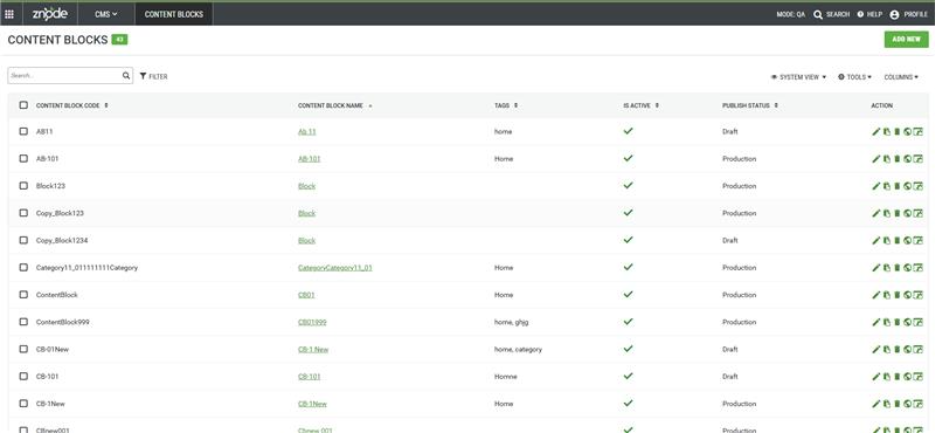
Create and Manage Content Blocks
- Create reusable Content Blocks with unique codes and names.
- Organize Content Blocks using Tags for easier categorization and search.
- Enable or disable Content Blocks using the Is Active setting.
- Note: For Creation Locale selection is non editable.
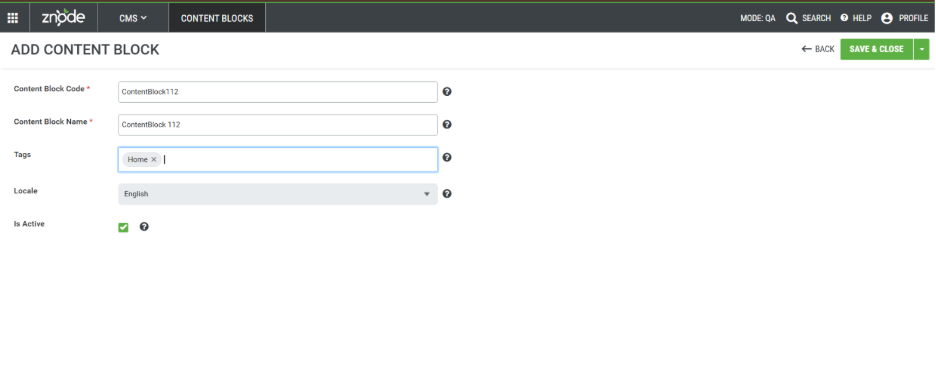
Visual Content Design with Page Builder
- Build Content Blocks using a drag-and-drop Page Builder interface.
- Configure layouts using Containers, Columns, and Spacing components.
- Add content using Text, Images, Videos, Forms, Buttons, Rich Text, and other widgets.
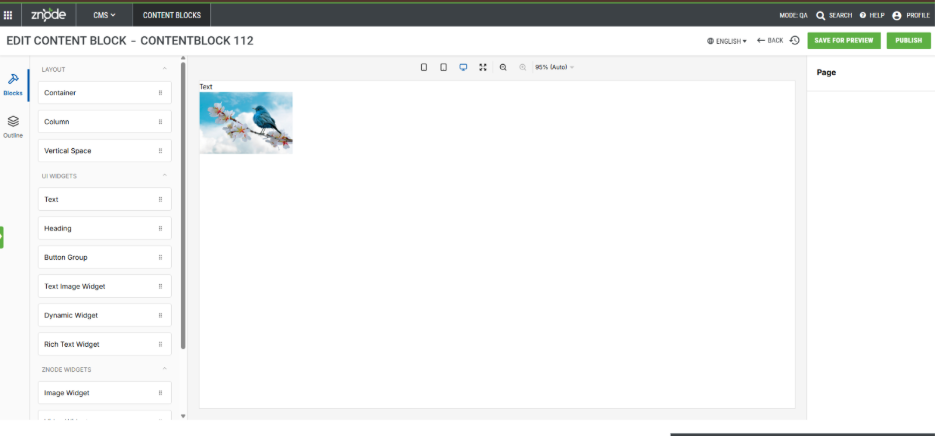
Draft and Publishing Workflow
- Save Content Blocks in Draft mode using Save for Preview.
- Publish changes to Preview or Production environments.
- Track publish status as Draft or Production.
Reusable Across Multiple Pages
- Associate Content Blocks with storefront pages using the Content Block Widget.
- Reuse the same Content Block across multiple pages and stores.
- Manage content centrally without recreating page-specific content.
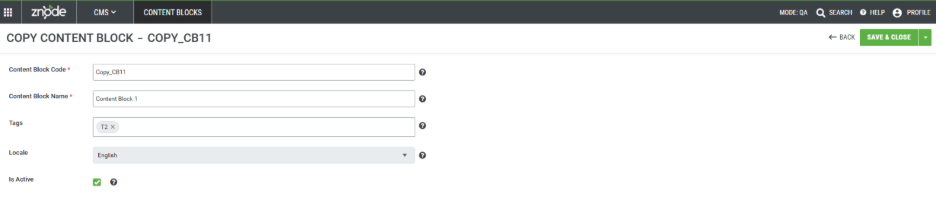
Copy Existing Content Blocks
- Create a duplicate of an existing Content Block.
- Reuse layouts and configurations without building from scratch.
- Maintain independent management of copied Content Blocks.
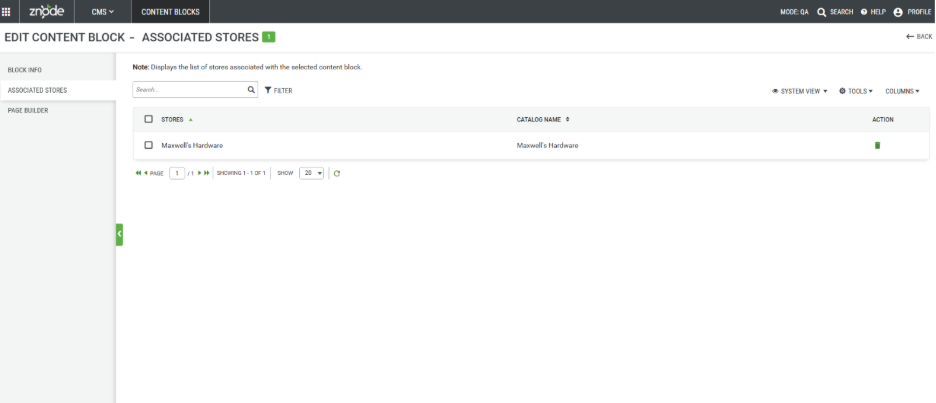
Store Association Management
- Associate Content Blocks with one or more stores.
- View and manage associated stores from the Content Block details page.
- Remove store associations when required.
Version History and Restore
- Automatically track content changes through Version History.
- View Draft, Preview, and Published versions.
- Restore previously published versions when required.
- Maintain content audit and change history.
Multi-Locale Support
- Create and manage content for different locales.
- Configure localized content based on active locales.
- Switch locales directly from the Page Builder.
Search, Filter, and Grid Management
- Search Content Blocks by Code, Name, Tags, and Publish Status.
- Filter records using supported grid columns.
- Customize visible columns using the Columns option.
- Use System Views and Sorting based on standard Znode functionality.
Secure Deletion Controls
- Prevent deletion of Content Blocks associated with stores.
- Support single and bulk record deletion.
- Ensure associations are removed before Content Blocks can be deleted.
Publishing and Version Tracking Across Stores
- Reflect Content Block changes in associated store version history after publishing.
- Support Store Publish and Global Publish workflows.
- Maintain accurate tracking of content updates across storefronts.
NMI Additional Information – Store Call and Payment API Enhancements (Admin Portal)
Feature Overview
As part of the NMI Gateway Integration enhancement, the store call and Payment Manager APIs have been updated to retain additional transaction context information within the NMI vendor processing flow. This enhancement ensures that richer order and customer information is available throughout the payment lifecycle, improving downstream processing, reconciliation, reporting, and troubleshooting capabilities.
Key Features
The additional information now propagated includes:
- Product and line-item details.
- Tax amount.
- Shipping and handling charges.
- Customer gateway profile information.
- Additional applicable order-level metadata.
In addition, the cartLineItems mapping has been aligned between the Webstore request payload and the Payment Manager/C# request models, ensuring that product-level information is correctly preserved during request processing and is not lost during model binding or data transformation.
Payment Manager APIs
The following Payment Manager APIs now support the additional transaction information:
- Verify API.
- Authorize API.
- Capture API.
Backward Compatibility
- Existing payment flows remain unaffected.
- Optional fields continue to be handled gracefully when not present.
- No changes are required for existing integrations that do not utilize the additional information.
Enhanced Product Navigation from Associated Product Grid
Feature Overview
The Product Name column in the Associated Products grid under PIM → Category → Products is enhanced to be clickable. Clicking the product name opens the corresponding Manage Product page.
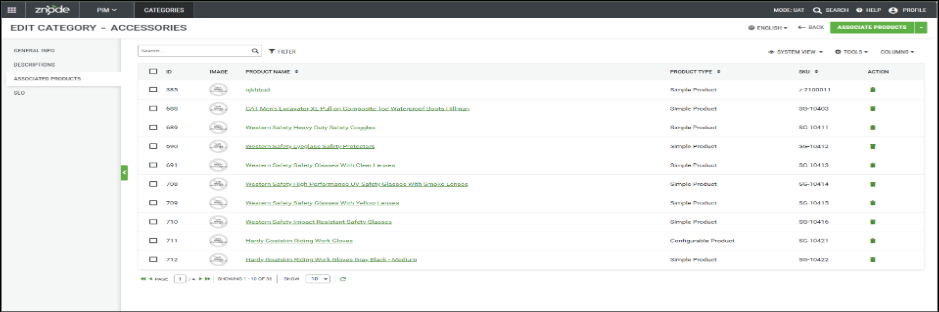
Upon navigating back using either the browser Back button or the Admin application Back button, the user is returned to the same Category → Products grid from which they were redirected, preserving the navigation context.
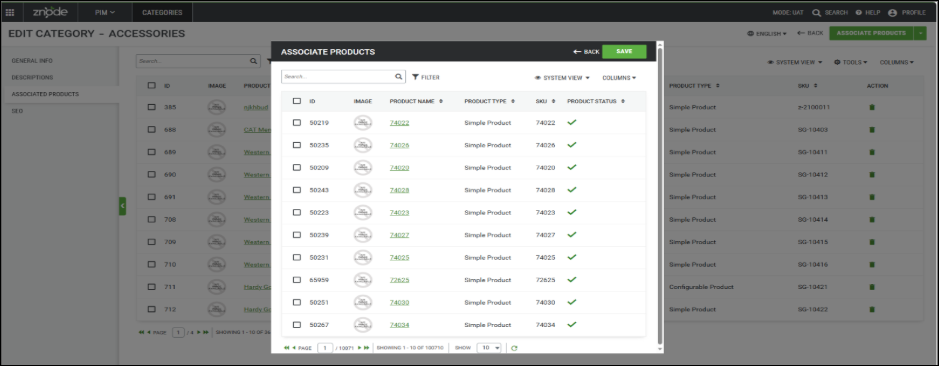
Similarly, when users access the product listing through the Associate Product action from the Manage Category page, the Product Name in the product selection grid is clickable and opens the respective Manage Product page. When navigating back from the product page using either the browser or application Back button, users are returned directly to the main Associated Products grid page and not to the intermediate Associate Product pop-up/page from which they were redirected.
If the user navigates to Manage Product by clicking the Product Name link from the modal and then navigates back, they will be redirected to the main page rather than returning to the previously opened modal.
Important Points
- Changes are implemented only for products associated and appearing in PIM → Category → Products.
- Changes are not implemented in PIM → Catalog → Category → Products (Out of Scope).
- Changes are not implemented for products associated through PIM → Products → Edit/Manage → Variants / You May Also Like / Frequently Bought / Replacement Product (Out of Scope).
Recommendation - This update applies to the system grid view and any newly created grid views. Existing custom grid views will not automatically inherit these changes. To ensure the update takes effect, delete any existing custom grid views and recreate them after deployment.
Zero Sales Price Support for Custom Pricing
Feature Overview
To provide greater flexibility in pricing management, a new configuration option Respect Zero Sales Price For Custom Pricing has been introduced that enables explicit zero-dollar sales prices to be honored within custom pricing scenarios. This enhancement allows organizations to better control pricing behavior while maintaining compatibility with existing pricing workflows.
Key Features
The enhancement includes:
- Introduction of a configurable setting to control zero sales price handling.
- Support for honoring explicitly configured $0 sales prices in custom pricing scenarios.
- Continued fallback to standard pricing when a sales price has not been explicitly configured.
- Configuration available through Global Settings for centralized administration.
- Feature disabled by default to preserve existing pricing behavior.
Security Enhancements
Storefront Security Improvement
- Upgrades affected dependencies to the latest compatible patch/minor versions within the currently supported major version.
- Addresses the reported security vulnerabilities without introducing unnecessary breaking changes.
- Maintains compatibility with the existing application and supported dependency versions.
- Avoids major-version upgrades, reducing the risk of compatibility issues and regression.
- Ensures dependencies remain aligned with the latest security fixes available within the current major version.
Performance Enhancements
Performance Optimizations for Scalability and Stability
Implemented performance enhancements to improve system scalability, stability, and overall responsiveness under high-traffic conditions. Optimizations have been made to reduce resource consumption, improve caching efficiency, and streamline transaction processing. These improvements help deliver faster response times, better system reliability, and a more consistent user experience during periods of increased activity.
Key Benefits
- Improved application performance under heavy load.
- Enhanced system stability and resource utilization.
- Faster transaction processing and response times.
- Better scalability for high-volume business operations.
- Optimized caching and background processing efficiency.
Admin Performance Optimizations
Implemented performance enhancements across key Admin workflows to improve responsiveness and reduce page load times when managing large volumes of data. Optimizations have been made to database queries, data retrieval processes, and page rendering operations to streamline common administrative tasks. These improvements help provide a faster and more efficient Admin experience, particularly when working with product management, catalog operations, and high-volume business data.
Key Benefits
- Improved Admin page load performance.
- Faster data retrieval and processing.
- Enhanced responsiveness for large datasets.
- Reduced wait times during common administration tasks.
- Improved overall stability and user experience.
SEO Performance and Scalability Improvements
Implemented performance optimizations to improve the efficiency and responsiveness of SEO-related operations across the platform. Enhancements focused on reducing processing overhead, optimizing data access patterns, and improving system performance for SEO-driven functionality.
Key Benefits:
- Faster execution of SEO-related operations.
- Improved application responsiveness and page performance.
- Reduced storage and indexing overhead.
- Enhanced efficiency for high-volume data processing.
- Improved overall system stability and user experience.
Black Box Improvements
Product Information Management (PIM)
Z10-35962 | Publish Operations Failing
Resolved an issue causing product publish operations to fail unexpectedly in certain environments. Publishing processes now complete successfully and synchronize product data as expected.
Z10-35977 | Incorrect Stock Information Displayed on PLP
Fixed an issue where Product Listing Pages displayed inaccurate inventory information when the Display Stock Levels From Default And All Warehouses setting was disabled. Stock availability now reflects the correct inventory source.
Z10-37198 | Color Attribute Display Order Issue
Resolved an issue where Color Attribute values appeared in an incorrect sequence on the storefront and admin interfaces. Attribute values now follow the configured display order.
Z10-37611 | Remove Swatch Images from Color Attribute Values
Enhanced Color Attribute management by allowing administrators to remove previously assigned swatch images. This provides greater flexibility when maintaining product attribute values.
Z10-38631 | Slow Product Search in Associated Products
Optimized product search performance within Associated Products and Highlights management screens. Search operations now execute significantly faster for large catalogs.
Z10-37672 | Associated Products assignment UI is broken for all catalog products
Resolved an issue where the Associated Products Assignment user interface was not functioning correctly across all catalog products, preventing users from viewing, adding, removing, or managing associated product relationships as expected.
Z10-37634 | Products with a Sales Price of 0 display incorrect pricing and allow checkout using the Retail Price.
Resolved an issue where products with a Sales Price set to 0 were displaying incorrect pricing information and could still be added to the cart and checked out using the Retail Price. The pricing logic has been corrected to properly handle products with a Sales Price of 0 and prevent unintended checkout behavior.
Z10-33976 | Product status changes to Out of Stock when the shipping method is updated in an Admin Quote despite the Don't Track Inventory setting being enabled.
updating the shipping method on an Admin Quote incorrectly triggered inventory validation, causing products configured with Don't Track Inventory to be marked as Out of Stock. The inventory status logic has been corrected to honor the Don't Track Inventory setting during quote updates.
System Settings
Z10-34130 | Multiple Quotes Created During Quote Conversion
Fixed an issue where converting quotes using Affirm payments and Order Number Regex configuration generated duplicate quotes. Quote conversion now creates only the intended order.
Z10-35913 | Apple Pay Displayed on Unsupported Browsers
Corrected an issue where Apple Pay appeared as an available payment method on unsupported browsers, resulting in checkout failures. Apple Pay now displays only when browser requirements are met.
Z10-35522 | Incorrect Tax Value Sent to Avalara
Corrected an issue where non-zero tax values were submitted to Avalara even when pricing was configured as tax-inclusive. Tax requests now honor based on tax configuration settings.
Z10-35526 | Tax Requests Sent Despite Global Setting Disabled
Resolved an issue where tax requests continued to be submitted to Avalara even when submission was disabled globally. Tax integrations now respect configured settings.
Z10-35768 | Incorrect User Status Display
Fixed an issue where user statuses displayed incorrectly when Centralized Login was disabled. User status values now accurately reflect account states.
Z10-36609 | Repeated USPS Recommendation Popup
Resolved an issue causing USPS recommendation popups to appear repeatedly for the same address. Recommendations are now displayed only when necessary.
Z10-36887 | Associate Configuration Set Sorting Issue
Corrected sorting functionality within Associate Configuration Set grids and selection modals. Records can now be sorted as expected. Associate Configuration Set(s) shipping sorting is working now.
Z10-37059 | Debugger Triggered on Plugin Configuration Page
Fixed an issue where debugger interruptions occurred on Plugin Configuration Set pages. Administrators can now access and configure plugins without interruption.
Z10-37929 | Misaligned Required Field Indicator
Corrected the alignment of the required-field asterisk for the Enable Product Information Overrides setting to improve visual consistency.
Z10-37374 | Shipping discount was displayed incorrectly in the Shipping Method section during checkout, while the Order Summary reflected the correct discount amount.
Resolved an issue where shipping discounts were presented inaccurately within the Shipping Method section of the checkout experience. The calculation and display logic have been aligned to ensure consistent discount values are shown across all checkout components.
Dev Center
Z10-36439 | Credentials Auto-Populated for SFTP and API Transmission Modes
Resolved a security-related issue where stored usernames and passwords were automatically populated when selecting SFTP or API transmission modes. Sensitive credentials are now handled securely and only displayed when appropriate.
Z10-37495 | Data Exchange History Not Displayed
Fixed an issue where clicking View History for a Data Exchange configuration did not display historical execution records. Exchange history now loads correctly, allowing administrators to review previous runs.
Z10-35289 | XSS Payload Allowed in Username Import
Resolved a security vulnerability that allowed potentially unsafe script content to be imported through the Username field. Input validation and sanitization have been strengthened to prevent XSS attacks.
Z10-37512 | Incorrect Success and Failure Counts in Logs
Corrected an issue where the Succeeded count displayed only processed records while the Failed count always appeared as zero. Log summaries now reflect accurate success and failure statistics.
Z10-37561 | Cron Expression Changes Not Reflected Immediately
Resolved an issue where updated Cron Expressions from Global Settings were not immediately reflected in the Hangfire Dashboard. Scheduler updates now synchronize correctly after configuration changes.
Marketing
Z10-37746 | Promotion Association Pagination Issue
Fixed an issue where pagination stopped functioning within promotion association popups and associated records grids, allowing users to navigate records correctly.
Content Management System (CMS)
Z10-35537 | Product Type Column in Associate Product Modal
Enhanced the Associate Product modal by introducing a Product Type column. Users can now more easily identify and select products during association workflows.
Z10-36112 | Alphabetical Page Listing and Typeahead Search
Improved page management by displaying Commerce Pages and Section Pages alphabetically. Users can now locate pages more quickly and efficiently.
Z10-36674 | Incorrect Favicon Preview After Save
Fixed an issue where the favicon field displayed a No Image Available placeholder after saving Store Experience settings. The configured favicon now displays correctly.
Z10-37822 | Product Commerce Page Not Opening
Corrected an issue preventing Product Commerce Pages from opening within Store Experience. Commerce Pages can now be accessed and edited successfully.
Z10-39050 | Content Block content disappears on publish.
Resolved an issue where content within a Content Block would disappear after publishing. Published content now retains its configured data and displays correctly across the site.
Accounts & Users
Z10-35241 | Incorrect Validation Message During Account Creation
Resolved an issue where guest users received inaccurate validation messages while creating accounts during checkout with Centralized Login enabled.
Z10-35846 | Reset Password API Issues
Fixed issues affecting password reset functionality. Reset Password API requests now execute successfully and return expected responses.
Z10-36469 | Postal Code Validation Persists After Correction
Corrected an issue where Postal/ZIP Code validation errors remained visible even after entering valid values.
Z10-37049 | Child Account Heading Formatting Issue
Improved account management display by correcting formatting issues affecting Child Account headings and restoring missing separators.
Z10-37052 | Child Account Country Dropdown Displays All Countries
Resolved an issue where child account creation displayed all available countries instead of only countries associated with the store. Country selections are now filtered correctly.
Z10-37171 | Incorrect Address Section Opens During Checkout Edit
Fixed an issue where editing the shipping address unexpectedly opened the billing address section and hid billing details. Address editing functionality now behaves correctly.
Z10-37313 | Admin Login Timeout Configuration
Enhanced administrator login timeout handling to ensure timeout settings are applied consistently and function as expected.
Z10-38041 | Existing Orders Marked as Expired
Resolved an issue where previously placed orders were incorrectly marked as expired after associating an existing user to an account. Historical orders now retain their correct status.
Z10-38183 | User Creation Blocked by Newsletter Subscription
Corrected an issue where user creation failed if the email address was already subscribed to the newsletter. User creation and newsletter subscriptions now function independently.
Order Management System (OMS)
Z10-35636 | Shipping Cost Changes Unexpectedly in Admin Quote
Resolved an issue where shipping costs displayed incorrectly and changed unexpectedly when quote quantities were modified. Shipping calculations now remain accurate throughout quote updates.
Z10-32913 | Missing Tooltip for Restrict Voucher to Customer
Added the missing tooltip for the Restrict Voucher To A Customer option on the Edit Voucher page to improve administrator guidance during voucher configuration.
Z10-34000 | Error When Moving Save for Later Items to Cart
Resolved an issue where moving a Save for Later item to the cart caused errors when multiple browser tabs and carts were open simultaneously. Cart operations now function correctly across sessions.
Z10-34656 | Invoice Displayed Admin Username Instead of Customer Name
Fixed an issue where order invoices displayed the administrator username rather than the customer's name. Invoice documents now accurately show customer details.
Z10-35691 | Missing Quantity Validation for Shipped Items
Corrected an issue where quantity validation messages did not appear when changing a line item status to Shipped. Users now receive appropriate validation feedback.
Z10-36770 | Reorder Uses Add-On Price Instead of Product Price
Resolved an issue where reorder functionality incorrectly used add-on pricing as the primary product price for quote-converted orders. Order totals now calculate correctly.
Z10-36964 | Incorrect Voucher Usage Email After Quote Conversion
Fixed an issue where the Voucher Used For An Order email was incorrectly triggered when converting a quote into an order from Admin. Email notifications now follow the intended workflow.
Z10-36968 | Incorrect Quote Created By Information in Receipt
Corrected an issue where order acknowledgement receipts displayed the admin email address instead of the customer's email address when quotes were approved by an administrator.
Z10-37027 | Incorrect Customer Name in Pending Orders
Fixed an issue where pending orders displayed incorrect customer information in Admin. Customer names are now shown accurately.
Z10-37281 | Payment Approval Orders Not Visible
Corrected an issue where payment-level approval orders did not appear in the approver's Pending Orders list. Approvers can now review and act on eligible orders.
Z10-37298 | Backorder Date Saved Incorrectly
Resolved an issue where the selected backorder date was saved one day earlier than expected. Backorder dates now match the user-selected value.
Z10-37444 | Incorrect Strike-Through Pricing for Zero Price Products
Fixed an issue where products with a price of zero incorrectly displayed strike-through pricing on PLP, Search, and Quick View pages. Pricing is now displayed accurately.
Z10-37447 | Grouped Product Cart Price Incorrect
Resolved an issue where grouped products displayed parent product pricing instead of child product pricing in the cart when child product prices were zero.
Z10-37464 | Company Name Missing in Return Shipping Address
Corrected an issue where the company name was missing from the Shipping From section on return orders. Return Order Receipt now displays complete address details.
Z10-37510 | Sorting Not Working in Price List Associated Users Grid
Fixed an issue where sorting functionality did not work correctly in the Price List Associated Users section. Records can now be sorted as expected.
Z10-37817 | Customer Comments Overwritten
Resolved an issue where customer comments were unintentionally overwritten during updates. Existing comments are now preserved correctly.
Z10-37846 | Pending Order Notes Displayed in UTC
Fixed a timezone issue where Pending Order Notes displayed UTC timestamps instead of the configured display timezone. Notes now reflect localized times.
Z10-37920 | Order Status Update Modified Payment SubTypeCode
Fixed an issue where changing order status updated the payment SubTypeCode to an invalid value, causing downstream payment processing failures.
Z10-37941 | Comments Truncated Without Notification
Added validation for Approver Comments exceeding allowed limits. Users now receive notification when comments exceed the supported length.
Z10-38019 | Incorrect Quote Price Change History
Resolved an issue where quote history displayed inaccurate previous pricing information. Audit entries now accurately reflect price changes.
Z10-38026 | Incorrect Username Formatting
Fixed formatting inconsistencies where usernames displayed with incorrect spacing in Voucher Orders and Price List Associated Users sections.
Z10-36716 | Multiple inconsistencies observed while managing orders in the Admin Portal
Resolved several issues affecting order management and status accuracy in the Admin Portal:
Fixed an inconsistency where the Order List page displayed an order status as Expired, while the same order showed Approved when opened in the Manage Order page.
Fixed an issue where the Tax Exempt flag was enabled on an order, but taxes were still being applied during order calculation, causing incorrect tax amounts to be displayed and charged.
Z10-38809| Users were unable to add products to the cart when the product included an additional cost.
Resolved an issue that prevented products with configured additional costs from being successfully added to the cart. The cart validation and pricing logic have been updated to correctly process products with supplemental charges during the add-to-cart workflow.
Z10-38237| Users were unable to add products to the cart when the product included an additional cost.
Resolved an issue that prevented products with configured additional costs from being successfully added to the cart. The cart validation and pricing logic have been updated to correctly process products with supplemental charges during the add-to-cart workflow.
DAM
Z10-31834 | Associated Banners Not Displaying in Banner Slider
Resolved an issue where banners appeared in Admin but failed to display on the storefront when associated with a Banner Slider. Eligible banners are now rendered correctly.
Z10-33105 | Console Errors During Multi-Image Upload
Fixed console errors and warning messages generated when uploading multiple images with different file extensions from DAM into the PIM Product Gallery. Upload operations now complete successfully without unnecessary browser warnings.
Z10-36752 | Images Not Generated During Sync
Corrected an issue preventing DAM image generation when image files were updated through synchronization processes. Image derivatives are now created as expected.
Z10-37494 | Missing Validation for Long Media File Names
Added filename validation when replacing internal media assets. Users are now informed when filenames exceed supported limits before saving changes. It gives validation for 400+ characters while replacing an image.
Z10-38510 | Internal Sync Folder Visible in Media Explorer
Resolved an issue where the system-generated Z_SyncData folder appeared in Media Explorer. Internal folders are now hidden from administrative users.
Other
Z10-35933 | BI Reports Returns API Improvements
Resolved multiple functional and documentation issues in the Returns Reporting API to improve accuracy and usability.
Z10-36865 | Send Email API Functional Corrections
Enhanced reliability and validation within the Send Email API endpoint to improve request processing and response handling.
Z10-37165 | CostType Returned as NULL in API Response
Corrected an issue where CostType values were returned as NULL within Additional Cost sections. API responses now return complete cost data.
Z10-37172 | Active Class API Functional Fixes
Resolved multiple issues affecting the Active Class API endpoint. Responses now return accurate and consistent results.
Z10-37185 | Status API Functional Improvements
Addressed multiple issues impacting class status retrieval. Status responses now return expected values.
Z10-37203 | Create Returns API Returns 500 Error
Fixed a server error occurring during the first valid Create Returns API request. Return creation now completes successfully.
Z10-37285 | Items Status API Returns 404
Resolved an issue where valid status update requests incorrectly returned a 404 response. Updates are now processed successfully.
Z10-37558 | Tracking API Returns Server Error
Corrected an issue where missing query parameters caused a 500 Internal Server Error. Proper validation messages are now returned.
Z10-37662 | Items API Validation and Functional Improvements
Addressed multiple issues impacting item retrieval and validation behavior. API processing is now more reliable and predictable.
Z10-37678 | Emails API Validation and Functional Improvements
Resolved validation and operational issues affecting email processing APIs. Requests now behave consistently with documentation.
Z10-37971 | Custom Tables API Validation Improvements
Enhanced request validation for Custom Tables APIs to ensure better data integrity and clearer error handling.
Improved validation logic and documentation behavior when updating custom table data, ensuring users receive meaningful feedback.
Open-Source Enhancements and Fixes
Z10-36030 | Text Alignment Shifts After Quantity Updates
Corrected storefront alignment issues that occurred after quantity modifications within Previous Purchases.
Z10-37623 | Checkout Address Handling Improvements
Improved checkout reliability by preventing orders from being placed when an address update fails. The system now automatically retries failed address updates and provides a clear retry option if the update remains unsuccessful. Once the address is successfully saved, checkout can proceed normally.
Z10-37057 | Account Orders Breadcrumb Navigation Issue
Resolved an issue where selecting the Account Orders breadcrumb within the My Account area redirected customers to a blank page instead of the intended destination. Breadcrumb navigation logic has been corrected to ensure customers are redirected to the appropriate page while maintaining the expected navigation path throughout the account experience.
Z10-37359 | Email Template UI Improvements
Enhanced Quote, Order, and Return email templates by correcting formatting and layout inconsistencies.
Z10-37859 | Missing Category Information on PDP
Corrected an issue where category information was missing from Product Detail Pages when accessed through Shop By Brand navigation. The product information logic has been updated to ensure category information is rendered correctly regardless of how customers navigate to the product page.
Z10-38031 | Invalid localeCode Requests Causing Slowness
Improved validation handling for invalid localeCode requests to reduce unnecessary processing and improve overall system performance.
Z10-38091 | TypeError: map is not a function
Resolved a JavaScript runtime error caused by invalid data structures being processed in the storefront experience.