
Release Notes / Version 10.6.2.0 / Jan 23, 2026
Highlights
Release Information
The Znode 10.6.2.0 release introduces new features, enhancements, performance upgrades,and bug fixes.
Disclaimer
Temporary Disablement of Promotions, Coupons, and Vouchers Management on the ManageOrder Screen. (Continued from Previous Version) In this release, the ability to add, manage, or modify promotions, coupons, and vouchershas been temporarily disabled on the Manage Order screen in the Admin Console. Whilepromotions and coupons applied during order creation will still be visible on the ManageOrder screen, the options to add new promotions or remove existing ones will not beavailable. This functionality will be re-enabled in a future update.
No Deprecations (in this release)
No Breaking Changes (in this release)
What’s New
Product Information Overrides
- Disclaimer:
- To enable Product Information Overrides on the Storefront, the Product OverrideAPIs must be explicitly implemented by the storefront development team(internal or partner).
- If Product Override APIs are not implemented:
- The Storefront continues to display default PIM product information.
- Override settings configured in Admin will have no impact on storefrontoutput.
- Feature Overview:
- The Product Information Overrides feature in Znode 10 enables administrators todisplay customized product content for the same SKU based on shopper context. Product details such as Product Name, Short Description, and Long Descriptioncan be overridden according to Store, Account, or Locale settings.
- Key Capabilities:
- Store-Based Overrides:
- Different product names and descriptions for each store.
- Account-Based Overrides:
- Customized product content for specific customer accounts.
- Locale-Based Overrides:
- Localized product content for different regions/languages.
- Store-Based Overrides:
- Behavior:
- When overrides are configured and enabled:
- Override data is returned via the new override APIs.
- Storefronts using these APIs display the overridden product content.
- If no override exists, the system falls back to the default PIM product data.
- When overrides are configured and enabled:
- Configuration Workflow:
- Enabling Product Information Overrides:
- This feature is disabled by default and must be enabled in both Global and Store settings.
- Global Settings
- Navigation Path: Global Settings → Global Product Settings →Enable Product Information Overrides.
- Enables the feature at the system level.
- If disabled, product overrides will not function regardlessof store configuration.
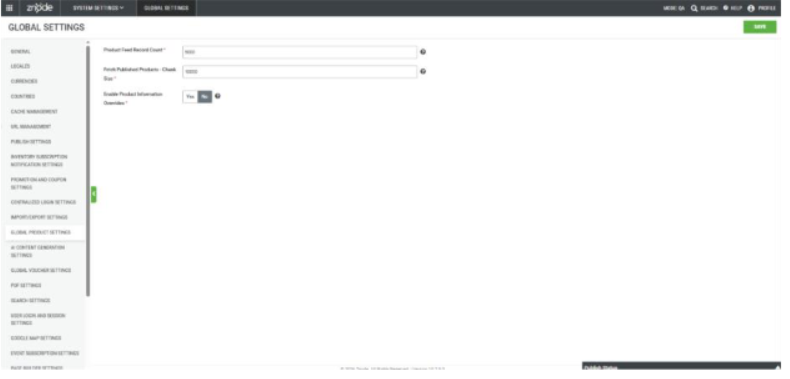
- Navigation Path: Global Settings → Global Product Settings →Enable Product Information Overrides.
- Store-Level Settings
- Navigation Path: Store Settings → Additional Attributes →Product Settings → Enable Product Information Overrides
- Enables product overrides for a specific store.
- Overrides are evaluated dynamically based on storecontext.
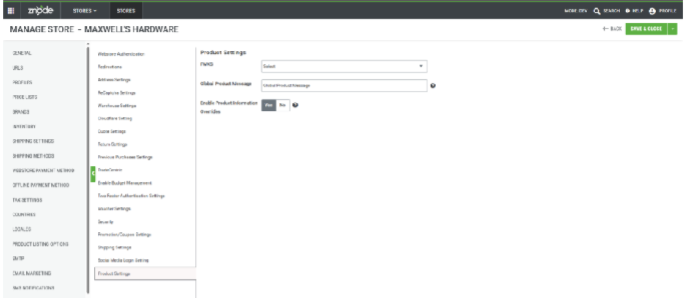
- Navigation Path: Store Settings → Additional Attributes →Product Settings → Enable Product Information Overrides
- Notes:
- Both flags must be enabled
- If the override flag is disabled at either level:
- Znode falls back to the default PIM product information.
- All override data is ignored.
- This feature is for display purposes only. No alternate data isstored in the database.
- Prerequisites:
- Before using Product Information Overrides, ensure:
- Enable Product Information Overrides is turned ON in:
- Global Settings
- Store Settings
- The product is already created and published in PIM.
- Appropriate catalog publishing permissions are available.
- Enable Product Information Overrides is turned ON in:
- Before using Product Information Overrides, ensure:
- Configuring Product Information Override Records
- To configure Product Information Overrides, override records must include the following attributes.
- Required Fields.
- SKU – Original product SKU (for example, GlobalSKU_01)
- Locale Code (for example, en-US)
- Store Code (for example, DemoStore)
- Optional Feilds:
- Account Code – Used for account-specific overrides
- Alternate SKU – Based on business requirements
- Alternate Product Name – Based on businessrequirements
- Alternate Short Description – Based on businessrequirements
- Alternate Long Description – Based on businessrequirements
- Override Combinations
- Different override scenarios can be created usingcombinations of:
- Locale Code (language or region)
- Store Code (store-specific)
- Account Code (account-specific)
- Different override scenarios can be created usingcombinations of:
- Required Fields.
- To configure Product Information Overrides, override records must include the following attributes.
- Managing Product Information Overrides
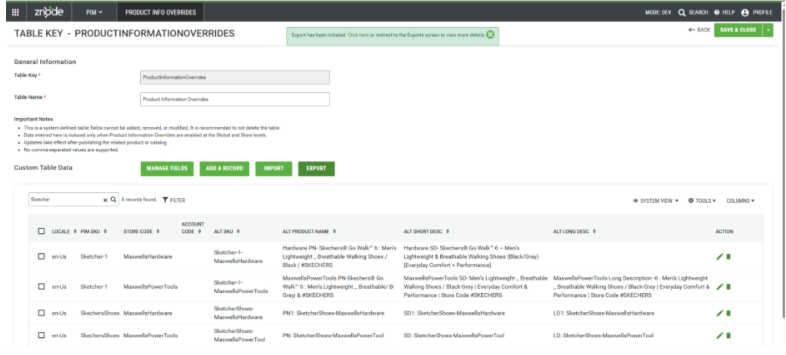
- Navigation Path: PIM → Product Information Overrides
- Product Information Overrides can be managed with ease fromthis section.
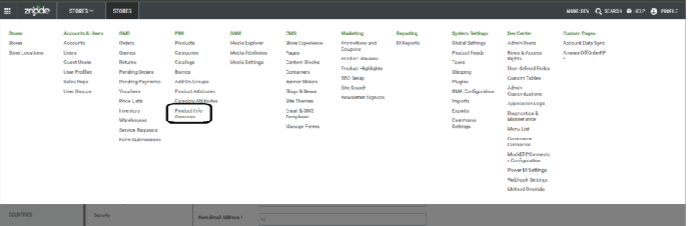
- Product Information Overrides can be managed with ease fromthis section.
- Product Information Overrides (Custom Table Management)
- Override records are stored in the ProductInformationOverridessystem table. Administrators can:
- Add new override records (Manual or via Import)
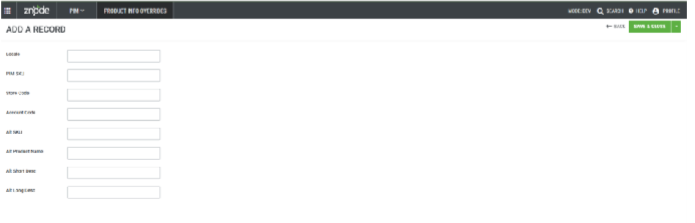
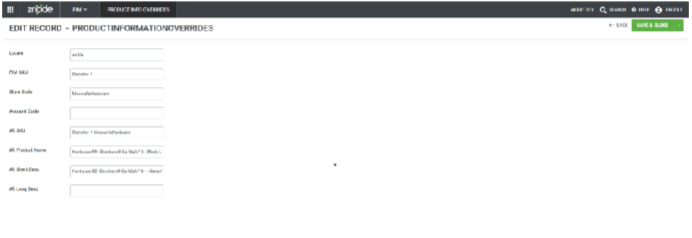
- Select “Add a Record”
- Navigate to PIM → Product InformationOverrides and click on the Add a Recordbutton to create a new record.
- Enter Required Details
- SKU: Input the unique Stock Keeping Unit ofthe product.
- Locale Code: Specify the locale or regioncode (e.g., en-US) for which the overrideapplies.
- Store Code: Enter the store identifier wherethe override should be applied.
- Enter Alternate Product Information
- Fill in any product details that need to override the default information, such ascustomer specific part number (Alt SKU, AltName, or Alt Long Description.
- Fields that do not need to be overridden areleft blank, so that default values arepreserved.
- Save the Record
- After verifying all entries, the user clicksSave to store the new Product InformationOverride record.
- A confirmation message appears toindicate that the record has beensuccessfully saved.
- Select “Add a Record”
- Edit existing records (Manual or via Import)
- Select an Existing Override Record
- The admin locates and selects the overriderecord that needs to be updated.
- Update Alternate Product Information
- The admin modifies any fields wherealternate product information is required, such as the name, description, or sku.
- Save the Changes
- The admin clicks Save to apply the updates to the override record.
- The admin clicks Save to apply the updates to the override record.
- Select an Existing Override Record
- Add new override records (Manual or via Import)
- Note: It is currently important to publish the respectivecatalog to reflect the changes on the Storefront (if thechanges are implemented at the Storefront).
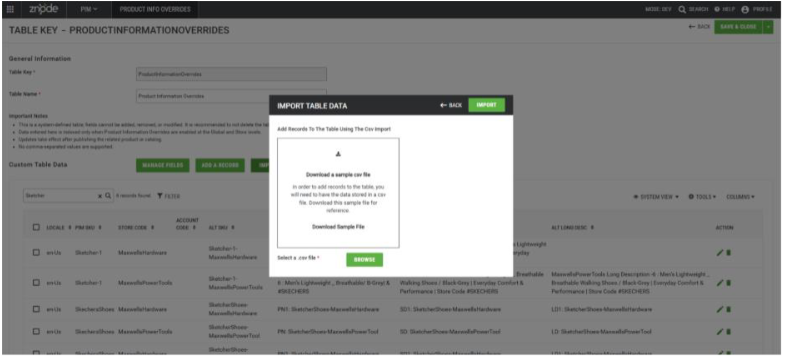
- Import or Export Overrides
- The import and export work as is for other CustomTable imports and exports.
- Notes: Adding New Fields to this custom table is restricted.
- Override records are stored in the ProductInformationOverridessystem table. Administrators can:
- Navigation Path: PIM → Product Information Overrides
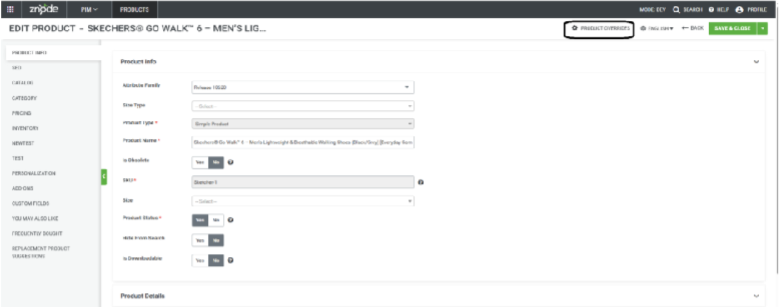
- Viewing Override Information for a Product:
- When both Global Product Override settings is enabled:
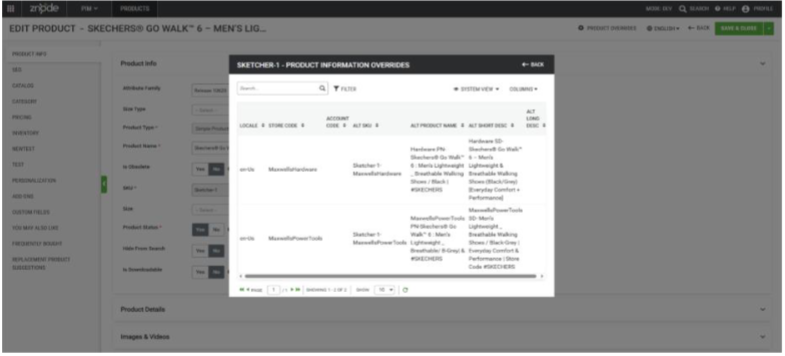
- A Product Overrides option becomes available on the ProductManage page.
- Selecting this option opens a modal displaying:
- All override records associated with the product
- Alternate sku, names, and descriptions.
- This view provides visibility into how the product appears acrossdifferent stores, accounts, and locales.
- Adding and editing Product Override information is not allowed from this screen.
- When both Global Product Override settings is enabled:
- Publishing Requirements:
- First-Time Setup (Mandatory)
- When Product Information Override is used for the first time:
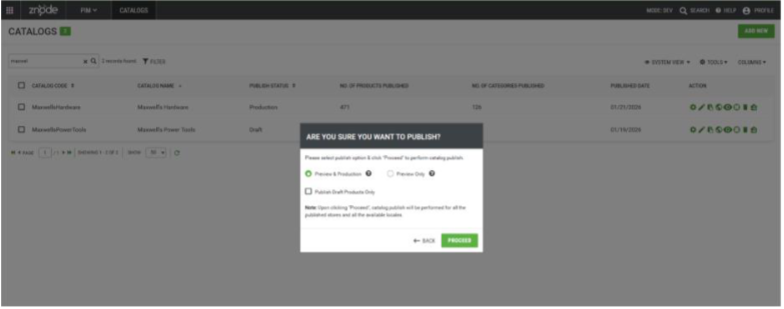
- The entire catalog must be published.
- The “Publish Draft Products Only” option must not be selected.
- Initial publishing may take additional time due to:
- Full Elasticsearch re-indexing
- Creation of the override-prefixed catalog index.
- This step is required because:
- A separate Elastic index is created to store overrideproduct information.
- Elastic Search must be fully rebuilt to support override data.
- After Initial Setup
- After the initial full catalog publish is completed:
- If any changes are made in the overridable data, then thecomplete catalog publish is required (which is a known limitation).
- After the initial full catalog publish is completed:
- When Product Information Override is used for the first time:
- First-Time Setup (Mandatory)
- Impact on Elastic Search:
- Product Information Overrides generate a dedicated Elasticsearch index to support overridden product data.
- Purpose:
- The override-specific Elasticsearch index ensures:
- Accurate search results
- Correct product information per Store, Account, and Locale
- Consistent application of overridden productattributes across search responses
- When override data exists, the override index is used toresolve product information. If no override data isavailable, the system falls back to the base catalog index.
- The override-specific Elasticsearch index ensures:
- Index Creation and Naming
- The override index is created using the same name as thecatalog index, prefixed with override_.
- (Example: override_<catalog_index_name>)
- This index:
- Is not visible in the Znode Admin UI
- Does not display status or health information inAdmin
- In the current phase, the override index can be viewed onlydirectly in Elasticsearch. Admin-level visibility andmanagement will be addressed in future phases.
- The override index is created using the same name as thecatalog index, prefixed with override_.
- Reindexing and Publishing Behavior
- The override index is created and refreshed only through afull catalog publish.
- Manual creation or reindexing of the override index fromthe Znode Admin screen is not supported.
- The following actions are out of scope:
- Reindexing a specific catalog index instead of publishing.
- Explicitly creating or refreshing the override indexfrom Admin.
- Any update to override-enabled product data requires acomplete catalog publish.
- Purpose:
- Product Information Overrides generate a dedicated Elasticsearch index to support overridden product data.
- Enabling Product Information Overrides:
- Important Points:
- This change does not affect data exchanges with any third-party applications. Existing integrations and data flows remain unchanged.
- If a product override is not available for a specific locale, the system falls back toPIM data. If PIM contains data for that locale, it is displayed; otherwise, theproduct’s default locale data from PIM is shown.
- The feature is supported for all product types as well as all associated add-ons.
- Znode’s default search behavior does not return results when a shopper searches for a variant that is associated only with a parent product and is not directly associated with a category. The same restriction will be respected for the Product Information Override.
- Example: If a variant SKU is associated with a parent product but only theparent product is associated with a category (and the variant itself is notassociated with any category), searching for that variant SKU will notreturn any results. Likewise, product information overrides for that variantwill not be searchable unless the variant is associated with a category.
- If the volume of data in the custom table is very large, it can significantly impactElasticsearch performance, particularly by increasing indexing load and slowingdown search query execution. As a result, search latency and resource consumption may increase. In such scenarios, Elasticsearch configurations—such as indexing strategy, shard sizing, query optimization, and resourceallocation—should be reviewed and adjusted to maintain optimal searchperformance and system stability.
- Performance optimization is not included in the scope of this release. Asa result, response times may vary based on data volume, query complexity, and usage patterns, especially when processing large datasets.
- Verification with TradeCentric is out of scope for this release.
- Known Limitations:
- Product Publish Status Is Not Updated Automatically
- Expected Behavior
- When Product Information Override data is added or updatedin the Custom Table associated with a product, the product’spublish status should automatically change to Draft, indicating that a publish action is required for the changes totake effect.
- Current Limitation
- This behavior is not currently implemented. Adding ormodifying Product Information Override records does notupdate the product’s publish status to Draft.
- Impact
- Product changes related to overrides may not be immediatelyapparent to administrators.
- The system does not indicate that publishing is required afteroverride updates.
- A full catalog publish is required to ensure override data isapplied correctly, particularly during the initial use of this feature.
- Workaround
- Perform a full catalog publish after adding or updating ProductInformation Override data.
- Custom Table Schema
- This override data is currently maintained in the Custom Table database. (Which is exposed for partners to modify the fields and schemas).
- Updating the existing Override schema or field details resultsin functional failure.
- Expected Behavior
- Product Publish Status Is Not Updated Automatically
- Duplicate Records in the Custom Table Cause Errors
- Description:
- Product Information Override data is stored in aCustom/System Table. Each record must be uniquely definedbased on the combination of:
- SKU
- Store Code
- Locale Code
- Account Code (if applicable)
- Product Information Override data is stored in aCustom/System Table. Each record must be uniquely definedbased on the combination of:
- Current Limitation
- If duplicate records exist in the Custom Table with the samecombination of identifying fields, the system throws an errorwhile returning the results in the API.
- Error Message: An error occurred while retrieving productoverride data due to multiple entries found in the customtable. Please correct the duplicate data and try again. Foradditional details, review the application logs in the AdminPortal.
- Mitigation and Best Practices
- Perform manual data validation before adding or importingoverride records.
- Avoid creating duplicate combinations during manual entry orCSV imports.
- Implement governance and review processes for managingProduct Information Override data.
- Description:
- Incomplete Publish History Tracking for Product Overrides
- Expected Behavior
- The Publish History section should display the complete lifecycle of a publish operation, including.
- Publish start time
- Publish completion time
- Product Information Override indexing time
- Current Limitation
- Currently, the Publish History displays only the main catalogpublish time. The indexing time related to Product InformationOverrides is not tracked or displayed.
- Impact
- Limited visibility into the total duration of publish operationsinvolving overrides.
- Difficulty in monitoring or troubleshooting override-relatedindexing delays.
- Incomplete audit information for published activities.
- Workaround
- Assume that override indexing is executed as part of theoverall catalog publish process.
- Allow additional time after the publish completion for overridedata to become fully available in search and storefront results.
- Expected Behavior
- Product Information: Override Table Deletion Is Possible
- Expected Behavior
- The system table should be protected from deletion andshould not be removable through any means once created, ensuring data integrity and system stability.
- Current Limitation
- There is no option available in the UI to delete the systemtable; however, the table can still be deleted directly from thedatabase.
- Impact
- System tables may be unintentionally removed through directdatabase access.
- Deletion of the system table can lead to data loss or systemmalfunction.
- Such actions bypass application-level safeguards andvalidations.
- Workaround
- Avoid deleting system tables directly from the database.
- Restrict database-level access to prevent unintended deletionof system tables.
- Expected Behavior
- Feature Not Optimized for Large Datasets
- Expected Behavior
- The feature should efficiently handle very large datasetswithout performance degradation, ensuring smooth operationregardless of the number of records.
- Current Limitation
- The feature is not fully optimized for extremely large datasets.It can handle up to one hundred thousand records reliably, butperformance may degrade or operations may fail with datasetssignificantly larger than this.
- Impact
- Users working with extremely large datasets may experience slowresponse times or incomplete processing.
- Certain operations may fail if the number of records exceeds thetested limits.
- This limitation could affect reporting, bulk updates, or any high-volume data operations.
- Workaround:
- Avoid exceeding the tested limit of one hundred thousand recordsuntil the feature is enhanced for larger-scale use.
- Expected Behavior
- Sorting and Pagination Limitations
- Expected Behavior
- The APIs should support sorting and pagination to efficientlymanage large datasets and return ordered results. API responsesshould be optimized to ensure consistent and predictableperformance regardless of data volume or usage patterns.
- Current Limitation
- Sorting and pagination are not supported in the current release.API responses may return large, unsorted datasets.
- Impact
- Large response payloads may affect performance and increaseresponse times.
- Consumers may need to process and organize data on the client side.
- Workaround:
- Apply sorting, pagination, and filtering logic on the client side untilthese features are supported in a future release.
- Expected Behavior
- Variants Not associated with Category-Catalog
- Expected Behavior
- API responses should include all product variants for whichoverride data exists, regardless of whether the variants areassociated with a catalog or category.
- Current Behavior
- Only product variants that are associated with a catalog arereturned in API responses. Variants not linked to any catalog areexcluded.
- The APIs productoverride/{sku} andproductoverride/multipleproduct/{skus} return data only forproducts associated with a category. Products or variants that arenot mapped to any category are not included in the responsepayload.
- Impact
- Product variants that are not associated with a catalog orcategory are not visible through the APIs, which may result inincomplete or missing data in downstream systems.
- Consumers of the APIs may not receive expected overrideinformation for certain products, potentially leading to data inconsistencies.
- Workaround
- Ensure that all relevant products and variants are properlyassociated with both a catalog and a category before invoking theAPIs.
- Review catalog and category mappings as part of the data setup process to avoid missing results in API responses.
- Expected Behavior
Affirm (Buy Now Pay Later) Payment Integration in Znode (Dark Mode)
- Disclaimer:
- To ensure the feature functions as intended, using the latest version of theStorefront may be required. Older versions could lead to limited functionality oroperational issues.
- To expand flexible payment options for customers, Znode now supports integration withAffirm. This enhancement enables shoppers to use Affirm’s Buy Now, Pay Later (BNPL)financing during checkout, allowing them to split purchases into manageableinstallments and improving overall customer convenience and satisfaction.
- A new gateway type, “Stripe Payment Intents – Affirm,” has been added to the SelectGateway Type dropdown under System Settings → Plugins → Spreedly → ConfigurationSets.
- When this gateway type is selected:
- The Select Payment Type field is automatically set to APM and becomesread‑only.
- A new field, APM Types, appears with a default value of Affirm. This field is also read-only.
- Storefront Updates:
- When the user adds the products to the cart and lands on the checkout page thein the payment types section, the Affirm payment method gets visible.
- Selecting this payment method will open an iframe rendered from Affirm.
- Important Points:
- Spreedly does not currently provide transaction settlement status. Merchants oradmins must verify the settlement status directly in the payment gateway beforeinitiating any refund.
- The Affirm payment method will not be supported as the store’s Offline PaymentMethods.
- Payment settlement between the customer and Affirm occurs entirely outside ofZnode. Znode does not manage or facilitate any settlement activities.
- Partial payments are not supported in this release.
- Configuration of a minimum order amount to enable the Affirm payment option isnot included in the current scope.
- Affirm Payment Flow (Understanding Purpose)
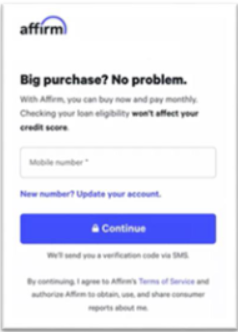
- Enter your mobile number when prompted and submit it.
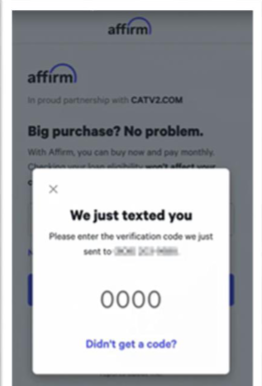
- Retrieve the verification code (OTP) sent to your phone, enter it, and submit toverify your number.
- Wait while Affirm checks your eligibility. (No action required during this step.)
- When financing options appear, pick the plan you prefer (example: Pay in 4, monthly installments). Tap/select the plan.
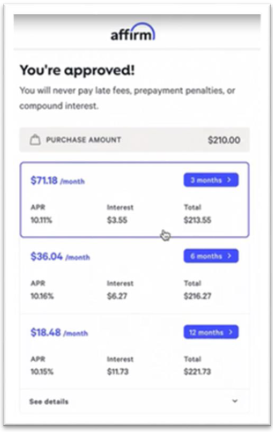
- Review the repayment amounts and total cost shown for the chosen plan. If youhave questions, expand the details or select a different plan.
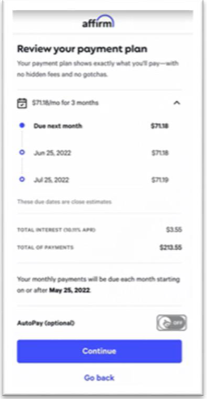
- Read any required disclosures and, if you agree, confirm/accept the loan orpayment plan.
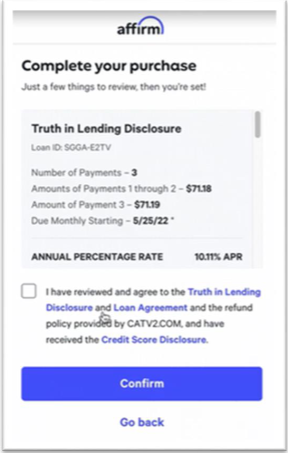
- After confirmation, the “Thanks for buying with Affirm” message appears.
- Once the user reaches this screen, the pop-up gets closed, and the order getsplaced.
- Note: The same payment flow will be followed when a customer converts thequote into an order.
- Enter your mobile number when prompted and submit it.
Skip CVV option Saved Cards (Spreedly Plugin) (Cybersource)
This release enhances the Spreedly payment integration in Znode by adding configurablecontrols for saved cards and CVV requirements (Cybersource Only). It reduces checkoutfriction for repeat customers while maintaining secure, PCI-compliant, token-basedpayment processing by allowing CVV to be required only during the initial card save, basedon admin configuration
Key Features:
- Configurable Saved Card Support
- Administrators can now control whether customers are allowed to save carddetails during checkout.
- New Enable Save Card flag at the Spreedly payment methodconfiguration level.
- Controls visibility and availability of the “Save this card for future use”option
- Default value: Yes
- Administrators can now control whether customers are allowed to save carddetails during checkout.
- Configurable CVV Requirement for Saved Cards
- Administrators can configure whether CVV is required for transactions madewith saved cards.
- New Skip CVV for Saved Cards flag
- Allows CVV to be skipped for subsequent transactions using saved cards
- Default value: Yes
- Applicable only when Enable Save Card = Yes
- Administrators can configure whether CVV is required for transactions madewith saved cards.
- Improved Checkout Experience
- Reduces friction for repeat customers by eliminating unnecessary CVV entry
- Aligns with token-based payment best practices
- Preserves existing behavior when CVV enforcement is required
- Security & Compliance
- Card data is tokenized via Spreedly
- CVV is used only for authorization and is never stored
- No sensitive card data is stored in Znod
- Fully compliant with PCI and security standards
Admin Configuration Workflow
- Navigation Path:
Admin Panel → Plugins → Spreedly → Edit Plugin → Configuration Set Tab → EditConfiguration Set.
Note: It is only available for the CyberSource gateway type in this version. - New Configuration Flags
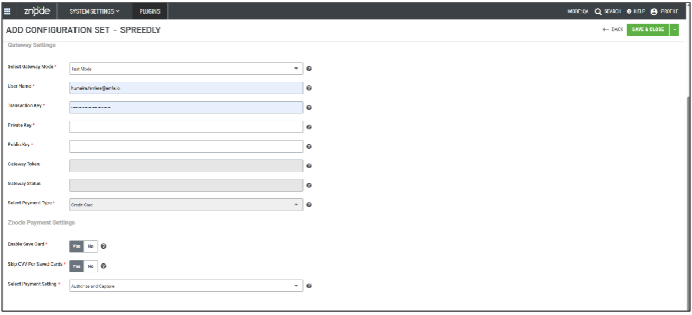
- Two new configuration flags have been introduced for the Spreedly payment method:
- Enable Save Card (Yes/No, Default: Yes): Controls whethercustomers are allowed to save their card details for futuretransactions.
- Skip CVV for Saved Cards (Yes/No, Default: Yes): Controls whetherCVV is required when customers make payments using previouslysaved cards.
- Two new configuration flags have been introduced for the Spreedly payment method:
Webstore Behavior & Workflow
- Enable Save Card = Yes (Default)
- Displays “Save this card for future use” checkbox during checkout
- Customers may opt to save card details
- Card details are tokenized via Spreedly after successful authorization
- CVV is used for authorization only and is never stored
- Enable Save Card = No
- “Save this card for future use” checkbox is hidden
- Customers cannot save card details
- All transactions behave as one-time payments
- Skip CVV for Saved Cards = Yes (Default)
- Applicable only when Enable Save Card = Yes
- Behavior:
- First-time payment:
- Customer enters card details, including CVV
- CVV is required for authorization
- The card may be saved if selected
- Subsequent payments using saved cards:
- CVV is not required
- A saved card can be used seamlessly
- “Save this card” option continues to function as expected
- First-time payment:
- Skip CVV for Saved Cards = No
- Applicable only when Enable Save Card = Yes
- Behavior (Current/Legacy Flow):
- CVV is required for:
- New card payments
- Payments where the card is being saved
- Payments using previously saved cards
- CVV must be entered for every transactiono
- Overall behavior remains unchanged from the currentimplementation
- CVV is required for:
- Behavior (Current/Legacy Flow):
- Applicable only when Enable Save Card = Yes
Tokenized Transaction Flow (Without CVV on Subsequent Payments)
- Cardholder enters card details (including CVV) during the first transaction
- Spreedly/payment processor validates the card and generates a secure token
- The token is stored and associated with the customer account
- For future transactions:
- The merchant sends the token to the card network
- The card network securely maps the token to the original card
- CVV is not required for authorization
Black Box Improvements
Product Information Management (PIM)
Z10-29317/Z10-30095/Z10-30437/Z10-30088 |
A system issue was identified where product publish statuses were not updating consistentlyacross the catalog. In certain cases, parent products failed to transition to PRODUCTION even though their associated child products did. Additionally, when the store was published with theCMS Content Catalog enabled, some products remained unpublished, causing updates to notappear on the webstore after full or partial catalog publishes. As a result, product publish changes were not reflected immediately, leading to delays in content visibility.
System Settings
Z10-30290 | Customer Import Failure When Using Default Customer Template
A defect was identified where customer imports failed with a database error when using thedefault customer import template. This issue caused the import process to terminateunexpectedly, preventing customer records from being successfully uploaded. The underlyingdatabase handling logic has been corrected to ensure reliable imports using the defaulttemplate.
Z10-30302 | Order Failure Using Existing CyberSource Saved Payment Method
An issue was identified where orders failed when customers attempted to use an existingCyberSource saved payment method. The transaction was rejected by CyberSource DecisionManager, preventing order completion. This fix ensures that saved payment methods areprocessed correctly and no longer trigger unintended Decision Manager rejections.
Z10-30359 | No UI Response When Submitting Payment After Adding a New Card
A defect was identified where the checkout page showed no UI response after a user added a payment card and attempted to submit the payment. This issue caused the payment actionto appear unresponsive, preventing users from proceeding with order completion. Theunderlying validation and submission flow has been corrected to ensure the UI respondsimmediately and the payment process continues as expected.
Z10‑30444 | Full Name Validation Triggered Incorrectly in Online Payments iFrame.
A defect was identified in the Online Payments iFrame where the “Full name required” validationmessage appeared even when a valid Cardholder Name was entered. This issue causedunnecessary validation errors and prevented users from proceeding with payment submission. The validation logic has now been corrected to ensure that properly entered Cardholder Names are accepted without triggering erroneous error messages.