
Release Information
Upgrade Note: Before upgrading, review the release notes for every version between the current version and the target version to ensure no critical upgrade information is missed. Important upgrade information—including breaking changes, prerequisites, configuration updates, database changes, and deprecated features—is documented in the release in which it is introduced and may not be repeated in later release notes.
Version Note: To ensure the new feature functions as intended, using the latest version of the Storefront is recommended. Older versions may support the feature partially or could lead to limited functionality or operational inconsistencies.
What’s New
Enhanced Product Navigation from Associated Product Grid
Feature Overview
The Product Name column in the Associated Products grid under PIM → Category → Products is enhanced to be clickable. Clicking the product name opens the corresponding Manage Product page.
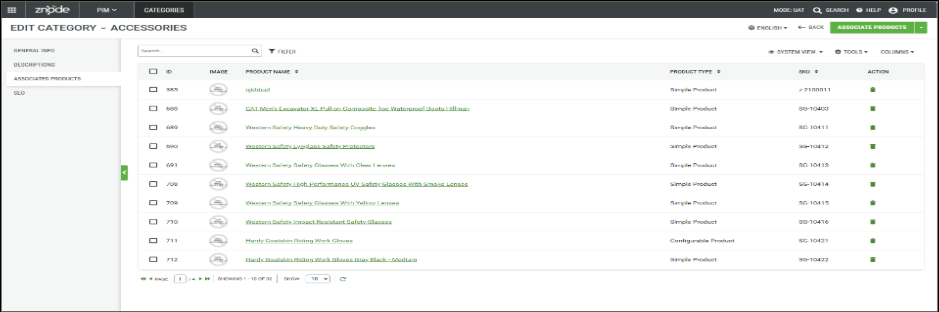
Upon navigating back using the Admin application Back button, the user is returned to the same Category → Products grid from which they were redirected, preserving the navigation context.
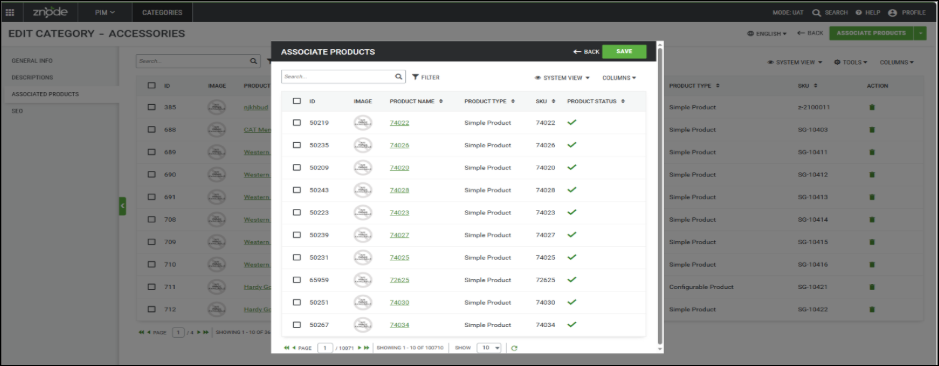
Similarly, when users access the product listing through the Associate Product action from the Manage Category page, the Product Name in the product selection grid is clickable and opens the respective Manage Product page. When navigating back from the product page using the application Back button, users are returned directly to the main Associated Products grid page and not to the intermediate Associate Product pop-up/page from which they were redirected.
If the user navigates to Manage Product by clicking the Product Name link from the modal and then navigates back, they will be redirected to the main page rather than returning to the previously opened modal.
Important Points:
- Changes are implemented only for products associated and appearing in PIM → Category → Products.
- Changes are not implemented in PIM → Catalog → Category → Products.
- Changes are not implemented for products associated through PIM → Products → Edit/Manage → Variants / You May Also Like / Frequently Bought / Replacement Product.
Recommendation - This update applies to the system grid view and any newly created grid views. Existing custom grid views will not automatically inherit these changes. To ensure the update takes effect, delete any existing custom grid views and recreate them after deployment.
Zero Sales Price Support for Custom Pricing
Feature Overview
To provide greater flexibility in pricing management, a new configuration option Respect Zero Sales Price For Custom Pricing has been introduced that enables explicit zero-dollar sales prices to be honored within custom pricing scenarios. This enhancement allows organizations to better control pricing behavior while maintaining compatibility with existing pricing workflows.
Key Features
The enhancement includes:
- Introduction of a configurable setting to control zero sales price handling.
- Support for honoring explicitly configured $0 sales prices in custom pricing scenarios.
- Continued fallback to standard pricing when a sales price has not been explicitly configured.
- Configuration available through Global Settings for centralized administration.
- Feature disabled by default to preserve existing pricing behavior.
Performance Enhancements
SEO Performance and Scalability Improvements
Implemented performance optimizations to improve the efficiency and responsiveness of SEO-related operations across the platform. Enhancements focused on reducing processing overhead, optimizing data access patterns, and improving system performance for SEO-driven functionality.
Key Benefits:
- Faster execution of SEO-related operations.
- Improved application responsiveness and page performance.
- Reduced storage and indexing overhead.
- Enhanced efficiency for high-volume data processing.
- Improved overall system stability and user experience.
Improved System Stability and Performance Under High Traffic Loads
Enhanced platform performance and stability to address issues identified during load testing under high-traffic conditions. Improvements ensure that both Admin and Webstore applications remain responsive and operational during peak usage periods, resulting in a more reliable and seamless user experience.
Key Benefits
- Improved platform responsiveness during heavy traffic.
- Enhanced system stability under high-load conditions.
- Reduced risk of application slowdowns and unresponsiveness.
- Better scalability to support growing business demands.
- Improved experience for both administrators and storefront users during peak activity.
Performance and Reliability Enhancements Following Version Upgrade
System optimizations were implemented to improve application responsiveness, reliability, and overall user experience across the platform.
Key Benefits
- Improved overall application performance after upgrades.
- Enhanced system reliability and operational stability.
- Reduced performance bottlenecks affecting daily operations.
- Improved user experience across Admin and Webstore applications.
- Increased confidence in platform upgrades through better system resilience.
- Smoother business operations with fewer performance-related disruptions.
Black Box Improvements
PIM
Z10-38672 | Associated Products assignment UI is broken for all catalog products.
Resolved an issue where the Associated Products Assignment user interface was not functioning correctly across all catalog products, preventing users from viewing, adding, removing, or managing associated product relationships as expected.
Z10-33976 | Product status changes to Out of Stock when the shipping method is updated in an Admin Quote despite the Don't Track Inventory setting being enabled.
Resolved an issue where updating the shipping method on an Admin Quote incorrectly triggered inventory validation, causing products configured with Don't Track Inventory to be marked as Out of Stock. The inventory status logic has been corrected to honor the Don't Track Inventory setting during quote updates.
Z10-39160 | Additional Cost Included in Cart Subtotal for Add-to-Cart API Orders
Corrected an issue where additional product costs were excluded from the cart subtotal when products were added using the Add-to-Cart API. The cart calculation functionality has been enhanced to correctly include all applicable additional costs, ensuring accurate pricing and order totals.
Z10-39081 | Product Pricing Expiration Date Display Corrected on PDP
Corrected an issue where the pricing expiration date displayed on the Product Details Page (PDP) appeared one day later than the actual configured expiration date. The pricing display functionality has been enhanced to accurately reflect expiration dates, ensuring customers see the correct promotional pricing timeline.
Z10-39203 | Product Images Display Corrected in Category Product Listing
Corrected an issue where product images were not appearing within the PIM → Category → Products section. The category product management functionality has been enhanced to correctly retrieve and display associated product images, improving product visibility and administration efficiency.
Z10-37634 | Products with a Sales Price of 0 display incorrect pricing and allow checkout using the Retail Price.
Resolved an issue where products with a Sales Price set to 0 were displaying incorrect pricing information and could still be added to the cart and checked out using the Retail Price. The pricing logic has been corrected to properly handle products with a Sales Price of 0 and prevent unintended checkout behavior.
System Settings
Z10-37374 | Shipping discount was displayed incorrectly in the Shipping Method section during checkout, while the Order Summary reflected the correct discount amount.
Resolved an issue where shipping discounts were presented inaccurately within the Shipping Method section of the checkout experience. The calculation and display logic have been aligned to ensure consistent discount values are shown across all checkout components.
Content Management System (CMS)
Z10-39050 | Content Block content disappears on publish.
Resolved an issue where content within a Content Block would disappear after publishing. Published content now retains its configured data and displays correctly across the site.
Order Management System (OMS)
Z10-38924 | Custom Coupon Code Creation Restored After Upgrade
Corrected an issue where custom coupon code creation stopped functioning after upgrading,the promotion and coupon management functionality has been enhanced to restore custom coupon code generation, ensuring promotional campaigns can be created and managed without disruption.
Z10-36716 | Multiple inconsistencies observed while managing orders in the Admin Portal.
Resolved several issues affecting order management and status accuracy in the Admin Portal:
- Fixed an inconsistency where the Order List page displayed an order status as Expired, while the same order showed Approved when opened in the Manage Order page.
- Fixed an issue where the Tax Exempt flag was enabled on an order, but taxes were still being applied during order calculation, causing incorrect tax amounts to be displayed and charged.
Z10-38809 | Users were unable to add products to the cart when the product included an additional cost.
Resolved an issue that prevented products with configured additional costs from being successfully added to the cart. The cart validation and pricing logic have been updated to correctly process products with supplemental charges during the add-to-cart workflow.
Z10-38237 | Users were unable to add products to the cart when the product included an additional cost.
Resolved an issue that prevented products with configured additional costs from being successfully added to the cart. The cart validation and pricing logic have been updated to correctly process products with supplemental charges during the add-to-cart workflow.
Z10-39140 | Promotion Coupon Code Field Now Supports Underscores
Corrected an issue where administrators were unable to create or edit promotion coupon codes containing underscore (_) characters. The promotion management functionality has been enhanced to support underscores in coupon codes, providing greater flexibility when creating and managing promotional campaigns.
Marketing
Z10-39216 | Tracking Number Was Not Getting Populated in Email Receipt
Corrected an issue where shipment tracking numbers were not being populated in order confirmation and shipment email receipts, preventing customers from accessing tracking information directly from the email. The email notification functionality has been enhanced to correctly retrieve and display the associated tracking number for shipped orders, ensuring customers can easily track their shipments and improving the overall post-purchase experience.
Accounts & Users
Z10-39149 | Enhanced Admin User Security with Password Authentication Restrictions
Implemented security enhancements by disabling password authentication for designated admin users and resetting default passwords for Admin and Master User accounts. These improvements strengthen account security, reduce unauthorized access risks, and align with security best practices.
Others
Z10-39147 | GetCategoryContent API Updated for Store-Level Product Configuration
Corrected an issue where the GetCategoryContent API did not properly utilize store-level child category product configurations. The API has been enhanced to honor store-specific category settings, ensuring product results accurately reflect configured store behavior.
Z10-38418 | Product Image Updates via API Functionality Restored
Corrected an issue where product images could not be successfully updated through API requests. The product management of API functionality has been enhanced to properly process image update operations, ensuring seamless integration with external systems.
Z10-38820 | Order Shipment Address Mismatch API Fix
Corrected an issue where discrepancies occurred between shipment address information and order data when processed through APIs. The order management APIs have been enhanced to ensure shipment address details are consistently synchronized and accurately reflected across all order transactions.
Open-Source Enhancements and Fixes
Z10-37623 | Checkout Address Handling Improvements
Improved checkout reliability by preventing orders from being placed when an address update fails. The system now automatically retries failed address updates and provides a clear retry option if the update remains unsuccessful. Once the address is successfully saved, checkout can proceed normally.