
Release Information
The Znode 10.12.1.0 release introduces new features, enhancements, performance upgrades, and bug fixes.
Upgrade Note: Before upgrading, please review the release notes for each version between your current version and the target versions. Important details, such as breaking changes and deprecated features, are only mentioned in the release notes where they are introduced and may not be repeated in later version's release notes.
Version Note: To ensure new features function as intended, using the latest Storefront version is recommended. Older Storefront versions may provide limited functionality or lead to operational inconsistencies.
Release Highlights
New Features & Enhancements
| Area | Highlights |
|---|---|
| Payments | Added Apple Pay support through Spreedly with Authorize.Net and Cybersource for secure checkout on supported Apple devices. |
| Experience & Content | Enhanced USPS Address Validation popup with improved address comparison, selection options, and usability. |
| Marketing | Added Promotion Type filtering and export capabilities for Promotions & Coupons in CSV and Excel formats. |
| Order Management (OMS) | Introduced Voucher Export in CSV and Excel formats with support for bulk exports and API integration. |
| Data Exchange / Integrations | Added the ability to remove steps from Commerce Connector Data Exchange workflows for easier configuration. |
| Reporting & Analytics | Enhanced Power BI Sales Tax report by adding Order Number for improved tax reconciliation and reporting. |
| APIs & Integrations | Enhanced Blogs/News API v2.1 with Activation and Expiration date range filters and improved content retrieval. |
| Security | Strengthened server-side validation of tax exemption indicators to improve security and data integrity. |
| Performance | Improved performance across PIM, Marketing, SEO, and OMS product-related screens, and optimized Cart & Checkout for large carts (200+ line items). |
Other Improvements
| Area | Highlights |
|---|---|
| PIM | Fixed category visibility, account catalog access, configurable product pricing API, product validations, and replacement product associations. |
| System Settings | Improved CVV validation, USPS address validation, and category import behavior. |
| Dev Center | Enhanced Custom Table APIs, Data Exchange reliability, logging, navigation, and search functionality. |
| Marketing | Improved logging behavior, typeahead search display, and Boost & Bury search rules. |
| CMS | Fixed widget persistence, inventory display, blog publishing/SEO issues, validations, and page preview behavior. |
| Accounts & Users | Improved user search, address handling, centralized login flows, and account association management. |
| OMS | Fixed cart, checkout, quote, order, shipping, Avalara integration, packing slip, and calculation-related issues. |
| DAM | Resolved Media Explorer duplicate column display issues. |
| Stores | Improved store deletion, publishing, filtering, validation, and storefront settings synchronization. |
| APIs & Integrations | Enhanced validation, error handling, functionality, and documentation across multiple APIs. |
| Open-Source Fixes | Improved currency display, localization, routing, UI alignment, and return receipt information. |
Disclaimer
Display Order Field Removal from Category (Admin UI Only)
This change is limited to the Admin UI only. The Display Order field has been hidden from the Category Listing, Add New Category, and Manage Category forms, and the DisplayOrderCategory attribute has been removed from the Category Attribute List.
No changes have been made to the underlying APIs or business logic. Existing APIs continue to support the Display Order value and will function as per their current behavior.
Enable XSS Validation
Even if the Enable XSS Validation and Enable IDOR Validation flags are set to True, the changes will only take effect after explicitly saving the configuration.
Temporary Disablement of Email Marketing Tab
The Email Marketing tab within the Stores section has been temporarily disabled to accommodate ongoing updates and improvements.
During this period, administrators will not have access to email marketing functionality from the Stores section. The feature will be restored once the required enhancements have been completed and validated.
Temporary Disablement of Promotions, Coupons, and Vouchers Management on the Manage Order Screen
In this release, the ability to add, manage, or modify Promotions, Coupons, and Vouchers from the Manage Order screen in the Admin Console remains temporarily disabled.
Promotions and coupons applied during order creation remain visible; however, administrators cannot add new promotions or remove existing ones from the Manage Order screen. This functionality will be re-enabled in a future release.
Disable SEO Validation
- Even if the Disable SEO Validation flag is set to true, the changes will only take effect after explicitly saving the configuration.
What's New
Apple Pay Integration through Spreedly (Authorize.Net & Cybersource)
Feature Overview
Znode now supports Apple Pay payments through Spreedly when using Authorize.Net or Cybersource as the payment processor. This enhancement enables customers on supported Apple devices to complete purchases using Apple Pay with a secure and streamlined checkout experience.
Key Features
- Added Apple Pay as a payment type within Spreedly Configuration Sets for Authorize.Net and Cybersource gateways.
- Supports both Authorize Only and Authorize and Capture processing modes.
- Added Store Payment Settings configuration to upload and manage Apple Pay domain certificates and private keys.
- Supports multiple Apple Pay domain configurations per store.
- Available for Storefront Checkout and Admin Impersonation Orders.
- Supports OMS payment lifecycle actions including authorization and capture workflows.
- Transactions are tokenized and processed through Spreedly to help maintain PCI-compliant payment processing.
Shopper Experience
Customers using supported Apple devices can select Apple Pay during checkout and complete their purchase using Face ID, Touch ID, or device passcode authentication.
No card details are entered or stored within Znode during the Apple Pay payment flow.
Important Notes
- Available only with Spreedly + Authorize.Net or Spreedly + Cybersource configurations.
- Requires valid Apple Pay merchant certificates and private keys for each storefront domain.
- Supports credit card-based wallet payments only.
- Verify transaction processing is not supported.
- Available only on supported Apple devices and browsers.
- Partial payment transactions are not supported.
- Partial refunds are not included in this release.
- Saved card functionality is not supported for Apple Pay transactions.
- ACH-based payment processing is not supported.
- B-Store support is out of scope for this release.
- Apple Pay support within the Znode Admin application is out of scope for this release.
Referral Documents
USPS Address Validation Popup Enhancements
Overview
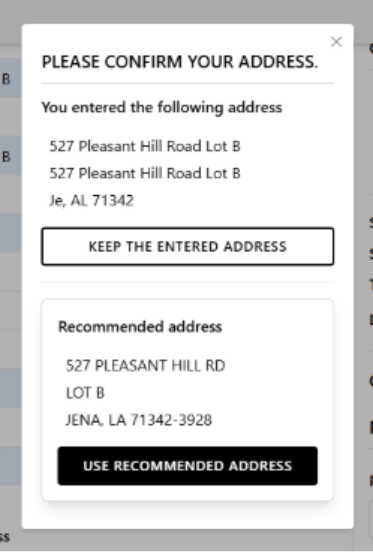
The USPS Address Validation popup has been enhanced to provide a clearer and more user-friendly address confirmation experience during checkout and address management.
- Added dedicated sections to display both the Entered Address and USPS Recommended Address for easy comparison.
- Introduced Keep Entered Address and Use Recommended Address actions to simplify address selection.
- Improved address formatting and popup layout for better readability and usability.
Promotions & Coupons Export with Promotion Type Filter
Feature Overview
Administrators can now export Promotions & Coupons directly from the Marketing > Promotions & Coupons page in CSV or Excel format. This enhancement also introduces a new Promotion Type filter, making it easier to locate, export, analyze, and manage promotion data while maintaining compatibility with existing Promotion Import templates.
What's New
- Introduced a new Promotion Type filter on the Promotions & Coupons listing page to simplify filtering and exporting promotions by type.
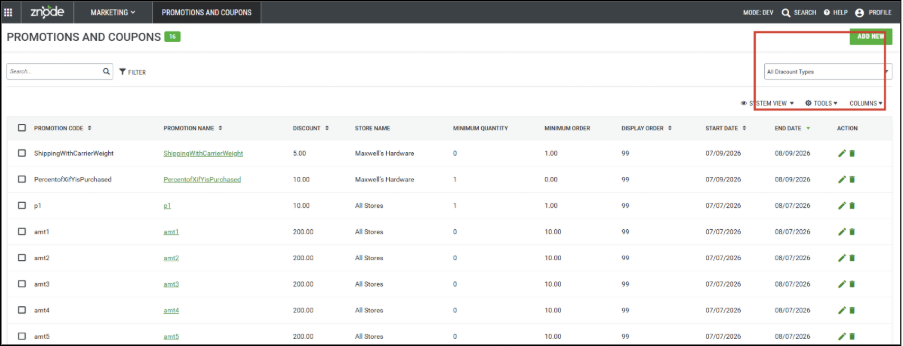
- Added a new Promotion Type filter on the Promotions & Coupons listing page.
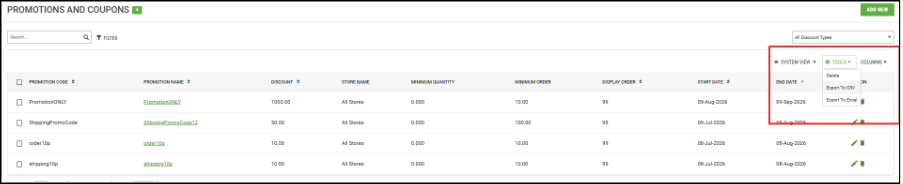
- Added Export to CSV and Export to Excel options under the Tools menu.
- Supports exporting:
- Selected Promotions
- Filtered Promotions
- All Promotions
- Generates a Promotions Export file containing promotion details.
- Exporting all promotions generates a consolidated ZIP package containing only promotion types with data.
- Added export preferences:
- Without Additional Attributes (Default)
- With Additional Attributes
- Export processing utilizes the existing Import/Export framework.
- Export files are available in System Settings > Exports once processing is complete.
- Export templates follow the existing Promotion Import template structure for compatibility.
Details
- Promotion Type filtering supports existing and future promotion types.
- Selected records take precedence over filtered records during export.
- Supports both CSV and Excel export formats.
- Export jobs continue processing even if the user logs out or closes the browser.
- Export files are packaged as ZIP files and include a unique Log ID in the file name.
- Exports include all available grid fields and supported custom columns.
- Templates maintain import-compatible formatting and structure.
- Associated entity data (Brands, Categories, Catalogs, Products) is exported as separate rows when applicable.
- Product-based promotions export SKU values to maintain import compatibility.
- Additional Attributes are exported only when attribute data exists.
- Standard coupon promotions are fully supported.
- Unique coupon codes are exported separately and may require manual updates before re-import.
- The IsUnique setting remains a creation-time configuration and cannot be modified after promotion creation.
- Promotion Message has been removed from the template, while Call for Price Message remains supported.
- Decimal inventory quantities are not supported in export templates.
- Custom Promotions are not included in this release.
- The enhancement is fully backward compatible and does not impact existing promotion management or import functionality.
Voucher Export in CSV and Excel Formats
Feature Overview
Administrators can now export voucher data directly from the OMS > Vouchers screen in CSV or Excel format. This enhancement leverages the existing Import/Export framework, making it easier to generate reports, perform audits, support migrations, and analyze voucher data while maintaining compatibility with the existing Voucher import process.
What's New
- Added Export to CSV and Export to Excel options under the Tools menu on the Voucher listing page.
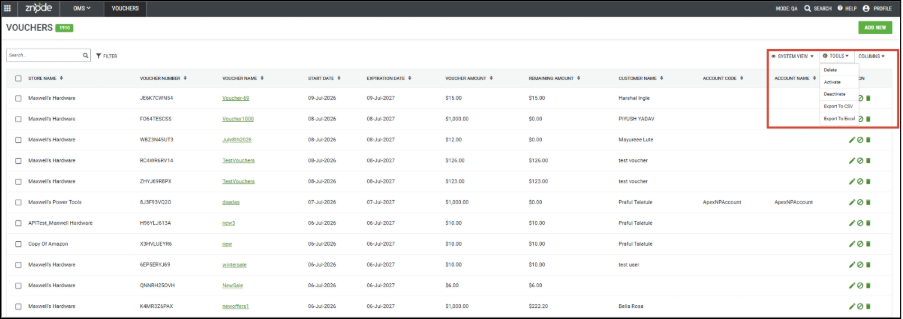
- Supports exporting:
- Selected Vouchers
- Filtered Vouchers
- All Vouchers
- Includes all standard voucher fields available on the Voucher listing page, including the Is Active field.
- Added export preferences:
- Without Additional Attributes (Default)
- With Additional Attributes (Includes Voucher UDFs)
- Exported files follow the existing Voucher Import template structure for seamless re-import.
- Export processing is handled through the existing Import/Export framework.
- Completed exports are available from System Settings > Exports.

- Large exports are automatically packaged into ZIP files and split into multiple files when required.
- Added API support for Voucher Export.
Additional Details
- Exports include voucher master data and associated voucher details.
- Uses only existing Voucher listing page filters.
- Status and Date Range filters are not included in this release.
- Column order and data formatting remain compatible with Voucher Import templates.
- Voucher UDFs are appended after standard voucher fields when Additional Attributes are selected.
- Export jobs continue processing even if the user logs out or closes the browser.
- Large datasets are automatically split according to configured export chunk settings.
- Voucher Amount and Remaining Amount must contain the same value for successful import, consistent with existing validation rules.
- This enhancement is fully backward compatible and does not impact existing Voucher management or import functionality.
Commerce Connector: Remove Steps in Data Exchange
Feature Overview
Administrators can now remove steps from multi-step Data Exchange workflows in Commerce Connector. This enhancement provides greater flexibility when configuring workflows by allowing unwanted or mistakenly added steps to be removed before saving or execution.
What's New
- Added a Delete/Remove option for each Data Exchange workflow step.
- Allows removal of accidentally added steps without additional configuration.
- Simplifies workflow management and configuration.
- Improves flexibility when modifying Data Exchange sequences.
Power BI Report Enhancement: Order Number in Sales Tax Report
Feature Overview
The Power BI Znode Sales Tax report has been enhanced to include the Order Number field, improving reporting accuracy and simplifying tax reconciliation activities.
What's New
- Added a new Order Number column to the Sales Tax report.
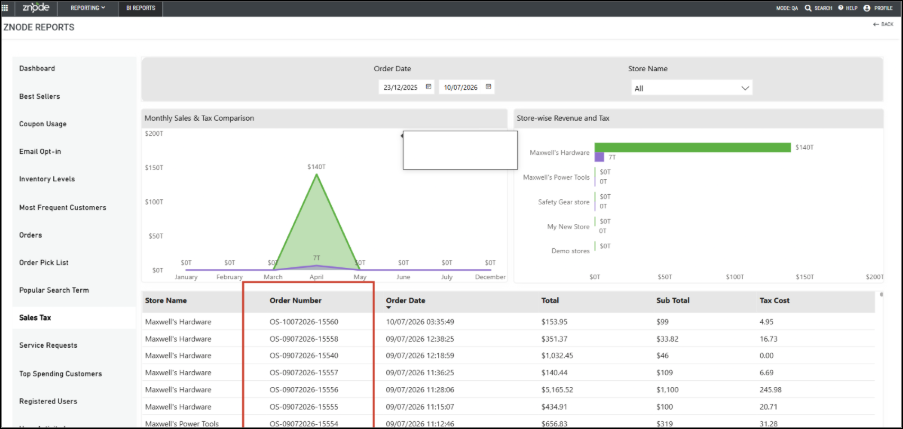
- Associates each sales tax record with its corresponding order.
- Improves tax reporting accuracy.
- Supports easier reconciliation of sales tax transactions, including Vertex integrations.
Enhanced Blog/News API Filtering with Date Range Support
Feature Overview
Security Enhancements
Strengthened Validation of Tax Exemption Indicator
Enhanced the integrity and security of the tax exemption handling mechanism used by the Cart Summary API.
Impacted Endpoint: GET /api/cart/cart-summary
- The isTaxEmpty flag is now validated and controlled exclusively on the server side.
- Removes dependency on client-side inputs for tax exemption processing.
- Improves security, data integrity, and business rule enforcement.
- Reduces exposure to externally modifiable request values.
- Enhances overall reliability of tax-related calculations and validations.
Important Consideration for Custom Implementations
Customers with custom tax exemption implementations that rely on client-side parameters or request values should review and update their customizations to align with the new server-side validation behavior.
Performance Enhancements
Performance Enhancements for Product Management and Search Operations
Implemented performance improvements across key product management and search workflows to increase responsiveness, reduce page load times, and improve the overall user experience.
Key Enhancements
- Improved performance of PIM product management screens including:
- Manage Product
- Link / Replacement Products
- Manage Catalog
- Optimized product loading and search performance in Marketing > Promotions > Product List.
- Enhanced product retrieval performance in Marketing > SEO Setup > Product List.
- Improved product search performance in OMS > Price List > Search Product.
- Reduced page load times and improved responsiveness across affected modules.
Cart/Checkout API Performance Improvement
Improved Cart and Checkout performance for large carts containing 200+ line items, providing a faster and smoother checkout experience.
Key Enhancements
- Optimized cart data processing for large-volume orders.
- Improved page rendering performance on Cart and Checkout pages.
- Enhanced responsiveness for high-volume cart operations.
- Reduced load times during cart review and checkout workflows.
Black Box Improvements
Product Information Management (PIM)
Z10-30004 | Last Category Not Appearing Under Departments
Resolved an issue where the last category within a department hierarchy was not displayed on the storefront and category navigation pages. In certain catalog structures, the final category node was incorrectly excluded. The category retrieval and display logic have been enhanced to ensure all assigned categories, including the final hierarchy level, are loaded and displayed correctly.
Z10-35616 | Products and Categories Not Available Through Account-Specific Catalogs
Resolved an issue that prevented products and categories from appearing for users assigned to account-specific catalogs. In affected scenarios, catalog associations were correctly configured, but the storefront and account experience failed to surface the expected product and category data, limiting catalog visibility for certain accounts. The catalog association and retrieval logic have been updated to correctly recognize account-level catalog assignments and display the appropriate products and categories.
Z10-35860 | Retail Price and Sale Price Not Returned in Configurable Product Details API Response
Fixed an issue where the Configurable Product Details API did not return Retail Price and Sale Price values for configurable products, resulting in incomplete pricing information for API consumers. This impacted integrations and custom storefront implementations that relied on the API response to display accurate pricing and promotional information. The API response has been enhanced to include both Retail Price and Sale Price fields consistently, ensuring consumers receive complete pricing details for configurable products and can accurately represent product pricing across integrated channels.
Z10-35869 | Custom1 Field Validation Inconsistency Between Manual Entry and Import
Resolved an inconsistency in the validation behavior of the Custom1 field where alphanumeric values were accepted during product import but rejected during manual entry through the administration interface. This discrepancy created confusion for administrators and resulted in inconsistent data management experiences. Validation rules have been standardized across both import and manual entry workflows to ensure the same data formats are accepted regardless of how information is entered.
Z10-36210 | Generic Errors While Associating Replacement Suggestion Products
Resolved performance and validation issues that resulted in generic error messages when associating replacement or suggested products, particularly in environments containing large product catalogs and extensive datasets. Users could experience failures during association operations or encounter generic errors while searching for products, making troubleshooting difficult and impacting productivity. The validation, search, and association processes have been optimized to handle large datasets more efficiently, while error handling has been improved to provide more reliable operation outcomes.
System Settings
Z10-35681 | Valid CVV Message Persists After Correct Entry
Resolved a validation issue in the payment workflow where CVV-related error messages continued to display even after a customer entered a valid CVV value. This behavior created confusion during checkout, as users were presented with validation errors despite correcting their input successfully. The validation logic and UI refresh mechanism have been improved to ensure that error messages are cleared immediately once valid card information is provided. Adding logic to revalidate CVV when a valid card number is entered and a CVV value exists.
Z10-36002 | USPS Address Validation Allows Invalid Addresses Despite Correct Configuration
Corrected an issue where invalid U.S. addresses were sometimes accepted during address validation even when USPS validation was properly configured and enabled. In certain scenarios, addresses containing incomplete or incorrect location details bypassed validation checks and were treated as valid, potentially leading to shipping failures, delivery delays, or order fulfillment issues. This validation appears when multiple fields contain invalid data, such as Street Address, City, State, and Postal Code. If only one field—Street Address, City, State, or Postal Code—contains invalid data, this validation does not appear, and the recommended address is shown.
Z10-36151 | Category Import Incorrectly Sets 'Hide Category on Menu' to Yes When Value Is Blank
Fixed an issue in the category import process where the Hide Category on Menu setting was automatically set to Yes whenever the corresponding import field was left blank. This behavior ignored the system's configured default value and caused categories to be unintentionally hidden from storefront navigation after import. The import logic has been updated to correctly honor default system settings when the field is not explicitly provided. Categories will now retain the intended visibility configuration, preventing unexpected menu display changes and ensuring more predictable import behavior for catalog management operations.
Dev Center
Z10-29047 | POST Custom Table Field API Validation Improvements
Updated the Custom Table Field API to remove unnecessary TableId dependency and provide clearer validation messages. Updated the validation messages to handle scenarios where the field length is either missing or invalid for Text, TextArea, and Numeric field types.
Z10-29787 | Header Navigation Missing in Admin Customization Areas
Fixed an issue where the header navigation disappeared while managing Admin Customization sections. Header Navigation elements now remain consistently available.
Z10-33436 | Incorrect Navigation After Saving Custom Table Fields
Corrected navigation behavior that redirected users to the Custom Table Information page instead of remaining on Manage Fields. Users now stay on the current page after saving.
Z10-33649 | Data Exchange Logs Showing Zero Record Count
Fixed an issue where Data Exchange Logs incorrectly displayed a record count of zero. Accurate counts are now shown for all executions.
Z10-33778 | No Records Displayed with Blank Search and Missing Actions
Resolved a problem where blank searches incorrectly showed “No Records” and action buttons disappeared after refresh. Records and actions now display properly.
Z10-34113 | Data Exchange Field Sequence Mismatch
Corrected inconsistencies between field sequences on Create and Edit screens. Both screens now display fields in the same order for a consistent user experience.
Z10-34669 | Duplicate Custom Data Exchange Logs in Execution History
Fixed an issue where custom Data Exchange execution logs were appearing multiple times. Log entries are now displayed only once per execution.
Z10-35851 | Long Field Data Breaks Custom Table UI Layout
Resolved a UI rendering issue where long field values caused layout distortion. Long content now wraps correctly without impacting the page design.
Z10-35941 | Blob File Import Failure Through Custom Table Endpoint
Corrected an issue preventing blob files from being imported via the Custom Table endpoint. The endpoint now processes supported files successfully.
Z10-36207 | Search Returns No Records in PPUI Logo Library Custom Table
Fixed a problem where searches in the PPUI Logo Library Custom Table returned no results despite matching data. Search functionality now works as expected.
Marketing
Z10-34362 | Investigate Log Level Mismatch and Excessive Logging
Resolved logging configuration inconsistencies that resulted in excessive log generation. Logging behavior is now aligned with expected settings.
Z10-35638 | Currency Symbol Missing in Typeahead Search
Resolved an issue where currency symbols were not displayed in search suggestions and intermittent generic errors occurred. Now Currency symbol is rendered in the Webstore Typeahead search when "Display Pricing and SEO Details from Index" is enabled, and a generic error is not observed
Z10-35697 | Boost & Bury Rules Not Applied for Multiple Conditions
Corrected search relevance behavior where Boost & Bury rules failed when multiple trigger conditions were configured. Search results now honor configured rules. Boost and Bury now support multiple search terms, and Shopper receives results based on these terms
Content Management System (CMS)
Z10-34965 | Widgets Removed After CMS Content Publish
Fixed an issue where widgets added to the Track Order page were removed after publishing. Widgets now remain intact. The added widget content is persist and display correctly in both Webstore Preview and Production view after publishing the CMS content.
Z10-35508 | Product Widgets Show Out of Stock for Available Products
Resolved incorrect inventory display causing in-stock products to appear as out of stock. Widget inventory information is now accurate.
Z10-35515 | Duplicate Banner Slider Name Validation Missing
Added validation to prevent duplicate slider names from being saved and causing the page to become unresponsive. Duplicate slider name validation has been triggered on the Banner slider popup. And the banner list page does not become disabled/unresponsive.
Z10-35518 | Duplicate Blog Codes Across Stores
Resolved an issue allowing duplicate blog codes across stores which caused unintended publishing behavior. Blog codes are now validated for uniqueness. Blogs with the same Blog Code in other stores will retain their existing publish status unless they are explicitly published.
Z10-35520 | Published Blog SEO URL Returns 404
Fixed an issue where published blog SEO-friendly URLs returned a Page Not Found error. Blog URLs are now resolved correctly.
Z10-35539 | Brand Carousel Column Spacing Issue
Improved spacing and alignment between Brand Name, Code, and Display Order columns for better readability.
Z10-35964 | reCAPTCHA Error Appears in Page Builder Preview
Resolved an issue displaying unnecessary reCAPTCHA errors while previewing pages. Preview mode now behaves correctly.
Accounts & Users
Z10-27487 | "Same as Billing Address" Checkbox Not Functioning Properly
Fixed an issue where the "Same as Billing Address" option worked only when clicking the label instead of the checkbox itself. Clicking on the “Same as Shipping Address” checkbox under the Billing Address section now:Hides the Billing Address section. Automatically checks the “Same as Billing Address” checkbox under the Shipping Address section as expected.
Z10-32503 | User Search on User List Page Causes Loader Issue
Resolved a problem where searching for users caused the page loader to remain active indefinitely. Search functionality now completes successfully and displays results as expected.
Z10-33599 | Error Displayed When Selecting All Stores and Saving User Association
Corrected an issue that displayed an unexpected error when associating users to all stores. User associations can now be saved successfully without interruption. Updated the validation logic to first determine whether the user is being associated with All Stores. If so, the portal order validation for store dissociation is skipped, as no actual store is being removed from the user's access. This prevents the erroneous validation failure while preserving the existing order validation for genuine store dissociation scenarios.
Z10-36193 | Forgot Password Shows Invalid Username for Centralized Users
Resolved an issue affecting centralized login users who attempted to use the Forgot Password functionality from a store other than their default store. In such cases, the system incorrectly displayed an “Invalid Username” message even when the user credentials were valid, preventing users from initiating the password reset process. The validation logic has been corrected to properly recognize centralized users across associated stores, allowing password reset requests to be processed successfully and improving the overall user authentication experience.
Z10-35976 | Restrict Flag Cleared After Associating Account with Centralized Login Enabled
Resolved an issue where the Restrict flag was removed when associating an account to a user with centralized login enabled. The Restrict setting is now preserved correctly. Restrict flag should retain its original value even after associating an account.
Order Management System (OMS)
Z10-33706 | Quick Order Displays Invalid SKU for Valid SKU
Fixed an issue where valid SKUs displayed as invalid and search suggestions were disabled. Quick Order functionality now validates products correctly. The issue with the invalid SKU is resolved, and Search suggestions do not remain disabled if the shopper clicks again in the Quick Order SKU field.
Z10-34111 | Incorrect Payment Method in Packing Slip
Corrected packing slips displaying “Gift Card” instead of “Voucher.” The actual payment method is now reflected accurately.
Z10-35483 | Checkout URL Access Behavior Incorrect
Fixed an issue with checkout URL validation that allowed inconsistent access behavior for guest and authenticated users. Depending on the user’s session state and navigation path, the checkout page could be accessed unexpectedly or redirect incorrectly, resulting in a confusing user experience. Access validation rules have been refined to ensure users are directed appropriately based on authentication status and checkout eligibility, providing a more secure and predictable checkout flow.
Z10-34112 | Email Field Blank in Packing Slip
Resolved an issue where customer email information was missing from admin-generated packing slips. The email field now displays correctly.
Z10-34119 | Incorrect Calculation After Shipping Address Change
Fixed calculation discrepancies occurring after updating shipping addresses on quotes or orders. Totals are now recalculated accurately.
Z10-34226 | Incorrect Quote-to-Order Total Calculation
Resolved calculation errors that occurred when converting modified quotes to orders without saving. Order totals now reflect accurate pricing.
Z10-34413 | Incorrect Quote Number in Quote Conversion Email
Corrected an issue where incorrect quote numbers appeared in quote-to-order acknowledgment emails. Emails now display the correct reference number.
Z10-35089 | Shipping Method Missing in Printed Quote Receipt
Fixed an issue where shipping method information was not displayed in printed quote receipts. The selected shipping method now appears correctly.
Z10-35239 | Incorrect User Name in Approval Email Notification
Resolved an issue where approval notification emails displayed the wrong user name. Notifications now reference the correct user.
Z10-35286 | Shipping Amount Passed as Zero to Avalara
Corrected a problem where shipping amounts were transmitted as zero for voucher-based orders. Accurate shipping values are now sent to Avalara.
Z10-35443 | Quote Search by Store Name Returns No Results
Fixed a search issue preventing quote retrieval by store name. Store-based searches now return matching records correctly.
Z10-35458 | Order Subtotal Increases Repeatedly After Save
Resolved a calculation issue where order subtotals increased after multiple saves or status changes when products had additional costs. Totals now remain accurate.
Z10-35595 | Orders Not Visible in Avalara
Corrected an integration issue preventing successfully placed orders from appearing in Avalara. Orders are now transmitted correctly.
Z10-35668 | Cart Reset During Guest-to-User State Switch
Fixed an issue where carts were cleared when transitioning between guest and logged-in states. Cart contents are now retained properly.
Z10-35711 | Unable to Save Order Due to Expiration Validation
Corrected validation logic preventing order saves when the in-hands date was in the past. Order processing now follows the intended business rules.
Z10-35793 | Additional Logo Cost Lost After Cart Merge
Resolved an issue where additional logo costs were removed when a guest cart merged after login. Pricing information is now preserved.
Z10-35808 | Billing Address Updated When Shipping Address Modified
Fixed an issue causing billing addresses to change automatically when editing shipping addresses. Both addresses are now maintained independently.
Z10-35902 | TradeCentric Order Shipping Address Creation Failure
Corrected a failure that prevented TradeCentric orders from creating new shipping addresses. Orders are now processed successfully.
DAM
Z10-34846 | Duplicate File Type Columns in Media Explorer
Fixed an issue where File Type columns appeared multiple times in Media Explorer. Only a single column is now displayed.
Other
Z10-34680 | Error Response from Product Search API
Fixed API issues that caused product search requests to return error responses incorrectly. Searches now return expected results. Now, when the product contains an inventory quantity garbage value for products, the full text search API returns a 400 bad request with "ErrorMessage": "Unable to process search results due to invalid value detected. Some values are out of range for 'Products'.
Z10-29598 | Accounts Bulk Delete API Functional Issue
Corrected functional issues within the Accounts Bulk Delete API that could prevent account deletion requests from processing successfully when multiple account IDs were provided. In certain scenarios, the API returned inconsistent responses or failed to complete the deletion operation as expected. The endpoint has been updated to validate input parameters correctly, process bulk deletion requests more reliably, and return accurate responses, ensuring consistent account management through API integrations.
Z10-34209 | Calculate Cart API – Validation & Calculation Issues
Resolved multiple validation and calculation inconsistencies within the Calculate Cart API that could result in inaccurate cart totals, incorrect pricing calculations, or unexpected validation behavior. Under specific conditions involving products, discounts, taxes, shipping charges, or cart updates, the API did not always return the expected calculation results. The calculation engine and validation logic have been refined to ensure accurate pricing, proper handling of cart data, and consistent calculation results across all supported checkout scenarios.
Z10-34277 | Cart Class Details API – Mandatory Input & Portal Validation Issues
Enhanced validation within the Cart Class Details API to ensure all required inputs are validated correctly before processing requests. Previously, requests with missing or invalid portal-related information could pass validation or generate inconsistent responses. Additional mandatory field checks and portal verification validations have been introduced to improve API reliability, prevent invalid requests from being processed, and provide clearer validation feedback to API consumers.
Z10-34325 | Bulk Quantity Update API – Mandatory Header & Status Code Issues
Corrected issues within the Bulk Quantity Update API where required request headers were not consistently validated and response status codes did not always accurately reflect the outcome of the operation. This could make error handling difficult for API consumers and integrations. The API now performs stricter request validation, enforces mandatory header requirements, and returns standardized status codes aligned with API behavior, improving integration reliability and troubleshooting.
Z10-34959 | Orders Count API – Functional and Documentation Issues
Resolved functional inconsistencies identified in the Orders Count API that impacted the accuracy or expected behavior of order count responses. In addition to correcting the API functionality, the corresponding API documentation has been updated to accurately reflect supported parameters, request behavior, and response structures.
Z10-35138 | Previous Purchase API – Functional and Documentation Issues
Corrected functional issues within the Previous Purchase API that could result in incomplete, inconsistent, or unexpected response data when retrieving historical purchase information. The API logic has been updated to ensure accurate retrieval of previous purchase records. Additionally, the API documentation has been aligned with the implemented functionality, providing consumers with clear guidance on request requirements, response formats, and expected behaviors.
Z10-35157 | Finalize Details API – Functional and Documentation Issues
Resolved functionality gaps within the Finalize Details API that could lead to inconsistencies between actual API behavior and documented expectations. Certain request scenarios resulted in unexpected responses or validation behavior. The endpoint has been enhanced to process requests more consistently, while the associated documentation has been updated to accurately describe supported operations, validations, and response structures. This ensures greater predictability for API consumers and integration developers.
Z10-35276 | Empty-Class API – Functional and Documentation Issues
Addressed validation and functionality inconsistencies within the Empty-Class API, where request handling and documented behavior were not fully aligned. The endpoint has been improved to validate inputs more effectively, provide consistent responses, and handle edge cases more reliably. Documentation updates have also been applied to accurately reflect endpoint expectations, supported parameters, and response behaviors, helping developers integrate with greater confidence.
Z10-35847 | Invalid Error Message When No Files Provided
Improved validation and error handling for file upload APIs when requests are submitted without any attached files. Previously, the system displayed a generic or misleading error message that did not clearly indicate the root cause of the issue. Validation logic has been enhanced to detect missing file uploads accurately and return a user-friendly, actionable validation message. This improvement helps API consumers identify and resolve request issues more efficiently.
Z10-36203 | PUT Accounts API – Catalog Validation Issue
Fixed a validation issue in the PUT Accounts API where the Catalog ID was incorrectly treated as a mandatory field even when the account already had a valid default catalog assigned. As a result, account update operations could fail unnecessarily despite having sufficient catalog configuration in place. The validation logic has been refined to recognize and utilize existing default catalog associations, eliminating unnecessary validation errors and allowing account updates to proceed successfully when a default catalog is already available.
Stores
Z10-33684 | Store Deletion via Tools Option Not Working
Fixed an issue where stores could not be deleted through the Tools menu and no feedback was displayed. Appropriate functionality and messaging have been added.
Z10-35684 | Alphanumeric Values Accepted in Display Order Field During Bulk Edit
Corrected a validation gap in the Brands module where the Display Order field accepted alphabetic and alphanumeric values during bulk edit operations despite being intended for numeric values only. Allowing invalid data led to inconsistent sorting behavior and potential display issues across storefront brand listings. Validation rules have been strengthened to ensure only numeric values can be entered and saved in the Display Order field during bulk updates.
Z10-35640 | Publish Status Window Becomes Unresponsive
Resolved pagination and data-loading issues causing Catalog and Stores pages to freeze within the Publish Status window. Catalog and Stores pages remain responsive when changing pagination in the Publish Status window, and the data in the Stores publish window updates accordingly
Z10-35856 | Shipping Settings Filters Not Working
Corrected filter functionality in the Associate Configuration Set dialog. Code, Name, and Shipping Type filters now return accurate results.
Z10-36046 | Storefront Listing Options Not Updated After Publish
Fixed an issue where sorting and pagination settings were not reflected on the storefront after publishing Store Settings
Open-Source Enhancements and Fixes
Z10-34308 | Currency Code Not Working for Product Slider Widget
Corrected an issue where Product Slider widgets did not display the configured currency code consistently across storefront pages. In certain scenarios, product prices were shown without the appropriate currency identifier, leading to confusion for customers shopping across different regions and currencies. The widget rendering logic has been updated to correctly retrieve and display the configured currency code alongside product pricing, ensuring accurate pricing representation and a consistent shopping experience throughout the storefront.
Z10-34394 | Locale Selection Ignored by Webstore
Resolved a localization issue where the webstore ignored a user’s selected locale and automatically reverted to the store’s default locale during navigation or page refreshes. This behavior caused content, labels, and localized information to appear in an unintended language despite the user making an explicit selection. The locale handling mechanism has been improved to properly preserve and apply the selected locale throughout the browsing session, ensuring a consistent multilingual experience across the storefront.
Z10-35528 | Account Base Route Should Return 404
Updated storefront routing behavior for the standalone /account URL. Previously, accessing the base account route could display an unintended page experience or incomplete content when no specific account-related page was configured. The route handling logic has been enhanced so that Login users are correctly redirected to /account/dashboard. Anonymous users are correctly redirected to the Login page.
Z10-35801 | Inconsistent Alignment of Category Product Count Boxes in Filter Section
Resolved a user interface issue where category product count indicators within storefront filter sections appeared misaligned when categories had varying name lengths or count values. This resulted in an inconsistent and visually unbalanced filter experience across category listings. The filter layout has been refined to ensure proper spacing, alignment, and positioning of category counts, providing a cleaner and more professional storefront appearance while improving readability for shoppers.
Z10-36028 | Return Code Missing in Return Order Receipt
Fixed an issue where the return code associated with a return request was not displayed in the printed Return Order Receipt. As a result, customers and support teams lacked a key reference identifier when reviewing or processing returned orders. The receipt generation logic has been updated to include the appropriate return code in the printed output, ensuring complete return information is available for tracking, verification, and customer service purposes.