
Release Information
The Znode 10.13.1.0 release introduces new features, enhancements, performance upgrades, and bug fixes across multiple areas of the platform.
Upgrade Note: Before upgrading, please review the release notes for each version between your current version and the target versions. Important details, such as breaking changes and deprecated features, are only mentioned in the release notes where they are introduced and may not be repeated in later version's release notes.
Version Note: To ensure new features function as intended, using the latest version of the Storefront is recommended. Older versions may support features only partially and could result in limited functionality or operational inconsistencies.
Release Highlights
New Features/Enhancements Highlights
| Area | Highlights |
|---|---|
| Reporting & Analytics | Added Account Name and Child Account Name filtering across Power BI reports with account-level reporting and exports. |
| Commerce Connector | Introduced native Dynamics 365 FSC data exchanges, Commerce Connector Dashboard, Credential Vault, and Custom Processor support for multistep exchanges. |
| SEO | Enhanced PLP/PDP JSON-LD structured data and schema markup support for improved search engine compatibility. |
| OMS | Added approver comment visibility across Storefront, Admin, workflows, and email notifications with the new #ApproverComments# macro. |
| Marketing | Increased coupon generation limit to 99,999 codes with improved scalability, export support, and pagination. |
| Performance | Optimized Redis cache memory usage, PDP APIs, database lookups, and Order Management page load performance. |
| Inventory | Added Stock Notice Email Sign-up with automated inventory monitoring and customer notifications. |
| Accounts & Users | Separated Username and Email Address fields and introduced flexible username validation across the platform. |
| Taxes | Added support for including Handling Charges in tax calculations across supported tax providers. |
| Payment & Integration | Enhanced NMI payment APIs to support additional order, customer, tax, shipping, and line-item information. |
| System Settings | Removed obsolete Azure CDN settings following the migration to Cloudflare CDN. |
| Admin Experience | Added SKU visibility in Admin → Manage User → User Cart for easier product identification. |
| Security | Implemented configurable XSS validation for product attributes to prevent script-based content from being saved. |
Other Improvement – Highlights
| Area | Highlights |
|---|---|
| PIM | Resolved catalog product and category count issues after publish operations, improved API support for Attribute Family and Attribute Group associations, and ensured more accurate catalog data visibility and synchronization. |
| System Settings | Improved checkout and quote validations for deleted shipping configurations, prevented unintended gateway deletion during configuration resets, strengthened import validations, optimized shipping estimate performance, corrected API root URI persistence, improved product association imports, resolved payment configuration creation issues, and enhanced Avalara and Braintree integration reliability. |
| Dev Center | Improved recurring job stability, standardized validation messaging, enhanced Custom Table management, refined Data Exchange behavior, improved scheduler usability, corrected source format updates, enhanced token/header parameter handling, and aligned placeholder documentation behavior. |
| Marketing | Improved Product Highlights consistency, standardized SEO store selection behavior, enhanced Boost & Bury suggestion accuracy, fixed SEO filtering and navigation issues, corrected promotion save and export functionality, improved coupon synchronization, and strengthened promotion validation controls. |
| CMS | Resolved blog save errors after image removal, corrected restricted CMS page search count behavior, and improved carousel display order save functionality. |
| Accounts & Users | Preserved customer account details during updates, corrected username display behavior, enhanced account lockout controls, prevented incorrect account disablement, corrected billing account validation, and improved duplicate user detection and synchronization logic. |
| OMS | Corrected order total calculations, improved approval workflow order placement, enforced coupon discount limits, enhanced shipping calculation accuracy, preserved account-specific products and shipping charges, corrected pricing and discount calculations, improved tax exemption handling, and ensured unique order number generation. |
| DAM | Added fallback support for invalid external image URLs, improved special character handling for uploaded images, corrected external image association messaging, enhanced DAM image selection workflows, filtered unsupported file types, enabled folder creation from PIM image selection, and optimized external media URL management. |
| Reporting | Enhanced KPI visibility by displaying complete Revenue, Tax, and Shipping Cost values in dashboard tooltips for improved reporting insights. |
| Stores | Corrected store grid record counts, fixed modal scrolling behavior in Test Email Settings, and restored SMTP configuration functionality. |
| APIs & Integrations | Improved DAM Files Upload API reliability and documentation, enhanced Product Override APIs, corrected Approval Routing, Category Metadata, Item, Class, Product Attribute Group, and User Account APIs, strengthened validation and error handling, improved response accuracy, and expanded PIM API support for attribute association data. |
| Open-Source Fixes | Restored Add-to-Cart confirmation popups, improved order-detail back navigation, corrected display of zero-dollar sales prices, standardized filter persistence behavior, fixed order history filtering, improved UI label consistency, and resolved replacement product navigation issues. |
Recommendation
To ensure that all catalog-related changes introduced in version 10.13.1.0 are applied correctly, a Full Catalog Publish is required after upgrading to this release. This applies to both account-based catalogs and store-based catalogs.
Customers upgrading to version 10.13.1.0 should perform a Full Catalog Publish to ensure that all catalog data is updated and reflects the new functionality and enhancements included in the release.
Disclaimer
Display Order Field Removal from Category (Admin UI Only)
This change is limited to Admin UI only. The Display Order field has been hidden from the Category Listing, Add New Category and Manage Category forms, and the DisplayOrderCategory attribute has been removed from the Category Attribute List. No changes have been made to the underlying APIs or business logic. Existing APIs continue to support the Display Order value and will function as per their current behavior.
Enable XSS Validation
Even if the Enable XSS Validation and Enable IDOR Validation flags are set to true, the changes will only take effect after explicitly saving the configuration.
Disable SEO Validation
Even if the Disable SEO Validation flag is set to true, the changes will only take effect after explicitly saving the configuration.
Temporary Disablement of Email Marketing Tab
The Email Marketing tab within the Stores section has been temporarily disabled. This measure has been implemented to accommodate ongoing updates and improvements. During this period, admin users will not have access to email marketing features from the Stores section. The functionality will be restored once the necessary changes have been completed and validated.
Temporary Disablement of Promotions, Coupons, and Vouchers Management on the Manage Order Screen (Continued from Previous Version)
In this release, the ability to add, manage, or modify promotions, coupons, and vouchers has been temporarily disabled on the Manage Order screen in the Admin Console. While promotions and coupons applied during order creation will still be visible on the Manage Order screen, the options to add new promotions or remove existing ones will not be available. This functionality will be re-enabled in a future update.
What’s New
Enhance Power BI Reports with Account Name Filtering and Reporting
Feature Overview
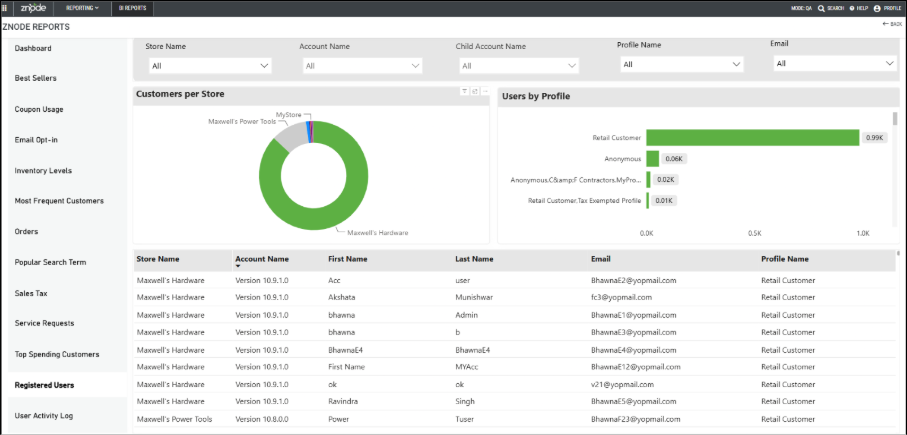
Enhanced the Power BI reports to provide Account Name visibility and filtering across multiple reports, enabling administrators and B2B users to analyze data at the account level.
This enhancement introduces Account Name and Child Account Name filters, along with Account Name columns in applicable reports, making it easier to identify, filter, and export account-specific information while preserving existing report functionality.
Key Enhancements
- Added Account Name and Child Account Name filters to supported Power BI reports.
- Introduced search functionality for both account filters to simplify account selection.
- Implemented dependent filter behavior between Parent and Child Accounts.
- Selecting a Parent Account displays only its associated Child Accounts.
- Selecting a Child Account automatically selects its associated Parent Account.
- Added Account Name columns to applicable report grids and included the Account Name in report exports.
- Displayed "NA" for records that are not associated with any account.
- Added support for standalone accounts, which appear only in the Account Name filter with the Child Account filter displayed as disabled ("NA").
- Enhanced Reports:
- Orders
- Registered Users
- Top Spending Customers
- Most Frequent Customers
- Best Sellers
- Coupon Usage
- Email Opt-In
- Popular Search Terms
- Sales Tax
- User Activity Log
- Updated report charts and grids to refresh dynamically based on the selected Account Name and Child Account filters.
- Included Order Number in the Best Sellers report grid.
- Improved the Inventory Levels report by filtering available Warehouses and Products based on the selected Store.
- Added the Child Account Name filter to the User Activity Log report.
- Preserved existing report calculations, charts, exports, sorting, rankings, and overall report behavior to maintain backward compatibility.
- Updated Power BI datasets and reporting models to support account-level reporting and filtering.
Native Data Exchange Library Items for Dynamics 365 Finance & Supply Chain (Phase 2)
Feature Overview
Commerce Connector now provides native multi-step data exchange support for Microsoft Dynamics 365 Finance & Supply Chain (FSC). Five pre-built native data exchanges are included with predefined mappings, allowing administrators to configure the connection credentials and execute the exchanges without manually creating mappings.
Key Enhancements
- Introduced two-step and multi-step native data exchange support for FSC integrations.
- Create Sales Order (Simple and Configurable product support)
- Create Account
- Create Customer
- Get Order History
- Get Order Details
- Included predefined mappings for all native data exchanges, eliminating the need for manual mapping configuration (custom attributes still require manual mapping).
- Simplified setup by requiring only the connection credentials and exchange configuration before execution.
- Added native support for retrieving order history and order details from FSC through APIs.
- Enabled real-time creation of Accounts, Customers, and Sales Orders in FSC using out-of-the-box multi-step data exchanges.
Current Limitations
- Only Simple and Configurable product types are supported for Sales Order creation.
- Bundled and Grouped product types are not supported in this release.
- Tax, Shipping Charges, Discounts, and Voucher/Coupon information are not included in the Sales Order integration.
- Bulk Order Import is not supported.
- Order History and Order Details are currently available through APIs only. Webstore support is planned for a future release.
- Tax and shipping processing within FSC remains dependent on the corresponding FSC configuration.
Custom Processor for Multistep Data Exchanges
Key Features
Users can now insert custom processing logic between steps in Multistep Data Exchanges, matching the capability previously available only in legacy two-step exchanges. This enables data transformation between input and output handlers.
For Developers Guide, refer this KB article: Commerce Connector Custom Processor Developer Guide
Introduction of Commerce Connector Dashboard
Feature Overview
A new Dashboard has been introduced in Commerce Connector to provide a consolidated view of the overall health and execution status of all configured data exchanges.
The dashboard enables administrators to quickly monitor execution activity, identify failures, analyze execution duration, and drill down into detailed execution history without navigating through individual data exchanges.
Key Enhancements
- Introduced a centralized Dashboard for monitoring all Commerce Connector data exchange executions.
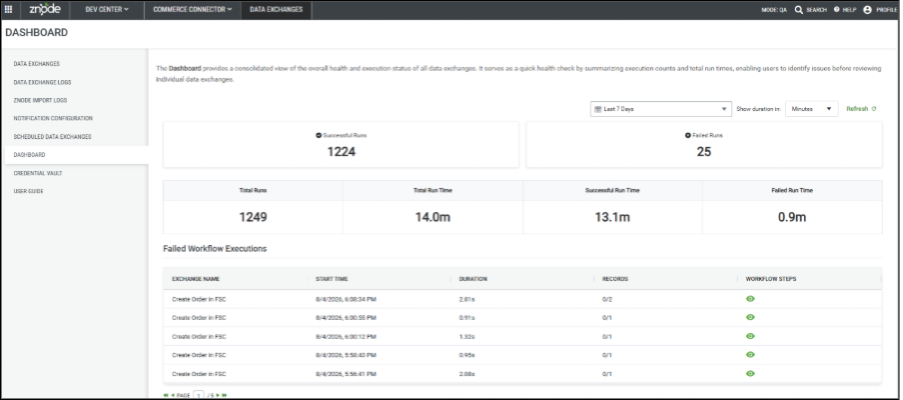
- Added Successful Runs metrics.
Successful Runs – Displays the total number of successfully completed executions for the selected time period.
Failed Runs – Displays the total number of failed executions for the selected time period.
Total Executions – Displays the total number of data exchange executions (successful and failed combined).
Total Execution Time – Displays the cumulative execution time for all executions.
Successful Execution Time – Displays the cumulative execution time for successful executions.
- Failed Execution Time – Displays the cumulative execution time for failed executions.
- Added Date Range filtering to view execution metrics for a selected time period.
- Added a Duration Unit selector to display execution durations in the preferred unit (for example, Minutes).
- Added Refresh functionality to retrieve the latest execution statistics without reloading the page.
- Introduced a Failed Workflow Executions section that displays recently failed executions, including:
- Exchange Name
- Start Time
- Execution Duration
- Records Processed
- Workflow Steps (View Details)
- Added drill-down capability from the dashboard:
- Selecting Successful Runs displays the execution log filtered to successful executions.
- Selecting Failed Runs displays the execution log filtered to failed executions.
- Added detailed Execution History for each execution, accessible through the View icon in the Workflow Steps column.
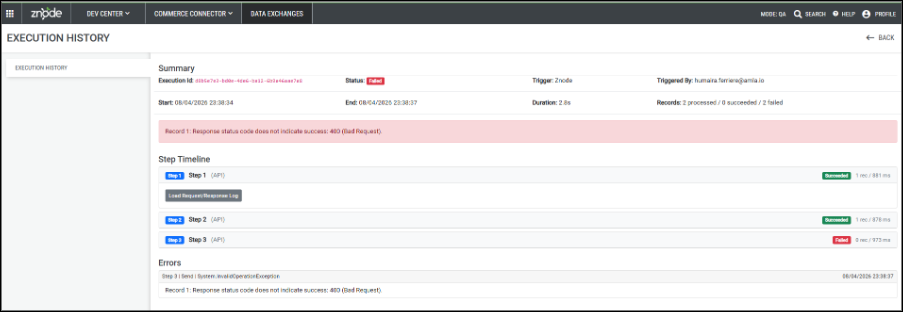
- The Execution History page provides:
- Execution summary, including Execution ID, Status, Trigger, Triggered By, Start Time, End Time, Duration, and Record Processing Summary.
- Overall execution error message (when applicable).
- Step-by-step execution timeline.
- Individual status for each workflow step.
- Request headers.
- Request body.
- Response payload.
- HTTP status codes.
- Step execution duration.
- Record processing information for each step.
- Enables administrators to quickly identify the exact workflow step that failed, review request and response payloads, and troubleshoot integration issues more efficiently.
Introduction of Credential Vault in Commerce Connector
Feature Overview
A new Credential Vault has been introduced in Commerce Connector to provide a centralized and secure location for storing reusable configuration values and secrets required by Data Exchanges.
Instead of hardcoding values such as API URLs, client IDs, client secrets, access tokens, or other environment-specific settings within individual transmission steps, administrators can now define them once as Global Variables and reference them across multiple Data Exchanges.
This simplifies configuration management, improves maintainability, reduces duplication, and helps secure sensitive information.
Key Enhancements
- Introduced a new Credential Vault screen under Commerce Connector.
- Added support for creating reusable Global Variables.
- Enabled storage of both plain text configuration values and sensitive credentials.
- Introduced Secret Variables for confidential information.
- Added search by Key or Description.
- Added support to edit Global Variables.
- Added support to delete Global Variables.
- Introduced a centralized repository to eliminate duplicate configuration values.
Variable Syntax:
{{Var.<VariableName>}}Add Global Variable
Administrators can create reusable variables by selecting Add Variable.
Each Global Variable includes the following information:
| Field | Description |
|---|---|
| Key | Unique identifier used to reference the variable within Commerce Connector. |
| Secret | Marks the variable as sensitive. Secret values are securely stored and hidden after being saved. |
| Value | URL, Client ID, API Key, Secret, Token, or any reusable configuration value. |
| Description | Optional description to help identify the purpose of the variable. |
Secret Variables
When the Mark As Secret (Value Will Be Hidden) option is selected:
- The variable is treated as confidential.
- The stored value is masked after saving.
- Secret values are never displayed in the Credential Vault listing.
- Secret variables can still be referenced during Data Exchange execution.
This Helps prevent accidental exposure of sensitive credentials.
Edit Global Variable
- Key
- Secret Flag
- Value
- Description
Any changes are automatically reflected wherever the variable is referenced.
Search and Management
Administrators can search using:
- Key
- Description
Listing Displays:
- Variable Key
- Stored Value (masked for secret variables)
- Secret Status
- Description
- Last Modified Date and Time
Variable Usage
Once created, Global Variables can be referenced throughout Commerce Connector using:
{{Var.VariableName}}Supported Locations:
- Endpoint URLs
- Request Headers
- Request Body
- Mapping Templates
This enables the same configuration value to be reused across multiple Data Exchanges without duplication.
Implement Standard Schema Markup Support for B2B Storefront
Feature Overview
Enhance the PLP/PDP JSON-LD structured data by adding the missing schema attributes required for the Product List Page.
Key Features
- PLP Schema Enhancement: Added the missing JSON-LD attributes required for the PLP ItemList/ProductList schema and aligned the implementation with the existing 9.x behavior.
- PLP/PDP Validation: Validated the applicable PLP and PDP scenarios to ensure the updated structured data does not impact existing functionality.
- Breadcrumb Schema: BreadcrumbList JSON-LD implementation is excluded from this ticket and will be handled separately under the dedicated GEO/breadcrumb implementation work.
- Organization & WebSite Schema: Retained the existing global behavior for Organization and WebSite schemas, which are expected to be rendered on pages such as PLP and PDP.
- LocalBusiness Schema: Reviewed the existing hardcoded address and priceRange values. Dynamic address population is not currently possible because the Portal Details API does not expose the required business address information.
- Maxwell’s Lifestyle Reference: Confirmed that the SocialMedia.tsx component responsible for this schema is not used in the current base implementation; therefore, the schema is not currently rendered and requires no changes as part of this ticket.
- JSON-LD / CSP Nonce Handling: Addressed the hydration warning caused by CSP nonce behavior by using suppressHydrationWarning on the JSON-LD script. This prevents React from reporting the expected server/client nonce mismatch while maintaining CSP functionality.
- Duplicate JSON-LD Investigation: Identified the previously observed duplicate JSON-LD script behavior related to nonce handling and reviewed the rendering flow to ensure the structured data implementation does not introduce unintended duplicate scripts.
- Breadcrumb Data Validation: Reviewed breadcrumb generation scenarios, including PLP-to-PDP navigation and Brand Details flows. Breadcrumb-specific behavior and server-side category/brand handling remain part of the separate breadcrumb implementation scope.
Order Approval Comments Visibility and Email Notification Enhancement
Feature Overview
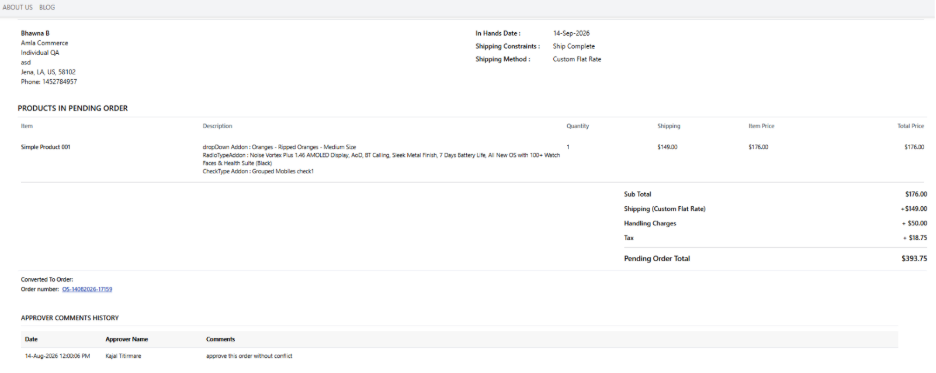
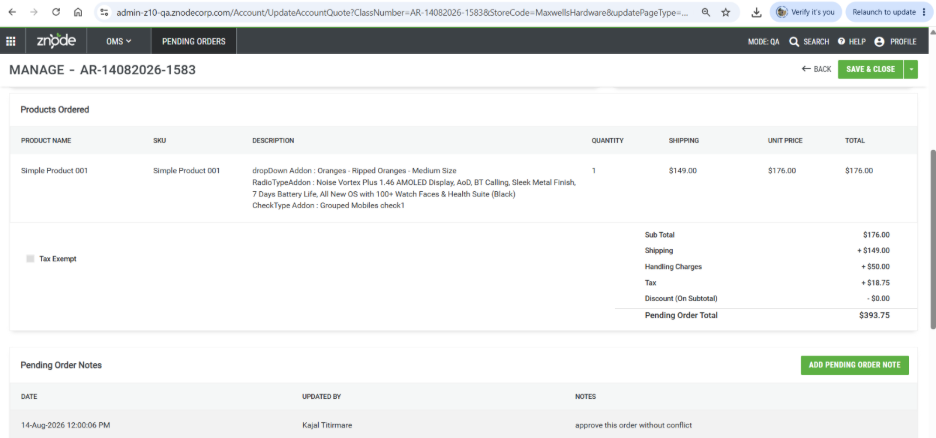
The Order Approval Comments Visibility and Email Notification Enhancement improves communication and order traceability by making approver comments available across the Storefront, Admin Console, approval workflow, and email notifications. Approver comments entered during order approval or rejection are automatically stored as part of the order history and made available to relevant users based on the approval process.
The enhancement also introduces the #ApproverComments# email macro, allowing approver comments to be included in supported order-related email templates. This provides consistent visibility of approval notes, rejection reasons, and order instructions across customer-facing experiences, administrative order management, and approval notifications, resulting in greater transparency throughout the order approval lifecycle.
Key Features
- Introduces the #ApproverComments# email macro for supported order-related email templates.
- Displays approver comments in My Account → Pending Orders → Manage Order.
- Maintains a complete Approver Comments History with date, approver name, and comments.
- Makes approver comments available to administrators within order management screens.
- Supports both single-level and multi-level approval workflows.
- Allows approvers to view comments entered by other approvers as part of the approval process.
- Includes approver comments in approval and rejection email notifications.
- Provides consistent comment visibility across the Storefront, Admin Console, approval workflow, and email communications.
- Improves communication, transparency, and traceability throughout the order approval process.
Promotion-Coupon Scalability Enhancement – Phase 1
Feature Overview
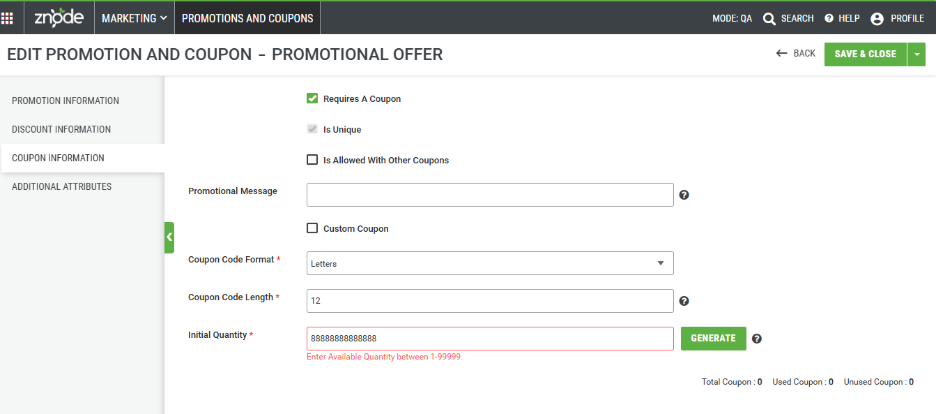
The Promotion-Coupon Scalability Enhancement – Phase 1 improves the management of unique promotion codes by increasing the generation limit to 99,999 codes per request. To support high-volume promotional campaigns, code generation is now performed at the database level, delivering improved performance, scalability, and reliability.
Administrators can easily review generated promotion codes through the Promotion Code grid, which provides visibility into coupon activity and allows all generated codes to be exported for marketing or operational use. To enhance usability when working with large datasets, the grid now supports pagination, displaying 10 records by default with options to view 20, 50, or 100 records per page. This enhancement streamlines large-scale coupon management while maintaining compatibility with existing promotion and coupon functionality.
Key Features
- Generate 1–99,999 unique coupon codes in a single request.
- Generate additional coupon codes for existing promotions without affecting previously generated codes.
- Automatically save promotion changes when generating coupon codes.
- Automatically persist generated coupon codes without requiring an additional Save action.
- View generated coupon codes in the Promotion Code grid.
- Track coupon metrics including Total, Used, and Unused Coupons.
- Export all generated coupon codes, including large datasets.
- Support custom coupon formats with prefixes and suffixes.
- Enable coupon generation through both Admin Console and API.
- Support pagination with page sizes of 10, 20, 50, and 100 records.
- Enforce validation for coupon quantity (1–99,999).
- Maintain compatibility with existing promotion and coupon functionality.
Redis Cache Key Generation & Memory Optimization
Feature Overview
Optimize Redis cache key generation by resolving an issue with the z-request-context header that caused unique cache keys to be generated for every API request. This resulted in continuous Redis key growth, increased memory consumption, and potential cache-layer instability during high-load scenarios.
Key Features
- Cache Key Generation Optimization: Updated z-request-context header handling to ensure proper verification and reuse of existing cache keys.
- Duplicate Key Prevention: Ensured only one cache key is created per API request context, preventing unnecessary Redis key generation.
- Empty Header Handling: Fixed the empty-header edge case that was contributing to duplicate and unique cache key creation.
- Redis Memory Optimization: Reduced Redis keys on the internal load testing server from 33,000 to 3,000, achieving approximately a 10x reduction.
- Improved Cache Stability: Significantly reduced Redis memory pressure and the risk of uncontrolled key growth and memory exhaustion during high-load scenarios.
Stock Notice Email Sign-up
Feature Overview
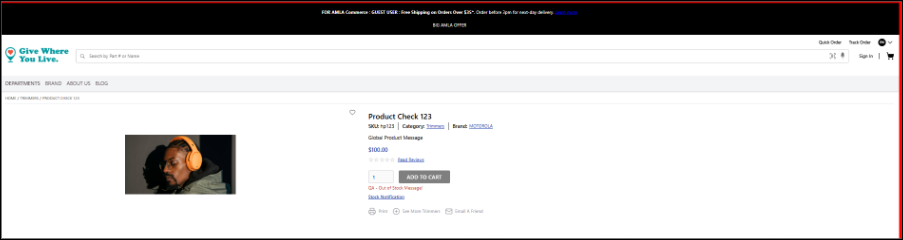
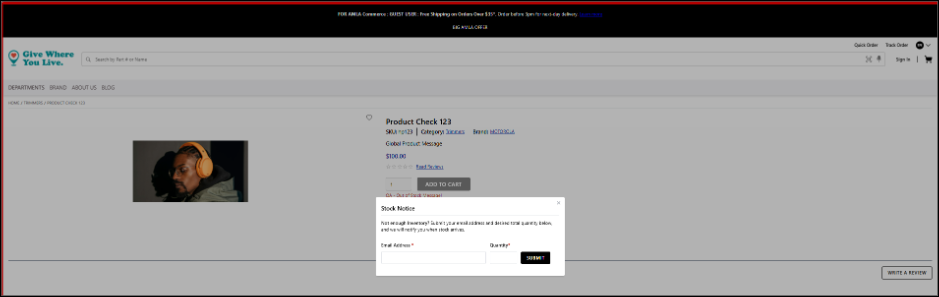
Introduced a Stock Notice Email Sign-up feature that allows customers to subscribe for inventory notifications when a product is out of stock and purchasing is disabled for out-of-stock products. Users can register their email address and desired quantity directly from the Product Details Page and receive an automated notification once sufficient inventory becomes available. This functionality supports guest and logged-in users, with email validation applied to all submissions.
Key Features
- Added "Stock Notification" subscription option for eligible out-of-stock products on the storefront.
- Supports inventory notifications for Simple, Grouped, and Configurable products. Bundle product support is excluded from this phase.
- Introduced store-level setting Enable Inventory Stock Notification under Warehouse Settings to control feature availability.
- Added automated inventory monitoring and email notification processing through scheduled Hangfire jobs.
- Notifications are sent only when the requested quantity is available in inventory.
- Created new email template SendWaitingListNoticeInInventory for
Handling Charges Tax Inclusion
Feature Overview
A new tax configuration has been introduced to provide greater flexibility in tax calculations by allowing handling charges to be included in taxable amounts. This enhancement ensures more accurate tax computation and compliance requirements across supported tax providers while maintaining backward compatibility with existing tax configurations.
Key Features
- Added "Stock Notification" subscription option for eligible out-of-stock products on the storefront.
Supports inventory notifications for Simple, Grouped, and Configurable products. Bundle product support is excluded from this phase.
Introduced store-level setting Enable Inventory Stock Notification under Warehouse Settings to control feature availability.
Added automated inventory monitoring and email notification processing through scheduled Hangfire jobs. Notifications are sent only when the requested quantity is available in inventory.
Created new email template SendWaitingListNoticeInInventory for customer stock availability notifications.
Added global settings to manage retention and cleanup of inventory subscription records, including:
- Deletion of already-sent notification records.
- Deletion of pending subscriptions that remain unfulfilled for a configurable period.
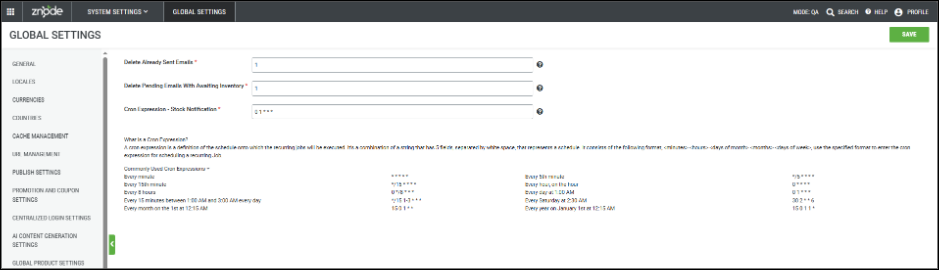
Added validation and controls to prevent duplicate notification processing after a notification has been sent or when product out-of-stock settings are changed.
Additional Notes- Stock notification availability is based on inventory from warehouses associated with the current store.
- Notifications are not sent for deleted, deactivated, obsolete, or unavailable catalog products.
- Feature respects existing storefront settings such as Login to See Pricing and Inventory.
Known Limitations- Inventory Stock Notification subscriptions do not currently support Dynamic Account Switching (catalog change scenarios) or Product Override functionality. Compatibility for these scenarios is planned for a future release.
Username Enhancement
Feature Overview
This enhancement introduces a significant update to user identity management across the Znode platform by separating Username and Email Address into two independent fields. Previously, the Username field was required to be in a valid email format and was also used as the user's email address. With this enhancement, users can now create and authenticate with a unique username that does not need to follow email formatting rules, while a dedicated Email Address field is used for all communications and notifications. Existing users continue to be fully supported without requiring any data migration or account changes.
Key Features
- Separate Username and Email Address Fields
- Username and Email Address are now managed as separate data elements throughout the platform.
- The existing Username/Email field has been renamed to Username wherever applicable.
- A new mandatory Email Address field has been introduced in screens where email was previously inferred from the Username.
- All system-generated emails, notifications, password reset emails, and user communications are now sent using the Email Address field exclusively.
- Enhanced Username Validation
- Usernames are no longer required to be email addresses and now support:
- Alphabetic characters (A-Z, a-z)
- Numeric values (0-9)
- Underscore (_)
- Hyphen (-)
- Period (.)
- Special characters including @, +, !, #, $, %, ^, &, *, (, ), and =
- Additional validation rules include:
- Username length must be between 5 and 100 characters.
- Usernames cannot contain spaces.
- Usernames cannot start with a special character.
- Usernames must remain unique across the platform.
- Usernames are no longer required to be email addresses and now support:
- Storefront Enhancements
- Registration Experience
- The registration form now contains separate Username and Email Address fields.
- Registration Experience
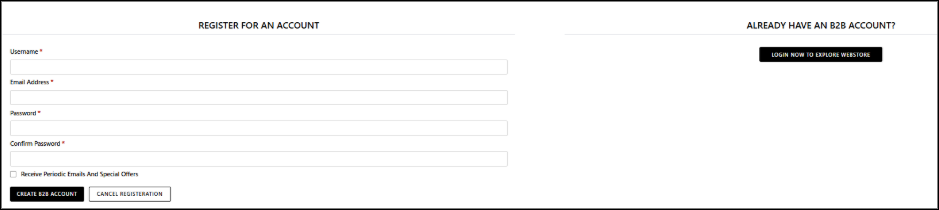
- Users can create accounts using non-email usernames while providing a valid email address for account communication.
- Existing duplicate Username validation continues to be enforced to prevent duplicate accounts.
- Guest Checkout account creation follows the same Username and Email Address behavior.
- Login Experience
- Login screens now display a Username field instead of Username/Email.

- Users can authenticate using usernames that are not in email format.
- Existing users whose usernames are email addresses can continue logging in without any changes
- Forgot Password
- Password recovery now uses Username lookup instead of email-formatted validation.
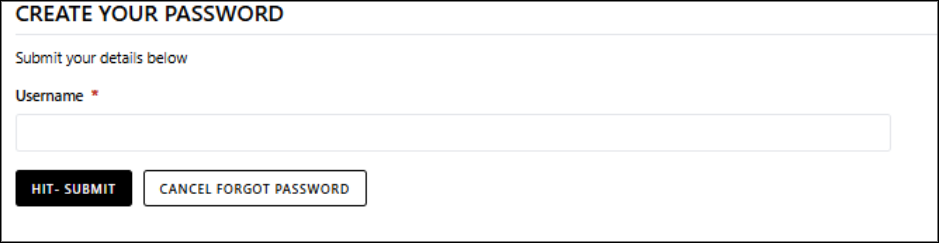
- Once the Username is validated, the password reset email is sent to the associated Email Address stored on the account.
- Profile Management
- Existing profile management functionality remains unchanged.
- Users can continue updating profile information while leveraging the new Username validation rules.
- Administrative Enhancements
- User Management
- The following areas now support separate Username and Email Address fields:
- Users
- Guest Users
- Account Users
- Sales Representatives
- Admin Users
- B-Store Users
- The following areas now support separate Username and Email Address fields:
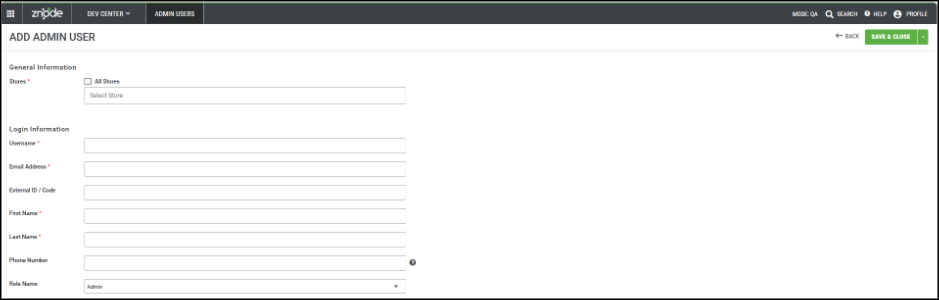
- Administrators can:
- Create users with non-email usernames.
- Maintain a separate email address for communications.
- Update usernames while preserving uniqueness validation.
- Continue using existing user management workflows with minimal disruption.
- Admin Authentication
- Admin login validation no longer requires usernames to be email addresses.
- Admin Forgot Password workflows have been updated to support username-based account lookup.
- Voucher Management Enhancements
- Voucher User Association
- Voucher customer information now displays Username | First Name Last Name instead of email-based user identification.
- Voucher history screens and filtering capabilities now operate using Username values.
- When creating users through voucher assignment workflows, separate Username and Email Address fields are supported.
- Import and Data Management Enhancements
- Customer Import
- Username email-format validation has been removed.
- New Username validation rules are enforced during import processing.
- Sales Representative Import
- Added mandatory Email Address column.
- Usernames are validated using the new Username standards.
- Import Validation
- Imports fail when Username validation rules are violated, ensuring consistency across all user records
- Customer Import
- API Enhancements
- User APIs
- APIs now support separate Username and Email Address properties.
- Request and response payloads have been updated to align with the new user model.
- Username validation rules are applied consistently across supported API endpoints.
- Backward Compatibility
- Existing users with email-based usernames continue to be supported.
- User APIs
- Authentication mechanisms support both legacy email-format usernames and newly created usernames.
Important Point
- Customers with custom integrations, imports, reporting, or authentication processes that assume Username and Email Address are the same value should review and update those customizations before adopting this enhancement.
Handling Charges Tax Inclusion
Feature Overview
A new tax configuration has been introduced to provide greater flexibility in tax calculations by allowing handling charges to be included in taxable amounts. This enhancement ensures more accurate tax computation and compliance requirements across supported tax providers while maintaining backward compatibility with existing tax configurations.
Key Features
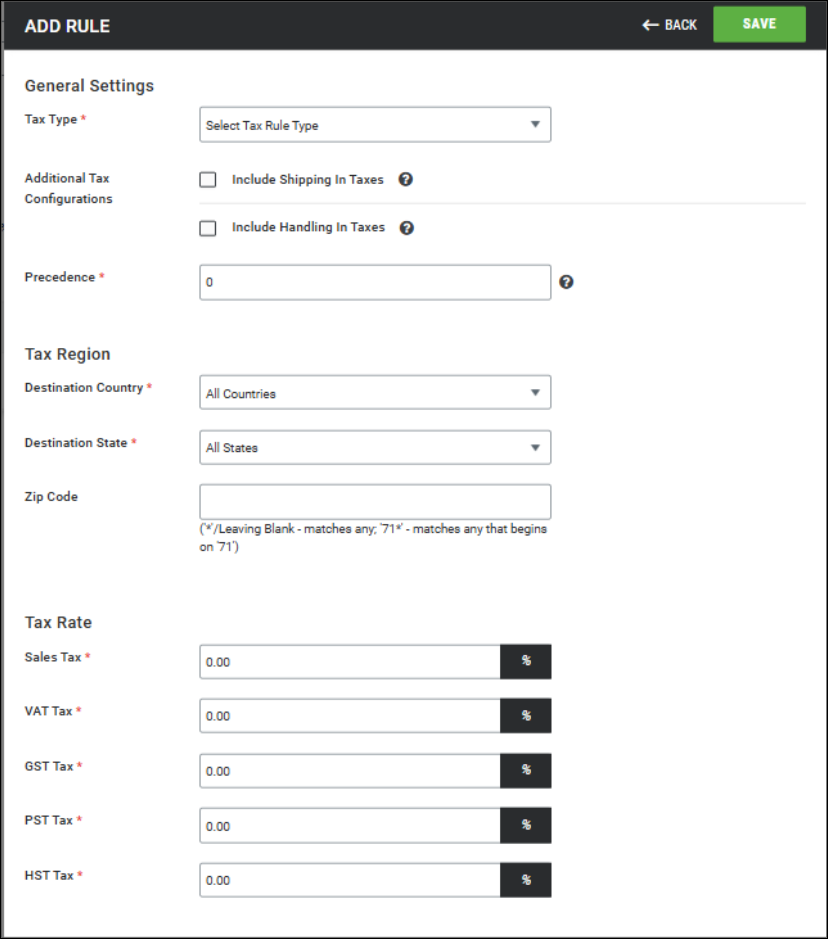
- Added a new "Include Handling In Taxes" option within Admin → System Settings → Taxes → Add/Edit Rule.
- Introduced an Additional Tax Configurations section to group:
- Include Shipping In Taxes
- Include Handling In Taxes
- Handling charges can now be independently included in tax calculations without impacting existing shipping tax configurations.
- When Include Handling In Taxes is enabled:
- Handling charges are included in tax calculations and submitted to the configured tax provider.
- Tax calculations are supported for Vertex, Avalara, and Sales Tax providers.
- The storefront displays a combined tax amount consisting of:
- Product Tax
- Shipping Tax (if applicable)
- Handling Tax (if applicable)
- Order, Refund & Return Behavior
- During Order Cancellation, handling tax is included in the refunded tax amount.
- During Returns, handling charges remain non-refundable; therefore, any tax associated with handling charges is also not refunded.
- Reporting
- Order reports now include taxes associated with handling charges as part of tax reporting totals.
- Backward Compatibility
- The new setting is disabled by default.
- Existing tax rules will continue to function without any changes.
- Historical orders and previously calculated taxes remain unaffected.
Important Points
- Tax exemption profiles and "Make Tax Exempt" scenarios continue to prevent tax calculation on handling charges when applicable.
- No changes have been made to handling charge calculation logic, tax rule precedence, or historical tax calculations.
NMI Additional Information – Store Call and Payment API Enhancements
Disclaimer
This enhancement is dependent on the following component versions. Deployment of these versions is mandatory to ensure additional order, customer, and line-item information is successfully propagated through the Webstore, Payment Manager, and NMI payment flow:
- Payment Manager Script Version:
- PaymentManager_1.1.7.js
- Webstore Version:
- 10.13.1.0
Feature Overview
As part of the NMI Gateway Integration enhancement, the store call and Payment Manager APIs have been updated to retain additional transaction context information within the NMI vendor processing flow. This enhancement ensures that richer order and customer information is available throughout the payment lifecycle, improving downstream processing, reconciliation, reporting, and troubleshooting capabilities.
Key Features
- The additional information now propagated includes:
- Product and line-item details
- Tax amount
- Shipping and handling charges
- Customer gateway profile information
- Additional applicable order-level metadata
- In addition, the cartLineItems mapping has been aligned between the Webstore request payload and the Payment Manager/C# request models, ensuring that product-level information is correctly preserved during request processing and is not lost during model binding or data transformation.
Payment Manager APIs
- The following Payment Manager APIs now support the additional transaction information:
- Verify API
- Authorize API
- Capture API
- The following Payment Manager APIs now support the additional transaction information:
- Backward Compatibility
- Existing payment flows remain unaffected.
- Optional fields continue to be handled gracefully when not present.
- No changes are required for existing integrations that do not utilize the additional information.
Important Points
Removed the Azure Related Keys From Global Settings
The following Azure fields in Global Settings → General Settings were used to purge Azure CDN cache. Since Znode has switched to Cloudflare CDN, these fields are no longer needed and are being permanently removed:
- Azure Client Id
- Azure Client Secret Id
- Azure Tenant Id
- Subscription Id
- Resource Groups
- AzureProfile
- AzureEndPoint
Display SKU Information in Admin Manage User Cart for Improved Product Identification
Enhanced the Admin > Manage User > User Cart page to display SKU information for products added to a user's cart.
With this update, the SKU is now displayed directly below the product name, providing better visibility and consistency across the Admin and Webstore experiences. This improvement helps administrators quickly identify cart items without requiring additional navigation or a separate SKU column.
Security Enhancement (SE)
Product Names with Scripts Display Correctly
Implemented configurable XSS validation for product attributes to prevent products containing malicious script content from being saved.
WYSIWYG-enabled Text and Text Area attributes are excluded from validation to support valid HTML content, and appropriate validation messages are displayed when restricted content is detected.
This prevents products with script-based names from appearing blank in product listings.
Performance Enhancements
Performance Enhancements for Indexed Database Lookups
Database query performance has been optimized by removing unnecessary ToLower() operations from indexed lookups, improving index utilization, reducing query execution time, and enhancing overall application responsiveness.
- Improved database query performance and index utilization.
- Enhanced application responsiveness through query optimization.
- Reduced database overhead by optimizing indexed search operations.
- Improved lookup performance for faster data retrieval.
Performance Enhancements for Product Detail Page (PDP) APIs
Optimized Product Detail Page (PDP) base APIs, including Published Product, Visual Editor, and SEO APIs, to improve response times and reduce overall page load time, resulting in a faster and more efficient product management experience.
Order Management Performance Improvements for Faster Page Loading
Implemented performance optimizations across the Order Management module to address slow page loading issues experienced throughout the application.
Improvements were made to underlying data retrieval and processing operations, reducing the time required to load order-related pages and execute common order management workflows.
These enhancements provide a faster, more responsive user experience when viewing, searching, and managing orders, particularly in environments with large order volumes.
List of Areas:
- Admin Order List
- Quotes List
Pending orders list
Pending payment list
Account list
Black Box Improvements
Product Information Management (PIM)
Z10-37921 | Catalog Product and Category Counts Fixed
Resolved an issue where catalog grids displayed zero product and category counts after catalog upload and publish. The catalog listing has been enhanced to refresh and display accurate product and category totals after upload and publish operations, ensuring administrators have a reliable view of catalog data and publish results.
System Settings
Z10-19929 | Checkout & Quote Validation for Deleted Shipping Configuration
Corrected an issue where shoppers could proceed with order or quote placement even when the associated Shipping Configuration Set had been deleted from Admin. Checkout and quote workflows now validate the configuration and display an appropriate message, preventing invalid transactions.
Z10-34363 | Configuration Reset No Longer Deletes Gateways
Removed gateway deletion logic during Shipping Configuration Set reset operations. This enhancement prevents unintended removal of payment gateway configurations and preserves existing system settings.
Z10-36931 | Voucher Import Database Error Resolved
Corrected a database error that occurred during voucher imports using valid CSV files. The import process now completes successfully and validates data as expected.
Z10-37014 | Attribute Default Value Import Validation Improved
Fixed an issue where invalid attribute codes were processed successfully during Attribute Default Value imports. The system now validates attribute codes and prevents invalid records from being imported.
Z10-37157 | Checkout Shipping Estimate Performance Optimization
Enhanced shipping estimate processing within Checkout APIs to improve performance and reduce response times during shipping calculations.
Z10-37275 | Custom API Root URI Persistence Fixed
Resolved an issue where previously removed Custom API Root URI values reappeared unexpectedly. Saved configuration changes are now retained correctly.
Z10-37394 | Product Association Import Default Value Handling
Corrected an issue where configured default values were not applied during Product Association imports. Imported records now reflect expected default settings.
Z10-37458 | Spreedly Payment Configuration Creation Fixed
Resolved an issue preventing administrators from creating new Spreedly Payment Configuration Sets. New configurations can now be created successfully.
Z10-37876 | Avalara CustomerCode Synchronization Corrected
Resolved an issue where updates to the CustomerCode in Znode were not being reflected in the AvaTax environment. The integration logic has been updated to ensure that the latest CustomerCode value is correctly synchronized with Avalara whenever customer information is updated in Znode.
Z10-37978 | Braintree Gateway Client ID Retrieval Enhancement
Enhanced payment processing by retrieving GatewayClientId information from the payment database for Braintree transactions when required. CustomerGatewayProfileId is now properly stored in the designated database table.
Dev Center
Z10-28434 | DeletePaymentAuthToken Recurring Job Stability Fix
Corrected a NullReferenceException occurring within the Hangfire DeletePaymentAuthToken recurring job. Scheduled jobs now execute reliably.
Z10-34211 | Standardized Validation Popup Messages
Enhanced validation messaging across popup dialogs to ensure users receive clear, consistent, and actionable feedback.
Z10-36284 | Custom Tables Multi-Delete Functionality Fixed
Resolved an issue preventing multiple records from being deleted simultaneously within Custom Tables. Bulk deletion now works as expected.
Z10-36497 | Improved Cursor Behavior on Confirmation Popup
Corrected the cursor behavior for the Cancel button on the Remove Data Exchange Step confirmation dialog to improve usability.
Z10-36732 | Improved Run Action Icon and Tooltip
Enhanced the Legacy ERP Connector Touch Point interface by improving the Run action icon and tooltip for better user understanding. The new Play icon is displayed with the tooltip "Run" for the action that triggers the scheduler.
Z10-37122 | Data Exchange Source Format Update Fixed
Resolved an issue where Source Format changes from CSV to JSON were not applied when a Data Exchange was triggered by Catalog Publish events.
Z10-37629 | Data Exchange Header Parameter Support Improved
Corrected an issue preventing Step 1 Access Token responses from being used as header parameters in subsequent Data Exchange steps. Header parameter mapping now works correctly across steps.
Z10-37640 | Placeholder Syntax Consistency Enhancement
Aligned Data Exchange placeholder behavior and documentation to improve consistency between UI configuration and Knowledge Base examples.
Marketing
Z10-35525 | Product Type Display Consistency Improved
Corrected inconsistent Product Type formatting within the Associate Products popup for Product Highlights. Product types are now displayed in a consistent format across all records, improving readability and providing a more uniform user experience.
Z10-35726 | SEO Setup Default Store Selection Standardized
Corrected and aligned default store selection behavior across Product, Category, and Content Page SEO management screens. Store selection behavior is now standardized across all SEO setup areas, providing a consistent and predictable experience when managing SEO settings for multiple stores.
Z10-35769 | Relevant Boost & Bury Suggestions Displayed
Enhanced Boost & Bury functionality to display suggestions only for applicable searchable attributes. Suggestions are now filtered based on the selected searchable attribute, improving accuracy, usability, and search merchandising efficiency.
Z10-36149 | SEO Content Page Store Filter Fixed
Resolved issues affecting the Store dropdown and Search Reset functionality within SEO content pages. Filtering and reset behavior now correctly refresh and display SEO content records based on selected store and search criteria.
Z10-36270 | Category Associations Saved Correctly
Resolved an issue where categories were not saved or displayed properly in Percent Off Category promotions. Category associations are now saved and displayed as expected.
Z10-36274 | Promotion Save Error After Bulk Association Fixed
Corrected a generic error encountered when saving promotions after associating large numbers of records. Validation has been added to limit selections to a maximum of 1,000 IDs at a time across Products, Categories, Catalogs, Brands, and Shipping Methods. For BOGO promotions, separate validation limits Product, Category, or Brand selections to 1,000 items independently within both Buy One (BO) and Get One (GO) sections.
Z10-36328 | Promotion Listing Navigation Corrected
Resolved an issue where browser back navigation caused promotion listings to display incorrect results. Navigation behavior has been improved to accurately retain and display the user's previous context and selections
Content Management System (CMS)
Z10-34903 | Blog Save Error Resolved After Image Removal
Corrected an issue where an error occurred when removing a blog image and saving the blog. Content updates now save successfully without requiring the image to remain attached.
Z10-36166 | Restricted CMS Pages Excluded from Search Counts
Resolved an issue where restricted CMS pages were included in storefront search result counts despite user access limitations. Search CMS Content Page counts now respect User Profile restrictions and only display results for CMS pages accessible to the selected user profile.
Z10-36311 | Carousel Display Order Saving Fixed
Corrected an issue preventing Display Order values from being saved after invalid input was corrected. Validation and save logic have been improved to recognize corrected entries properly, allowing carousel display order changes to be saved successfully without additional rework.
Accounts & Users
Z10-36658 | B2B Account Name Retention Fixed
Resolved an issue where first and last names were removed after saving associated Webstore user information. Customer name details are now preserved correctly, ensuring account information remains intact after user updates.
Z10-36790 | Username Field Displays Correct Value
Corrected an issue where the Username field displayed customer names instead of the actual username. The account details page now consistently displays the correct username throughout the Admin interface.
Z10-37247 | User Lockout Threshold Increased
Enhanced account security settings by allowing a higher number of failed password attempts before a user account is disabled. This provides greater flexibility while maintaining security and helps reduce unnecessary account lockouts caused by accidental login failures.
Z10-37665 | Incorrect Account Disablement Fixed
Corrected an issue where user accounts were disabled after a single failed login attempt. User status now remains Enabled until the configured maximum number of incorrect login attempts is reached and is displayed as Disabled only after the threshold has been exceeded.
Z10-37785 | Billing Account Number Requirement Corrected
Corrected an issue where Billing Account Number was incorrectly enforced as a mandatory field. The validation has been updated to align with the intended business rules, allowing account records to be managed without requiring this value when it is not applicable.
Z10-37855 | Duplicate User Detection Improved
Resolved user synchronization issues where records were simultaneously identified as both missing and duplicate users. User matching and duplicate detection logic have been enhanced to accurately identify existing records, eliminate conflicting validation results, and improve overall user data integrity.
Order Management System (OMS)
Z10-32812 | Order Total Recalculation Corrected
Resolved discrepancies in order totals when order statuses were changed and saved. Pricing, taxes, shipping charges, and discounts are now preserved
DAM
Z10-28660 | Default Image Fallback for Invalid External URLs
Resolved an issue where products displayed broken images when an invalid External Base URL was configured. The image rendering process has been enhanced to automatically fall back to the configured default product image whenever an external image source is unavailable, ensuring products continue to display a valid image and maintaining a consistent storefront presentation.
Z10-30519 | Special Character Support for Uploaded Images
Corrected an issue where special characters in image names were replaced with question marks after upload. File names now retain supported characters correctly, improving file management and consistency.
Z10-31995 | Product External Image Association Error Corrected
Resolved an issue where a failure message appeared when assigning external images to products despite successful operations. Validation messaging has been corrected to accurately reflect the outcome of image association actions.
Z10-33635 | DAM Image Selection Navigation Improved
Resolved an issue where users were redirected back to the Product Image field before DAM images were fully loaded. Users can now complete image selection without interruption, improving the media selection experience.
Z10-35268 | Unsupported JSON Files Removed from DAM Explorer
Corrected an issue where unsupported .json files appeared within the DAM Media Explorer. Unsupported file types are now filtered appropriately to provide a cleaner and more relevant browsing experience.
Z10-36541 | Create DAM Folders from PIM Image Selection
Enhanced DAM usability by allowing administrators to create folders directly from the PIM Browse from DAM experience. This streamlines media management workflows by eliminating the need to leave the product image selection process.
Z10-37218 | External Media URL Length Optimization
Updated External Media Settings URL fields to use a controlled database length, improving data consistency, storage efficiency, and long-term maintainability.
Reporting
Z10-37400 | Full KPI Values Available on Hover
Enhanced reporting dashboards by displaying fully formatted Revenue, Tax, and Shipping Cost values within hover tooltips. Users can now quickly view exact KPI amounts without leaving the dashboard, improving visibility into financial performance and overall data readability.
Other
Z10-29931 | Files Upload API Documentation & Functional Corrections
Resolved multiple issues impacting the V2 DAM Files Upload API, improving both functionality and documentation accuracy. These enhancements provide a more reliable integration experience and help developers successfully implement DAM file upload functionality with greater confidence.
Z10-30767 | Product Override Full-Text Search API Fixes
Corrected multiple functional issues affecting Product Override search results and endpoint behavior. Search processing
Stores
Z10-32434 | Store Grid Record Count Corrected Resolved an issue where the Store Grid displayed inaccurate record counts. Record totals now correctly match available results. Z10-33575 | Test Email Settings Popup Scroll Fix Corrected an issue where the background page remained scrollable while the Test Email Settings popup was open. Modal behavior now functions correctly.
Z10-37578 | SMTP Configuration Functionality Restored Resolved an issue preventing SMTP functionality from working correctly. Email communication now processes successfully. Open-Source Enhancements and Fixes Z10-32835 | Add to Cart Confirmation Popup Restored Corrected an issue where the Add to Cart confirmation popup did not appear when products were added from product carousels. The cart interaction behavior has been updated to consistently display the confirmation popup regardless of where the product is added from, providing immediate feedback and a more seamless shopping experience.
Z10-35843 | Improved Back Navigation from Order Details Enhanced navigation behavior so users return to their previous context when viewing Order Details from the Thank You page.Back navigation returns to the previous user action/context when accessing Order Details from the "Thank You order receipt" pageNow, when the order is accessed from the "Thank You order receipt" page, it returns to the blank cart
Z10-36012 | Sales Price of $0.00 Displayed Correctly Resolved an issue where PDP pages failed to display a Sales Price configured as $0.00. Pricing is now shown consistently across storefront pages. The pricing engine has been updated to consistently recognize and display valid zero-dollar sales prices across PDP, cart, and related storefront experiences.
Z10-35868 | Consistent Filter Persistence Across Admin Pages Improved filter persistence and Clear All behavior to provide a consistent experience across list pages. The filtering experience has been standardized to provide consistent behavior across list pages, making it easier for administrators to search, manage, and navigate records efficiently. Z10-36582 | Order Date NotOn Filter Corrected Resolved an issue where Order History results incorrectly included records matching an excluded date. The filter logic has been corrected to properly exclude orders associated with the selected date, ensuring more accurate order history filtering and search results.
Z10-36706 | UI Label Formatting Corrected Removed an unnecessary colon from the user interface to improve label consistency. The label formatting has been updated to align with established UI standards, resulting in a cleaner and more consistent user experience throughout the storefront.
Z10-37439 | Replacement Product Navigation Fixed Corrected an issue where selecting a replacement product for an obsolete item caused the PDP to remain in a loading state. Navigation and product-loading logic have been corrected to ensure replacement products load successfully, enabling shoppers to seamlessly transition from obsolete products to their recommended alternatives.