
Release Notes / Version 10.8.0.0 / Mar 04, 2026
Highlights
Release Information
The Znode 10.8.0.0 release introduces new features, enhancements, performance upgrades, and bug fixes.
Version Note:
To ensure the new feature functions as intended, using the latest version of the Storefront is recommended. Older versions may support the feature partially or could lead to limited functionality or operational inconsistencies.
Disclaimer
Temporary Disablement of Promotions, Coupons, and Vouchers Management on the Manage Order Screen. (Continued from Previous Version)
- In this release, the ability to add, manage, or modify promotions, coupons, and vouchers has been temporarily disabled on the Manage Order screen in the Admin Console. While promotions and coupons applied during order creation will still be visible on the Manage Order screen, the options to add new promotions or remove existing ones will not be available. This functionality will be re-enabled in a future update.
Breaking Change
- Alternatively, CSP settings can be modified in:
- packages\constants\src\headers.ts
- After making the changes, deploy the latest storefront build for the updates to take effect.
What’s New
Publish Enhancements
- Product Publish – Performance & Visibility Improvement
- Previously, publishing a product could take some time, especially when the product was associated with multiple catalogs. During this process:
- There was no clear indication of progress.
- It was difficult to determine whether the publish was still in progress, completed successfully, or stuck.
- Products associated with multiple catalogs required publishing in each catalog, increasing the overall publish time.
- What’s New?
- The Product Publish experience has been enhanced to provide better visibility and confidence during the process:
- New Progress Bar with Real-Time Status Updates
- The progress bar now displays the following stages:
- Product Workflow
- Product Publish Initiated
- Collecting Product Data
- Collecting Category Data
- Index Creation Initiated
- Processing Product: Completed 1 of 1
- Cloning Index For Preview
- Alias Switched To New Index
- Cache Cleared (Redis Notified)
- Publish Completed Successfully
- This allows administrators to:
- Track exactly where the product is in the publish cycle.
- Identify if the process is progressing as expected.
- Quickly determine if a publish appears to be stuck.
- Receive clear confirmation once publishing is completed
- The progress bar now displays the following stages:
- Improved Transparency for Multi-Catalog Products
- Enhanced visibility provides better clarity on publish duration, especially when a product is associated with multiple catalogs and must be processed across each one.
- New Progress Bar with Real-Time Status Updates
- The Product Publish experience has been enhanced to provide better visibility and confidence during the process:
- Previously, publishing a product could take some time, especially when the product was associated with multiple catalogs. During this process:
- Catalog Publish – Enhanced Progress Visibility
- Previously, catalog publishing included a progress bar; however, it did not provide detailed stage-level visibility. During this process:
- There was no clear indication of the specific stage being executed.
- It was difficult to determine what operation was currently in progress or whether the publish was potentially stuck.
- For large catalogs with a high volume of products, limited visibility made it challenging to understand processing progress and overall publishing status.
- What’s New
- The existing progress bar has been enhanced to display detailed publishing stages, providing clearer and more granular visibility throughout the process.
- The progress bar now displays the following stages:
- Catalog Publish Initiated
- Collecting Catalog Data
- Collecting Product Data
- Index Creation Initiated
- Processing Products: Completed 500 of 28,774
- Cloning Index For Preview
- Alias Switched To New Index
- Cache Cleared (Redis Notified)
- Publish Completed Successfully
- This enhancement enables administrators to:
- See exactly which stage the catalog publish is in.
- Track product processing counts in real time.
- Better assess whether the publish is progressing as expected.
- Receive clear confirmation once publishing completes successfully.
- The progress bar now displays the following stages:
- The existing progress bar has been enhanced to display detailed publishing stages, providing clearer and more granular visibility throughout the process.
- Previously, catalog publishing included a progress bar; however, it did not provide detailed stage-level visibility. During this process:
- Create PIM Index – Progress Visibility Enhancement
- Previously, there was no progress bar available to track the Create PIM Index process. During this process:
- There was no visibility into the current stage of index creation.
- It was difficult to determine whether the process was in progress, completed successfully, or potentially stuck.
- With this release, a progress bar has been introduced to provide clear visibility into the index creation workflow.
- Real-Time Status Updates
- The progress bar now displays the following stages:
- Index Creation Initiated
- Creating Catalog Index
- Creating New Elasticsearch Index
- Rebuilding Catalog Index
- Switching Alias to New Index
- Index Creation Completed Successfully
- This enhancement provides better transparency and allows administrators to confidently monitor the complete index creation process from start to finish.
- The progress bar now displays the following stages:
- Previously, there was no progress bar available to track the Create PIM Index process. During this process:
Extend “Save Card” and “Skip CVV” Support to All Credit‑Card‑Enabled Gateways (Previously Limited to CyberSource)
- Feature Overview
- This release enhances the Spreedly payment integration in Znode by adding configurable controls for saved cards and CVV requirements.
- It reduces checkout friction for repeat customers while maintaining secure, PCI-compliant, token-based payment processing by allowing CVV to be required only during the initial card save, based on admin configuration.
- Not applicable to Stripe Payment Intents - Affirm payment gateway.
- Key Features:
- Configurable Saved Card Support
- Administrators can now control whether customers are allowed to save card details during checkout.
- New Enable Save Card flag at the Spreedly payment method configuration level
- Controls visibility and availability of the “Save this card for future use” option
- Default value: Yes
- Administrators can now control whether customers are allowed to save card details during checkout.
- Configurable CVV Requirement for Saved Cards
- Administrators can configure whether CVV is required for transactions made with saved cards.
- New Skip CVV for Saved Cards flag
- Allows CVV to be skipped for subsequent transactions using saved cards
- Default value: No
- Applicable only when Enable Save Card = Yes
- Administrators can configure whether CVV is required for transactions made with saved cards.
- Improved Checkout Experience
- Reduces friction for repeat customers by eliminating unnecessary CVV entry
- Aligns with token-based payment best practices
- Preserves existing behavior when CVV enforcement is required
- Security & Compliance
- Card data is tokenized via Spreedly
- CVV is used only for authorization and is never stored
- No sensitive card data is stored in Znode
- Fully compliant with PCI and security standards
- Configurable Saved Card Support
External ID Added as a Column in OMS Orders Listing
- Feature Overview
- The Orders listing page in the Znode Admin OMS has been enhanced to include the External ID as a visible column.
- This improvement enables faster identification of orders that have not yet synchronized with the ERP system, allowing the customer’s team to review order status at a glance without needing to open each order individually.
- This update streamlines monitoring workflows and improves operational efficiency
Scheduled Data Exchange Configuration – Show Separately
- Feature Overview
- A new Scheduled Data Exchange configuration has been introduced to separate scheduler management from the core Data Exchange setup.
- This enhancement provides centralized visibility and independent control over scheduled executions without impacting existing Data Exchange functionality.
- Key Features
- Dedicated Scheduled Data Exchanges Tab
- New tab added to the Data Exchange page.
- Displays all enabled scheduled data exchanges in a centralized list view.
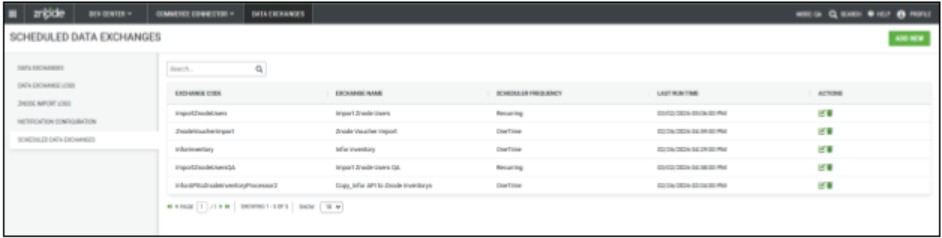
- Centralized List View
- Columns: Exchange Code, Exchange Name, Last Run Time, Type (One Time / Recurring), Actions.
- Actions available: Edit and Delete (with confirmation).
- Create Scheduled Data Exchange
- Add a new option to configure scheduling.
- Data Exchange selection with search popup (enabled exchanges only).
- Frequency options:
- One Time (Run Date, Run Time)
- Recurring (Cron Expression)
- Save with validation or Cancel without saving.
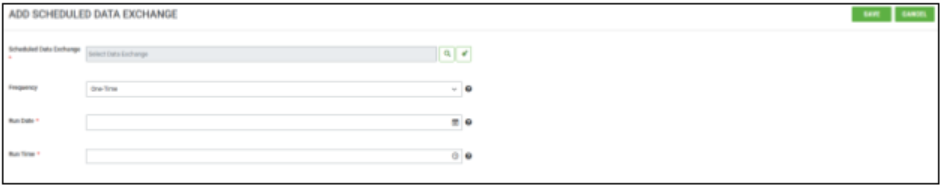
- Edit & Delete Support
- The edit screen displays the Data Exchange name in the header.
- Confirmation prompt required before deletion
- UI Update
- Scheduled column removed from the main Data Exchange grid.
- UI aligned with Znode design standards.
- Dedicated Scheduled Data Exchanges Tab
Paginated API Data Aggregator
- Feature Overview
- We have introduced a Paginated Data API Aggregator to simplify integration with third-party ERP and external APIs that return data in paginated formats.
- This enhancement allows users to configure and control how paginated data is retrieved directly within Source API configurations, eliminating the need for custom pagination handling and reducing integration complexity
- Key Features
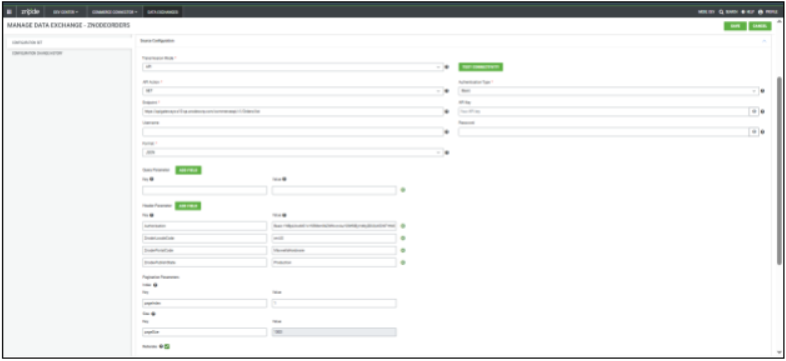
- Configurable Pagination Controls
- Define Page Size and Starting Page Number directly in the Source configuration.
- Reiterate Flag for Iterative Fetching
- Enable or disable automatic pagination using a simple toggle:
- OFF → Single API call
- ON → Iterative data retrieval until completion
- Enable or disable automatic pagination using a simple toggle:
- Automatic Data Aggregation
- When iteration is enabled, data from multiple pages is automatically consolidated into a single dataset.
- Flexible Termination Conditions
- Supports multiple end-of-data detection methods, such as an empty response, a total count reached, or API indicators (e.g., hasMore = false).
- Partial Success Handling
- If pagination fails mid-way, successfully retrieved data can still be processed, with clear logging and visibility.
- If pagination fails mid-way, successfully retrieved data can still be processed, with clear logging and visibility.
- Configurable Pagination Controls
Validate Scheduled data exchanges
- Feature Overview
- This release includes important fixes and validations to improve the reliability and behavior of scheduled Data Exchanges, ensuring better control over job execution and scheduler state management.
Show the Exchange code column under the data exchange logs
- Feature Overview
- To improve visibility and the ease of identifying data exchanges, an enhancement has been made to the Data Exchange Logs view.
- Key Update
- Exchange Code Column Reordered. The Exchange Code column is now displayed before the Exchange Name column in the Data Exchange Logs grid.
Conditional Banner Sliders
- Disclaimer
- To use this feature, updating the webstore is mandatory.
- The required changes for the webstore have been completed in the following files:
- packages/agents/src/widget/widget.ts
- packages/clients/src/znode-client/V2/base.ts
- packages/clients/src/znode-client/V2/multifront-types.ts
- packages/clients/src/znode-client/V2/web-store-widgets.ts
- packages/page-builder/src/utils/cache.t
- Since all modifications are contained within these files. Updating only the files listed above is sufficient to enable the feature.
- If the webstore is not updated, there will be no impact or discrepancies on the existing banners. They will function as they are with no disruptions.
- Please note that after applying the Blackbox update, an additional field will appear on the Manage Banner screen. This field is “Show Banner For”, which is set to All Users (Default).
- However, any changes made to this attribute — even after publishing the banner — will not take effect unless the Webstore update is completed
- Feature Overview
- The platform now supports targeted banner visibility based on Customer Accounts and User Profiles. Previously, banners were displayed to all users, limiting personalization and reducing effectiveness. With this enhancement, administrators can configure banners to appear only for selected accounts, account types, or user roles while still respecting start and end dates.
- This enables more relevant messaging, improves customer engagement, and supports use cases such as loyalty promotions and role-specific announcements.
- Key Features
- Admin Changes and Configurations
- Introduction of Show Banner For Attribute
- A new attribute is introduced for Banner named “Show Banner For”.
- Attribute is a required attribute with the following values:
- All Users (Defaults)
- Accounts
- User Profiles
- Changing the value of Show Banner For dynamically controls the visibility of dependent configuration fields in the Admin Console.
- When Accounts is selected, the dependent field is
- Select Accounts
- When User Profiles is selected, the dependent field is
- Select User Profiles
- When Accounts is selected, the dependent field is
- Behavior of Show Banner For - Values
- All Users(Default
- When Show Banners For = All Users, the Banner is visible to all the Znode Users without any limitations.
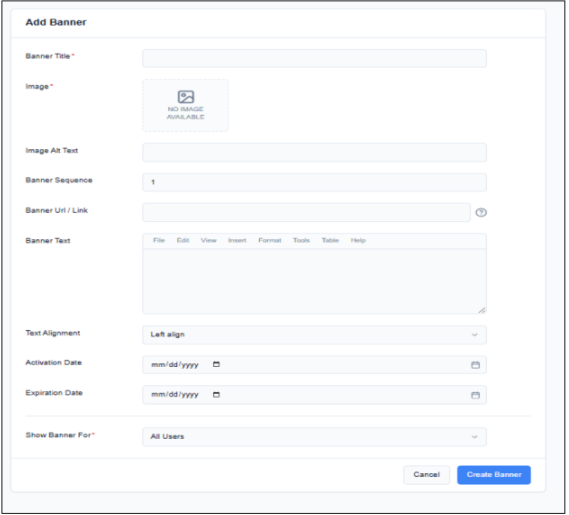
- When Show Banners For = All Users, the Banner is visible to all the Znode Users without any limitations.
- Accounts
- When Show Banners For = Accounts, the system displays the multi-select attribute Select Accounts.
- Select Account Functional Behavior:
- Multi-Select Attribute that displays the following values:
- All Accounts (Checkbox)
- List of all the Accounts in Znode Accounts
- Admin can either select All Accounts or one or more Accounts (similar to the UI in Promotions and Coupons).
- Admin can search for a specific Account using the account name.
- Admin can:
- Select Multiple Accounts
- Remove Previously Selected Accounts
- The system validates that at least one Account is selected before allowing the Banner to be saved. If left blank throws a validation message below the field: “Please select at least one Account”.
- Banner Visibility Rule:
- A banner configured for Selected Accounts displays only if the logged-in user belongs to one of the selected accounts.
- If no matching account exists, the banner is not displayed to the Shopper.
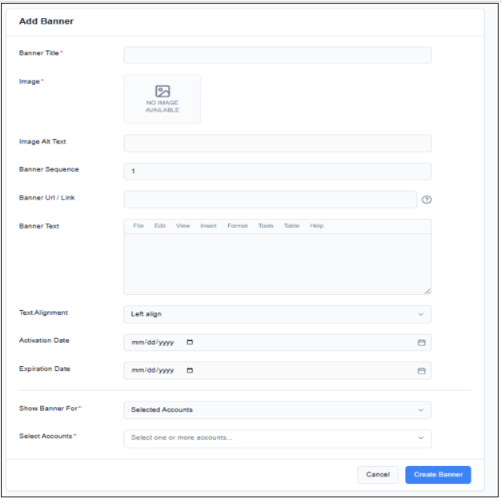
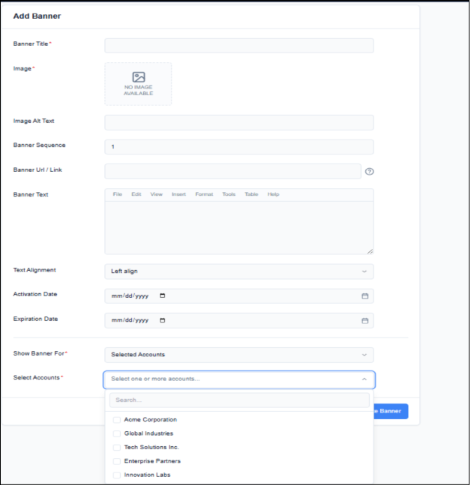
- Multi-Select Attribute that displays the following values:
- User Profiles
- When Show Banners For = User Profiles, the system displays the multi-select attribute Select User Profiles.
- Select Account Functional Behavior:
- Multi-Select Attribute that displays the following values:
- All User Profiles (Checkbox)
- List of all the Accounts in Znode Accounts
- Admin can either select All User Profiles or one or more User Profiles (like the UI in Promotions and Coupons).
- Admin can search for a specific User Profile using Profile Name.
- Admin can:
- Select Multiple User Profiles
- Remove Previously Selected User Profiles
- The system validates that at least one User Profile is selected before allowing the Banner to be saved; if left blank throws a validation message below the field “Please select at least one User Profile”.
- Banner Visibility Rule:
- A banner configured for Selected User Profiles displays only if the logged-in user belongs to one of the selected User Profiles.
- If no matching User Profile exists, the banner does not display to the Shopper.
- Only the Default User Profile is respected in this case.
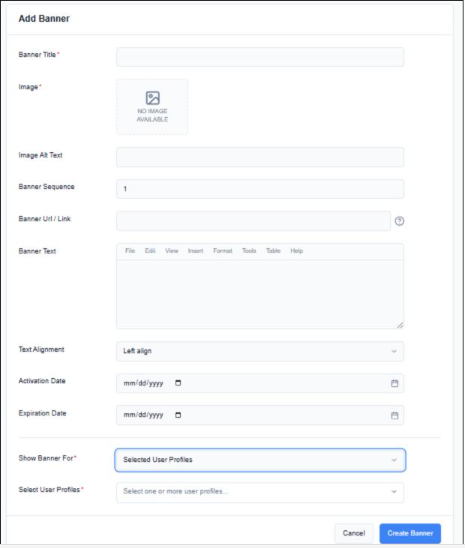
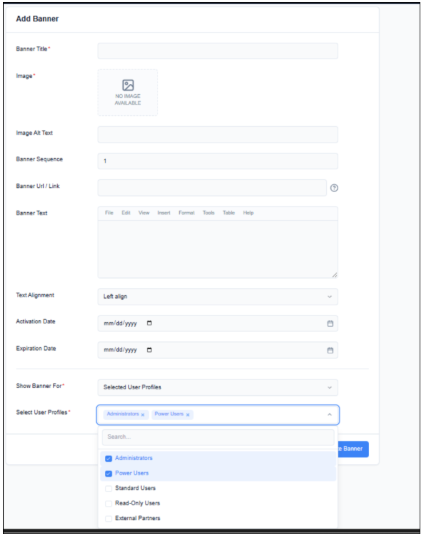
- Banner Configuration and Display Logic (Admin Console/Storefront/B Store Behavior) Banner Configuration in CMS >> Store Experience
- The configuration of Banner Slider works as is.
- If the Banner Slider is configured with the Store/Portal, then the following entities are checked:
- Shopper’s Account
- Shopper’s User Profile
- Display Logic:
- The system evaluates banner eligibility at runtime whenever banners render, i.e, when the user logs in, the system checks for the following:
- Portal
- Shopper’s Account
- Shopper’s User Profile
- The system evaluates banner eligibility at runtime whenever banners render, i.e, when the user logs in, the system checks for the following:
- Based on the configurations, the above data is used to display the Banner/Banner Slider.
- Banner filtering occurs in this order:
- Validate that banners are within its active date range.
- Evaluate Show Banner for targeting rules.
- Match banner criteria against the user Account or the User Profile
- No Banner is displayed unless the Show Banner For rules match
- If none of the banners in a Banner Slider match the Show Banner For rules, then the complete Banner Slider should not be displayed in the Storefront/B Store.
- Multi-Select Attribute that displays the following values:
- All Users(Default
- Introduction of Show Banner For Attribute
- Admin Changes and Configurations
Boost and Bury – Keyword Autocomplete Enhancement
Feature Overview
- The Boost and Bury feature has been enhanced to improve search accuracy and ElasticSearch performance during keyword-based product selection.
- Previously, when entering a minimum of three characters in the keyword field, the system would auto-populate products containing those characters anywhere within the product name or keyword.
- With this update, the autocomplete logic has been refined to return only those products whose names or keywords start with the entered text.
- Example
- Previous Behavior:
If a user entered wal, the dropdown would display products such as- Walnut Table
- Sidewall Panel
- Stone Wall Decor
- (In this case, results included products where wal appeared at the beginning, middle, or end of the word.)
- Updated Behavior:
- If a user enters wal, the dropdown will now display only products such as:
- Walnut Table
- Wall Shelf
- Products like Sidewall Panel will no longer appear, as wal does not occur at the beginning of the word.
- If a user enters wal, the dropdown will now display only products such as:
- Previous Behavior:
Key Improvements
- Improved ElasticSearch query efficiency
- More precise and relevant autocomplete results
- Reduced irrelevant product suggestions
- Faster response time during keyword search
Security Enhancements
Strengthened Content Security Policy
- To improve application security and reduce exposure to Cross‑Site Scripting (XSS) risks, the Content Security Policy configuration has been updated to remove the use of unsafe-inline and unsafe-eval directives. These directives previously weakened script execution controls and could allow malicious code injection.
- The updated CSP now enforces stricter script‑loading rules, ensuring that only trusted and explicitly authorized resources are executed. This change significantly enhances protection against XSS and other client‑side attack vectors.
Strengthened Cart and Checkout Integrity Controls
- The cart and checkout processes have been enhanced with improved server‑side validations and stricter integrity controls.
- These updates ensure that pricing and transaction details remain accurate and tamper‑resistant throughout the purchasing workflow.
- The enhancements provide stronger protection against unauthorized modifications, reinforcing overall transactional security.
Improved Input Handling and Administrative Session Protection
- The platform now includes enhanced input‑validation controls for user‑submitted address information, along with strengthened protections within the Admin portal.
- These updates ensure that all address field data is thoroughly sanitized and securely processed, preventing untrusted content from affecting administrative workflows.
- Additionally, administrative sessions now benefit from improved safeguards that block unauthorized script execution and ensure that only trusted data can interact with the Admin interface.
- These enhancements collectively reinforce session security, protect administrative actions, and maintain the integrity of the management environment.
Optimized Session Management in auth.ts
- Session handling within auth.ts has been improved by retaining only essential session keys and removing non‑required entries.
- This enhancement ensures more stable and predictable NextAuth session behavior, particularly when custom session fields are introduced. By streamlining session data, the application now benefits from improved reliability, reduced risk of session inconsistencies, and more efficient session processing.
Strengthened Validation for Cart and Order Operations
- The cart creation and order‑processing workflows have been enhanced with stricter server‑side validation of request parameters.
- Updates ensure that only authorized and validated transitions—from cart to checkout to completed order—are permitted.
- These improvements reinforce transactional integrity, prevent unintended order creation paths, and ensure that order processing consistently follows the approved checkout and payment flow.
Strengthened Payment Finalization and Order Creation Controls (Affirm)
- The payment‑manager and order‑creation workflows have been enhanced with robust validation to ensure that each order is generated only after a fully authorized and verified payment flow.
- The system now enforces strict one‑time use of payment tokens, transaction identifiers, and order references, ensuring they cannot be reused once a checkout is completed.
- These improvements reinforce transactional integrity, prevent unauthorized or unintended order generation, and ensure that all orders are created only through a valid, authenticated payment process.
Updated Status Flow for Catalog Index Creation Process
- Updated the catalog index creation status flow from In Progress → Completed to Started → Processing → Completed.
- This ensures consistency with other system workflows, improves clarity, and provides a uniform user experience.
Stored Script Execution from Webstore to Admin
- We’ve strengthened the Webstore’s security by adding protection against malicious scripts that hackers sometimes try to insert through forms (like contact forms, address, feedback forms, checkout, etc.).
- Now, the system automatically:
- Scans all submitted data
- Cleans any harmful content
- Prevents security risks before they affect your site.
- So if the user enters any malicious script or html it will get filtered out.
Black Box Improvements
Product Information Management (PIM)
Z10-25244 | When a category is removed from a product, and the product is published, the product continues to appear in the PLP and PDP of the removed category on the webstore
Fixed publish pipeline and index cleanup to remove stale category associations, ensuring products disappear from removed categories post‑publish.
Z10-25257 | Improper sort order on Configurable Product "display variants on grid."
Corrected variant sorting to respect defined attributes (e.g., size, color) and custom sort rules when displaying variants on grid.
Z10-28854 | Znode API replaces Special/Delta characters with questionmark and other invalid characters.
Implemented UTF‑8 handling and proper normalization for special characters, preserving accurate attribute and content data across APIs.
Z10-30003 | Create the GetProductInventoryList API that allows users to select a list of products along with their inventory data.
Introduced a performant bulk inventory endpoint with pagination and filters, enabling the retrieval of product lists with accurate inventory snapshots.
Z10-30472 | Publishing of catalogs is inconsistent, takes a long time, and the PIM index entries are not created
Optimized publish jobs, parallelized indexing, and added health checks to ensure timely catalog publishing and reliable index generation.
Z10-30722 | Allowing multiple catalog publish
Enabled controlled concurrent catalog publishes with queueing and resource throttling, reducing bottlenecks while maintaining system stability.
Z10-30751 | Catalog publish status is not converted from production to draft after updating categories / adding categories / removing categories
Corrected status transitions to automatically move catalogs back to draft upon structural changes, preventing silent mismatches.
Z10-30961 | Seeing duplicate entries for PIM attributes in admin
Fixed deduplication logic and unique constraints on attribute retrieval to eliminate duplicate rows in Admin views.
Z10-31071 | V2 API: CustomModelStateObject should return a clear, relevant error when the Product inventory API resource is unavailable. The message must focus on the resource, not on individual product IDs
Updated error handling to return a single resource‑centric error with retry hints rather than noisy per‑ID errors.
Z10-31124 | V2 API: GET: Functional issues: published-products/{publishedProductIds}/inventory
Resolved filtering and mapping issues to return accurate inventory for specified published product IDs with consistent pagination and metadata.
Z10-31296 | Return specific custom product attributes from Commerce APIs
Extended API projections and whitelisting to include requested custom attributes, enabling richer product data in downstream commerce experiences.
Z10-31412 | Override Info Publish Failed
Fixed dependency ordering and retry logic so product override information publishes reliably alongside base product data.
System Settings
Z10-28550 | Plugins: CyberSource: Duplicate tokens are created in Spreedly when placing an order using CyberSource with “Save Credit Card” enabled
Implemented idempotent token creation and deduplicated card fingerprinting to prevent multiple Spreedly tokens per card.
Z10-29340 | Hide 'Save this card for future use' checkbox from credit card model pop-up.
Added configuration to hide the save‑card option in the payment modal, ensuring compliance with business rules and PCI guidance.
Z10-29494 | OrderLoss: Receipt: Shipping & Tax become $0.00 after CC iframe cancel + navigation from cart
Fixed state rollback after iframe cancel events so shipping and tax are recalculated correctly when returning to the cart and proceeding again.
Z10-29736 | Issue with re-importing accounts
Resolved unique key detection and upsert logic, allowing accounts to be re‑imported without conflicts or duplicate records.
Z10-29804 | Need to update the mapping in Shipping API to pass the custom data
Enhanced shipping API payload mapping to include customer‑specific custom data fields, enabling downstream carrier logic and analytics.
Z10-30209 | Dev identified bug : Admin Quote-to-Order : Loader Displayed Along With Payment Pop-up
Corrected UI state handling to hide the loader when the payment modal opens, preventing dual overlays and user confusion.
Z10-30341 | The redirected URL can be reused multiple times due to missing/disabled validation.
Added nonce/once‑use tokens and expiry checks to redirect flows, preventing replay attacks and unintended repeated use.
Z10-30366 | Dev-identified bug | Webstore | Affirm payment – Pay & Submit button not visible on payment failure
Fixed failure‑state UI logic to re‑render the “Pay & Submit” control after a declined/failed Affirm attempt, allowing retry.
Z10-30403 | Dev identified bug | Sporadic : Webstore | Affirm Payment | Order Total Mismatch When Voucher/Coupon Applied
Synchronised voucher application with Affirm totals and ensured server‑authoritative amounts are passed to the provider to avoid mismatches.
Z10-30476 | Dev Identified Bug | Webstore | Cancel icon on Affirm payment popup does not function as expected
Repaired the cancel handler to close the modal cleanly and restore the checkout state without side effects.
Z10-30666 | Third Party Payment: Calculation is wrong in case of Partial Payment, Pending amount showing 0 instead of the actual pending.
Fixed partial payment allocation and pending balance calculation so the outstanding amount displays accurately.
Z10-30702 | Payment Manager API V1 – Swagger comparison revealed new endpoint and schema changes
Updated Swagger/OpenAPI definitions to match deployed functionality, documenting new endpoints and schema adjustments for integrator alignment.
Z10-30867 | Tax value shows 0 on the Thank You page when the product quantity is changed in
another tab during checkout (Credit Card)
Implemented final tax reconciliation on order confirmation and locked basket mutations post‑payment authorization to ensure correct tax display.
Z10-30871 | Sales Rep Import not working
Corrected CSV mapping, role validation, and error reporting in the import pipeline; Sales Rep records now import successfully with clear feedback on failures.
Z10-31258 | Provision to replace userID by accountCode(numeric) in Avalara transaction API call
Added configuration to send accountCode in place of userID for Avalara transactions, aligning with tax account requirements.
Z10-31775 | Cancel button in payment modal is not displaying as a secondary button.
Updated modal theming to render the cancel action as a true secondary button, improving visual hierarchy and accessibility.
Dev Center
Z10-14599 | Multiple issues with End point- /custom-table-data/{tableKey}/records
Resolved multiple defects in the Custom Table Data endpoint, including inconsistent pagination, incorrect filtering on complex types, and missing validation for tableKey; standardized response schema and tightened input validation to ensure reliable CRUD operations and predictable API behavior.
Z10-30896 | Custom Table Bulk Insert endpoint fails for specific data payload
Fixed a failure in bulk insert when payloads contained mixed data types or were nullable by improving schema coercion, transactional batching, and error aggregation; the endpoint now reliably ingests large, heterogeneous datasets with clear per-record error reporting.
Z10-30927 | Entity Type value temporarily changes to ID instead of name while creating User-defined Field
Corrected a UI binding issue where the Entity Type dropdown briefly displayed the underlying ID while loading; implemented stable label rendering and debounced data binding so the readable entity name is consistently shown.
Z10-31007 | Entity Type changes to ID value when selecting Attribute Type
Fixed a regression that swapped display labels with raw IDs when the Attribute Type changed; synchronized dependent dropdowns and introduced strict mapping to ensure human‑readable names persist across selections.
Z10-31075 | Tools - Delete shows the wrong message in the confirmation dialog
Updated the delete confirmation to display accurate, context‑aware messaging (including entity name and impact), preventing accidental deletions and aligning dialog text with the action performed.
Z10-27707 | Commerce Connector: Enhancement/Suggestion: We require a property of "IsActive" (True/False) in GetImportTypeList API response - ImportTypeList.
Extended the API to include an IsActive flag per import type, enabling clients to filter and present only supported/active import options.
Z10-29771 | CommerceConnector_ManageDataExchagnes: Configuration Change History grid shows same username even when admin is not logged in with that user
Corrected auditing to record the actual operator on each change; the history grid now displays accurate usernames for all configuration edits.
Content Management System (CMS)
Z10-28906 | When an admin user configures and then returns to the Content Page List page, the grid flickers
Eliminated grid re‑render thrashing by debouncing data fetches and stabilizing state restoration, resulting in a smooth return experience.
Z10-2893 Place Order” button becomes disabled after closing the payment popup when user adds a new address.
Corrected event handling so closing the payment modal after adding an address re‑enables the CTA and preserves form state.
Z10-29005 | CMS Page can not be deleted
Fixed deletion constraints and route dependency checks, allowing legitimate CMS pages to be deleted with clear warnings when linked content exists.
Z10-30020 | UI issues observed in the webstore (mobile view)
Addressed responsive layout breakpoints, tap targets, and overflow issues to improve mobile usability across common devices.
Z10-30863 | A JavaScript runtime error occurs due to the invalid function name StoreExperience.Init in Core.min.js, which may cause the page builder iframe to fail
Corrected function naming and export wiring in the core bundle; page builder iframe initializes without errors.
Z10-30869 | Logo image changes automatically after 5–10 minutes on the webstore.
Fixed cache key collisions and auto‑rotation logic so the configured logo remains stable and does not randomly switch.
Z10-30897 | Container's Add Variant window expanded more than expected, UI is not user-friendly
Adjusted modal sizing and content wrapping to maintain reasonable dimensions and usability across content densities.
Z10-30902 | The "   " HTML entity non-breaking space appears on the webstore home page promo container
Sanitized and decoded HTML entities in CMS content rendering to prevent raw entities from appearing on the storefront.
Z10-30913 | The Banner image is not updating in the banner and on the grid, and the API status is 404
Repaired media link resolution and ensured banner updates purge CDN caches; API now serves valid assets immediately after changes.
Z10-31103 | Admin: CMS Page Additional Attributes do not work
Restored binding and persistence of additional attribute fields, enabling extended metadata to save and render correctly.
Z10-31127 | Page getting blank fraction of seconds
Removed redundant reflow triggers and optimized suspense/loading states to avoid momentary blanking during navigation.
Z10-31428 | Unable to retrieve the previously saved form in the Page Builder Form widget.
Fixed widget data retrieval and versioning references so previously saved forms load consistently for editing and reuse.
Z10-31103 | CMS Page Additional Attributes Not Working
Corrected a defect where additional attributes configured for CMS pages were not being saved, rendered, or applied correctly in the Admin interface. These fields appeared editable but failed to persist changes, causing incomplete or inaccurate CMS configurations. The attribute mapping and save logic have been fixed so that all additional CMS properties now function as intended, improving content flexibility and administrative efficiency.
Accounts & Users
Z10-18798 | Saved shipping address is not rendering on the checkout page if the default billing address has not been added.
Updated address resolution to fall back gracefully and render saved shipping addresses even when no default billing exists, avoiding a checkout blocker.
Z10-19486 | "Don’t save this address for future use" check box is getting on the saved address.
Adjusted UI logic so the “Don’t save” option only appears during new address entry and is hidden for previously saved addresses, preventing confusion.
Z10-21140 | Administrator B2B role overridden when associated with CP Role – user inherits only B2B User role behavior
Fixed role precedence and union logic so users associated with CP Role retain Administrator permissions without being downgraded to B2B User.
Z10-28167 | Account association allowed for users having Admin role, leading to coexistence of Admin and B2B roles
Enforced constraints preventing incompatible role mixing and clarified association rules to avoid unintended dual‑role behavior.
Z10-28958 | Webstore - Login is allowed for users who have the Commerce Portal role only
Corrected authentication checks to require a valid Webstore role for storefront login, blocking CP‑only users from accessing the webstore.
Z10-30089 | Webstore - Checkout Page - The billing address loads indefinitely when the user refreshes the page with the “Don’t save address for future use” checkbox selected
Fixed state hydration and async calls so non‑persistent billing entries are reloaded correctly after refresh without infinite spinners.
Z10-30143 | API v2/accounts/{accountcode} returns error even when all required properties are set
Resolved server‑side validation mismatch and optional field parsing; the endpoint now accepts valid payloads and returns expected results.
Z10-30167 | Admin: User needs to be enabled twice.
Fixed toggling logic and cache invalidation so a single enable action reliably activates the user across Admin and Webstore contexts.
Z10-30641 | Error shown when adding additional store to user with Centralized Login exemption
Corrected exemption checks during multi‑store association so eligible users can be mapped to additional stores without erroneous blocks.
Z10-30726 | Centralized Login validation incorrectly blocks user creation for non-exempted stores
Adjusted centralized login rules to honor store exemptions and eligibility, allowing valid user creation paths.
Z10-30727 | Forgot Password fails with “Entered Username is invalid” for centralized login user
Fixed identity resolution to support centralized credentials in password reset, ensuring accurate messaging and successful email dispatch.
Z10-30728 | Centralized login user mapped to incorrect store and login fails with “User does not exist” error
Corrected store mapping synchronization and lookup keys so centralized users authenticate against the correct store context.
Z10-30995 | Newly Registered User - The default shipping address is not being populated
Ensured default shipping flags are set at registration and surfaced correctly in the address book and checkout flows.
Z10-31001 | Edit icon is displayed for imported normal users when centralized login is enabled
Updated UI permissions to hide edit actions for centrally managed users, preventing unsupported inline edits.
Z10-31002 | Error occurs when saving centralized imported user from Admin – “Failed to unassociate the selected record.”
Fixed association transactions and validation ordering for centralized imports, so it saves completely without spurious unassociation errors.
Z10-31005 | Webstore does not allow creating a user with an existing username for the exempted store, while import allows it
Harmonized uniqueness checks to consistently allow permitted duplicates for exempted stores across UI and import paths.
Z10-31025 | No Error Message Displayed When Impersonating an Inactive User
Added explicit error messaging and guard rails when trying to impersonate inactive accounts, improving admin feedback and audit logging.
Z10-31559 | Commerce Portal - Newly Created Users Unable to Log in to Knox SPP Portal
Resolved provisioning delays and role assignment gaps so newly created users can authenticate immediately to the Knox SPP Portal.
Z10-31754 | Billing address section goes in continue loading state.
Fixed an initialization race condition in the account address component to prevent indefinite loading and ensure timely data rendering.
Order Management System (OMS)
Z10-17350 | Default Order Status Not Saving in OMS (Tried with different admin users)
Fixed a permissions and transaction scope conflict preventing the default order status from persisting; updates now save consistently across admin roles and environments.
Z10-23594 | Resend Confirmation Email Shows Success, but Email Not Received.
Corrected false‑positive success responses by wiring async mail send results into the API outcome; added retries, bounce logging, and template validation for dependable delivery.
Z10-27360 | returns/{orderNumber}/validate API: Returns 404 with garbage responses and incorrect StatusCodes
Standardized error handling to return accurate HTTP codes and structured JSON bodies for invalid returns; removed ambiguous text and aligned responses with REST conventions.
Z10-28514 | ApprovalRouting: Manipulating targetClassType in /api/place-order bypasses approval routing and creates completed orders
Closed a security loophole by validating immutable targetClassType server‑side and enforcing approval checkpoints, preventing bypasses of approval routing.
Z10-29537 | Webstore - Price is displaying when product is marked as Call For Pricing.
Fixed visibility logic to hide prices on PDP/PLP and cart when “Call For Pricing” is active, ensuring consistent compliance across pages and APIs.
Z10-29560 | Webstore: OrderTemplates: Editing an existing order template creates a duplicate template
Resolved an unintended create‑on‑edit behavior by switching to idempotent updates and record locking, eliminating duplicate templates after edits.
Z10-29632 | Orders: Line item status change to Approved in case of shipping method change and line item status vanished.
Corrected workflow so shipping method changes no longer auto‑approve line items; preserved and re‑evaluated line item statuses to prevent data loss.
Z10-29738 | Remaining Amount Calculated Incorrectly in Voucher History as per listed vouchers
Fixed rounding and stacking logic in voucher ledger to match applied discounts; remaining amounts now reflect precise post‑discount calculations.
Z10-29956 | Email template 'NewReturnOrderNotificationForAdmin' is not functional.
Repaired template bindings and notification triggers so administrators receive properly populated return notifications on eligible events.
Z10-29962 | Webstore: Quick Order: “No Records Found.” appears for products with SKUs containing special characters in the ‘Paste Multiple’ section of Quick Order.
Enhanced SKU parsing and encoding to support special characters, enabling accurate product resolution in bulk, quick orders.
Z10-30535 | Incorrect error response returned for SKU having duplicate entries in PIO table
Standardized conflict detection and error messaging to clearly indicate duplicate SKU entries in product‑inventory overrides, aiding quick remediation.
Z10-30545 | Cart: For the configurable product, SKU of the added product is not displaying in the Cart.
Fixed cart rendering to display selected variant SKU (not parent SKU) for configurable products, improving order clarity and fulfillment accuracy.
Z10-30569 | 2FA: 'Resend Code' button enables before the configured cooldown duration expires in 2FA.
Enforced server‑side cooldown checks and synced UI timers so Resend remains disabled until the configured interval lapses, reducing spam and confusion.
Z10-30606 | Billing Address Visible on Track Order & Email Receipt Despite “Hide Billing Address = Yes” for BillMe
Respected privacy settings across order tracking and receipts by masking billing details when “Hide Billing Address” is enabled.
Z10-30608 | Checkout fails with “Please add/save billing address.” error when Hide Billing Address is enabled for COD payment
Corrected COD flow to bypass mandatory billing address persistence when hidden, allowing checkout to complete without erroneous validation failures.
Z10-30617 | Product Override: GET – /v2/productoverrides/suggestions/{keyword} API is not returning accurate product count information, Even when valid product override data exists for the provided keyword
Fixed aggregation and portal/account scoping to return accurate counts with relevant overrides for given keywords.
Z10-30620 | Webstore: Checkout: “Place Order” becomes enabled with Online payment when adding a new Billing/Shipping address, and clicking it puts checkout into infinite loading
Synchronized address save completion with payment readiness and guards the Place Order button to prevent premature submission and spinner lock.
Z10-30704 | Admin_Return: Unable to proceed with the return from Admin, showing "This order is not eligible for return"
Corrected eligibility checks and status mapping for Admin‑initiated returns, enabling valid orders to proceed with clear guidance for ineligible cases.
Z10-30717 | Voucher Cannot Be Re-Applied After Removal Without Page Refresh – Invalid Voucher Error
Fixed session and cart recalculation so that removed vouchers can be re‑applied without a refresh, preventing stale validation states.
Z10-30766 | API: Product Override – Multiple Functional Issues in GET /v2/productoverrides/suggestions/{keyword}
Resolved filtering, deduplication, and sorting issues to return relevant, non‑redundant suggestions aligned to account/store scope
Z10-30771 | Saved cart list is empty for Sales Rep users
Corrected permission joins and ownership filters to display saved carts accessible to Sales Reps, including delegated and shared carts.
Z10-30774 | Submit Quote button stays disabled after editing Shipping or Billing address during Request Quote flow on the webstore
Fixed state management so address edits correctly re‑enable validation and allow quote submission without page reload.
Z10-30903 | Order list API(commerceapi/v1/orders/list) does not support filtering by multiple statuses using IN operator
Added support for multi‑status filter via IN semantics, enabling more efficient queries over complex order lifecycles.
Z10-30926 | Manage Returns - Shipping From address is showing wrong.
Corrected address source mapping in RMA flows to display the correct “Ship From” address based on warehouse/return settings.
Z10-30946 | Missing Information on Quotes
Restored missing fields (creator, expiry, pricing breakdown, and notes) to quote responses and PDFs, ensuring complete data for review and approval.
Z10-30948 | Voucher allows back-dated Start Date when date picker validation is bypassed
Enforced server‑side date validation to block back‑dated voucher starts even if client validation is bypassed, maintaining promotion integrity.
Z10-30989 | Duplicate vouchers are created when Save is clicked multiple times, and all duplicates get applied in Webstore checkout.
Implemented idempotency and unique constraints to prevent duplicate voucher creation and removed duplicate applications in the cart.
Z10-30999 | Strange API behavior for additional information
Standardized the structure, casing, and null‑handling of the additionalInformation payload to eliminate inconsistent behavior across endpoints.
Z10-31069 | Order total mismatch after approval when voucher is used with payment method
Fixed post‑approval recalculation to properly reapply vouchers and payment adjustments, keeping totals consistent through the approval workflow.
Z10-31125 | Error appears while adding a customer on Add Voucher page
Corrected customer lookup and association validations to allow seamless customer selection when creating vouchers.
Z10-31230 | Order Gets Both Approved and Rejected both on clicking on Action Buttons in Approval Management.
Introduced optimistic locking and action guards to ensure a single, definitive state transition per action, eliminating dual outcomes.
Z10-31269 | Submit quote button gets disabled after editing shipping address on quote request screen
Fixed real‑time validation to re‑evaluate required fields after address changes so Submit Quote becomes available as expected.
Z10-31317 | A comma is missing in the address format in various areas
Standardize address formatting templates across OMS (invoices, emails, and receipts) to include consistent punctuation and spacing.
Z10-31434 | Incorrect Created By Returned in Quote Details API
Corrected attribution logic to return the original creator of the quote rather than the last modifier, improving audit accuracy.
DAM
Z10-16926 | DAM-Store_Locators-manage store locators .ico file format is not uploading
Added support for .ico MIME detection and validation in DAM uploads so store locator icons can be uploaded and served correctly without conversion workarounds.
Z10-27030 | Product image not imported when source column is left blank
Addressed import logic to gracefully skip empty source columns while still importing valid image rows; improved import validation and logging for clearer operator feedback.
Z10-30165 | Media Explorer: Multiple issues with Replace Media in DAM
Fixed broken references, stale preview caching, and version mismatch during Replace Media; implemented atomic replace, cache-busting, and reference reindexing so updated assets propagate correctly.
Z10-30340 | Banner Image Validation Error When Using External Source Image in Banner Slider
Resolved overly strict validation blocking external image URLs for banners; updated URL, MIME, and reachability checks to permit secure external sources while maintaining safety controls.
Z10-30664 | WEBP external image fails to associate via Admin UI for product, but works via import
Corrected UI‑side MIME whitelisting and HEAD request handling for WEBP sources to match import behavior; product association now works consistently across both paths.
Z10-30674 | Unable to associate external images to categories via Admin.
Fixed category media association to accept external URLs, adding validations for HTTPS, content type, and dimensions; categories can now link to externally hosted images reliably.
Z10-30677 | External media upload fails for a single file but works for multiple files
Resolved a single‑file upload edge case caused by form boundary parsing and progress event handling; single and batch uploads now share the same robust code path.
Z10-30913 | The Banner image is not updating in the banner and on the grid, and the API status is 404
Addressed asset linkage and CDN cache invalidation, causing 404s and stale images; ensured banner updates trigger revalidation and grid refresh for immediate visibility.
Marketing
Z10-24988 | PDP: Breadcrumb Displays Category Trail Instead of Brand Path When Navigated via 'Shop by Brand'.
Corrected breadcrumb source to honor brand navigation context, showing the brand path instead of category trail for consistent UX.
Z10-28003 | SEO Setup → Publish status not updating correctly for Category after SEO details update and published
Fixed SEO publish jobs and status signals to reflect updates immediately on categories, including meta changes and canonical URLs.
Z10-28441 | Deleting one newsletter signup from a store deletes all signups across all stores
Scoped newsletter deletion by store, preventing cross‑store cascades and preserving subscriber integrity.
Z10-30380 | V2 API - CustomersReviews- POST : Multiple Stoplight Documentation Gaps and Inconsistencies for /v2/customers-reviews API
Aligned API documentation with implementation, clarified required fields, response models, and error codes to reduce integration friction.
Z10-30829 | Sitemap is throwing an error on Google Search Console
Resolved sitemap index and URL encoding issues; ensured valid XML schemas and chunking so Search Console ingests without errors.
Z10-30983 | PDP opens with Product ID instead of SEO URL when navigated from Product Review details section
Fixed routing to use the SEO‑friendly URL consistently when entering PDP from reviews, supporting organic search best practices.
Z10-31118 | Store URL Not Parsed in Order Approval Email Flow
Repaired templating variables so the store URL renders properly in approval emails, enabling recipients to navigate directly.
Reporting
Z10-31101 | Power BI Reports data is not accurate
Reconciled data pipelines and model measures with source systems, added data freshness indicators, and corrected joins/filters to ensure Power BI visuals reflect accurate, timely metrics.
Other
Z10-30723 | API: Product Override: Override data is returned based on Znode-PortalCode even when Znode-AccountCode belongs to a different store in GET – /v2/productoverrides/full-text-search/{keyword} API
Fixed scoping to honor Znode-AccountCode and prevent cross‑store leakage; full‑text search now returns overrides only for the correct store/account context.
Z10-30724 | API: Product Override: Override data is returned based on Znode-PortalCode even when Znode-AccountCode belongs to a different store in GET – /v2/productoverrides/suggestions/{keyword} API
Aligned the suggestion endpoint with strict account/store scoping, eliminating mismatched results derived from Znode-PortalCode alone.
Z10-30837 | Store settings, CMS, and product changes take ~30 minutes to reflect on the webstore on Production
Optimized cache invalidation, reduced CDN TTLs for admin‑triggered updates, and improved publish webhooks to reduce propagation time from ~30 minutes to near‑real‑time.
Open-Source Enhancements and Fixes
Z10-9116 | Disabled/Inactive Product Not Properly Displayed in Order Template
Corrected an issue where disabled or inactive products were still appearing in the order template without any contextual warning. Instead of showing a blank or misleading product display, the system now presents a clear validation message indicating that the product is no longer active. This update ensures accurate communication to customers and prevents confusion during order review.
Z10-10993 | Return Quantity UI Misaligned on Webstore Return Page
Fixed a UI alignment issue where the return quantity input field appeared off‑center on the Webstore Return Page. The component has been visually corrected to sit centrally within its container, providing a cleaner interface and improving user readability and overall page consistency.
Z10-17896 | UI Flicker Disturbance During Locale Change in Dashboard Sections
Resolved a visual flickering issue that occurred when changing the locale on the dashboard. Multiple sections of the dashboard were momentarily flashing or shifting as translations re-rendered. The rendering process has been optimized so content now updates smoothly without disruptive flicker, enhancing usability and visual stability.
Z10-18556 | Infinite Redirect Loop After SEO‑Friendly Page Name Update
Addressed a critical issue where updating a page to an SEO‑friendly URL triggered an infinite redirect loop, resulting in the browser error “ERR_TOO_MANY_REDIRECTS.” The logic controlling redirects and slug updates has been corrected to prevent looping conditions. Pages now resolve properly after SEO updates, ensuring accessibility and stable navigation.
Z10-18693 | Mobile PLP: Category Gets Selected When Tapping Deactivated Navigation Icon
Fixed a mobile-specific defect where tapping a deactivated navigation icon on the Product Listing Page (PLP) still triggered category selection. The touch interaction has been updated so inactive icons no longer respond to taps. This ensures user navigation behaves predictably and prevents unintended category changes.
Z10-24565 | Newsletter Sign-Ups: Console Error and Infinite Spinner (Intermittent Issue)
Resolved a random issue where newsletter sign‑ups occasionally produced console errors and caused the loading spinner to run indefinitely. The API handling and loading state management have been refined so the spinner stops correctly and users receive accurate feedback on successful or failed submissions, improving reliability and user trust.
Z10-29299 | Breadcrumb Navigation Incomplete When Performing a Search
Corrected an issue where breadcrumb trails were not fully populated when navigating via search results. Critical hierarchy elements were missing, creating an incomplete navigation path. The breadcrumb generation logic has been updated to reflect the full category structure, even when users arrive via search, ensuring a consistent wayfinding.
Z10-31028 | Inconsistent Category & Brand Display Across Product Detail Pages (PDPs)
,Fixed inconsistencies where some Product Detail Pages showed incorrect or missing category and brand information. The data retrieval and template rendering have been standardized so category and brand details now appear uniformly across all PDPs. This provides users with reliable product context and enhances catalog coherence.