
Highlights
The Znode11.1.0 release introduces new features, enhancements, performance upgrades, and bug fixes.
Version Note: To ensure the new feature functions as intended, using the latest version of the Storefront is recommended. Older versions may support the feature partially or could lead to limited functionality or operational inconsistencies.
Release Highlights
New Features/Enhancements Highlights
Area | Highlights |
Search | Added Did You Mean (DYM) for spelling suggestions on zero-result searches |
Checkout | Configurable session expiration, countdown visibility, last-session-wins behavior |
Security | IDOR validation, ownership checks, anti-framing headers |
Security (Admin Controls) | Configurable Content Security Policy (CSP) for Admin Console; introduced XSS validation toggle |
Payments | Google Pay via Spreedly (Authorize.Net, CyberSource); improved transaction logging |
Performance | Configuration caching with event-based invalidation; improved API response times |
Integrations | Vertex endpoint configuration; enhanced Google Merchant Center feed |
Content | Page Builder support for Track Order, Quick Order, Forgot Password |
Platform | Removed News section from Admin UI |
Experience & Configuration | Introduced standardized Display Order management for consistent UI and API sorting |
Stability | Extensive bug fixes across PIM, OMS, CMS, Users, APIs, DAM, and Storefront |
Other Improvement – Highlights
Area | Key Improvements |
PIM | Improved publish validation, search visibility behavior, stock messaging consistency, and API reliability |
System Settings | Fixed shipping, tax calculation, and promotion validation issues across integrations |
Dev Center | Improved data integrity, import reliability, and admin user consistency |
Marketing | Corrected product sorting behavior and standardized PLP sorting logic |
CMS | Fixed content publishing, banner rendering, and date consistency issues |
Accounts & Users | Improved user management, role assignment, data consistency, and performance in large datasets |
OMS | Strengthened order validation, pricing accuracy, promotions, email triggers, and security enforcement |
DAM | Fixed media duplication, rendering issues, and configuration inconsistencies |
Stores | Improved email handling and locale configuration behavior |
APIs & Platform | Fixed data inconsistencies, API response accuracy, and documentation alignment |
Open Source | Improved UI behavior, navigation experience, and error handling |
Disclaimer
Enable XSS Validation
- Even if the Enable XSS Validation and Enable IDOR Validation flags are set to true, the changes will only take effect after explicitly saving the configuration.
Temporary Disablement of Email Marketing Tab
- The Email Marketing tab within the Stores section has been temporarily disabled. This measure has been implemented to accommodate ongoing updates and improvements. During this period, admin users will not have access to email marketing features from the Stores section. The functionality will be restored once the necessary changes have been completed and validated.
Temporary Disablement of Promotions, Coupons, and Vouchers Management on the Manage Order Screen. (Continued from Previous Version)
- In this release, the ability to add, manage, or modify promotions, coupons, and vouchers has been temporarily disabled on the Manage Order screen in the Admin Console. While promotions and coupons applied during order creation will still be visible on the Manage Order screen, the options to add new promotions or remove existing ones will not be available. This functionality will be re-enabled in a future update.
Temporary Configuration Change
- As a temporary optimization to address memory consumption issues during sitemap and product feed generation, the default chunk size has been reduced from 50,000 to 10,000 records. This change improves processing stability for large datasets and applies to Product Sitemaps, Category Sitemaps, Content Page Sitemaps, and Product Feeds (Google, Bing, and XML). Future enhancements may revisit this configuration as part of ongoing performance improvements.
Temporary Checkout UI Change
- Temporary removal of line-item REMOVE action from the checkout page. Shoppers must modify items on the cart page before checkout. Ensures consistency with updated checkout session handling.
Disable SEO Validation
- Even if the Disable SEO Validation flag is set to true, the changes will only take effect after explicitly saving the configuration.
What’s New
Search Enhancement: Did You Mean (DYM)
Feature Overview
- The new Did You Mean (DYM) capability enhances the site search experience by providing spelling correction suggestions when a customer's search returns no results.
- Powered by Elasticsearch suggesters, the feature helps users recover from misspelled or incorrect search queries by presenting alternative search terms that are more likely to return relevant results.
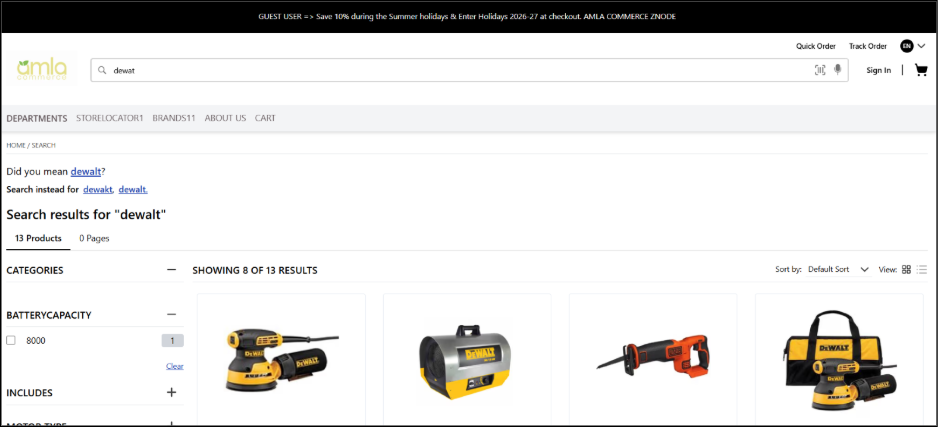
- For example, if a user searches for "diwalt" and no results are found, the storefront may display:
- Did you mean: dewalt?
- Selecting a suggestion automatically re-executes the search using the suggested term, helping users find relevant products faster and reducing search abandonment.
Key Features
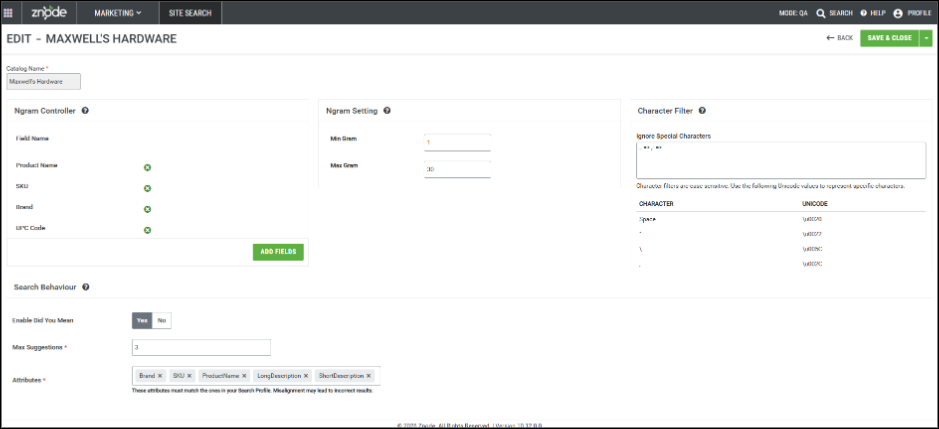
- Admin Configuration
- A new Search Behavior section has been added under:
- Marketing → Site Search → Manage PIM Indexes → PIM Index Settings
- Administrators can configure the following:
- A new Search Behavior section has been added under:
- Enable Did You Mean
- Enable or disable DYM functionality at the catalog (PIM Index) level.
- Default value: Disabled
- Maximum Suggestions
- Configure the maximum number of suggestions displayed to shoppers.
- Supported range: Up to 5 suggestions.
- Suggestions are ranked and displayed in order of relevance.
- DYM Attributes
- Administrators can select which searchable attributes are used to generate suggestions.
- Supported default attributes include:
- Product Name
- SKU
- Brand
- Only attributes that:
- Are configured as searchable (Use In Search = Yes)
- can be selected for DYM generation.
- Storefront Experience
- When a search returns no results and valid suggestions are available:
- The "Did you mean:" section is displayed.
- Up to the configured number of suggestion links are shown.
- Suggestions are clickable and execute a new search using the selected term.
- The "Did you mean:" section is displayed.
- Once a suggestion is selected, the search runs using the suggested term, and the DYM section is not displayed again for that search.
- When a search returns no results and valid suggestions are available:
Performance Optimizations
- To improve response times:
- Repeated search suggestions are cached.
- Cached suggestions are automatically refreshed after index recreation or DYM configuration changes.
Important Notes
- Suggestions are displayed only when:
- DYM is enabled
- The search returns zero results
- Valid suggestions are available
- Suggestion Strategy
- This release uses the Elasticsearch Basic (Term Suggester) approach for generating spelling corrections.
- Search Profile Dependency
- DYM attributes must remain aligned with the attributes configured in the Search Profile.
- Removing an attribute from either configuration may result in incomplete or inaccurate suggestion generation.
- Index Recreation Required
- After adding, removing, or modifying DYM attributes:
- A full index recreation (republish) is required.
- DYM data is generated during indexing and is not dynamically rebuilt at query time.
- After adding, removing, or modifying DYM attributes:
- Performance Impact
- Performance observations during testing (~11,000 products):
- Index size increased by approximately 3%
- Publish time increased slightly (approximately 1 additional minute)
- Elasticsearch peak CPU utilization increased during indexing
- Memory impact was negligible
- Initial searches may take slightly longer until cache is populated
- Actual impact may vary depending on catalog size and the number of configured DYM attributes.
- Performance observations during testing (~11,000 products):
- Existing Search Features
- This enhancement does not affect existing search capabilities, including:
- Typeahead Search
- Hydrated Search
- Synonyms
- Keyword Redirects
- Boost & Bury Rules
- Auto Correct
- Hide From Search
- Existing Search Profile configurations
- This enhancement does not affect existing search capabilities, including:
Disclaimer / Known Limitations
- Elasticsearch Limitations
- Special Characters
- Search terms containing special characters may not generate expected suggestions because Elasticsearch's standard tokenizer treats special characters as delimiters.
- Phrase Reordering
- The Elasticsearch phrase suggester does not guarantee preservation of the original word order.
- Example:
- Input:
- Wolverine Mens Blade
- Possible suggestion:
- mens wolverine blade
- This behavior is expected and is not considered a defect.
- Input:
- Suggestion Availability
- Suggestion generation depends on available indexed data and Elasticsearch matching behavior.
- As a result:
- Suggestions may not always be generated even when the feature is enabled.
- No DYM section is displayed when valid suggestions cannot be produced.
Page Builder Integration for Track Order, Quick Order and Forgot Password
Feature Overview
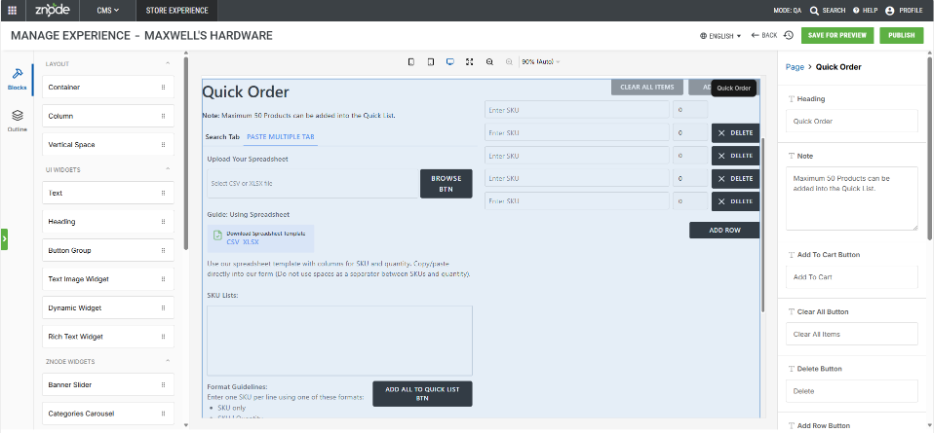
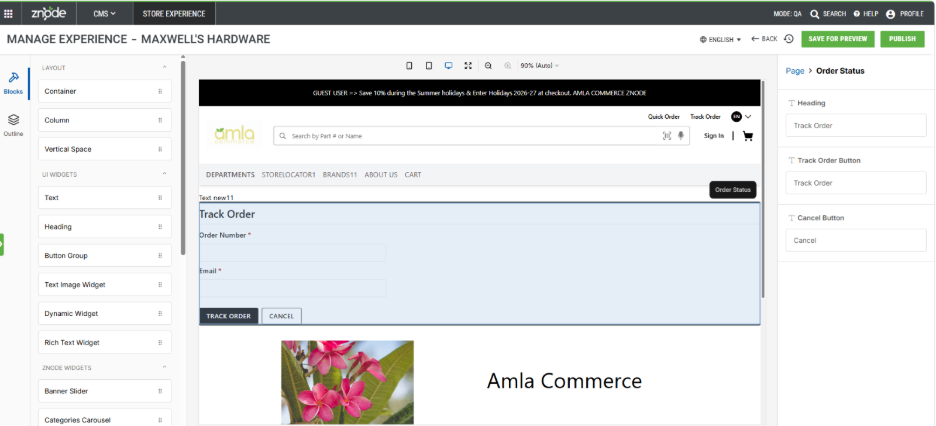
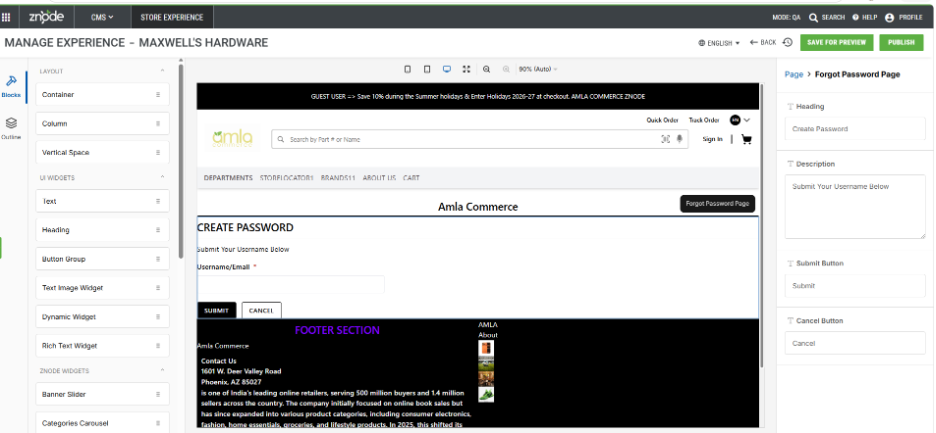
- Znode now supports Page Builder integration for Track Order, Quick Order and Forgot Your Password pages, enabling admin to manage and enhance these storefront pages directly through Page Builder.
- This enhancement allows businesses to add and manage Page Builder content around the existing Track Order, Quick Order and Forgot Your password functionality without requiring code changes. The core business functionality remains system-controlled, ensuring that existing workflows and user experiences are preserved.
- The feature provides a flexible way to enrich these pages with banners, promotional content, text blocks, images, links, and other supported Page Builder components while maintaining full backward compatibility with existing implementations.
Disclaimer:
- To ensure the new feature functions as intended, using the latest version of the Storefront is recommended. Older versions may support the feature partially or could lead to limited functionality or operational inconsistencies.
Key Feature
- Added Track Order, Quick Order and Forgot Your Password pages under Commerce Pages in Page Builder.
- Enables administrators to customize page layouts using existing Page Builder components.
- Preserves the core functionality and workflow of Track Order, Quick Order and Forgot Your password pages.
- Supports drag-and-drop placement of Page Builder components above and below the predefined page structure.
- Allows editing of page-specific labels, headings, descriptions, and instructional content through Page Builder attributes.
- Supports preview, publish, version history, and locale management using existing Page Builder capabilities.
- Provides a consistent Page Builder experience aligned with other commerce and content pages.
- Maintains full backward compatibility with existing storefront implementations and customizations.
- Supports multi-store and multi-locale environments.
- No impact on existing customer workflows or order management functionality.
Checkout Session Management (With Additional Configurations)
Feature Overview
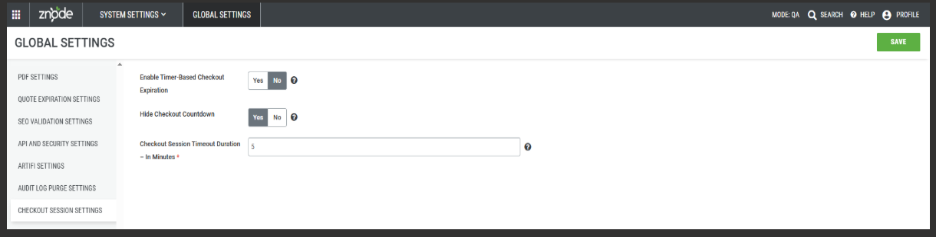
- The v10.11.1.0 release introduces enhancements to the checkout session management framework, enabling greater flexibility and control over how checkout sessions behave and expire. Building on the functionality introduced in v10.10.1.0, this update provides configurable options to manage session expiration, improve storefront experience, and align checkout workflows with updated processing logic.
- Key updates include new global settings to control timer-based expiration and countdown visibility, temporary UI adjustments to support the revised flow, and backend refactoring that separates checkout logic from cart operations. These improvements aim to create a more stable, customizable, and scalable checkout experience.
Disclaimer:
- To ensure the new feature functions as intended, using the latest version of the Storefront is recommended. Older versions may support the feature partially or could lead to limited functionality or operational inconsistencies.
- By default, the Enable Timer-Based Checkout Expiration setting is False, meaning the timer-based expiration that was mandatory in earlier releases will be disabled after upgrading.
- Impact on Custom Implementations
- Customizations related to cart, checkout APIs, workflows, validations, and UI must be reviewed.
- Existing implementations may require updates to align with the new architecture and session management changes.
Key Features
- Configurable Checkout Expiration Control
- Introduced Enable Timer-Based Checkout Expiration setting.
- Allows administrators to enable or disable time-based session expiration.
- When disabled (default), sessions persist until order completion or manual cancellation, with no expiration UI or timeout validation.
- Existing timeout behavior continues unchanged when enabled.
- Persistent “Last Checkout Wins” Behavior
- Only the most recent checkout session remains active across devices/tabs.
- All previously initiated sessions are marked inactive and cannot be used for order placement.
- Future enhancement planned to allow configuration of this behavior.
- Checkout Countdown Visibility Control
- New Hide Checkout Countdown setting to control timer display on storefront.
- Timer can be hidden without impacting backend expiration processing.
- Applicable only when timer-based expiration is enabled.
- Checkout UI Adjustment
- Temporary removal of line-item REMOVE action from the checkout page.
- Shoppers must modify items on the cart page before checkout.
- Ensures consistency with updated checkout session handling.
Content Security Policy for Admin Console
Feature Overview
- This release introduces a configurable Content Security Policy (CSP) framework for the Admin Console, enabling administrators to extend and manage CSP directives without requiring code changes or deployment updates.
- Previously, CSP configurations were fully managed within the application using predefined settings. With this enhancement, administrators can now dynamically add trusted domains and directives to support business integrations, external APIs, scripts, and embedded resources while maintaining the integrity of the default security configuration.
Disclaimer:
- To ensure the new feature functions as intended, using the latest version of the Storefront is recommended. Older versions may support the feature partially or could lead to limited functionality or operational inconsistencies.
- Incorrect configuration of Content Security Policy (CSP) settings may result in unintended behavior, including restricted or blocked access to the Admin Console. Administrators should ensure all configurations are validated before applying changes.
Key Features:
- Impact on CSP Changes in Admin
- Configurable CSP via Global Settings
- Introduces a new global setting: Content Security Policy (Admin Console)
- Places the setting under: Global Settings → API And Security Settings
- Allows administrators to define additional CSP directives using a textarea-based configuration
- Combined CSP Execution Model
- The Admin application maintains default CSP directives internally.
- The system appends user-defined CSP entries to the default configuration.
- The application generates the final CSP header using:
- Default system-defined directives
- Administrator-defined directives
- Flexible Multiline Configuration Support
- Supports multiline CSP entries for better readability and management.
- Enables configuration of multiple directives such as:
- script-src
- frame-src
- connect-src
- style-src
- img-src, and others
- Configurable CSP via Global Settings
- Input Validation and Data Integrity
- Validates:
- CSP directive syntax
- Domain and URL format
- Prevents:
- Invalid or malformed entries
- Duplicate configurations where applicable
- Ensures that only valid CSP directives are accepted
- Validates:
- Default CSP Configuration Support
- The system includes a predefined default CSP configuration to ensure secure baseline behavior.
- If administrators do not provide custom values, the application continues to use the default configuration without changes.
- Real-Time Application of Changes
- Applies configuration changes immediately after update.
- Does not require a publish action.
- Enables faster implementation of security updates and integrations.
- Administrative Control and Auditability
- Allows only authorized administrators to modify CSP configuration.
- Maintains audit logs for all configuration changes.
- Supports governance, monitoring, and compliance requirements.
- Default Behavior and Guidance
- Includes predefined CSP directives to support scripts, styles, images, frames, APIs, and other resources.
- Allows img-src * by default to support images from all domains.
- Requires administrators to explicitly configure domains if permissive defaults are removed.
- Recommends adding third-party domains to CSP configuration if resources fail to load
Important Points
- Treats user-defined CSP entries as additive, not replacements.
- May restrict content loading if administrators remove permissive defaults (such as *) without proper configuration.
- Supports integrations involving external APIs, third-party scripts, and embedded content.
- Applies changes automatically while following the existing configuration lifecycle.
Enable XSS Validation
Feature Overview
- This release introduces a configurable XSS (Cross-Site Scripting) Validation setting, enabling administrators to control whether XSS validation is enforced or bypassed across the application.
- By default, the application enforces XSS validation globally to protect against malicious script injection. With this enhancement, administrators gain the flexibility to disable validation for specific business scenarios, integrations, or custom implementations without requiring code changes.
Disclaimer:
- Even if the Enable XSS Validation and Enable IDOR Validation flags are set to true, the changes will only take effect after explicitly saving the configuration.
- This could be a breaking change when enabled; it is important to adopt the update carefully and perform thorough regression testing across all impacted features after upgrading.
Key Features:
- Global Configuration for XSS Validation
- Introduces a new global setting: Enable XSS Validation
- Located under: Global Settings → API And Security Settings
- Configured as a Yes/No toggle
- Provides centralized control over XSS validation behavior across the application
- Dynamic Validation Control
- Allows administrators to control XSS validation behavior globally:
- When Disbaled (NO):
- XSS validation checks are skipped
- When Enabled (YES) - Default Value:
- Standard XSS validation remains enforced
- Default Behavior
- The setting is configured with a default value that preserves existing application behavior
- Ensures that XSS validation continues to function as currently implemented unless explicitly changed
- Applicable Functional Areas
- The setting currently applies to the following areas:
- Storefront (Registered Users)
- Edit Profile
- Edit / Update Address
- The setting currently applies to the following areas:
- Admin Console
- Create User
- Edit User
- Address Management under Manage Users
- Backward Compatibility
- Existing application behavior remains unchanged after deployment
- No impact on existing integrations or workflows unless the setting is explicitly modified
- Ensures smooth adoption without disruption
- Administrative Control and Governance
- Only authorized administrators can modify the setting
- Configuration changes follow the existing application refresh/reload mechanism
- All updates are tracked through audit logging
- Proper validation and permission checks are enforced before applying change
Important Points:
- The setting applies globally across the application
- Disabling XSS validation may increase security risk and should be used cautiously
- Intended to support specific use cases such as trusted integrations or controlled environments
- Administrators should ensure appropriate validation mechanisms are in place when disabling XSS protection
Standardized Display Order Management System for Platform Entities (Phase 1)
Feature Overview
- This release introduces a Standardized Display Order (DO) Management System to unify and streamline how entities are ordered across the platform.
- Previously, display order handling was inconsistent—some areas rely on hardcoded values while others do not support ordering at all. This leads to dependency on development teams, inconsistent user experiences, and limited flexibility in implementing business or merchandising strategies.
- With this enhancement, the system provides a centralized, configurable, and scalable solution that enables administrators to define and control display order across all supported entities. The update ensures consistent ordering behavior across both Storefront UI and APIs while eliminating hardcoded dependencies.
Disclaimer:
- To ensure the new feature functions as intended, using the latest version of the Storefront is recommended. Older versions may support the feature partially or could lead to limited functionality or operational inconsistencies.
Key Features
- Configurable Display Order Management
- Introduces Display Order (DO) as a configurable attribute across applicable entities
- Enables administrators to define and update ordering without code changes
- Replaces hardcoded ordering logic with configurable values
- Standardized Sorting Logic
- Applies consistent sorting rules across the platform:
- Primary Sorting: Ascending order of Display Order (lower values appear first)
- Secondary Sorting: Alphabetical order (A–Z) for duplicate values
- Ensures deterministic and predictable ordering
- Flexible Value Handling
- Supports duplicate Display Order values
- Allows non-sequential inputs (e.g., 1, 5, 10)
- Uses alphabetical sorting to resolve duplicates
- Validation and Constraints
- Accepts only positive integers for Display Order
- Rejects invalid inputs such as:
- Non-numeric values
- Negative or zero values
- Decimal values
- Displays clear validation messages (e.g., “Display Order must be a positive number.”)
- Default Value Handling
- Assigns a default Display Order value of 999 when not explicitly provided
- Ensures consistent fallback behavior for unordered entities
- Draft and Publish Workflow Support
- Supports draft mode (where applicable)
- Applies changes only after publish action
- Ensures that only published values reflect in:
- Storefront UI
- API responses
- Consistent Behavior Across UI and APIs
- Applies Display Order logic uniformly across:
- Storefront interfaces
- API responses
- Eliminates discrepancies between frontend and backend ordering
- Applies Display Order logic uniformly across:
Admin Workflow
- Configuration and Update Flow
- Admin user navigates to the relevant entity configuration
- Views records along with their Display Order values
- Updates one or more Display Order values
- System validates inputs (numeric, greater than zero)
- Admin saves changes (draft mode, if supported)
- Admin publishes updates
- System Actions
- Stores updated values in the database
- Applies sorting logic
- Updates API responses
- Reflects changes across all user-facing interfaces
- Important Note:
- Display Order is fully configurable (no hardcoding)
- Sorting logic: Display Order (ascending) + alphabetical tie-breaker
- Changes are reflected only after publish
- Applies consistently across UI and APIs
- Supports scalability without performance impact
- Only authorized Admin users can update Display Order
- If the “Is Default” flag is enabled, it takes precedence over Display Order
- Entities Considered in Phase 1
- The following areas are included due to their direct impact on customer experience and storefront behavior:
- Manage Store (Post-Publish Scope)
- Brands
- Shipping Methods
- Storefront Payment Methods
- Offline Payment Methods
- Sort By Options
- Manage Products
- Product Attributes (Facets)
- Attribute Values
- Manage Search Profile
- Associated Facets
- Manage Store (Post-Publish Scope)
- The following areas are included due to their direct impact on customer experience and storefront behavior:
- Out of Scope
- Changes to core sorting algorithms beyond ordering sequence
- UI enhancements such as drag-and-drop
- Role or permission model changes
Enhanced API Security with IDOR Validation (Phase 4)
Feature Overview
- A new global setting, Enable IDOR Validation, has been introduced under Global Settings → General to control API-level security for preventing unauthorized data access. This enhancement enforces ownership validation across APIs, ensuring users can only access their own resources while allowing controlled rollout through configuration.
- The implementation has been done for Cart.
Disclaimer:
- To ensure the new feature functions as intended, using the latest version of the Storefront is recommended. Older versions may support the feature partially or could lead to limited functionality or operational inconsistencies.
- This is a breaking change when enabled; it is important to adopt the update carefully and perform thorough regression testing across all impacted features after upgrading.
Key Features
- New Global Setting – Enable IDOR Validation
- Added a configurable toggle (Yes/No) within Global Settings to manage IDOR validation.
- Default Value: NO
- Provides centralized control for enabling or disabling enhanced API security.
- When disabled, the system continues to behave as per existing logic.
- Accessible via Admin UI under Global Settings → General.
- Added a configurable toggle (Yes/No) within Global Settings to manage IDOR validation.
- Phase 4– IDOR Support for APIs (Security Enhancement)
- IDOR validation has been implemented across selected APIs to ensure that users can only access resources they own. This enhancement enforces ownership validation at the API level, preventing unauthorized access to other users’ data. The feature is controlled through the global setting, allowing phased adoption.
- Key Features:
- Ownership Validation:
- Validates each request against user context to ensure access is restricted to owned resources only.
- Enhanced Security Enforcement:
- Protects against unauthorized data access by enforcing strict ownership checks.
- Standardized Error Handling:
- Returns a 403 Forbidden response when an IDOR violation is detected. Existing validations continue to return appropriate 4xx responses where applicable.
- Feature Flag Control:
- Can be enabled or disabled using the Enable IDOR Validation setting, supporting controlled rollout.
- API Contract Stability:
- No changes to request/response structures or parameters; however, responses may differ when validation is enforced.
- Documentation Updates:
- API documentation has been updated to include IDOR validation behavior and the new 403 response for impacted endpoints.
- Ownership Validation:
- Request Context Requirement (Storefront Update Required)
- To support IDOR validation, API requests must include authenticated user contexts passed from the Storefront.
- Mandatory Header: Z-Request-Context
- This header carries an encoded user context generated by the Storefront BFF layer.
- It is validated before authorization checks to ensure request authenticity.
- Header Requirements
- Must be generated by the Storefront BFF layer.
- Must include valid, encoded user context. Must follow the exact structure expected by the backend.
- Strict Validation Rules
- Any modification to the header structure will result in validation failure.
- Custom or altered formats are not supported by the backend.
- Secure Context Handling & Encryption
- All API requests include an encrypted Z-Request-Context header.
- The header securely identifies:
- The authenticated user
- Any CSR (Customer Service Representative) acting on behalf of the user
- Ensures tamper-proof transmission and data integrity.
- Key Characteristics:
- Uses encryption with a shared key mechanism.
- Prevents manipulation of request context.
- Supports secure CSR impersonation scenarios.
- Maintains a consistent structure for validation and auditing.
- Storefront Behavior & Integration
- The Storefront must attach the Z-Request-Context header to all outgoing API requests.
- Implemented the API client/BFF layer.
- Ensures secure and consistent communication with backend services.
- Backward Compatibility and Fallback Behavior
- IDOR validation is applied only when both conditions are met:
- The Enable IDOR Validation setting is enabled
- The Z-Request-Context header is present in the request
- If the header is missing:
- The request is processed using existing authorization logic
- IDOR validation is not enforced
- IDOR validation is applied only when both conditions are met:
- This approach allows gradual adoption without disrupting existing integrations.
- Guest User Behavior:
- IDOR validation is not applicable for guest users.
- Guest flows (such as cart operations without login) continue to function using the platform’s existing access model, as no user context is available.
- Important Note:
- Any modification to the request context structure or encryption logic is not supported by the backend and will result in validation failure.
- Only a few APIs are currently covered; more will be included in upcoming releases.
- List of APIs can be accessed here.
Google Pay Support via Spreedly (Authorize.Net & Cybersource)
Feature Overview
- Added support for Google Pay payments through the Spreedly payment gateway, with Authorize.Net and CyberSource as supported processors.
Disclaimer
- To ensure the new feature functions as intended, using the latest version of the Storefront is recommended. Older versions may support the feature partially or could lead to limited functionality or operational inconsistencies.
Key Feature
- Introduced Google Pay as a payment option within Spreedly configuration for Authorize.Net and Cybersource gateways.
- Enables seamless token-based wallet payments during checkout without requiring card entry.
- Supports standard payment workflows:
- Authorize Only
- Authorize and Capture
- Available across key transaction flows:
- Storefront checkout
- Admin impersonation
- Quote-to-Order
Admin Configuration Updates
- Added “Google Pay” option in Select Payment Type (available only for Authorize.Net and Cybersource).
- Payment type dropdown options are now alphabetically sorted.
- Introduced Google Pay Merchant ID under Additional Settings (mandatory for enabling Google Pay).
- Renamed “Znode Payment Settings” section to “Additional Settings” across all applicable configurations.
Storefront Experience
- Displays Google Pay button on checkout alongside other supported payment methods.
- Launches a native Google Pay modal for payment confirmation.
- Supports secure authentication via customer’s Google account and device security.
- No card details are entered or stored within Znode.
Compatibility & Behavior
- Fully backward compatible with existing payment gateways and configurations.
- No impact on existing payment methods such as Credit Card, ACH, PayFabric, or offline payments.
- Retains standard Znode payment behaviors for cancellation and navigation.
Limitations
- Supported only with Spreedly + Authorize.Net or Cybersource.
- Not supported:
- Saved cards
- Partial payments
- Verify-only transactions
- Partial refunds (future enhancement)
- B-Store scenarios
- Wallet-specific reporting enhancements
Additional Notes
- Available for approval routing in digital payment scenarios.
- Supports offline payment flows where applicable.
Important Point
- Google Pay Production Readiness: To process Google Pay transactions with live cards in Production, the merchant domain URL(s) must be approved by the Google Pay team. This approval ensures compliance with Google Pay integration and security standards before live transactions can be enabled. Below are the steps for the same:
- Steps to Obtain Google Pay Merchant ID (Live/ Production Mode)
- Navigate to the Google Pay & Wallet Console:Google Pay & Wallet Console
- Sign in using your organization’s Google account.
- From the left navigation menu, click:
- Google Pay API
- Open the Web Integration section.
- In the Your Website section:
- Enter the website URL where Google Pay will be integrated.
- Ensure the website uses HTTPS and is publicly accessible.
- In the Your Google Pay API Integration Type section:
- Select Gateway as the Integration Type.
- Upload the required buyflow screenshots under:
- Item Selection
- Pre-purchase Screen
- Payment Method Screen
- Google Pay API Payment Screen
- Post-purchase Screen
- Click Save to submit the integration details for review.
- Complete the business verification and approval process required by Google.
- Once the integration is approved, navigate to the Dashboard section of the Google Pay & Wallet Console.
- Copy the Merchant ID displayed on the Dashboard page.
Authorize.Net – Transaction Data & Logging Enhancements
Feature Overview
- Enhanced the Authorize.Net payment integration to improve transaction traceability and support downstream payment operations.
Disclaimer
- To ensure the new feature functions as intended, using the latest version of the Storefront is recommended. Older versions may support the feature partially or could lead to limited functionality or operational inconsistencies.
Key Features
- Extended transaction data capture to include additional gateway-provided identifiers such as:
- Authorization Code
- Customer Profile Identifier
- Payment Profile Identifier
- These enhancements enable better support for downstream processes such as capture, refunds, and adjustments.
Transaction Logging Improvements
- Introduced comprehensive logging of Authorize.Net transaction responses for successful payment events, including authorization, capture, verification, and payment method storage.
- Transaction responses are stored in a structured format to improve auditability, troubleshooting, and operational visibility.
- Logging occurs only when a valid transaction response is received, ensuring data accuracy.
Benefits
- Improved reliability of payment lifecycle operations
- Enhanced visibility into payment processing
- Better alignment with payment gateway requirements
Configuration Retrieval Performance Enhancement (Caching & Event-Based Invalidation)
Feature Overview
- Introduced caching to improve the performance and responsiveness of configuration retrieval for payment-related operations.
Disclaimer
- To ensure the new feature functions as intended, using the latest version of the Storefront is recommended. Older versions may support the feature partially or could lead to limited functionality or operational inconsistencies.
Key Features
- Implemented API-level caching for configuration retrieval to reduce redundant processing and improve response times.
- Caching is applied selectively to endpoints that serve relatively stable configuration data.
Event-Driven Cache Invalidation
- Introduced an event-based invalidation mechanism to ensure cached configuration data remains accurate and up to date.
- Added a new Configuration Set event module within webhook/event settings to trigger cache refresh when configuration changes occur.
Scope & Behavior
- Caching is currently limited to specific configuration retrieval operations and is not applied to dynamic or user-context-driven endpoints, ensuring real-time accuracy where needed.
- This targeted approach balances performance optimization with data consistency.
Benefits
- Improved API response times for configuration retrieval
- Reduced system load through optimized data access
- Ensured data freshness using event-driven updates
Vertex Plugin – Endpoint URL Configuration
Feature Overview
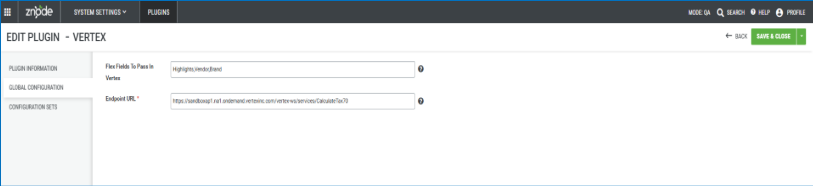
- Enhanced the Vertex plugin configuration by introducing a new Endpoint URL field in the plugin settings.
Disclaimer
- To ensure the new feature functions as intended, using the latest version of the Storefront is recommended. Older versions may support the feature partially or could lead to limited functionality or operational inconsistencies.
Key Features
- Added the ability for administrators to define and manage the endpoint URL used for tax calculation services directly within the plugin configuration.
Benefits
- Provides greater flexibility to configure environment-specific endpoints (e.g., sandbox or production).
Google Merchant Center Product Feed Enhancements
Feature Overview
Enhanced the Google Merchant Center Product Feed generation to align with Google Merchant Center feed specifications and industry-standard feed formatting requirements. This update improves feed quality, compatibility, and data accuracy, helping merchants achieve better product synchronization and reduce feed validation errors within Google Merchant Center.
The enhancement addresses structural inconsistencies in the generated feed and introduces support for additional recommended product attributes to improve product identification and listing quality.
Key Features
- Removed unsupported sitemap-specific elements from Google Merchant Center product feeds.
- Updated product price formatting to include the required ISO 4217 currency code.
- Standardized product availability values to comply with Google Merchant Center requirements.
- Added support for Brand information within the product feed.
- Updated product identifiers to use SKU-based values instead of internal product IDs where applicable.
- Improved overall feed structure and standards compliance.
Important Points
- Hide News Section from Admin UI
- The News functionality is no longer used for the current business requirements and may cause confusion for admin by displaying unused menu options. To simplify the user experience and reduce unnecessary navigation items, the News section removed from the Admin Panel UI. We hide all News-related navigation menus, pages, and actions from the Admin Panel. Admin should no longer be able to access or manage News content through the user interface.
- Global Entity Attributes API EntityType Validation Correction
- Resolved an issue where the PUT /v2/global-entity-attributes API incorrectly rejected the valid EntityType value "Quote" and accepted "Quotes" instead, creating a mismatch between documented behavior and implementation. The validation logic has been corrected to support EntityType = "Quote" as specified, ensuring consistency with the API contract and expected behavior.
Security Enhancements
Admin & Webstore Missing Anti‑Framing Policy
- Enhanced a Security headers to prevent unauthorized UI embedding
- X-Frame-Options header — prevents the pages from being loaded inside an iframe on unauthorized domains
- Content-Security-Policy (frame-ancestors directive) — provides a modern, more flexible mechanism to control which origins can embed the application in frames.
Security Enhancements & Vulnerability Remediation
- Enhanced multiple security improvements across the Admin Console and storefront, including the enforcement of required security headers and remediation of identified vulnerabilities. These updates strengthen the overall security posture of the application and reduce exposure to common web-based threats and potential exploits.
Performance Enhancements
Z10-34793 | Performance Issue in Account Listing API Due to Stored Procedure Execution
Resolved a performance issue where the account listing API experienced delays due to inefficient stored procedure execution. The query execution has been optimized to improve response time and overall, API performance. Applied AccountId filter during temp table data collection and added necessary indexes. API response time improved from ~1.99s → ~69ms (dev1) / ~0.3s.
Black Box Improvements
Product Information Management (PIM)
Z10-31731 | Publish Skipped (No Drafts) Functionality Not Working
Fixed the issue by Adding validation in the catalog publish flow to check whether products exist in Draft state before initiating publishing. A new stored procedure was created and optimized to validate Draft state products and integrated into the catalog publish process. If no products are in Draft status, the system now displays the validation message "Unable to initiate catalog publish as there are no products in Draft status" and marks the publish status as "Publish Skipped (No Drafts)."
Z10-31781 | Hide from Search Products Removed from Category Listing
Fixed the "Hide from Search" functionality to ensure that when a product's "Hide from search" flag is set to TRUE, the product is only hidden from search results and not removed from the category product list. The fix corrects the publish logic so that the "Hide from Search" flag applies exclusively to search visibility while the product continues to appear in the category navigation as expected.
Z10-32254 | Stock Status Inconsistency Between PLP and PDP
Fixed the inventory message rendering logic to ensure consistent stock status messaging across PLP, PDP, category pages, product carousels, and linked products when backorders are enabled.
Z10-32375 | Publishing Progress Bar Visible on Reset Password Page
Fixed the publishing progress bar leaking across user sessions by ensuring the progress bar API is no longer called from the Reset Password page. The progress bar is now session/user-specific and only visible to the logged-in admin user who initiated the publish action.
Z10-34467 | Frequent Product Publish Failures Due to Missing revision_type
Fixed the create_catalog_index() method call by passing the missing revision_type__int positional argument. The method was declared with 3 parameters but was being invoked with only 2, causing intermittent to publish failures.
Z10-34575 | Pagination Not Working in Filter Categories API
Fixed the getfiltercategories API pagination by updating the existing condition in the WHERE clause used while fetching category details. The fix ensures that both sorting and pagination work correctly together, and pagination metadata (TotalPages, TotalResults) now returns accurate values.
Z10-34679 | Category Menu Arrows Missing in Navigation
Resolved an issue where category menu arrows were not displayed in the storefront navigation for specific implementations. UI rendering logic has been corrected to ensure proper visibility of category navigation indicators for improved user experience.
Z10-35258 | Configurable Variants API Returning No Results After Upgrade
Fixed the Configurable Variants API by binding the configurable attribute additionally in the selected attribute list. The API now dynamically includes the configurable attribute associated with the variant alongside the existing selected attributes and AdditionalAttributes parameter value.
System Settings
Z10-29544 | FedEx Freight Shipping Rates Mismatch on Checkout
Fixed FedEx shipping rate calculation by making the pickupType parameter dynamic (previously hardcoded) and updating the FedEx Rate API request payload per the latest FedEx API documentation to include pickup-related parameters. FedEx Freight rate accuracy was also validated and confirmed matching after proper discount/fuel surcharge analysis.
Z10-30091 | Shipping Amount Sent as Zero to Avalara with Coupons/Vouchers
Fixed an issue where the shipping amount was passed as zero to Avalara when vouchers or coupons were applied, resulting in incorrect tax calculations. Proper shipping amount handling has now been implemented.
Z10-30746 | Order Creation Without Shipping and Tax Validation via API
Fixed the Avalara shipping amount issue by changing the INNER JOIN to a LEFT JOIN in the database function [dbo].[Fn_GetAllOrderDetailJSON] (called by stored procedure [dbo].[Znode_GetCartDetail]). This ensures that order payment details — including shipping cost and shipping discount — are returned even when the ConfigurationSetCode is NULL, allowing Avalara to receive the correct shipping amount for tax calculation.
Z10-33051 | Tax Exemption Applied Incorrectly Across Multiple Stores
Fixed multi-store tax exemption by adding portalId filtering in two methods — GetTaxExempt() and UnAssociateProfiles() — to ensure tax exempt status and profile association/disassociation are scoped to the correct portal (store) rather than applied globally across all stores.
Z10-3304 | Percent Off Shipping Promotion Coupon Marked Invalid in Discount Calculation API
Resolved an issue where “Percent Off Shipping” promotion coupons were incorrectly marked as invalid during discount calculation via the API. The promotion validation and calculation logic have been corrected to ensure valid shipping discounts are properly applied.
Dev Center
Z10-28257 | Import Logs Showing Incorrect Start and End Date/Time
Updated the Commerce Connector's time handling logic to convert timestamps from the saved/server time zone to the user's display time zone (as configured in Znode General Settings) before rendering them in the Znode Import Logs. The import log start date/time and end date/time now match the time shown on the Imports page under the Mega Menu, ensuring consistency across both screens when the same time zone is configured.
Z10-30718 | Product Association Failing via Manual Import and Scheduler
Resolved the Product Association failure by identifying and removing duplicate SKU entries from the ZnodePimProduct table on the Apex DV environment. The Product Association touchpoint (both manual import and scheduler) was failing with a database error because duplicate product records violated the expected data uniqueness constraint. After the duplicate records were cleaned up, the Product Association executed successfully without any errors.
Z10-31297 | Duplicate Admin Users Displayed in Dev Center
Modified the stored procedure Znode_AdminUsersByUserId to remove the permission-related columns (AccountPermissionAccessId, PortalId) from the result set. These columns were causing duplicate rows to be returned for the same admin user when the user had different store-level approval configurations. Since the permission-related data was not consumed by any of the calling APIs or their view models, removing these columns from the SP eliminated the duplicate entries without impacting any existing functionality.
Z10-34084 | Global OMS Attribute Not Appearing
Fixed an issue where the Global OMS attribute was not visible as expected. Attribute mapping and visibility logic have been corrected.
Z10-34557 | Inconsistent Number Field Validation Across Admin, API, and Import
Resolved an issue where validation messages for number fields were inconsistent across Admin UI, API, and import processes. Updated the Admin validation message logic to directly use the configured precision and scale values instead of the calculated integer length.
Marketing
Z10-16866 | Product Detail Sorting Options Not Working on Webstore
Resolved an issue where sorting options such as Highest Reviewed, Most Reviewed, In Stock, and Out of Stock were not functioning correctly on the product detail/listing pages. The API sorting logic was corrected so that when users apply "Highest Rating" or "Most Reviewed" sorting, the products are now returned in the correct descending order — products with the highest ratings or most reviews appear first, followed by others. Sorting is applied across all products within the category (not per page size).
Z10-34188 | PLP Sorting Behavior Investigation and Documentation
Addressed inconsistencies in Product Listing Page (PLP) sorting behavior by standardizing logic and documenting expected sorting functionality for improved clarity and predictability. Removal of non-functional sort options (DB-side) and correction of the sort option fallback behavior (code-side)
Content Management System (CMS)
Z10-34578 | Inconsistent Date Display in CMS Page Edit and Listing
Resolved an issue where the date displayed for CMS pages was inconsistent between the edit screen and the listing view. The ContentPageList method in ContentController was updated to ensure consistent, user-friendly date formatting in the grid.
Z10-35009 | Banner Sliders Not Displayed Without Republish
The corrected stored procedure Znode_SetPublishWidgetSliderBannerEntity was deployed with the proper WidgetKey filter added to the DELETE operation, ensuring only the relevant widget key's data is deleted and re-inserted during publish.
Z10-35052 | Banner, Header, and Footer Removed After Publishing Content Page
Database script fix applied to admin pages — Category Carousel, Product Carousel, Banner Slider, Offer Banner, Link Widget, Brand Carousel, and Content Container.
Z10-35205 | Offer Banner “Advertisement Banner 2” is displaying repeated sliders infinitely despite configuration set to 3 per view
Modified stored procedure [dbo].[Znode_GetPublishBannerSlider] to return only distinct CMSSliderId values, eliminating duplicates at retrieval time. Removed unused columns (WidgetKey, WidgetSliderBannerId) from the temp table. Performance improved from ~600ms to ~300ms.
Note : It is mandatorily required to clear the webstore cache. This step ensures that the display problem is effectively fixed and the webstore functions as intended without showing repeated banners
Accounts & Users
Z10-28098 | User Sequence Changes on Items Per Page Update
Fixed user ordering issue when pagination settings are updated. Sequence consistency is now maintained. Stored procedure (Znode_AdminUsersByUserId) was updated to ensure proper ordering
Z10-28599 | Incorrect B2B Role Assignment via API
Resolved role assignment logic issues in user update API. Roles are now correctly mapped. Added role conversion support in the v2/users/{userName} API by implementing the necessary logic to handle both role and account updates properly.
Fixed discrepancy in user count reporting. Data synchronization is now consistent. The fix addressed 5 key areas across both application code and stored procedures
Z10-32482 | Approval Routing Shows Updated Email Instead of Username
Resolved an issue where updated email replaced original username. System now retains correct identifier. Updated AutoMapper mapping to set ApproverName from ApproverUser.UserName instead of ApproverUser.Email and removed the incorrect ApproverName to User.Email mapping.
Z10-32503 | Loader Issue in User Search
Fixed UI loader issue during user search operations. Proper loading indicators are now displayed. Optimized the Znode_AdminUsers stored procedure by adding indexes on temporary tables, fixing inefficient update blocks, and reducing global search filters from 9 fields to 3 (UserName | FullName | Email), bringing query execution from ~70+ seconds (timeout) down to 1–2 seconds for 75,000+ users.
Z10-33599 | Error When Assigning All Stores to User
Resolved issue causing error when associating users with multiple stores. Assignment logic has been corrected. Updated the user portal association handling to correctly support the "All Stores" scenario during user updates:
Z10-34724 | Registration Email Not Triggered for Existing Username
Fixed issue where duplicate registration attempts did not trigger email notifications. Proper validation is now applied. Fixed FirstName/LastName macro mapping in UserModel so the RegistrationAttemptUsingExistingUsername email resolves #FirstName# and #LastName# to actual name values instead of the username, with added null guards for PortalIds and conditional logic to prevent name overwrite in same-store validation flows.
Z10-34836 | Reset Password Validation Error After Email Update
The stored procedure handling customer import was updated to sync email changes to the AspNetUsers table whenever a user's email or related details are updated through import. This ensures both tables remain consistent.
Z10-34840 | Reset Password Failure After Import
Resolved issue where reset password failed due to mismatched username/email. Data consistency checks are added. The Znode_ImportData stored procedure was updated to sync email changes to the AspNetUsers table whenever an existing user's email is updated during import, keeping both tables consistent.
Z10-34997 | Username Not Saved When Centralized Login Disabled
Fixed issue where username updates were not persisted. Save functionality is now corrected. A clearUserNameValidation() call was added before the early return to ensure validation states are properly reset
Order Management System (OMS)
Z10-24715 | Unwanted Notes Added on Status Change
Fixed an issue where unnecessary notes were automatically added to order/quote history during status updates. System now records only relevant entries.
Z10-29309 | Missing Validation for Expired Product Pricing
Resolved an issue where expired product pricing did not trigger validation on the storefront, allowing checkout. Proper validation has been enforced. An explicit price availability check was added at the cart level in the CP API
Z10-30746 | Order Creation Without Shipping and Tax Validation
Fixed an issue where orders could be created via API without validating shipping and tax. Mandatory validations are now enforced. A shipping ID selection validation check was added to the create API. To ensure the new changes as intended, using the latest version of the Storefront is recommended. Older versions may support the feature partially or could lead to limited functionality or operational inconsistencies.
Z10-32176 | Discount Not Displayed Due to Case Sensitivity
Resolved an issue where discounts were not shown in Admin when coupon casing differed between Admin and Webstore. Case-insensitive handling has been implemented. Case-insensitive string comparison fix in ShoppingCartServiceMap.cs
Z10-32389 | Pending Payments Showing Incorrect User Details
Fixed an issue where “Created By” and “Modified By” fields displayed ‘0’ instead of user details. Correct mapping is now implemented. The XML column mapping in SingleSchemaPendingPaymentList was updated:
Z10-32528 | Order Placement Without Shipping Selection
Resolved an issue where users could place orders without selecting shipping. Mandatory shipping validation is now enforced.
Z10-34611 | Customized Product Details Showing Raw API Data in Admin Order Details
Resolved an issue where customized product details in the Admin Order Details page displayed raw API data (such as designId and URLs) instead of properly formatted UI values. Rendering logic has been corrected to ensure product details are displayed in a user-friendly and structured format.
Z10-33195 | Impersonation Displays Incorrect Customer Name
Fixed an issue where Admin impersonation displayed “Admin” instead of actual customer name. Correct user mapping is now maintained. The Customer Name binding on the webstore quote receipt was changed from CreatedByUserName → AssignToFullName:
Z10-33335 | Voucher Not Auto‑Applied at Checkout
Resolved an issue where assigned vouchers were not auto-applied. System now correctly applies eligible vouchers. Created a stored procedure to check whether the user's cart already exists. If the cart exists, the new voucher is now assigned and applied to the existing cart as well.
Z10-33699 | Missing Redirect After Feedback Submission
Fixed an issue where users were not redirected post feedback submission. Users are now redirected to the home page. Added useRouter in Feedback.tsx — after a successful API response in submitFeedbackForm, a router.push("/") call was added to redirect the user to the home page.
Z10-34046 | Price Round Off Causing Zero Totals
Resolved an issue where higher precision rounding resulted in zero totals. Correct rounding logic has been applied.
Z10-34140 | Tax Not Recorded in Database Table
Fixed an issue where tax values were added to orders but not recorded in the ZnodeOrderTax table. Data persistence has been corrected.
Z10-34176 | Pending Order Approved Email Not Triggered
Resolved an issue where approval emails were not sent after order approval. Email triggers have been fixed.
Z10-34314 | Multiple Click Issue on Convert to Order
Fixed a UI issue allowing multiple clicks without loader on quote conversion. Loader handling and click prevention are now implemented. Show loader immediately after modal closes and disable the button while processing
Z10-34719 | Order Receipt Macros Not Working
Resolved macro rendering issues in order receipt templates. Macros now correctly populate values.
Z10-34769 | Unauthorized Access to Order Details via URL Manipulation
Fixed an IDOR issue allowing users to view other users’ orders. Proper authorization checks are now enforced.
Z10-34780 | Coupon Error Display Despite Successful Application
Resolved an issue where error messages appeared even when coupons were successfully applied. Messaging logic has been corrected. Here's a shorter version:Refactored ZnodeCartPromotionPercentOffOrder and ZnodeCartPromotionManager to properly apply percent discounts independently for each coupon, added minimum order amount validation, and ensured correct error messaging when the maximum discount limit is reached.
Z10-34835 | Line-Item Status Delay After Update
Fixed an issue where line-item status was not updated immediately after order status change. Real-time update handling is now implemented. Corrected the logic so that IsSetOrderLineItemFlag properly evaluates to true when the order status is updated
Z10-35060 | Incorrect User Details in Rejection Email
Resolved an issue where customer email appeared instead of name. Correct data binding has been applied. Corrected the mapping so the #CustomerName# macro resolves to the customer's full name instead of the email address
Z10-35365 | Mobile Order Details Page Not Found
Resolved an issue where order details accessed via mobile resulted in a 404 page. Routing has been corrected. Added the missing /account prefix to the mobile renderAction function's href
Z10-35435 | Product Edit API Returning 404
Fixed an issue where product edit API returned incorrect 404 responses. API handling is now corrected. added the missing/conflicting column with proper aliasing
Z10-35521 | Remove Item Link on Checkout Does Not Remove Item from Cart
Resolved an issue where clicking the “Remove Item” link on the checkout page redirected the user to the cart page without actually removing the selected item. The removal functionality has been corrected to ensure items are deleted successfully without unintended navigation behavior.
DAM
Z10-26132 | Duplicate Media Entries After Sync
Resolved issue where duplicate media records were created after Azure sync. Deduplication logic applied. Store Procedures were updated.
Z10-35078 | DAM Image Generation Not Working
Fixed issue where images were not generated or displayed correctly. Rendering logic corrected. cleaned up DB entries that had no corresponding files in Azure Blob.
Z10-35139 | MediaServerUrl Returning Null in Production
Resolved issue where media server URL returned null values. Configuration handling fixed. The code was updated to remove the Website Logo dependency for sending MediaServerUrl. Now, only for External Media does it check the MediaSource; for all other cases, it sends the DefaultMediaConfiguration server URL in the MediaServerUrl property.
Stores
Z10-33702 | Emails Not Sent with Custom Fields in Advanced SMTP
Fixed an issue where emails failed to send when key-value pairs were provided in Custom Fields under Advanced SMTP settings. Email handling logic has been corrected to support custom field data.
Z10-34307 | Webstore Default Locale Not Working
Fixed an issue where the default locale configuration for the webstore was not being applied correctly. Locale handling logic has been corrected to ensure proper default language behavior. Changed the fallback chain in middleware.ts to use the portal's defaultLocale instead of the hardcoded SETTINGS.DEFAULT_LOCALEAdded URL path locale as highest priority to keep the language switcher working
Other
Z10-21417 | Incorrect or Missing URLs in User Activation Emails
Resolved an issue where CP users activated via Admin or API received emails with incorrect or missing URLs. Email generation logic has been corrected to ensure accurate and functional activation links are included. Pass portalId = 0 for Admin users, and update the logic to check for portalId == 0 instead of portalId == null to ensure the activation email is sent.
Z10-28599 | Incorrect B2B Role Assignment via User Update API
Fixed an issue where the PUT /v2/users/{username} API failed to correctly assign B2B roles based on AccountId and displayed incorrect role information in the General tab. Role mapping logic is now properly aligned. Added role conversion support in the v2/users/{userName} API by implementing the necessary logic to handle both role and account updates properly.
Z10-29050 | Large Data Removed from Auth File for Optimization
Optimized the authentication file by removing unnecessary large data, improving performance and reducing file size without impacting functionality.Removed keys: profiles, customerPaymentGuid, isVerified, and other non-essential fields from auth.ts
Z10-29805 | Functional Issue in Accounts Addresses API
Resolved inconsistencies in the GET /v2/accounts/addresses/{accountId} API where address data was not retrieved correctly. API responses are now accurate and consistent.
Z10-30475 | Product Count Mismatch in Hydrated Search API
Fixed an issue where the number of products returned in the Products[] array did not match the TotalProductCount value. API response consistency has been corrected.
Z10-30530 | Functional Issues in Product Overrides Suggestions API
Resolved multiple functional issues in the GET /v2/productoverrides/suggestions/{keyword} API, ensuring accurate and reliable suggestion results are returned.
Z10-34330 | Documentation Issue in User Permission API
Corrected inconsistencies in the functional documentation for POST /v2/accounts/{userName}/user-permissions, ensuring accurate representation of API behavior and expected request/response structure.
Open-Source Enhancements and Fixes
Z10-29746 | Store Locator Pins Not Displayed on Find A Branch Page
Resolved an issue where not all store locations were pinned on the map in the Find A Branch page. The map functionality has been enhanced to display all available store locators correctly.
Z10-33699 | Missing Redirect After Feedback Form Submission
Fixed an issue where shoppers were not redirected after successfully submitting the feedback form. Users are now redirected to the Home page upon successful submission. Added useRouter in Feedback.tsx — after a successful API response in submitFeedbackForm, calls router.push("/") to redirect to the home page.
Z10-34517 | Automatic Scroll to Top on Browser Back Action
Resolved an issue where the page automatically scrolled to the top when using the browser back button. Navigation behavior has been corrected to retain the user’s previous scroll position.
Z10-34631 | Save for Later Page Price Alignment Issue
Fixed a UI issue where the item price label and value were misaligned on the Save for Later page. Layout styling has been corrected for better visual consistency. Added the missing text-left class to the price heading element in the Saved Items component.
Z10-35037 | Incorrect 200 Response for Missing Next.js Static Assets
Resolved an issue where missing Next.js static assets under /_next/static/ returned a 200 response instead of an error. Proper HTTP status handling has been implemented. The fix ensures missing static assets under /_next/static/css and /_next/static/chunks correctly return 404 Not Found, while available files continue to return 200 OK with proper content.