
Feature Overview
- Znode 10 enhances the Commerce Connector with support for multi-step data exchanges, real-time eventing, and real-time callback execution. These enhancements enable organizations to orchestrate complex integration workflows, automate integrations based on business events, and retrieve live external data during storefront requests.
- Previously, Data Exchanges supported only a fixed two-step integration architecture (source → destination). This enhancement introduces a flexible multi-step pipeline architecture that supports sequential processing across APIs, SFTP, Blob Storage, and external systems.
- The new HTTP-based Trigger Execution framework enables two real-time execution models:
- Znode Event (Push Model) – Automatically triggers a Data Exchange when a configured event occurs within Znode.
- Znode Callback (Pull Model) – Retrieves live pricing or inventory data from external systems during storefront requests such as Product Detail Page (PDP) loads.
- The new HTTP-based Trigger Execution framework enables two real-time execution models:
- This enhancement enables real-time integrations while maintaining backward compatibility with existing scheduler-based Data Exchanges.
Key Features
- Multi-Step Data Exchanges
- Data Exchanges now support unlimited sequential integration steps instead of the previous fixed two-step model.
- Supported Transmission Modes
- API
- SFTP
- Blob Storage
- Multi-Step Capabilities
- Add unlimited integration steps
- Configure independent mappers for each step
- Sequential step execution
- Reuse data from previous steps
- Configure transformations per step
- Step Data Referencing
- Data from previous steps can be referenced using:
- Step1.fieldName
- Step2.fieldName
- Example:
- Step1.Account.Name
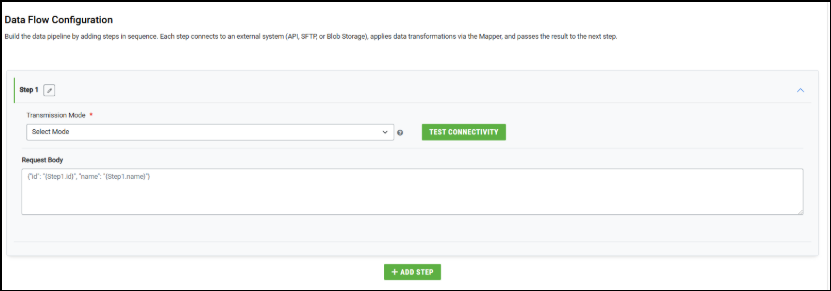
- Step1.Account.Name
- Data from previous steps can be referenced using:
- Trigger Execution Framework
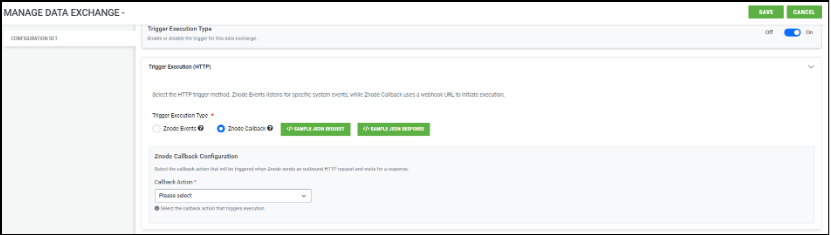
- A new Trigger Execution (HTTP) configuration section is available within the Manage Data Exchange screen.
- Trigger Execution type must be set to on when using multi-step data exchanges
- Supported Trigger Types
- Znode Event (Push-Based Execution)
- Automatically executes a Data Exchange when configured system events occur.
- Supported event modules include:
- Account
- Order
- Product
- Category
- Price
- Inventory
- Catalog
- Portal
- Example use cases:
- Account updates
- Order creation
- Product changes
- Znode Event (Push-Based Execution)
- Znode Callback (Pull-Based Execution)
- Znode Callback enables storefront pages to retrieve real-time data from external systems during user activity.
- Supported Callback Types
- Real-Time Pricing
- Real-Time Inventory
- Callback Behavior
- When a storefront request occurs
- Znode triggers the callback
- Commerce Connector calls the external API
- Response data is transformed using the Global Mapper
- Live data is returned to the storefront
- When a storefront request occurs
- Supported Storefront Scenarios
- Real-time pricing on PDP
- Real-time inventory availability
- Enhanced Manage Data Exchange Experience
- The Manage Data Exchange screen now contains:
- Exchange Details / Base Definition Details
- Trigger Execution (HTTP)
- Data Flow Configuration
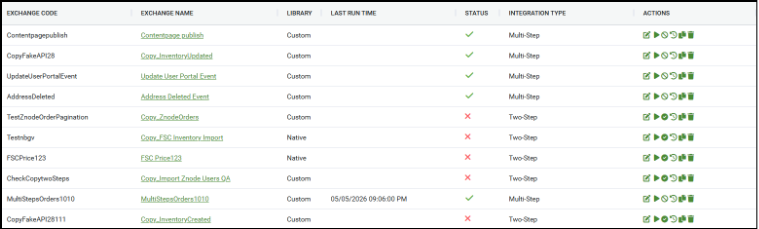
- Integration Type Column
- A new Integration Type column is added to the Data Exchange listing page.
- Supported values:
- Two-Step – Legacy integration architecture
- Multi-Step – Enhanced configurable integration flow
- The Manage Data Exchange screen now contains:
- Step-Level Mapping Enhancements
- Each step in a multi-step exchange now contains its own independent mapper
- Behavior Changes
- Mappers are no longer shared globally
- GET/API retrieval steps may not require mappings
- Transformations are configured only where needed
- Global Mapper
- Callback-based exchanges introduce a Global Mapper used specifically to format responses returned to Znode.
- Example required mappings:
- Sales Price
- Retail Price
- SKU
- Line Item ID

- Backward Compatibility
- Existing scheduler-based Data Exchanges continue functioning without modification.
- Behavior
- Legacy two-step exchanges remain supported (Edit mode only)
- Existing integrations are unaffected
- No migration is required
- New real-time integrations use HTTP-trigger-based architecture
- Workflow
- Real-Time Eventing Workflow (Push Model)
- A configured Znode Event occurs
- Trigger validation executes
- Data Exchange execution initializes
- Sequential steps execute
- Mapper transformations are applied
- API/SFTP/Blob operations execute
- Execution logs are generated
- Status is marked Completed or Failed
- Example Event Workflow
- Account Updated → Fetch Account Details → Transform Data → Send to ERP/SFTP
- Real-Time Eventing Workflow (Push Model)
- Real-Time Callback Workflow (Pull Model)
- Shopper opens PDP
- Znode triggers callback request
- Commerce Connector calls external API
- API response is transformed using Global Mapper
- Live pricing/inventory is returned to Znode
- PDP displays real-time data
- Execution logs are generated
- Example Callback Workflow
- PDP Load → External Pricing API → Response Mapping → Live Price Display
- Multi-Step Execution Workflow
- Step 1 retrieves data
- Step output is stored
- Step 2 consumes previous output (optional)
- Mapper transformations execute
- Additional sequential steps process data
- Final execution result is returned
- Important Notes and Limitations
- Important Conditions
- Callback Data Exchanges must be enabled
- Legacy real-time pricing/inventory integrations must be disabled for callback execution
- Disabling callback exchanges reverts storefront pricing/inventory to stored Znode values
- Important Conditions
- Current Limitations
- The following capabilities are currently not supported:
- Advanced retry monitoring UI
- Pagination and aggregation in multi-step flows
- Copying multi-step exchanges
- Custom processors in multi-step flows
- Individual step data logging
- Advanced monitoring dashboards
- The following capabilities are currently not supported:
- Prerequisites
- Before configuring Real-Time Eventing or Callback:
- Administrator access to the Znode Admin Console
- Commerce Connector must be enabled
- External APIs or endpoints must be reachable
- ERP/SFTP/Blob configurations must be available
- Legacy RP integrations must be disabled for callback scenarios
- Before configuring Real-Time Eventing or Callback:
- Scheduler & Exchange Recommendations
- Supported Scheduler Types
Scheduler Type Purpose Scheduled Automated recurring exchanges OnDemand Manual execution RealTime Event-triggered immediate processing
- Supported Scheduler Types
- Recommended Production CRON Frequencies
Exchange Type Recommended Frequency Inventory Sync Every 15 minutes Order Export Every 15–30 minutes Price Sync Every 4 hours Product Impor Daily Full Catalog Sync Weekly - Important Scheduler Guidelines
- Do not configure scheduler intervals below 5 minutes.
- High-frequency jobs may overload Hangfire queues.
- Large exchanges should be scheduled during off-peak hours.
- Long-running jobs should use dedicated queues where possible.
- Pagination & Data Volume Recommendations
- Recommended Page Sizes
Data Type Recommended Page Size Maximum Recommended Inventory 500 5,000 Orders 200 3,000 Products 250 3,000 Prices 1,000 5,000 Customers 250 3,000
- Recommended Page Sizes
- Pagination Guidelines
- Pagination should always be enabled for API-based exchanges.
- Page sizes above 1,000 may cause memory pressure.
- Very small page sizes increase HTTP overhead.
- Large payloads increase serialization and deserialization costs.
- Recommended Processing Limits
Parameter Recommended Maximum Export records per file 5,000 Export file size 50 MB API payload size 10 MB Concurrent export jobs 3 per server - Real-Time Processing Guidelines
- Real-Time Processing Characteristics
- Real-time exchanges execute as synchronous HTTP operations.
- The request lifecycle includes:
- Request received
- Processor execution
- ERP/Znode API communication
- Data transformation
- Immediate response returned
- Recommended Usage Patterns
Recommended Usage Not Recommended Single order processing Bulk catalog synchronization Single SKU inventory lookup Large inventory exports Order acknowledgment Full price synchronization Lightweight API workflows Large batch operations
- Real-Time Processing Characteristics
- Recommended Performance Targets
Metric Recommended Response Time < 2 seconds Payload Size < 1 MB Concurrent Requests < 20 ERP API Latency < 500 ms - Real-Time Operational Risks
- Real-time exchanges are blocking operations.
- Slow ERP APIs directly impact storefront performance.
- No queue buffering exists for real-time requests.
- High concurrency may saturate API thread pools.
- Inventory Synchronization Recommendations
- Recommended Inventory Modes
Scenario Recommended Mode Product page inventory check Real-Time Warehouse inventory sync Scheduled Full inventory reconciliation File-based
- Recommended Inventory Modes
- Inventory Synchronization Risks
- Real-time inventory calls execute in line with storefront requests.
- Slow ERP APIs increase storefront latency.
- No native in-process inventory caching exists.
- High inventory traffic can overload ERP systems.
- Recommended Mitigation Strategies
- Enable Redis caching for inventory lookups.
- Use short cache expiration windows (2–5 minutes).
- Prefer scheduled synchronization for large catalogs.
- Avoid bulk real-time inventory requests.
- Transmission Modes & File Processing
- Supported Transmission Modes
Mode Recommended Usage API Real-time and lightweight integrations SFTP Legacy ERP file integrations Blob Storage Large file exchange Import Handler Bulk Znode imports
- Recommended File Processing Limits
Import Type Recommended Batch Size Product Import 1,000–10,000 Price Import 2,500–10,000 Inventory Import 2,500–10,000 Category Import 500–1,000 Promotions 500 - File Processing Recommendations
- Split large files into smaller batches.
- Avoid processing files larger than 50 MB.
- Prefer Blob Storage or SFTP for high-volume integrations.
- Increase timeout values for large imports where necessary.
- Infrastructure Sizing Recommendations
- Recommended Production Sizing
Environment CPU Memory Recommended Instances Small 1 vCPU 2 GB 1 Mid-Market 2 vCPU 4 GB 2 Enterprise 3+ vCP 8–16 GB 3+
- Recommended Production Sizing
- Known Limitations & Constraints
- Architecture Limitations
ID Limitation Impact L1 No hard-coded max record limit per exchange Large exchanges may cause memory pressure L2 Real-time processing is synchronous Caller blocks until processing completes L3 Event queues may be temporary Events may be lost during a restart L4 No built-in DLQ Failed events may be discarded L5 Shared Hangfire queue Long-running jobs may block short jobs L6 Pagination retry counts are partially hardcoded Limited runtime tuning L7 SQL parser timeout constraints Large parsing jobs may fail L8 No built-in real-time rate limiting ERP APIs may be overloaded L9 SFTP reconnect per file Slow for many small files L10 Real-time calls execute inline No buffering or async queueing
- Architecture Limitations
- Operational Constraints
Constraint Details Minimum Scheduler Interval 5 minutes recommended Real-Time Payload Size 10 MB maximum recommended Export File Size 50 MB recommended maximum API Page Size 5,000 recommended maximum Concurrent Real-Time Requests More than 20 may impact stability - Recommended Data Volume Limits
Exchange Type Recommended Limit Product Import 10,000 rows per batch Price Import 10,000 rows per batch Inventory Import 10,000 rows per batch Category Import 2,000 rows per batch - Unsupported Configurations & Anti-Patterns
The following patterns are not recommended and may negatively impact performance or system stability.Anti-Pattern Risk Real-time full catalog synchronization API thread exhaustion Real-time bulk inventory updates ERP overload Page sizes greater than 5,000 Memory spikes CRON execution every 30 seconds Hangfire saturation Single-node RabbitMQ deployments Single point of failure Very large XML payloads High memory allocation Running all workloads on a single queue Queue starvation Large synchronous ERP calls Storefront slowness