
Release Notes / Version 10.6.0.0 / Dec 28, 2025
Highlights
Release Information
The Znode 10.6.0.0 release introduces new features, enhancements, performance upgrades, and bug fixes.
Disclaimer
Temporary Disablement of Promotions, Coupons, and Vouchers Management on the Manage Order Screen. (Continued from Previous Version)
- In this release, the ability to add, manage, or modify promotions, coupons, and vouchers has been temporarily disabled on the Manage Order screen in the Admin Console. While promotions and coupons applied during order creation will still be visible on the Manage Order screen, the options to add new promotions or remove existing ones will not be available. This functionality will be re-enabled in a future update.
No Deprecations
There are no deprecations in this release
What’s New
User Activity Log – Phase 2
Introduction
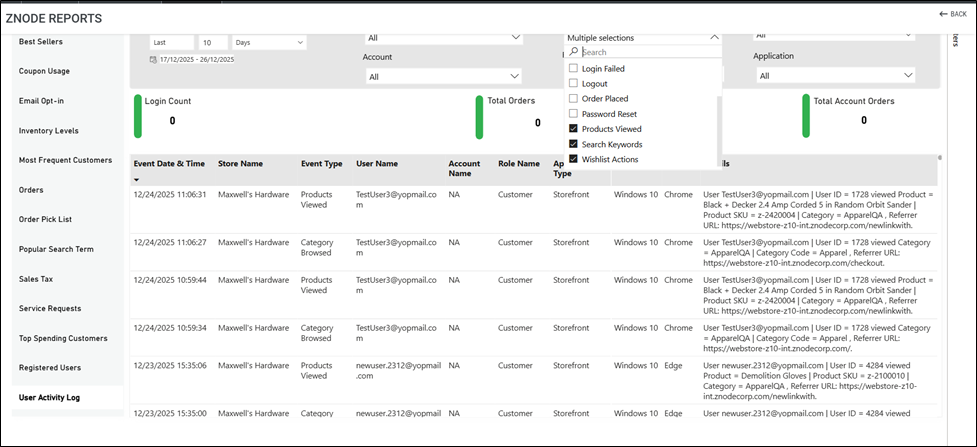
User Activity Log Phase 2 introduces new user interaction events to enhance tracking and reporting of user behavior across the platform.
Newly Introduced Events
The following events have been added to the User Activity Log:
- Products Viewed
- Search Keywords
- Wishlist Actions
- Category Browsed
Workflow
Under Power BI Reports → User Activity, new events are now available as part of Phase 2.
Event Details
- Products Viewed
This event captures when a user visits a Product Detail Page (PDP).Details Captured in API:
- Timestamp
- User ID
- Username / Full Name
- Account ID
- Account Name
- Product SKU
- Product Name
- Product Category (if applicable)
- Referrer URL
- Device and Browser Used
Log Message Format:
User [Username / Full Name] | User ID = [User ID] associated with Account = [Account Name] | Account ID = [Account ID] viewed Product = [Product Name] | Product SKU = [Product SKU] | Category = [Product Category], Referrer URL: [Referrer URL]
Notes:
- Only products for which the Product Detail Page (PDP) is visited will be considered.
- If a product belongs to multiple categories, the category recorded will be the one displayed in the PDP breadcrumb.
- Search Keywords
This event captures user search activity on the platform.
Details Captured in API:- Timestamp
- User ID
- Username / Full Name
- Account ID
- Account Name
- Search Query
- Device and Browser Used
Log Message Format:
User [Username / Full Name] | User ID = [User ID] associated with Account = [Account Name] | Account ID = [Account ID] searched for: "[Search Query]"
Exemptions:
Searches performed by bots or automated systems are excluded from logging.
- Wishlist Actions
This event captures when a user adds or removes a product from their wishlist.Details Captured in API:
- Timestamp
- User ID
- Username / Full Name
- Account ID
- Account Name
- Product SKU
- Product Name
- Action Type (Added / Removed)
- Device and Browser Used
Category Browsed
This event captures when a user views a product category.
Details Captured in API:
- Timestamp
- User ID
- Username / Full Name
- Account ID
- Account Name
- Category Code
- Category Name
- Referrer URL
- Device and Browser Used
Log Message Format:
User [Username / Full Name] | User ID = [User ID] associated with Account = [Account Name] | Account ID = [Account ID] viewed Category = [Category Name] | Category Code = [Category Code], Referrer URL: [Referrer URL]
Mockup:
Additional Notes
- No changes are made to existing Power BI columns; all columns remain the same as in Phase 1.
- The User Activity flag will be set to NO by default.
Power BI UI Changes
- New labels have been added to the Power BI report to display:
- o Login Count
o Total Orders
o Total Account Orders
- o Login Count
These enhancements provide improved visibility into user engagement and activity trends within Power BI.
Handling Special Characters in Product SKUs
Introduction
Previously, Znode did not enforce validation rules for special characters in product SKUs, leading to inconsistent product creation, import failures, and search issues on the webstore. This enhancement standardizes SKU validation while preserving search flexibility.
Solution
SKU validation has now been standardized across all product creation methods—Admin Console, API, and Import. Only a defined set of special characters is allowed in the SKU field, ensuring consistent behavior regardless of how products are created.
Allowed Special Characters
The SKU field now supports only the following special characters (and their valid combinations):
- !
- -
- .
- /
- _
- Space
- [
- ]
All other special characters are restricted.
Search and SEO Considerations
- Using special characters in SKUs may cause unintended search results, where multiple SKUs appear for a single search query. No validation currently prevents such combinations.
- Ï It is recommended not to use SKUs containing special characters as SEO-friendly URLs, as the following characters are not permitted in SEO URLs:
- !
- [
- ]
- Space
- SEO-friendly URLs composed only of special characters are not recommended, as they may prevent proper storefront page loading.
Important Points:
- A standardized regex pattern has been applied to the SKU product attribute.
- The regex configuration field is now greyed out and non-editable to prevent changes.
- SKUs consisting of only spaces are not allowed.
- Leading and trailing spaces in SKUs are automatically trimmed.
- Consecutive identical special characters are not permitted.
- Creating SKUs using only special characters is not recommended.
Display Order Implementation for Form Attributes
Introduction
Previously, user-defined attributes in Form Builder were displayed in the order they were assigned to attribute groups. Changes to display order were not reflected on forms, causing inconsistencies. This update ensures display order is properly applied and updated across forms and storefronts.
Solution
- Admins can assign a display order when creating user-defined attributes (Dev Center > User-defined Fields > Add Attribute > Form Builder).
- Attributes can be associated with attribute groups or new groups (Dev Center > Attribute Groups).
- Attributes within a group now appear in the configured display order on forms.
- Updating the display order in an attribute group updates all forms using that group.
- Individual attributes added directly to forms are not affected by display order.
- Publishing CMS settings updates the storefront to reflect changes.
Workflow
- Create Attributes: Assign display order in Dev Center > User-defined Fields.
- Associate Groups: Add attributes to existing or new groups.
- Add to Form: Add attribute group to form; attributes display in order.
- Update Order: Modify display order in attribute groups to update all associated forms.
- Publish: Push changes via Page Builder, Store Experience, or Store Settings to update the storefront.
Notes
- Attributes with the same display order: the first associated appears first.
- Existing submitted forms remain unchanged.
- Unspecified behaviors follow standard Znode functionality.
View and Download Processor File Code for Data Exchanges
Introduction
Users currently cannot view or download the processor file code for native or custom data exchanges. This limits transparency, makes it difficult to review or troubleshoot the logic, and provides no guidance when a custom processor file is not deployed.
Solution
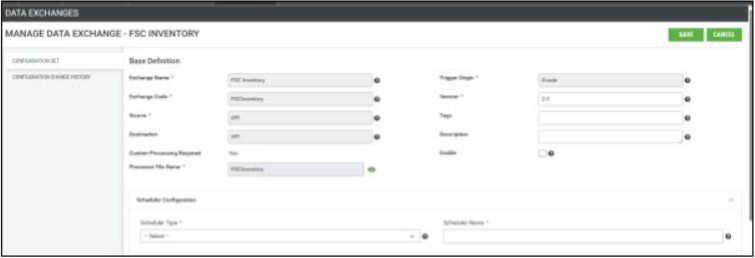
- A green eye icon is added next to the processor file name for both native and custom data exchanges.
- Mockup – Custom data exchange
- Clicking the icon opens a read-only pop-up displaying the processor code
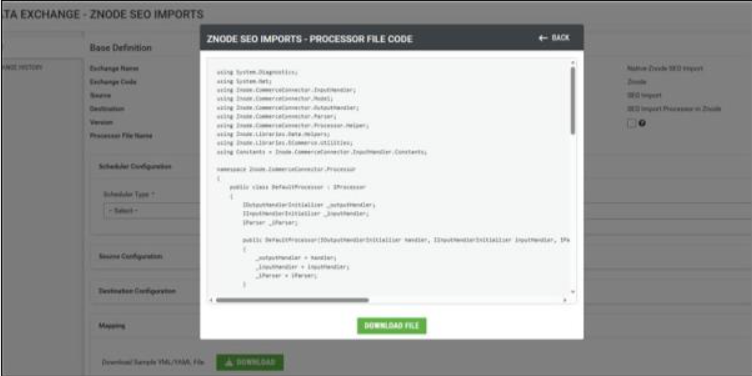
- A Download button allows users to save the code in Word (.docx) format.
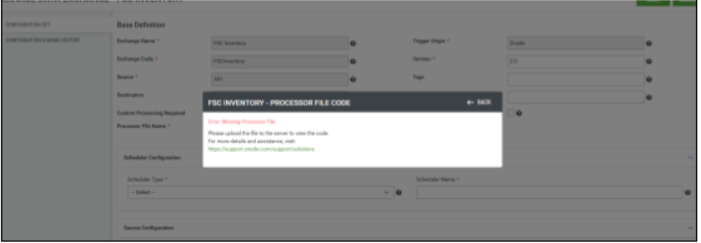
- If a custom processor file is not deployed, an informational message with a Knowledge Base URL is displayed to guide the user
Workflow
- Navigate to the Data Exchange configuration page.
- Click the green eye icon next to the processor file name.
- View the processor code in the read-only pop-up.
- Use the Back button to return to the configuration page.
- Scroll through the code if needed.
- Click Download to save the processor code, or follow the Knowledge Base link if the custom processor is not deployed.
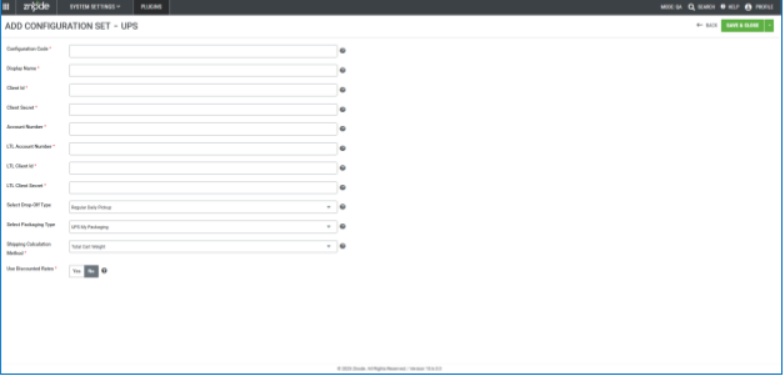
UPS Shipping Method - Enhancements
- Disclaimer:
- To ensure the feature functions as intended, using the latest version of the Storefront may be required. Older versions could lead to limited functionality or operational issues.
- The release introduces two major enhancements to UPS shipping configuration:
- Support for UPS Discounted (Negotiated) Rates
- Merchants can now enable Use Discounted Rates for UPS shipping methods. When enabled, the system retrieves account-specific negotiated rates from UPS instead of standard published rates.
- Benefits:
- More accurate shipping prices at checkout.
- Prevents overcharging when discounted UPS rates exist.
- Note: Discounted rates are returned only if the UPS account is eligible and properly configured.
- Configurable Shipping Calculation Method
- Administrators can now choose how shipping costs are calculated for UPS.
- Available Options
- Total Cart Weight (Default): Calculates shipping based on the combined weight of all items in the cart.
- Per-Item Weight: Calculates shipping for each item individually and sums the total.
- The selected method is applied consistently across cart, checkout, order summary, and APIs.
- Support for UPS Discounted (Negotiated) Rates
- Important Points:
- Total Cart Weight does not support line-item shipping refunds (return shipping will be 0).
- Only item weight is considered; dimensions are not used in calculations in terms of Total Cart Weight.
FedEx Shipping Method - Enhancements
- Disclaimer:
- To ensure the feature functions as intended, using the latest version of the Storefront may be required. Older versions could lead to limited functionality or operational issues.
- The release introduces a major enhancement to the FedEx shipping configuration:
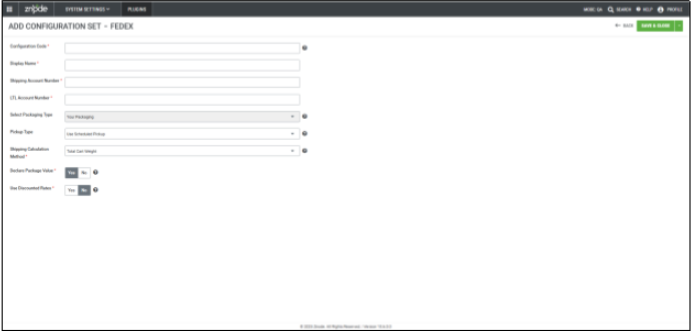
- Configurable Shipping Calculation Method
- Administrators can now choose how shipping costs are calculated for FedEx.
- Available Options
- Total Cart Weight (Default): Calculates shipping based on the combined weight of all items in the cart.
- Per-Item Weight: Calculates shipping for each item individually and sums the total.
- The selected method is applied consistently across cart, checkout, order summary, and APIs.
- Configurable Shipping Calculation Method
- Important Points:
- Total Cart Weight does not support line-item shipping refunds (return shipping will be 0).
- Only item weight is considered; dimensions are not used in calculations in case of Total Cart Weight.
- Other Updates:
- The “Use FedEx Discount Rate” setting has been renamed to “Use Discounted Rates” for consistency.
- The “Use FedEx Discount Rate” setting has been renamed to “Use Discounted Rates” for consistency.
Multi Locale Support – Page Builder Enhancements
- Disclaimer:
- To ensure the feature functions as intended, using the latest version of the Storefront may be required. Older versions could lead to limited functionality or operational issues.
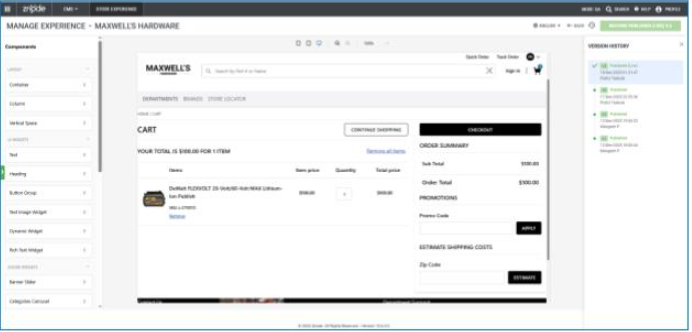
- This release introduces multi-locale support in the Znode Page Builder, enabling content management for multiple languages and regions. Admins can now create, edit, and manage localized content across various locales for both commerce and content pages. The new functionality provides greater flexibility for global stores and enhances the user experience by allowing the design of region-specific content.
- Multi-Locale Support in Page Builder
- Locale Selector: A new dropdown has been added to the Page Builder header for both commerce and content pages.
- Default Locale: By default, the locale is set to the store's default locale.
- Locale Selection: Users can now select and manage content in any active store locale.
- Content Switching: Once a locale is selected, all content for that locale can be viewed and edited within the Page Builder.
- Localized Component Support
- Components such as Text, Button Groups, Widgets, Image, and Video now support locale-specific content.
- Text, images, and videos can be different for each locale.
- If a component has no content for a specific locale, content from the default locale is displayed.
- Components such as Text, Button Groups, Widgets, Image, and Video now support locale-specific content.
- Znode Component Locale Configuration
- Znode Components like Banner Sliders, Offer Banners, Product Carousels, and more now support configuration for multiple locales directly from Znode settings.
- Content shown in the Page Builder reflects the selected locale.
- Published content will appear on the Storefront based on the selected locale
- Znode Components like Banner Sliders, Offer Banners, Product Carousels, and more now support configuration for multiple locales directly from Znode settings.
- CMS Versioning with Multi-Locales
- Version History now supports changes across multiple locales.
- A single version history record is created for changes made across different locales.
- The version is restored with content for all included locales.
- Version History now supports changes across multiple locales.
- Locale Selector: A new dropdown has been added to the Page Builder header for both commerce and content pages.
- Behavior Changes
- Page Builder Locale Handling
- Page Structure remains consistent across all locales; only content (text, images, videos) changes per locale.
- Component Deletion: Deleting a component in one locale removes it across all locales.
- Attribute Configuration: Configuration settings for components are maintained across locales, ensuring consistency.
- Localized Content in Widgets
- Text & Heading Widgets: Content added for a specific locale is shown on the Storefront when the page is viewed in that locale.
- Dynamic and Rich Text Widgets: HTML, CSS, JavaScript, and formatted text are localized based on the selected locale.
- Image and Video Widgets: Different images and videos can be uploaded per locale.
- Fallback Rules
- If content is missing for a specific locale, the system falls back to the default locale.
- If content for the default locale is missing, those components will be hidden on the Storefront.
- Page Builder Locale Handling
- Other Updates & Limitations
- Backward Compatibility: This update does not impact existing pages, components, or workflows in the Page Builder.
- Known Limitations
- Currency Handling: Currency logos and amounts do not automatically convert based on the selected locale.
- Label Language: Labels for components and attributes remain in English across all locales.
- Currency conversion or locale-specific pricing is not part of this release.
- Some system-generated components (like Store Locator, Contact Us) are handled at the code level and cannot be configured for different locales directly
TradeCentric – Punchout Support
- Disclaimer:
- To ensure the feature functions as intended, using the latest version of the Storefront may be required. Older versions could lead to limited functionality or operational issues.
- This release introduces TradeCentric integration with Znode, enabling supported stores to be accessed and used through the TradeCentric platform. The integration allows TradeCentric administrators to browse the Znode storefront, manage carts, and place orders, while ensuring controlled behavior and clear boundaries between the two systems.
- Admin Console: Store-Level TradeCentric Enablement
- A new store-specific setting has been introduced to control TradeCentric integration.
- Enabled (Yes):
- TradeCentric integration becomes active.
- The store can be accessed via TradeCentric.
- Disabled (No):
- TradeCentric access is blocked for the store.
- Enabled (Yes):
- Admins can enable or disable TradeCentric access independently for each store.
- A new store-specific setting has been introduced to control TradeCentric integration.
- Admin Console: User Management Enhancements
- TradeCentric User Handling
- When a user accesses Znode via TradeCentric:
- If the user already exists in Znode, they are tagged as a TradeCentric user.
- If the user does not exist, a new user is created using the provided email address with a system-generated password.
- TradeCentric users are visible in the Znode admin user list.
- TradeCentric user identification is maintained internally in the database
- When a user accesses Znode via TradeCentric:
- Admin Warnings
- When managing a TradeCentric user, admins see a warning message:
- “The user you are trying to manage is a TradeCentric user. Making any changes to the user’s information may cause the system to not work as intended.”
- Admins can still modify user details, but changes are not synced back to TradeCentric.
- When managing a TradeCentric user, admins see a warning message:
- TradeCentric User Handling
- Admin Console: Order Management Enhancements
- TradeCentric Orders in Znode
- Orders placed via TradeCentric are created and stored in Znode.
- On the Order Listing page, the Application Type column displays “TradeCentric” for such orders.
- Admin Warnings
- When managing a TradeCentric order, admins see a warning message:
- “The order you are trying to manage is a TradeCentric order. Any changes made to this order will not sync back to TradeCentric.”
- Admins can modify orders in Znode, but updates remain local to Znode only.
- When managing a TradeCentric order, admins see a warning message:
- TradeCentric Orders in Znode
- Storefront Access via TradeCentric
- Iframe-Based Access
- Stores with TradeCentric enabled are accessible only through an iframe when launched from TradeCentric
- TradeCentric Admins must specify the user’s email address when accessing the store.
- Restricted Storefront Features
- The following features are hidden or disabled within the iframe:
- User dropdown (Profile, Order History, Logout)
- Save Cart
- Quick Order
- Request a Quote
- Standard Checkout
- Available Features:
- Product Search
- Product Listing/Search Listing Pages
- Product Detail Pages
- Add to Cart
- Transfer Cart
- The following features are hidden or disabled within the iframe:
- Cart & Order Flow
- Cart Transfer
- A “Transfer Cart” button is available on the cart page.
- Clicking this button:
- Transfers the cart to TradeCentric for review and editing.
- Redirects the user back to the Znode cart within the iframe.
- The order is placed from TradeCentric and created in Znode with full order details.
- Cart Transfer
- Payment & Shipping Rules
- Supported Methods:
- Payment Method: PO (Purchase Order) only
- If multiple PO methods exist, only the first one is used.
- Shipping Method: Free Shipping only
- Handling charges (if any) associated with Free Shipping are ignored.
- Payment Method: PO (Purchase Order) only
- Validation Messages
- If no PO payment method exists:
- “No supported payment method is associated.”
- If no Free Shipping method exists:
- “No supported shipping method is associated.”
- If no PO payment method exists:
- Supported Methods:
- Promotions & Discounts
- Auto-applied promotions are carried over to TradeCentric.
- Coupon codes, vouchers, and manual promotions are not supported.
- Shipping-based promotions are not applied.
- Iframe-Based Access
- Important Points
Security Enhancements
- Cart and Order State Isolation Across Concurrent Sessions
- Implemented a critical security enhancement to prevent post–order submission cart manipulation across concurrent user sessions.
- Introduced strict order state locking once payment is completed and the order is submitted.
- Ensured that cart operations from any active session are fully decoupled from finalized orders.
- Prevented any cart updates, quantity changes, or line-item mutations from being applied to orders in a Completed / Submitted state.
- Added session-aware validation to ensure that cart modifications apply only to the active cart context and never retroactively impact placed orders.
- This enhancement significantly improves order integrity, session isolation, and transactional security within the storefront checkout flow.
- Returns: Prevent Unauthorized Access to Create Return URL
- Implemented a security enhancement to prevent unauthorized access to the Create Return functionality for orders that do not belong to the logged-in user.
- This enhancement introduces strict ownership and authorization validation to ensure that return creation is permitted only for the authenticated user who owns the order.
- The system validates the logged-in user’s identity against the order ownership before allowing access to the Create Return page or processing any return requests. If the user is not authorized, access is denied and the request is blocked.
- This enhancement strengthens data security and user isolation, prevents unauthorized return initiation, and ensures compliance with secure access control best practices across the Returns workflow.
- Enforce Secure Cookie Attribute for Sensitive Cookies
Implemented a security enhancement to enforce the Secure flag on all sensitive application cookies to prevent exposure of session data over unencrypted channels.
Updated the application server configuration to set the Secure attribute on all authentication and session-related cookies.
Ensured cookies are transmitted only over encrypted HTTPS connections, preventing access over HTTP.
Applied the Secure flag consistently across environments to align with modern browser security standards.
Strengthened overall session handling to reduce the risk of cookie theft and session hijacking.
API Enhancements
- Enhancement | Extend PluginGetEstimateRateShippingCartItem Model to Support ShippingSettings Attributes
- Implemented an enhancement to extend the PluginGetEstimateRateShippingCartItem model by introducing a new Attributes property. This property will carry all attributes associated with the ShippingSettings attribute group.
- The ShippingSettings group is a system-defined group that is included as part of the default data setup. As business needs evolve, additional attributes can be added to this group without requiring further structural changes to the model.
- During the estimate shipping rate calculation, the system will automatically bind all attributes configured under the ShippingSettings group into the Attributes property of the PluginGetEstimateRateShippingCartItem model
Important Points:
- Z10LMC-1736 | Provided support for Delta Characters in Bulk Updates. Support is not available for SKU.
- Z10-27116 | Pricing Update Behavior - Product pricing updates will no longer move products to Draft
Breaking Changes (in this release)
- When the Centralized Login flag is OFF, a user is created. After assigning an Account and selecting a B2B role in General Settings, the Roles tab correctly updates to display the B2B role, replacing the previous Customer role. However, if the Account is later removed in General Settings, the Roles tab continues to display the B2B role, and the original Customer role is not restored.
Black Box Improvements
Digital Asset Management (DAM)
Z10-20926 | Media Filename Not Retained When Selecting and Saving Assets.
Resolved an issue in Digital Asset Management (DAM) where media file names were not retained correctly when an asset was selected and saved. In certain scenarios, the filename was altered or lost, leading to confusion and inconsistency in asset identification. The media selection and save workflow has been corrected to preserve the original filename accurately across upload, selection, and save operations
Order Management System (OMS)
Z10-11006 | Tier Pricing Not Applied for Selected Price List
Resolved an issue where tier pricing was not respected in the cart despite the correct price list being assigned. Pricing evaluation logic now correctly applies tier-based pricing rules.
Z10-17728 | ‘Not On’ Filter Not Working in Order History
Fixed a defect where the “Not on” option in the Order Date filter failed to return correct results. Filter logic has been corrected to accurately exclude selected dates.
Z10-18656 | Voucher Expiration Date Displayed Incorrectly
Resolved inconsistencies in voucher expiration dates displayed across multiple screens. Date formatting and timezone handling have been standardized.
Z10-22038 | All Vouchers Displayed Instead of Applied Voucher
Fixed an issue where all user vouchers appeared on the Manage Order screen even when only one was used. Voucher display logic now shows only relevant, applied vouchers.
Z10-23243 | Removed Restricted Voucher Still Appears on Order
Resolved a defect where a customer-restricted voucher continued to appear on the Manage Order page and receipt after removal. Voucher validation now reflects real-time voucher eligibility.
Z10-23673 | Unnecessary Action Column Displayed in Pending Orders
Removed the redundant “Action” column that appeared when managing pending orders. The UI now displays only relevant controls.
Z10-24014 | Broken Image and Text for Products Without Images in Quote View
Fixed display issues where products without images showed broken visuals and unexpected text. Placeholder handling has been improved for cleaner quote presentation.
Z10-24357 | Updated In-Hands Date Not Reflected in Order History
Resolved an issue where changes to the In-Hands Date were not reflected in Order History. Save and refresh logic has been corrected to persist updates accurately.
Z10-24686 | Duplicate Personalization and Add-On Calculation Issues
Corrected multiple issues involving duplicate personalization entries, missing add-ons after quote conversion, and incorrect pricing calculations. Quote-to-order conversion logic has been stabilized.
Z10-25515 | Quote Number Incrementing by 2 Instead of 1
Fixed a sequencing issue where quote numbers skipped values. Sequence generation logic now increments correctly.
Z10-27105 | Removed and Non-Applied Vouchers Shown With $0.00
Resolved an issue where removed or unused vouchers still appeared with a $0.00 value. Voucher cleanup logic has been improved.
Z10-27118 | Voucher History Displays Incorrect Time
Corrected voucher history display to show only dates instead of incorrect start and expiration times.
Z10-27298 | Reorder From Cancelled Order Does Not Add Items to Cart
Fixed an issue where reordering a cancelled order resulted in an empty cart. Cart recreation logic has been corrected.
Z10-27299 | Address Not Updating From the Dropdown in Manage Order
Resolved a defect where changing the address via the dropdown did not update the order. Address persistence logic now applies updates correctly.
Z10-27417 | Billing Section UI Alignment Issue in Pending Orders
Corrected UI alignment issues in the Billing section of the Pending Order screen for improved readability.
Z10-27542 | Unable to Convert Quote to Order (Store Specific)
Resolved a store-specific error preventing quote-to-order conversion. Validation and store configuration handling have been corrected.
Z10-27661 | Customer Name Incorrect After Quote Conversion
Fixed an issue where the customer name displayed as the admin user after converting a quote. Customer association logic has been corrected.
Z10-27725 | Quote Summary Incorrect After Deleting Line Items.
Resolved inaccuracies in Quote Summary totals after line item deletion. Recalculation logic now updates summaries correctly.
Z10-27924 | Incorrect Order Date/Time on Package Slip
Fixed a timezone-related issue causing incorrect date and time display on package slips.
Z10-27982 | Duplicate History Entries Added on Order Save
Resolved an issue where multiple saves added redundant history entries, such as In-Hands Date and Voucher updates.
Z10-28072 | Expired Voucher Visibility Inconsistent Across Screens
Corrected voucher visibility logic to ensure expired vouchers display consistently across Admin, OMS, and Webstore.
Z10-28393 | UI Issues in Quote Emails When Show Constraint Is Disabled
Fixed layout and spacing issues in Quote Acknowledgment and Receipt emails when the Show Constraint flag is false.
Z10-28407 | Line Item Status Not Updating After Order Cancellation.
Resolved an issue where line item statuses did not update after order cancellation. Status propagation logic has been corrected.
Z10-28428 | Notes Not Displayed After Adding New Note
Fixed an issue where newly added notes were not displayed in account records. Note refresh logic has been improved.
Z10-28455 | Discount Displayed as $0.00 in Approved Pending Orders
Resolved a defect where approved orders showed discounts as $0.00 despite applied promotions. Discount calculation and display logic have been corrected.
Z10-28627 | Submenu Missing in Manage Pending Order Screen
Restored the missing submenu in the Manage Pending Order screen to ensure complete navigation options.
Z10-28642 | Admin Can Re-Create Order From Converted Quote
Fixed a logic gap, allowing admins to recreate orders from already converted quotes. Validation has been added to prevent duplicate order creation.
Z10-29462 | Admin Orders Page Goes Blank When Selecting Email Column
Resolved a UI rendering issue that caused the Orders page to go blank when sorting by the Email column.
Dev Center
Z10-12620 | Redundant Custom Table Fields in API Response
Removed redundant CustomTableFields from the Custom Table Data GET API response to ensure cleaner and more accurate payloads.
Z10-24460 | Remove Redundant Launch Dashboard Button
Removed the unnecessary “Launch Dashboard” button from the Hangfire section to streamline Diagnostics & Maintenance UI.
Z10-26263 | Global Attribute Not Reflected on Category Page
Fixed publishing issues preventing global attributes from appearing on category pages after product publish.
Z10-28238 | Attribute Field Misalignment in Admin UI
Corrected spacing and alignment issues between Phone Number and Role Name fields.
Z10-28647 | BI Reports Cron Expression Not Updated in Hangfire
Resolved an issue where updated cron expressions were not reflected in Hangfire dashboard views.
Z10-28813 | Uneven Field Spacing in User General Settings
Improved UI alignment for better consistency and readability.
Product Information Management (PIM)
Z10-3487 | Deleted Brand Edit Page Displays Incomplete UI
Corrected an issue where attempting to edit a deleted brand resulted in an incomplete edit page with no brand name displayed and missing navigation options in the left panel. Validation has been strengthened to prevent loading deleted brand records, and the UI now redirects users appropriately to avoid confusion and invalid edit states.
Z10-20330 | Bulk Update Auto Publish Stuck at 80% With Invalid Admin User
Resolved an issue where the Bulk Update Auto Publish process stalled at 80% completion and referenced a non-existent admin user. Background job handling and audit user validation have been improved to ensure successful completion and accurate progress reporting.
Z10-25940 | Category Changes Reflected Incorrectly Across Locales
Fixed a defect where category updates were inconsistently reflected on the webstore across different locales. Locale-aware publishing logic has been corrected to ensure category changes are accurately applied and displayed for each configured locale.
Z10-26131 | Product Image
Removed From Cart When Product Is Deactivated Resolved an issue where deactivating a product from Admin caused its image to disappear from the cart. Cart rendering logic now retains product image references for existing cart items even when the product is deactivated.
Z10-28450 | Default Attribute Value Not Published
Corrected a publishing issue where default attribute values were not propagated to the webstore. Attribute publishing logic has been enhanced to ensure default values are included during product and catalog publish operations.
Z10-28561 | Re-associating
Removed Product Shows “No Record Found” Fixed an issue where re-associating a previously removed product resulted in a “No record found” message and incorrectly moved the product to Draft status. Association and product state handling logic has been corrected to preserve product integrity.
Z10-28844 | no-image.png Appears in Product Document Section
Resolved a defect where the placeholder image no-image.png appeared incorrectly in the product Documents section. Media filtering logic now properly differentiates between image and document assets.
Z10-29325 | Cart Appears Empty After Switching Account Catalog
Fixed an issue where switching the Account Catalog from Specific to Default caused the cart to appear empty. Cart-to-catalog mapping logic has been updated to retain valid cart items during catalog transitions.
Marketing
Z10-17939 | Call for Pricing Not Working for Selected Profile
Resolved an issue where Call for Pricing did not trigger correctly based on profile selection.
Z10-28259 | SEO Setup Clears Search to Default Store Incorrectly
Fixed behavior where clearing a no-result search restored data for the default store instead of the selected store.
Z10-28715 | PIM Index Record Not Deleted After Confirmation pop-up
Resolved an issue where index records were not removed, and the delete confirmation pop-up persisted.
Z10-28758 | Free Shipping Appears in Carrier Promotions Incorrectly
Fixed promotion logic where Free Shipping methods appeared incorrectly under Percent or Amount of Shipping promotions.
Z10-25148 | Same Profile Code Assigned to Multiple Profile Names
Resolved a data integrity issue allowing duplicate profile codes. Validation now enforces uniqueness.
Z10-28068 | Previous Purchases Sync Disabled but Data Still Updated
Fixed logic where disabling Previous Purchases Data Sync still updated storefront data.
Z10-28135 | Duplicate Import Template Names Allowed
Enforced uniqueness for import template names to prevent confusion and overwrite issues.
Z10-28673 | Validation Message Misalignment in Global Settings
Corrected inconsistent validation message alignment across configuration screens.
Z10-28928 | Address Type Missing in Import Template
Added the mandatory Address Type column to the Account Import template.
Z10-29322 | Update Mapping Button UI Misaligned
Fixed UI alignment issues for the Update Mapping button in Import screens.
CMS
Z10-9646 | Promotion Code Displayed Instead of Coupon Code in Email Receipt
Corrected an issue where email receipts displayed the promotion code instead of the actual applied coupon code. Email template bindings have been updated to ensure accurate coupon information is shown to customers.
Z10-27232 | Blank Space in Order Receipt Email When Address Line 2 Is Empty
Resolved a formatting issue where an empty Street Address 2 field caused unnecessary blank space in order receipt emails. Email layout logic now conditionally renders address fields only when populated.
Z10-27773 | Blank Page on Edit Email Template Screen
Fixed a defect where editing an email template resulted in a blank page. Template rendering and data retrieval logic have been stabilized to ensure consistent access to email content.
Z10-28626 | Missing ‘s’ in Webstore URLs in Emails
Corrected malformed URLs in emails where “https” was incorrectly rendered as “http”. URL generation logic now consistently produces secure webstore links.
Z10-28782 | Preview Store Displays Incorrect CMS Published Data
Resolved an issue where preview stores failed to display the latest CMS-published content. Cache synchronization between preview and published environments has been improved.
Z10-28892 | Blog Publishing Errors
Fixed multiple issues preventing blogs from publishing successfully. Validation, workflow handling, and error reporting have been enhanced to ensure reliable blog publishing.
Z10-28902 | Blog Comments Still Visible After Disabling Comments
Corrected a defect where blog comments continued to appear on the webstore even after disabling the “Comments allowed” option. Blog visibility rules now correctly respect comment configuration settings.
Accounts and Users
Z10-21968 | Cart Validation Message Displayed for Admin Role
Resolved an issue where admins navigating to a user’s cart saw an incorrect validation message stating the cart was empty.
Z10-26208 | Account Name Changes When Navigating to Orders Tab
Fixed an issue where account names changed unexpectedly while navigating between tabs. Account context is now preserved.
Z10-27611 | Incorrect Profile Assigned to Default Store User
Resolved an issue where newly created users were assigned an incorrect profile under Centralized Login. Profile assignment now respects store and account defaults.
Z10-27802 | Store and Username Missing in Notes Section
Fixed an issue where store and username information were missing while managing notes under a selected store.
Z10-27938 | Duplicate “Add New” Button in Address Tab
Removed duplicate action buttons to ensure a clean and consistent UI.
Z10-28146 | Webstore User Role Changes to Administrator
Resolved a critical issue where B2B users were incorrectly assigned Administrator roles.
Z10-28313 | Typo in Role Change Alert Message
Corrected a typo in the alert message shown when changing user roles.
Z10-28466 | Pagination Not Working for Sales Rep Association
Fixed pagination issues when associating sales representatives with users.
Z10-28770 | Store Name Replaced by Portal ID When Adding Existing User
Resolved a defect where the portal ID replaced the store name during user association.
Z10-28896 | Incorrect Message Displayed When Deleting User
Corrected an inaccurate confirmation message shown during user deletion.
Z10-29090 | Unable to Find Users During Account Setup
Fixed search logic to ensure users are discoverable when setting up accounts.
Z10-29298 | User Unable to Log In After Adding Second Profile
Resolved login failures caused by incorrect profile mapping when Centralized Login is disabled.
Other Improvements
Z10-12820 | V2 API Path and Validation Sequence Improvements
Improved API path naming and validation sequencing for the WebStoreAccount Update Address endpoint.
Z10-17170 | Store Code Returned as Null in Update Global Attribute API
Resolved an issue where the store code was missing in the API response.
Z10-25736 | Bulk Delete Account API Enhancement
Improved reliability and validation for the bulk account deletion API.
Z10-25792 | V2 API Creates Address for Account
Enhanced the account address creation API to ensure consistent data persistence.
Z10-25793 | V2 API Update Account Address
Stabilized update logic and validation for account address updates.
Z10-26467 | Inconsistent Error Messages in Update Portals Configuration API
Standardized error responses return clear and user-friendly validation messages.
Z10-27684 | Associate Roles API Returns 500 Error
Fixed API behavior to correctly handle userId as per the specification.
Z10-27687 | Unassociate Roles API Returns Inconsistent Responses
Resolved inconsistent success and error handling between the userId and AspNetUserId parameters.
Z10-28136 | Label Attribute Missing From Search API Response
Fixed Search API response mapping to include the Label product attribute.
Z10-28804 | Inconsistent SEO Data Across APIs
Resolved mismatches in SEO data returned between class-details and item-list APIs.
Open-Source Enhancements and Fixes
Z10-7829 | PDP Print View Displays Replacement Suggestions and Extra Information
Resolved an issue where printing the Product Detail Page (PDP) incorrectly included replacement product suggestions and additional on-screen information. The print layout has been streamlined to ensure only relevant product details are displayed, improving clarity and usability for printed documents.
Z10-11483 | Quick Order SKU Alignment Issue for Long Product Names
Fixed a UI alignment issue in the Quick Order search suggestions where SKUs associated with long product names were misaligned. Search results now display SKU and product information consistently, improving readability and selection accuracy.
Z10-17727 | Checkout Address Update Not Reflected for Guest User Registration
Corrected an issue where a guest user registering during checkout could update the shipping address, but the order receipt continued to display the original guest address. The system now correctly reflects the updated shipping address in the order receipt.
Z10-18694 | Mobile Order History – Generate Invoice Button Misalignment
Resolved a UI alignment issue on mobile devices where the “Generate Invoice” button appeared misaligned in portrait mode on the Order History page. The layout has been adjusted for improved usability on smaller screens.
Z10-18695 | Mobile Cart Page Button Placement Issue
Fixed an issue on the mobile Cart page where the “Request Quote” and “Checkout” buttons appeared between the order summary and cart line items. Buttons are now positioned correctly to maintain logical flow and enhance user experience.
Z10-18705 | Mobile Order Receipt Page Layout Optimization
Improved the Order Thank You page on mobile devices by optimizing unused empty space. The layout has been enhanced to present order information in a more structured and visually balanced manner.
Z10-18757 | My Account Filter Text Not Visible After Applying Filters
Resolved an issue in the My Account section where the applied filter text was not visible and only the close icon appeared. Applied filters now display correctly, improving clarity and usability.
Z10-18926 | Grouped Product Quantity and Add-to-Cart Logic Issue
Fixed an issue where the quantity field was enabled for out-of-stock, priceless, or obsolete products, while valid products had the Add to Cart button disabled. Product availability logic has been corrected to ensure appropriate field enablement.
Z10-19204 | Order Template – Add to Template Button Enabled Without SKUs
Resolved an issue where the “Add To Template” button remained enabled even when no SKU was added. The button is now conditionally enabled only when at least one valid SKU is present.
Z10-20245 | PDP Grid View Misalignment for Child Products
Fixed layout issues on the PDP grid view where child products under Configurable, Bundle, and Grouped products appeared misaligned. Product grids now render consistently across all supported product types.
Z10-20544 | Product Images Not Clickable on Cart and Checkout Pages
Resolved an issue where product images on the Cart and Checkout pages were not clickable. Images now correctly redirect users to the corresponding PDP, improving navigation and user flow.
Z10-21522 | Quote History Filter Selection Not Displayed
Corrected an issue in Quote History where applied filters for quote status and quote date were not shown in the dropdown after selection. Filter selections are now retained and displayed correctly.
Z10-22197 | Mobile Quote Receipt UI Distortion on Thank You Page
Fixed UI distortion issues on the Quote Thank You page when viewed on mobile devices. Layout adjustments ensure consistent rendering across screen sizes.
Z10-23755 | Footer Image Enlarged When Inserted via Link Panel
Resolved an issue where footer images inserted from the system via the Link Panel appeared enlarged on the storefront. Image rendering has been corrected to respect defined dimensions.
Z10-25356 | Incorrect Product Name Displayed on PDP for French Locale
Fixed a localization issue where product names were incorrectly displayed on the PDP for the French locale. Locale-specific product data now renders accurately.
Z10-25892 | PDP and Quick Order Cosmetic Message Adjustments
Implemented cosmetic improvements across PDP, Quick Order, and related sections to correct message formatting and alignment, ensuring consistent and user-friendly messaging.
Z10-25996 | Contact Us Page Displays Unwanted Semicolon
Resolved a content issue on the Contact Us page where an unwanted semicolon was displayed. The page content has been cleaned up for better presentation.
Z10-26439 | Add to Cart Disabled for Grouped Product SKU
Fixed an issue where the Add to Cart button was disabled for certain grouped product SKUs. The button now behaves correctly based on product availability and configuration.
Z10-26926 | Products Not Appearing in Search for Long or Space-Less Queries
Resolved a search issue where products did not appear in suggestions or results when searching with long character strings or queries without spaces. Search behavior has been optimized for broader query handling.
Z10-27310 | Saved Cart Checkbox Cannot Be Deselected
Fixed an issue where deselecting a previously selected saved cart did not uncheck the checkbox. The selection state now updates correctly.
Z10-27872 | PLP “Most Popular” Sort Not Working
Resolved an issue where the “Most Popular” sorting option on the Product Listing Page (PLP) did not function as expected. Sorting logic has been corrected.
Z10-27895 | Incorrect Account Disabled Message After Invalid Login Attempts
Fixed an issue where an account disabled message appeared after multiple page refreshes with invalid login attempts. Messaging logic has been updated to display accurate status information.
Z10-27955 | Incorrect Product Details in Products Carousel Widget
Resolved an issue where product details displayed in the Products Carousel widget were inaccurate. Widget data binding has been corrected to ensure consistency.
Z10-28103 | Mobile Home Page UI Issues on Android Devices
Fixed UI issues on Android devices related to menu behavior and Brand Carousel display on the Home page. Layout and interactions have been optimized for mobile viewing.
Z10-28392 | Unable to Update User Profile Information
Resolved an issue preventing users from updating their profile information. Profile updates now save and reflect correctly.
Z10-28467 | Shipping Receipt Email Missing Macro Values
Fixed an issue in Commerce Portal where macro values were missing in the Shipping Receipt email. All relevant dynamic values are now populated correctly.
Z10-28504 | Newly Added Address Not Appearing in the Dropdown Immediately
Resolved an issue where newly added addresses did not immediately appear in the address dropdown during checkout or quote flow. Address lists now refresh correctly without requiring a hard refresh.
Z10-28605 | Facets Missing on PLP for Categories with Only Configurable Products
Fixed an issue where facets were not displayed on the PLP when a category contained only configurable products. Facet rendering logic has been corrected.
Z10-28716 | Home Page Ticker Text Settings Not Displaying Correctly
Resolved an issue where Content Container ticker text settings on the Home page did not display as configured. Text rendering now aligns with admin settings.
Z10-28960 | Invalid Credit Card Message Not Displayed
Implemented proper validation messaging to display an “Invalid Credit Card Number” message when incorrect CC details are entered.
Z10-29432 | Credit Card Iframe Slash Position Shifts on Zoom
Fixed a UI issue where the slash inside the credit card iframe shifted position when the browser zoom was set below 100%. Layout has been stabilized across zoom levels.
Z10-29471 | Order Placement Fails with Fully Discounted Customer Voucher
Resolved an issue where order placement failed when a customer-specific voucher fully discounted the order amount. Orders with a zero payable balance now complete successfully.