
TABLE OF CONTENTS
- Overview
- Filters, Expands and Field Names
- Example - Product Documents
- Where the Files Go
- Caching
- Errors and Performance
- Golden Rules
- Hand-Over Checklist
- Troubleshooting
Solution Architecture Guidance
When to Use This Customization
Use storefront data-retrieval customization when an experience requires data that isn't already available through the standard storefront flow, or when existing data must be mapped or combined differently for a specific project. A change to presentation alone is a UI customization, not a data-retrieval change.
First determine whether the requirement can use data already returned by Znode, needs a new back-end call, or requires project-specific behavior, because each option has a different delivery and upgrade impact. When the data needs a back-end endpoint that doesn't exist yet, that back-end work is separate scope and should be estimated separately from the storefront work.
Data Type and Where It Loads
Determine early whether the requirement involves shared content, customer-specific data, or information that must remain current. These characteristics materially affect the solution approach: customer data can't be treated like shared cached content, and live or time-sensitive information requires a strategy that prevents stale values from being presented.
The solution must also decide where the data loads:
- In the browser.
- In the server render, which is needed for SEO.
- In a Page Builder widget. Widget data is cached with the page, so customer-specific or time-sensitive values must not be loaded there.
Scope and Estimates
Include data source, customer and store context, privacy and security, freshness, performance, localization, failure behavior, testing, and operational support when defining scope and estimating the solution. Requirements involving customer-specific data, live pricing, large result sets, or numerous data requests can materially increase delivery complexity and should be identified during discovery.
Upgrade Impact
Prefer approaches that minimize changes to platform-owned functionality. Extending data already available or adding isolated custom retrieval generally creates less upgrade effort than copying or replacing baseline behavior. Wrapping baseline behavior is preferred over copying it.
- Generated API clients: don't modify them at all. They're regenerated on upgrade, and changes would be lost.
- Other baseline code: changes should be minimal and clearly marked. These changes increase regression testing and should be treated as an ongoing maintenance commitment.
Client Expectations
Set client expectations that adding data to a storefront isn't only a presentation change. The source, ownership, freshness, privacy, failure behavior, and effect on page performance must be defined before committing to the solution, especially for customer data, live prices, large result sets, or data not refreshed by normal Znode publishing events.
Data from external systems isn't refreshed by Znode publish events. It must either be fetched on every request, with a performance cost, or the source system must notify the storefront when it changes. Both options affect scope and estimate.
Every piece of data takes the same route: from a page or component, through an agent and a client, to a back-end API. This guide shows that route, where your change belongs on it, and the rules that keep data fast, current and private.
- Audience: Implementation partners and developers
- Stack: Next.js 15 · React 19 · TypeScript · Nx
- Example: Product Documents on the product page
Example names (Product Documents, custom-components, <project>) are placeholders. Replace them with your own. custom-components stands for your project's customization package, for example <project>-components.
Overview
Three callers, one agent layer. Browser code reaches agents only through an API route; Server Components and Page Builder widgets call agents directly. The diagram groups each part by where it runs: in the browser, on the storefront server, or in the back-end services.
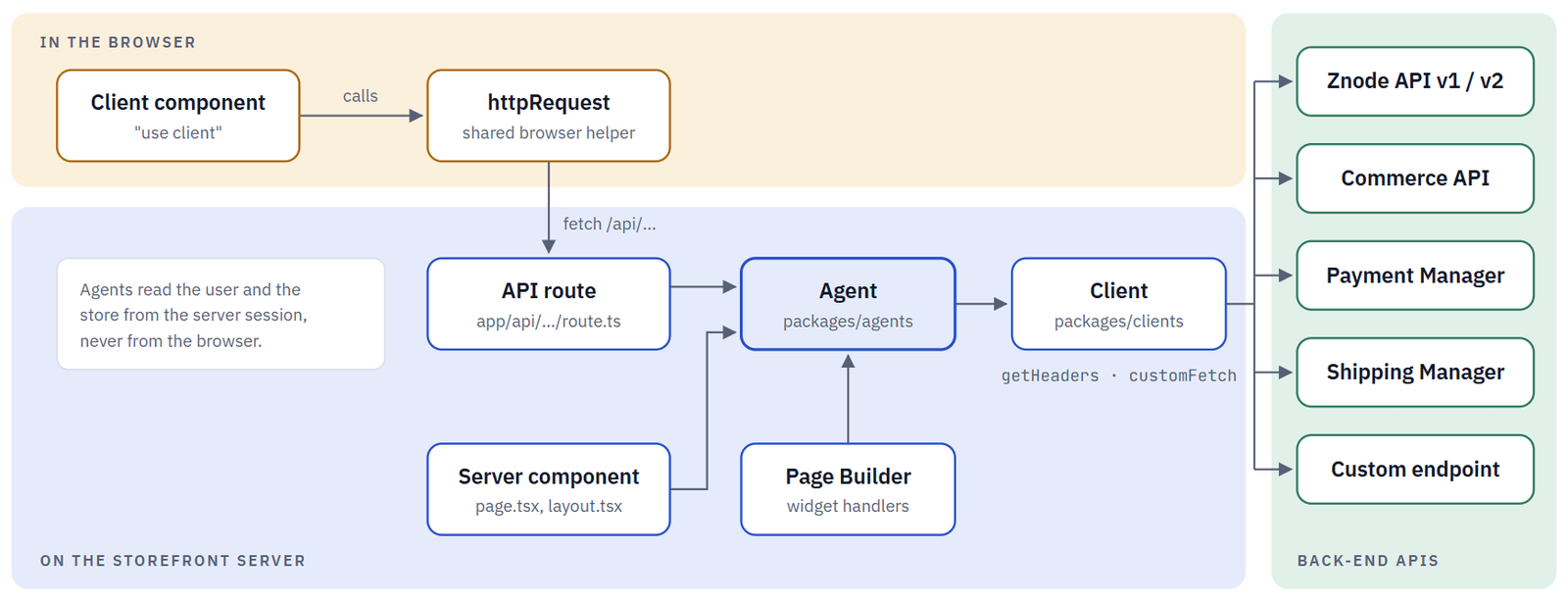
| Layer | Runs in | Role |
|---|---|---|
| Client Component | Browser | Shows data and calls API routes with httpRequest. |
| API route | Server | The only door the browser may use. |
| Agent | Server | Adds store and user context, applies rules, maps the data. |
| Client | Server | One HTTP call with headers, cache options and a timeout. |
Three Ways Data Reaches a Page
All three end in the same agents. Choose by when the data is needed and whether it may be cached with the page.
| Entry point | Runs in | How it gets data | Best for |
|---|---|---|---|
| Client component | Browser | Calls /api/<feature> through httpRequest. | Data that follows user actions, and anything that must stay out of a cached page. |
| Server component | Server | A page.tsx or layout.tsx awaits the agent and passes the result as props. | The first render, SEO, feature switches and redirects. |
| Page Builder widget | Server | A registered data handler calls the agent and stores the result in the widget's props.response.data. | Content merchandisers place on pages. |
Do load independent data in parallel with Promise.all, the way the quote page loads translations and four agents at once.
Don't call a back-end URL, or send Znode headers, from browser code. Anything prefixed NEXT_PUBLIC_ is visible to visitors.
How Page Builder Pages and Widgets Get Their Data
A Page Builder page is prepared once, cached, and then given fresh per-request values every time it is served. Knowing which part is cached tells you where your data belongs.
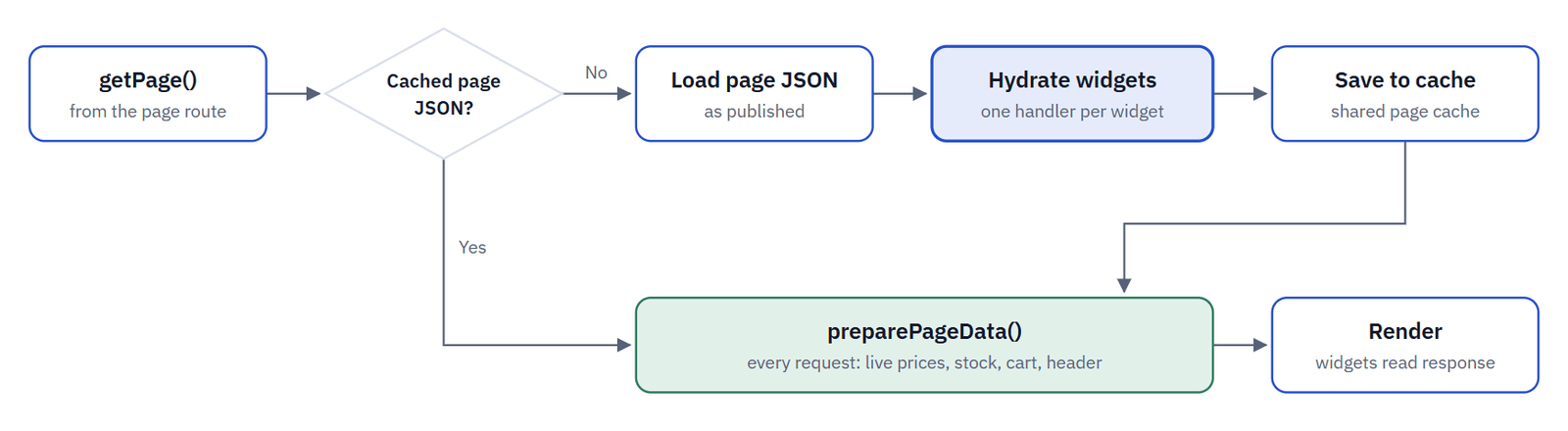
Header, main content and footer are hydrated in parallel. The cache key covers the page, publish state, locale, account and profile, so everything a handler returns is shared by those visitors.
| Handler map | Used for | Example |
|---|---|---|
| pageHandlers | Page widgets | ProductDetailsPage → getProductInformation |
| widgetHandlers | Content widgets | BannerSliderWidget → getSliderData |
| layoutHandlers | Header layout | HeaderLayout → getHeaderInitialDetails |
Rule: page and widget handlers return shared data only. Add per-user or time-sensitive values in preparePageData, or load them client-side through an API route. The storefront's product carousel loads through /api/product-widget for exactly this reason.
The maps live in packages/page-builder/src/utils/prepared-content-item.ts. To feed a new widget, add one entry pointing at your agent and mark it // CUSTOM:. In the editor app, widget API routes read their query parameters with getWidgetParams(req), and render components wrap their output in DataStateHandler.
Inside One Client Call
You never write authentication, timeouts or cache logic yourself. Three shared helpers do it; your code supplies the URL, the function name and, for shared data, the cache tags.
| Step | Helper | Written by | What it covers |
|---|---|---|---|
| 1 | getHeaders | Shared helper | Domain token (API_DOMAIN|API_KEY, Base64), store, locale and publish state, encrypted Z-Request-Context, and user IDs when logged in. |
| 2 | addCacheOption | Shared helper | Turns a CacheTags filter into force-cache with tags, or leaves the call uncached. |
| 3 | customFetch | Shared helper | Times out after API_FETCH_TIMEOUT_MS (30 s by default), merges identical in-flight GETs per user, logs errors and optional debug detail. |
| 4 | Agent mapping | You | convertCamelCase, map to your UI model, log under your AREA, return a safe default on error. |
| Back end | Client folder | Import |
|---|---|---|
| Znode API v1 / v2 | znode-client/V1, V2 | @znode/clients/v1, @znode/clients/v2 |
| Commerce API | znode-client/commerce | @znode/clients/cp |
| Payment Manager | znode-client/payment-manager | @znode/clients/payment |
| Shipping Manager | znode-client/shipping-manager | @znode/clients/shipping-manager |
| Your endpoints | znode-client/custom | @znode/clients/custom |
Do put every new call in znode-client/custom/ and give it a unique function name such as ProductDocument_list. That name drives logging and debugging.
Don't edit the generated V1, V2 or payment clients. They carry an auto-generated banner and are replaced on upgrade.
Filters, Expands and Field Names
Znode list endpoints accept filter, expand, sort, pageIndex and pageSize. Build them with the shared helpers, never by hand.
agent (excerpt)
import { ExpandCollection, ExpandKeys, FilterCollection, FilterKeys, FilterOperators } from "@znode/utils/server";
const filters = new FilterCollection();
filters.add(FilterKeys.PortalId, FilterOperators.Equals, String(portalId));   // filter=PortalId~eq~1
const expands = new ExpandCollection();
expands.add(ExpandKeys.Seo); // expand=Seo| Helper | What it gives you |
|---|---|
| FilterKeys | Field names Znode understands, such as PortalId, UserId, IsActive, and the special CacheTags |
| FilterOperators | eq, ne, cn, sw, ew, gt, ge, lt, le, in, not in, bw, lk and more |
| ExpandKeys | Related data to include, such as Seo, Promotions, Inventory, Pricing |
| convertPascalCase / convertCamelCase | Outgoing bodies to Znode's PascalCase, incoming responses to camelCase |
Do request only the expands you render, and convert case in the agent. Test key names that start or end with SKU, SEO, URL or CMS: they are converted with special rules.
Don't send a CacheTags filter expecting the back end to see it. The client removes it and turns it into cache tags.
Where Should Your Change Go?
Choose the pattern that touches the fewest baseline files. New files are free; edits to baseline files cost effort at every upgrade. The diagram shows how to choose between Patterns A, B and C.
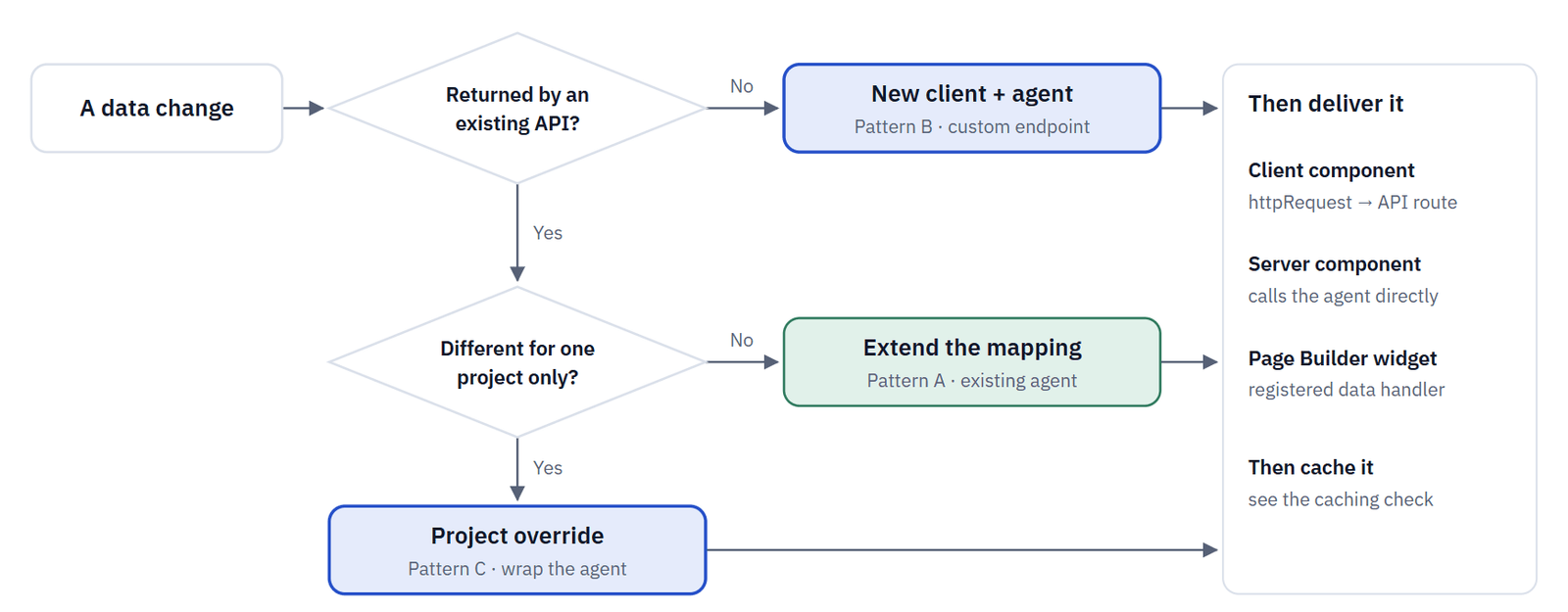
| Pattern | When to use it | What you change |
|---|---|---|
| Pattern A: Extend an existing mapping | The data already arrives from an existing call or store setting. | Add an optional field to the type and map it in the agent, marked // CUSTOM:. |
| Pattern B: New agent and custom client (this guide's example) | The data needs a call the storefront doesn't make yet. | New files only: type, client, agent, and an API route or data handler. |
| Pattern C: Project override | One project needs different data. | A project agent in packages/agents/src/<project>/ wraps the baseline agent; one marked line wires it in. |
Example - Product Documents
The example adds Product Documents: spec sheets, manuals and safety sheets for a product, read from a custom endpoint and shown on the product page. Build from the back end toward the screen, so each piece can be tested before the next depends on it.
Step 1 - Describe the data
packages/types/src/product-document.ts
product-document.ts
export interface IProductDocument {
  documentId: number;
  title: string;
  documentType: string;
  url: string;
}
export interface IProductDocumentListResponse {
  documents: IProductDocument[];
  hasError?: boolean;
}
Step 2 - Write the client
packages/clients/src/znode-client/custom/product-document/product-document.ts · custom/index.ts
One function, one endpoint. The shared helpers add headers, cache options and the timeout. Export it from custom/index.ts.
product-document.ts
export async function ProductDocument_list(productId: number, storeCode: string, localeCode: string, cacheInvalidator: FilterTuple[] = []) {
  let options: RequestInit = { method: "GET", cache: "no-store", headers: await getHeaders("GET", String(baseUrl)) };
  options = addCacheOption(cacheInvalidator, options);   // tags → force-cache when ENABLE_CACHE=true
  const url = `${baseUrl}ProductDocument/List?productId=${productId}&storeCode=${storeCode}&localeCode=${localeCode}`;
  const response = await customFetch(url, options, "ProductDocument_list");
  if (response.status === 200) return JSON.parse((await response.text()) || "null");
  throw new Error(`ProductDocument_list failed with status ${response.status}`);
}
Step 3 - Write the agent
packages/agents/src/product-document/ · packages/logger/src/log-manager/areas.ts
The agent takes the store from the server, tags the call so a product or catalog publish refreshes it, converts the field names and never throws.
product-document.ts (excerpt)
export async function getProductDocuments(productId: number): Promise<IProductDocumentListResponse> {
  try {
    const portalData = await getPortalDetails();
    const catalogCode = await getCatalogCode(portalData);
    const cacheInvalidator = new FilterCollection();                  // shared data: tag it
    cacheInvalidator.add(FilterKeys.CacheTags, FilterOperators.Contains,
      generateTagName(`${CACHE_KEYS.PUBLISH_PRODUCT}, ${CACHE_KEYS.CATALOG}`, String(productId), String(catalogCode)));
    const response = await ProductDocument_list(productId, String(portalData.storeCode), String(portalData.localeCode),
      cacheInvalidator.filterTupleArray as FilterTuple[]);
    return { documents: (convertCamelCase(response)?.documents ?? []).map(mapProductDocument) };
  } catch (error) {
    logServer.error(AREA.PRODUCT_DOCUMENT, errorStack(error));       // log, never crash the page
    return { documents: [], hasError: true };
  }
}
Step 4 - Expose an API route
apps/webstore/src/app/api/product-document/list/route.ts
route.ts
export async function GET(request: Request) {
  try {
    const productId = Number(new URL(request.url).searchParams.get("productId"));
    if (!Number.isInteger(productId) || productId <= 0) return sendError("A valid productId is required.", 400);
    return sendSuccess(await getProductDocuments(productId), "Product documents retrieved successfully.");
  } catch (error) {
    return sendError("An error occurred while fetching product documents.", 500);
  }
}
Important: documents are public, so this route has no session check. Any route that returns customer data must read the user with getSavedUserSession() and return 401 without one.
Step 5 - Add the browser helper
packages/custom-components/src/http-request/product-document.ts
product-document.ts
export const getProductDocumentList = (productId: number) =>
  httpRequest<IProductDocumentListResponse>({ endpoint: "/api/product-document/list", queryParams: { productId } });
httpRequest returns the envelope's data, or { hasError: true, errorMessage } on any failure. It never throws.
Step 6 - Show it
packages/custom-components/src/components/product-document/ProductDocuments.tsx · apps/webstore/messages/*.json
A "use client" component loads the list after the page renders, so the cached product page stays untouched. Hide the section when the list is empty or hasError is set. Add the ProductDocuments translation namespace to every language file.
Do call the agent from a Server Component instead when the documents must be in the first HTML, for example for SEO.
Don't add the documents to the product page's data handler unless they are the same for every visitor. Its output is cached with the page.
Step 7 - Test it
packages/agents/src/product-document/product-document.spec.ts
Mock the client and the portal agent. Test that PascalCase input maps to your model, and that a client error returns { documents: [], hasError: true }. Run npx nx test agents.
Extend Mapping: Estimated Delivery Date
The product already carries a LeadTimeDays attribute, so no new call is needed. Map it in getProductInformation and compute the date in the browser.
packages/agents/src/product/product.ts (excerpt)
// CUSTOM: lead time used for the estimated delivery date
const leadTime = productBasicDetails.attributes?.find((attribute) => attribute.attributeCode === "LeadTimeDays")?.attributeValues;
productBasicDetails.leadTimeDays = Number(leadTime) || 0;
Why the browser computes the date: product details are cached with the page. The lead time changes only when the product is published, so it is safe to cache. A date computed on the server would be frozen into the cache and wrong the next day. Cache the inputs; compute time-sensitive values at render time.
Project override
Wrap the baseline agent in your project's agents folder, then switch the caller with one marked line. Baseline fixes keep reaching your project.
packages/agents/src/<project>/product/product-information.ts
export async function getProjectProductInformation(id: number, queryParams: IQuery) {
  const [information, documents] = await Promise.all([getProductInformation(id, queryParams), getProductDocuments(id)]);
  return { ...information, documents: documents.documents };
}
packages/page-builder/src/utils/prepared-content-item.ts (pageHandlers)
// CUSTOM: project product page also loads documents
["ProductDetailsPage", async (id, searchParams) => await getProjectProductInformation(Number(id), searchParams)],
Do add new fields as optional and mark every baseline edit with // CUSTOM: <reason>.
Don't copy a whole baseline agent into a project folder, or change the meaning of an existing field.
Where the Files Go
apps/webstore/
  messages/
    en-US.json, fr-FR.json  [add namespace]
  src/app/api/product-document/list/
    route.ts  [new · step 4]
packages/
  types/src/
    product-document.ts  [new · step 1]
  clients/src/znode-client/custom/
    product-document/product-document.ts  [new · step 2]
    index.ts  [export it]
  logger/src/log-manager/
    areas.ts  [add log area]
  agents/src/
    product-document/  [new · step 3]
    <project>/  [pattern C only]
  custom-components/src/
    http-request/product-document.ts  [new · step 5]
    components/product-document/ProductDocuments.tsx  [new · step 6]
  page-builder/src/utils/
    prepared-content-item.ts  [only for widget data · CUSTOM line]
Caching
A call is cached only when three things are true: it runs on the server, ENABLE_CACHE=true, and the agent added a CacheTags filter. Use this check to decide whether to add one.
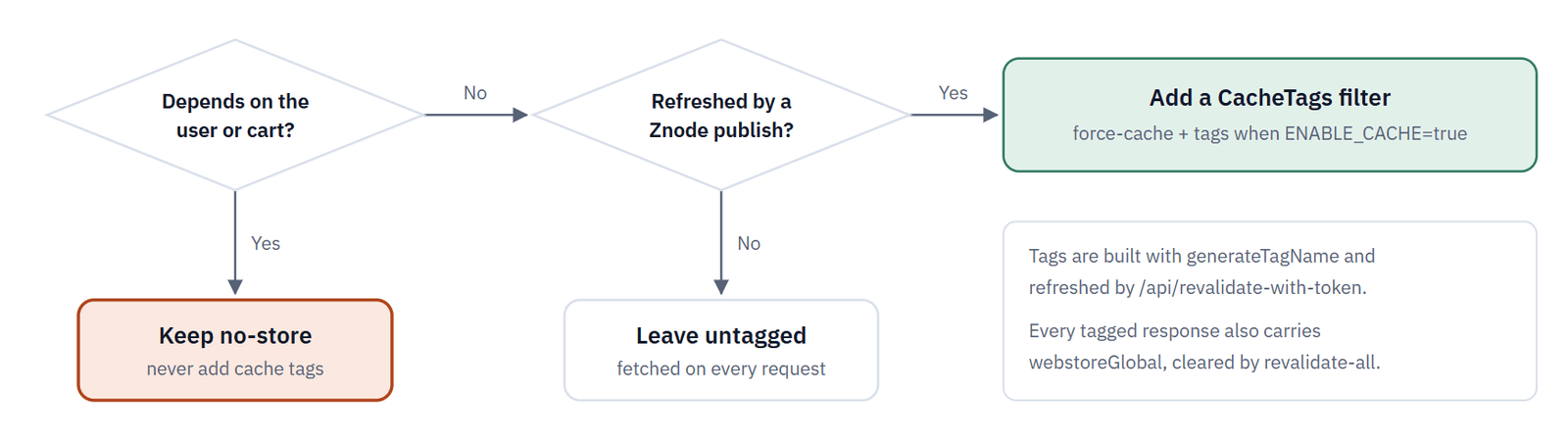
User data (cart, orders, addresses, quotes, live prices) is always no-store. Shared reference data (catalog, product, category, content, store settings) is tagged.
| Situation | What the client does |
|---|---|
| ENABLE_CACHE is not "true", or the call runs in the browser | Never cached |
| Server, ENABLE_CACHE=true, CacheTags filter present | force-cache with webstore<Tag> tags plus webstoreGlobal |
| Server, ENABLE_CACHE=true, no CacheTags filter | Fetched on every request |
Do build tags from CACHE_KEYS and reuse the key and ID combination the baseline agents use for the same data, so the same publish event refreshes yours.
Don't tag data that Znode publish events know nothing about unless your back end also triggers a revalidation when it changes.
Requests from guest users share one cache entry: before a response is force-cached, empty or zero user-identity headers are removed. Requests from logged-in users keep their own entry.
Real-Time Pricing
Product pages and lists may come from cache, but prices must not be stale. Unless ENABLE_REAL_TIME_PRICING=false, the storefront lays live prices over the cached data on every request.
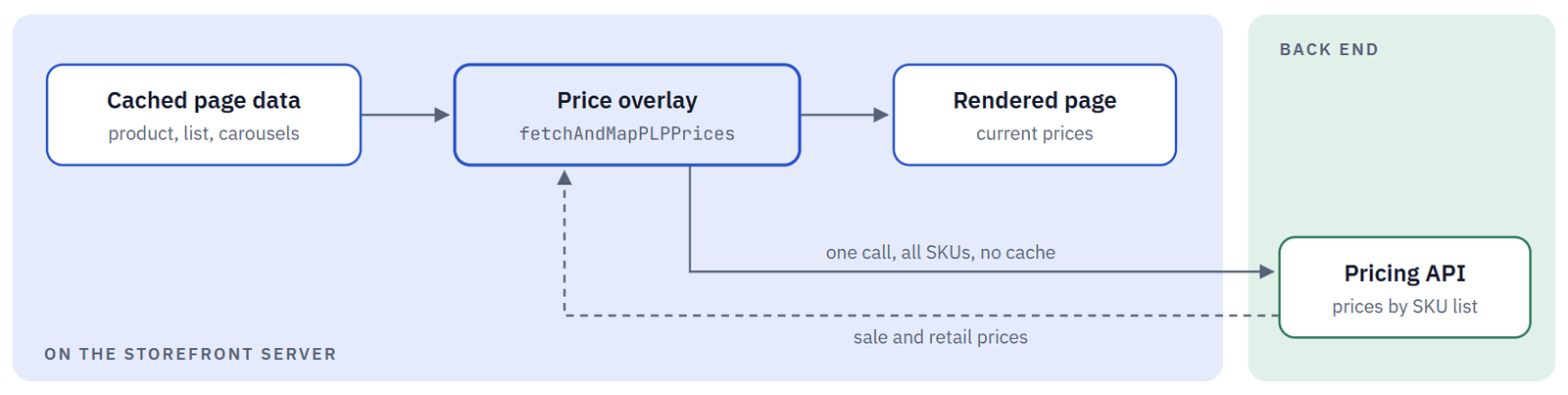
If the pricing call fails, the helpers return the product or list unchanged, so the page still renders.
| Helper | Use it for |
|---|---|
| fetchAndMapPDPPrice(product) | One product, including its configurable variant or grouped children, in a single call |
| fetchAndMapPLPPrices(productList) | Any product list or carousel, all SKUs in a single call |
Do apply fetchAndMapPLPPrices to every new product list, guarded by the same ENABLE_REAL_TIME_PRICING check, and collect SKUs from all lists on the page into one call.
Don't write live prices back into a cached structure, or call the pricing API once per product.
Errors and Performance
Errors
| Layer | On error |
|---|---|
| Client | Throws on an unexpected status. Network errors are logged under the function name. |
| Agent | Catches, logs with logServer.error(AREA.X, errorStack(error)), returns a safe default with hasError: true. |
| API route | Returns sendSuccess(data, message) or sendError(message, status): 400 bad input, 401 no session, 403 no permission. |
| Browser | httpRequest returns { hasError: true }. Show an empty or error state. |
Performance
| Practice | What to do |
|---|---|
| Run independent calls together | Promise.all for anything that doesn't depend on another result. |
| Batch, never loop | Collect IDs or SKUs and make one call. One call per item is the classic N+1 slowdown. |
| Let de-duplication help | Identical concurrent GETs share one upstream call. Build URLs the same way every time so they match. |
| Ask for less | Only the expands and fields you render; page long lists with pageIndex and pageSize. |
| Keep optional data off the critical path | Load it client-side or behind a Suspense boundary, and give it a shorter AbortSignal.timeout. |
Debug one function at a time
POST /api/debug with the Znode-Debug-Token header enables full request and response logging for a named client function.
curl -X POST https://<store-domain>/api/debug \
  -H "Znode-Debug-Token: <ZNODE_DEBUG_TOKEN>" -H "Content-Type: application/json" \
  -d '{ "action": "enable", "functionNames": ["ProductDocument_list"] }'
The enabled list is held in memory on the instance that received the request and resets on restart. Send { "action": "clear" } when you are done.
Golden Rules
| Rule | What it means |
|---|---|
| The browser calls only /api/ routes | Back-end URLs, keys and Znode headers stay on the server. |
| Logic lives in agents | Pages, routes and widgets stay thin. Clients do HTTP only. |
| The server decides who and where | Take user and store from the session, never from the request. |
| Customer data is never cached | No cache tags on user calls, and no user data in page or widget handlers. |
| Agents never crash the page | Log under your own area and return a safe default. |
| Custom code stays in custom folders | Never edit generated clients. Mark baseline edits with // CUSTOM: <reason>. |
Hand-Over Checklist
Before the pull request, confirm:
- New calls live in znode-client/custom/ or your project client folder; no generated client was edited
- Every call uses getHeaders, customFetch and a unique function name
- Agents read store and user on the server, convert case, log under their own area and return a safe default
- API routes validate input, check the session for customer data and use sendSuccess / sendError
- User calls are no-store; shared calls carry CACHE_KEYS-based tags
- Page and widget handlers return shared data only
- New product lists apply real-time pricing in one batched call
- Unit tests cover the mapping and the error default (npx nx test <package>)
- Baseline edits are marked with // CUSTOM:
Troubleshooting
| You see | What it usually means |
|---|---|
| A field is undefined in the UI but present in the API response | Case wasn't converted, or a SKU / SEO / URL key converted differently than expected |
| httpRequest returns { hasError: true } | The API route threw or returned sendError. Check the server log for your area |
| Data doesn't change after a publish | The call isn't tagged, or its tag doesn't match the tag the publish event sends |
| One customer sees another customer's data | A user-specific call was tagged, or a widget handler returned user data |
| Old prices on product pages | ENABLE_REAL_TIME_PRICING=false, or a new list doesn't apply the price overlay |
| A call aborts after about 30 seconds | The back end is slower than API_FETCH_TIMEOUT_MS |
| A widget shows nothing on the storefront | It has no widgetKey, or no data handler is registered for it |