
TABLE OF CONTENTS
- Overview
- Cache Tiers
- Purging Cache on Demand
- Putting a CDN in Front
- Can I Cache This?
- Performance Rules for Customizations
- Tuning Recipes
- Where the Files Go
- Hand-off Checklist
- Troubleshooting
Solution Architecture Guidance
Cache Tiers
Treat storefront caching as part of the solution architecture, not only a performance setting. Znode separates guest page, page-structure, portal, shared-data and optional CDN caching. Each tier has different freshness and invalidation behavior.
Most cache tiers are switched on per environment. Only the portal cache is always on. During discovery, confirm which cache tiers are enabled in each environment.
Establish whether each experience is shared by all guest visitors or personalized and stateful.
- Customer, cart, checkout, account, buyer-specific pricing (account, contract or profile prices) and other visitor-specific experiences must not be served from shared caches.
- Shared caches may hold data only when it is identical for everyone who shares the cache key. Guest prices are the same for every guest visitor, so they are correctly included in the cached guest pages.
- Logged-in visitors and visitors with a cart bypass the shared page cache automatically. A public page needs explicit cache exclusion when it varies by something else, such as a custom cookie, a request header, location or an A/B test.
- Incorrect CDN behavior can expose one visitor's content to another.
Content Freshness and Publish Behavior
Agree with the client on acceptable content freshness and publish behavior.
| Cache | Behavior on publish |
|---|---|
| Shared data and page structures | Respond to publish events. Custom data refreshes on publish only if it uses the standard cache tags. |
| Portal cache | Refreshes on publish. This refresh depends on the publish events being configured with the revalidation token, and on Redis in multi-server environments. |
| Guest page cache | Not purged automatically on publish. Copies may remain until their configured freshness window expires unless they are purged. |
| CDN | Not purged automatically on publish. Copies may remain until their freshness window expires unless they are purged. The freshness window is the configured cache time plus its stale-while-revalidate period. |
Identify requirements for immediate updates during discovery, because they change how the solution must handle caching and content refresh. Immediate visibility needs one of these options, and each option affects scope and estimate:
- A purge step in the publish runbook.
- An automated purge.
- Shorter cache times.
- Excluding the affected pages.
Requirements That Affect Scope
Identify requirements that affect Znode's managed caching behavior before committing to the solution. In particular, call out:
- Public pages with personalized content.
- Requirements for immediate visibility after publishing.
- Customizations that change normal caching or revalidation behavior.
These requirements may require platform-side configuration or operational support and should be reflected in the solution scope and estimate.
Customization Risks
Set expectations that aggressive caching can improve guest storefront performance. Customizations that bypass Znode's cache and revalidation patterns, force-cache personalized pages or depend on repeated full resets can increase security risk, back-end traffic, technical debt and future upgrade effort.
Overview
The storefront renders every page on the server. It stays fast by not repeating work: guest pages, page layouts, store settings and shared catalog data are each cached at their own level. This guide shows those levels, what each may hold, how a Znode publish refreshes them, and the rules your customizations must follow.
This guide is for implementation partners and developers working on the Znode 10 storefront (Next.js 15, React 19, Node 24 and Redis). In this guide, guest visitors are visitors without a session or cart.
The diagram below shows the caching tiers across the browser, the storefront server and the back end. Each tier answers from its own copy when it can. Page tiers (CDN, L1, L2) serve guest visitors only. Data tiers hold only data that is identical for everyone who shares the cache key.
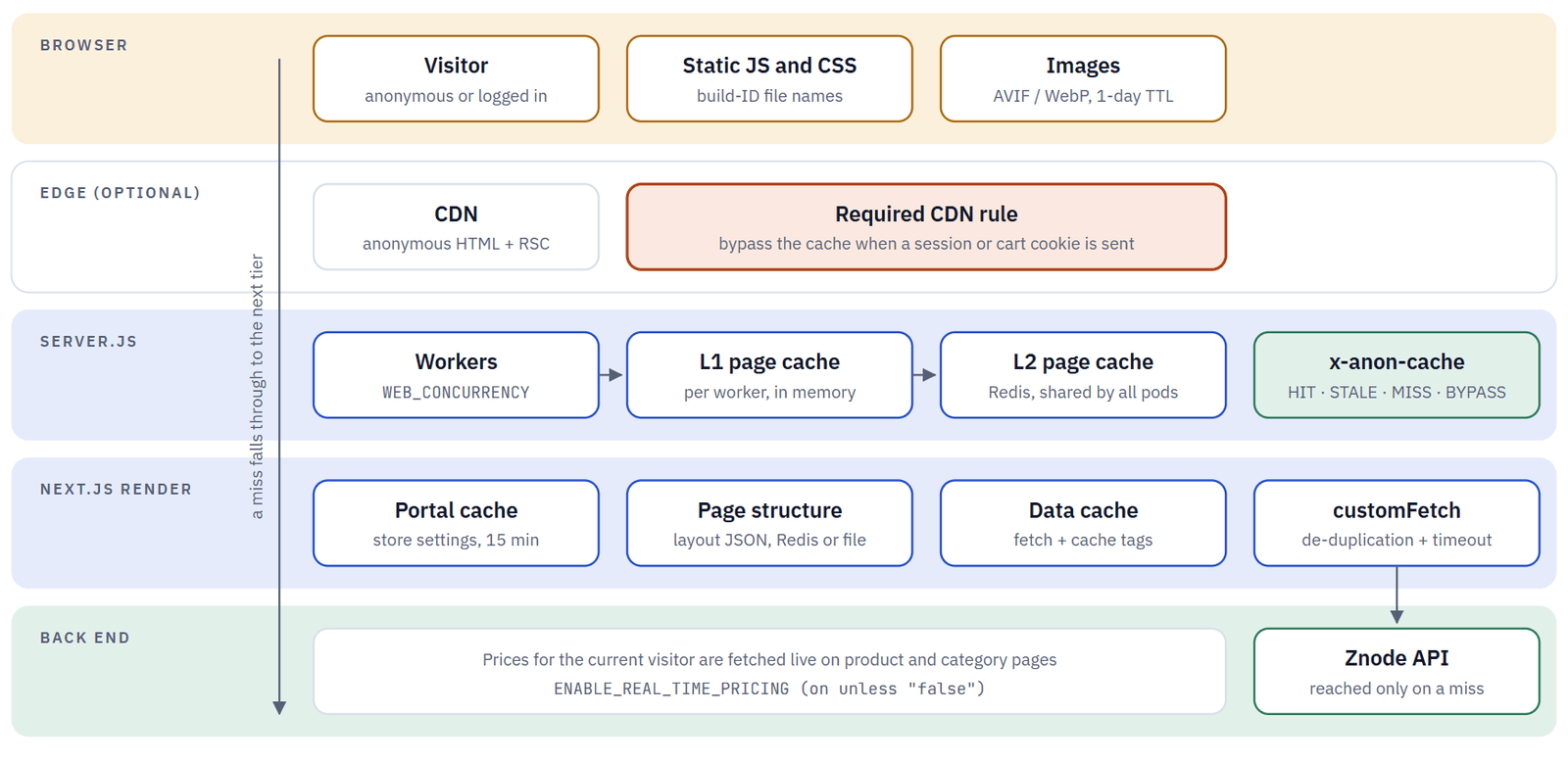
| Level | Cache | What it holds |
|---|---|---|
| Browser | Guest page cache | Whole HTML pages for visitors without a session or cart. |
| Edge | CDN | Optional. Caches only what the server marks as public. |
| Server.JS | Page structure | Prepared Page Builder JSON, per store, locale, account and profile. |
| Next.JS Render | Portal cache | Store details, theme and redirects, refreshed every 15 minutes. |
| Next.JS Render | Data cache | Shared catalog and content responses, invalidated by tags. |
Cache Tiers
Most tiers are opt-in through environment variables. The defaults below are the values that apply when a variable is not set.
| Tier | Holds | Shared by pods? | Switch |
|---|---|---|---|
| CDN | Guest HTML and RSC payloads | Yes | CDN_CACHE_SMAXAGE_S > 0 (default 0, off) |
| L1 page cache | Rendered HTML, per worker | No | ENABLE_ANON_PAGE_CACHE=true |
| L2 page cache | The same HTML, gzip-compressed in Redis | Yes | ANON_PAGE_CACHE_L2_ENABLED=true + Redis |
| Portal cache | Store settings, theme, metadata, 301 redirects | No, cleared on every pod through Redis | Always on, PORTAL_CACHE_TTL_MS (default 15 min) |
| Page structure | Page Builder JSON for home, category, product, content, layout and other pages | Yes with STORAGE=REDIS | ENABLE_PAGE_CACHE=true |
| Data cache | Tagged fetch responses for shared data | Yes with CACHE_MEMORY=REDIS | ENABLE_CACHE=true |
| Request de-duplication | Identical GET calls that are in flight at the same moment | No | Always on, timeout API_FETCH_TIMEOUT_MS (default 30 s) |
Memory note: in-memory caches exist once per worker. With WEB_CONCURRENCY workers per pod (default 1), memory use is roughly the worker count times the per-worker limits, for example the 256 MB page budget (ANON_PAGE_CACHE_MAX_TOTAL_BYTES). Size pods accordingly.
The Guest Page Cache
For guest visitors, the rendered HTML is identical, so the custom server (apps/webstore/server.js) stores it and replays it. Logged-in visitors, visitors with a cart and personal paths always receive a fresh, personalized render.
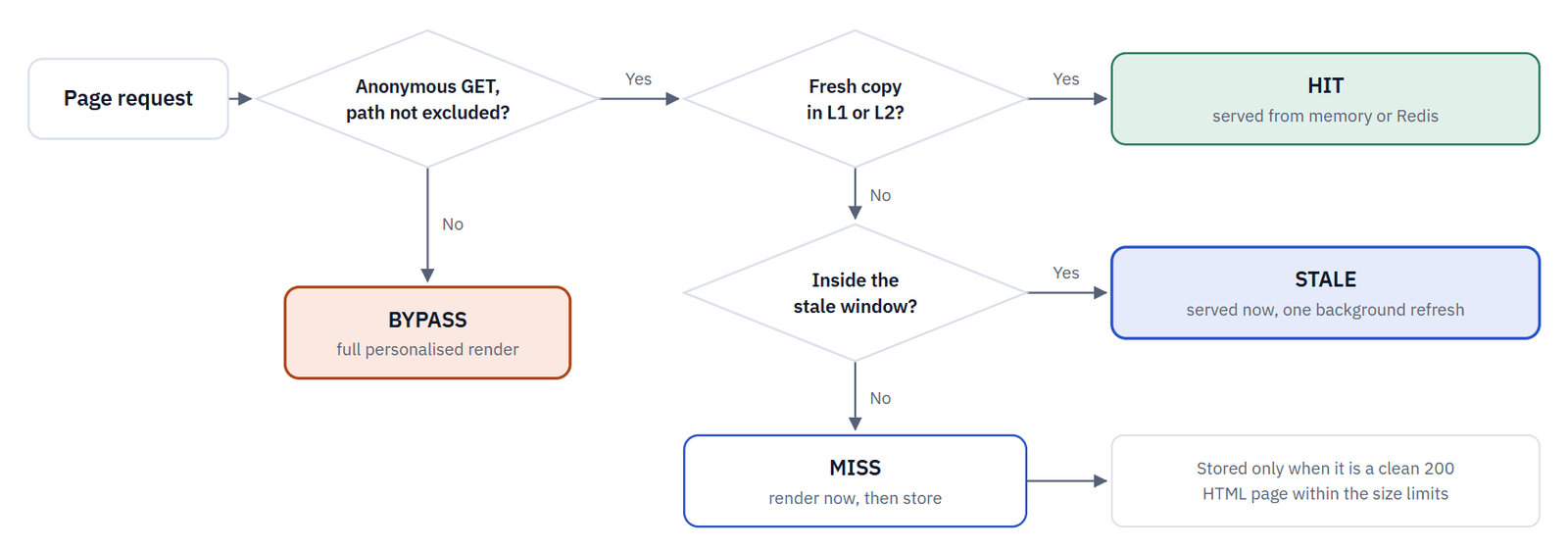
The diagram below shows how the guest page cache handles a page request. The outcome is sent in the x-anon-cache response header. Pages served from Redis also carry x-anon-cache-tier: L2. Stale copies are always sent as private, no-store so a CDN never keeps them.
| Never cached | Why |
|---|---|
| Requests with a next-auth.session-token, __Secure-next-auth.session-token, CartId, CartNumber or CopiedCartNumber cookie | The visitor is logged in or has a cart |
| Paths under api, _next, cart, checkout, account, login, logout, register, welcome, impersonation, punchout, quick-order, saved-cart, order, quote, error, maintenance, revalidate (with or without a locale prefix) | The EXCLUDED_PATHS list in server.js: personal or stateful pages |
| Non-GET requests, static files, error renders, pages over 5 MB | Only clean 200 HTML is stored |
Key Settings
| Variable | Default | Purpose |
|---|---|---|
| ENABLE_ANON_PAGE_CACHE | off | Master switch; set true to enable. Turning it off restores fully dynamic rendering at once. |
| ANON_PAGE_CACHE_TTL_MS | 60000 | Time an entry is fresh |
| ANON_PAGE_CACHE_STALE_TTL_MS | 600000 | Window after the TTL in which a stale copy is served while it refreshes |
| ANON_PAGE_CACHE_MAX_ENTRIES | 500 | Entries per worker |
| ANON_PAGE_CACHE_MAX_BODY_BYTES | 5 MB | Largest page stored |
| ANON_PAGE_CACHE_MAX_TOTAL_BYTES | 256 MB | Memory budget per worker; oldest entries are evicted first |
| ANON_PAGE_CACHE_L2_ENABLED | off | Shared Redis tier; one instance renders a cold or stale page, the others read it |
| ANON_PAGE_CACHE_L2_TIMEOUT_MS | 80 | Per Redis call; on timeout the page is rendered locally |
| ANON_PAGE_CACHE_L2_LOCK_TTL_MS | 10000 | Render lock; keep it above your slowest render |
The cache key combines the store host, a mobile or desktop bucket, gzip support, the NEXT_LOCALE cookie and the full URL including the query string. Two store domains never share pages.
Purging Cache on Demand
Send a purge request to clear every cached copy, or every variant of one URL.
# everything: this worker, sibling workers, other pods and Redis
curl -X POST https://<store-domain>/api/anon-cache/purge \
  -H "x-secret: <ZNODE_REVALIDATE_TOKEN>"
# one URL, all of its variants
curl -X POST https://<store-domain>/api/anon-cache/purge \
  -H "x-secret: <ZNODE_REVALIDATE_TOKEN>" \
  -H "Content-Type: application/json" \
  -d '{"path":"/category/5602"}'
A successful call returns { "purged": true, "entriesCleared": n, "broadcast": { "cluster", "redis", "l2" } }. It returns 403 for a wrong secret, an empty 404 when no token is configured, and 503 when the app is not running under server.js.
Putting a CDN in Front
Set CDN_CACHE_SMAXAGE_S above zero and the server marks guest HTML as public, s-maxage=<n>, stale-while-revalidate=<CDN_CACHE_SWR_S> (default 600) with Vary: Accept-Encoding. Every personalized or excluded page is marked private, no-store. RSC payloads for client-side navigation are included unless CDN_CACHE_RSC=false.
Required rule: configure the CDN to bypass its cache for any request that carries one of the five personal cookies (next-auth.session-token, __Secure-next-auth.session-token, CartId, CartNumber, CopiedCartNumber). Response headers alone cannot say "vary by these cookies only".
Do keep the query string in the CDN cache key, respect origin Cache-Control, and pick an s-maxage that matches how quickly guest visitors must see a publish.
Don't add an edge rule that force-caches HTML, or strip the query string. Either one can serve the wrong page variant.
How a Publish Refreshes the Storefront
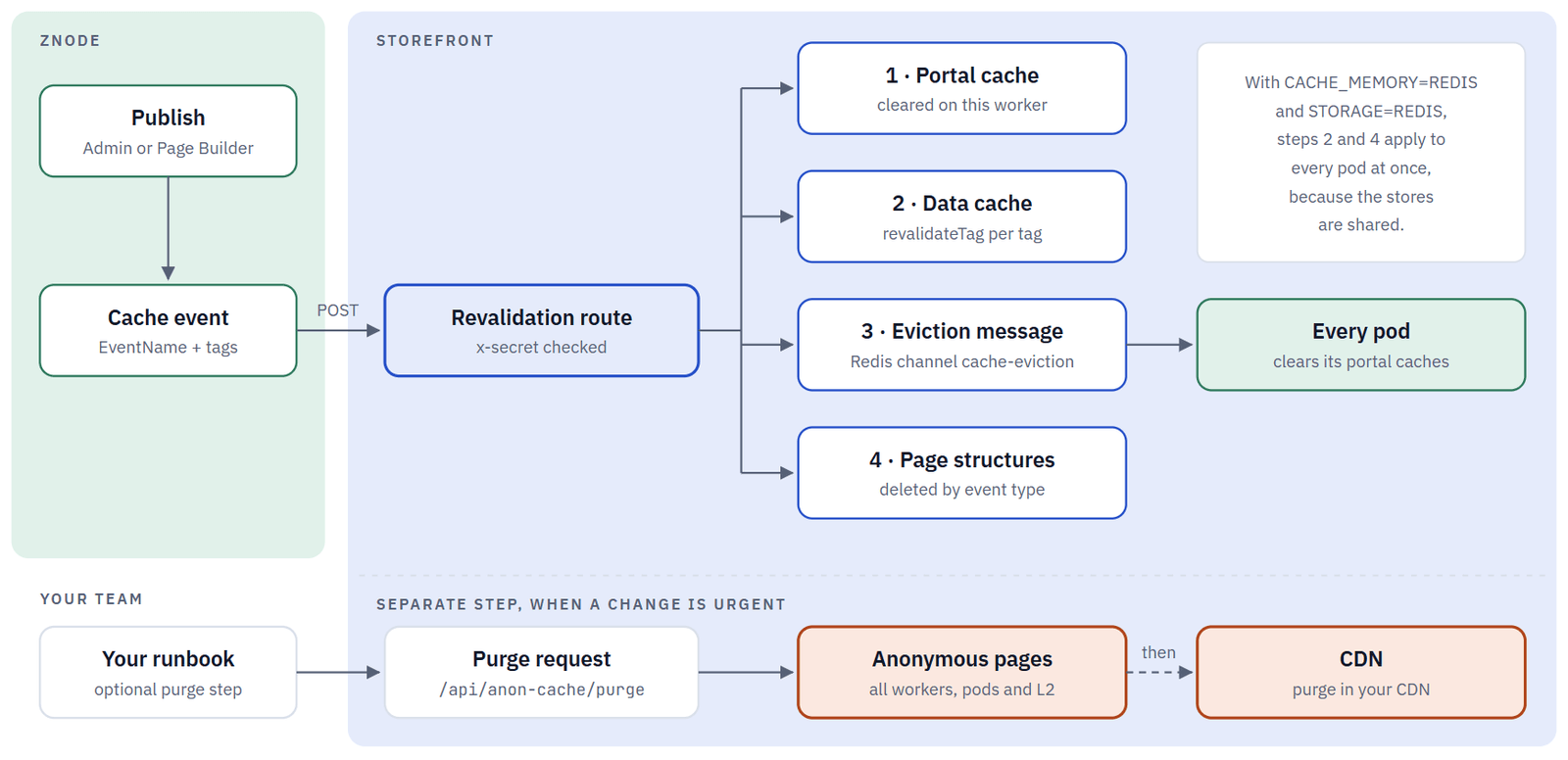
When content, catalog or store settings are published, Znode sends a cache event to the storefront. One request to the revalidation route updates the data tiers on every pod. The page tiers in front refresh on their own timers, or immediately when you purge them.
The diagram below shows this flow. The revalidation route updates the data tiers. Guest pages and CDN copies refresh after their TTL (60 s and s-maxage), or at once when you purge them.
| Tier | Refreshes | Your action | Detail |
|---|---|---|---|
| Data cache | Immediate | Automatic | Tagged responses are dropped by revalidateTag. |
| Page structure | Immediate | Automatic | Deleted for the store, product, category or layout named by the event. |
| Guest pages | Within the TTL | Purge if urgent | 60 s by default, refreshed in the background. Purge for an instant update. |
| CDN | Within s-maxage | Purge if urgent | Your chosen CDN_CACHE_SMAXAGE_S. Purge the CDN for an instant update. |
| Event | Page structures cleared |
|---|---|
| Portal publish or update, Visual Editor publish, manual "refresh webstore cache" | Every structure of the store, plus cart, checkout, quick order, track order, forgot password, sign-up and login |
| Product publish, price, inventory or review update | The product pages named in the event's tags |
| Category publish, price, inventory or review update | The category pages named in the event's tags |
| Banner slider or content container publish | Cached structures under the str_ prefix |
| Catalog publish | Header and footer layout structures and the catalog's page keys |
Do point Znode at POST /api/revalidate-with-token and send x-secret: <ZNODE_REVALIDATE_TOKEN>. Set the same token on every pod, and configure Redis in every environment that receives publish events: the route publishes the eviction message on Redis.
Don't use the deprecated /api/revalidate routes or the variants that carry the token in the URL path. URL paths end up in access logs.
Full reset: POST /api/revalidate-all-with-token revalidates every tagged response and deletes every key in the configured cache store. Use it only for recovery, expect a burst of back-end traffic, and give the storefront its own Redis database.
Can I Cache This?
Ask these questions for every new page, widget and API call. Shared tiers must never hold data that belongs to one visitor. The diagram below shows the questions in order.
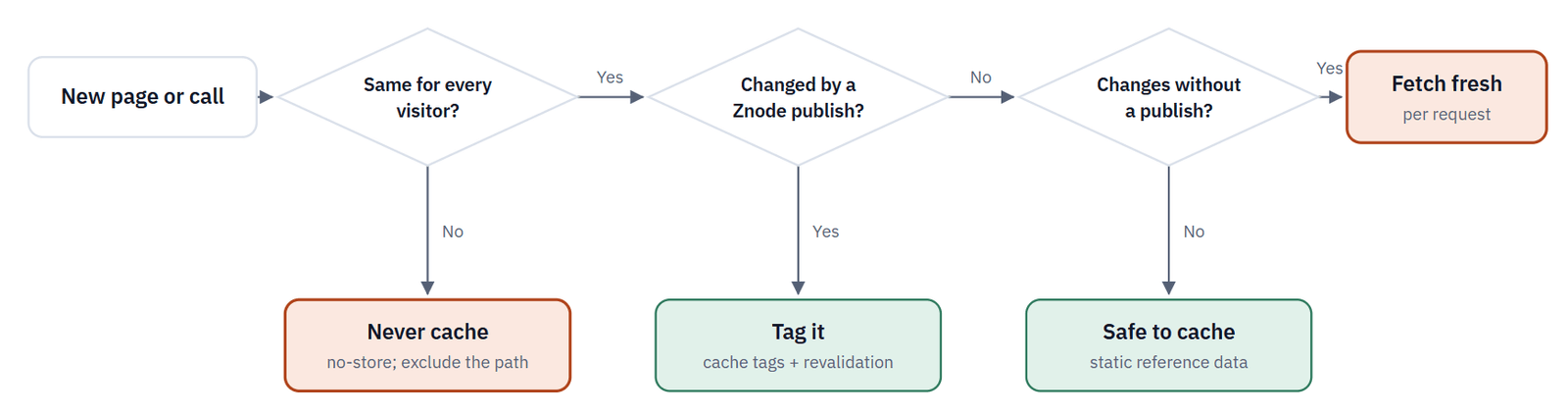
For a public page, also ask: can guest visitors accept a delay of up to the page TTL (and the CDN s-maxage)? If not, add the path to EXCLUDED_PATHS, or purge after each change.
| Data | Shared cache? | How |
|---|---|---|
| Catalog, categories, brands, content, CMS widgets, store settings | Yes | Cache tags with FilterCollection and generateTagName |
| Guest HTML of public pages | Yes | Automatic (page cache, CDN) |
| Prices and stock for a logged-in buyer | No | Live pricing, no-store |
| Cart, checkout, orders, quotes, addresses, account data | No | cache: "no-store"; paths already excluded |
| Anything read from the session, cookies or a per-visitor header | No | no-store, and exclude the path if the page is public |
packages/agents/src/brand/brand.ts (pattern for shared data)
const cacheInvalidator = new FilterCollection();
cacheInvalidator.add(
  FilterKeys.CacheTags,
  FilterOperators.Contains,
  generateTagName(`${CACHE_KEYS.PORTAL}, ${CACHE_KEYS.DYNAMIC_TAG}`, portalHeader.storeCode || "", "PublishedBrandsGet")
);
// pass cacheInvalidator.filterTupleArray to the client call
With ENABLE_CACHE=true, a server call that carries CacheTags is sent with cache: "force-cache" and Next.js tags (each prefixed with webstore, plus webstoreGlobal). Without tags, or in the browser, the call is not cached. Use tag names from CACHE_KEYS so that publish events reach your data.
Performance Rules for Customizations
| Rule | Detail |
|---|---|
| Fetch on the server | Pages are Server Components. Call agents there and pass results to client components as props. |
| Run independent calls in parallel | Wrap them in Promise.all, as quote/page.tsx does. |
| No client waterfalls | One API route that returns everything a component needs beats three chained browser calls. |
| Use customFetch | It adds the timeout, de-duplicates identical GETs and supports debug logging. |
| Keep "use client" at the leaves | A client component ships its whole import tree to the browser. |
| Load heavy UI on demand | Use next/dynamic for dialogs, scanners and quick views. |
| Use the shared image components | They are built on next/image: AVIF/WebP and a one-day optimizer cache. Always give dimensions. |
| Bound every in-memory cache | Give it a TTL and a size cap, and remember it exists once per worker. |
| Agents return safe defaults | A failed call should not fail the page, and error renders are never stored in the page cache. |
| Mark baseline edits | If you change EXCLUDED_PATHS or another shared file, add // CUSTOM: <reason>. |
loading heavy UI on demand (from the baseline products carousel)
const QuickViewDetails = dynamic(
  () => import("../../common/product-card/quick-view/QuickViewDetails").then((mod) => mod.default),
  { ssr: false }
);
Tuning Recipes
STEP 1 - Size the workers
Set WEB_CONCURRENCY to the CPU cores each pod receives. Set KEEP_ALIVE_TIMEOUT_MS (default 65000) above your load balancer's idle timeout to avoid 502 errors. Behind an ingress, set IS_INGRESS_ENABLED=true.
STEP 2 - Share caches across pods with Redis
environment (several pods)
REDIS_CONNECTION_STRING=<redis url>
CACHE_EXPIRY=<seconds>
ENABLE_CACHE=true
CACHE_MEMORY=REDIS
ENABLE_PAGE_CACHE=true
STORAGE=REDIS
ENABLE_ANON_PAGE_CACHE=true
ANON_PAGE_CACHE_L2_ENABLED=true
ANON_PAGE_CACHE_WARM_HOST=<public store host>
ZNODE_REVALIDATE_TOKEN=<secret>
Do always set CACHE_EXPIRY with STORAGE=REDIS. With Sentinel, list REDIS_SENTINELS as host:port with ports, and set REDIS_MASTER_NAME to the same value as REDIS_SENTINEL_MASTER_NAME.
Don't use STORAGE=FILE with more than one pod. The files are local to each pod.
STEP 3 - Add the CDN
environment
CDN_CACHE_SMAXAGE_S=<seconds of anonymous staleness you accept>
CDN_CACHE_SWR_S=600
Then add the cookie bypass rule on the CDN, and a CDN purge to your publish runbook.
STEP 4 - Warm the cache after deploys
environment
ANON_PAGE_CACHE_WARM_URLS=/,/<top landing page>
ANON_PAGE_CACHE_WARM_CATEGORY_LIMIT=<number of category pages>
ANON_PAGE_CACHE_WARM_CONCURRENCY=3
Category pages are discovered from the storefront's own navigation API. Warm categories rather than products: the category set is small, while busy product pages stay warm through normal traffic. With L2 on, one instance warms for the whole fleet. ANON_PAGE_CACHE_WARM_HOST must be the public store host, because the host is part of the cache key.
STEP 5 - Set the build ID in CI
Chunk file names include BUILD_ID (or the git commit when it is not set). A stable ID keeps browser and CDN asset caches valid across redeploys and keeps separately built pods consistent. Production builds also emit Brotli copies of JS, CSS, HTML and SVG files over 10 KB, and DISABLE_CONSOLE_LOG=true removes console output from compiled application code.
Verify Caching
Run the first command twice to check the guest page cache, then run the second with a cart cookie.
# run twice: MISS, then HIT
curl -s -o /dev/null -D - -H "Accept-Encoding: gzip" https://<store-domain>/ | grep -i -E "x-anon-cache|cache-control"
# with a cart cookie: BYPASS
curl -s -o /dev/null -D - -H "Cookie: CartId=1" https://<store-domain>/ | grep -i x-anon-cache
| You see | It means |
|---|---|
| No x-anon-cache header | The guest page cache is off, or the app is not running under server.js |
| MISS on every request | The page is not a clean 200 HTML render, is over the size limit, or each request differs in host, device, encoding, locale or query string |
| x-anon-cache-tier: L2 | Served from Redis; another pod or worker rendered it |
| public, s-maxage=… | CDN caching is on and the response is for a guest visitor |
| private, no-store | Personalized, excluded, or a stale copy; the CDN must not keep it |
| Log line or switch | Tells you |
|---|---|
| [anon-cache] warming n URLs, warmup complete | Warm-up ran |
| [anon-cache] purged n entries (reason) | A purge reached this worker (request, cluster or Redis broadcast) |
| Subscribed to Redis channel: cache-eviction | This worker will receive publish evictions |
| data evicted with tag -> | A revalidation request was processed |
| CACHE_DEBUG_LOG=true | Logs page-structure cache writes, misses and deletes (verbose, enable briefly) |
| NEXT_PRIVATE_DEBUG_CACHE | Logs Redis errors in the Next.js cache handler |
| /api/debug with header Znode-Debug-Token | Enables request and response logging for named client functions on the worker that receives the call |
For ongoing monitoring, configure New Relic (NEW_RELIC_APP_NAME, NEW_RELIC_LICENSE_KEY) or OpenTelemetry (OTEL_ENABLED=true plus OTEL_SERVICE_NAME, OTEL_EXPORTER_OTLP_TRACES_ENDPOINT, OTEL_ENVIRONMENT, OTEL_CLUSTER, OTEL_NAMESPACE). Both are preloaded by npm run run-image. Track render time per route, the share of HIT and STALE responses, back-end call duration and worker memory.
Where the Files Go
The storefront files that hold each caching feature:
apps/webstore/
  server.js  [workers, page cache, CDN headers]
  cache-handler.mjs  [data cache in Redis]
  next.config.js  [build ID, Brotli, images]
  src/app/api/
    revalidate-with-token/route.ts  [publish events]
    revalidate-all-with-token/route.ts  [full reset]
    anon-cache/purge/route.ts  [page purge]
packages/
  clients/src/
    znode-client/V2/base.ts  [addCacheOption]
    common/customFetch.ts  [timeout, de-dup]
  cache/src/
    factory.ts, redis/, file/  [STORAGE, pub/sub]
  page-builder/src/utils/
    cache.ts  [page structures]
  agents/src/
    revalidate/revalidate.ts  [clean-up per event]
    portal/global.ts  [portal cache]
  utils/src/server/middleware/
    global-caching-helper.ts  [portal cache]
  constants/src/
    cache-keys.ts  [tag names, events]
Hand-off Checklist
Before go-live, confirm:
- WEB_CONCURRENCY matches CPU cores per pod, and pod memory covers the per-worker cache budgets
- Multi-pod environments use STORAGE=REDIS, CACHE_MEMORY=REDIS and, with the page cache on, ANON_PAGE_CACHE_L2_ENABLED=true
- CACHE_EXPIRY is set, and the storefront has its own Redis database
- ZNODE_REVALIDATE_TOKEN is set on every pod, and Znode calls /api/revalidate-with-token with x-secret
- The publish runbook says when to purge the guest page cache and the CDN
- ANON_PAGE_CACHE_WARM_HOST is the public store host
- The CDN bypasses its cache for the five personal cookies and respects origin Cache-Control
- Only the POST purge handler is reachable from outside: the purge route's validation-only GET handler is secured or removed, and diagnostic routes such as /api/redis-check are restricted at the ingress
- Every public page with per-visitor content is in EXCLUDED_PATHS, marked // CUSTOM:
- BUILD_ID is set in CI, DISABLE_CONSOLE_LOG=true in production, and monitoring is configured
Troubleshooting
| You see | What it usually means |
|---|---|
| A publish is visible to logged-in buyers but not to guest visitors | The guest page cache or CDN still holds the page. It refreshes within the TTL, or purge it |
| A logged-in buyer sees a guest page | The CDN cookie bypass rule is missing |
| One visitor sees another visitor's content | A personalized public page is cached. Add its path to EXCLUDED_PATHS and use no-store for its data |
| Content differs between pods | Caches are not shared: use STORAGE=REDIS and CACHE_MEMORY=REDIS, and check the cache-eviction subscription log on each pod |
| Revalidation returns 401 | ZNODE_REVALIDATE_TOKEN is not set on the pod, or the x-secret header does not match |
| Revalidation returns 500 | Redis is not reachable from the pod that received the request |
| Pods restart under load | Memory: lower ANON_PAGE_CACHE_MAX_TOTAL_BYTES or WEB_CONCURRENCY, or give pods more memory |
| Intermittent 502 errors at the load balancer | KEEP_ALIVE_TIMEOUT_MS is shorter than the load balancer idle timeout |