
Navigate to: PIM > Products > Product Detail > You May Also Like Tab
Overview
The You May Also Like feature allows administrators to associate related products with a product in Znode. These product suggestions can help buyers discover complementary or alternative products, improving product visibility and enhancing the shopping experience on the Storefront.
Prerequisites
- The user must have Administrator access to the Znode Admin Console.
- The user ensures that the products to be associated already exist in the product catalog.
Use Case
Use the You May Also Like section to recommend related products that buyers may be interested in viewing alongside the current product.
Add You May Also Like Product Suggestions
- Navigate to PIM > Products.
- Open the product you want to modify.
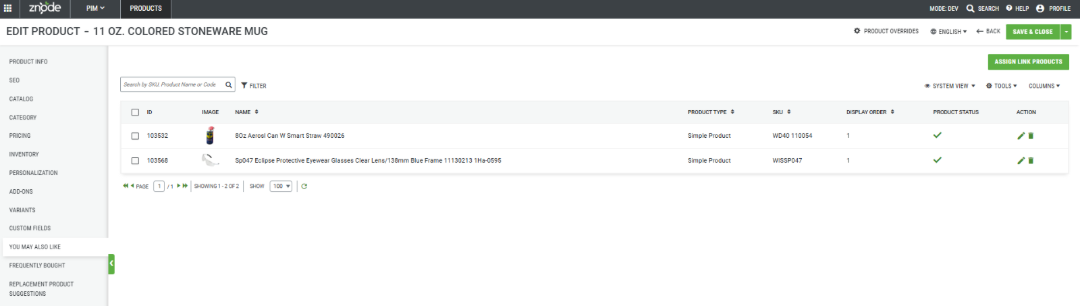
- Select the You May Also Like tab.
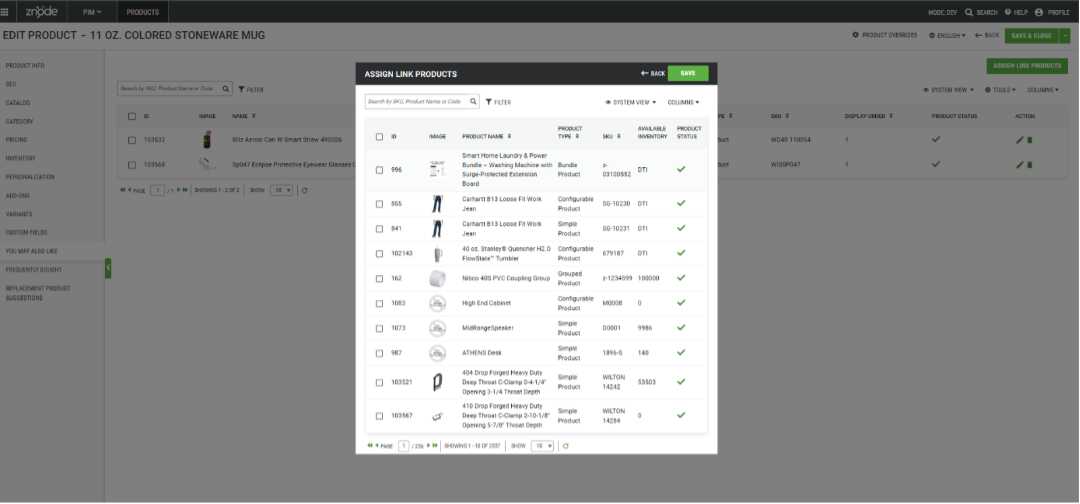
- Click Assign Link Products.
- In the product selection window, choose one or more products to associate with the current product.
- Click Save.
- Verify that the selected products appear in the associated products list.
- Click Save as Draft to save your changes without publishing, or click Publish to make the changes available.
Expected Outcome
After saving and publishing the product:
- The selected products are associated with the current product.
- The associated products appear in the You May Also Like product list.
- Buyers can view the recommended products where the You May Also Like feature is displayed on the Storefront.
Global Search Field Restrictions in Product Association
To enhance system performance, the fields available in Global Search have been restricted across all Product Association pages. Global Search now supports the following fields:
- SKU and Product Name
- SKU, Product Name, and Product Code (only where Product Code is available in the respective grid)
Notes
- Multiple products can be associated with a single product.
- Changes saved as a draft are not visible on the Storefront until the product is published.
- Publishing the product ensures the latest product associations are available to buyers.
Tips
- Associate products that are complementary, related, or frequently viewed together to improve product discovery.
- Regularly review product recommendations to ensure they remain relevant and accurate.