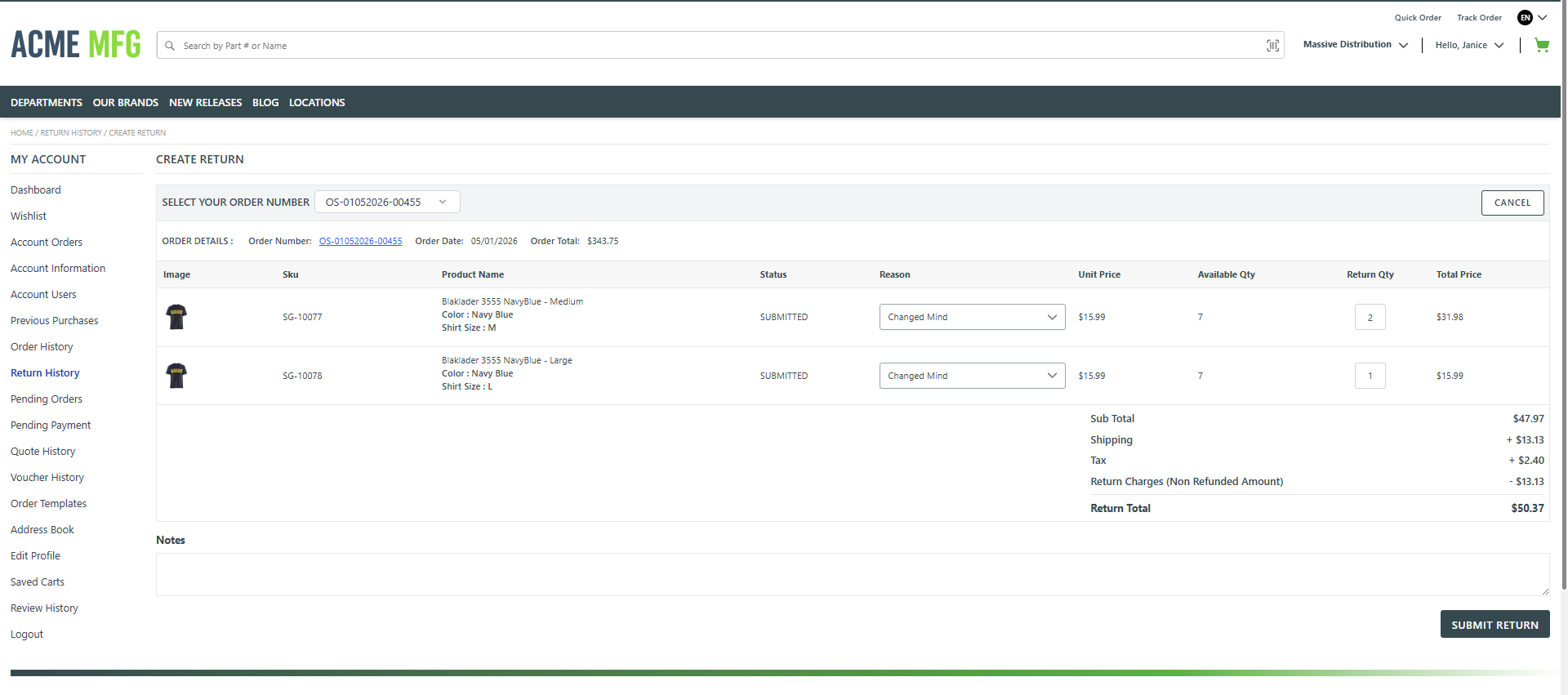
This page allows the user to create a return for an existing order by selecting items and specifying return details.
The following features are available on this page:
- Select an Order Number to initiate a return and view the associated order details such as order date and order total.
- View the list of products from the selected order, including product image, SKU, product name, unit price, and available quantity.
- Select a Return Reason for each item being returned.
- Enter the Return Quantity for eligible items.
- View calculated pricing details including Subtotal, Shipping, Tax, Return Charges (Non‑Refunded Amount), and the Return Total.
- Add optional Notes to provide additional information related to the return.
- Submit the return using the Submit Return action or cancel the process using the Cancel option.
The left navigation panel provides access to other account‑related sections such as Dashboard, Orders, Purchase History, Return History, Pending Orders, Payments, Quotes, Saved Carts, Profile management, and includes the Logout option to securely sign out of the application.
NOTE: Not-logged-in users can use the Track Order feature to find an order and then Create a Return.