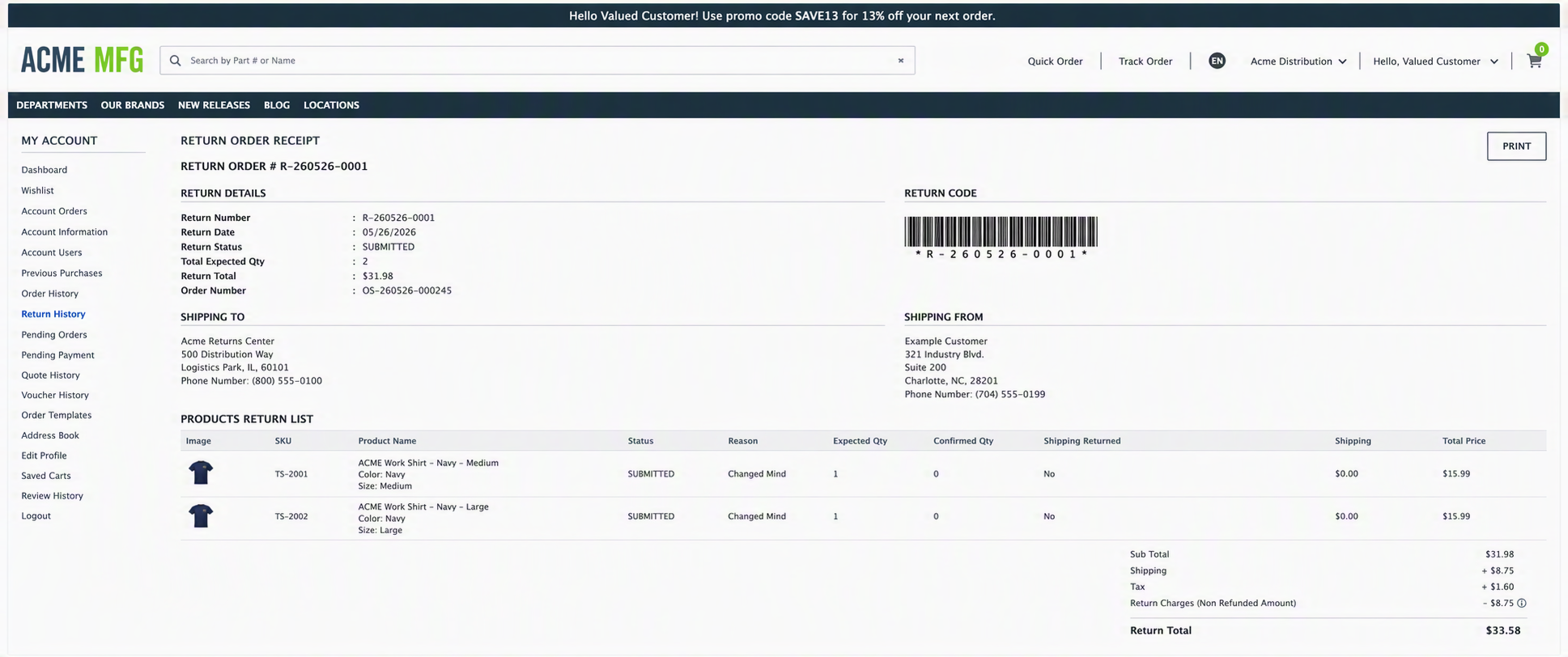
This page allows the user to view the complete details of a specific return order after it has been created or submitted.
The following features are available on this page:
- View high‑level return information, including Return Number, Return Date, Return Status, Total Expected Quantity, Return Total, and the associated Order Number.
- View and scan the Return Code (barcode) associated with the return for identification and processing purposes.
- Review Shipping To and Shipping From address details related to the return.
- View the Products Return List, including product image, SKU, product name, return status, return reason, expected quantity, confirmed quantity, and shipping return status.
- Review pricing details such as Subtotal, Shipping, Tax, Return Charges (Non‑Refunded Amount), and the final Return Total.
- Print the return receipt using the Print action for record‑keeping or shipment documentation.
The left navigation panel provides access to other account‑related sections such as Dashboard, Orders, Purchase History, Return History, Quotes, Vouchers, Saved Carts, Profile management, and includes the Logout option to securely sign out of the application.