
Overview
The Account Users page allows Account Users with Administrators role to view and manage the users associated with a B2B customer account in Znode. This page provides visibility into who has access to the account, the role assigned to each user, and the available user-level actions.
Administrators use this page to manage account access, while Administrators can review the list of users associated with their organization.
Prerequisites
- The Administrator must be signed in to the Znode Storefront.
- The Administrator must have access to the My Account area.
Navigation Path
Storefront → My Account → Account Users
Page Layout and Fields
Account Users Grid
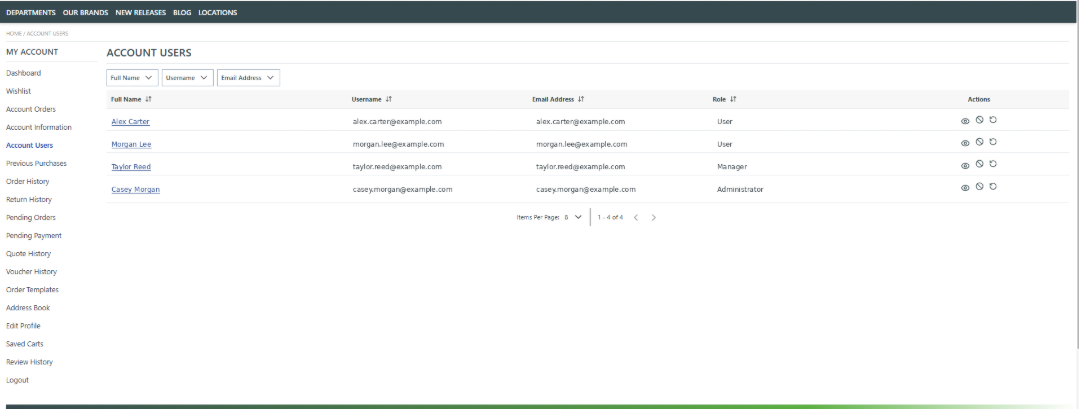
The Account Users page displays a grid containing all users associated with the account.
Each row represents one account user and includes the following columns:
- Full Name
Displays the first and last name of the user. - Username
Displays the username used to sign in. In most cases, this matches the email address. - Email Address
Displays the user’s registered email address. - Role
Indicates the role assigned to the user, such as: User / Manager / Administrator.
Sort and Filter Users
This use case applies when a user needs to quickly locate a specific account user.
- The user navigates to the Account Users page.
- The user selects a filter option such as Full Name, Username, or Email Address.
- The user clicks a column header to sort the list in ascending or descending order.
Outcome:
The grid updates to reflect the selected filters or sorting criteria.
Notes and Limitations
- Only users with the Administrator role can perform account user management actions.
- All users listed on this page belong to the same customer account.
- For non-administrator Account Users, the Account Users page is hidden.