
Release Information
The Znode 10.8.1.0 release introduces new features, enhancements, performance upgrades, and bug fixes
Deprecations
CMS: Content Block Hidden from CMS Module
The Content Block component has been hidden from the CMS module, as it is not implemented or supported in the 10X product. This change helps reduce UI clutter and avoids confusion for content authors by displaying only relevant and usable components within the CMS. There is no impact on existing functionality or published content.
What’s New
Separate Processor Files for FSC Data Exchanges
- Removed the logic that stripped square brackets from API responses containing arrays. To avoid impacting FSC integrations (which accept only single records), dedicated FSC-specific processor files have been created and configured in the demo environment.
- New FSC processors:
- FSCCustomerExport
- FSCOrderHeaderExport
- FSCOrderLinesExport.
Admin: Store Location: The deprecated Marker API is showing warning messages in browser console.
Feature Overview
The Store Location feature has been updated to align with the latest Google Maps API standards. Previously, the implementation relied on a deprecated Google Maps Marker API, which resulted in warning messages appearing in the browser console. This enhancement modernizes the Store Locator by adopting Google’s recommended marker approach, ensuring improved compatibility, stability, and long‑term support.
Key Feature
- Updated Google Maps Marker Implementation
Replaced the deprecated google.maps.Marker API with the recommended google.maps.marker.AdvancedMarkerElement, eliminating browser console warnings. - New MapId Configuration Support
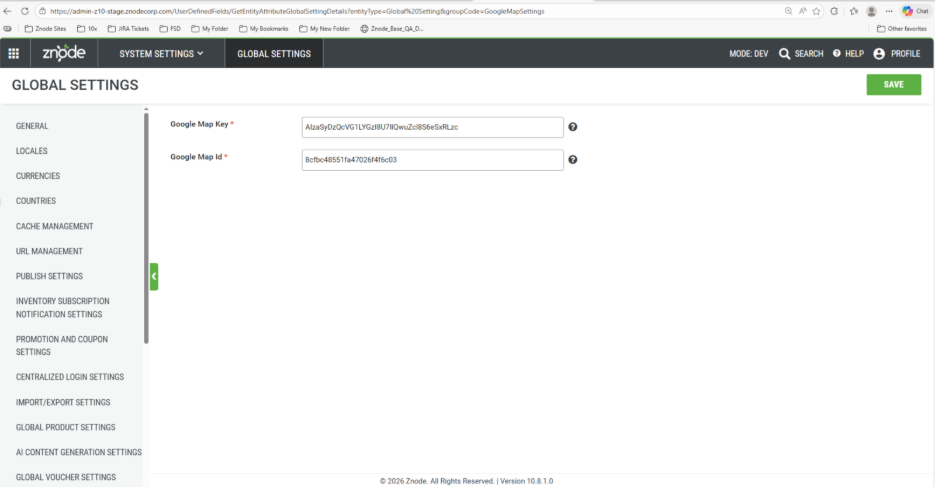
Added support for configuring a MapId under Admin → Global Settings → Google Map Settings, as required by the upgraded Google Maps API. - Improved Platform Compliance
Ensures the Store Locator remains compatible with current and future Google Maps updates while maintaining existing functionality. - No Change to End‑User Experience
The Store Locator continues to function as before for storefront users; the update is primarily a technical and compliance improvement.
Improved Cart Management for Trade‑Centric PunchOut Sessions
Feature Overview
- This release introduces significant enhancements to cart handling within Trade‑Centric PunchOut workflows, ensuring accurate cart state management, clean session initialization, and reliable editing of previously transferred carts.
- These improvements deliver a more seamless and consistent user experience across both Znode and TradeCentric.
Key Features
- Clean Initialization of New PunchOut Sessions
- When a user initiates a new PunchOut session from TradeCentric, Znode now automatically clears any existing cart associated with that user/store.
- An empty cart is always loaded at the start of every new session, ensuring a conflict‑free and consistent starting point.
- Users may then add items and leverage the existing Transfer Cart functionality to return the cart to TradeCentric.
- Enhanced Editing for Previously Transferred Carts
- TradeCentric redirects the user into Znode and provides the complete set of line items associated with the cart being edited.
- Znode clears any existing cart data for the user and loads the exact line items from the transferred cart into the session.
- Users can:
- Add new items
- Remove existing items
- Update quantities and other editable attributes
- Upon transferring the cart back to TradeCentric, the updated cart fully replaces the prior version.
- Multi‑Cart Support in TradeCentric
- Every PunchOut session now results in automatic creation of a new cart, regardless of existing carts or previously placed orders.
- This enables support for multiple concurrent carts for the same user/store.
- TradeCentric users can:
- View all carts associated with their account
- Select any cart for order conversion
- Accurate Cart‑to‑Order Conversion
- When a cart is selected for order creation, TradeCentric converts only the line items in that cart—independent of other active carts.
- Upon successful conversion, a corresponding order is created in Znode with:
- Matching line items
- Correct quantities and pricing
- All cart‑specific details
- No other carts for the user are impacted during this process.
Line‑Item Tax Rate Calculation & Persistence
Feature Overview
- We have introduced improved tax‑calculation capabilities at the line‑item level.
Each order line item now includes its individually calculated tax rate as part of the API response. - In addition, this tax rate now persists in the database, ensuring long‑term consistency, traceability, and alignment with the configured tax‑calculation rules.
- This enhancement provides:
- Accurate, item-specific tax calculation
- Full visibility of tax rates in API responses
- Reliable storage of tax rates for reconciliation, auditing, and reporting
- Greater consistency across all downstream systems
Security Enhancement
Security Testing – Missing X-Frame-Option
Previously, user inputs from the webstore were not fully validated before being processed. This has now been addressed by sanitizing all user inputs prior to sending them to the backend server. As a result, only valid content is accepted and persisted in the database, strengthening overall application security and reducing the risk of malicious input. This improvement enhances platform security without impacting normal user workflows.
Important Points
Z10-24317- Page Builder | Button Group: Added Padding and Vertical Alignment Attributes
Enhanced the Button Group component in Page Builder by expanding layout configuration options. In addition to existing padding support for managing spacing around the button group, a new Vertical Alignment attribute has been introduced to allow buttons to be arranged vertically instead of the default horizontal layout. This enhancement provides greater layout flexibility, improves visual consistency, and enables content authors to design more responsive and structured button presentations without relying on custom CSS.
Z10-31442 | Mail Functionality Abuse
Strengthened email security to prevent misuse and excessive triggering by adding stricter validation, access controls, and rate limiting. The Email a Friend feature is now restricted to logged‑in users only, reducing the risk of anonymous abuse. These changes enhance platform security without impacting legitimate email workflows.
Z10-25212 | Padding Attribute Added for Newsletter Component
Enhanced the Newsletter component in Page Builder by adding a Padding attribute to allow configurable spacing around the component. This update enables content authors to better control layout alignment and visual spacing within pages, ensuring improved design consistency and responsiveness without requiring custom CSS.
Z10-31078 | Eliminate Local Multi-Store Workaround in webstore
Removed the existing local multi‑store workaround from the webstore to simplify local development and configuration management. Administrators can now define multiple localhost URL entries directly in Znode Admin, enabling support for multiple stores running on different localhost ports. This enhancement provides a cleaner, more scalable approach for local multi‑store setups and improves flexibility during development and testing.
Z10-31989 | EmailAFriend Template Uses #CatalogName# and #StoreName# But Resolves Empty
Fixed an issue where the EmailAFriend template incorrectly resolved the #CatalogName# macro using the Company Name property, causing catalog and store details to appear empty. The template resolution logic has been updated to use the actual Catalog Name, ensuring accurate and consistent information in EmailAFriend communications.
Z10-30830 | Updated Help Text for 301 Redirect Configuration
Improved the help text on the Admin Create/Edit 301 Redirect screens to clearly explain the expected input for “URL to redirect from” and “URL to redirect to,” including practical examples. This update is informational only and does not introduce any functional changes to manual or import‑based 301 redirects.
Help Text
URL to redirect from
Enter the previous (old) URL of the category or product.
Example (Category): Category/Fruits/FruitName or Fruits/Invalid-URL
URL to redirect to
Enter the new (updated) URL for the category or product.
Example (Category): Category/Fruits/FruitName or Fruits/Valid-URL
Z10-31421 | Help Text Updates for SEO‑Friendly URL Page Name
Updated the help text for the SEO‑Friendly URL Page Name field to provide clearer validation rules and usage guidelines for Product, Category, and Content pages. The revised help text explains allowed characters, SEO path rules, and reserved system keywords, helping administrators create valid, search‑friendly URLs and avoid configuration errors. This update is informational only and does not introduce any functional changes.
Updated Help Text :
Enter a Page Name
Use only alphanumeric characters.
The only special character allowed are the “-", “_”, “/”.
SEO Path Rules
The SEO path must not begin with a “/”.
It cannot exactly match any reserved system keyword listed below.
Plural or extended variants (e.g., “products” or “product-list”) are allowed even if a reserved keyword exists in singular form.
Reserved keywords:
content, product, blog, brand, account, cart, check-global-cache, checkout, compare-product, contactus, feedback, forgot-password, highlight, login, multi-factor-authentication, order, order-status, pending-order, punch-out, quick-order, quote, reset-password, return, search, signup, store-locator, validate-impersonation-session, validate-single-sign-in, write-review, maintenance, category
Impacted Areas
SEO Setup
Product/Category/Content Page
PIM
Product → SEO
Categories → SEO
Z10-30337 | Help Text Updates for SEO‑Friendly URL Page Name
Updated the help text for the SEO‑Friendly URL Page Name field to provide clearer validation rules and usage guidelines for Product, Category, and Content pages. The revised help text explains allowed characters, SEO path rules, and reserved system keywords, helping administrators create valid, search‑friendly URLs and avoid configuration errors.
Z10-30894 | Display of Custom Shipping Methods with Zero Rates
Shipping methods generated through custom shipping plugins will now always appear on the checkout page, even when the calculated shipping rate is 0.
Black Box Improvements
Product Information Management (PIM)
Z10-29995 | 301 URL Redirects Is Not Functional on Webstore in Case of a Single Product or Catalog Publish
Repaired incremental publish hooks so 301 redirects register immediately on single product/catalog publishes, preventing broken links and preserving SEO continuity.
Z10-31346 | Product Association Import Updates Error: “A product with the same combinations already exist”
Refined duplicate detection to distinguish legitimate updates (Display Order, IsDefault) from true duplicates, reducing false-positive errors during association imports.
Z10-31348 | Product Association Import Updates Error: “A product with the same combinations already exist”
Applied the same validation improvements across parallel import routines to ensure consistent handling of updates vs duplicates.
Z10-31426 | Z10LMC –212 | Product Association Import Updates for Display Order and Default Variant
Resolved errors encountered during Product Association imports when updating Display Order and Is Default values. The import process now correctly updates configurable product variants, ensuring the intended default variant is applied, with validation handled properly
Z10-31786 | Product Override API Does Not Work with “/” in Product SKU
Updated routing and parameter encoding so SKUs containing slashes are accepted and processed correctly by the product override APIs.
Z10-32006 | Showing No Products for Guest and Logged-In User
Resolved indexing and visibility rule faults that hid products for all users. Rebuilt search indexes and corrected audience filters to restore product listings.
Z10-32182 | Unable to Fetch Published Catalog via API – Object Reference Error
Resolved a null reference issue when accessing dependent catalog resources in the V1 API. Added defensive null checks and improved error handling to ensure published catalogs are returned reliably with the expected fields.
System Settings
Z10-24430 | Tax Not Displayed on Webstore Order Receipt After Placing Quote (Intermittent Issue)
Synchronized tax finalization after quote-to-order conversion to ensure tax lines consistently appear on order receipts. Stabilized event ordering and receipt rendering.
Z10-25198 | Custom Table Import Fails with DB Error for Specific Field Types and Column Configuration
Fixed importer schema mapping and type-casting for problematic field/column setups. Added pre-import validation and graceful normalization to prevent database errors.
Z10-29745 | Tax Difference in Avalara in Case of Order Is Cancelled
Aligned tax reversal timing and document status updates with Avalara on cancellations, ensuring totals match between the platform and Avalara records.
Z10-31352 | Duplicate User Records Created on Import When Same Username Exists (Instead of Updating Existing Record)
Changed import behavior to upsert by username rather than creating duplicates. Added pre-checks and conflict resolution rules to maintain unique identities.
Z10-31431 | Two Validations Display at the Same Time If 3-Digit CVV Is Provided with Amex Card Number
Resolved an issue where two validations were triggered for the same CVV error on American Express cards. Removed the unnecessary and incorrectly placed UI validation, ensuring a single, clear message is shown requiring a 4‑digit CVV for Amex cards.
Z10-31892 | Webstore – “Amla Commerce” Shown in Error Popup
Removed vendor-specific branding from generic error popups and ensured storefront-appropriate messaging is displayed for a consistent white-labeled experience.
Dev Center
Z10-13210 | File Type Attribute with Multiple Upload Support Not Working for User-Defined Fields in Global Entity from Admin and API
Corrected schema binding and API parsing so User-Defined Fields with multiple file upload support consistently accept and persist multiple assets. Standardized array handling, validation, and attachment storage across Admin UI and API.
Z10-25951 | CustomTables: Import Fails to Update Records with Whole Number Values in Unique Number Field (10,2)
Fixed numeric normalization so whole-number values correctly upsert into decimal-typed unique number fields. Ensured mapping, precision handling, and key-based matching work reliably during imports.
Z10-27139 | No Log History Is Captured When We Execute the Touchpoint
Restored touchpoint execution logging by re-enabling pipeline hooks and audit persistence. Execution history now captures timestamps, initiators, and result statuses for monitoring and troubleshooting.
Z10-30522 | Blank Record Gets Saved in the Custom Table When the Mandatory Unique Number Field Is Left Empty on Save & Close
Added client- and server-side validations to block Save & Close when the mandatory unique numeric field is empty. Users now receive a clear validation message, preventing creation of blank/invalid records.
Z10-31546 | Dev Center Menu & Breadcrumb Missing on Hangfire Dashboard Page
Reintroduced the standard Admin shell and breadcrumb trail on the Hangfire dashboard, restoring consistent navigation and context for background job management.
Z10-31669 | POST /dataexchanges/exchanges/processor-file-code Returns Null Values Despite Valid Request Payload
Corrected request parsing and response mapping for processor-file-code submissions. The endpoint now returns the expected non-null payload, with enhanced input validation and actionable error messages.
Z10-31685 | Exchange Code Column Position Inconsistent in Scheduled Data Exchanges Grid
Standardized the grid’s column ordering and saved-view behavior so the Exchange Code column appears in a consistent position across sessions and users.
Z10-31693 | Past Dates Selectable for "One Time" Frequency in Scheduled Data Exchange
Added UI constraints and backend validation to prevent scheduling one-time exchanges in the past. Users now receive clear date validation messages, ensuring valid scheduling.
Content Management System (CMS)
Z10-29854 | Order Gets Placed Without Voucher When User Tabs Quickly to the Voucher “X” During Braintree – Voucher/Payment Mismatch
Resolved a race condition where dismissing a voucher via keyboard could remove it post-authorization. Synchronized discount application with payment flow to maintain total integrity.
Z10-30901 | Promo Small Image Appears Broken; Relevant Home Page Promo Details Not Updated
Fixed asset path resolution and promo cache invalidation to prevent broken small promo images and ensure promo content refreshes after updates.
Z10-31030 | Multiple Issues in Blogs/News API Related to Pagination and Visibility Logic
Corrected pagination calculations and visibility filters so the API returns accurate counts/pages and audience-specific content.
Z10-31076 | Remove Page Builder Application URL from Admin Global Settings
Removed the obsolete configuration setting to reduce confusion and align with the current page builder architecture.
Z10-31083 | HTML in My Text Attributes by Default
Sanitized text attribute rendering to prevent raw HTML from appearing. Implemented proper encoding and optional whitelisting for intended rich text fields.
Z10-31355 | Problem with Text Alignment of the Offer Banner on the Webstore
Fixed an issue where the offer banner text alignment did not reflect CMS configuration due to the alignment property not being passed to the component. The alignment value is now applied dynamically, ensuring promotional text aligns correctly across viewports based on CMS selection.
Z10-31392 | JavaScript Runtime Error Due to Invalid Function Name Content.Init in Core.min.js
Resolved a JavaScript runtime error caused by an undefined templateDataList variable during Content.Init execution. Added proper variable handling and guard checks to prevent console errors and ensure stable content initialization across pages.
Z10-31416 | Page Builder Preview Iframe Sometimes Doesn’t Return to Original Size After Resizing or Closing Console
Improved resize event handling and height recalculation to ensure the iframe consistently restores correct dimensions without leaving extra space.
Z10-31438 | Uncaught ReferenceError: ZnodeBase Is Not Defined in Admin Application
Ensured proper script load order and dependency availability for ZnodeBase, eliminating reference errors and improving stability.
Z10-31446 | Multiple JavaScript Errors and Runtime Exceptions When Accessing Containers
Resolved initialization sequence issues and added null checks within container modules to prevent runtime exceptions and feature breakage.
Z10-31455 | Stored XSS Leading to Admin Panel Takeover
Patched stored XSS vectors by sanitizing inputs, encoding outputs, and strengthening Content Security Policy. Added automated tests to prevent regressions.
Z10-31589 | Page Title Is Not Updating Based on the Selected Locale in CMS Pages
Fixed locale binding so page titles correctly reflect the selected language, with proper fallbacks and immediate UI refresh.
Z10-31651 | CMS_Banner Slider Images Not Displayed During Initial Page Load
Resolved lazy-load and timing issues that prevented initial banner images from rendering. Implemented preload hints and reliable initialization.
Z10-31772 | CREATE Banner API – Error Message Not User-Friendly for Invalid BannerTypeId
Improved validation responses to explicitly indicate invalid BannerTypeId values and list acceptable options.
Accounts & Users
Z10-19472 | Webstore – On Editing Address, “DO NOT SAVE THIS ADDRESS” Flag Showing Unchecked
Fixed a UI state binding issue where the “Don’t save this address for future use” preference was not retained when re-entering edit mode. The checkbox now persists accurately across edits and refreshes.
Z10-20302 | B2B Account Administrator Editing Default Address at Checkout Causes Address Disappearance & Default Address Reset in Admin
Separated checkout edit sessions from stored defaults to prevent address loss and unintended resets in Admin. Implemented working copies and guardrails to preserve default address configuration.
Z10-30883 | Duplicate Customer Import Rows Are Processed When Centralized Login Is ON
Introduced row de-duplication and centralized-login-aware uniqueness checks during import to prevent duplicate user creation from repeated rows.
Z10-30889 | Department Field Not Updated for Users Imported with All Stores When Centralized Login Is ON
Repaired attribute propagation for centralized “All Stores” users so Department updates are applied consistently across all store associations.
Z10-31120 | Product Removal Fails (“OOPS! Something went wrong”) with Centralized Login ON for Exempted Store Login
Resolved scope and authorization validation that incorrectly blocked product removal actions for exempted-store sessions. Improved error clarity and permission evaluation logic.
Z10-31297 | Duplicate Admin User Displayed in Admin > Dev Center > Admin User
Corrected grid data binding and join conditions that caused the same admin user to appear twice. The listing now shows unique entries only.
Z10-31298 | Unclear Error Message When Importing User with Centralized Login and User-Level Restrictions Enabled
Enhanced import error messaging to explicitly call out centralized-login conflicts and user-level restrictions, with steps to resolve before retry.
Z10-31399 | Unable to Import Sales and Reps User for “All Stores” – “All Stores input must be unique”
Adjusted validation to allow proper All Stores assignment for Sales/Rep imports without triggering false uniqueness errors. Clarified feedback when store mapping is actually invalid.
Z10-31544 | Checkout: Billing “Don’t Save This Address for Future Use” Link Incorrectly Selects Shipping Version
Fixed misbound controls where the billing toggle influenced shipping settings. Billing and shipping preferences now operate independently.
Z10-31650 | Checkout Page – Billing Address Resets and “Add Billing Address” Opens Automatically After Editing Shipping (Same as Shipping Unchecked)
Removed cross-field coupling that reset billing when shipping was edited. Billing information remains intact unless explicitly changed by the user.
Z10-31514 | Duplicate Admin Users Displayed
Removed unintended account insert logic and cleaned up duplicate/garbage records in the ZnodeUserAccount table. Admin users are no longer associated with accounts, ensuring only a single admin record appears in the Admin User list with no impact on authentication or permissions
Order Management System (OMS)
Z10-27548 | Shipping From Address Is Not Appearing on Return Receipt and Return Order Acknowledgement
Resolved an issue by correcting address binding logic to use the order shipment address instead of the user address list. Fixed discrepancies between the Return Order Receipt and Return Order Acknowledgement by removing duplicate city/state entries, aligning Address Name placement, and ensuring Company Name consistency. Verified on INT and working as expected.
Z10-27923 | Visibility of the Configurable Product Pricing in the Wishlist
Enabled variant price resolution for configurable products in the wishlist by adding default variant fallback and dynamic price retrieval.
Z10-28170 | Inconsistency in Messages While Applying Same Invalid Code Against Coupon vs Voucher
Standardized error messaging so users receive consistent feedback for invalid codes, regardless of whether entered as coupon or voucher.
Z10-28426 | Missing and Misaligned Information in Pending Orders and Orders Screens After Approval Conversion
Corrected field mapping and alignment to ensure buyer info, totals, and approval status display accurately post-approval conversion.
Z10-29495 | Order Info Logs Are Not Printing in Admin > Applications Logs > All Logs
Restored logging configuration and routing so order information events are recorded and visible in the All Logs view for auditing.
Z10-29502 | Out-of-Stock Message Displays Against Line Item When Quantity Changes
Fixed timing in inventory checks during quantity edits to prevent false out-of-stock messages. Implemented debounced recalculation and atomic availability checks.
Z10-29534 | Converting Quote with Bundle Resets Child Quantities to 1
Preserved bundle component quantities during quote-to-order conversion. Quantities and derived pricing now carry forward correctly.
Z10-29536 | Incorrect Inventory Behavior for Bundle Product Across PDP, Cart, and Admin
Unified bundle inventory rules and ATS calculations across PDP, Cart, and Admin so stock levels and reservations remain consistent throughout the journey.
Z10-29557 | Unable to Open Multiple Orders from Admin > OMS > Orders
Corrected UI event handling to support opening multiple order details in parallel tabs/windows without losing context.
Z10-29669 | Application type=Webstore When Order Is Placed from Preview Site
Fixed source attribution logic so orders placed from the preview site are tagged appropriately and not misattributed as Webstore in reports/integrations.
Z10-29950 | Tracking Number Missing in Shipment Email After Order Is Marked as Shipped
Ensured shipment notification templates receive and render carrier and tracking details. Added validation to block sending without a tracking number.
Z10-30037 | Incorrect Bracket Formatting in Order Summary on Checkout Page
Standardized the checkout summary template to correct misplaced brackets around discounts, taxes, and subtotals for clearer readability.
Z10-30256 | Save for Later Is Not Working; Product Is Getting Removed from Cart
Fixed persistence logic so moving items to “Save for Later” no longer deletes them. Items now transfer safely between cart and saved lists.
Z10-30416 | Checkout Page – Purchase Order – Re-uploading the Same Document After Removal Does Not Work
Adjusted file input handling to allow re-uploading the same PO document after deletion within the same session. Implemented input reset and deduping.
Z10-30640 | Order Receipt Displays Previously Used Voucher with Zero Balance Along with a New Valid Voucher
Updated receipt rendering logic to exclude exhausted vouchers from the current transaction unless actually applied, avoiding confusion.
Z10-31130 | Checkout: Incorrect Error Message Shown When Voucher and Coupon Codes Are Applied in the Wrong Fields
Improved validation to detect code type and present targeted guidance when a code is placed in the wrong field.
Z10-31281 | Bug in Update All Details Commerce API
Fixed atomic processing for multi-section updates to prevent partial overwrites and added clearer validation/error responses.
Z10-31282 | Inconsistent Quantity Validation Message Between Cart and Saved Cart Page
Aligned validation rules and message text so quantity errors render consistently on both Cart and Saved Cart pages.
Z10-31401 | Order Cancellation Email Notification Is Not Sent to Admin or User
Restored event triggers and template bindings for cancellation notifications. Emails now dispatch reliably to both admin and customer.
Z10-31483 | Multiple BOGO Coupons Do Not Invalidate Correctly When Quantity Condition Fails
Corrected offer qualification checks so BOGO promotions are invalidated immediately when the quantity threshold is not met, preventing unintended discounts.
Z10-31569 | Quote to Order Conversion Issue Related to Time Zone Configuration
Standardized time zone conversions for quote expirations, approval timestamps, and order creation to avoid mismatches across regions.
Z10-31578 | Return Receipt – Shipping From Address Showing Wrong
Corrected the source mapping for the “Shipping From” address on return receipts to ensure the correct origin is displayed.
Z10-31579 | Commerce Portal – Random Tax Exempt Logs Triggered on Order Status Change (Hold for Review → Ready for ERP)
Eliminated spurious tax-exempt audit entries by tightening event criteria and de-duplicating triggers during status transitions.
Z10-31732 | Admin: Dashboard: Missing Section Titles & “View All” Links for Quotes & Orders
Restored dashboard widget headers and “View All” quick links for Quotes and Orders, improving navigation from the dashboard.
Z10-31782 | Orders_ApprovalRouting: Approver Name Displayed in “Order Created By” Field When Managing Order from Admin
Corrected attribution so the original creator remains under “Order Created By,” while approvers are listed separately, maintaining accurate audit trails.
Z10-31784 | Order Total Mismatch When Coupon Removed via Keyboard (Tab + Enter) During Braintree Checkout
Fixed timing/race conditions to ensure discount recalculation and total synchronization occur before payment authorization when removing a coupon via keyboard.
Z10-31821 | Back Button Displayed as Disabled While Editing the Shipping Address on Checkout Page (Case Specific)
Addressed conditional UI states that disabled the back button during certain address edit flows. Navigation controls now remain usable throughout checkout.
Z10-31844 | Customer Name Field Not Reset After Changing Store While Creating Voucher
Cleared and reloaded customer field dependencies when store selection changes to prevent cross-store attribution errors.
Z10-31869 | Account Information Does Not Appear on Manage Order Page When Quote Is Converted to Order
Restored account association propagation from quote to order so account details are visible on the Manage Order page.
DAM
Z10-16422 | Admin Console > Attach Media > Media Library Loading Slowness
Improved performance of the media library in the Attach Media flow by optimizing database queries, adding pagination and lazy loading, and caching image metadata to reduce initial load time and scrolling latency.
Z10-19067 | Newly Synced DAM Images Appear Broken on Webstore and Admin After Publishing
Addressed a publishing pipeline gap that left asset URLs unresolved immediately after sync, causing broken images. Introduced asset readiness checks, corrected URL signing, and added retry logic to ensure images render post-publish.
Z10-28844 | no-image.png Appearing in Document Section of a Product
Fixed media-type association logic so document sections no longer display placeholder images. The system now differentiates document assets from image placeholders and renders only relevant files.
Z10-29507 | External Image at Website Logo Is Not Displayed on Webstore After Store Publish
Resolved URL allowlist and cache invalidation issues preventing external logo images from displaying post-publish. Implemented proper validation and cache-busting to ensure logo visibility.
Z10-30326 | Store Website Logo Fails to Update When Configured with Full URL Media Image
Corrected validation and storefront caching so full-URL logo updates reflect promptly and reliably after configuration changes.
Marketing
Z10-21000 | Old SEO URLs Still Accessible for CMS Pages, Products, Brands and Categories
Updated SEO URL handling to ensure only the latest published SEO URLs are accessible across CMS pages, categories, products, and brands. Old SEO URLs now correctly return “Page Not Found” where applicable, preventing duplicate content access.
Z10-31409 | Store Locator: Pin Clicks Not Responding and Google Maps Implementation Review
Fixed event delegation for map pins and updated Google Maps configuration for compatibility. Pin interactions now reliably open location details across devices.
Z10-31924 | Generic Error Occurs on Product Associated Page under Product Highlights
Resolved an issue where a generic error was displayed on the Product Associated page under Product Highlights. Improved data validation and error handling to ensure the page loads correctly and associated product information is displayed as expected.
Open-Source Enhancements and Fixes
Z10-4395 | User Session Not Working Correctly After Browser Back & Forward Post Login
Resolved an issue where using the browser Back/Forward buttons after login led to session desynchronization and stale authentication states. Implemented server-side session revalidation, cache-control headers, and client-side route guards to ensure consistent authentication continuity and proper redirects across navigation.
Z10-28019 | Cloudflare Cache Failure Leading to QA Webstore Unavailability
Identified and mitigated an edge cache misconfiguration that caused the QA webstore to become unavailable. Added health checks, fail-open rules for critical static assets, refined cache purge logic, and improved origin failover to prevent future outages.
Z10-29608 | 404 Error When Navigating to Product/Catalog/Other Pages of Webstore
Resolved intermittent 404s caused by stale route manifests and partial cache invalidation. Standardized SPA routing configurations, added prefetch/fallback routes, and enforced publish-time cache busting to maintain stable navigation.