
TABLE OF CONTENTS
- Overview
- Prerequisites
- Search Suggestion Experiences
- Accessing Search Settings
- All Stores vs Store-Specific Settings
- Configuring Typeahead Search
- Configuring Hydrated Search
- Storefront Behaviour
- Validation Rules and Limits
- Notes and Best Practices
- Summary
Overview
Search Suggestions in Znode enhance the Storefront search experience by presenting relevant information when customers interact with the search bar. Znode supports two complementary search suggestion experiences:
- Typeahead Search – Displays live results as customers type.
- Hydrated Search – Displays a structured, enhanced search panel when customers click or begin typing in the search input.
Together, these experiences help customers discover products, categories, brands, and content faster while reducing search effort and abandonment.
Prerequisites
- Administrator access to the Znode Admin Console.
- A Store created and published.
- Product catalogues published and indexed.
- Site Search enabled for the Store.
Search Suggestion Experiences
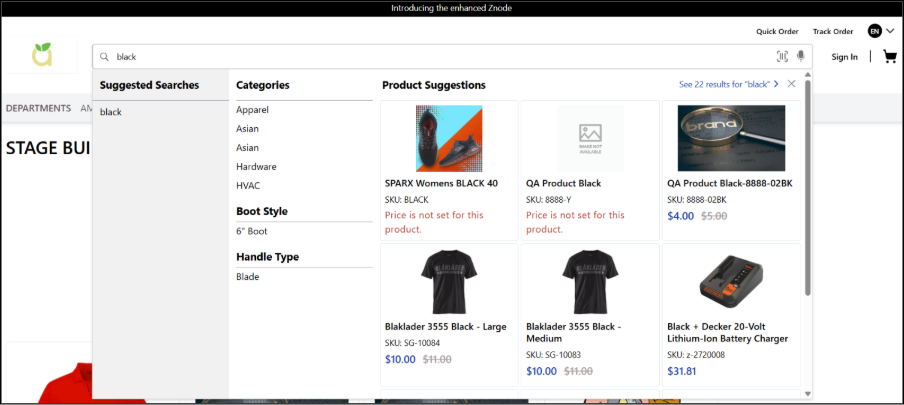
Typeahead Search
Typeahead Search displays suggestions dynamically as the customer types a search term.
- Suggestions update in real time.
- Results are refined with every keystroke.
- Selecting a suggestion executes the search immediately.
- Functions independently of Hydrated Search.
Hydrated Search
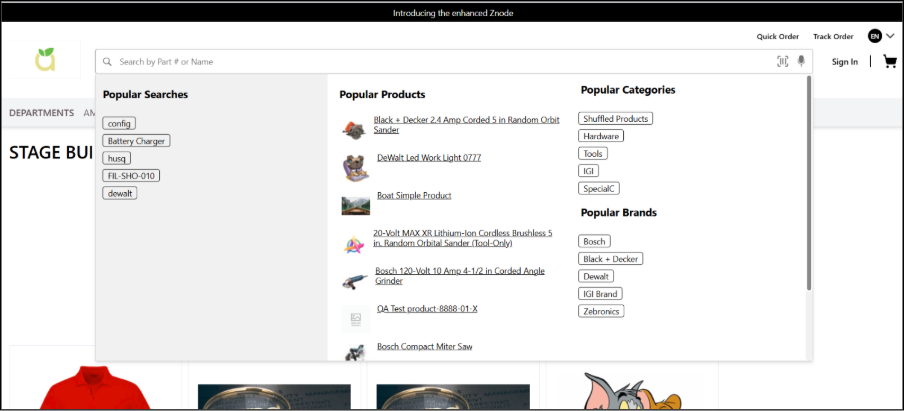
Hydrated Search provides an expanded search interface that opens when a customer clicks into the search bar or begins typing.
Depending on configuration, the hydrated view can display:
- My Searches
- Popular Searches
- Popular Products
- Popular Categories
- Popular Brands
- Popular Content
If all hydrated search sections are disabled, the hydrated panel does not appear.
Accessing Search Settings
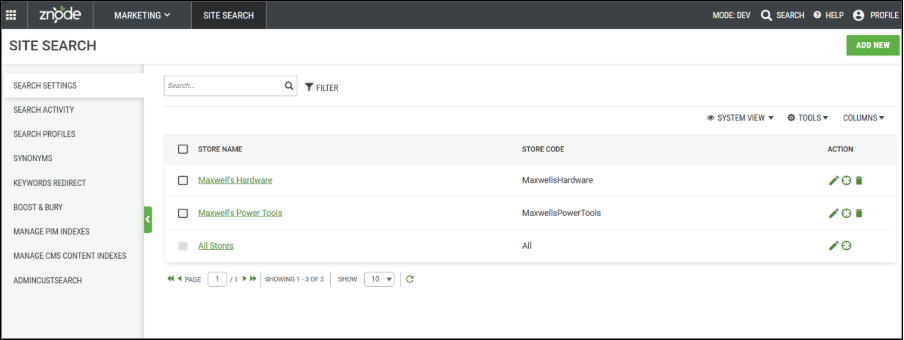
- Sign in to the Znode Admin Console.
- Navigate to Marketing.
- Select Site Search.
- Open the Search Settings tab.
This page displays configurations for individual Stores and a mandatory All Stores configuration.
All Stores vs Store-Specific Settings
- All Stores acts as the default configuration.
- Store-specific settings override the All Stores configuration.
- Only one search configuration can exist per Store.
- The All Stores configuration cannot be deleted.
Configuring Typeahead Search
- Navigate to Marketing > Site Search > Search Settings.
- Edit the required Store.
- Enable Typeahead Search.
- Configure the applicable limits or behaviours.
- Save the changes.
- Republish the Store.
Expected Outcome: Customers see live search suggestions while typing in the search bar.
Configuring Hydrated Search
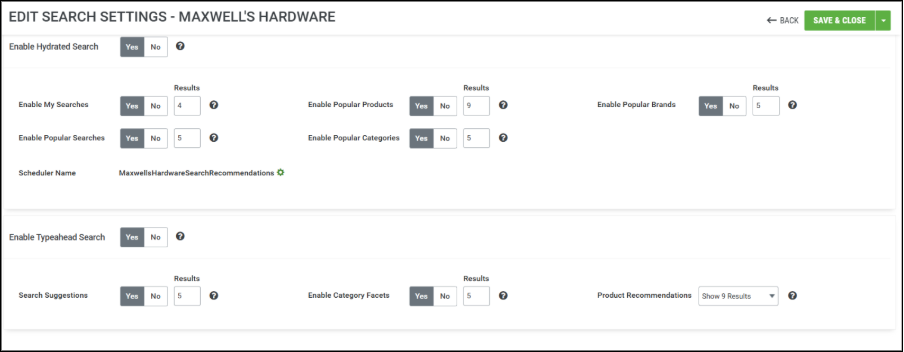
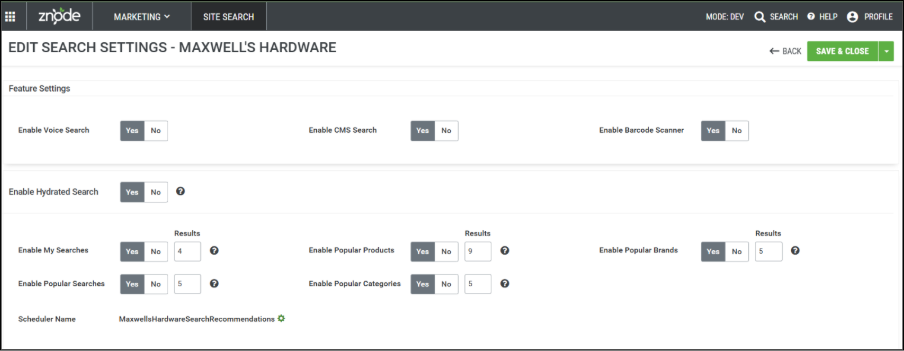
Hydrated Search behaviour is controlled through the Typeahead Settings section.
Available Hydrated Sections
| Section | Description |
|---|---|
| My Searches | Displays recent searches for logged-in customers. Not visible for guest users. |
| Popular Searches | Displays frequently used search terms collected from Site Search activity. |
| Popular Products | Displays frequently purchased products using placed order data when available. |
| Popular Categories | Derived from popular products. |
| Popular Brands | Derived from popular products. |
| Popular Content | Displayed only when CMS Search is enabled. |
Storefront Behaviour
When the Search Bar Is Clicked (No Input)
- The hydrated search panel opens if enabled.
- Configured sections are displayed.
- Result counts follow the Admin configuration.
When a Customer Types a Search Term
- Typeahead results are displayed.
- Product results may exceed 10.
- Categories, Brands, and Content are limited to 10 results.
- An All Products link redirects users to the Product List Page (PLP).
- If CMS Search is disabled, content results do not appear.
Validation Rules and Limits
- Result values must be between 1 and 10.
- Values greater than 10 are not allowed.
- A value of 0 is invalid.
- If all hydrated search sections are disabled, the hydrated search panel does not appear.
- Search results are filtered based on the applicable catalogue.
Notes and Best Practices
- Configure the All Stores settings before creating Store-specific configurations.
- Test changes in a non-production Store before deployment.
- Ensure catalogues are indexed after significant product or search configuration updates.
- Review search activity regularly to optimize search relevance and customer experience.
Summary
Znode Search Suggestions combine Typeahead Search and Hydrated Search to deliver a fast, intuitive, and configurable search experience. Using both approaches together enables administrators to improve product discovery, personalize the shopping experience, and increase customer engagement across Stores.