
TABLE OF CONTENTS
- Overview
- Technology Stack
- A Request, End to End
- Themes and Widgets
- Languages
- Configuration
- Security
- Monitoring
- Build and Deploy
- Golden Rules
- Hand-off Checklist
- Glossary
Solution Architecture Guidance
- Use the standard Znode storefront architecture as the default for experiences that combine Page Builder content, fixed commerce routes, customer-specific data and custom back-end integrations. All Znode and custom back-end data goes through the storefront server, which keeps credentials and back-end URLs out of browser code and provides the required store, language, session and access context.
- By design, the hosted payment script and the reCAPTCHA widget talk to their providers directly from the browser.
- Card details go straight to the payment provider and are returned as a token, so they never reach the storefront server.
- Storefront API routes that return customer data must check the shopper's session themselves.
- Decide early whether each requirement belongs in Page Builder, a fixed storefront route or a shared experience used by both. Page Builder supports merchandiser-managed layouts and theme-based widget variation. Resolve route ownership, theme scope and supported languages during solution design.
- Fixed routes take precedence over Page Builder SEO URLs.
- When Znode Admin 301 redirects are enabled, they are applied before any route, so a redirect set up for a fixed-route URL takes effect first.
- Some fixed routes, such as the cart, still use a Page Builder layout.
- Treat security and caching as architectural boundaries. Requirements involving customer-specific data, public personalization, immediate content freshness or access rules beyond Znode's standard storefront behavior can materially increase solution complexity and delivery scope.
- Consider storefront customizations by how many architectural areas they cross. A change contained within one storefront experience generally has fewer dependencies than a requirement that also spans Page Builder, customer-specific data, back-end integrations, multiple languages, access rules or caching behavior. As more of these areas intersect, implementation effort, testing scope, solution risk and ongoing support can increase.
- Requirements that change standard Znode behavior across multiple architectural areas carry greater lifecycle impact than isolated extensions. The more a customization touches shared storefront behavior, Page Builder, data access, security or caching, the more regression testing and future upgrade consideration it can require.
Overview
Two Next.js applications share one set of libraries. The browser talks only to the storefront servers, and the servers talk to Znode and your own back-end services. This guide shows the layers of the Znode 10 storefront, how a request moves through them and what is cached along the way.
- Audience: implementation partners and developers
- Stack: Next.js 15.5, React 19, TypeScript, Nx
- Apps: webstore and page-builder
In paths and examples, <project> stands for your project's name. Replace it with your own package and folder names.
The diagram shows what runs in the browser, what runs on the storefront servers and the back-end services.
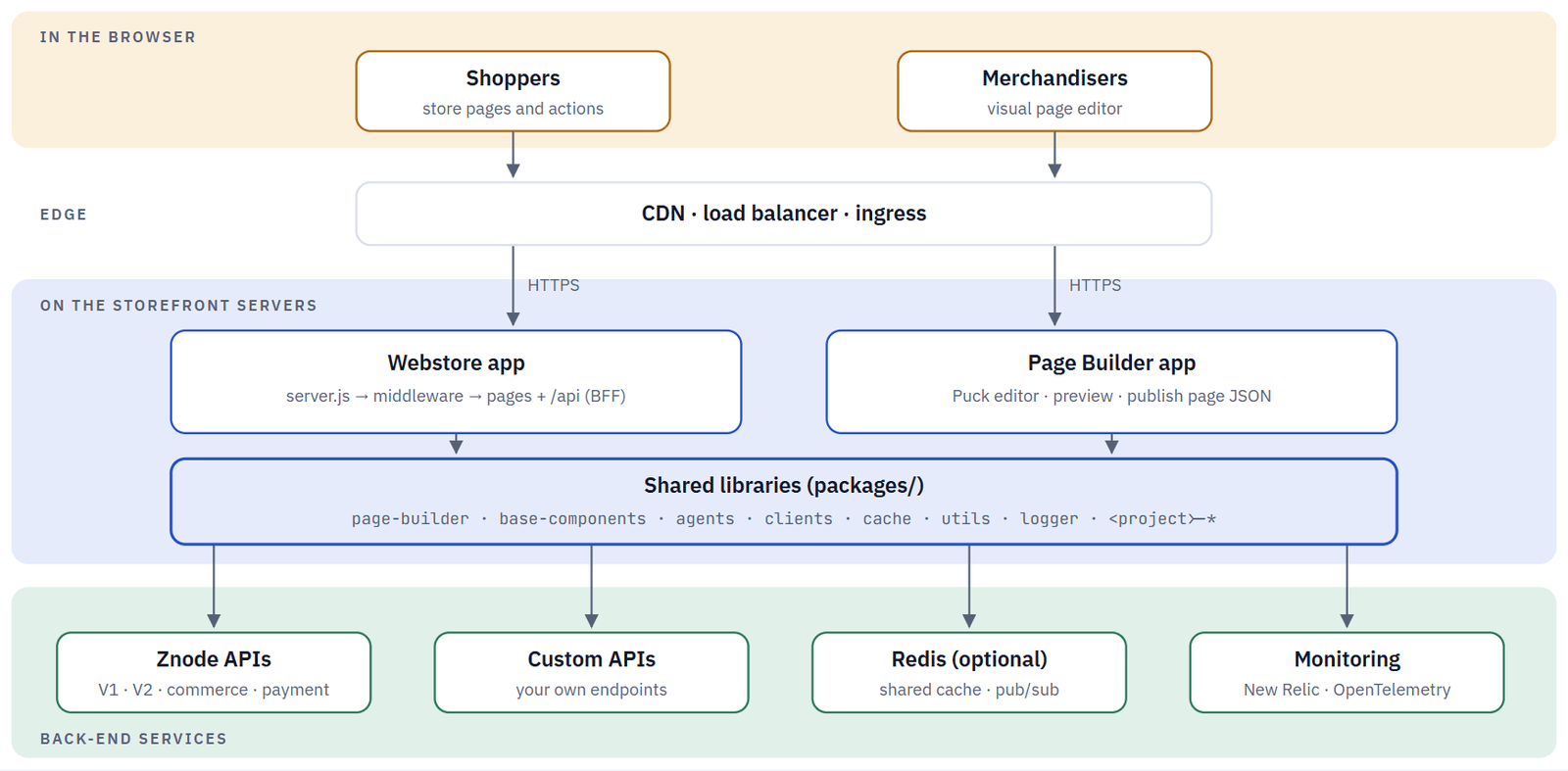
Both apps render the same widgets from the same packages, so what merchandisers build in the editor is what shoppers see. Credentials and back-end URLs never leave the server layer.
The table lists each layer and where it runs.
| Layer | Runs on | What it does |
|---|---|---|
| server.js | Server | Workers, page cache and CDN headers. |
| Middleware | Server | Store, language, session and access checks. |
| Routes | Server | Pages and the /api routes the browser calls. |
| Agents | Server | Business rules and data shaping. |
| Clients | Server | One HTTP call to one endpoint. |
| Components | Browser | Hydrated UI that calls /api routes. |
Technology Stack
| Area | Technology | Where to look |
|---|---|---|
| Runtime | Node.js 24, Alpine Docker images | apps/*/Dockerfile |
| Framework | Next.js 15.5 App Router, React 19 | package.json |
| Language and monorepo | TypeScript 5.9, Nx 22 | tsconfig.base.json, nx.json |
| Visual editor | Puck | packages/page-builder |
| Sign-in | NextAuth v4, credentials provider, JWT session | packages/utils/src/server/authentication/ |
| Languages | next-intl | apps/*/messages/ |
| Styling and state | Tailwind CSS 3 with theming, Zustand | packages/base-components |
| Shared cache | Redis with a Next.js cache handler | apps/webstore/cache-handler.mjs, packages/cache |
| Monitoring | New Relic, OpenTelemetry | newrelic.js, otel.js |
| Testing and delivery | Jest 30, GitHub Actions, Znode CLI | jest.config.ts, .github/workflows/ |
Repository Map
Each package has one responsibility. Knowing which package owns what tells you where a change belongs.
apps/
  webstore/  [customer storefront]
    server.js  [custom Node server]
    cache-handler.mjs  [Redis data cache]
    src/middleware.ts  [runs on every request]
    src/app/[locale]/  [pages]
    src/app/api/  [BFF routes]
    messages/  [en-US, fr-FR]
  page-builder/  [visual page editor]
packages/
  page-builder/  [getPage, widget configs, renderer]
  base-components/  [baseline UI, httpRequest, stores]
  agents/  [business logic]
  clients/  [HTTP clients]
  cache/  [Redis or file cache, pub/sub]
  utils/  [session, headers, CSP, helpers]
  logger/  [logging and log areas]
  constants/, types/  [routes, settings, types]
  <project>-components/  [your customizations]
  <project>-global-components/  [your shared UI]
Do keep project work in your project's customization packages: UI in <project>-components, logic in packages/agents/src/<project>/, widgets in your theme config. Typical examples are approval routing, allowances, vouchers and custom checkout fields.
Don't edit baseline files when an extension point exists. When you must, mark the change with // CUSTOM: <reason> so it is easy to carry through a Znode upgrade.
A Request, End to End
A page request passes the edge, the custom server and the middleware before a route renders it. The page then hydrates, and later actions go through the storefront's own API routes.
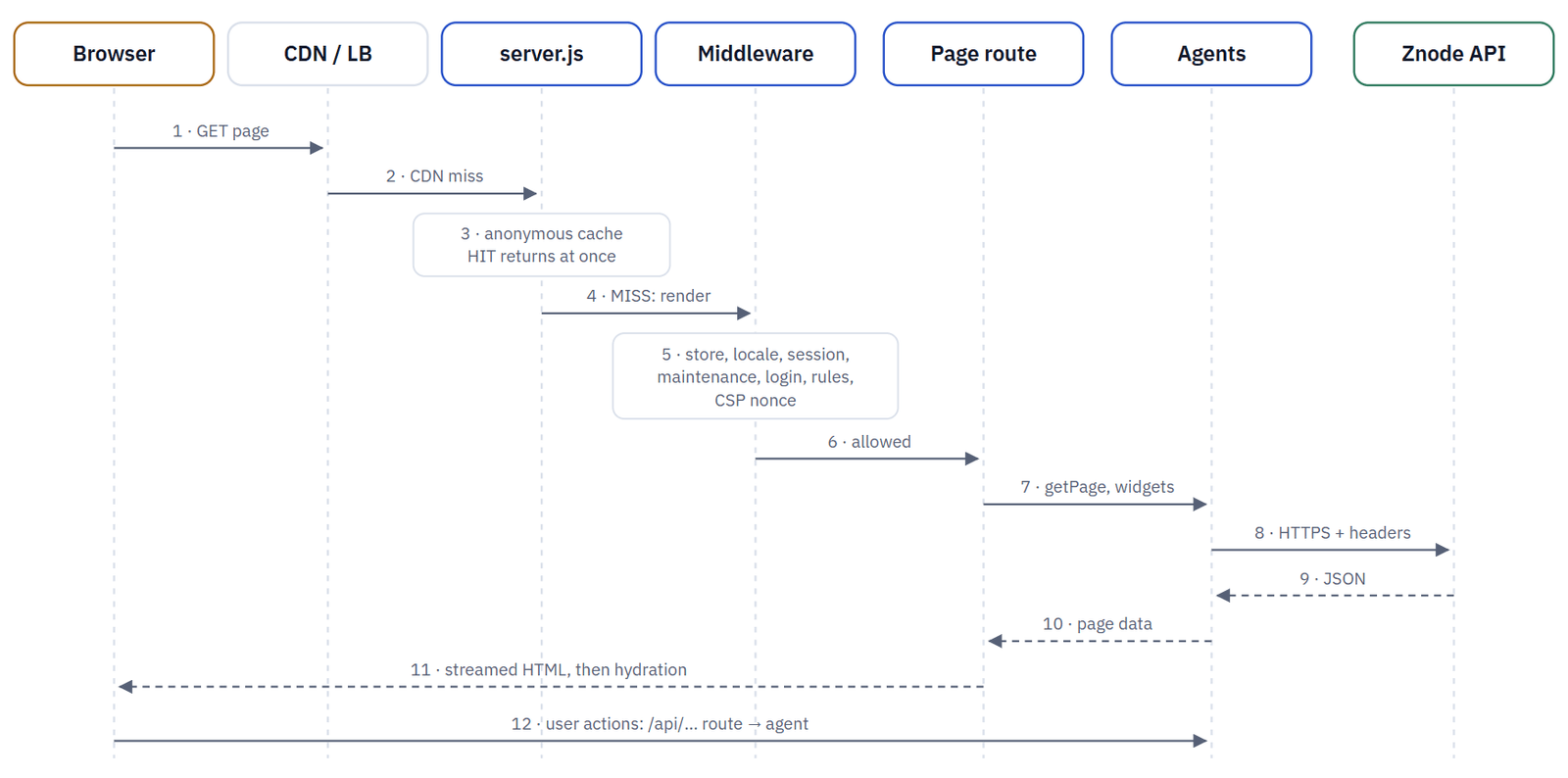
Solid arrows are requests; dashed arrows are responses. API calls in step 12 also pass through server.js and the middleware, but are never page-cached.
| server.js feature | What it does | Switch |
|---|---|---|
| Cluster mode | Forks worker processes that share the port, and restarts a worker that stops | WEB_CONCURRENCY (default 1) |
| Anonymous page cache | Serves rendered HTML from memory to visitors without a session or cart cookie | ENABLE_ANON_PAGE_CACHE (opt-in) |
| CDN headers | Marks HTML for visitors without a session or cart cookie as edge-cacheable and everything personal as private, no-store | CDN_CACHE_SMAXAGE_S |
| HTTP or HTTPS | Plain HTTP behind an ingress that terminates TLS | IS_INGRESS_ENABLED, PORT (3000) |
These features run only in built images (npm run run-image). npx nx dev webstore uses the standard Next.js development server.
Middleware Checks
apps/webstore/src/middleware.ts runs before every page. It decides which store the visitor is in, which language to use and whether the visitor may see the page. The diagram shows the checks in order.
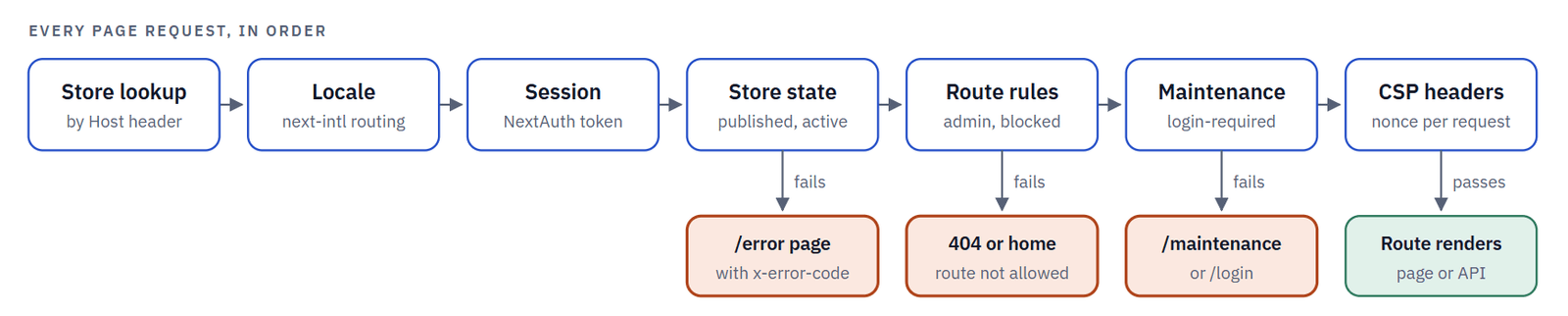
Optional 301 redirects from Znode Admin are applied after the route rules when IS_301_REDIRECT=true. In development the store comes from STORE_URL instead of the Host header.
Important: for /api/ routes the middleware applies maintenance mode and the admin-only API list, but it does not check sign-in. Every API route that returns customer data must check the session itself.
Routes and Pages
A URL is served either by a fixed route in code or by the catch-all route, which turns an SEO URL from Znode Admin into a Page Builder page. A fixed route always wins over the catch-all.
| Route type | Defined in | How it works |
|---|---|---|
| Fixed routes | Code | Folders under app/[locale]/, such as cart, checkout, account, quote and login. Some, such as cart, still load a Page Builder layout by page code. |
| Catch-all route | Page Builder | app/[locale]/[...slug] resolves the SEO URL to a product, category, content, brand or blog page and renders its page JSON. Unknown URLs return 404. |
How a Page Builder Page Is Loaded
STEP 1 - Read the store. getPage reads the store code and publish state (preview or production) from getPortalHeader().
STEP 2 - Try the page cache. A cached page at the current JSON version is returned straight away.
STEP 3 - Load the page JSON. On a miss, the page is loaded from the Znode preview or production endpoint. Content pages are checked against the visitor's profile first.
STEP 4 - Load widget data. Header, footer and main content are split, and page widgets load their data through agents. Real-time prices are merged in on the server.
STEP 5 - Cache, migrate, render. The result is cached, upgraded to the current widget versions by the migration pipeline, rendered on the server and hydrated in the browser.
Data Access
Every piece of data follows the same chain. Server Components and widgets start at the agent; browser components start at an API route.
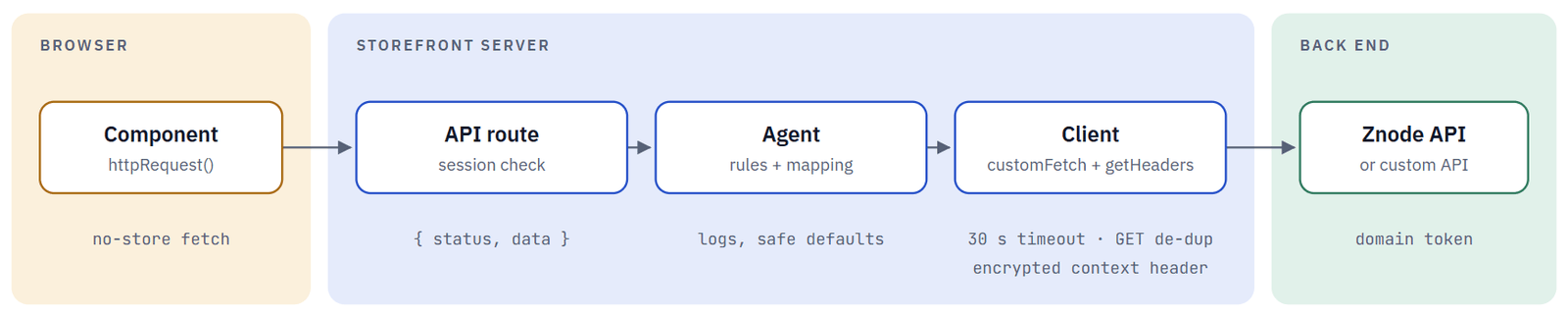
Identical GET requests that run at the same time are merged into one upstream call, per user. Write requests from the storefront are sanitized before they are sent.
| Layer | Owns | Never |
|---|---|---|
| API route | Session check, inputs, one agent call, the standard response | Business logic |
| Agent | Store and user context, rules, mapping, logging | Throwing errors up to the page |
| Client | URL, headers, one HTTP call | Rules or UI mapping |
Caching Tiers
Five caches sit between the shopper and the back end. A request goes one tier deeper only when the tier above misses. Customer-specific data is never stored in a shared tier.
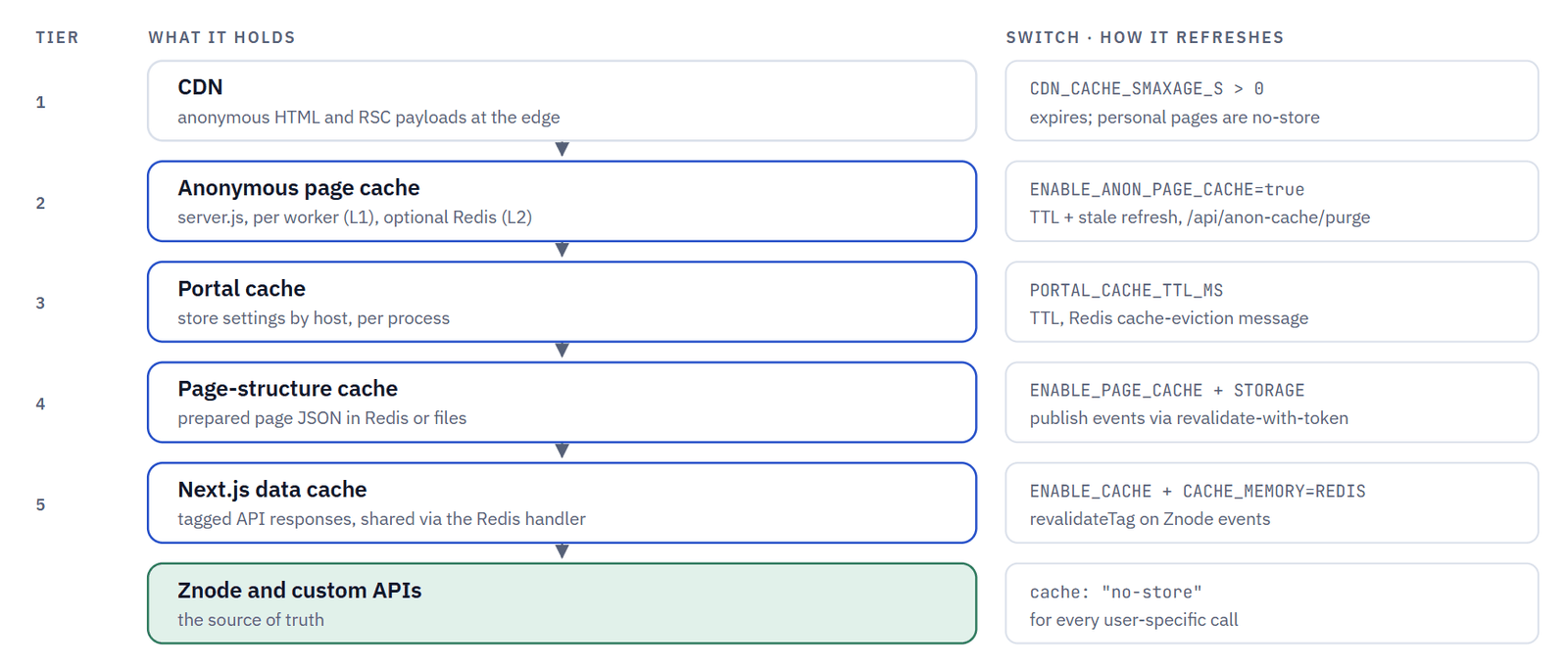
Requests that carry a session or cart cookie skip tiers 1 and 2. The x-anon-cache response header shows HIT, STALE, MISS or BYPASS.
All three refresh endpoints require the x-secret header.
| Refresh endpoint | Use it to |
|---|---|
| POST /api/revalidate-with-token | Receive Znode publish and update events. Clears matching tags and page entries, and tells every pod to drop its portal cache |
| POST /api/revalidate-all-with-token | Clear every tagged data-cache entry |
| POST /api/anon-cache/purge | Clear the anonymous page cache on all workers and pods, or one path only |
To purge one path from the anonymous page cache:
terminal · purge one path from the anonymous page cache
curl -X POST "https://<store-domain>/api/anon-cache/purge" \
  -H "x-secret: <value of ZNODE_REVALIDATE_TOKEN>" \
  -H "Content-Type: application/json" \
  -d '{ "path": "/en-US/some-page" }'
Themes and Widgets
The store's theme name selects which set of Page Builder widgets is used. A project theme changes only the widgets it overrides; everything else stays baseline, so upgrades keep flowing in.
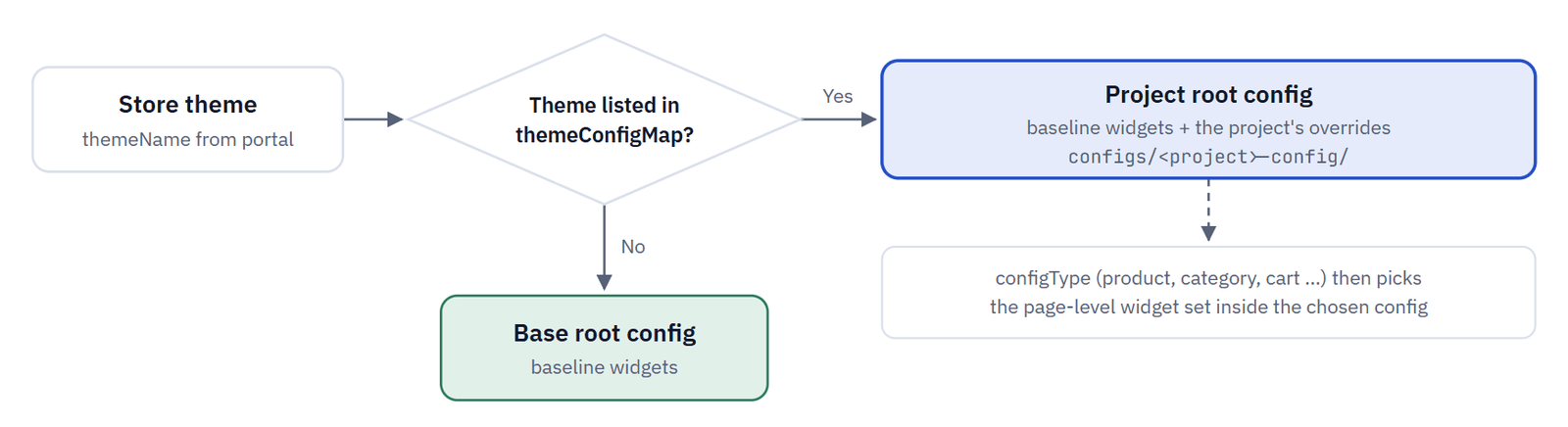
getConfig in packages/page-builder/src/configs/get-config.ts makes this choice. DEFAULT_THEME is used when the store has no theme name. Theme colors come from the store's theme data and are applied through the shared Tailwind config.
Languages
The storefront ships with en-US and fr-FR. The store's default language has no URL prefix; other languages do, for example /fr-FR/cart. All text comes from message files.
Load messages in page.tsx on the server and read them in the component in the browser:
page.tsx (server) → component (browser)
const messages = await fetchMessages(["Product", "Common"]);   // on the server
return <NextIntlClientProvider messages={messages}>...</NextIntlClientProvider>;
const t = useTranslations("Product");                        // in the component
Do add every namespace to every file in apps/webstore/messages/, and to apps/page-builder/messages/ when a widget renders in the editor too.
Don't hard-code visible text. A namespace missing from one language file stops the page from rendering.
Configuration
Behavior is controlled by environment variables. The groups below list names only; take values from your environment's configuration.
| Group | Variables |
|---|---|
| Back-end connection | API_URL, API_DOMAIN, API_KEY, API_FETCH_TIMEOUT_MS |
| Application and store | APP_NAME, NEXT_PUBLIC_APP_NAME, WEBSTORE_DOMAIN_NAME, STORE_URL (development), DEFAULT_THEME |
| Server and scaling | PORT, HOSTNAME, IS_INGRESS_ENABLED, WEB_CONCURRENCY, KEEP_ALIVE_TIMEOUT_MS |
| Sign-in and secrets | NEXTAUTH_SECRET, NEXTAUTH_URL, NEXT_ENCRYPTION_SECRET, ZNODE_REVALIDATE_TOKEN, ZNODE_DEBUG_TOKEN, ENABLE_IFRAME_COOKIES |
| Data and page caching | ENABLE_CACHE, CACHE_MEMORY, CACHE_EXPIRY, ENABLE_PAGE_CACHE, STORAGE, PORTAL_CACHE_TTL_MS |
| Page cache and CDN | ENABLE_ANON_PAGE_CACHE, ANON_PAGE_CACHE_*, CDN_CACHE_SMAXAGE_S, CDN_CACHE_SWR_S, CDN_CACHE_RSC |
| Redis | REDIS_CONNECTION_STRING, or REDIS_SENTINEL_ENABLED, REDIS_SENTINELS, REDIS_SENTINEL_MASTER_NAME, REDIS_MASTER_NAME, REDIS_PASSWORD |
| Features | IS_301_REDIRECT, ENABLE_REAL_TIME_PRICING, IS_DEBUGGING |
| Payments (browser) | NEXT_PUBLIC_PAYMENT_MANAGER_URL, NEXT_PUBLIC_SPREEDLY_PLUGIN_URL |
| Monitoring and build | NEW_RELIC_APP_NAME, NEW_RELIC_LICENSE_KEY, OTEL_*, LOGGING_METHOD, DISABLE_CONSOLE_LOG, BUILD_ID |
Rules: never give a secret the NEXT_PUBLIC_ prefix, because those values are built into browser code. Supply secrets through your hosting platform at deploy time. With Redis Sentinel, set REDIS_SENTINEL_MASTER_NAME and REDIS_MASTER_NAME to the same value.
Security
Security is layered. Most of it is built in; the parts you own are the checks inside your own API routes and agents.
| Layer | What it covers | Who provides it |
|---|---|---|
| 1. Edge and headers | Per-request CSP with a nonce, HSTS, frame, referrer and permissions policies. | Automatic |
| 2. Middleware | Store state, maintenance, login-required stores, blocked and admin-only routes. | Automatic |
| 3. API routes | Check the session and return 401 when there is none. | You add this |
| 4. Agents | Take user and store from the server session, never from the request. | You add this |
| Capability | How it works |
|---|---|
| Sign-in | NextAuth credentials provider, JWT session cookie, 60-minute session |
| Bot protection | reCAPTCHA, verified on the server with the store's secret key |
| Multi-factor authentication | Dedicated MFA page and API routes |
| Single sign-on and punch-out | Dedicated sign-in routes for SSO and punch-out sessions |
| Impersonation | Customer service users can shop on behalf of a customer through a validated session |
| Back-end identity | Domain token and encrypted request context on every call; secrets stay on the server |
| Payments | Card details are captured by the hosted payment script and plugin, which return a token |
Monitoring
| Tool | How it works |
|---|---|
| New Relic | The agent is preloaded by npm run run-image and configured with NEW_RELIC_* variables. |
| OpenTelemetry | otel.js exports traces over OTLP when OTEL_ENABLED=true, and refuses to start if a required OTEL_* variable is missing. |
| Application logs | logServer.error(AREA.X, errorStack(error)). LOGGING_METHOD is FILE (default) or API. |
| Health check | GET /api/health-check returns status, memory, CPU and release version. Use it for probes. |
Build and Deploy
STEP 1 - Start a workflow. A GitHub Actions workflow is started manually with a branch, a target environment and a Znode CLI token.
STEP 2 - Build two images. The Znode CLI builds apps/webstore/Dockerfile and apps/page-builder/Dockerfile. Each is a three-stage node:24-alpine build: install, nx build, run.
STEP 3 - Run and probe. Each container starts npm run run-image on port 3000. Point liveness and readiness probes at /api/health-check.
STEP 4 - Scale. Add pods, or workers per pod with WEB_CONCURRENCY. With more than one pod, configure Redis so caches and cache eviction are shared.
For local development:
terminal · local development
npm install
npx nx dev webstore        # storefront; STORE_URL picks the store
npx nx dev page-builder    # Page Builder
npx nx test <project>      # unit tests
npm run lint
Golden Rules
| Rule | What it means |
|---|---|
| The browser calls only /api/ routes | Back-end URLs and credentials stay on the server. |
| Logic lives in agents | Routes stay thin; clients only make HTTP calls. |
| The server decides who and where | User and store come from the session and the portal, never from the request body. |
| Customer data is never shared | Use no-store for user calls and keep personalized pages out of the page cache. |
| Every language gets every text | Add each namespace to every message file of every app that renders it. |
| Custom code stays in custom folders | Mark unavoidable baseline edits with // CUSTOM: <reason>. |
Hand-off Checklist
Work through these once with a running storefront. Afterwards every other guide will feel familiar.
Checklist
- Run npx nx dev webstore with STORE_URL set to a configured store domain
- Open a product page and find its widget config under packages/page-builder/src/configs/
- Follow one API route from apps/webstore/src/app/api/ to its agent and client
- Read the checks in apps/webstore/src/middleware.ts and your project's route rules constant
- Switch the language to fr-FR and find the matching message file
- Check which caching switches are on in your environment's configuration
- Call /api/health-check and look at the response
- Find your project's customization packages and the // CUSTOM: markers in baseline files
Glossary
| Term | Meaning |
|---|---|
| Agent | Server-side module that holds the business logic for a feature |
| BFF | Backend-for-frontend: the storefront's own /api/ routes, the only endpoints the browser calls |
| Catch-all route | app/[locale]/[...slug], which serves every SEO URL without a fixed route |
| Client | Function that makes one HTTP call to one back-end endpoint |
| configType | Page type such as product or category, used to pick the widget set |
| Page JSON | The Puck document describing a page's widgets and settings |
| Portal | A Znode store, found from the request's host name |
| Publish state | Whether a store serves preview or production content |
| Revalidation | Clearing cached entries after a change in Znode |
| SEO URL | A friendly URL set in Znode Admin for a product, category, content page, brand or blog |
| Widget | A Page Builder component with editor fields and a render function |