
TABLE OF CONTENTS
Overview
The Credential Vault provides a centralized location for storing reusable configuration values and sensitive credentials required by Commerce Connector Data Exchanges. Instead of hardcoding environment-specific values such as API URLs, Client IDs, Client Secrets, or access tokens within individual transmission steps, administrators can store them once as Global Variables and reference them across multiple Data Exchanges.
This simplifies configuration management, improves maintainability, reduces duplication, and helps secure sensitive information.
Accessing the Credential Vault
Navigation: Commerce Connector > Credential Vault
The Credential Vault displays all configured Global Variables along with their descriptions, secret status, and last modified information.
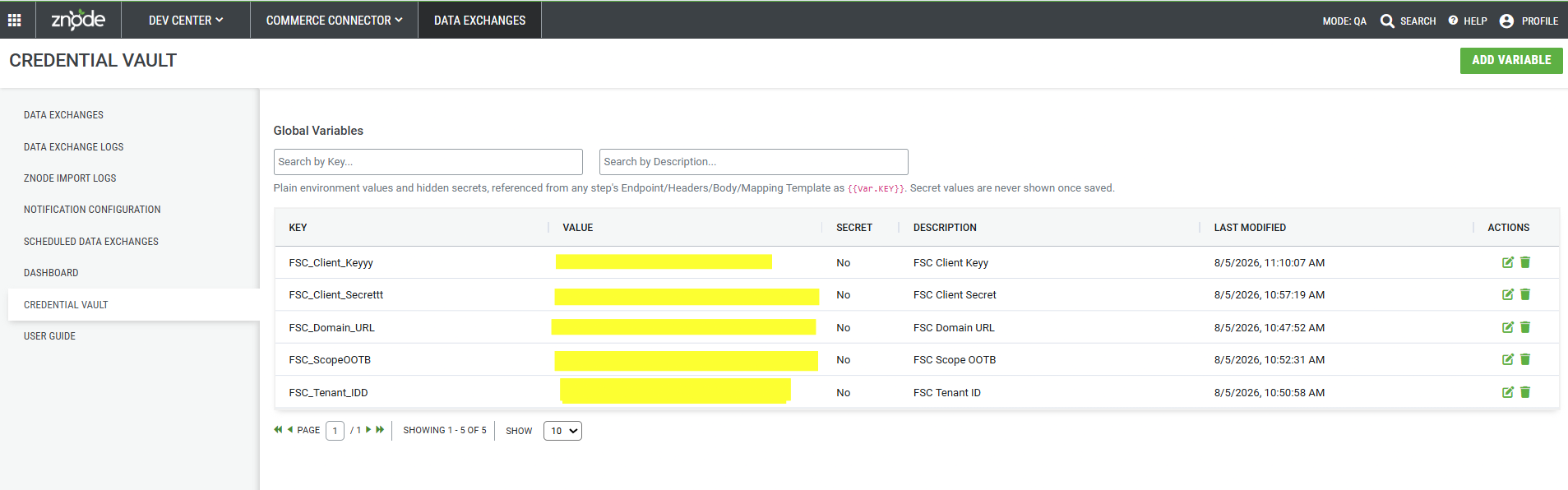
Credential Vault Listing
The Credential Vault displays the following information for each Global Variable.
| Column | Description |
|---|---|
| Key | Unique identifier used to reference the Global Variable. |
| Value | Stored value for the variable. Secret values are masked after being saved. |
| Secret | Indicates whether the variable is stored as a secret. |
| Description | Description provided for the Global Variable. |
| Last Modified | Date and time when the variable was last updated. |
| Actions | Edit or delete the selected Global Variable. |
Searching Global Variables
Use the search boxes available at the top of the page to quickly locate Global Variables.
- Search by Key.
- Search by Description.
Adding a Global Variable
Select Add Variable to create a new Global Variable.
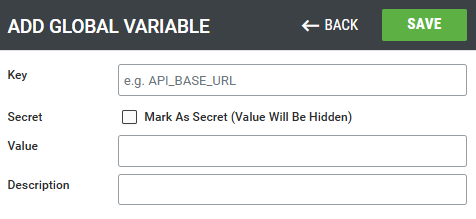
Provide the following information.
| Field | Description |
|---|---|
| Key | Unique name used to reference the variable throughout Commerce Connector. |
| Secret | Select Mark As Secret (Value Will Be Hidden) to securely store confidential values. |
| Value | Configuration value to be stored, such as an API URL, Client ID, Client Secret, Access Token, or any reusable value. |
| Description | Optional description that helps identify the purpose of the variable. |
Secret Variables
Enable the Mark As Secret (Value Will Be Hidden) option to securely store confidential values.
When a variable is marked as a secret:
- The value is securely stored.
- The stored value is hidden after it is saved.
- The value is not displayed in the Credential Vault listing.
- The variable can still be referenced during Data Exchange execution.
Editing a Global Variable
To modify an existing Global Variable, select the Edit icon from the Actions column.
The following properties can be updated:
- Key
- Secret setting
- Value
- Description
After saving the changes, the updated value is automatically used wherever the Global Variable is referenced.
Deleting a Global Variable
Select the Delete icon to permanently remove a Global Variable from the Credential Vault.
Before deleting a variable, ensure that it is no longer referenced by any Data Exchange. Removing a variable that is currently in use may cause Data Exchange executions to fail.
Using Global Variables
Global Variables can be referenced throughout Commerce Connector using the following syntax:
{{Var.VariableName}}Global Variables can be used in the following locations:
- Endpoint URLs
- Request Headers
- Request Body
- Mapping Templates
Example
Instead of hardcoding an API endpoint:
https://api.contoso.com/v1/ordersCreate a Global Variable named API_BaseUrl and reference it as:
{{Var.API_BaseUrl}}/v1/ordersSimilarly, instead of storing a Client Secret directly within a transmission step, create a Secret Global Variable named ClientSecret and reference it wherever required.
{{Var.ClientSecret}}Notes
- Global variables works only with Multi-step data exchanges
Benefits
- Centralized management of reusable configuration values.
- Secure storage of sensitive credentials.
- Reduced duplication across Data Exchanges.
- Simplified maintenance by updating shared values in one location.
- Improved security through secret value masking.
- Consistent configuration across multiple Data Exchanges.
- Simplified migration between environments by separating configuration values from transmission definitions.
Best Practices
- Store sensitive values such as Client Secrets, API Keys, and Access Tokens as Secret Variables.
- Use descriptive Key names to make variables easier to identify.
- Add meaningful descriptions to simplify administration.
- Reuse Global Variables across multiple Data Exchanges instead of duplicating values.
- Review variables periodically and remove those that are no longer required.