
Overview
The Znode Commerce Connector provides native (out-of-the-box) data exchanges for integrating with Microsoft Dynamics 365 Finance & Supply Chain Management (F&SCM). These exchanges are available through the Add From Library option and allow data to be synchronized between F&SCM and Znode without building custom integrations.
Native exchanges include preconfigured source, destination, and YAML mappings, allowing organizations to quickly configure the connection and begin importing data into Znode. Support for Multi step data exchange is also available.
Prerequisites
Before configuring any F&SCM data exchange, ensure the following information is available.
| Requirement | Description |
|---|---|
| Endpoint | Dynamics 365 F&SCM environment URL (for example: yourorg.operations.dynamics.com) |
| Access Token URL | Azure AD OAuth Token Endpoint (https://login.microsoftonline.com/{TenantID}/oauth2/v2.0/token) |
| Grant Type | client_credentials |
| Client ID | Azure App Registration Client ID |
| Client Secret | Azure App Registration Client Secret |
| Scope | Dynamics 365 API scope configured in Azure AD |
Available Data Exchanges
The following native exchanges retrieve data from F&SCM and import it into Znode.
| Data Exchange | Description |
|---|---|
| Import Simple Products | Imports simple product data from F&SCM into Znode. |
| Import Configurable Products | Imports configurable product data from F&SCM into Znode. |
| Import Categories | Imports category data from F&SCM into Znode. |
| Import Inventory | Imports inventory on-hand quantities from F&SCM into Znode. |
| Import Pricing | Imports pricing information from F&SCM into Znode. |
| Import Accounts | Imports customer account information from F&SCM into Znode. |
| Create Sales Order | Creates a sales order in FSC when an order is placed in Znode. Supports Simple and Configurable products. |
| Create Account | Creates an account in FSC from a Znode account. |
| Create Customer | Creates a customer in FSC from a Znode user. |
| Get Order History | Retrieves the list of orders from FSC for API consumption. |
| Get Order Details | Retrieves the details of a specific order from FSC using the FSC order number. |
Adding an F&SCM Data Exchange
- Navigate to Commerce Connector → Manage Commerce Connector.
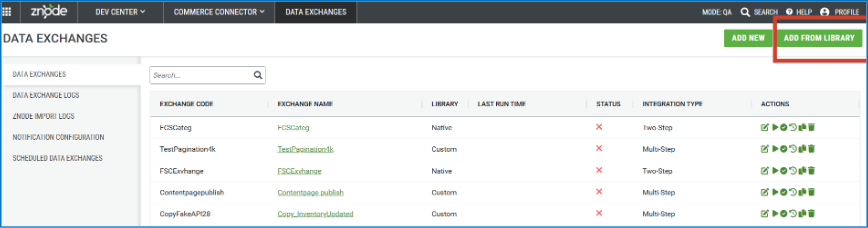
- Click Add From Library.
- Select the required F&SCM data exchange.
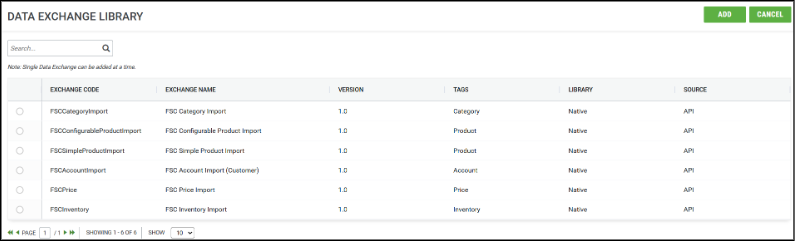
- Click Add.
- Configure the connection using:
- Endpoint
- Access Token URL
- Client ID
- Client Secret
- Scope
- Save the configuration.
- Review the Mapping configuration.
- Run the data exchange.
Note
The Create Sales Order data exchange supports the following product types:
- Simple Products
- Configurable Products
Understanding Data Exchange Components
Each F&SCM data exchange consists of the following sections.
| Component | Description |
|---|---|
| Source Configuration | Defines how the exchange connects to Microsoft Dynamics 365 F&SCM and retrieves data. |
| Destination Configuration | Defines how the retrieved data is processed and imported into Znode. |
| Mapping Configuration | Defines how fields from F&SCM are mapped to the corresponding fields in Znode. |
Proper mappings ensure that data is imported accurately and populated into the correct destination fields.
Data Exchange Use Cases
Product Import (Simple and Configurable Products)
Purpose
Imports product information from F&SCM into Znode, allowing organizations to synchronize their product catalog between the two systems.
Configuration Overview
- Source Configuration – Retrieves product data from F&SCM.
- Destination Configuration – Imports product data into Znode.
- Mapping Configuration – Maps F&SCM product fields to Znode product fields.
Price Import
Purpose
Imports pricing information from F&SCM into Znode to keep pricing synchronized.
- Source Configuration – Retrieves pricing data.
- Destination Configuration – Imports pricing into Znode.
- Mapping Configuration – Maps pricing fields.
Category Import
Purpose
Imports category information from F&SCM into Znode.
- Source Configuration – Retrieves category data.
- Destination Configuration – Imports category data.
- Mapping Configuration – Maps category fields.
Inventory Import
Purpose
Imports inventory information from F&SCM into Znode.
- Source Configuration – Retrieves inventory data.
- Destination Configuration – Imports inventory into Znode.
- Mapping Configuration – Maps inventory fields.
Account Import
Purpose
Imports customer account information from F&SCM into Znode.
- Source Configuration – Retrieves account data.
- Destination Configuration – Imports account data into Znode.
- Mapping Configuration – Maps account fields.
Monitoring Exchange Execution
Data Exchange Logs
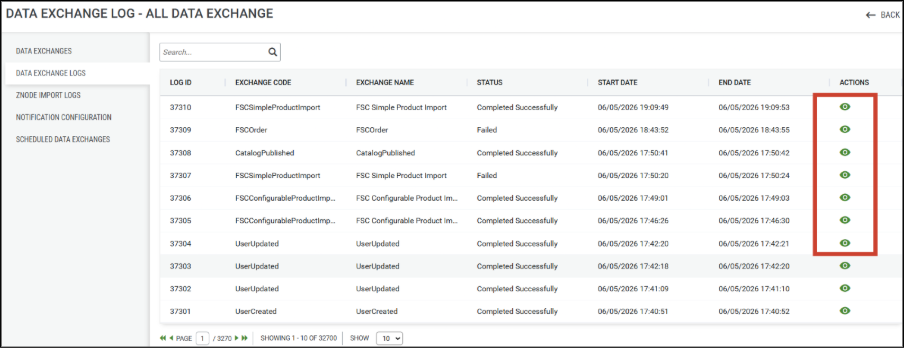
Review the Data Exchange Logs after each execution to verify whether the data exchange completed successfully.
| Status | Description |
|---|---|
| Success | Data was successfully retrieved from the source system and processed by the destination. |
| Failed | An error occurred during connection, configuration, mapping, or processing. |
Znode Import Logs
Znode Import Logs are generated only for exchanges that use the Znode Import process.
These logs indicate whether imported records were successfully processed.
| Status | Description |
|---|---|
| Success | Records were successfully imported into Znode. |
| Failed | One or more records failed validation or import processing. |
To view import errors
- Open the Import Log.
- Click the View Details (Eye) icon.
- Review the reported error.
- Correct the source data or mapping configuration.
- Run the data exchange again.
Mapping Configuration
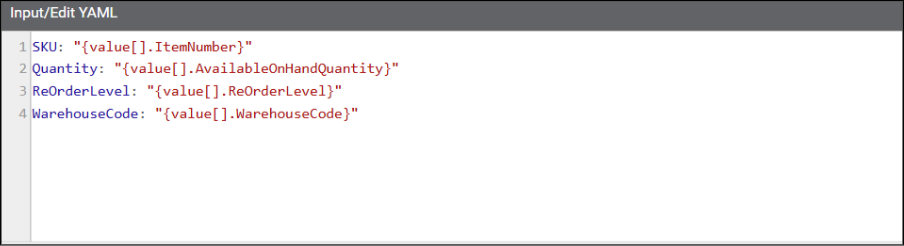
The Mapping Configuration defines how data retrieved from Microsoft Dynamics 365 Finance & Supply Chain Management is mapped to fields in Znode.
Mapping Structure
| Section | Description |
|---|---|
| Left Column | Destination field in Znode. |
| Right Column | Source field in Microsoft Dynamics 365 F&SCM. |
Purpose
The mapping configuration is used to:
- Match source fields to destination fields.
- Transform data between systems.
- Ensure accurate synchronization.
- Support data validation during import.
Example
The following example illustrates how F&SCM fields can be mapped to corresponding Znode fields during an Inventory Import.
Important Considerations
- Ensure all required Znode fields are mapped before running the data exchange.
- Verify that the source and destination field data types are compatible.
- Review the mapping configuration whenever changes are made to the source or destination data structure.
- Validate mappings before executing imports in a production environment.
Important Note on Preconfigured Mappings
All native data exchanges include preconfigured YAML mappings designed to support common implementation scenarios.
The connector provides out-of-the-box mappings only for the predefined attributes included in the standard Znode Product Template. Since custom attributes are implementation-specific and vary based on business requirements, they are not included in the default mapping configuration.
To import data for custom attributes, the corresponding field mappings must be configured manually in the Mapping section before running the data exchange.
The out-of-the-box YAML mapping is configured only for fields that receive data from the source API. Fields that are not populated by the API are included in the mapping configuration with empty mappings
Known Limitations
- Mapping requirements may vary depending on the Microsoft Dynamics 365 Finance & Supply Chain Management implementation and data model.
- Additional custom attributes require manual mapping configuration.
- When using Transmission Mode – Znode Import with the Default Product Template, the connector automatically maps only the predefined product attributes listed below.
| Predefined Product Attributes | Predefined Product Attributes |
|---|---|
| ProductName | ProductCode |
| ProductType | ProductSpecification |
| SKU | FeatureDescription |
| IsActive | CallForPricing |
| LongDescription | Color |
| ShortDescription | IsFeatured |
| Brand | NewProduct |
| Tags | ShippingInformation |
| ProductImage | GalleryImages |
| FreeShipping | Height |
| ShippingCostRules | Width |
| Weight | Length |
| MaximumQuantity | OutOfStockOptions |
| MinimumQuantity |
- Bundled and Grouped products are not supported for the Create Sales Order data exchange.
- Tax, Shipping Charges, Discounts, and Voucher/Coupon information are not included in the sales order integration.
- Bulk Order Import is not supported.
- Get Order History and Get Order Details are currently supported through APIs only. Webstore support will be available in a future release.
- Tax and shipping calculations are dependent on the corresponding configuration within Microsoft Dynamics 365 Finance & Supply Chain (FSC).
Troubleshooting
| Issue | Resolution |
|---|---|
| Authentication Failure | Verify the Client ID, Client Secret, Scope, Tenant ID, and Access Token URL configuration. |
| Empty Import Results | Review the Data Exchange Logs and verify that data exists in F&SCM for the configured legal entity. |
| Import Failures | Review the Znode Import Logs and correct any validation or mapping errors. |
| Missing Fields After Import | Verify that the required fields are mapped correctly in the YAML configuration. |
| Special Characters in Data | Review and remove unsupported characters from the source data before importing. |
| Mapping Errors | Validate the source-to-destination mappings and ensure that compatible data types are used. |
Summary
The native Microsoft Dynamics 365 Finance & Supply Chain Management data exchanges provide an efficient way to synchronize products, pricing, inventory, categories, and customer accounts with Znode. The preconfigured YAML mappings simplify implementation while allowing customization to meet specific business requirements. Before deploying to production, review and validate all mappings to ensure that the required data is imported successfully.