Introduction
Navigate: System Settings > Global Settings > Terminate Stuck Process(es)
The Terminate Stuck Process(es) setting in Znode allows administrators to efficiently manage and resolve system processes that become unresponsive or stuck due to unexpected errors or interruptions. This feature helps maintain system stability by automatically or manually terminating processes that remain in the “execution” or “in progress” state beyond a defined duration. The Terminate Stuck Process(es) Scheduler automatically monitors and ends processes that exceed the configured execution time limit.
Once set up, the scheduler runs at regular intervals based on the specified frequency or cron expression, checking all ongoing processes and terminating those identified as “stuck.” This ensures optimal system performance, prevents unnecessary resource consumption, and it is recommended to retain the default scheduler configurations unless specific timing adjustments are needed for your environment.
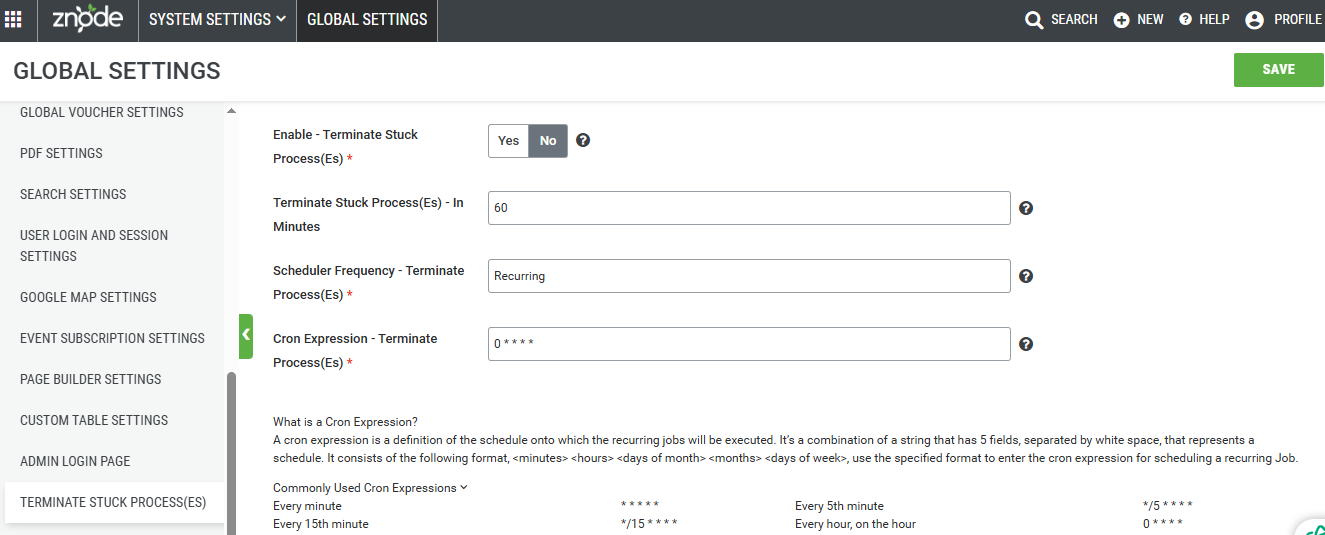
Terminate Stuck Process(es) Menu
| Field | Description |
| Enable - Terminate Stuck Process(es) | If this is set to yes, then this setting allows the system to automatically schedule the termination of all processes that are in the "execution" or "in progress" state after a specific duration. |
| Terminate Stuck Process(es) - In Minutes | Administrators need to enter the desired time (in minutes) that a process can run before it is considered "stuck" |
| Scheduler Frequency - Terminate Process(es) | It is recommended to use the default configurations for this setting. |
| Cron Expression - Terminate Process(es) | It is recommended to use the default configurations for this setting. |