
TABLE OF CONTENTS
- Overview
- Business Scenario
- How Quote Expiration Works
- Quote Status as the Single Source of Truth
- Storefront Quote Validation
- Configure Quote Expiration Settings
- Quote Update Logging
- Best Practices
- Important Considerations
- Expected Outcome
Overview
The Quote Expiration Scheduler automatically updates quotes to Expired based on their configured Expiration Date and the scheduler execution schedule configured in Global Settings.
This automation helps organizations maintain accurate quote statuses, prevent outdated quotes from remaining active, and ensure consistent quote behavior across both the Admin Console and Storefront.
Administrators can configure quote expiration through the Quote Expiration Settings group in Global Settings, including whether the scheduler is enabled and when it runs.
The Quote Expiration Scheduler is the single source of truth for determining whether a quote is active or expired. The Storefront relies on the quote status maintained by the scheduler when determining whether a quote can be converted into an order.
Business Scenario
Automatically Expire Quotes on Their Expiration Date
Organizations often provide customers with quotes that are valid until a specific date. Once that date is reached, the quote should no longer be considered available for conversion.
The Quote Expiration Scheduler automatically evaluates quotes according to its configured schedule and updates eligible quotes to Expired on their expiration date.
This automation helps organizations:
- Keep quote statuses accurate and up to date.
- Prevent expired quotes from remaining active.
- Eliminate manual quote maintenance.
- Ensure consistent quote validation across the Admin Console and Storefront.
- Maintain a single source of truth through the Quote Status field.
How Quote Expiration Works
The Quote Expiration Scheduler runs according to the cron expression configured in Global Settings.
During each scheduled execution, the scheduler:
- Reads the configured cron expression.
- Retrieves quotes eligible for expiration evaluation.
- Checks the quote expiration date.
- Evaluates the current quote status.
- Updates eligible quotes to Expired.
A quote is updated to Expired when:
- The quote's expiration date matches the scheduler execution date.
- The quote status is not Approved.
- The quote status is not Canceled.
Understanding Expiration Date Behavior
The configured Expiration Date represents the date on which the quote expires.
For example:
- Quote Expiration Date = July 15
- Scheduler Schedule = Daily at Midnight (12:00 AM)
When the scheduler runs at 12:00 AM on July 15, all quotes whose expiration date is July 15 are evaluated.
If a quote is not in Approved or Canceled status, its status is immediately updated to Expired.
Important
A quote with an expiration date of July 15 does not remain active throughout July 15.
Instead:
- July 14 is the last fully active day.
- As soon as the date changes to July 15 and the scheduler runs according to the configured schedule, the quote becomes eligible for expiration.
- Quotes with an expiration date of July 15 are updated to Expired during the July 15 scheduler run.
- Customers can no longer convert those quotes into orders once the status is updated.
Because expiration is controlled by the scheduler, the Quote Status should always be considered the authoritative indicator of whether a quote is active or expired.
Quote Status as the Single Source of Truth
The Quote Expiration Scheduler is responsible for managing quote expiration and updating quote statuses.
The Storefront does not independently determine whether a quote has expired by comparing the current date with the expiration date. Instead, it relies entirely on the Quote Status maintained by the scheduler.
This approach provides:
- Consistent behavior across the Admin Console and Storefront.
- Elimination of duplicate expiration logic.
- Improved reliability when determining quote eligibility.
- Clear visibility into quote lifecycle status.
Storefront Quote Validation
When a customer attempts to convert a quote into an order, the Storefront evaluates the quote status.
Conversion Allowed
A quote can be converted into an order when:
- Quote Status = In Review
Conversion Not Allowed
A quote cannot be converted into an order when:
- Quote Status = Expired
Since the Storefront relies on the scheduler-managed quote status, both the Admin Console and Storefront use the same criteria when determining quote eligibility.
Prerequisites
- Access to the Admin Console is required.
- Permission to manage Global Settings is required.
- Quotes must have valid expiration dates configured.
- Store-level quote expiration settings should be properly maintained.
Configure Quote Expiration Settings
Step 1: Access Quote Expiration Settings
- Sign in to the Admin Console.
- Navigate to Global Settings.
- Open the Quote Expiration Settings group.
Result: The quote expiration settings are displayed.
Step 2: Configure Scheduler Settings
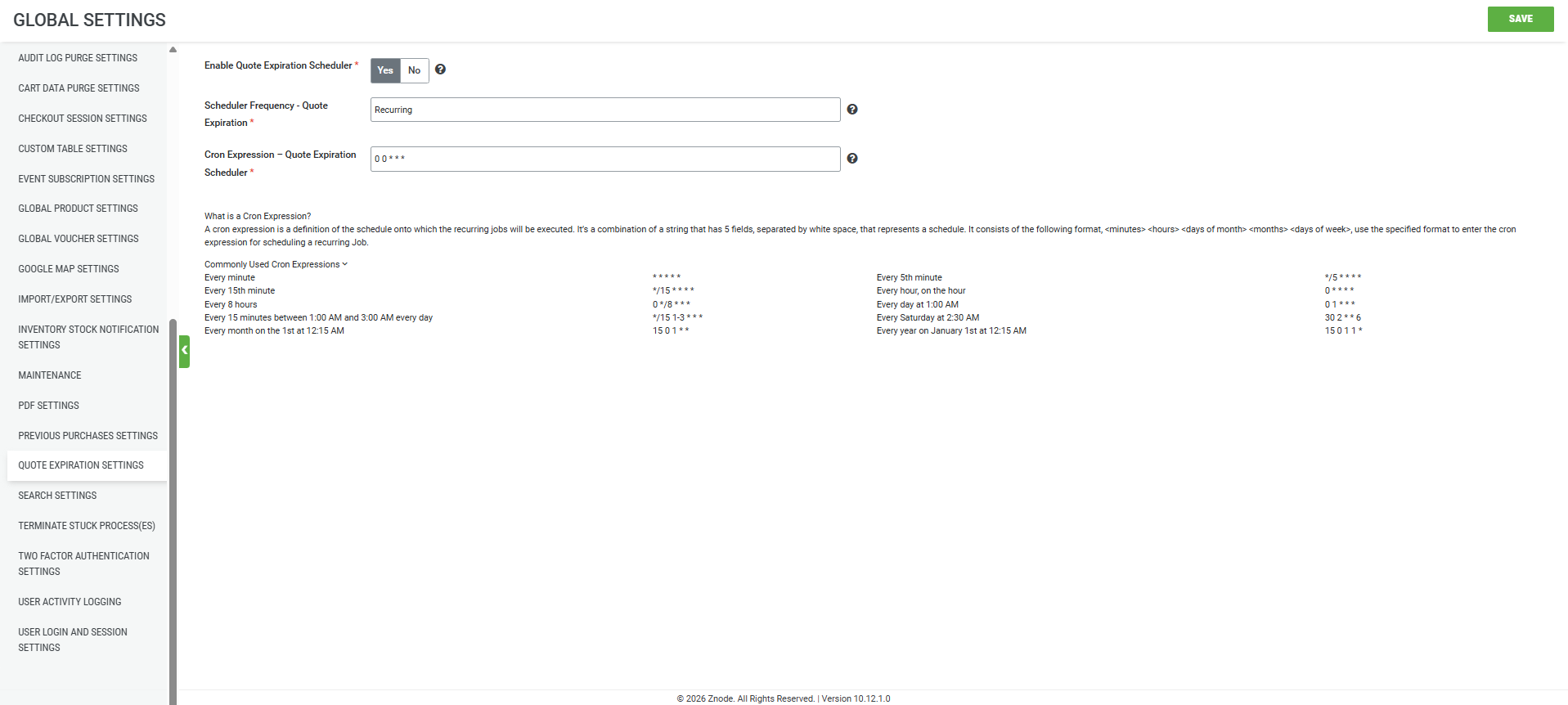
The Quote Expiration Settings group contains three system-defined attributes.
Enable Quote Expiration Scheduler
| Type | Yes/No Toggle |
|---|---|
| Default Value | Yes |
When Enabled
- The scheduler runs automatically.
- Eligible quotes are updated to Expired.
When Disabled
- The scheduler does not run.
- Eligible quotes remain unchanged.
- Quotes may continue to appear active even after their expiration date.
Scheduler Frequency – Quote Expiration
| Type | Text Field |
|---|---|
| Supported Value | Recurring |
This setting determines how frequently the scheduler executes.
Note: Only recurring schedules are currently supported.
Cron Expression – Quote Expiration Scheduler
| Type | Text Field |
|---|---|
| Default Value | 0 0 * * * |
The cron expression determines exactly when the Quote Expiration Scheduler runs.
The default value runs the scheduler once every day at 12:00 AM (midnight).
Quote Update Logging
When a quote is automatically expired, the update is recorded in the Manage Quote screen.
The log entry includes:
- Timestamp
- Updated By: Quote Expiration – Scheduler
- Status Change: Previous Status → Expired
This audit trail provides visibility into all automated quote status updates.
Best Practices
- Keep the Quote Expiration Scheduler enabled.
- Schedule the job to run nightly.
- Review expiration date configurations regularly.
- Monitor scheduler execution to confirm successful processing.
- Use Quote Status as the authoritative indicator of quote validity.
- Ensure expiration dates are maintained correctly when quotes are created.
Important Considerations
- The scheduler uses store-level expiration configuration settings.
- Only recurring schedules are currently supported.
- The expiration date is the date on which the quote becomes expired.
- Quotes whose expiration date matches the scheduler execution date are expired during that scheduler run.
- Approved quotes are not automatically updated to Expired.
- Canceled quotes are not automatically updated to Expired.
- If the scheduler is disabled, eligible quotes are not automatically expired.
- The configured cron schedule determines exactly when quote statuses are updated.
Expected Outcome
- Quotes are automatically evaluated according to their expiration dates and scheduler schedule.
- Quotes reaching their expiration date are automatically updated to Expired.
- Quote Status becomes the authoritative indicator of quote validity.
- The Admin Console and Storefront remain synchronized when determining quote eligibility.
- Customers can convert only valid quotes into orders.
- Administrators can review automatic quote status updates through quote history logs.