
Content Security Policy (CSP) and IDOR Validation
Overview
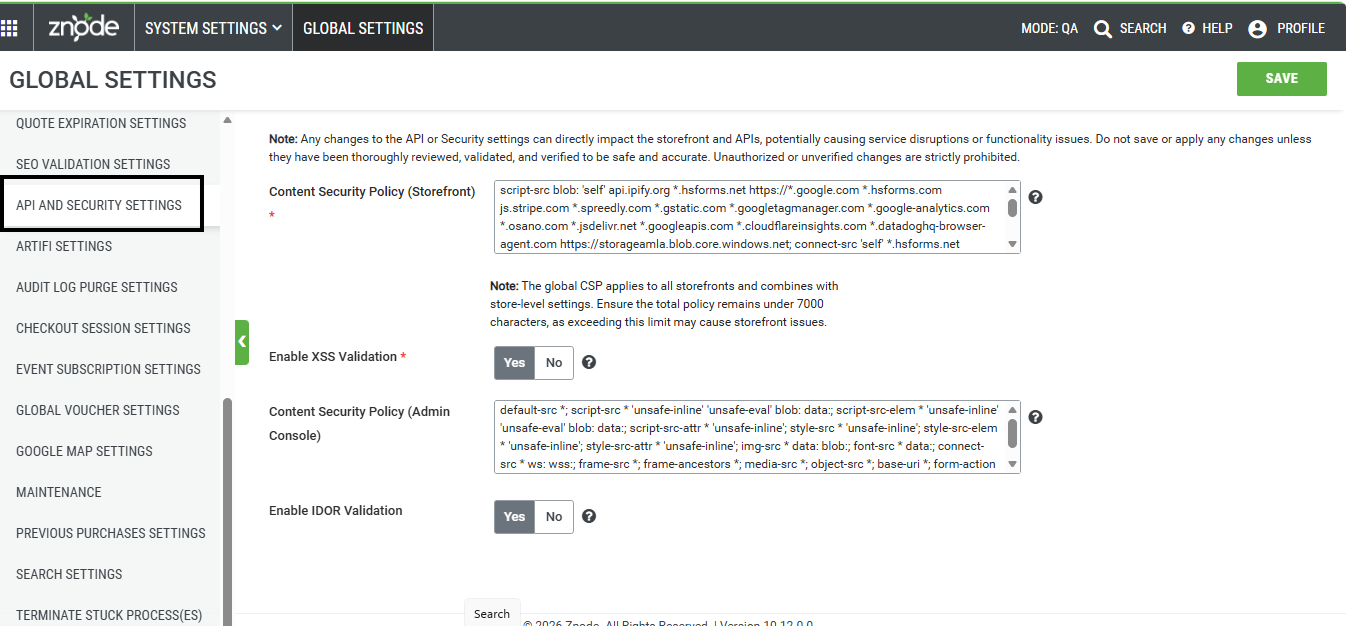
Znode provides centralized security controls that help administrators protect Storefronts and APIs from unauthorized access and malicious activity. These controls include:
- Content Security Policy (CSP) (Admin)/(Storefront): Defines which external scripts, APIs, and resources can load in the browser.
- IDOR Validation: Restricts API access to user-owned resources only.
- XSS Validation Control: Allows administrators to enforce or bypass cross-site scripting protection.
Note: Any changes to the API or Security settings can directly impact the storefront and APIs, potentially causing service disruptions or functionality issues. Do not save or apply any changes unless they have been thoroughly reviewed, validated, and verified to be safe and accurate. Unauthorized or unverified changes are strictly prohibited.
Prerequisites
- Administrator access to the Admin Console
- Permission to manage Global Settings and API configurations
- Updated Storefront version (required for IDOR support)
Use Case 1: View or Update Content Security Policy (Storefront)
Steps
- Sign in to the Admin Console.
- Navigate to System Settings > Global Settings > API and Security Settings.
- Locate the Content Security Policy(Storefront) field.
- Review or update CSP directives (for example,
default-src,script-src,connect-src). - Click Save.
Expected Outcome
- The CSP configuration is applied across all Storefronts.
- Updates take effect immediately.
Notes
- CSP rules are additive; store-level CSP can extend global rules without overriding them.
- Removing required domains (such as payment APIs) can block critical functionality like checkout.
CSP Validation
Must include valid directives (default-src, script-src, src)
Maximum size: 7,000 characters
Invalid input error:
“CSP must include a directive like default-src, script-src, or connect-src before the URL.”
Use Case 2: View or Update Content Security Policy (Admin)
Steps
- Sign in to the Admin Console.
- Navigate to System Settings > Global Settings > API and Security Settings.
- Locate the Content Security Policy field.
- Review or update CSP directives (for example,
default-src,script-src,connect-src). - Click Save.
Expected Outcome
- Updates take effect immediately on Admin.
Use Case 2: Enable IDOR Validation
Steps
- Sign in to the Admin Console.
- Navigate to Global Settings > General.
- Locate Enable IDOR Validation.
- Select Yes.
- Click Save.
Expected Outcome
- IDOR validation is enforced for supported APIs (currently Cart APIs).
- Unauthorized access attempts return a 403 Forbidden response.
Validation Behavior
- Correct ownership → Access granted
- Incorrect ownership → Access denied (403)
- Missing request header → Existing authorization logic applies
Use Case 3: Configure XSS Validation
Steps
- Sign in to the Admin Console.
- Navigate to Global Settings > API and Security Settings.
- Locate Enable XSS Validation.
- Select:
- Yes to bypass validation
- No to enforce validation
- Click Save.
Expected Outcome
- The selected XSS behavior is applied across supported areas (Storefront and Admin user management).
Key Concepts
Request Context (for IDOR)
- Requires the header Z-Request-Context
- Contains encrypted user context from the Storefront
- Ensures secure and verified API access
Combined CSP Model
- Default system CSP is always applied
- Administrator-defined directives are appended
- Supports multiline configuration for readability
Limitations
- No system warning if CSP changes break integrations
- IDOR validation applies only to selected APIs
- Older Storefront versions may not fully support IDOR
- Guest users are not impacted by IDOR validation
Best Practices
General
- Always test changes in a lower environment
- Review all updates carefully before saving
CSP Configuration
- Include all required third-party domains
- Use valid directives (
default-src,script-src,connect-src) - Avoid wildcards (*) unless necessary
- Use browser developer tools to troubleshoot blocked resources
Security Controls
- Enable IDOR only after validating API behavior end-to-end
- Disable XSS validation only for trusted and controlled scenarios