
Overview
Audit logs play a critical role in tracking user activity and maintaining compliance. Over time, these logs can grow significantly and impact storage, performance, and data governance requirements.
The Audit Log Data Purge feature allows administrators to automatically and safely delete audit log records that are older than a defined retention period. The purge runs on a configurable schedule and records each purge operation for visibility and compliance.
This feature helps ensure:
- Controlled audit data retention.
- Reduced database growth.
- Improved system performance.
- Continued regulatory and compliance alignment.
Prerequisites and Permissions
- Access to the Admin Console.
- Permissions to manage Global Settings.
- Audit logging must be enabled to generate audit records.
Configure Automatic Audit Log Purging (Administrators)
Administrators can configure the purge schedule and retention period from Global Settings.
Step-by-Step Configuration
- In the Admin Console, navigate to Global Settings.
- Select the Audit Log Data Purge tab.
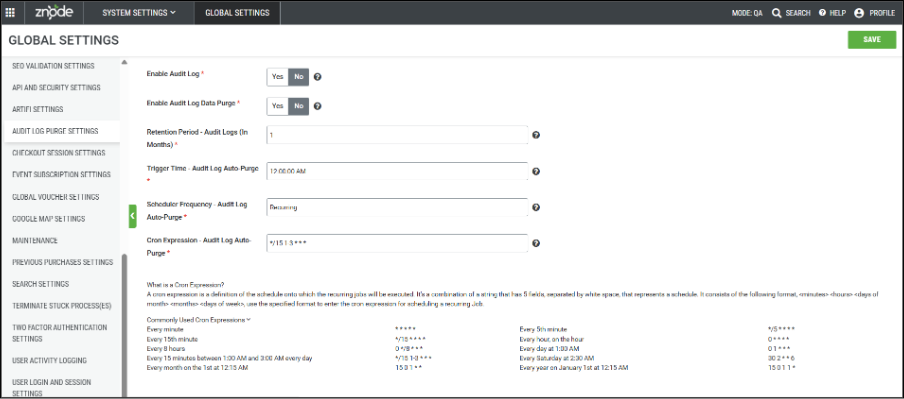
The following settings are available under Audit Log Purge Settings.
Audit Log Purge Settings
| Setting | Description |
|---|---|
| Enable Audit Log Data Purge | Purpose: Turns automatic audit log purging on or off. Type: Yes / No Default Value: Yes Description: Enables scheduled purging of audit logs older than the configured retention period. |
| Audit Log Retention (In Months) | Purpose: Defines how long audit logs are retained. Type: Number Required: Yes Minimum Value: 1 Maximum Value: 60 Default Value: 12 Description: Audit logs older than the configured retention period are permanently deleted during purge execution. |
| Trigger Time – Audit Log Auto-Purge | Purpose: Specifies the daily time when the purge operation runs. Type: Text Default Value: 12:00:00 AM Description: Defines the time of day the scheduler initiates the audit log purge. |
| Scheduler Frequency – Audit Log Auto-Purge | Purpose: Defines how often the scheduler runs. Type: Text Default Value: Recurring Description: Determines the recurrence pattern for the purge scheduler. |
| Cron Expression – Audit Log Auto-Purge | Purpose: Controls the exact schedule for purge execution. Type: Text Default Value: 0 3 * * *Description: Cron expression used to schedule the purge task. |
Save the Global Settings.
Outcome: Audit logs older than the defined retention period are automatically removed according to the configured schedule.
Enable or Disable Audit Logging (Administrators)
Audit log creation can be controlled independently of audit log purging.
Step-by-Step Instructions
- In Global Settings, locate Enable Audit Log.
- Set the value to:
- Yes to capture user actions and system changes.
- No to stop generating audit logs.
- Save the setting.
Outcome: When disabled, no new audit logs are created. Existing audit logs remain subject to the configured purge rules.
How Audit Log Purging Works
Purge Logic
The system calculates a cutoff date using:
- The current date.
- The configured retention period (in months).
Audit records older than the calculated cutoff date are deleted during a scheduled batch process.
Scheduler Behaviour
- Uses the cron-based scheduler defined in AuditLogPurgeCronExpression.
- Respects the configured trigger time and recurrence settings.
- Runs independently of user activity.
Data Integrity
- Only audit log records are affected.
- Core transactional data remains unchanged.
- Purge operations execute as controlled system processes.
Logging and Monitoring
Every purge operation is recorded in All Logs for transparency and compliance.
Each log entry includes:
- Timestamp of execution.
- Number of audit records purged.
- Module or area purged.
- Initiator (System or Scheduler).
These logs provide a complete audit trail of audit data management activities.
Expected Outcomes
- Automatic removal of outdated audit logs.
- Reduced database storage usage.
- Improved system performance.
- Clear visibility into purge activity for compliance reporting.
Notes, Limitations, and Best Practices
- Purged audit logs cannot be recovered.
- Ensure the retention period aligns with your organization's compliance requirements.
- Disabling audit logging stops new audit records from being created but does not stop scheduled purging of existing logs unless the purge feature is also disabled.
- Review purge logs regularly to verify successful execution.